+
William Stallings
Computer Organization
and Architecture
9th Edition
+
Chapter 3
A Top-Level View of Computer
Function and Interconnection
+
Computer Components
 Contemporary computer designs are based on concepts
developed by John von Neumann at the Institute for Advanced
Studies, Princeton
 Referred to as the von Neumann architecture and is based on
three key concepts:
 Data and instructions are stored in a single read-write memory
 The contents of this memory are addressable by location, without
regard to the type of data contained there
 Execution occurs in a sequential fashion (unless explicitly modified)
from one instruction to the next
 Hardwired program
 The result of the process of connecting the various components in
the desired configuration
+
Hardwired Program Concept
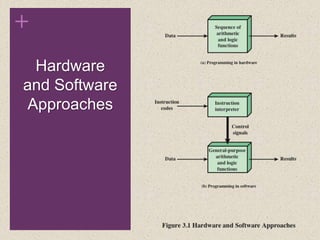
 Hardwired systems are inflexible
 General purpose hardware can do different tasks, given correct
control signals
 Instead of re-wiring, supply a new set of control signals
+
Hardware
and Software
Approaches
+
I/O
Components
Software
• A sequence of codes or instructions
• Part of the hardware interprets each instruction
and generates control signals
• Provide a new sequence of codes for each new
program instead of rewiring the hardware
Major components:
• CPU
• Instruction interpreter
• Module of general-purpose arithmetic and logic
functions (ALU & CU)
• I/O Components
• Input module
• Contains basic components for accepting
data and instructions and converting them
into an internal form of signals usable by the
system
• Output module
• Means of reporting results
Software
The Control Unit and the Arithmetic
and Logic Unit constitute the Central
Processing Unit
Main memory
Temporary storage is needed for code/
instruction and results
Action Categories
• The processor
may perform
some arithmetic
or logic operation
on data
• An instruction
may specify that
the sequence of
execution be
altered
• Data transferred
to or from a
peripheral device
by transferring
between the
processor and an
I/O module
• Data transferred
from processor to
memory or from
memory to
processor
Processor-
memory
Processor-
I/O
Data
processing
Control
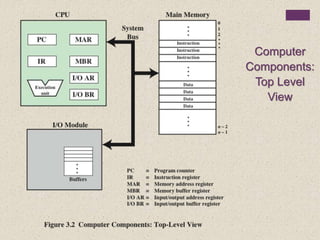
Computer
Components:
Top Level
View
+
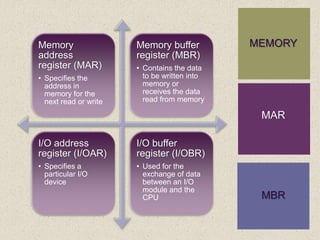
MEMORYMemory
address
register (MAR)
• Specifies the
address in
memory for the
next read or write
Memory buffer
register (MBR)
• Contains the data
to be written into
memory or
receives the data
read from memory
I/O address
register (I/OAR)
• Specifies a
particular I/O
device
I/O buffer
register (I/OBR)
• Used for the
exchange of data
between an I/O
module and the
CPU
MAR
MBR
+
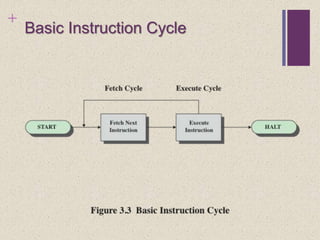
Basic Instruction Cycle
+
Instruction Cycle
 At the beginning of each instruction cycle the processor
fetches an instruction from memory
 The program counter (PC) holds the address of the instruction
to be fetched next
 The processor increments the PC after each instruction fetch
so that it will fetch the next instruction in sequence
 The fetched instruction is loaded into the instruction register
(IR)
 The processor interprets the instruction and performs the
required action
+
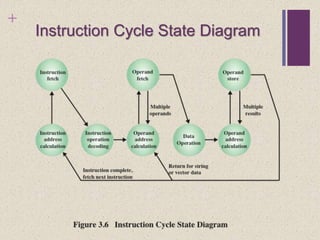
Instruction Cycle State Diagram
+
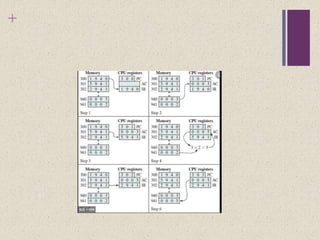
FEtch
 Program Counter (PC) holds address of next instruction to
fetch
 Processor fetches instruction from memory location pointed to
by PC
 Increment PC
 Unless told otherwise
 Instruction loaded into Instruction Register (IR)
 Processor interprets instruction and performs required actions
+
Execute cycle
 Processor-memory
 data transfer between CPU and main memory
 Processor I/O
 Data transfer between CPU and I/O module
 Data processing
 Some arithmetic or logical operation on data
 Control
 Alteration of sequence of operations
 e.g. jump
 Combination of above
+
+
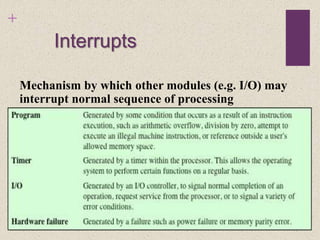
Interrupts
Mechanism by which other modules (e.g. I/O) may
interrupt normal sequence of processing
+
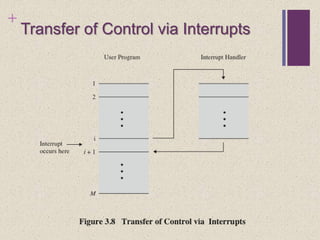
Transfer of Control via Interrupts
+
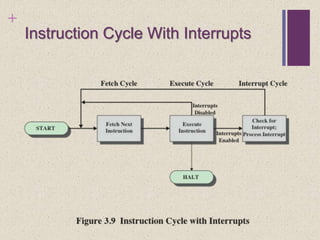
Instruction Cycle With Interrupts
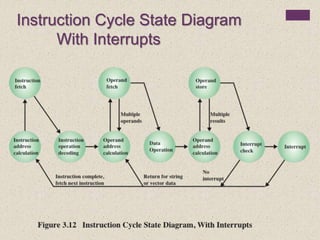
Instruction Cycle State Diagram
With Interrupts
+
Interrupt Cycle
 Added to instruction cycle
 Processor checks for interrupt
 Indicated by an interrupt signal
 If no interrupt, fetch next instruction
 If interrupt pending:
 Suspend execution of current program
 Save context
 Set PC to start address of interrupt handler routine
 Process interrupt through Interrupt handler routine by generating ISR
(Interrupt Service Request)
 Restore context and continue interrupted program
+
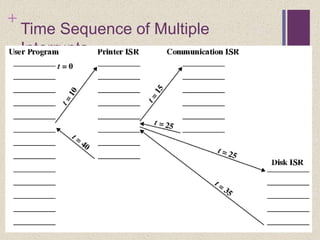
Time Sequence of Multiple
Interrupts
+
Multiple Interrupts
 Disable interrupts
 Processor will ignore further interrupts while processing one
interrupt
 Interrupts remain pending and are checked after first interrupt has
been processed
 Interrupts handled in sequence as they occur
 Define priorities
 Low priority interrupts can be interrupted by higher priority interrupts
 When higher priority interrupt has been processed, processor
returns to previous interrupt
+
Connecting
 All the units must be connected
 Different type of connection for different type of unit
 Memory
 Input/Output
 CPU
+
Memory Connection
 Receives and sends data
 Receives addresses (of locations)
 Receives control signals
 Read
 Write
 Timing
+
Input/Output Connection(1)
 Similar to memory from computer’s viewpoint
 Output
 Receive data from computer
 Send data to peripheral
 Input
 Receive data from peripheral
 Send data to computer
+
Input/Output Connection(2)
 Receive control signals from computer
 Send control signals to peripherals
 Receive addresses from computer
 e.g. port number to identify peripheral
 Send interrupt signals (control)
+
CPU Connection
 Reads instruction and data
 Writes out data (after processing)
 Sends control signals to other units
 Receives (& acts on) interrupts
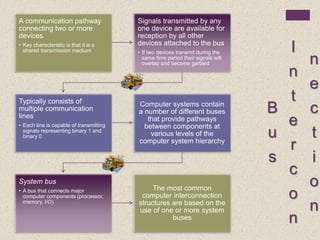
B
u
s
I
n
t
e
r
c
o
n
n
e
c
t
i
o
n
A communication pathway
connecting two or more
devices
• Key characteristic is that it is a
shared transmission medium
Signals transmitted by any
one device are available for
reception by all other
devices attached to the bus
• If two devices transmit during the
same time period their signals will
overlap and become garbled
Typically consists of
multiple communication
lines
• Each line is capable of transmitting
signals representing binary 1 and
binary 0
Computer systems contain
a number of different buses
that provide pathways
between components at
various levels of the
computer system hierarchy
System bus
• A bus that connects major
computer components (processor,
memory, I/O)
The most common
computer interconnection
structures are based on the
use of one or more system
buses
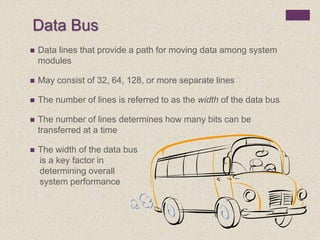
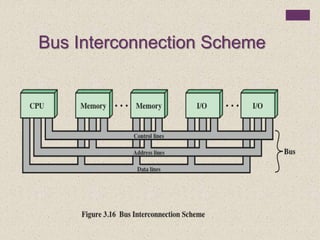
Data Bus
 Data lines that provide a path for moving data among system
modules
 May consist of 32, 64, 128, or more separate lines
 The number of lines is referred to as the width of the data bus
 The number of lines determines how many bits can be
transferred at a time
 The width of the data bus
is a key factor in
determining overall
system performance
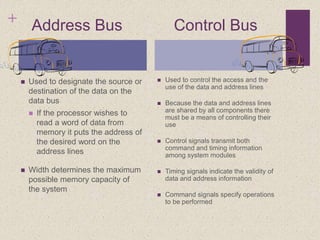
+ Address Bus Control Bus
 Used to designate the source or
destination of the data on the
data bus
 If the processor wishes to
read a word of data from
memory it puts the address of
the desired word on the
address lines
 Width determines the maximum
possible memory capacity of
the system
 Used to control the access and the
use of the data and address lines
 Because the data and address lines
are shared by all components there
must be a means of controlling their
use
 Control signals transmit both
command and timing information
among system modules
 Timing signals indicate the validity of
data and address information
 Command signals specify operations
to be performed
Bus Interconnection Scheme
+
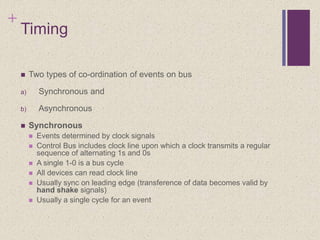
Timing
 Two types of co-ordination of events on bus
a) Synchronous and
b) Asynchronous
 Synchronous
 Events determined by clock signals
 Control Bus includes clock line upon which a clock transmits a regular
sequence of alternating 1s and 0s
 A single 1-0 is a bus cycle
 All devices can read clock line
 Usually sync on leading edge (transference of data becomes valid by
hand shake signals)
 Usually a single cycle for an event
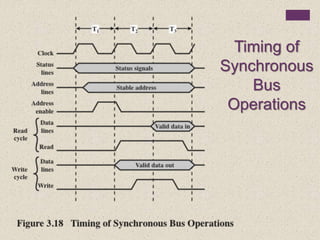
Timing of
Synchronous
Bus
Operations
+
In this simple example,
 The processor places a memory address on the address lines during
the first clock cycle and may assert various status lines.
 Once the address lines have stabilized, the processor
issues an address enable signal.
 For a read operation, the processor issues a read command at the start
of the second cycle. A memory module recognizes the address
 and, after a delay of one cycle, places the data on the data lines.
+
Contd..
 The processor reads the data from the data lines and drops the read
signal.
 For a write operation, the processor puts the data on the data lines at
the start of the second cycle
 and issues a write command after the data lines have stabilized.
 The memory module copies the information from the data lines
during the third clock cycle.
+
Asynchronous Timing
With asynchronous timing, the
occurrence of one event on a bus
follows
and depends on the occurrence of a
previous event.
+
Asynchronous Timing – Read
Diagram
+
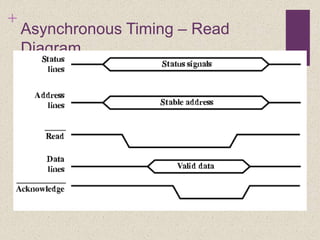
In this read example of asynchronous
Read diagram
 The processor places address and status signals on the bus.
 After pausing for these signals to stabilize, it issues a read command,
indicating the presence of valid address and control signals.
 The appropriate memory decodes the address and responds by placing
the data on the data line.
 Once the data lines have stabilized, the memory module asserts the
acknowledged line to signal the processor that the data are available.
+
 Once the processor has read the data from the data lines, it de-asserts
the read signal. This causes the memory module to drop the data and
acknowledge lines.
 Finally, once the acknowledge line is dropped, the processor removes
the address information.
+
Asynchronous Timing – Write
Diagram
+
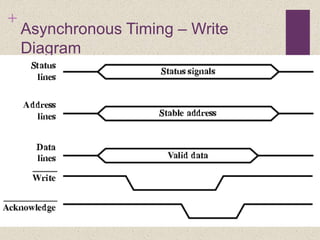
A Simple Asynchronous Write
Operation
 The processor places the data on the data line at the same time that it
puts signals on the status and address lines.
 The memory module responds to the write command by copying the
data from the data lines and then asserting the acknowledge line.
 The processor then drops the write signal and the memory module
drops the acknowledge signal.
+
Comparison b/w Synchronous and
Asynchronous timing
 Synchronous timing is simpler to implement and test. However, it is less
flexible than asynchronous timing.
 Because all devices on a synchronous bus are tied to a fixed clock rate,
the system cannot deviate in clock serving time.
 With asynchronous timing, a mixture of slow and fast devices, using
older and newer technology, can share a bus.
 Synchronous connection every device is going to be served whether it
had something to send or not.
Chapter 3 caal (1)

Chapter 3 caal (1)

  • 1.
  • 2.
    + Chapter 3 A Top-LevelView of Computer Function and Interconnection
  • 3.
    + Computer Components  Contemporarycomputer designs are based on concepts developed by John von Neumann at the Institute for Advanced Studies, Princeton  Referred to as the von Neumann architecture and is based on three key concepts:  Data and instructions are stored in a single read-write memory  The contents of this memory are addressable by location, without regard to the type of data contained there  Execution occurs in a sequential fashion (unless explicitly modified) from one instruction to the next  Hardwired program  The result of the process of connecting the various components in the desired configuration
  • 4.
    + Hardwired Program Concept Hardwired systems are inflexible  General purpose hardware can do different tasks, given correct control signals  Instead of re-wiring, supply a new set of control signals
  • 5.
  • 6.
    + I/O Components Software • A sequenceof codes or instructions • Part of the hardware interprets each instruction and generates control signals • Provide a new sequence of codes for each new program instead of rewiring the hardware Major components: • CPU • Instruction interpreter • Module of general-purpose arithmetic and logic functions (ALU & CU) • I/O Components • Input module • Contains basic components for accepting data and instructions and converting them into an internal form of signals usable by the system • Output module • Means of reporting results Software
  • 7.
    The Control Unitand the Arithmetic and Logic Unit constitute the Central Processing Unit Main memory Temporary storage is needed for code/ instruction and results
  • 8.
    Action Categories • Theprocessor may perform some arithmetic or logic operation on data • An instruction may specify that the sequence of execution be altered • Data transferred to or from a peripheral device by transferring between the processor and an I/O module • Data transferred from processor to memory or from memory to processor Processor- memory Processor- I/O Data processing Control
  • 9.
  • 10.
    + MEMORYMemory address register (MAR) • Specifiesthe address in memory for the next read or write Memory buffer register (MBR) • Contains the data to be written into memory or receives the data read from memory I/O address register (I/OAR) • Specifies a particular I/O device I/O buffer register (I/OBR) • Used for the exchange of data between an I/O module and the CPU MAR MBR
  • 11.
  • 12.
    + Instruction Cycle  Atthe beginning of each instruction cycle the processor fetches an instruction from memory  The program counter (PC) holds the address of the instruction to be fetched next  The processor increments the PC after each instruction fetch so that it will fetch the next instruction in sequence  The fetched instruction is loaded into the instruction register (IR)  The processor interprets the instruction and performs the required action
  • 13.
  • 14.
    + FEtch  Program Counter(PC) holds address of next instruction to fetch  Processor fetches instruction from memory location pointed to by PC  Increment PC  Unless told otherwise  Instruction loaded into Instruction Register (IR)  Processor interprets instruction and performs required actions
  • 15.
    + Execute cycle  Processor-memory data transfer between CPU and main memory  Processor I/O  Data transfer between CPU and I/O module  Data processing  Some arithmetic or logical operation on data  Control  Alteration of sequence of operations  e.g. jump  Combination of above
  • 16.
  • 17.
    + Interrupts Mechanism by whichother modules (e.g. I/O) may interrupt normal sequence of processing
  • 18.
    + Transfer of Controlvia Interrupts
  • 19.
  • 20.
    Instruction Cycle StateDiagram With Interrupts
  • 21.
    + Interrupt Cycle  Addedto instruction cycle  Processor checks for interrupt  Indicated by an interrupt signal  If no interrupt, fetch next instruction  If interrupt pending:  Suspend execution of current program  Save context  Set PC to start address of interrupt handler routine  Process interrupt through Interrupt handler routine by generating ISR (Interrupt Service Request)  Restore context and continue interrupted program
  • 22.
    + Time Sequence ofMultiple Interrupts
  • 23.
    + Multiple Interrupts  Disableinterrupts  Processor will ignore further interrupts while processing one interrupt  Interrupts remain pending and are checked after first interrupt has been processed  Interrupts handled in sequence as they occur  Define priorities  Low priority interrupts can be interrupted by higher priority interrupts  When higher priority interrupt has been processed, processor returns to previous interrupt
  • 24.
    + Connecting  All theunits must be connected  Different type of connection for different type of unit  Memory  Input/Output  CPU
  • 25.
    + Memory Connection  Receivesand sends data  Receives addresses (of locations)  Receives control signals  Read  Write  Timing
  • 26.
    + Input/Output Connection(1)  Similarto memory from computer’s viewpoint  Output  Receive data from computer  Send data to peripheral  Input  Receive data from peripheral  Send data to computer
  • 27.
    + Input/Output Connection(2)  Receivecontrol signals from computer  Send control signals to peripherals  Receive addresses from computer  e.g. port number to identify peripheral  Send interrupt signals (control)
  • 28.
    + CPU Connection  Readsinstruction and data  Writes out data (after processing)  Sends control signals to other units  Receives (& acts on) interrupts
  • 29.
    B u s I n t e r c o n n e c t i o n A communication pathway connectingtwo or more devices • Key characteristic is that it is a shared transmission medium Signals transmitted by any one device are available for reception by all other devices attached to the bus • If two devices transmit during the same time period their signals will overlap and become garbled Typically consists of multiple communication lines • Each line is capable of transmitting signals representing binary 1 and binary 0 Computer systems contain a number of different buses that provide pathways between components at various levels of the computer system hierarchy System bus • A bus that connects major computer components (processor, memory, I/O) The most common computer interconnection structures are based on the use of one or more system buses
  • 30.
    Data Bus  Datalines that provide a path for moving data among system modules  May consist of 32, 64, 128, or more separate lines  The number of lines is referred to as the width of the data bus  The number of lines determines how many bits can be transferred at a time  The width of the data bus is a key factor in determining overall system performance
  • 31.
    + Address BusControl Bus  Used to designate the source or destination of the data on the data bus  If the processor wishes to read a word of data from memory it puts the address of the desired word on the address lines  Width determines the maximum possible memory capacity of the system  Used to control the access and the use of the data and address lines  Because the data and address lines are shared by all components there must be a means of controlling their use  Control signals transmit both command and timing information among system modules  Timing signals indicate the validity of data and address information  Command signals specify operations to be performed
  • 32.
  • 33.
    + Timing  Two typesof co-ordination of events on bus a) Synchronous and b) Asynchronous  Synchronous  Events determined by clock signals  Control Bus includes clock line upon which a clock transmits a regular sequence of alternating 1s and 0s  A single 1-0 is a bus cycle  All devices can read clock line  Usually sync on leading edge (transference of data becomes valid by hand shake signals)  Usually a single cycle for an event
  • 34.
  • 35.
    + In this simpleexample,  The processor places a memory address on the address lines during the first clock cycle and may assert various status lines.  Once the address lines have stabilized, the processor issues an address enable signal.  For a read operation, the processor issues a read command at the start of the second cycle. A memory module recognizes the address  and, after a delay of one cycle, places the data on the data lines.
  • 36.
    + Contd..  The processorreads the data from the data lines and drops the read signal.  For a write operation, the processor puts the data on the data lines at the start of the second cycle  and issues a write command after the data lines have stabilized.  The memory module copies the information from the data lines during the third clock cycle.
  • 37.
    + Asynchronous Timing With asynchronoustiming, the occurrence of one event on a bus follows and depends on the occurrence of a previous event.
  • 38.
  • 39.
    + In this readexample of asynchronous Read diagram  The processor places address and status signals on the bus.  After pausing for these signals to stabilize, it issues a read command, indicating the presence of valid address and control signals.  The appropriate memory decodes the address and responds by placing the data on the data line.  Once the data lines have stabilized, the memory module asserts the acknowledged line to signal the processor that the data are available.
  • 40.
    +  Once theprocessor has read the data from the data lines, it de-asserts the read signal. This causes the memory module to drop the data and acknowledge lines.  Finally, once the acknowledge line is dropped, the processor removes the address information.
  • 41.
  • 42.
    + A Simple AsynchronousWrite Operation  The processor places the data on the data line at the same time that it puts signals on the status and address lines.  The memory module responds to the write command by copying the data from the data lines and then asserting the acknowledge line.  The processor then drops the write signal and the memory module drops the acknowledge signal.
  • 43.
    + Comparison b/w Synchronousand Asynchronous timing  Synchronous timing is simpler to implement and test. However, it is less flexible than asynchronous timing.  Because all devices on a synchronous bus are tied to a fixed clock rate, the system cannot deviate in clock serving time.  With asynchronous timing, a mixture of slow and fast devices, using older and newer technology, can share a bus.  Synchronous connection every device is going to be served whether it had something to send or not.