Presentation Outlines
Definition ofColor Model
Types of Color Model
Additive and Subtractive Color Model
RGB Color Model (RED,GREEN,BLUE)
Importance Of RGB Color Model
Best File Formats For RGB
CMY/CMTK Color Model (Cyan.maginda,Yellow)
When to use CMYK?
Best File Formats For CMYK
HSL (Hue , situation, Value/brightness )
Questions & Suggestions
4.
Definition of
Color Model
•"Color model is produce all range of color through the primary color set." There are
millions of colors used in computer graphics. The light displays the color. A Color model
is a hierarchical system in which we can create every color by using RGB (Red, Green,
Blue) and CMYK (Cyan, Magenta, Yellow, key Color) models. We can use different
colors for various purposes.
• Color Model Known as Color Spaces.
• The total number of colors displayed by the monitor depends on the storage capacity of
the video controller card. The Video controller card is used as an interface between the
computer system and the display device. It is also known as “Video Random Access
Memory (VRAM).”
• There are many color models. Some of them are RGB, CMY, HSV, e.t.c
5.
Types Of ColorModel
• The Basic color model divided into two parts.
6.
Additive Color Model
•Additive Color Model: It is also named as “RGB model.” RGB
stands for Red, Green, Blue.
• It uses transmitting of light for generating a color.
• RGB colors model are much brighter than the colors in the CMYK
model.
• The Additive color model uses a mixture of light to display colors.
• The perceived color depends on the transmission of light. It is used in
digital media(digital cameras) and other light based displayed
devices .
• For Example- Computer Monitor, Television, etc.
7.
Subtractive Color Model
•Subtractive Color Model: It is also named as “CMYK
Model.” CMYK stands for Cyan, Magenta, Yellow, and Black.
• The Subtractive model uses a reflection of light to display the
colors. The perceived color depends on the reflection of light.
• It is uses ink for generating a color .
• The CMYK model uses printing inks.
• For Example: printer,paint,color filter e.t.c.
8.
RGB Color Model
•RGB stand for Red Green Blue.
• It is an additive model, the primary colors are red green blue .
• It used light to display a color
• The main use of the RGB color model is for displaying images on electronic
devices.
• It is the process of mixing 3 primary colors, red, green and blue, together in
different proportions to make more different colors.
• It is used in cathode ray tubes, LCD displays, and LED display such as
television, computer monitor or large screens.
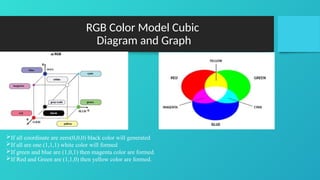
• It is represent by a unit cube.
9.
RGB Color ModelCubic
Diagram and Graph
If all coordinate are zero(0,0,0) black color will generated
If all are one (1,1,1) white color will formed
If green and blue are (1,0,1) then magenta color are formed.
If Red and Green are (1,1,0) then yellow color are formed.
10.
Importance of RGBcolor Model
• It is used for hardware application like Pc,monitor,scanner,cameras,and
TV.
• It is used for web graphics, but cannot be used for print production.
• Turn to RGB if your design project involves:
• web & app design
• icons
• buttons
• graphics
CMY/CMYK Color Model
•CMYK stand for (Cyan, Magenta, Yellow, Key/Black)
• CMYK is a subtractive color model it is used for offset printing colors
perceived in this model are the result of reflected light.
• A printing machine creates images by combining CMYK colors to varying
degrees with physical ink. This is known as subtractive mixing.
• All colors start as blank white.
• When all colors are mixed together, they create pure black.
13.
CMYK model Diagram
Bydefault white
Subtract white – Green = Magenta
Subtract white – Red = Cyan
Subtract white – blue = yellow
14.
When we usedCMYK
• Use CMYK for any project design that will be physically printed, not viewed
on a screen. If you need to recreate your design with ink or paint, the CMYK
color mode will give you more accurate results.
•project involves:
• Branding
• business cards
• stationary
• stickers
• signs & storefronts
• Merchandise
• t-shirts, hats and other branded cloth
• promotional swag (pens, mugs, etc.)
• Advertising
• Bill boards
• Posters
• flyers
15.
Best File FormatsFor CMYK
• PDF (portable document format)
• AI (Adobe Illustrator)
• EPS (Encapsulated PostScript File Format)
What is hue?
•Hue represents the angle with the vertical axis. All the 6 color which
cover total 360 degrees of color hexagon and are separated by 60
degrees.
• Hue is the color portion of the model, expressed as a number from 0
to 360 degrees:
• Red falls between 0 and 60 degrees.
• Yellow falls between 61 and 120 degrees.
• Green falls between 121 and 180 degrees.
• Cyan falls between 181 and 240 degrees.
• Blue falls between 241 and 300 degrees.
• Magenta falls between 301 and 360 degrees.
18.
What is situation?
•Situation represents the ratio of the purity of the hue.
• saturation appears as a range from 0 to 1, where 0 is gray, and 1 is
a primary color(full pure color).
• If you take hue 60 degree yellow
• Situation represent how yellow is pure.
• It is hexagon shape and also called
Diamond shape
19.
What is value?
•Value v varies from 0 to 1. value decides the brightness of the
color.
• V=0 means black color and v=1 means white color
• The top of surface of hexagon represent pure hue colors







![[DSC Europe 25] Slobodan Dolinic - Smart and Intelligent Green Region.pptx](https://cdn.slidesharecdn.com/ss_thumbnails/0bribinjsp6ghwtvsvor-2-sigre-slobodan-dolinic-260115093812-c9c10e90-thumbnail.jpg?width=640&height=640&fit=bounds)


![[DSC Europe 25] Stefan Brankovic - #ResumeIsDead. AI-Powered Interviews and C...](https://cdn.slidesharecdn.com/ss_thumbnails/qnmbsv0xq3uysdrq3sev-2-stefan-brankovic-job-bolt-260114111931-a065aa3d-thumbnail.jpg?width=640&height=640&fit=bounds)


![[DSC Europe 25] Mijat Kustudic - Building Financial Intelligence with AI Agen...](https://cdn.slidesharecdn.com/ss_thumbnails/38y2lb5lse6wstegtvas-3-mijat-kustudic-building-financial-intelligence-with-ai-agents-260114111931-1a4783ce-thumbnail.jpg?width=640&height=640&fit=bounds)