Computer Fundamentals: Pradeep K. Sinha & Priti SinhaComputer Fundamentals: Pradeep K. Sinha & Priti Sinha
Slide 1/16Chapter 19: MultimediaRef. Page
Computer Fundamentals: Pradeep K. Sinha & Priti SinhaComputer Fundamentals: Pradeep K. Sinha & Priti Sinha
Slide 2/16Chapter 19: MultimediaRef. Page
Learning ObjectivesLearning Objectives
In this chapter you will learn about:
§ Multimedia
§ Multimedia computer system
§ Main components of multimedia and their associated
technologies
§ Common multimedia applications
366
Computer Fundamentals: Pradeep K. Sinha & Priti SinhaComputer Fundamentals: Pradeep K. Sinha & Priti Sinha
Slide 3/16Chapter 19: MultimediaRef. Page
MultimediaMultimedia
§ Media is something that can be used for presentation of
information.
§ Two basic ways to present some information are:
§ Unimedia presentation: Single media is used to
present information
§ Multimedia presentation: More than one media is
used to present information
§ Multimedia presentation of any information greatly
enhances the comprehension capability of the user as it
involves use of more of our senses
366
Computer Fundamentals: Pradeep K. Sinha & Priti SinhaComputer Fundamentals: Pradeep K. Sinha & Priti Sinha
Slide 4/16Chapter 19: MultimediaRef. Page
Common MediaCommon Media
§ Common media for storage, access, and transmission of
information are:
§ Text (alphanumeric characters)
§ Graphics (line drawings and images)
§ Animation (moving images)
§ Audio (sound)
§ Video (Videographed real-life events)
§ Multimedia in information technology refers to use of more
than one of these media for information presentation to
users
367
Computer Fundamentals: Pradeep K. Sinha & Priti SinhaComputer Fundamentals: Pradeep K. Sinha & Priti Sinha
Slide 5/16Chapter 19: MultimediaRef. Page
Multimedia Computer SystemMultimedia Computer System
§ Multimedia computer system is a computer having
capability to integrate two or more types of media (text,
graphics, animation, audio, and video)
§ In general, size for multimedia information is much
larger than plain text information
§ Multimedia computer systems require:
§ Faster CPU
§ Larger storage devices (for storing large data files)
§ Larger main memory (for large data size)
§ Good graphics terminals
§ I/O devices to play any multimedia
(Continued on next slide)
367
Computer Fundamentals: Pradeep K. Sinha & Priti SinhaComputer Fundamentals: Pradeep K. Sinha & Priti Sinha
Slide 6/16Chapter 19: MultimediaRef. Page
Text MediaText Media
§ Alphanumeric characters are used to present information
in text form. Computers are widely used for text
processing
§ Keyboards, OCRs, computer screens, and printers are
some commonly used hardware devices for processing
text media
§ Text editing, text searching, hypertext, and text
importing/exporting are some highly desirable features
of a multimedia computer system for better presentation
and use of text information
(Continued from previous slide..)
368
Computer Fundamentals: Pradeep K. Sinha & Priti SinhaComputer Fundamentals: Pradeep K. Sinha & Priti Sinha
Slide 7/16Chapter 19: MultimediaRef. Page
Graphics MediaGraphics Media
§ Computer graphics deals with generation, representation,
manipulation, and display of pictures (line drawings and
images) with a computer
§ Locating devices (such as a mouse, a joystick, or a
stylus), digitizers, scanners, digital cameras, computer
screens with graphics display capability, laser printers,
and plotters are some common hardware devices for
processing graphics media
§ Some desirable features of a multimedia computer system
are painting or drawing software, screen capture software,
clip art, graphics importing, and software support for high
resolution
369
Computer Fundamentals: Pradeep K. Sinha & Priti SinhaComputer Fundamentals: Pradeep K. Sinha & Priti Sinha
Slide 8/16Chapter 19: MultimediaRef. Page
Animation MediaAnimation Media
§ Computer animation deals with generation, sequencing,
and display (at a specified rate) of a set of images
(called frames) to create an effect of visual change or
motion, similar to a movie film (video)
§ Animation is commonly used in those instances where
videography is not possible or animation can better
illustrate the concept than video
§ Animation deals with displaying a sequence of images at
a reasonable speed to create an impression of
movement. For a jerk-free full motion animation, 25 to
30 frames per second is required
(Continued on next slide)
371
Computer Fundamentals: Pradeep K. Sinha & Priti SinhaComputer Fundamentals: Pradeep K. Sinha & Priti Sinha
Slide 9/16Chapter 19: MultimediaRef. Page
§ Scanners, digital cameras, video capture board
interfaced to a video camera or VCR, computer
monitors with image display capability, and graphics
accelerator board are some common hardware devices
for processing animation media
§ Some desirable features of a multimedia computer
system with animation facility are animation creation
software, screen capture software, animation clips,
animation file importing, software support for high
resolution, recording and playback capabilities, and
transition effects
Animation MediaAnimation Media
(Continued from previous slide..)
371
Computer Fundamentals: Pradeep K. Sinha & Priti SinhaComputer Fundamentals: Pradeep K. Sinha & Priti Sinha
Slide 10/16Chapter 19: MultimediaRef. Page
Virtual RealityVirtual Reality
§ Virtual reality is a relatively new technology using
which the user can put a pair of goggles and a glove
and tour a three-dimensional world that exists only in
the computer, but appears realistic to the user
371
Computer Fundamentals: Pradeep K. Sinha & Priti SinhaComputer Fundamentals: Pradeep K. Sinha & Priti Sinha
Slide 11/16Chapter 19: MultimediaRef. Page
Audio MediaAudio Media
§ Computer audio deals with synthesizing, recording, and
playback of audio or sound with a computer
§ Sound board, microphone, speaker, MIDI devices,
sound synthesizer, sound editor and audio mixer are
some commonly used hardware devices for processing
audio media
§ Some desirable features of a multimedia computer
system are audio clips, audio file importing, software
support for high quality sound, recording and playback
capabilities, text-to-speech conversion software,
speech-to-text conversion software, and voice
recognition software
373
Computer Fundamentals: Pradeep K. Sinha & Priti SinhaComputer Fundamentals: Pradeep K. Sinha & Priti Sinha
Slide 12/16Chapter 19: MultimediaRef. Page
§ Computer video deals with recording and display of a
sequence of images at a reasonable speed to create an
impression of movement. Each individual image of
such a sequence is called a frame
§ Video camera, video monitor, video board, and video
editor are some of the commonly used hardware
devices for processing video media
§ Some desirable features of a multimedia computer
system with video facility are video clips and recording
and playback capabilities
Video MediaVideo Media
374
Computer Fundamentals: Pradeep K. Sinha & Priti SinhaComputer Fundamentals: Pradeep K. Sinha & Priti Sinha
Slide 13/16Chapter 19: MultimediaRef. Page
Multimedia ApplicationsMultimedia Applications
§ Multimedia presentation
§ Foreign language learning
§ Video games
§ Special effects in films
§ Multimedia kiosks as help desks
§ Animated advertisements
§ Multimedia conferencing
375
Computer Fundamentals: Pradeep K. Sinha & Priti SinhaComputer Fundamentals: Pradeep K. Sinha & Priti Sinha
Slide 14/16Chapter 19: MultimediaRef. Page
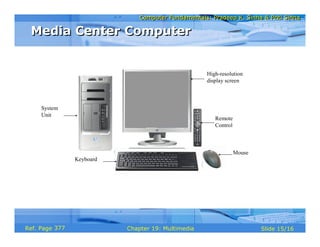
Media Center ComputerMedia Center Computer
§ There is a growing trend of owning a personal computer
(PC) at home like other electronic equipment
§ New terminologies like “infotainment” and “edutainment”
have evolved to refer to computers as versatile tools
§ Media center PC provides following functionalities:
§ Server as PC, TV, radio, and music system
§ Serve as digital photo album and digital library
§ Server as Game station and DVD/CD Player
§ Allows play, pause, and record of TV programs
§ Provides Electronic Programming Guide (EPG)
376
Computer Fundamentals: Pradeep K. Sinha & Priti SinhaComputer Fundamentals: Pradeep K. Sinha & Priti Sinha
Slide 15/16Chapter 19: MultimediaRef. Page
Media Center ComputerMedia Center Computer
High-resolution
display screen
Remote
Control
Mouse
Keyboard
System
Unit
377
Computer Fundamentals: Pradeep K. Sinha & Priti SinhaComputer Fundamentals: Pradeep K. Sinha & Priti Sinha
Slide 16/16Chapter 19: MultimediaRef. Page
Keywords/PhrasesKeywords/Phrases
§ Animation
§ Audio
§ Clip art
§ Cognitive graphics
§ Computer Aided Design (CAD)
§ Computer Aided Manufacturing (CAM)
§ Frames
§ Generative graphics
§ Graphics
§ Multimedia
§ Media Center Computer
§ Pixel
§ Refresh rate
§ Text
§ Transducer
§ Transition effects
§ Video
§ Virtual reality
378

Chapter 19 multimedia

  • 1.
    Computer Fundamentals: PradeepK. Sinha & Priti SinhaComputer Fundamentals: Pradeep K. Sinha & Priti Sinha Slide 1/16Chapter 19: MultimediaRef. Page
  • 2.
    Computer Fundamentals: PradeepK. Sinha & Priti SinhaComputer Fundamentals: Pradeep K. Sinha & Priti Sinha Slide 2/16Chapter 19: MultimediaRef. Page Learning ObjectivesLearning Objectives In this chapter you will learn about: § Multimedia § Multimedia computer system § Main components of multimedia and their associated technologies § Common multimedia applications 366
  • 3.
    Computer Fundamentals: PradeepK. Sinha & Priti SinhaComputer Fundamentals: Pradeep K. Sinha & Priti Sinha Slide 3/16Chapter 19: MultimediaRef. Page MultimediaMultimedia § Media is something that can be used for presentation of information. § Two basic ways to present some information are: § Unimedia presentation: Single media is used to present information § Multimedia presentation: More than one media is used to present information § Multimedia presentation of any information greatly enhances the comprehension capability of the user as it involves use of more of our senses 366
  • 4.
    Computer Fundamentals: PradeepK. Sinha & Priti SinhaComputer Fundamentals: Pradeep K. Sinha & Priti Sinha Slide 4/16Chapter 19: MultimediaRef. Page Common MediaCommon Media § Common media for storage, access, and transmission of information are: § Text (alphanumeric characters) § Graphics (line drawings and images) § Animation (moving images) § Audio (sound) § Video (Videographed real-life events) § Multimedia in information technology refers to use of more than one of these media for information presentation to users 367
  • 5.
    Computer Fundamentals: PradeepK. Sinha & Priti SinhaComputer Fundamentals: Pradeep K. Sinha & Priti Sinha Slide 5/16Chapter 19: MultimediaRef. Page Multimedia Computer SystemMultimedia Computer System § Multimedia computer system is a computer having capability to integrate two or more types of media (text, graphics, animation, audio, and video) § In general, size for multimedia information is much larger than plain text information § Multimedia computer systems require: § Faster CPU § Larger storage devices (for storing large data files) § Larger main memory (for large data size) § Good graphics terminals § I/O devices to play any multimedia (Continued on next slide) 367
  • 6.
    Computer Fundamentals: PradeepK. Sinha & Priti SinhaComputer Fundamentals: Pradeep K. Sinha & Priti Sinha Slide 6/16Chapter 19: MultimediaRef. Page Text MediaText Media § Alphanumeric characters are used to present information in text form. Computers are widely used for text processing § Keyboards, OCRs, computer screens, and printers are some commonly used hardware devices for processing text media § Text editing, text searching, hypertext, and text importing/exporting are some highly desirable features of a multimedia computer system for better presentation and use of text information (Continued from previous slide..) 368
  • 7.
    Computer Fundamentals: PradeepK. Sinha & Priti SinhaComputer Fundamentals: Pradeep K. Sinha & Priti Sinha Slide 7/16Chapter 19: MultimediaRef. Page Graphics MediaGraphics Media § Computer graphics deals with generation, representation, manipulation, and display of pictures (line drawings and images) with a computer § Locating devices (such as a mouse, a joystick, or a stylus), digitizers, scanners, digital cameras, computer screens with graphics display capability, laser printers, and plotters are some common hardware devices for processing graphics media § Some desirable features of a multimedia computer system are painting or drawing software, screen capture software, clip art, graphics importing, and software support for high resolution 369
  • 8.
    Computer Fundamentals: PradeepK. Sinha & Priti SinhaComputer Fundamentals: Pradeep K. Sinha & Priti Sinha Slide 8/16Chapter 19: MultimediaRef. Page Animation MediaAnimation Media § Computer animation deals with generation, sequencing, and display (at a specified rate) of a set of images (called frames) to create an effect of visual change or motion, similar to a movie film (video) § Animation is commonly used in those instances where videography is not possible or animation can better illustrate the concept than video § Animation deals with displaying a sequence of images at a reasonable speed to create an impression of movement. For a jerk-free full motion animation, 25 to 30 frames per second is required (Continued on next slide) 371
  • 9.
    Computer Fundamentals: PradeepK. Sinha & Priti SinhaComputer Fundamentals: Pradeep K. Sinha & Priti Sinha Slide 9/16Chapter 19: MultimediaRef. Page § Scanners, digital cameras, video capture board interfaced to a video camera or VCR, computer monitors with image display capability, and graphics accelerator board are some common hardware devices for processing animation media § Some desirable features of a multimedia computer system with animation facility are animation creation software, screen capture software, animation clips, animation file importing, software support for high resolution, recording and playback capabilities, and transition effects Animation MediaAnimation Media (Continued from previous slide..) 371
  • 10.
    Computer Fundamentals: PradeepK. Sinha & Priti SinhaComputer Fundamentals: Pradeep K. Sinha & Priti Sinha Slide 10/16Chapter 19: MultimediaRef. Page Virtual RealityVirtual Reality § Virtual reality is a relatively new technology using which the user can put a pair of goggles and a glove and tour a three-dimensional world that exists only in the computer, but appears realistic to the user 371
  • 11.
    Computer Fundamentals: PradeepK. Sinha & Priti SinhaComputer Fundamentals: Pradeep K. Sinha & Priti Sinha Slide 11/16Chapter 19: MultimediaRef. Page Audio MediaAudio Media § Computer audio deals with synthesizing, recording, and playback of audio or sound with a computer § Sound board, microphone, speaker, MIDI devices, sound synthesizer, sound editor and audio mixer are some commonly used hardware devices for processing audio media § Some desirable features of a multimedia computer system are audio clips, audio file importing, software support for high quality sound, recording and playback capabilities, text-to-speech conversion software, speech-to-text conversion software, and voice recognition software 373
  • 12.
    Computer Fundamentals: PradeepK. Sinha & Priti SinhaComputer Fundamentals: Pradeep K. Sinha & Priti Sinha Slide 12/16Chapter 19: MultimediaRef. Page § Computer video deals with recording and display of a sequence of images at a reasonable speed to create an impression of movement. Each individual image of such a sequence is called a frame § Video camera, video monitor, video board, and video editor are some of the commonly used hardware devices for processing video media § Some desirable features of a multimedia computer system with video facility are video clips and recording and playback capabilities Video MediaVideo Media 374
  • 13.
    Computer Fundamentals: PradeepK. Sinha & Priti SinhaComputer Fundamentals: Pradeep K. Sinha & Priti Sinha Slide 13/16Chapter 19: MultimediaRef. Page Multimedia ApplicationsMultimedia Applications § Multimedia presentation § Foreign language learning § Video games § Special effects in films § Multimedia kiosks as help desks § Animated advertisements § Multimedia conferencing 375
  • 14.
    Computer Fundamentals: PradeepK. Sinha & Priti SinhaComputer Fundamentals: Pradeep K. Sinha & Priti Sinha Slide 14/16Chapter 19: MultimediaRef. Page Media Center ComputerMedia Center Computer § There is a growing trend of owning a personal computer (PC) at home like other electronic equipment § New terminologies like “infotainment” and “edutainment” have evolved to refer to computers as versatile tools § Media center PC provides following functionalities: § Server as PC, TV, radio, and music system § Serve as digital photo album and digital library § Server as Game station and DVD/CD Player § Allows play, pause, and record of TV programs § Provides Electronic Programming Guide (EPG) 376
  • 15.
    Computer Fundamentals: PradeepK. Sinha & Priti SinhaComputer Fundamentals: Pradeep K. Sinha & Priti Sinha Slide 15/16Chapter 19: MultimediaRef. Page Media Center ComputerMedia Center Computer High-resolution display screen Remote Control Mouse Keyboard System Unit 377
  • 16.
    Computer Fundamentals: PradeepK. Sinha & Priti SinhaComputer Fundamentals: Pradeep K. Sinha & Priti Sinha Slide 16/16Chapter 19: MultimediaRef. Page Keywords/PhrasesKeywords/Phrases § Animation § Audio § Clip art § Cognitive graphics § Computer Aided Design (CAD) § Computer Aided Manufacturing (CAM) § Frames § Generative graphics § Graphics § Multimedia § Media Center Computer § Pixel § Refresh rate § Text § Transducer § Transition effects § Video § Virtual reality 378