Computer Fundamentals: Pradeep K. Sinha & Priti SinhaComputer Fundamentals: Pradeep K. Sinha & Priti Sinha
Slide 1/26Chapter 20: Classification of ComputersRef. Page
Computer Fundamentals: Pradeep K. Sinha & Priti SinhaComputer Fundamentals: Pradeep K. Sinha & Priti Sinha
Slide 2/26Chapter 20: Classification of ComputersRef. Page
Learning ObjectivesLearning Objectives
In this chapter you will learn about:
§ Classifications of computers
§ Common types of computers today
§ Characteristic features of various types of
computers in use today
381
Computer Fundamentals: Pradeep K. Sinha & Priti SinhaComputer Fundamentals: Pradeep K. Sinha & Priti Sinha
Slide 3/26Chapter 20: Classification of ComputersRef. Page
Computer ClassificationComputer Classification
§ Traditionally, computers were classified by their size,
processing speed, and cost
§ Based on these factors, computers were classified as
microcomputers, minicomputers, mainframes, and
supercomputers
§ However, with rapidly changing technology, this
classification is no more relevant
§ Today, computers are classified based on their mode of
use
381
Computer Fundamentals: Pradeep K. Sinha & Priti SinhaComputer Fundamentals: Pradeep K. Sinha & Priti Sinha
Slide 4/26Chapter 20: Classification of ComputersRef. Page
Types of ComputersTypes of Computers
Based on their mode of use, computers are classified as:
§ Notebook computers
§ Personal computers
§ Workstations
§ Mainframe systems
§ Supercomputers
§ Clients and servers
§ Handheld computers
381
Computer Fundamentals: Pradeep K. Sinha & Priti SinhaComputer Fundamentals: Pradeep K. Sinha & Priti Sinha
Slide 5/26Chapter 20: Classification of ComputersRef. Page
Notebook ComputersNotebook Computers
§ Portable computers mainly meant for use by people who
need computing resource wherever they go
§ Approximately of the size of an 8½ x 11 inch notebook and
can easily fit inside a briefcase
§ Weigh around 2 kg only.
§ Comfortably placed on ones lap while being used. Hence,
they are also called laptop PC
§ Lid with display screen is foldable in a manner that when
not in use it can be folded to flush with keyboard to
convert the system into notebook form
(Continued on next slide)
381
Computer Fundamentals: Pradeep K. Sinha & Priti SinhaComputer Fundamentals: Pradeep K. Sinha & Priti Sinha
Slide 6/26Chapter 20: Classification of ComputersRef. Page
§ Designed to operate with chargeable batteries
§ Mostly used for word processing, spreadsheet
computing, data entry, and power point presentations
§ Normally run MS-DOS or MS WINDOWS operating
system
§ Some manufacturers are also offering models with
GNU/Linux or its distributions
§ Each device of laptop is designed to use little power and
remain suspended if not used
Notebook ComputersNotebook Computers
(Continued from previous slide..)
382
Computer Fundamentals: Pradeep K. Sinha & Priti SinhaComputer Fundamentals: Pradeep K. Sinha & Priti Sinha
Slide 7/26Chapter 20: Classification of ComputersRef. Page
Keyboard, trackball,
hard disk, floppy
disk drive, etc. are
in this unit
Foldable flat
screen
Notebook ComputersNotebook Computers
382
Computer Fundamentals: Pradeep K. Sinha & Priti SinhaComputer Fundamentals: Pradeep K. Sinha & Priti Sinha
Slide 8/26Chapter 20: Classification of ComputersRef. Page
Personal Computers (PCs)Personal Computers (PCs)
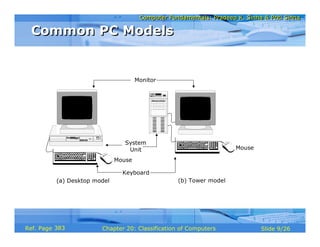
§ Non-portable, general-purpose computer that fits on a
normal size office table
§ Designed to meet personal computing needs of
individuals
§ Often used by children and adults for education and
entertainment also
§ Generally used by one person at a time, supports
multitasking
§ Two common models of PCs are desktop model and
tower model
§ Popular OS are MS-DOS, MS-Windows, Windows-NT,
Linux, and UNIX
382
Computer Fundamentals: Pradeep K. Sinha & Priti SinhaComputer Fundamentals: Pradeep K. Sinha & Priti Sinha
Slide 9/26Chapter 20: Classification of ComputersRef. Page
(a) Desktop model
Keyboard
Mouse
Mouse
System
Unit
Monitor
(b) Tower model
Common PC ModelsCommon PC Models
383
Computer Fundamentals: Pradeep K. Sinha & Priti SinhaComputer Fundamentals: Pradeep K. Sinha & Priti Sinha
Slide 10/26Chapter 20: Classification of ComputersRef. Page
WorkstationsWorkstations
§ Powerful desktop computer designed to meet the
computing needs of engineers, architects, and other
professionals
§ Provides greater processing power, larger storage, and
better graphics display facility than PCs
§ Commonly used for computer-aided design, multimedia
applications, simulation of complex scientific and
engineering problems, and visualization
§ Generally run the UNIX operating system or a variation of
it
§ Operating system is generally designed to support
multiuser environment
384
Computer Fundamentals: Pradeep K. Sinha & Priti SinhaComputer Fundamentals: Pradeep K. Sinha & Priti Sinha
Slide 11/26Chapter 20: Classification of ComputersRef. Page
Mainframe SystemsMainframe Systems
§ Mainly used by large organizations as banks, insurance
companies, hospitals, railways, etc.
§ Used for data handling and information processing
requirements
§ Used in such environments where a large number of
users need to share a common computing facility
§ Oriented to input/output-bound applications
(Continued on next slide)
384
Computer Fundamentals: Pradeep K. Sinha & Priti SinhaComputer Fundamentals: Pradeep K. Sinha & Priti Sinha
Slide 12/26Chapter 20: Classification of ComputersRef. Page
Mainframe SystemsMainframe Systems
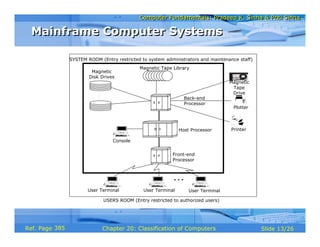
§ Typically consist of a host computer, front-end
computer, back-end computer, console terminals,
magnetic disk drives, tape drives, magnetic tape
library, user terminals, printers, and plotters
§ Typical mainframe system looks like a row of large file
cabinets and needs a large room
§ Smaller configuration (slower host and subordinate
computers, lesser storage space, and fewer user
terminals) is often referred to as a minicomputer
system
(Continued from previous slide..)
385
Computer Fundamentals: Pradeep K. Sinha & Priti SinhaComputer Fundamentals: Pradeep K. Sinha & Priti Sinha
Slide 13/26Chapter 20: Classification of ComputersRef. Page
USERS ROOM (Entry restricted to authorized users)
SYSTEM ROOM (Entry restricted to system administrators and maintenance staff)
Magnetic
Disk Drives
Host Processor
Front-end
Processor
Back-end
Processor
User Terminal User Terminal User Terminal
Console
Printer
Plotter
Magnetic
Tape
Drive
Magnetic Tape Library
Mainframe Computer SystemsMainframe Computer Systems
385
Computer Fundamentals: Pradeep K. Sinha & Priti SinhaComputer Fundamentals: Pradeep K. Sinha & Priti Sinha
Slide 14/26Chapter 20: Classification of ComputersRef. Page
SupercomputersSupercomputers
§ Most powerful and most expensive computers available at
a given time.
§ Primarily used for processing complex scientific
applications that require enormous processing power
§ Well known supercomputing applications include:
§ Analysis of large volumes of seismic data
§ Simulation of airflow around an aircraft
§ Crash simulation of the design of an automobile
§ Solving complex structure engineering problems
§ Weather forecasting
(Continued on next slide)
386
Computer Fundamentals: Pradeep K. Sinha & Priti SinhaComputer Fundamentals: Pradeep K. Sinha & Priti Sinha
Slide 15/26Chapter 20: Classification of ComputersRef. Page
§ Supercomputers also support multiprogramming
§ Supercomputers primarily address processor-bound
applications
SupercomputersSupercomputers
(Continued from previous slide..)
387
Computer Fundamentals: Pradeep K. Sinha & Priti SinhaComputer Fundamentals: Pradeep K. Sinha & Priti Sinha
Slide 16/26Chapter 20: Classification of ComputersRef. Page
§ Use multiprocessing and parallel processing
technologies to solve complex problems faster
§ Also known as parallel computers or parallel processing
systems
§ Modern supercomputers employ hundreds of
processors and are also known as massively parallel
processors
Parallel Processing SystemsParallel Processing Systems
387
Computer Fundamentals: Pradeep K. Sinha & Priti SinhaComputer Fundamentals: Pradeep K. Sinha & Priti Sinha
Slide 17/26Chapter 20: Classification of ComputersRef. Page
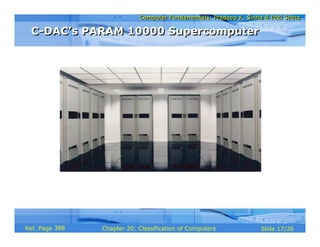
C-DAC’s PARAM 10000 SupercomputerC-DAC’s PARAM 10000 Supercomputer
388
Computer Fundamentals: Pradeep K. Sinha & Priti SinhaComputer Fundamentals: Pradeep K. Sinha & Priti Sinha
Slide 18/26Chapter 20: Classification of ComputersRef. Page
Client and Server ComputersClient and Server Computers
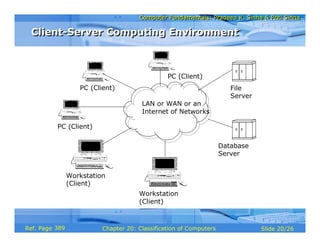
§ Client-server computing environment has multiple
clients, one/more servers, and a network
§ Client is a PC/workstation with user-friendly interface
running client processes that send service requests to
the server
§ Server is generally a relatively large computer that
manages a shared resource and provides a set of
shared user services to the clients
§ Server runs the server process that services client
requests for use of managed resources
§ Network may be a single LAN or WAN or an internet
work
388
Computer Fundamentals: Pradeep K. Sinha & Priti SinhaComputer Fundamentals: Pradeep K. Sinha & Priti Sinha
Slide 19/26Chapter 20: Classification of ComputersRef. Page
§ Involves splitting an application into tasks and putting
each task on computer where it can be handled most
efficiently
§ Computers and operating systems of a client and a
server may be different
§ Common for one server to use the services of another
server, and hence act both as client and server
§ Concept of client and server computers is purely role-
based and may change dynamically as the role of a
computer changes
Client-Server ComputingClient-Server Computing
388
Computer Fundamentals: Pradeep K. Sinha & Priti SinhaComputer Fundamentals: Pradeep K. Sinha & Priti Sinha
Slide 20/26Chapter 20: Classification of ComputersRef. Page
File
Server
Workstation
(Client)
LAN or WAN or an
Internet of Networks
Database
Server
Workstation
(Client)
PC (Client)
PC (Client)
PC (Client)
Client-Server Computing EnvironmentClient-Server Computing Environment
389
Computer Fundamentals: Pradeep K. Sinha & Priti SinhaComputer Fundamentals: Pradeep K. Sinha & Priti Sinha
Slide 21/26Chapter 20: Classification of ComputersRef. Page
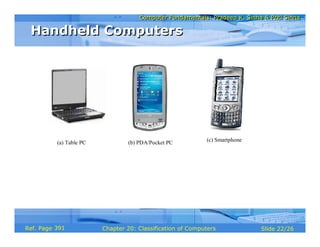
Handheld ComputersHandheld Computers
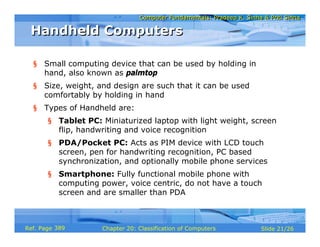
§ Small computing device that can be used by holding in
hand, also known as palmtop
§ Size, weight, and design are such that it can be used
comfortably by holding in hand
§ Types of Handheld are:
§ Tablet PC: Miniaturized laptop with light weight, screen
flip, handwriting and voice recognition
§ PDA/Pocket PC: Acts as PIM device with LCD touch
screen, pen for handwriting recognition, PC based
synchronization, and optionally mobile phone services
§ Smartphone: Fully functional mobile phone with
computing power, voice centric, do not have a touch
screen and are smaller than PDA
389
Computer Fundamentals: Pradeep K. Sinha & Priti SinhaComputer Fundamentals: Pradeep K. Sinha & Priti Sinha
Slide 22/26Chapter 20: Classification of ComputersRef. Page
(a) Table PC (b) PDA/Pocket PC (c) Smartphone
Handheld ComputersHandheld Computers
391
Computer Fundamentals: Pradeep K. Sinha & Priti SinhaComputer Fundamentals: Pradeep K. Sinha & Priti Sinha
Slide 23/26Chapter 20: Classification of ComputersRef. Page
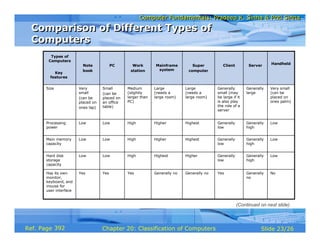
No
Low
Low
Low
Very small
(can be
placed on
ones palm)
Handheld
Generally
no
YesGenerally noGenerally noYesYesYesHas its own
monitor,
keyboard, and
mouse for
user interface
Generally
high
Generally
low
HigherHighestHighLowLowHard disk
storage
capacity
Generally
high
Generally
low
HighestHigherHighLowLowMain memory
capacity
Generally
high
Generally
low
HighestHigherHighLowLowProcessing
power
Generally
large
Generally
small (may
be large if it
is also play
the role of a
server
Large
(needs a
large room)
Large
(needs a
large room)
Medium
(slightly
larger than
PC)
Small
(can be
placed on
an office
table)
Very
small
(can be
placed on
ones lap)
Size
ServerClientSuper
computer
Mainframe
system
Work
station
PCNote
book
Key
features
Types of
Computers
Comparison of Different Types of
Computers
Comparison of Different Types of
Computers
(Continued on next slide)
392
Computer Fundamentals: Pradeep K. Sinha & Priti SinhaComputer Fundamentals: Pradeep K. Sinha & Priti Sinha
Slide 24/26Chapter 20: Classification of ComputersRef. Page
MS-Wndows
Mobile, Palm
OS, Symbian
OS, Linux,
Blackbery OS
Single
Single
Small
display
Handheld
Windows
-NT,
Unix or
its
variation,
or
proprieta
ry
MS-DOS,
MS-
Windows,
Windows-
NT,
Linux,
Unix
A variation of
Unix, or
proprietary
A variation
of Unix, or
proprietary
Unix or a
variation of
it
MS-DOS,
MS-
Windows,
Windows-
NT, Linux,
Unix
MS-DOS,
MS-
Windows
Popular
operating
systems
MultipleSingleMultipleMultipleGenerally
single
SingleSingleSingle/
multiple –
User
oriented
Generally
multiple
Generally
single
MultipleMultipleGenerally
multiple
Generally
single
SingleSingle/
multiple
processors
Generally
not
available
Medium to
large
screen
monitor
Generally not
available
Generally
not
available
Large-screen
color monitor
which can
display high
resolution
graphics
Medium
size
display
screen
Foldable
flat screen
small
display
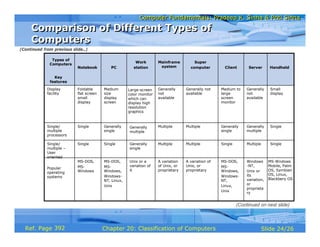
Display
facility
ServerClient
Super
computer
Mainframe
system
Work
stationPCNotebook
Key
features
Types of
Computers
Comparison of Different Types of
Computers
Comparison of Different Types of
Computers
(Continued on next slide)
(Continued from previous slide..)
392
Computer Fundamentals: Pradeep K. Sinha & Priti SinhaComputer Fundamentals: Pradeep K. Sinha & Priti Sinha
Slide 25/26Chapter 20: Classification of ComputersRef. Page
Nokia,
Sony,
Motorola,
Dell,
Hawlett-
Packard
Computing,
Personal
Information
Managemen
t (PIM), cell
phone,
digital
camera
Handheld
Same as
Workstation,
Mainframe
System, &
Super-
computer
vendors
Same as
PC and
Workstati
on
vendors
Cray, IBM,
Silicon
Graphics,
Fujitsu,
Intel, C-
DAC
IBM, DECSun
Microsystems
, IBM, DEC,
Hewlett-
Packard,
Silicon
Graphics
IBM, Apple,
Compaq,
Dell,
Zenith,
Siemens,
Toshiba,
Hewlett-
Packard
IBM,
Compaq,
Siemens,
Toshiba
Major
vendors
Manage a
shared
resource
and
provide a
set of
shared
user
services
in a
client-
server
computin
g
environm
ent
Provide
highly
user-
friendly
interface
in a client-
server
computing
environme
nt
Large
processor-
bound
application
s like
complex
scientific
simulation
s
Data and
information
processing
of I/O-
bound
applications
Computing
needs of
engineers,
architects,
designers;
Simulation of
complex
scientific and
engineering
problems and
visualizing the
results of
simulation; and
Multimedia
applications
Personal
computing
needs of
individuals
either in
their
working
places or at
their
homes; and
Education
and
entertain-
ment of
children
and adults
Word
processing;
Spreadsheet
; Data
Entry;
Preparing
presentation
materials;
and Making
presentation
s
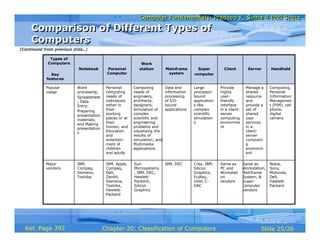
Popular
usage
ServerClientSuper
computer
Mainframe
system
Work
stationPersonal
Computer
Notebook
Key
features
Types of
Computers
Comparison of Different Types of
Computers
Comparison of Different Types of
Computers
(Continued from previous slide..)
392
Computer Fundamentals: Pradeep K. Sinha & Priti SinhaComputer Fundamentals: Pradeep K. Sinha & Priti Sinha
Slide 26/26Chapter 20: Classification of ComputersRef. Page
Key Words/PhrasesKey Words/Phrases
§ Back-end computer
§ Client computer
§ Client process
§ Front-end computer
§ Host computer
§ Handheld
§ I/O-bound application
§ Laptop PC
§ Mainframe system
§ Massively parallel processors
§ Minicomputer
§ Notebook computer
§ Parallel computers
§ Parallel processing system
§ Personal Computer (PC)
§ Processor-bound application
§ Server computer
§ Server process
§ Supercomputer
§ System board
§ Workstation
393

Chapter 20 coc

  • 1.
    Computer Fundamentals: PradeepK. Sinha & Priti SinhaComputer Fundamentals: Pradeep K. Sinha & Priti Sinha Slide 1/26Chapter 20: Classification of ComputersRef. Page
  • 2.
    Computer Fundamentals: PradeepK. Sinha & Priti SinhaComputer Fundamentals: Pradeep K. Sinha & Priti Sinha Slide 2/26Chapter 20: Classification of ComputersRef. Page Learning ObjectivesLearning Objectives In this chapter you will learn about: § Classifications of computers § Common types of computers today § Characteristic features of various types of computers in use today 381
  • 3.
    Computer Fundamentals: PradeepK. Sinha & Priti SinhaComputer Fundamentals: Pradeep K. Sinha & Priti Sinha Slide 3/26Chapter 20: Classification of ComputersRef. Page Computer ClassificationComputer Classification § Traditionally, computers were classified by their size, processing speed, and cost § Based on these factors, computers were classified as microcomputers, minicomputers, mainframes, and supercomputers § However, with rapidly changing technology, this classification is no more relevant § Today, computers are classified based on their mode of use 381
  • 4.
    Computer Fundamentals: PradeepK. Sinha & Priti SinhaComputer Fundamentals: Pradeep K. Sinha & Priti Sinha Slide 4/26Chapter 20: Classification of ComputersRef. Page Types of ComputersTypes of Computers Based on their mode of use, computers are classified as: § Notebook computers § Personal computers § Workstations § Mainframe systems § Supercomputers § Clients and servers § Handheld computers 381
  • 5.
    Computer Fundamentals: PradeepK. Sinha & Priti SinhaComputer Fundamentals: Pradeep K. Sinha & Priti Sinha Slide 5/26Chapter 20: Classification of ComputersRef. Page Notebook ComputersNotebook Computers § Portable computers mainly meant for use by people who need computing resource wherever they go § Approximately of the size of an 8½ x 11 inch notebook and can easily fit inside a briefcase § Weigh around 2 kg only. § Comfortably placed on ones lap while being used. Hence, they are also called laptop PC § Lid with display screen is foldable in a manner that when not in use it can be folded to flush with keyboard to convert the system into notebook form (Continued on next slide) 381
  • 6.
    Computer Fundamentals: PradeepK. Sinha & Priti SinhaComputer Fundamentals: Pradeep K. Sinha & Priti Sinha Slide 6/26Chapter 20: Classification of ComputersRef. Page § Designed to operate with chargeable batteries § Mostly used for word processing, spreadsheet computing, data entry, and power point presentations § Normally run MS-DOS or MS WINDOWS operating system § Some manufacturers are also offering models with GNU/Linux or its distributions § Each device of laptop is designed to use little power and remain suspended if not used Notebook ComputersNotebook Computers (Continued from previous slide..) 382
  • 7.
    Computer Fundamentals: PradeepK. Sinha & Priti SinhaComputer Fundamentals: Pradeep K. Sinha & Priti Sinha Slide 7/26Chapter 20: Classification of ComputersRef. Page Keyboard, trackball, hard disk, floppy disk drive, etc. are in this unit Foldable flat screen Notebook ComputersNotebook Computers 382
  • 8.
    Computer Fundamentals: PradeepK. Sinha & Priti SinhaComputer Fundamentals: Pradeep K. Sinha & Priti Sinha Slide 8/26Chapter 20: Classification of ComputersRef. Page Personal Computers (PCs)Personal Computers (PCs) § Non-portable, general-purpose computer that fits on a normal size office table § Designed to meet personal computing needs of individuals § Often used by children and adults for education and entertainment also § Generally used by one person at a time, supports multitasking § Two common models of PCs are desktop model and tower model § Popular OS are MS-DOS, MS-Windows, Windows-NT, Linux, and UNIX 382
  • 9.
    Computer Fundamentals: PradeepK. Sinha & Priti SinhaComputer Fundamentals: Pradeep K. Sinha & Priti Sinha Slide 9/26Chapter 20: Classification of ComputersRef. Page (a) Desktop model Keyboard Mouse Mouse System Unit Monitor (b) Tower model Common PC ModelsCommon PC Models 383
  • 10.
    Computer Fundamentals: PradeepK. Sinha & Priti SinhaComputer Fundamentals: Pradeep K. Sinha & Priti Sinha Slide 10/26Chapter 20: Classification of ComputersRef. Page WorkstationsWorkstations § Powerful desktop computer designed to meet the computing needs of engineers, architects, and other professionals § Provides greater processing power, larger storage, and better graphics display facility than PCs § Commonly used for computer-aided design, multimedia applications, simulation of complex scientific and engineering problems, and visualization § Generally run the UNIX operating system or a variation of it § Operating system is generally designed to support multiuser environment 384
  • 11.
    Computer Fundamentals: PradeepK. Sinha & Priti SinhaComputer Fundamentals: Pradeep K. Sinha & Priti Sinha Slide 11/26Chapter 20: Classification of ComputersRef. Page Mainframe SystemsMainframe Systems § Mainly used by large organizations as banks, insurance companies, hospitals, railways, etc. § Used for data handling and information processing requirements § Used in such environments where a large number of users need to share a common computing facility § Oriented to input/output-bound applications (Continued on next slide) 384
  • 12.
    Computer Fundamentals: PradeepK. Sinha & Priti SinhaComputer Fundamentals: Pradeep K. Sinha & Priti Sinha Slide 12/26Chapter 20: Classification of ComputersRef. Page Mainframe SystemsMainframe Systems § Typically consist of a host computer, front-end computer, back-end computer, console terminals, magnetic disk drives, tape drives, magnetic tape library, user terminals, printers, and plotters § Typical mainframe system looks like a row of large file cabinets and needs a large room § Smaller configuration (slower host and subordinate computers, lesser storage space, and fewer user terminals) is often referred to as a minicomputer system (Continued from previous slide..) 385
  • 13.
    Computer Fundamentals: PradeepK. Sinha & Priti SinhaComputer Fundamentals: Pradeep K. Sinha & Priti Sinha Slide 13/26Chapter 20: Classification of ComputersRef. Page USERS ROOM (Entry restricted to authorized users) SYSTEM ROOM (Entry restricted to system administrators and maintenance staff) Magnetic Disk Drives Host Processor Front-end Processor Back-end Processor User Terminal User Terminal User Terminal Console Printer Plotter Magnetic Tape Drive Magnetic Tape Library Mainframe Computer SystemsMainframe Computer Systems 385
  • 14.
    Computer Fundamentals: PradeepK. Sinha & Priti SinhaComputer Fundamentals: Pradeep K. Sinha & Priti Sinha Slide 14/26Chapter 20: Classification of ComputersRef. Page SupercomputersSupercomputers § Most powerful and most expensive computers available at a given time. § Primarily used for processing complex scientific applications that require enormous processing power § Well known supercomputing applications include: § Analysis of large volumes of seismic data § Simulation of airflow around an aircraft § Crash simulation of the design of an automobile § Solving complex structure engineering problems § Weather forecasting (Continued on next slide) 386
  • 15.
    Computer Fundamentals: PradeepK. Sinha & Priti SinhaComputer Fundamentals: Pradeep K. Sinha & Priti Sinha Slide 15/26Chapter 20: Classification of ComputersRef. Page § Supercomputers also support multiprogramming § Supercomputers primarily address processor-bound applications SupercomputersSupercomputers (Continued from previous slide..) 387
  • 16.
    Computer Fundamentals: PradeepK. Sinha & Priti SinhaComputer Fundamentals: Pradeep K. Sinha & Priti Sinha Slide 16/26Chapter 20: Classification of ComputersRef. Page § Use multiprocessing and parallel processing technologies to solve complex problems faster § Also known as parallel computers or parallel processing systems § Modern supercomputers employ hundreds of processors and are also known as massively parallel processors Parallel Processing SystemsParallel Processing Systems 387
  • 17.
    Computer Fundamentals: PradeepK. Sinha & Priti SinhaComputer Fundamentals: Pradeep K. Sinha & Priti Sinha Slide 17/26Chapter 20: Classification of ComputersRef. Page C-DAC’s PARAM 10000 SupercomputerC-DAC’s PARAM 10000 Supercomputer 388
  • 18.
    Computer Fundamentals: PradeepK. Sinha & Priti SinhaComputer Fundamentals: Pradeep K. Sinha & Priti Sinha Slide 18/26Chapter 20: Classification of ComputersRef. Page Client and Server ComputersClient and Server Computers § Client-server computing environment has multiple clients, one/more servers, and a network § Client is a PC/workstation with user-friendly interface running client processes that send service requests to the server § Server is generally a relatively large computer that manages a shared resource and provides a set of shared user services to the clients § Server runs the server process that services client requests for use of managed resources § Network may be a single LAN or WAN or an internet work 388
  • 19.
    Computer Fundamentals: PradeepK. Sinha & Priti SinhaComputer Fundamentals: Pradeep K. Sinha & Priti Sinha Slide 19/26Chapter 20: Classification of ComputersRef. Page § Involves splitting an application into tasks and putting each task on computer where it can be handled most efficiently § Computers and operating systems of a client and a server may be different § Common for one server to use the services of another server, and hence act both as client and server § Concept of client and server computers is purely role- based and may change dynamically as the role of a computer changes Client-Server ComputingClient-Server Computing 388
  • 20.
    Computer Fundamentals: PradeepK. Sinha & Priti SinhaComputer Fundamentals: Pradeep K. Sinha & Priti Sinha Slide 20/26Chapter 20: Classification of ComputersRef. Page File Server Workstation (Client) LAN or WAN or an Internet of Networks Database Server Workstation (Client) PC (Client) PC (Client) PC (Client) Client-Server Computing EnvironmentClient-Server Computing Environment 389
  • 21.
    Computer Fundamentals: PradeepK. Sinha & Priti SinhaComputer Fundamentals: Pradeep K. Sinha & Priti Sinha Slide 21/26Chapter 20: Classification of ComputersRef. Page Handheld ComputersHandheld Computers § Small computing device that can be used by holding in hand, also known as palmtop § Size, weight, and design are such that it can be used comfortably by holding in hand § Types of Handheld are: § Tablet PC: Miniaturized laptop with light weight, screen flip, handwriting and voice recognition § PDA/Pocket PC: Acts as PIM device with LCD touch screen, pen for handwriting recognition, PC based synchronization, and optionally mobile phone services § Smartphone: Fully functional mobile phone with computing power, voice centric, do not have a touch screen and are smaller than PDA 389
  • 22.
    Computer Fundamentals: PradeepK. Sinha & Priti SinhaComputer Fundamentals: Pradeep K. Sinha & Priti Sinha Slide 22/26Chapter 20: Classification of ComputersRef. Page (a) Table PC (b) PDA/Pocket PC (c) Smartphone Handheld ComputersHandheld Computers 391
  • 23.
    Computer Fundamentals: PradeepK. Sinha & Priti SinhaComputer Fundamentals: Pradeep K. Sinha & Priti Sinha Slide 23/26Chapter 20: Classification of ComputersRef. Page No Low Low Low Very small (can be placed on ones palm) Handheld Generally no YesGenerally noGenerally noYesYesYesHas its own monitor, keyboard, and mouse for user interface Generally high Generally low HigherHighestHighLowLowHard disk storage capacity Generally high Generally low HighestHigherHighLowLowMain memory capacity Generally high Generally low HighestHigherHighLowLowProcessing power Generally large Generally small (may be large if it is also play the role of a server Large (needs a large room) Large (needs a large room) Medium (slightly larger than PC) Small (can be placed on an office table) Very small (can be placed on ones lap) Size ServerClientSuper computer Mainframe system Work station PCNote book Key features Types of Computers Comparison of Different Types of Computers Comparison of Different Types of Computers (Continued on next slide) 392
  • 24.
    Computer Fundamentals: PradeepK. Sinha & Priti SinhaComputer Fundamentals: Pradeep K. Sinha & Priti Sinha Slide 24/26Chapter 20: Classification of ComputersRef. Page MS-Wndows Mobile, Palm OS, Symbian OS, Linux, Blackbery OS Single Single Small display Handheld Windows -NT, Unix or its variation, or proprieta ry MS-DOS, MS- Windows, Windows- NT, Linux, Unix A variation of Unix, or proprietary A variation of Unix, or proprietary Unix or a variation of it MS-DOS, MS- Windows, Windows- NT, Linux, Unix MS-DOS, MS- Windows Popular operating systems MultipleSingleMultipleMultipleGenerally single SingleSingleSingle/ multiple – User oriented Generally multiple Generally single MultipleMultipleGenerally multiple Generally single SingleSingle/ multiple processors Generally not available Medium to large screen monitor Generally not available Generally not available Large-screen color monitor which can display high resolution graphics Medium size display screen Foldable flat screen small display Display facility ServerClient Super computer Mainframe system Work stationPCNotebook Key features Types of Computers Comparison of Different Types of Computers Comparison of Different Types of Computers (Continued on next slide) (Continued from previous slide..) 392
  • 25.
    Computer Fundamentals: PradeepK. Sinha & Priti SinhaComputer Fundamentals: Pradeep K. Sinha & Priti Sinha Slide 25/26Chapter 20: Classification of ComputersRef. Page Nokia, Sony, Motorola, Dell, Hawlett- Packard Computing, Personal Information Managemen t (PIM), cell phone, digital camera Handheld Same as Workstation, Mainframe System, & Super- computer vendors Same as PC and Workstati on vendors Cray, IBM, Silicon Graphics, Fujitsu, Intel, C- DAC IBM, DECSun Microsystems , IBM, DEC, Hewlett- Packard, Silicon Graphics IBM, Apple, Compaq, Dell, Zenith, Siemens, Toshiba, Hewlett- Packard IBM, Compaq, Siemens, Toshiba Major vendors Manage a shared resource and provide a set of shared user services in a client- server computin g environm ent Provide highly user- friendly interface in a client- server computing environme nt Large processor- bound application s like complex scientific simulation s Data and information processing of I/O- bound applications Computing needs of engineers, architects, designers; Simulation of complex scientific and engineering problems and visualizing the results of simulation; and Multimedia applications Personal computing needs of individuals either in their working places or at their homes; and Education and entertain- ment of children and adults Word processing; Spreadsheet ; Data Entry; Preparing presentation materials; and Making presentation s Popular usage ServerClientSuper computer Mainframe system Work stationPersonal Computer Notebook Key features Types of Computers Comparison of Different Types of Computers Comparison of Different Types of Computers (Continued from previous slide..) 392
  • 26.
    Computer Fundamentals: PradeepK. Sinha & Priti SinhaComputer Fundamentals: Pradeep K. Sinha & Priti Sinha Slide 26/26Chapter 20: Classification of ComputersRef. Page Key Words/PhrasesKey Words/Phrases § Back-end computer § Client computer § Client process § Front-end computer § Host computer § Handheld § I/O-bound application § Laptop PC § Mainframe system § Massively parallel processors § Minicomputer § Notebook computer § Parallel computers § Parallel processing system § Personal Computer (PC) § Processor-bound application § Server computer § Server process § Supercomputer § System board § Workstation 393