Introduction to the Internet
The Internet
• A network of networks
• Began in 1969 as ARPANET (Advanced
  Research Projects Agency Network)
• No central authority and thus impossible to
  state the precise size
• The Internet is not free just because you do
  not pay for it
The World Wide Web
• A subset of the Internet consisting of all
  computers with hypertext or hypermedia
  documents
• These documents contain references (links)
  to other documents which may be on a
  different computer anywhere in the world
• Began in 1991 at the European Particle
  Physics Laboratory (CERN) in Switzerland
A Client/Server Model
• A server (Web server or Web site) is any
  computer that stores hypermedia documents
  and furnishes them upon request
• A client is any computer that requests, then
  displays, hypermedia documents
• Every client must be able to display every
  document from every server and does so
  through a browser (e.g., Netscape or Internet
  Explorer)
Connecting to the Internet
• At Work or School
  – Via a Local Area
    Network (LAN)
• At Home
  – Traditional Modem
    (56KB)
  – Cable Modem
  – DSL Modem
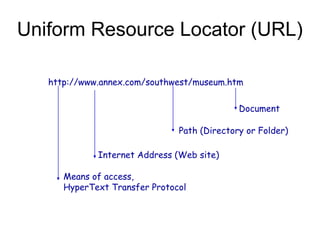
Uniform Resource Locator (URL)

   http://www.annex.com/southwest/museum.htm

                                             Document

                               Path (Directory or Folder)

             Internet Address (Web site)

      Means of access,
      HyperText Transfer Protocol
Acronyms Abound
• HTTP – HyperText Transfer Protocol is
  used to transmit Web documents
• HTTPS – Secure protocol for confidential
  transactions
• HTML – Hypertext Markup Language is the
  language for all Web Documents
• ISP – Internet Service Provider
Suggestions for Searching
• Use the Search button on the Internet
  Explorer Toolbar
• Try multiple search engines on one query
• Be aware of logical operators - AND, OR,
  and NOT
• Search on a concept; e.g., “first ladies”
  rather than “Eleanor Roosevelt”
• Set Bookmarks/Favorites
E-commerce

• The exchange of goods and services
  – Buyer and seller
  – Products and suppliers
  – A place to “meet”
  – Marketing to attract the buyer
  – Accept and process the order
• All of these elements are present in e-
  commerce and traditional commerce
Advantages of E-commerce
• For the Seller:             • For the Buyer:
  – Open 24/7                   – Open 24/7
  – Shoppers from anywhere      – Never leave home
  – Virtual inventory is        – Easy to view and
    cheaper and extensive         explore product line
  – Lower transaction costs     – Comparison shop
  – Target your customers       – Web site knows you
Security and Privacy
• Secure transactions
  – Https protocol
  – Encryption
• Privacy
  – A cookie is a small file written to your disk each
    time you visit a site
  – Problems occur when one site can read many
    cookies; e.g. Double Click.com

Chapter 1 practice 3 introduction to the internet

  • 1.
  • 2.
    The Internet • Anetwork of networks • Began in 1969 as ARPANET (Advanced Research Projects Agency Network) • No central authority and thus impossible to state the precise size • The Internet is not free just because you do not pay for it
  • 3.
    The World WideWeb • A subset of the Internet consisting of all computers with hypertext or hypermedia documents • These documents contain references (links) to other documents which may be on a different computer anywhere in the world • Began in 1991 at the European Particle Physics Laboratory (CERN) in Switzerland
  • 4.
    A Client/Server Model •A server (Web server or Web site) is any computer that stores hypermedia documents and furnishes them upon request • A client is any computer that requests, then displays, hypermedia documents • Every client must be able to display every document from every server and does so through a browser (e.g., Netscape or Internet Explorer)
  • 5.
    Connecting to theInternet • At Work or School – Via a Local Area Network (LAN) • At Home – Traditional Modem (56KB) – Cable Modem – DSL Modem
  • 6.
    Uniform Resource Locator(URL) http://www.annex.com/southwest/museum.htm Document Path (Directory or Folder) Internet Address (Web site) Means of access, HyperText Transfer Protocol
  • 7.
    Acronyms Abound • HTTP– HyperText Transfer Protocol is used to transmit Web documents • HTTPS – Secure protocol for confidential transactions • HTML – Hypertext Markup Language is the language for all Web Documents • ISP – Internet Service Provider
  • 8.
    Suggestions for Searching •Use the Search button on the Internet Explorer Toolbar • Try multiple search engines on one query • Be aware of logical operators - AND, OR, and NOT • Search on a concept; e.g., “first ladies” rather than “Eleanor Roosevelt” • Set Bookmarks/Favorites
  • 9.
    E-commerce • The exchangeof goods and services – Buyer and seller – Products and suppliers – A place to “meet” – Marketing to attract the buyer – Accept and process the order • All of these elements are present in e- commerce and traditional commerce
  • 10.
    Advantages of E-commerce •For the Seller: • For the Buyer: – Open 24/7 – Open 24/7 – Shoppers from anywhere – Never leave home – Virtual inventory is – Easy to view and cheaper and extensive explore product line – Lower transaction costs – Comparison shop – Target your customers – Web site knows you
  • 11.
    Security and Privacy •Secure transactions – Https protocol – Encryption • Privacy – A cookie is a small file written to your disk each time you visit a site – Problems occur when one site can read many cookies; e.g. Double Click.com