1
IT105
Operating Systems
Introduction
Harris Chikunya
2
Introduction
 Computer software can be divided into two main categories:
 Application software
• consists of the programs for performing tasks particular to the machine’s
utilisation.
• This software is designed to solve a particular problem for users.
• E.g. of application software include spreadsheets, database systems,
desktop publishing systems, program development software and games.
 System software
• acts as an interface between the hardware of the computer and the
application software that users need to run on the computer
• The most important type of system software is the operating system.
3
Learning Outcomes
By the end of this unit, you should be able to:
• explain the purpose of an Operating System;
• discuss the evolution of an Operating System;
• discuss eight types of Operating System;
• describe four desirable qualities of Operating System; and
• describe eight functions performed by the Operating System.
4
Definition
• A computer’s operating system is a group of programs designed to
serve two basic purpose:
(a) To control the allocation and use of the computing system’s resources
among the various users and tasks; and
(b) To provide an interface between the computer hardware and the
programmer that simplifies and makes feasible the creation, coding,
debugging, and maintenance of application program.
5
Functions of an OS
An effective operating system should accomplish the following
functions:
(a) Should act as a command interpreter by providing a user friendly
environment;
(b) Should facilitate communication with other users;
(c) Provide access to compilers to translate programs from high-level
language to machine language;
(d) Assure that when there are several active processes in the computer,
each will get fair and non-interfering access to the central processing unit
for execution;
(e) Take care of storage and device allocation;
6
Goals of an OS
• The primary goal of an operating system is to make the computer
convenient to use.
• The secondary goal is to use the hardware in an efficient manner.
7
Generations of Operating Systems
• Operating systems have been evolving over the years.
• Research/Assignment
• Discuss the evolution of operating systems
8
Types of Operating Systems
• Modern computer operating systems may be classified into 8 groups
1. Batch Processing operating system
• users submit jobs to a central place where these jobs are collected into a
batch, and subsequently placed on an input queue at the computer where
they will be run.
2. Time sharing
• a computer provides computing services to several or many users
concurrently in-line.
3. Real Time Operating System
• are designed to service those applications where response time is of
essence in order to prevent error, misrepresentation or even disaster.
• E.g of RTOS are those which handle airlines reservations, machine tool
control, and monitoring of a nuclear power station
9
4. Distributed Operating System
 consists of a number of computers that are connected and managed so
that they automatically share the job processing load among the
constituent computers
5. Network Operating System
• Runs on a server and provides the server the capability to manage
data, users, applications other networking functions.
6. Multiprocessing System
7. Multiprogramming Operating System
8. Embedded Operating Systems
10
Functions of Operating System
• The main functions of an operating system are as follows:
(a) Process management;
(b) Memory management;
(c) Secondary storage management;
(d) I/o management;
(e) File management;
(f) Protection;
(g) Networking management; and
(h) Command interpretation.
11
Process Management
• The operating system is responsible for the following activities in
connection with processes management:
(a) The creation and deletion of both user and system processes;
(b) The suspension and resumption of processes;
(c) The provision of mechanisms for process synchronisation; and
(d) The provision of mechanisms for deadlock handling.
12
Memory Management
• The operating system is responsible for the following activities in
connection with memory management.
(a) Keep track of which parts of memory are currently being used and by
whom;
(b) Decide which processes are to be loaded into memory when memory
space becomes available; and
(c) Allocate and deallocate memory space as needed.
13
Secondary Storage Management
• The operating system is responsible for the following activities in
connection with disk management:
(a) Free space management;
(b) Storage allocation; and (c) Disk scheduling.
14
I/O Management
• The operating system is responsible for the following activities in
connection to I/O management:
• A buffer caching system;
• To activate a general device driver code; and
• To run the driver software for specific hardware devices as and
when required.
15
File Management
• The operating system is responsible for the following activities in
connection to the file management.
(a) The creation and deletion of files;
(b) The creation and deletion of directory;
(c) The support of primitives for manipulating files and directories;
(d) The mapping of files onto disk storage;
(e) Backup of files on stable (non volatile) storage; and
(f) Protection and security of the files.
16
Protection
• refers to a mechanism for controlling the access of programs,
processes, or users to the resources defined by the computer
together with some means of enforcement.
• Protection can improve reliability by detecting latent errors at the
interfaces between component subsystems.
• An unprotected resource cannot defend against use (or misuse) by
an unauthorised or incompetent user.
17
Command Interpretation
• One of the most important components of an operating system is its
command interpreter.
• It is the primary interface between the user and the rest of the
system.
• This program is variously called:
 The command line interpreter (CLI)
 The shell (in Unix)
18
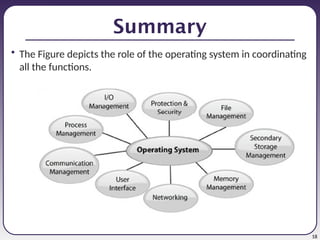
Summary
• The Figure depicts the role of the operating system in coordinating
all the functions.
19
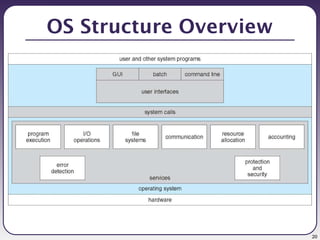
OS Structure
• We can view an OS from several vantage
points i.e.
Services that the system provides
The interface that it makes available to
users and programmers
Its components and their interconnections.
20
OS Structure Overview
21
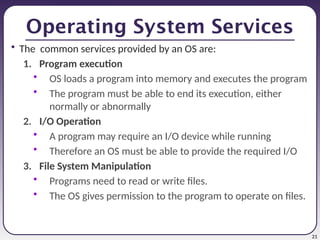
Operating System Services
• The common services provided by an OS are:
1. Program execution
• OS loads a program into memory and executes the program
• The program must be able to end its execution, either
normally or abnormally
2. I/O Operation
• A program may require an I/O device while running
• Therefore an OS must be able to provide the required I/O
3. File System Manipulation
• Programs need to read or write files.
• The OS gives permission to the program to operate on files.
22
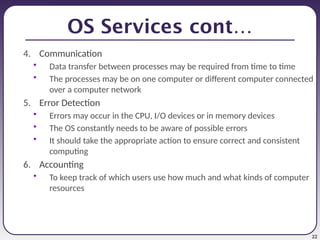
OS Services cont…
4. Communication
• Data transfer between processes may be required from time to time
• The processes may be on one computer or different computer connected
over a computer network
5. Error Detection
• Errors may occur in the CPU, I/O devices or in memory devices
• The OS constantly needs to be aware of possible errors
• It should take the appropriate action to ensure correct and consistent
computing
6. Accounting
• To keep track of which users use how much and what kinds of computer
resources
23
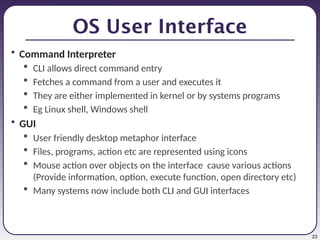
OS User Interface
• Command Interpreter
 CLI allows direct command entry
 Fetches a command from a user and executes it
 They are either implemented in kernel or by systems programs
 Eg Linux shell, Windows shell
• GUI
 User friendly desktop metaphor interface
 Files, programs, action etc are represented using icons
 Mouse action over objects on the interface cause various actions
(Provide information, option, execute function, open directory etc)
 Many systems now include both CLI and GUI interfaces
24
System Calls
• System calls provide the interface between a process and the
operating system.
• These calls are generally available as assembly-language
instructions.
• Typically written in a high-level language (C or C++)
• allow user-level processes to request some services from the
operating system.
• E.g. for I/O a process involves a system call telling the operating
system to read or write particular area and this request is satisfied
by the operating system.
25
System Calls cont..
• The following different types of system calls provided by an OS:
• Process control
 End, abort
 Load, execute
 Create, terminate
 Get attributes, set attributes
 Allocate, free memory
• File management
 Create, delete
 Open, close
 Read, write
 Get file attributes, set file attributes
• Device management
 Request, release device
 Read, write
 Get attributes, set attributes
 Logically attach or detach
devices
• Communication
 Create, delete communication
connection
 Send, receive message
 Transfer status information
 Attach or detach remote devices
26
System Programs
• System programs provide a convenient environment for program development
and execution.
• Some of them are simply user interfaces to system calls; others are considerably
more complex. They can be divided into:
 File manipulation - Create, delete, copy, rename, print, dump, list, and generally
manipulate files and directories
 Status information - Some ask the system for info - date, time, amount of available
memory, disk space, number of users. Others provide detailed performance, logging,
and debugging information
 File modification - Text editors to create and modify files. Use of special commands to
search contents of files or perform transformations of the text
 Programming language support - Compilers, assemblers, debuggers and interpreters
sometimes provided
 Program loading and execution - Absolute loaders, relocatable loaders, linkage
editors, and overlay-loaders, debugging systems for higher-level and machine language
 Communications - Allow users to send messages to one another’s screens, browse
web pages, log in remotely, transfer files from one machine to another
27
Operating System design
• Various ways are used to design OS’s
• Many OS’s do not have well-defined structure i.e. not one pure model
is used:
• Most OS’s are Hybrid systems i.e. multiple approaches are combined
to address performance, security and usability needs
• Internal structure of different OS’s can vary widely.
• Factors to consider when designing an OS:
 Goals and Specifactions
• User goals - should be convenient to use, easy to learn, reliable, safe, and
fast
• System goals - should be easy to design, implement, and maintain, as well as
flexible, reliable, error-free, and efficient
 Choice of hardware, type of system
28
Mechanism and Policy
• Policy: What will be done?
• Mechanism: How to do it?
• The separation of policy from mechanism is a
very important principle.
• It allows maximum flexibility if policy
decisions are to be changed later.
29
Operating Systems Structures
• There are various ways used to structure OS’s
1. Simple Structure – MS-DOS
2. Complex Structure – UNIX
3. Layered Structure
4. MicroKernel Structure
30
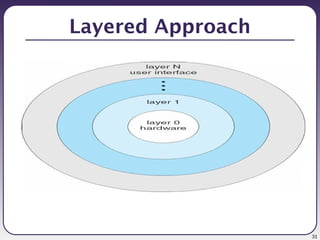
Layered Approach
• One way to make the OS modular
• The OS is divided into a number of layers (levels)
• Each layer is built on top of lower layers
• The bottom layer (layer 0), is the hardware
• The Highest (layer N) is the user interface
• Layers are selected such that each uses functions
(operations) and services of only lower-level layers.
31
Layered Approach
32
Layered Approach
• Advantages
 Simplicity of construction and debugging
• Disadvantages
 Can be hard to decide how to split functionality into
layers
 Less efficient due to high overhead
33
End

Lecture 1 Introduction to operating systems.pptx

  • 1.
  • 2.
    2 Introduction  Computer softwarecan be divided into two main categories:  Application software • consists of the programs for performing tasks particular to the machine’s utilisation. • This software is designed to solve a particular problem for users. • E.g. of application software include spreadsheets, database systems, desktop publishing systems, program development software and games.  System software • acts as an interface between the hardware of the computer and the application software that users need to run on the computer • The most important type of system software is the operating system.
  • 3.
    3 Learning Outcomes By theend of this unit, you should be able to: • explain the purpose of an Operating System; • discuss the evolution of an Operating System; • discuss eight types of Operating System; • describe four desirable qualities of Operating System; and • describe eight functions performed by the Operating System.
  • 4.
    4 Definition • A computer’soperating system is a group of programs designed to serve two basic purpose: (a) To control the allocation and use of the computing system’s resources among the various users and tasks; and (b) To provide an interface between the computer hardware and the programmer that simplifies and makes feasible the creation, coding, debugging, and maintenance of application program.
  • 5.
    5 Functions of anOS An effective operating system should accomplish the following functions: (a) Should act as a command interpreter by providing a user friendly environment; (b) Should facilitate communication with other users; (c) Provide access to compilers to translate programs from high-level language to machine language; (d) Assure that when there are several active processes in the computer, each will get fair and non-interfering access to the central processing unit for execution; (e) Take care of storage and device allocation;
  • 6.
    6 Goals of anOS • The primary goal of an operating system is to make the computer convenient to use. • The secondary goal is to use the hardware in an efficient manner.
  • 7.
    7 Generations of OperatingSystems • Operating systems have been evolving over the years. • Research/Assignment • Discuss the evolution of operating systems
  • 8.
    8 Types of OperatingSystems • Modern computer operating systems may be classified into 8 groups 1. Batch Processing operating system • users submit jobs to a central place where these jobs are collected into a batch, and subsequently placed on an input queue at the computer where they will be run. 2. Time sharing • a computer provides computing services to several or many users concurrently in-line. 3. Real Time Operating System • are designed to service those applications where response time is of essence in order to prevent error, misrepresentation or even disaster. • E.g of RTOS are those which handle airlines reservations, machine tool control, and monitoring of a nuclear power station
  • 9.
    9 4. Distributed OperatingSystem  consists of a number of computers that are connected and managed so that they automatically share the job processing load among the constituent computers 5. Network Operating System • Runs on a server and provides the server the capability to manage data, users, applications other networking functions. 6. Multiprocessing System 7. Multiprogramming Operating System 8. Embedded Operating Systems
  • 10.
    10 Functions of OperatingSystem • The main functions of an operating system are as follows: (a) Process management; (b) Memory management; (c) Secondary storage management; (d) I/o management; (e) File management; (f) Protection; (g) Networking management; and (h) Command interpretation.
  • 11.
    11 Process Management • Theoperating system is responsible for the following activities in connection with processes management: (a) The creation and deletion of both user and system processes; (b) The suspension and resumption of processes; (c) The provision of mechanisms for process synchronisation; and (d) The provision of mechanisms for deadlock handling.
  • 12.
    12 Memory Management • Theoperating system is responsible for the following activities in connection with memory management. (a) Keep track of which parts of memory are currently being used and by whom; (b) Decide which processes are to be loaded into memory when memory space becomes available; and (c) Allocate and deallocate memory space as needed.
  • 13.
    13 Secondary Storage Management •The operating system is responsible for the following activities in connection with disk management: (a) Free space management; (b) Storage allocation; and (c) Disk scheduling.
  • 14.
    14 I/O Management • Theoperating system is responsible for the following activities in connection to I/O management: • A buffer caching system; • To activate a general device driver code; and • To run the driver software for specific hardware devices as and when required.
  • 15.
    15 File Management • Theoperating system is responsible for the following activities in connection to the file management. (a) The creation and deletion of files; (b) The creation and deletion of directory; (c) The support of primitives for manipulating files and directories; (d) The mapping of files onto disk storage; (e) Backup of files on stable (non volatile) storage; and (f) Protection and security of the files.
  • 16.
    16 Protection • refers toa mechanism for controlling the access of programs, processes, or users to the resources defined by the computer together with some means of enforcement. • Protection can improve reliability by detecting latent errors at the interfaces between component subsystems. • An unprotected resource cannot defend against use (or misuse) by an unauthorised or incompetent user.
  • 17.
    17 Command Interpretation • Oneof the most important components of an operating system is its command interpreter. • It is the primary interface between the user and the rest of the system. • This program is variously called:  The command line interpreter (CLI)  The shell (in Unix)
  • 18.
    18 Summary • The Figuredepicts the role of the operating system in coordinating all the functions.
  • 19.
    19 OS Structure • Wecan view an OS from several vantage points i.e. Services that the system provides The interface that it makes available to users and programmers Its components and their interconnections.
  • 20.
  • 21.
    21 Operating System Services •The common services provided by an OS are: 1. Program execution • OS loads a program into memory and executes the program • The program must be able to end its execution, either normally or abnormally 2. I/O Operation • A program may require an I/O device while running • Therefore an OS must be able to provide the required I/O 3. File System Manipulation • Programs need to read or write files. • The OS gives permission to the program to operate on files.
  • 22.
    22 OS Services cont… 4.Communication • Data transfer between processes may be required from time to time • The processes may be on one computer or different computer connected over a computer network 5. Error Detection • Errors may occur in the CPU, I/O devices or in memory devices • The OS constantly needs to be aware of possible errors • It should take the appropriate action to ensure correct and consistent computing 6. Accounting • To keep track of which users use how much and what kinds of computer resources
  • 23.
    23 OS User Interface •Command Interpreter  CLI allows direct command entry  Fetches a command from a user and executes it  They are either implemented in kernel or by systems programs  Eg Linux shell, Windows shell • GUI  User friendly desktop metaphor interface  Files, programs, action etc are represented using icons  Mouse action over objects on the interface cause various actions (Provide information, option, execute function, open directory etc)  Many systems now include both CLI and GUI interfaces
  • 24.
    24 System Calls • Systemcalls provide the interface between a process and the operating system. • These calls are generally available as assembly-language instructions. • Typically written in a high-level language (C or C++) • allow user-level processes to request some services from the operating system. • E.g. for I/O a process involves a system call telling the operating system to read or write particular area and this request is satisfied by the operating system.
  • 25.
    25 System Calls cont.. •The following different types of system calls provided by an OS: • Process control  End, abort  Load, execute  Create, terminate  Get attributes, set attributes  Allocate, free memory • File management  Create, delete  Open, close  Read, write  Get file attributes, set file attributes • Device management  Request, release device  Read, write  Get attributes, set attributes  Logically attach or detach devices • Communication  Create, delete communication connection  Send, receive message  Transfer status information  Attach or detach remote devices
  • 26.
    26 System Programs • Systemprograms provide a convenient environment for program development and execution. • Some of them are simply user interfaces to system calls; others are considerably more complex. They can be divided into:  File manipulation - Create, delete, copy, rename, print, dump, list, and generally manipulate files and directories  Status information - Some ask the system for info - date, time, amount of available memory, disk space, number of users. Others provide detailed performance, logging, and debugging information  File modification - Text editors to create and modify files. Use of special commands to search contents of files or perform transformations of the text  Programming language support - Compilers, assemblers, debuggers and interpreters sometimes provided  Program loading and execution - Absolute loaders, relocatable loaders, linkage editors, and overlay-loaders, debugging systems for higher-level and machine language  Communications - Allow users to send messages to one another’s screens, browse web pages, log in remotely, transfer files from one machine to another
  • 27.
    27 Operating System design •Various ways are used to design OS’s • Many OS’s do not have well-defined structure i.e. not one pure model is used: • Most OS’s are Hybrid systems i.e. multiple approaches are combined to address performance, security and usability needs • Internal structure of different OS’s can vary widely. • Factors to consider when designing an OS:  Goals and Specifactions • User goals - should be convenient to use, easy to learn, reliable, safe, and fast • System goals - should be easy to design, implement, and maintain, as well as flexible, reliable, error-free, and efficient  Choice of hardware, type of system
  • 28.
    28 Mechanism and Policy •Policy: What will be done? • Mechanism: How to do it? • The separation of policy from mechanism is a very important principle. • It allows maximum flexibility if policy decisions are to be changed later.
  • 29.
    29 Operating Systems Structures •There are various ways used to structure OS’s 1. Simple Structure – MS-DOS 2. Complex Structure – UNIX 3. Layered Structure 4. MicroKernel Structure
  • 30.
    30 Layered Approach • Oneway to make the OS modular • The OS is divided into a number of layers (levels) • Each layer is built on top of lower layers • The bottom layer (layer 0), is the hardware • The Highest (layer N) is the user interface • Layers are selected such that each uses functions (operations) and services of only lower-level layers.
  • 31.
  • 32.
    32 Layered Approach • Advantages Simplicity of construction and debugging • Disadvantages  Can be hard to decide how to split functionality into layers  Less efficient due to high overhead
  • 33.

Editor's Notes

  • #4 While there is no universally agreed upon definition of the concept of an operating system, the following is a reasonable starting point.
  • #8 which are distinguished by the nature of interaction that takes place between the computer user and his or her program during its processing.
  • #21 An OS provides services to programs and to the users of those programs. It provides an environment for the execution of programs.
  • #26 Communication - Provide the mechanism for creating virtual connections among processes, users, and computer systems.
  • #28 Mechanisms determine how to do something Policies decide what will be done
  • #31 Has been established over the years UNIX and Windows 2000 have a layered structure Designers choosing this should carefully choose the layers and define the functionality of each one