PHP AdvancedPHP Advanced
Chapter 08
MOHAMAD RAHIMI MOHAMAD
ROSMAN
IntroductionIntroduction
This chapter will cover:
◦ PHP Date() Function
◦ Include() Function
◦ Require() Function
◦ Upload function
◦ Cookie
◦ Session()
◦ PHP mail() function
MOHAMAD RAHIMI MOHAMAD
ROSMAN
PHP Date() FunctionPHP Date() Function
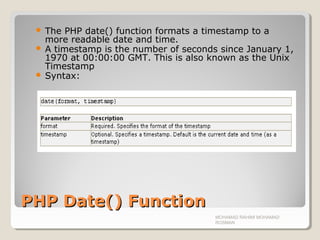
 The PHP date() function formats a timestamp to a
more readable date and time.
 A timestamp is the number of seconds since January 1,
1970 at 00:00:00 GMT. This is also known as the Unix
Timestamp
 Syntax:
MOHAMAD RAHIMI MOHAMAD
ROSMAN
PHP Date - Format the DatePHP Date - Format the Date
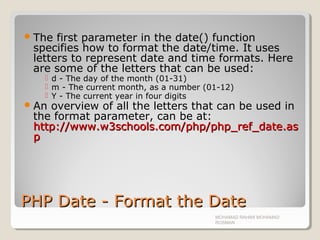
The first parameter in the date() function
specifies how to format the date/time. It uses
letters to represent date and time formats. Here
are some of the letters that can be used:
 d - The day of the month (01-31)
 m - The current month, as a number (01-12)
 Y - The current year in four digits
An overview of all the letters that can be used in
the format parameter, can be at:
http://www.w3schools.com/php/php_ref_date.ashttp://www.w3schools.com/php/php_ref_date.as
pp
MOHAMAD RAHIMI MOHAMAD
ROSMAN
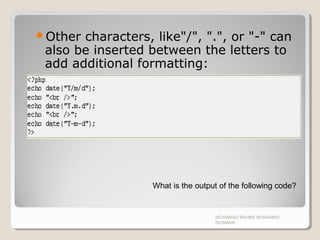
Other characters, like"/", ".", or "-" can
also be inserted between the letters to
add additional formatting:
MOHAMAD RAHIMI MOHAMAD
ROSMAN
What is the output of the following code?
Server Side IncludesServer Side Includes
 You can insert the content of a file into a PHP file before the server
executes it, with the include() or require() function.
 The two functions are identical in every way, except how they handle
errors.
 The include() function generates a warning (but the script will continue
execution) while the require() function generates a fatal error (and the
script execution will stop after the error).
 These two functions are used to create functions, headers, footers, or
elements that can be reused on multiple pages.
 This can save the developer a considerable amount of time. This means
that you can create a standard header or menu file that you want all your
web pages to include. When the header needs to be updated, you can
only update this one include file, or when you add a new page to your
site, you can simply change the menu file (instead of updating the links on
all web pages).
MOHAMAD RAHIMI MOHAMAD
ROSMAN
include() functioninclude() function
The include() function takes all the text in
a specified file and copies it into the file
that uses the include function.
MOHAMAD RAHIMI MOHAMAD
ROSMAN
ExampleExample
Create 2 new text document
Rename the file to include.php and
index.php
Open include.php and write the following
code.
MOHAMAD RAHIMI MOHAMAD
ROSMAN
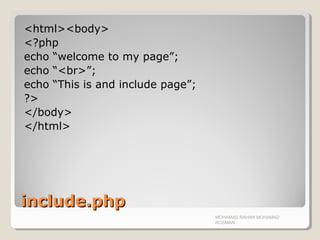
include.phpinclude.php
<html><body>
<?php
echo “welcome to my page”;
echo “<br>”;
echo “This is and include page”;
?>
</body>
</html>
MOHAMAD RAHIMI MOHAMAD
ROSMAN
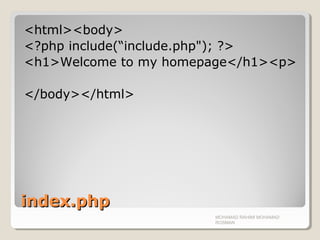
index.phpindex.php
<html><body>
<?php include(“include.php"); ?>
<h1>Welcome to my homepage</h1><p>
</body></html>
MOHAMAD RAHIMI MOHAMAD
ROSMAN
The require() FunctionThe require() Function
The require() function is identical to
include(), they only handle errors
differently.
The include() function generates a
warning (but the script will continue
execution) while the require() function
generates a fatal error (and the script
execution will stop after the error).
MOHAMAD RAHIMI MOHAMAD
ROSMAN
MOHAMAD RAHIMI MOHAMAD
ROSMAN
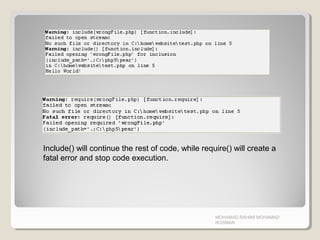
Include() will continue the rest of code, while require() will create a
fatal error and stop code execution.
Uploading FileUploading File
With PHP, its possible to upload file
into your website/server.
MOHAMAD RAHIMI MOHAMAD
ROSMAN
Create an Upload-File FormCreate an Upload-File Form
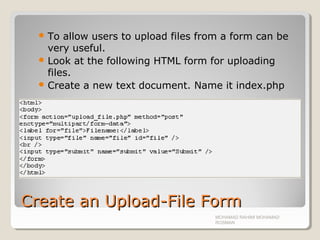
 To allow users to upload files from a form can be
very useful.
 Look at the following HTML form for uploading
files.
 Create a new text document. Name it index.php
MOHAMAD RAHIMI MOHAMAD
ROSMAN
Important NotesImportant Notes
Notice the following about the HTML form above:
◦ The enctype attribute of the <form> tag specifies which
content-type to use when submitting the form.
"multipart/form-data" is used when a form requires
binary data, like the contents of a file, to be uploaded
◦ The type="file" attribute of the <input> tag specifies
that the input should be possessed as a file. For
example, when viewed in a browser, there will be a
browse-button next to the input field
Note: Allowing users to upload files is a big
security risk. Only permit trusted users to
perform file uploads. Many programmer make
mistakes in this kind of area.
MOHAMAD RAHIMI MOHAMAD
ROSMAN
Create The Upload ScriptCreate The Upload Script
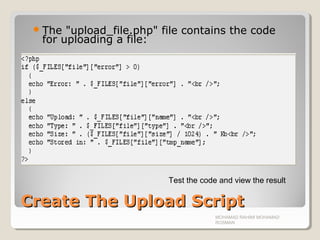
The "upload_file.php" file contains the code
for uploading a file:
MOHAMAD RAHIMI MOHAMAD
ROSMAN
Test the code and view the result
PHP $_FILESPHP $_FILES
 By using the global PHP $_FILES array you can upload files from
a client computer to the remote server.
 The first parameter is the form's input name and the second
index can be either "name", "type", "size", "tmp_name" or
"error". Like this:
◦ $_FILES["file"]["name"] - the name of the uploaded file
◦ $_FILES["file"]["type"] - the type of the uploaded file
◦ $_FILES["file"]["size"] - the size in bytes of the uploaded file
◦ $_FILES["file"]["tmp_name"] - the name of the temporary copy of the
file stored on the server
◦ $_FILES["file"]["error"] - the error code resulting from the file upload
 This is a very simple way of uploading files. For security reasons,
you should add restrictions on what the user is allowed to upload.
MOHAMAD RAHIMI MOHAMAD
ROSMAN
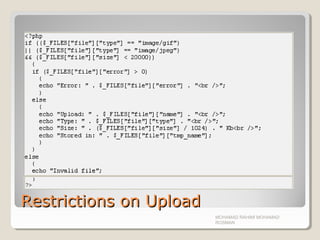
Restrictions on UploadRestrictions on Upload
In this script we add some restrictions to
the file upload. The user may only
upload .gif or .jpeg files and the file size
must be under 20 kb:
MOHAMAD RAHIMI MOHAMAD
ROSMAN
Restrictions on UploadRestrictions on Upload
MOHAMAD RAHIMI MOHAMAD
ROSMAN
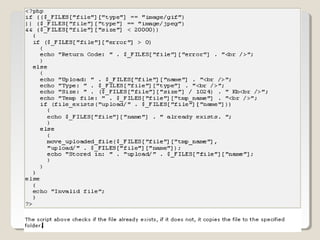
Saving the Uploaded FileSaving the Uploaded File
The examples above create a temporary
copy of the uploaded files in the PHP temp
folder on the server.
The temporary copied files disappears
when the script ends. To store the
uploaded file we need to copy it to a
different location:
MOHAMAD RAHIMI MOHAMAD
ROSMAN
MOHAMAD RAHIMI MOHAMAD
ROSMAN
What is a Cookie?What is a Cookie?
A cookie is often used to identify a user. A
cookie is a small file that the server
embeds on the user's computer.
Each time the same computer requests
for a page with a browser, it will send the
cookie too. With PHP, you can both create
and retrieve cookie values.
MOHAMAD RAHIMI MOHAMAD
ROSMAN
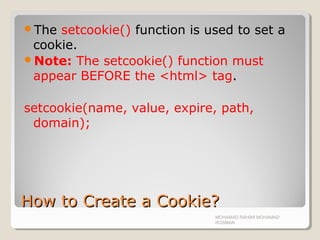
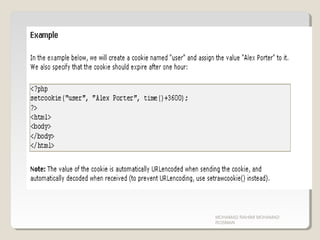
How to Create a Cookie?How to Create a Cookie?
The setcookie() function is used to set a
cookie.
Note: The setcookie() function must
appear BEFORE the <html> tag.
setcookie(name, value, expire, path,
domain);
MOHAMAD RAHIMI MOHAMAD
ROSMAN
MOHAMAD RAHIMI MOHAMAD
ROSMAN
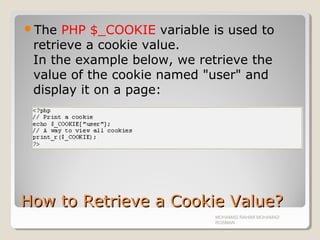
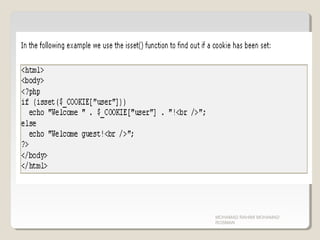
How to Retrieve a Cookie Value?How to Retrieve a Cookie Value?
The PHP $_COOKIE variable is used to
retrieve a cookie value.
In the example below, we retrieve the
value of the cookie named "user" and
display it on a page:
MOHAMAD RAHIMI MOHAMAD
ROSMAN
MOHAMAD RAHIMI MOHAMAD
ROSMAN
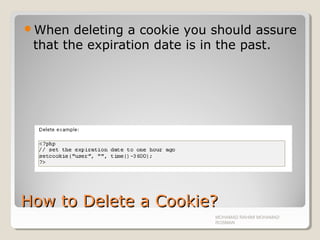
How to Delete a Cookie?How to Delete a Cookie?
When deleting a cookie you should assure
that the expiration date is in the past.
MOHAMAD RAHIMI MOHAMAD
ROSMAN
What if a Browser Does NOT SupportWhat if a Browser Does NOT Support
Cookies?Cookies?
If your application deals with browsers
that do not support cookies, you will have
to use other methods to pass information
from one page to another in your
application.
One method is to pass the data through
forms (forms and user input are described
earlier in this tutorial) but this isn’t
practical.
The best solution is to use the Session()
functions.
MOHAMAD RAHIMI MOHAMAD
ROSMAN
PHP Session VariablesPHP Session Variables
 When you are working with an application, you open it, do some
changes and then you close it. This is much like a Session. The
computer knows who you are. It knows when you start the
application and when you end. But on the internet there is one
problem: the web server does not know who you are and what
you do because the HTTP address doesn't maintain state.
 A PHP session solves this problem by allowing you to store user
information on the server for later use (i.e. username, shopping
items, etc).
 However, session information is temporary and will be deleted
after the user has left the website. If you need a permanent
storage you may want to store the data in a database.
 Sessions work by creating a unique id (UID) for each visitor and
store variables based on this UID. The UID is either stored in a
cookie or is propagated in the URL.
MOHAMAD RAHIMI MOHAMAD
ROSMAN
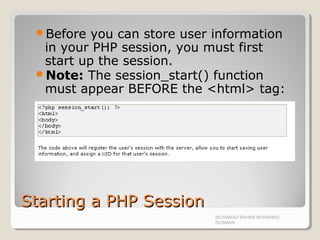
Starting a PHP SessionStarting a PHP Session
Before you can store user information
in your PHP session, you must first
start up the session.
Note: The session_start() function
must appear BEFORE the <html> tag:
MOHAMAD RAHIMI MOHAMAD
ROSMAN
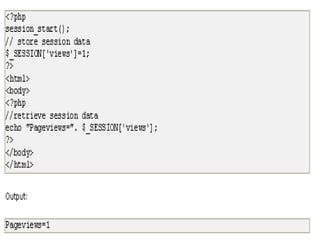
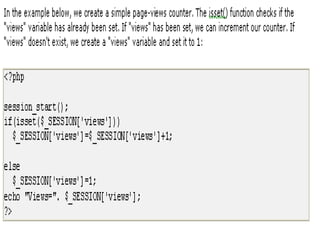
Storing a Session VariableStoring a Session Variable
The correct way to store and retrieve
session variables is to use the PHP
$_SESSION variable:
MOHAMAD RAHIMI MOHAMAD
ROSMAN
MOHAMAD RAHIMI MOHAMAD
ROSMAN
MOHAMAD RAHIMI MOHAMAD
ROSMAN
Destroying a SessionDestroying a Session
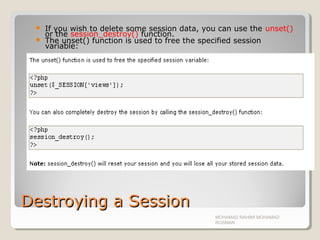
 If you wish to delete some session data, you can use the unset()
or the session_destroy() function.
 The unset() function is used to free the specified session
variable:
MOHAMAD RAHIMI MOHAMAD
ROSMAN
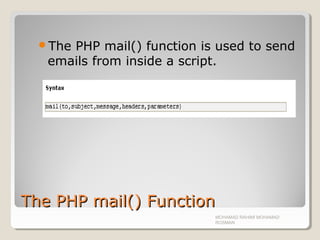
The PHP mail() FunctionThe PHP mail() Function
The PHP mail() function is used to send
emails from inside a script.
MOHAMAD RAHIMI MOHAMAD
ROSMAN
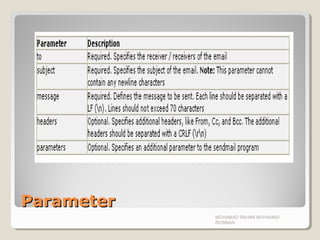
ParameterParameter
MOHAMAD RAHIMI MOHAMAD
ROSMAN
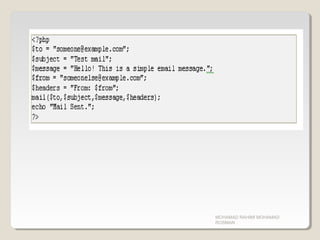
PHP Simple E-MailPHP Simple E-Mail
The simplest way to send an email with
PHP is to send a text email.
In the example below we first declare the
variables ($to, $subject, $message,
$from, $headers), then we use the
variables in the mail() function to send an
e-mail:
MOHAMAD RAHIMI MOHAMAD
ROSMAN
MOHAMAD RAHIMI MOHAMAD
ROSMAN
ExerciseExercise
Create a simple upload form to upload
image into the root folder.
MOHAMAD RAHIMI MOHAMAD
ROSMAN

Chapter 08 php advance

  • 1.
    PHP AdvancedPHP Advanced Chapter08 MOHAMAD RAHIMI MOHAMAD ROSMAN
  • 2.
    IntroductionIntroduction This chapter willcover: ◦ PHP Date() Function ◦ Include() Function ◦ Require() Function ◦ Upload function ◦ Cookie ◦ Session() ◦ PHP mail() function MOHAMAD RAHIMI MOHAMAD ROSMAN
  • 3.
    PHP Date() FunctionPHPDate() Function  The PHP date() function formats a timestamp to a more readable date and time.  A timestamp is the number of seconds since January 1, 1970 at 00:00:00 GMT. This is also known as the Unix Timestamp  Syntax: MOHAMAD RAHIMI MOHAMAD ROSMAN
  • 4.
    PHP Date -Format the DatePHP Date - Format the Date The first parameter in the date() function specifies how to format the date/time. It uses letters to represent date and time formats. Here are some of the letters that can be used:  d - The day of the month (01-31)  m - The current month, as a number (01-12)  Y - The current year in four digits An overview of all the letters that can be used in the format parameter, can be at: http://www.w3schools.com/php/php_ref_date.ashttp://www.w3schools.com/php/php_ref_date.as pp MOHAMAD RAHIMI MOHAMAD ROSMAN
  • 5.
    Other characters, like"/",".", or "-" can also be inserted between the letters to add additional formatting: MOHAMAD RAHIMI MOHAMAD ROSMAN What is the output of the following code?
  • 6.
    Server Side IncludesServerSide Includes  You can insert the content of a file into a PHP file before the server executes it, with the include() or require() function.  The two functions are identical in every way, except how they handle errors.  The include() function generates a warning (but the script will continue execution) while the require() function generates a fatal error (and the script execution will stop after the error).  These two functions are used to create functions, headers, footers, or elements that can be reused on multiple pages.  This can save the developer a considerable amount of time. This means that you can create a standard header or menu file that you want all your web pages to include. When the header needs to be updated, you can only update this one include file, or when you add a new page to your site, you can simply change the menu file (instead of updating the links on all web pages). MOHAMAD RAHIMI MOHAMAD ROSMAN
  • 7.
    include() functioninclude() function Theinclude() function takes all the text in a specified file and copies it into the file that uses the include function. MOHAMAD RAHIMI MOHAMAD ROSMAN
  • 8.
    ExampleExample Create 2 newtext document Rename the file to include.php and index.php Open include.php and write the following code. MOHAMAD RAHIMI MOHAMAD ROSMAN
  • 9.
    include.phpinclude.php <html><body> <?php echo “welcome tomy page”; echo “<br>”; echo “This is and include page”; ?> </body> </html> MOHAMAD RAHIMI MOHAMAD ROSMAN
  • 10.
    index.phpindex.php <html><body> <?php include(“include.php"); ?> <h1>Welcometo my homepage</h1><p> </body></html> MOHAMAD RAHIMI MOHAMAD ROSMAN
  • 11.
    The require() FunctionTherequire() Function The require() function is identical to include(), they only handle errors differently. The include() function generates a warning (but the script will continue execution) while the require() function generates a fatal error (and the script execution will stop after the error). MOHAMAD RAHIMI MOHAMAD ROSMAN
  • 12.
    MOHAMAD RAHIMI MOHAMAD ROSMAN Include()will continue the rest of code, while require() will create a fatal error and stop code execution.
  • 13.
    Uploading FileUploading File WithPHP, its possible to upload file into your website/server. MOHAMAD RAHIMI MOHAMAD ROSMAN
  • 14.
    Create an Upload-FileFormCreate an Upload-File Form  To allow users to upload files from a form can be very useful.  Look at the following HTML form for uploading files.  Create a new text document. Name it index.php MOHAMAD RAHIMI MOHAMAD ROSMAN
  • 15.
    Important NotesImportant Notes Noticethe following about the HTML form above: ◦ The enctype attribute of the <form> tag specifies which content-type to use when submitting the form. "multipart/form-data" is used when a form requires binary data, like the contents of a file, to be uploaded ◦ The type="file" attribute of the <input> tag specifies that the input should be possessed as a file. For example, when viewed in a browser, there will be a browse-button next to the input field Note: Allowing users to upload files is a big security risk. Only permit trusted users to perform file uploads. Many programmer make mistakes in this kind of area. MOHAMAD RAHIMI MOHAMAD ROSMAN
  • 16.
    Create The UploadScriptCreate The Upload Script The "upload_file.php" file contains the code for uploading a file: MOHAMAD RAHIMI MOHAMAD ROSMAN Test the code and view the result
  • 17.
    PHP $_FILESPHP $_FILES By using the global PHP $_FILES array you can upload files from a client computer to the remote server.  The first parameter is the form's input name and the second index can be either "name", "type", "size", "tmp_name" or "error". Like this: ◦ $_FILES["file"]["name"] - the name of the uploaded file ◦ $_FILES["file"]["type"] - the type of the uploaded file ◦ $_FILES["file"]["size"] - the size in bytes of the uploaded file ◦ $_FILES["file"]["tmp_name"] - the name of the temporary copy of the file stored on the server ◦ $_FILES["file"]["error"] - the error code resulting from the file upload  This is a very simple way of uploading files. For security reasons, you should add restrictions on what the user is allowed to upload. MOHAMAD RAHIMI MOHAMAD ROSMAN
  • 18.
    Restrictions on UploadRestrictionson Upload In this script we add some restrictions to the file upload. The user may only upload .gif or .jpeg files and the file size must be under 20 kb: MOHAMAD RAHIMI MOHAMAD ROSMAN
  • 19.
    Restrictions on UploadRestrictionson Upload MOHAMAD RAHIMI MOHAMAD ROSMAN
  • 20.
    Saving the UploadedFileSaving the Uploaded File The examples above create a temporary copy of the uploaded files in the PHP temp folder on the server. The temporary copied files disappears when the script ends. To store the uploaded file we need to copy it to a different location: MOHAMAD RAHIMI MOHAMAD ROSMAN
  • 21.
  • 22.
    What is aCookie?What is a Cookie? A cookie is often used to identify a user. A cookie is a small file that the server embeds on the user's computer. Each time the same computer requests for a page with a browser, it will send the cookie too. With PHP, you can both create and retrieve cookie values. MOHAMAD RAHIMI MOHAMAD ROSMAN
  • 23.
    How to Createa Cookie?How to Create a Cookie? The setcookie() function is used to set a cookie. Note: The setcookie() function must appear BEFORE the <html> tag. setcookie(name, value, expire, path, domain); MOHAMAD RAHIMI MOHAMAD ROSMAN
  • 24.
  • 25.
    How to Retrievea Cookie Value?How to Retrieve a Cookie Value? The PHP $_COOKIE variable is used to retrieve a cookie value. In the example below, we retrieve the value of the cookie named "user" and display it on a page: MOHAMAD RAHIMI MOHAMAD ROSMAN
  • 26.
  • 27.
    How to Deletea Cookie?How to Delete a Cookie? When deleting a cookie you should assure that the expiration date is in the past. MOHAMAD RAHIMI MOHAMAD ROSMAN
  • 28.
    What if aBrowser Does NOT SupportWhat if a Browser Does NOT Support Cookies?Cookies? If your application deals with browsers that do not support cookies, you will have to use other methods to pass information from one page to another in your application. One method is to pass the data through forms (forms and user input are described earlier in this tutorial) but this isn’t practical. The best solution is to use the Session() functions. MOHAMAD RAHIMI MOHAMAD ROSMAN
  • 29.
    PHP Session VariablesPHPSession Variables  When you are working with an application, you open it, do some changes and then you close it. This is much like a Session. The computer knows who you are. It knows when you start the application and when you end. But on the internet there is one problem: the web server does not know who you are and what you do because the HTTP address doesn't maintain state.  A PHP session solves this problem by allowing you to store user information on the server for later use (i.e. username, shopping items, etc).  However, session information is temporary and will be deleted after the user has left the website. If you need a permanent storage you may want to store the data in a database.  Sessions work by creating a unique id (UID) for each visitor and store variables based on this UID. The UID is either stored in a cookie or is propagated in the URL. MOHAMAD RAHIMI MOHAMAD ROSMAN
  • 30.
    Starting a PHPSessionStarting a PHP Session Before you can store user information in your PHP session, you must first start up the session. Note: The session_start() function must appear BEFORE the <html> tag: MOHAMAD RAHIMI MOHAMAD ROSMAN
  • 31.
    Storing a SessionVariableStoring a Session Variable The correct way to store and retrieve session variables is to use the PHP $_SESSION variable: MOHAMAD RAHIMI MOHAMAD ROSMAN
  • 32.
  • 33.
  • 34.
    Destroying a SessionDestroyinga Session  If you wish to delete some session data, you can use the unset() or the session_destroy() function.  The unset() function is used to free the specified session variable: MOHAMAD RAHIMI MOHAMAD ROSMAN
  • 35.
    The PHP mail()FunctionThe PHP mail() Function The PHP mail() function is used to send emails from inside a script. MOHAMAD RAHIMI MOHAMAD ROSMAN
  • 36.
  • 37.
    PHP Simple E-MailPHPSimple E-Mail The simplest way to send an email with PHP is to send a text email. In the example below we first declare the variables ($to, $subject, $message, $from, $headers), then we use the variables in the mail() function to send an e-mail: MOHAMAD RAHIMI MOHAMAD ROSMAN
  • 38.
  • 39.
    ExerciseExercise Create a simpleupload form to upload image into the root folder. MOHAMAD RAHIMI MOHAMAD ROSMAN