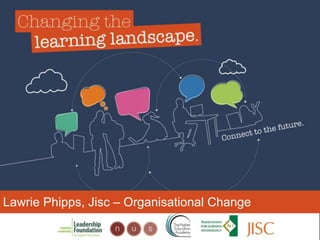
Lawrie Phipps, Jisc – Organisational Change
• With thanks to:
• Dave White
• Sarah Davies
• Helen Beetham
• Rhona Sharpe
• The whole of the CLL team, especially
SEDA
What are the students in this
picture
What are the students in this
picture
‘I just don’t – I really don’t
understand why Wikipedia is so taboo
because – I mean, I do understand that
anyone can add information on there
but then again anyone can make a
website, anyone can make a journal, it
doesn’t make it like an educational
source.’
‘…also there’s so many
people that can edit and
modify Wikipedia pages
so you can have a less
biased and more
standardized information.’
‘I always stick with the
first thing that comes up on
Google because I think that’s
the most popular site which
means that’s the most
correct.’
How much do we really know about
students?
Personal devices
ICT
skills
Networking and
collaboration
Learning
skills
What is ‘digital literacy’?
those capabilities which fit an
individual for living, learning and
working in a ‘digital’ society
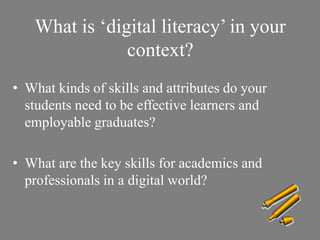
What is ‘digital literacy’ in your
context?
• What kinds of skills and attributes do your
students need to be effective learners and
employable graduates?
• What are the key skills for academics and
professionals in a digital world?
Don't Leave College Without
These 10 Digital Skills*
*http://mashable.com/2013/05/06/digital-skills-college/
1. Setting Up a Wi-Fi Network
2. Backing Up to the Cloud
3. Basic Photo Editing
4. Basic Video Editing
5. Google Drive and Microsoft Office
6. HTML and Basic Coding
7. Setting Up a Website and Domain
8. Converting File Formats
9. Online Banking
Digital literacy – a working definition
ICT literacy
Information literacy
Media
literacy
Communication and
collaboration
Digital
scholarship
Identity
management
Learning
skills
10. Branding Yourself
By ProtoplasmaKid (Own work) [CC-BY-SA-3.0
(http://creativecommons.org/licenses/by-sa/3.0)], via
Wikimedia Commons
Stages of development
access and awareness
skills
practices in
context
attributes
identity
(Beetham and Sharpe 2009 & 2010)
'I am...'
'I do...'
'I can...'
'I have...'
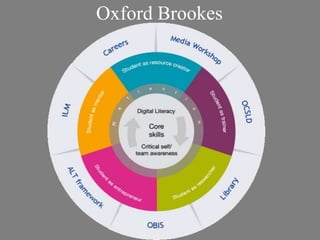
Oxford Brookes
Exeter and Greenwich
• Exeter Cascade:
• 17 student interns: post-graduate researchers
– Digital innovators and emerging subject specialists who can
influence undergraduates and staff
– Undertake programme of personal development
– Acting as co-researchers
– Leading digital literacy development in their academic setting
• Greenwich – Digital literacies in transition
– Engaging UG students as part of the project research team
– Developing students, then supporting them in carrying out
research on eg student views and skills
– Producing materials to support other students
Digital Literacy and the
Organisation
An analogous student
experience is important no
matter what campus, what
course, or whatever
individual needs.
This is not only true for
students!
Support for student digital literacy development
Self-
assessment
tools &
reflection
Learning
materials &
guidance
Workshops,
classes,
surgeries
Embedded
in subject
teaching
Barriers Enablers
Support for Staff?
Institutional responses?
Individual as Institution
Characteristics
• Highly visible, perhaps persistent
• Readily engage in dialogue
• Collaborations and part of networks
(connectivist in their approach?)
• Sometimes off topic
Institutional responses
Digital literacies in the disciplines
Strategic embedding of digital literacies
Harness
change
Evidence
Contextualised
Discussion
Parallel
activities
Strategic push
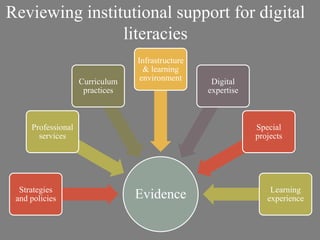
Reviewing institutional support for digital
literacies
Tools for Digital literacy
• Areas covered by the
institutional audit tool
• Understanding learners’
experiences
http://jiscdesignstudio.pbworks.com
‘I always stick with the
first thing that comes up on
Google because I think that’s
the most popular site which
means that’s the most
correct.’
Jisc design studio
Reviewing institutional support for digital
literacies
EvidenceStrategies
and policies
Professional
services
Curriculum
practices
Infrastructure
& learning
environment Digital
expertise
Special
projects
Learning
experience
Understanding learners’ experiences
Surveying learners and staff
• Need to be clear on what you really need to know, and keep
it as short as possible
• Some example areas:
– Technology use (eg devices, operating system, applications)
– What they’re used for (personal use, study, research, teaching...)
– Digital skills/confidence/practices and how these are acquired
– Processes and perceptions of the use of digital resources and
technologies within courses
• Need to know enough about your respondents to know if
they’re representative
May need ethics approval
Joe Loong
http://www.flickr.com/photos/joelogon/2762005194/
Split into groups to look at the following aspects of the
audit:
Strategies and policies
Support from professional services
Support in programmes of study
IT and learning environment infrastructure
and support
Developing digital expertise
Scan through the questions, providing answers, or pointers
to the answers, where you can
Aim to identify and feed back on those questions for which
you don’t have the answer
Beyond Digital
Literacy
• Change occurs at the junction
• Tools are just Tools
• Digital is only the canvas upon which
change is played out.
• Ontological errors
• for example e-learning, m-learning and
digital researcher.
Potentially creating a
situation where
technology diverts energy
and resource away from
people and process and
into capital expenditure on
‘things’
• Digital sits beneath practice
• Affordances will rise to the surface
• Practice is the foci of investment
• The Tool is irrelevant, as long as it can function
• Organisation as an Organism
Post - Digital
Summary
• Students have varying degrees of digital literacy and
most need guidance on some aspects
• Digital literacies can be effectively aligned with other
key drivers and change programmes in the institution
• Jisc Developing Digital Literacies programme
• There are stages of development of digital literacies
which need to be considered when planning support
• Key digital literacies in your context
• Key aspects of auditing your support for digital literacies
and identified areas where more information is needed
Jisc Design Studio
@lawrie
http://lawrie.jiscinvolve.org

Changing Learning Landscape Event

  • 1.
    Lawrie Phipps, Jisc– Organisational Change
  • 2.
    • With thanksto: • Dave White • Sarah Davies • Helen Beetham • Rhona Sharpe • The whole of the CLL team, especially SEDA
  • 4.
    What are thestudents in this picture What are the students in this picture
  • 5.
    ‘I just don’t– I really don’t understand why Wikipedia is so taboo because – I mean, I do understand that anyone can add information on there but then again anyone can make a website, anyone can make a journal, it doesn’t make it like an educational source.’
  • 6.
    ‘…also there’s somany people that can edit and modify Wikipedia pages so you can have a less biased and more standardized information.’
  • 7.
    ‘I always stickwith the first thing that comes up on Google because I think that’s the most popular site which means that’s the most correct.’
  • 8.
    How much dowe really know about students? Personal devices ICT skills Networking and collaboration Learning skills
  • 9.
    What is ‘digitalliteracy’? those capabilities which fit an individual for living, learning and working in a ‘digital’ society
  • 10.
    What is ‘digitalliteracy’ in your context? • What kinds of skills and attributes do your students need to be effective learners and employable graduates? • What are the key skills for academics and professionals in a digital world?
  • 11.
    Don't Leave CollegeWithout These 10 Digital Skills* *http://mashable.com/2013/05/06/digital-skills-college/
  • 12.
    1. Setting Upa Wi-Fi Network 2. Backing Up to the Cloud 3. Basic Photo Editing 4. Basic Video Editing 5. Google Drive and Microsoft Office 6. HTML and Basic Coding 7. Setting Up a Website and Domain 8. Converting File Formats 9. Online Banking
  • 13.
    Digital literacy –a working definition ICT literacy Information literacy Media literacy Communication and collaboration Digital scholarship Identity management Learning skills
  • 14.
    10. Branding Yourself ByProtoplasmaKid (Own work) [CC-BY-SA-3.0 (http://creativecommons.org/licenses/by-sa/3.0)], via Wikimedia Commons
  • 15.
    Stages of development accessand awareness skills practices in context attributes identity (Beetham and Sharpe 2009 & 2010) 'I am...' 'I do...' 'I can...' 'I have...'
  • 16.
  • 17.
    Exeter and Greenwich •Exeter Cascade: • 17 student interns: post-graduate researchers – Digital innovators and emerging subject specialists who can influence undergraduates and staff – Undertake programme of personal development – Acting as co-researchers – Leading digital literacy development in their academic setting • Greenwich – Digital literacies in transition – Engaging UG students as part of the project research team – Developing students, then supporting them in carrying out research on eg student views and skills – Producing materials to support other students
  • 18.
    Digital Literacy andthe Organisation
  • 19.
    An analogous student experienceis important no matter what campus, what course, or whatever individual needs. This is not only true for students!
  • 20.
    Support for studentdigital literacy development Self- assessment tools & reflection Learning materials & guidance Workshops, classes, surgeries Embedded in subject teaching
  • 21.
  • 22.
  • 23.
    Individual as Institution Characteristics •Highly visible, perhaps persistent • Readily engage in dialogue • Collaborations and part of networks (connectivist in their approach?) • Sometimes off topic
  • 24.
  • 25.
    Digital literacies inthe disciplines
  • 26.
    Strategic embedding ofdigital literacies Harness change Evidence Contextualised Discussion Parallel activities Strategic push
  • 27.
    Reviewing institutional supportfor digital literacies Tools for Digital literacy • Areas covered by the institutional audit tool • Understanding learners’ experiences http://jiscdesignstudio.pbworks.com
  • 28.
    ‘I always stickwith the first thing that comes up on Google because I think that’s the most popular site which means that’s the most correct.’ Jisc design studio
  • 29.
    Reviewing institutional supportfor digital literacies EvidenceStrategies and policies Professional services Curriculum practices Infrastructure & learning environment Digital expertise Special projects Learning experience
  • 30.
  • 31.
    Surveying learners andstaff • Need to be clear on what you really need to know, and keep it as short as possible • Some example areas: – Technology use (eg devices, operating system, applications) – What they’re used for (personal use, study, research, teaching...) – Digital skills/confidence/practices and how these are acquired – Processes and perceptions of the use of digital resources and technologies within courses • Need to know enough about your respondents to know if they’re representative
  • 32.
    May need ethicsapproval Joe Loong http://www.flickr.com/photos/joelogon/2762005194/
  • 33.
    Split into groupsto look at the following aspects of the audit: Strategies and policies Support from professional services Support in programmes of study IT and learning environment infrastructure and support Developing digital expertise Scan through the questions, providing answers, or pointers to the answers, where you can Aim to identify and feed back on those questions for which you don’t have the answer
  • 34.
  • 35.
    • Change occursat the junction • Tools are just Tools • Digital is only the canvas upon which change is played out. • Ontological errors • for example e-learning, m-learning and digital researcher.
  • 36.
    Potentially creating a situationwhere technology diverts energy and resource away from people and process and into capital expenditure on ‘things’
  • 37.
    • Digital sitsbeneath practice • Affordances will rise to the surface • Practice is the foci of investment • The Tool is irrelevant, as long as it can function • Organisation as an Organism Post - Digital
  • 38.
    Summary • Students havevarying degrees of digital literacy and most need guidance on some aspects • Digital literacies can be effectively aligned with other key drivers and change programmes in the institution • Jisc Developing Digital Literacies programme • There are stages of development of digital literacies which need to be considered when planning support • Key digital literacies in your context • Key aspects of auditing your support for digital literacies and identified areas where more information is needed
  • 39.
  • 40.

Editor's Notes

  • #2 What are the students in this lovely graphic talking about? What are they thinking? How do they feel about the use of technology in their studies? How much do we really know about them?Then talk through text on ‘How much do we really know about students’ slide and following.Outline structure – discuss some of our findings re where we are now with digital literacy, look at the approaches taken by some of our projects, and have a chance to engage with some of the resources produced by the projects and Jisc
  • #10 This is what you could call a ‘shell definition’ – it allows for expansion within your own context; for considering what are the key digital literacies in your university, college, or discipline or service context.The definition highlights why digital literacies are important – they are necessary for students to make the most of their learning opportunities and to maximise their employability when they leave.
  • #27 Contextualise digital literacies for services and disciplines and be clear what it means for your institution overallCreate opportunities for digital issues to be discussed across policy arenasGenerally requires a lot of pushing on all fronts/ keeping lots of balls in the air!Useful if digital literacies can be linked with another strategic priorityGreat to get it into strategies – but needs to be the right strategy, and needs to be implementedImportant to have evidence of the need for changeWider institutional changes can provide opportunities for embedding
  • #30 The specific prompts to audit from the documentation supplied by Jisc are the first 6 points.To add depth to this, most projects also wanted to do something to understand more about the student digital learning experience.Helps you to understand where you are, and provides evidence of where more work may be needed.For findings, see the baseline reports page on the Design Studio at http://jiscdesignstudio.pbworks.com/w/page/46422098/Baselining%20digital%20literacy%20provision
  • #31 Students are big users of tech to organise their complex lives - and get very frustrated if things get in the way of this - eg multiple logins, lack of connectivity, stuff that won't work on mobile.Students do reliably seem to be bigger users of mobile than staff.  'Checking against' what was sanctioned or deemed 'appropriate' by lecturerswas described by all students in this study. While they remain so focused on theexpectations of their tutors, it is important that students receive consistent messages about,for example, online collaborations, the value of wikipedia, the use of facebook to exchangecourse notes, and the recording of lectures.
  • #40 A range of different types of tools, case studies, models, learning design, lessons learned etc which support teams in designing, developing and delivering curriculum in their institutions. Assessment and employability Assessment for learningAssessment managementAuthentic assessmentFeedback and Feed forwardLongitudinal and ipsative assessmentPeer assessment and reviewSelf-monitoring and self-evaluationWork-based learning and assessmentAssessment and curriculum design Assessment in strategy and policyBalancing effectiveness and efficiency in assessment & feedbackEngaging stakeholders in assessment and feedbackLearner perspectives on assessment and feedbackModels of change in assessment and feedbackProcesses supporting assessment and feedback Wide-scale and cross institutional implementation