Dr. Eng. Ghada Abozaid
Ghada.abozaid@aswu.edu.eg
Electrical Engineering Dept.
BASIC COMPUTER
ORGANIZATION AND DESIGN
5.1 Instruction Codes
5.2 Computer Registers
5.3 Computer Instructions
5.4 Timing and Control
5.5 Instruction Cycle
Agenda
Introduction
• Every different processor type has its own design (different registers,
buses, microoperations, machine instructions, etc)
• Modern processor is a very complex device
• It contains
• Many registers
• Multiple arithmetic units, for both integer and floating point
calculations
• The ability to pipeline several consecutive instructions to speed
execution
• Etc.
• Simplified processor model would be better to start with. ( Basic
Computer)
• We will use this to introduce processor organization and the
relationship of the RTL model to the higher level computer processor
The Basic Computer
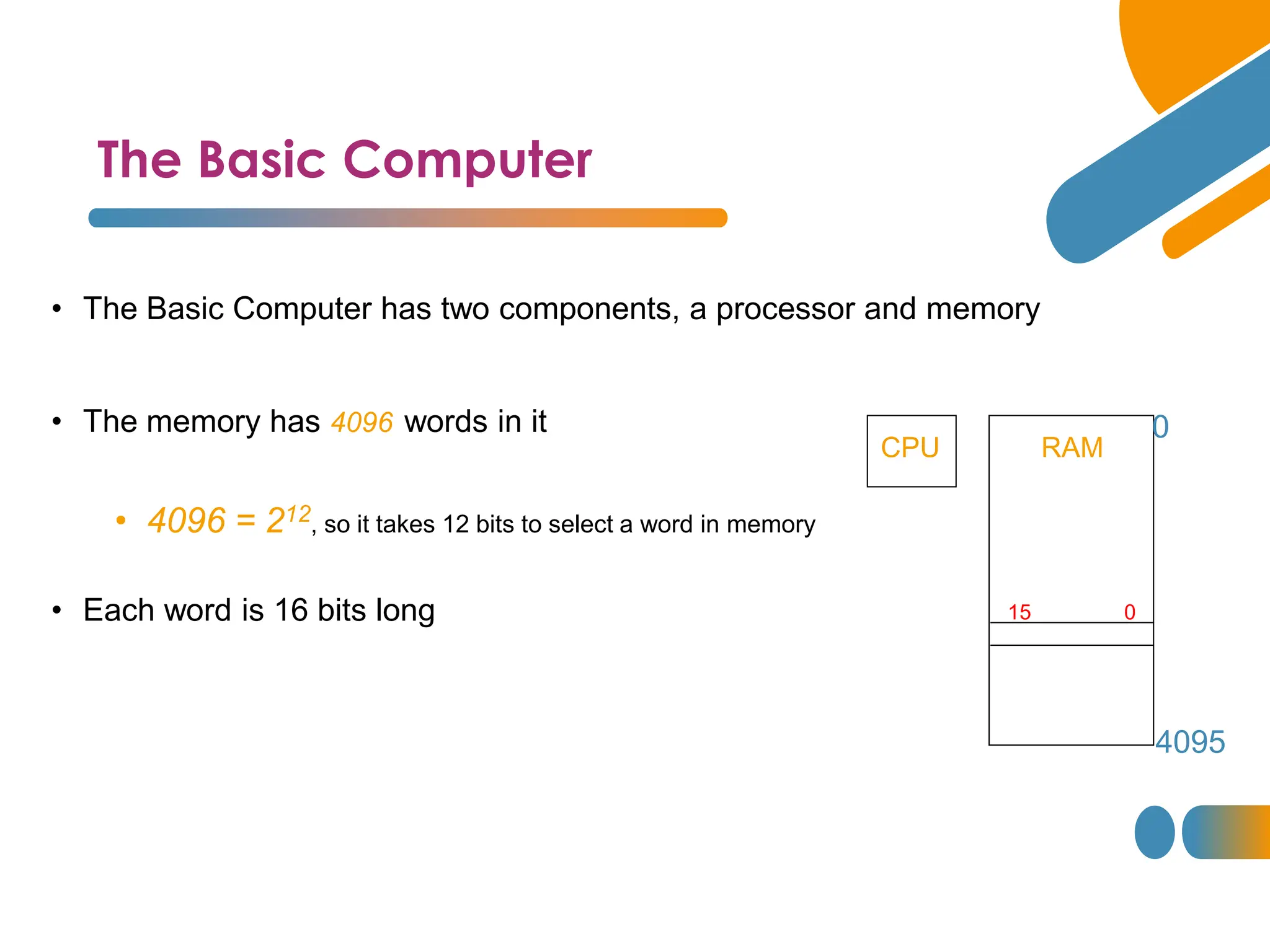
• The Basic Computer has two components, a processor and memory
• The memory has 4096 words in it
• 4096 = 212, so it takes 12 bits to select a word in memory
• Each word is 16 bits long
CPU RAM
0
4095
0
15
Instructions
Instruction codes
• Program
• A sequence of (machine) instructions
• (Machine) Instruction
• A group of bits that tell the computer to perform a specific operation
(a sequence of micro-operation)
• The instructions of a program, along with any needed data are
stored in memory
• The CPU reads the next instruction from memory
• It is placed in an Instruction Register (IR)
• Control circuitry in control unit then translates the instruction
into the sequence of microoperations necessary to implement it
Instruction Format
Instruction codes
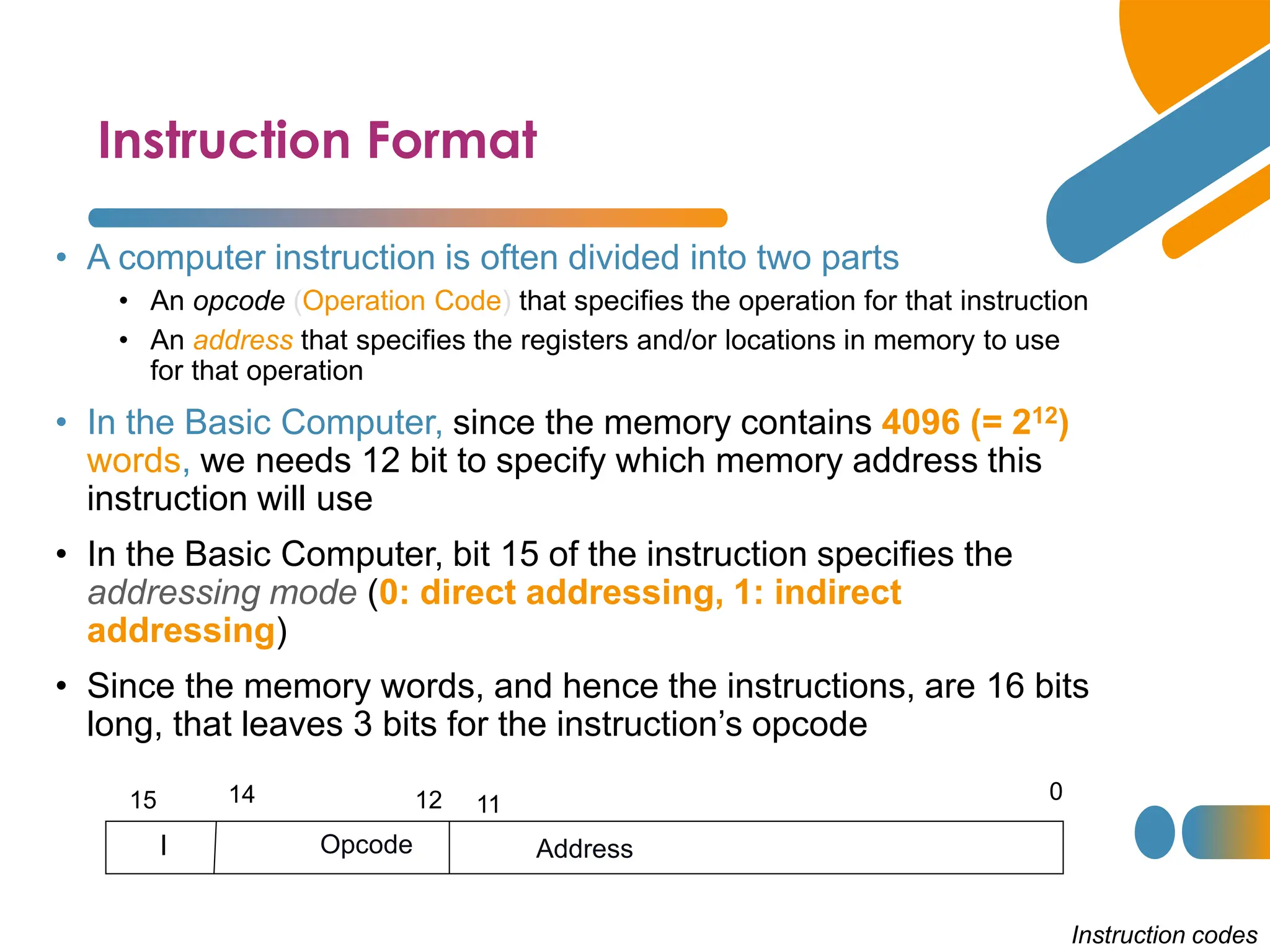
• A computer instruction is often divided into two parts
• An opcode (Operation Code) that specifies the operation for that instruction
• An address that specifies the registers and/or locations in memory to use
for that operation
• In the Basic Computer, since the memory contains 4096 (= 212)
words, we needs 12 bit to specify which memory address this
instruction will use
• In the Basic Computer, bit 15 of the instruction specifies the
addressing mode (0: direct addressing, 1: indirect
addressing)
• Since the memory words, and hence the instructions, are 16 bits
long, that leaves 3 bits for the instruction’s opcode
Address
Opcode
I
0
11
12
14
15
Addressing Modes
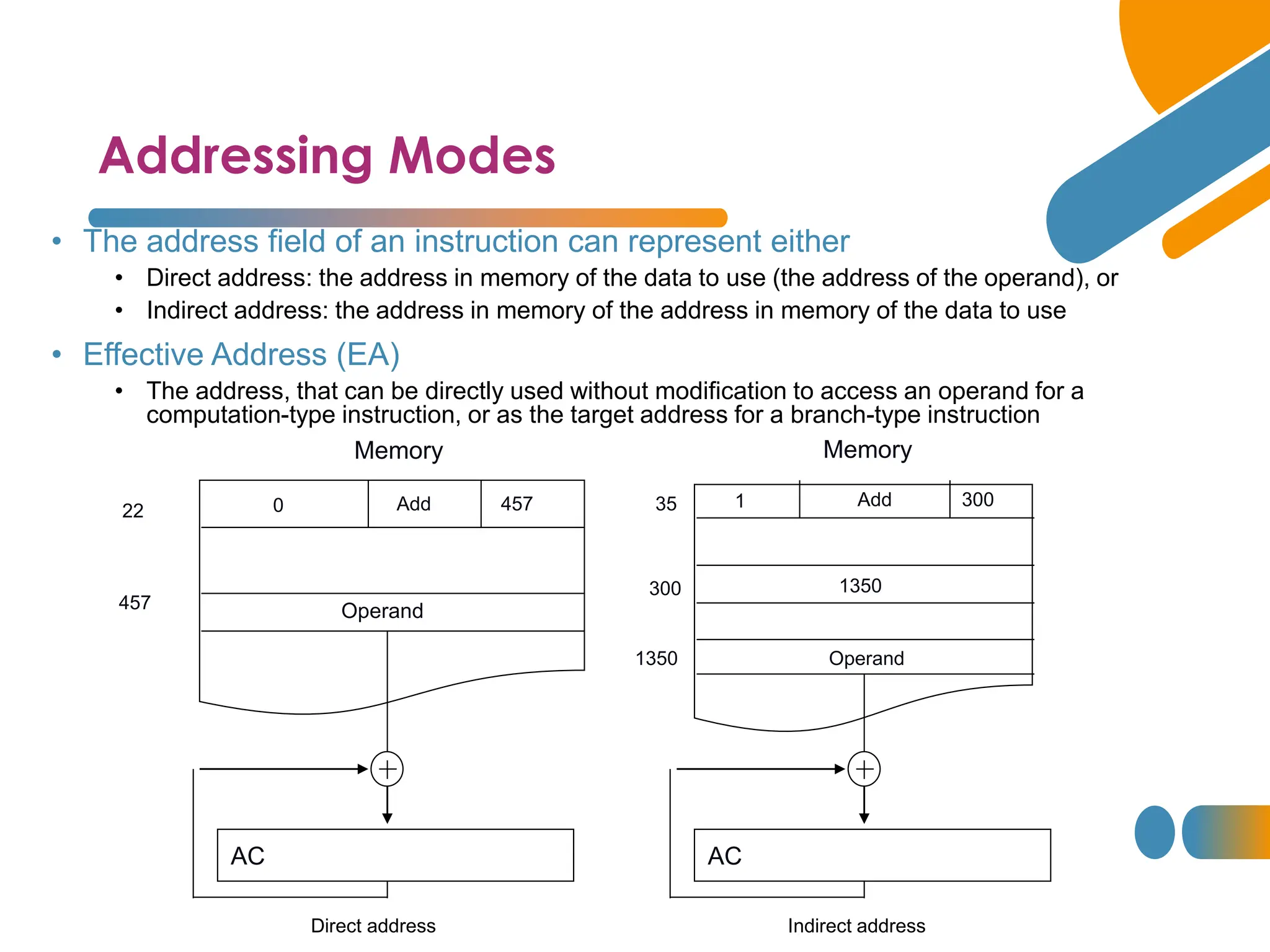
• The address field of an instruction can represent either
• Direct address: the address in memory of the data to use (the address of the operand), or
• Indirect address: the address in memory of the address in memory of the data to use
• Effective Address (EA)
• The address, that can be directly used without modification to access an operand for a
computation-type instruction, or as the target address for a branch-type instruction
Operand
457
457
Memory
Add
0
22
AC
1350
300
35 1
Operand
1350
Memory
300
Add
AC
Direct address Indirect address
Processor Registers
Instruction codes
A processor has many registers to hold instructions, addresses, data,
etc..
• The processor has a register, the Program Counter (PC) that holds
the memory address of the next instruction to get
• Since the memory in the Basic Computer only has 4096 locations, the PC only
needs 12 bits
• In a direct or indirect addressing, the processor needs to keep track
of what locations in memory it is addressing: The Address Register
(AR) is used for this
• The AR is a 12 bit register in the Basic Computer
Processor Registers
Instruction codes
• When an operand is found, using either direct or indirect addressing,
it is placed in the Data Register (DR). The processor then uses this
value as data for its operation
• The Basic Computer has a single general purpose register – the
Accumulator (AC)
Processor Registers
Instruction codes
• The significance of a general purpose register is that it can be referred
to in instructions
• e.g. load AC with the contents of a specific memory location; store the contents of
AC into a specified memory location
• Often a processor will need a scratch register to store intermediate
results or other temporary data; in the Basic Computer this is the
Temporary Register (TR)
Processor Registers
Instruction codes
• The Basic Computer uses a very simple model of input/output (I/O)
operations
• Input devices are considered to send 8 bits of character data to the processor
• The processor can send 8 bits of character data to output devices
• The Input Register (INPR) holds an 8 bit character gotten from an input
device
• The Output Register (OUTR) holds an 8 bit character to be send to an
output device
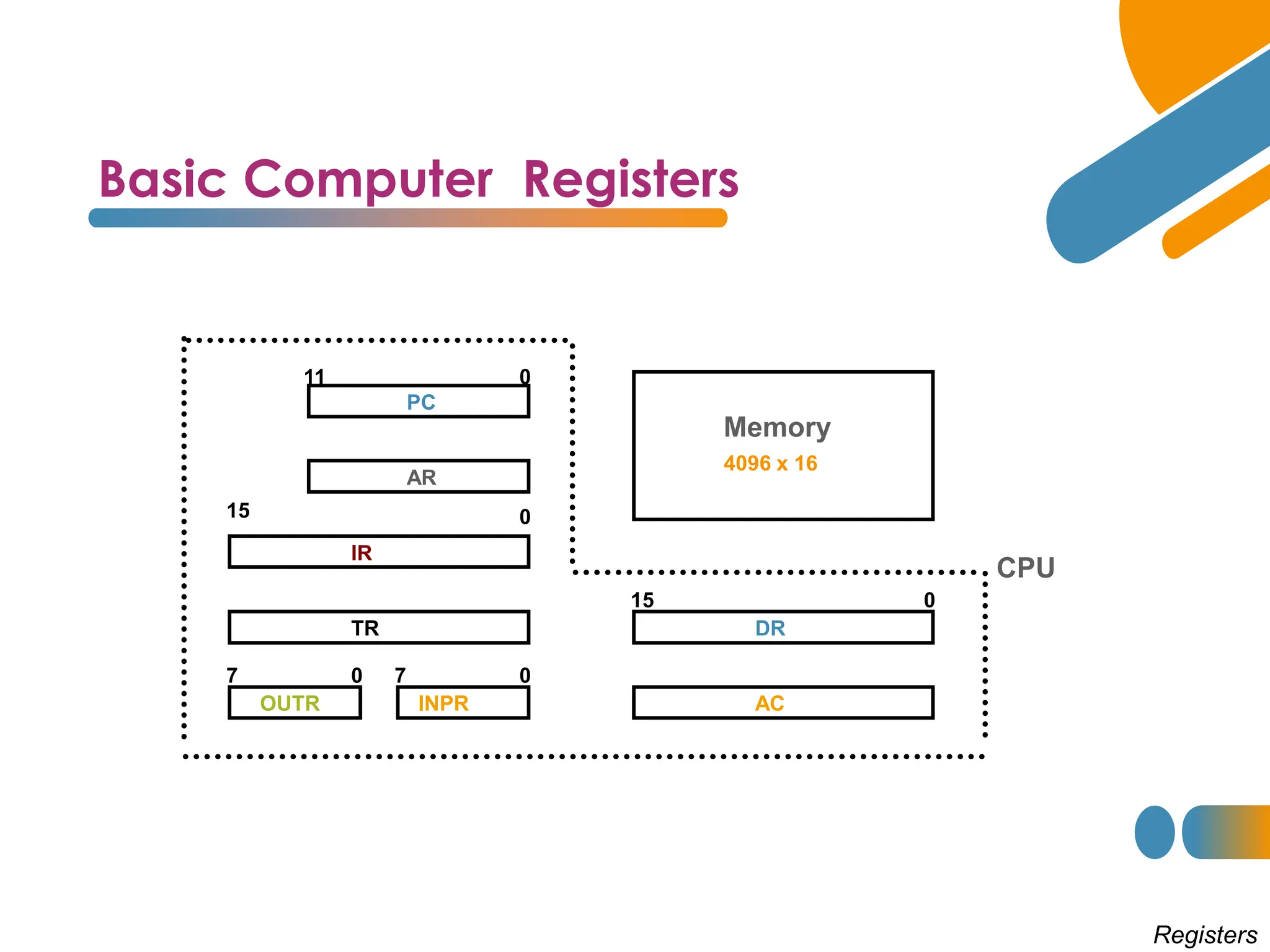
Basic Computer Registers
Registers
11 0
PC
15 0
IR
TR
7 0
OUTR
15 0
DR
AC
AR
INPR
0 7
Memory
4096 x 16
CPU
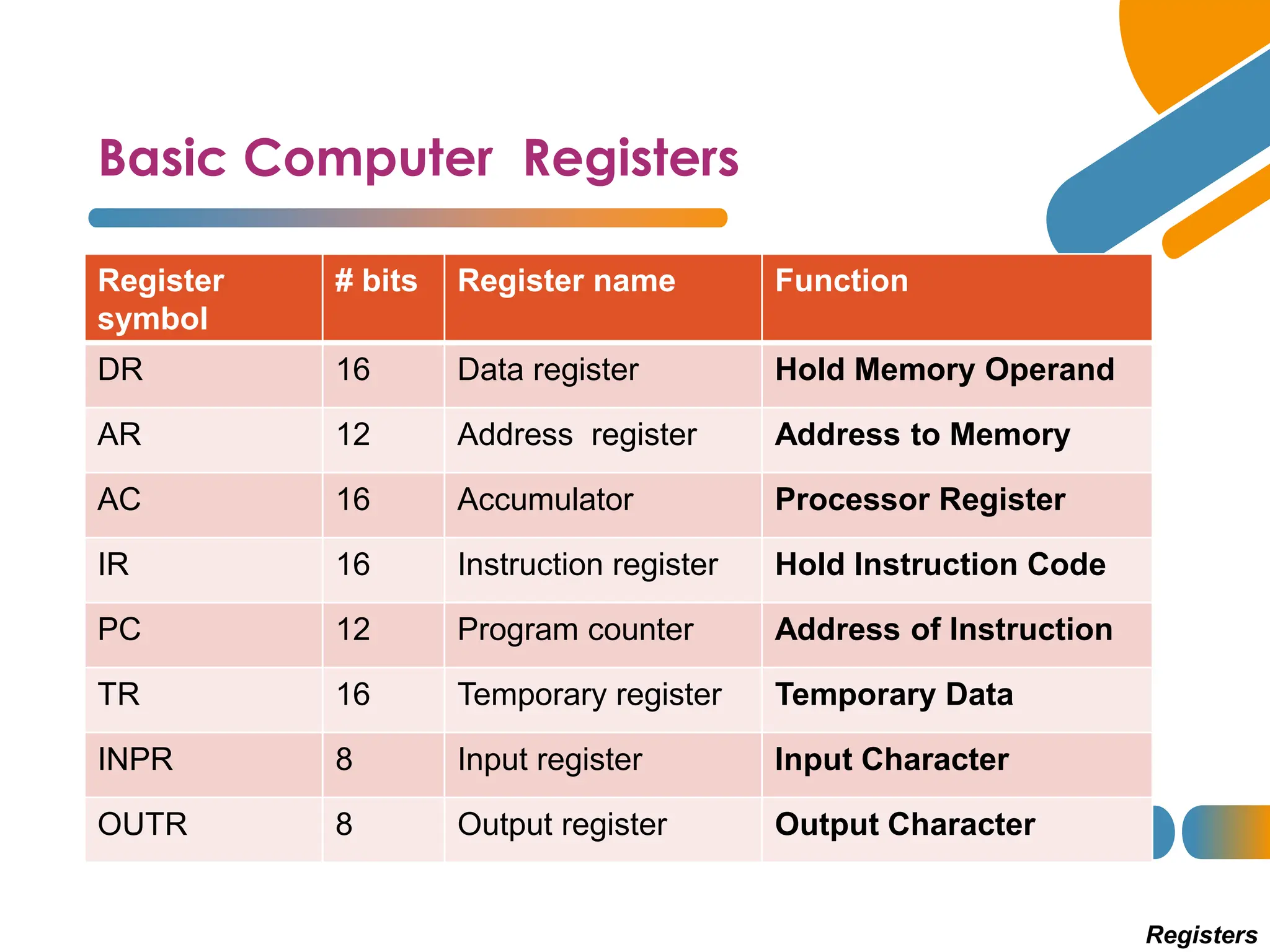
Basic Computer Registers
Registers
Register
symbol
# bits Register name Function
DR 16 Data register Hold Memory Operand
AR 12 Address register Address to Memory
AC 16 Accumulator Processor Register
IR 16 Instruction register Hold Instruction Code
PC 12 Program counter Address of Instruction
TR 16 Temporary register Temporary Data
INPR 8 Input register Input Character
OUTR 8 Output register Output Character
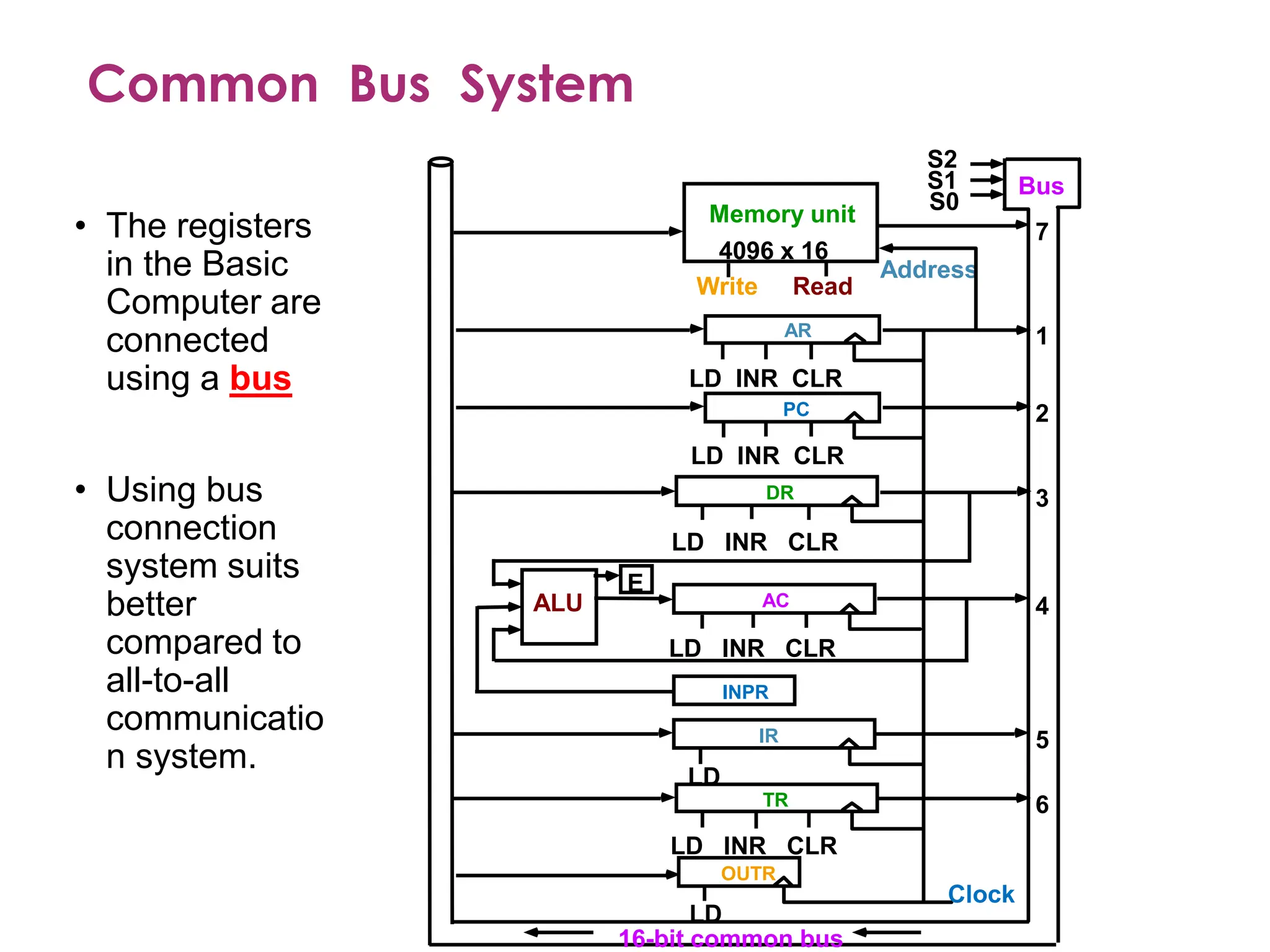
Common Bus System
S2
S1
S0
Bus
Memory unit
4096 x 16
LD INR CLR
Address
Read
Write
AR
LD INR CLR
PC
LD INR CLR
DR
LD INR CLR
AC
ALU
E
INPR
IR
LD
LD INR CLR
TR
OUTR
LD
Clock
16-bit common bus
7
1
2
3
4
5
6
• The registers
in the Basic
Computer are
connected
using a bus
• Using bus
connection
system suits
better
compared to
all-to-all
communicatio
n system.
Common Bus System
Registers
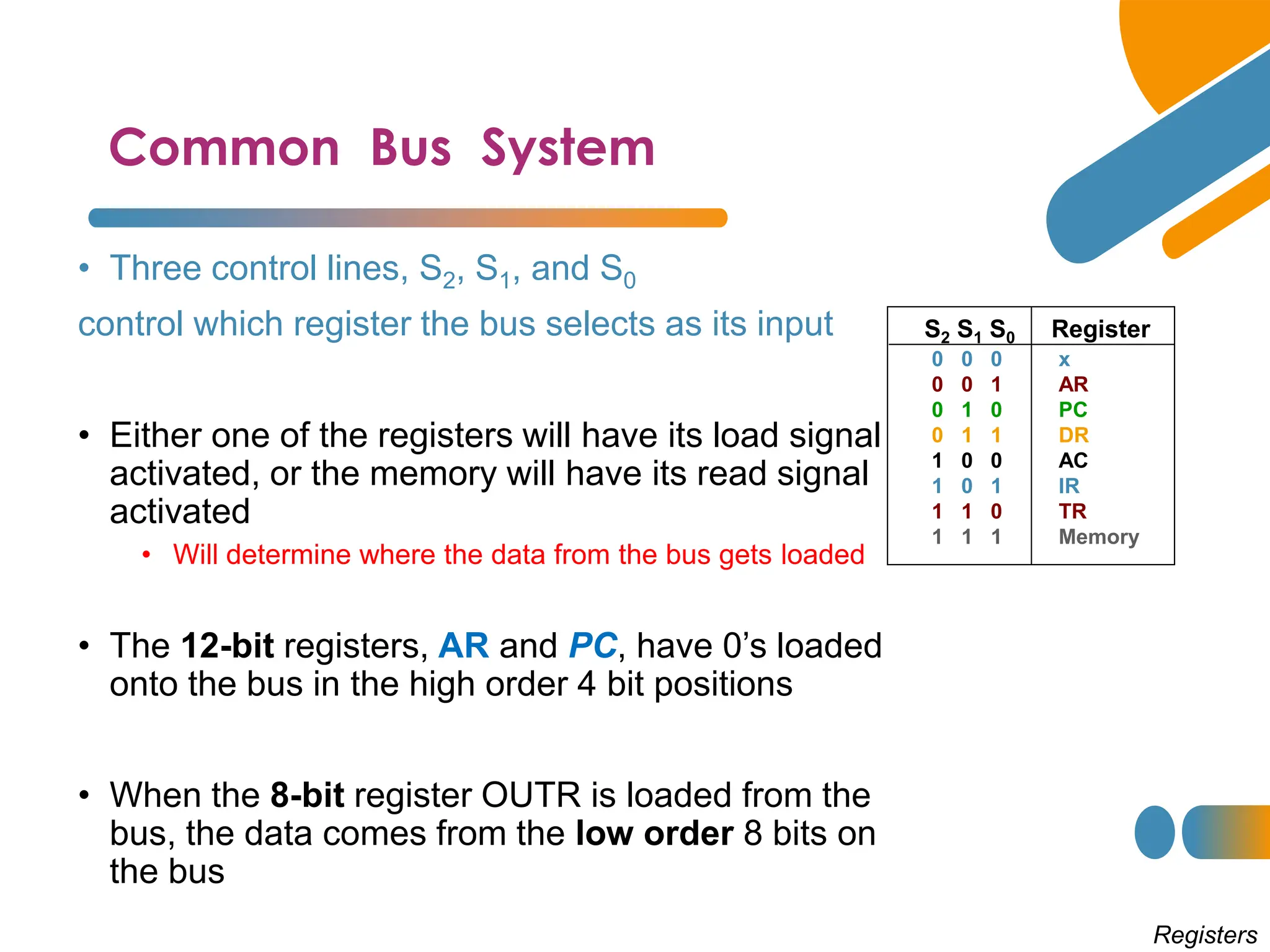
• Three control lines, S2, S1, and S0
control which register the bus selects as its input
• Either one of the registers will have its load signal
activated, or the memory will have its read signal
activated
• Will determine where the data from the bus gets loaded
• The 12-bit registers, AR and PC, have 0’s loaded
onto the bus in the high order 4 bit positions
• When the 8-bit register OUTR is loaded from the
bus, the data comes from the low order 8 bits on
the bus
0 0 0 x
0 0 1 AR
0 1 0 PC
0 1 1 DR
1 0 0 AC
1 0 1 IR
1 1 0 TR
1 1 1 Memory
S2 S1 S0 Register
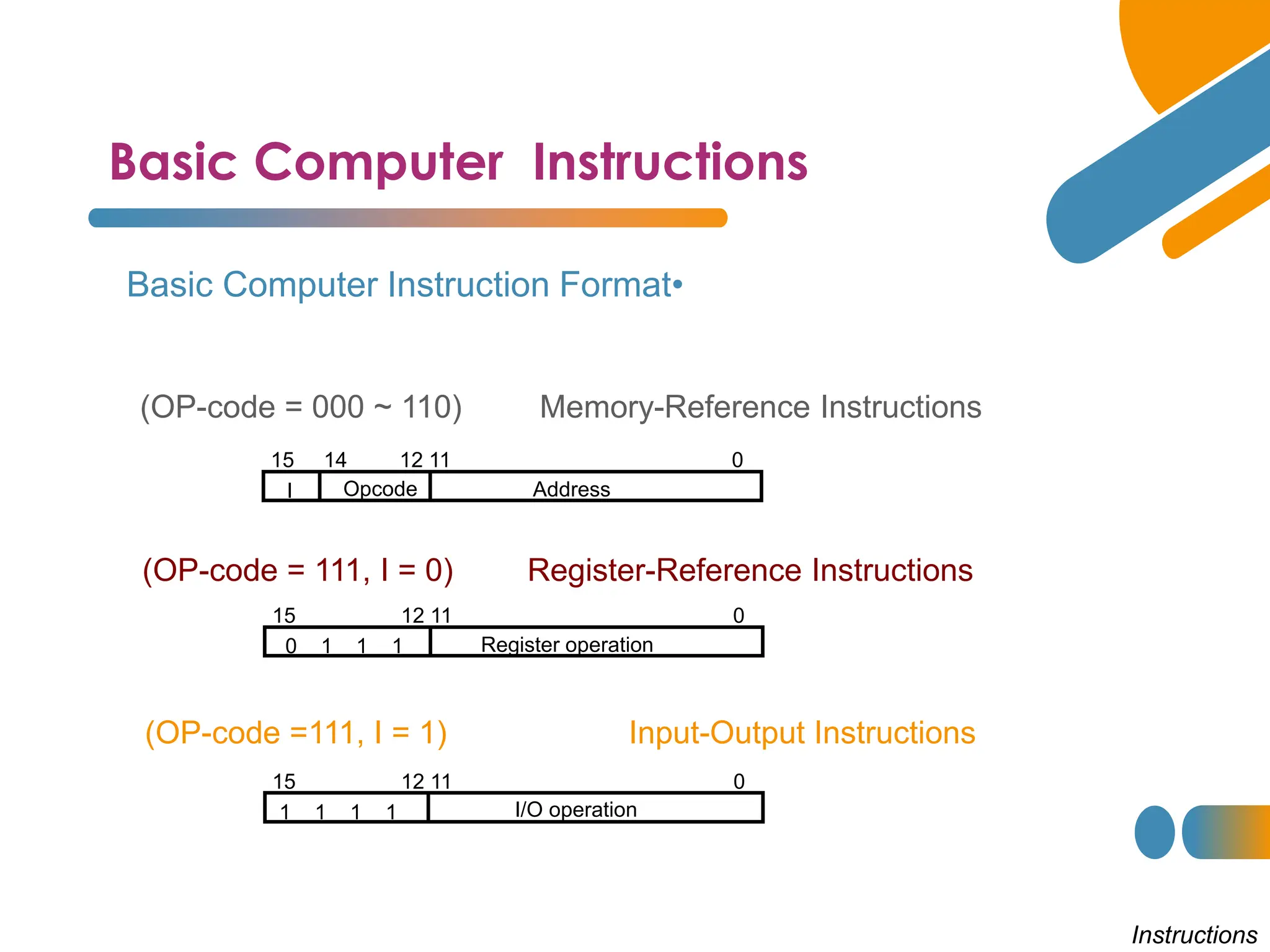
Basic Computer Instructions
Instructions
•
Basic Computer Instruction Format
15 14 12 11 0
I Opcode Address
Memory-Reference Instructions
(OP-code = 000 ~ 110)
Register-Reference Instructions
(OP-code = 111, I = 0)
Input-Output Instructions
(OP-code =111, I = 1)
15 12 11 0
Register operation
0 1 1 1
15 12 11 0
I/O operation
1 1 1 1
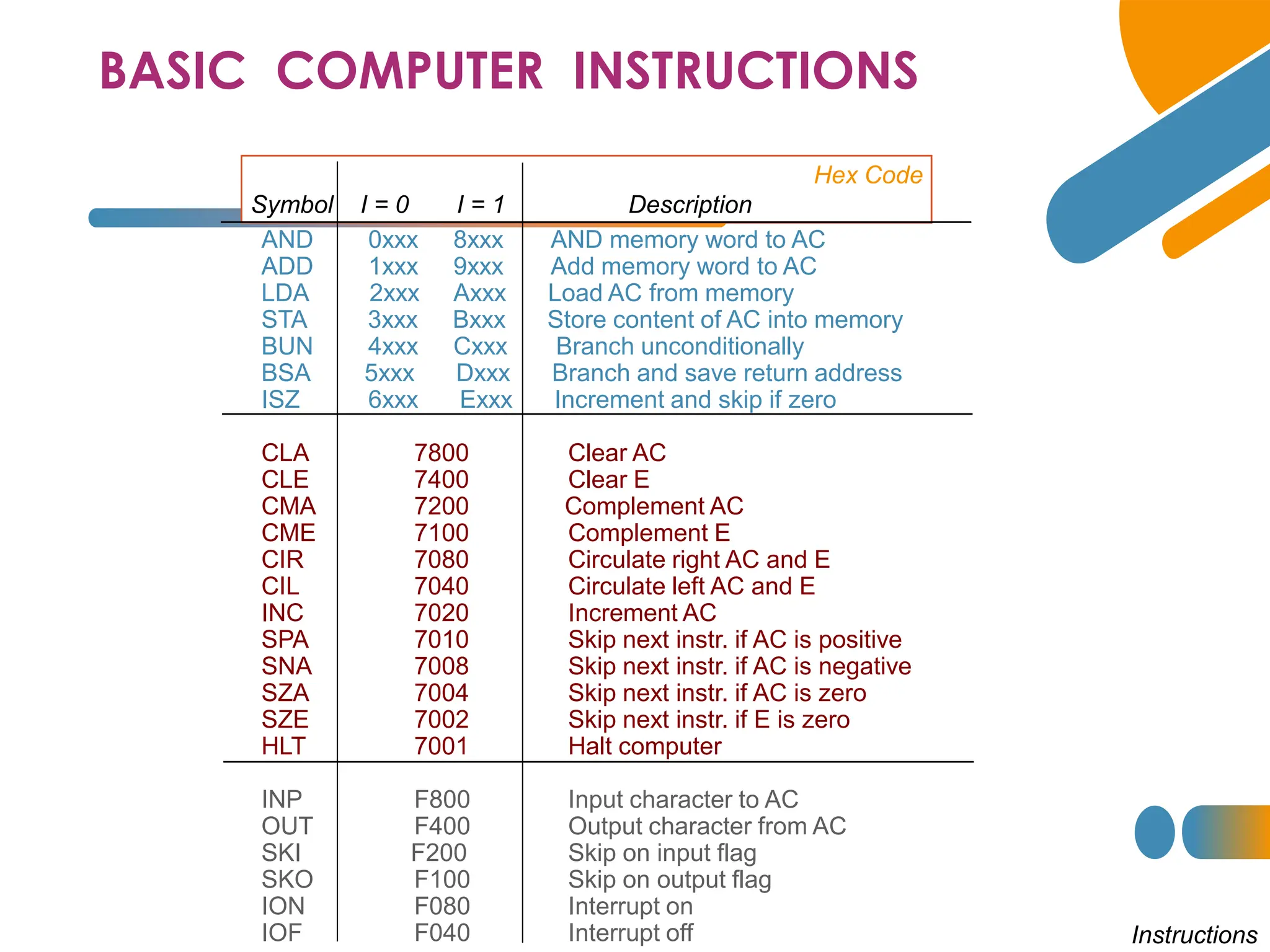
BASIC COMPUTER INSTRUCTIONS
Hex Code
Symbol I = 0 I = 1 Description
AND 0xxx 8xxx AND memory word to AC
ADD 1xxx 9xxx Add memory word to AC
LDA 2xxx Axxx Load AC from memory
STA 3xxx Bxxx Store content of AC into memory
BUN 4xxx Cxxx Branch unconditionally
BSA 5xxx Dxxx Branch and save return address
ISZ 6xxx Exxx Increment and skip if zero
CLA 7800 Clear AC
CLE 7400 Clear E
CMA 7200 Complement AC
CME 7100 Complement E
CIR 7080 Circulate right AC and E
CIL 7040 Circulate left AC and E
INC 7020 Increment AC
SPA 7010 Skip next instr. if AC is positive
SNA 7008 Skip next instr. if AC is negative
SZA 7004 Skip next instr. if AC is zero
SZE 7002 Skip next instr. if E is zero
HLT 7001 Halt computer
INP F800 Input character to AC
OUT F400 Output character from AC
SKI F200 Skip on input flag
SKO F100 Skip on output flag
ION F080 Interrupt on
IOF F040 Interrupt off Instructions
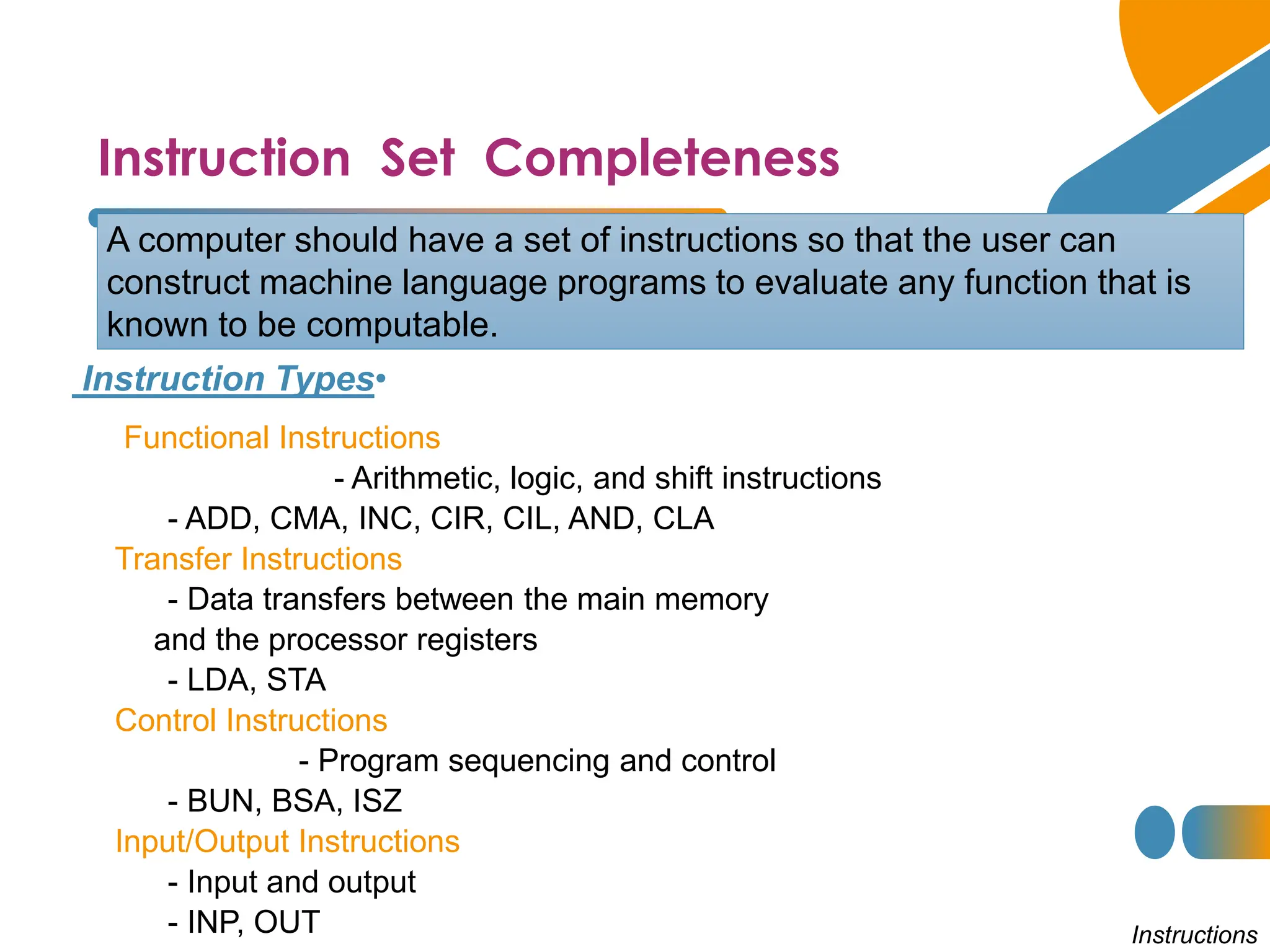
Instruction Set Completeness
•
Instruction Types
A computer should have a set of instructions so that the user can
construct machine language programs to evaluate any function that is
known to be computable.
Functional Instructions
- Arithmetic, logic, and shift instructions
- ADD, CMA, INC, CIR, CIL, AND, CLA
Transfer Instructions
- Data transfers between the main memory
and the processor registers
- LDA, STA
Control Instructions
- Program sequencing and control
- BUN, BSA, ISZ
Input/Output Instructions
- Input and output
- INP, OUT Instructions
Control Unit
Instruction codes
• Control unit (CU) of a processor translates from machine
instructions to the control signals for the microoperations that
implement them
• Control units are implemented in one of two ways
• Hardwired Control
• CU is made up of sequential and combinational circuits to generate the control signals
• Microprogrammed Control
• A control memory on the processor contains microprograms that activate the necessary
control signals
• We will consider a hardwired implementation of the control unit
for the Basic Computer
Timing and Control
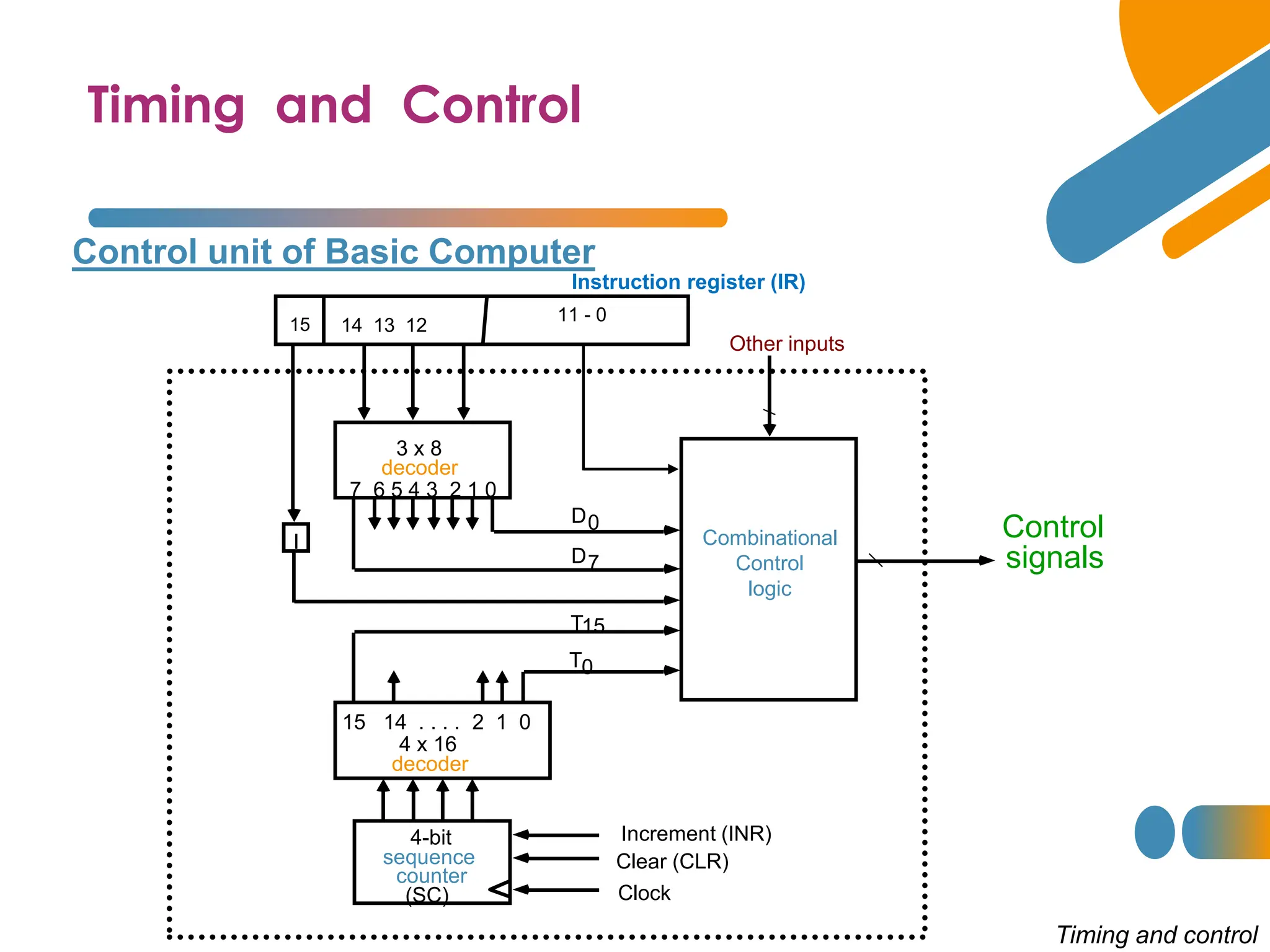
Control unit of Basic Computer
Timing and control
Instruction register (IR)
15 14 13 12
11 - 0
3 x 8
decoder
7 6 5 4 3 2 1 0
I
D0
15 14 . . . . 2 1 0
4 x 16
decoder
4-bit
sequence
counter
(SC)
Increment (INR)
Clear (CLR)
Clock
Other inputs
Control
signals
D
T
T
7
15
0
Combinational
Control
logic
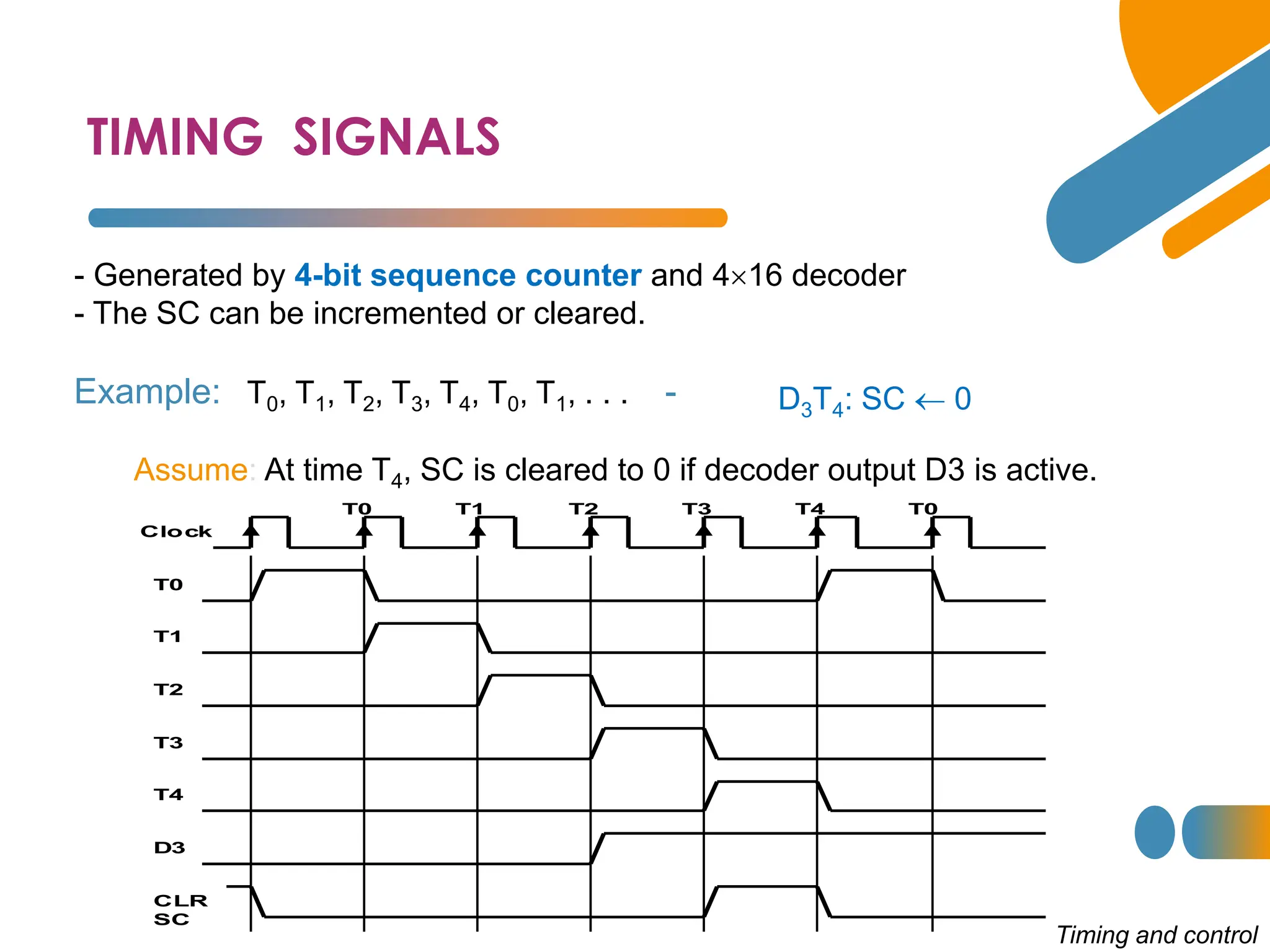
TIMING SIGNALS
Clock
T0 T1 T2 T3 T4 T0
T0
T1
T2
T3
T4
D3
CLR
SC
- Generated by 4-bit sequence counter and 416 decoder
- The SC can be incremented or cleared.
-
Example: T0, T1, T2, T3, T4, T0, T1, . . .
Assume: At time T4, SC is cleared to 0 if decoder output D3 is active.
D3T4: SC  0
Timing and control
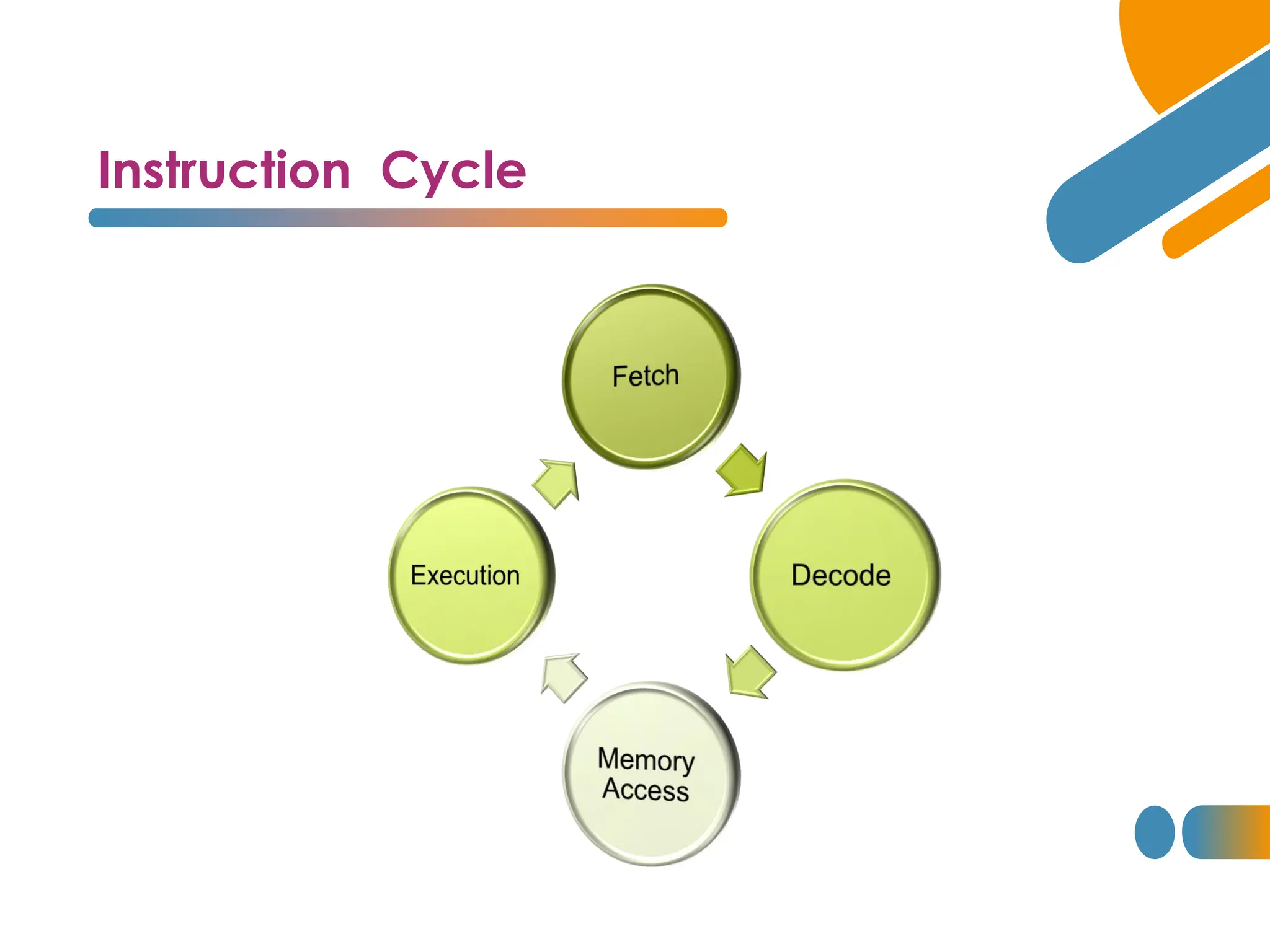
Instruction Cycle
Instruction Cycle
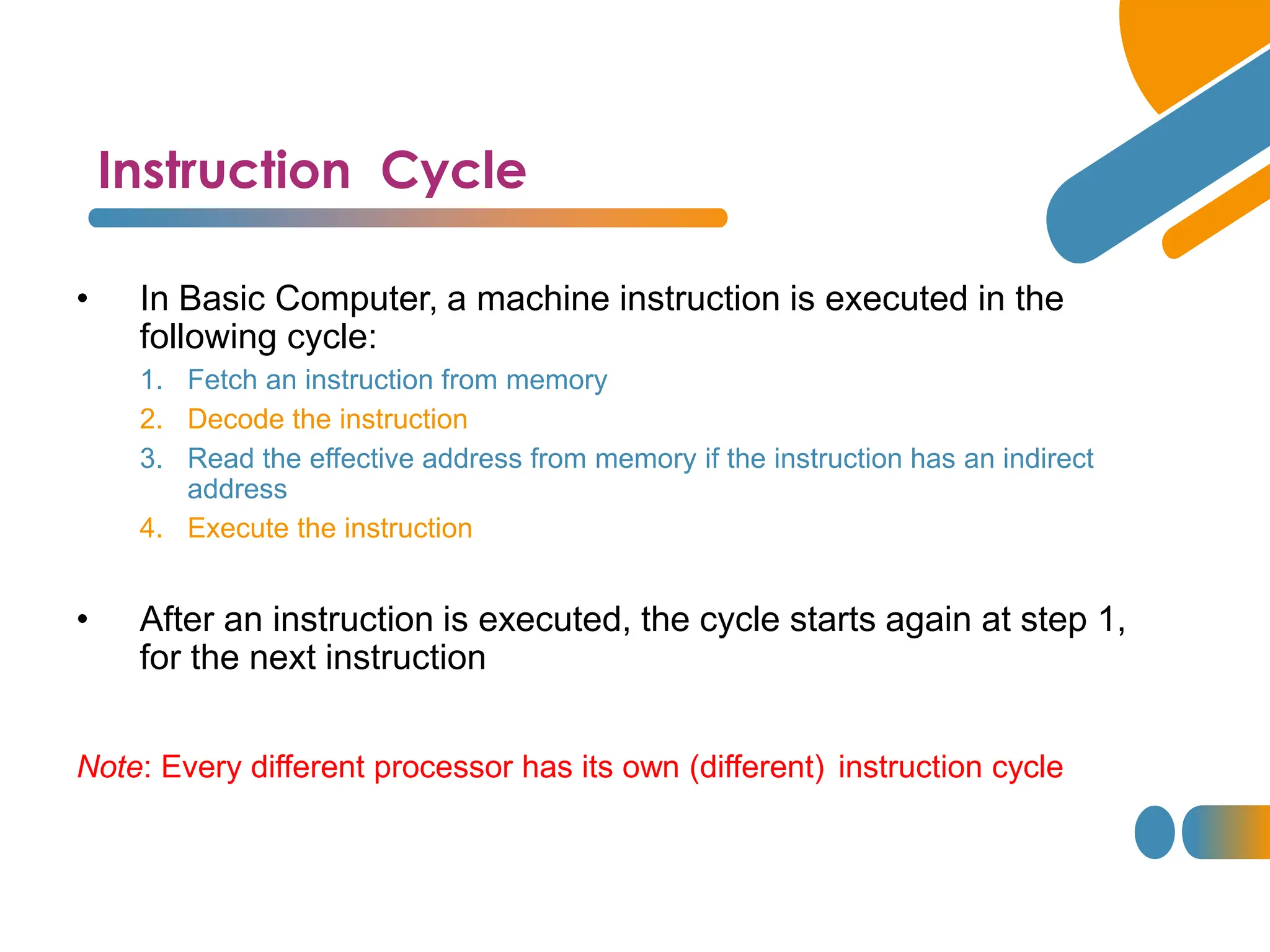
• In Basic Computer, a machine instruction is executed in the
following cycle:
1. Fetch an instruction from memory
2. Decode the instruction
3. Read the effective address from memory if the instruction has an indirect
address
4. Execute the instruction
• After an instruction is executed, the cycle starts again at step 1,
for the next instruction
Note: Every different processor has its own (different) instruction cycle
Fetch and Decode
Fetch and Decode T0: AR PC (S0S1S2=010, T0=1)
S2
S1
S0
Bus
7
Memory
unit
Address
Read
AR
LD
PC
INR
IR
LD Clock
1
2
5
Common bus
T1
T0
Instruction Cycle
T1: IR  M [AR], PC  PC + 1 (S0S1S2=111, T1=1)
T2: D0, . . . , D7  Decode IR(12-14),
AR  IR(0-11),
I  IR(15)
Determine The Type of Instruction
= 0 (direct)
Start
SC  0
AR  PC T0
IR  M[AR], PC  PC + 1 T1
AR  IR(0-11), I  IR(15)
Decode Opcode in IR(12-14),
T2
D7
= 0 (Memory-reference)
(Register or I/O) = 1
I
I
Execute
register-reference
instruction
SC  0
Execute
input-output
instruction
SC  0
M[AR]

AR Nothing
= 0 (register)
(I/O) = 1 (indirect) = 1
T3 T3 T3
T3
Execute
memory-reference
instruction
SC  0
T4

D'7IT3: AR M[AR]
D'7I'T3: Nothing
D7I'T3: Execute a register-reference instr.
D7IT3: Execute an input-output instr.
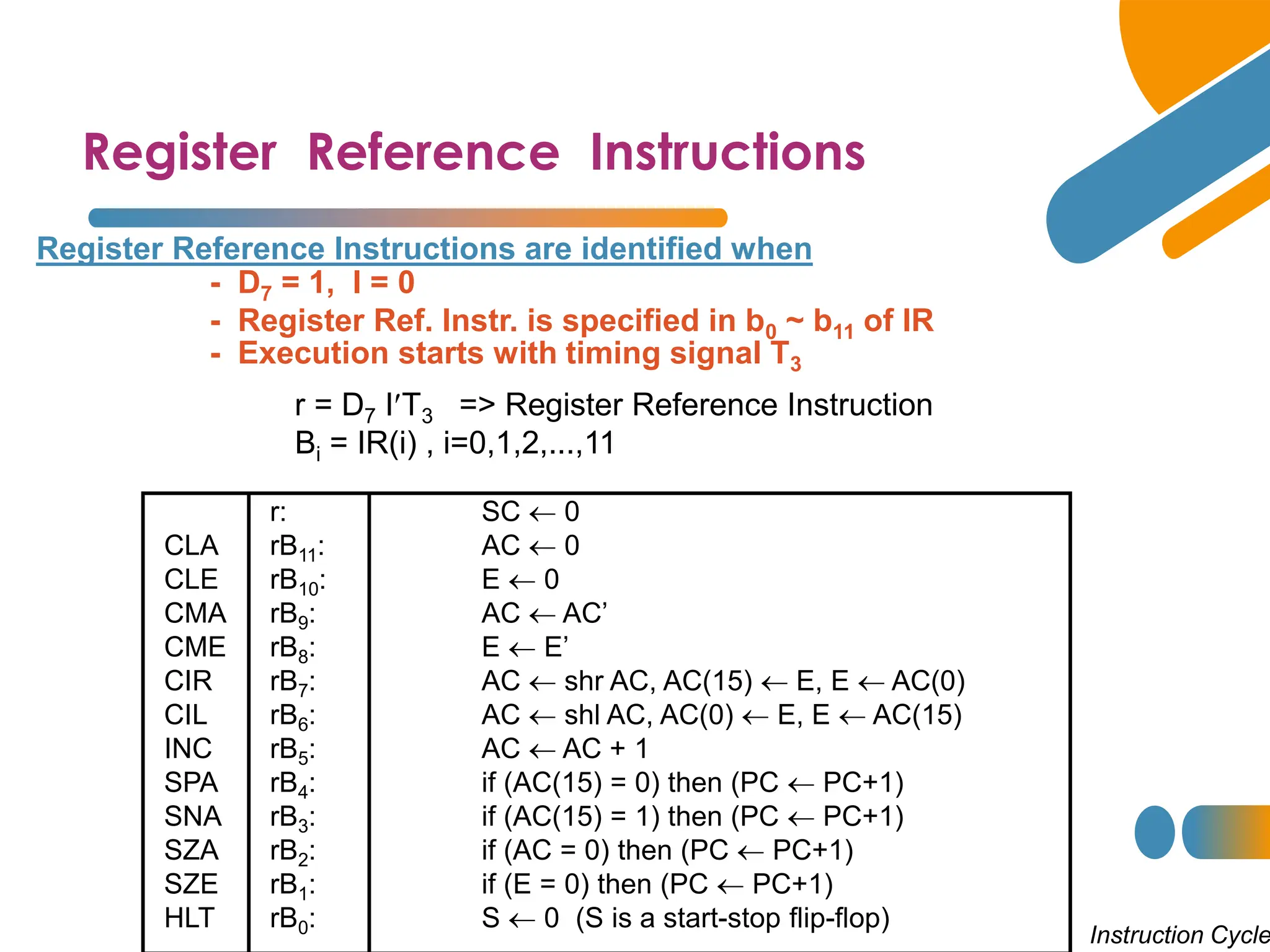
Register Reference Instructions
r = D7 IT3 => Register Reference Instruction
Bi = IR(i) , i=0,1,2,...,11
- D7 = 1, I = 0
- Register Ref. Instr. is specified in b0 ~ b11 of IR
- Execution starts with timing signal T3
Instruction Cycle
Register Reference Instructions are identified when
r: SC  0
CLA rB11: AC  0
CLE rB10: E  0
CMA rB9: AC  AC’
CME rB8: E  E’
CIR rB7: AC  shr AC, AC(15)  E, E  AC(0)
CIL rB6: AC  shl AC, AC(0)  E, E  AC(15)
INC rB5: AC  AC + 1
SPA rB4: if (AC(15) = 0) then (PC  PC+1)
SNA rB3: if (AC(15) = 1) then (PC  PC+1)
SZA rB2: if (AC = 0) then (PC  PC+1)
SZE rB1: if (E = 0) then (PC  PC+1)
HLT rB0: S  0 (S is a start-stop flip-flop)
10/17/2024 28

2024_lecture6_come321.pdf...............................

  • 1.
    Dr. Eng. GhadaAbozaid Ghada.abozaid@aswu.edu.eg Electrical Engineering Dept.
  • 2.
  • 3.
    5.1 Instruction Codes 5.2Computer Registers 5.3 Computer Instructions 5.4 Timing and Control 5.5 Instruction Cycle Agenda
  • 4.
    Introduction • Every differentprocessor type has its own design (different registers, buses, microoperations, machine instructions, etc) • Modern processor is a very complex device • It contains • Many registers • Multiple arithmetic units, for both integer and floating point calculations • The ability to pipeline several consecutive instructions to speed execution • Etc. • Simplified processor model would be better to start with. ( Basic Computer) • We will use this to introduce processor organization and the relationship of the RTL model to the higher level computer processor
  • 5.
    The Basic Computer •The Basic Computer has two components, a processor and memory • The memory has 4096 words in it • 4096 = 212, so it takes 12 bits to select a word in memory • Each word is 16 bits long CPU RAM 0 4095 0 15
  • 6.
    Instructions Instruction codes • Program •A sequence of (machine) instructions • (Machine) Instruction • A group of bits that tell the computer to perform a specific operation (a sequence of micro-operation) • The instructions of a program, along with any needed data are stored in memory • The CPU reads the next instruction from memory • It is placed in an Instruction Register (IR) • Control circuitry in control unit then translates the instruction into the sequence of microoperations necessary to implement it
  • 7.
    Instruction Format Instruction codes •A computer instruction is often divided into two parts • An opcode (Operation Code) that specifies the operation for that instruction • An address that specifies the registers and/or locations in memory to use for that operation • In the Basic Computer, since the memory contains 4096 (= 212) words, we needs 12 bit to specify which memory address this instruction will use • In the Basic Computer, bit 15 of the instruction specifies the addressing mode (0: direct addressing, 1: indirect addressing) • Since the memory words, and hence the instructions, are 16 bits long, that leaves 3 bits for the instruction’s opcode Address Opcode I 0 11 12 14 15
  • 8.
    Addressing Modes • Theaddress field of an instruction can represent either • Direct address: the address in memory of the data to use (the address of the operand), or • Indirect address: the address in memory of the address in memory of the data to use • Effective Address (EA) • The address, that can be directly used without modification to access an operand for a computation-type instruction, or as the target address for a branch-type instruction Operand 457 457 Memory Add 0 22 AC 1350 300 35 1 Operand 1350 Memory 300 Add AC Direct address Indirect address
  • 9.
    Processor Registers Instruction codes Aprocessor has many registers to hold instructions, addresses, data, etc.. • The processor has a register, the Program Counter (PC) that holds the memory address of the next instruction to get • Since the memory in the Basic Computer only has 4096 locations, the PC only needs 12 bits • In a direct or indirect addressing, the processor needs to keep track of what locations in memory it is addressing: The Address Register (AR) is used for this • The AR is a 12 bit register in the Basic Computer
  • 10.
    Processor Registers Instruction codes •When an operand is found, using either direct or indirect addressing, it is placed in the Data Register (DR). The processor then uses this value as data for its operation • The Basic Computer has a single general purpose register – the Accumulator (AC)
  • 11.
    Processor Registers Instruction codes •The significance of a general purpose register is that it can be referred to in instructions • e.g. load AC with the contents of a specific memory location; store the contents of AC into a specified memory location • Often a processor will need a scratch register to store intermediate results or other temporary data; in the Basic Computer this is the Temporary Register (TR)
  • 12.
    Processor Registers Instruction codes •The Basic Computer uses a very simple model of input/output (I/O) operations • Input devices are considered to send 8 bits of character data to the processor • The processor can send 8 bits of character data to output devices • The Input Register (INPR) holds an 8 bit character gotten from an input device • The Output Register (OUTR) holds an 8 bit character to be send to an output device
  • 13.
    Basic Computer Registers Registers 110 PC 15 0 IR TR 7 0 OUTR 15 0 DR AC AR INPR 0 7 Memory 4096 x 16 CPU
  • 14.
    Basic Computer Registers Registers Register symbol #bits Register name Function DR 16 Data register Hold Memory Operand AR 12 Address register Address to Memory AC 16 Accumulator Processor Register IR 16 Instruction register Hold Instruction Code PC 12 Program counter Address of Instruction TR 16 Temporary register Temporary Data INPR 8 Input register Input Character OUTR 8 Output register Output Character
  • 15.
    Common Bus System S2 S1 S0 Bus Memoryunit 4096 x 16 LD INR CLR Address Read Write AR LD INR CLR PC LD INR CLR DR LD INR CLR AC ALU E INPR IR LD LD INR CLR TR OUTR LD Clock 16-bit common bus 7 1 2 3 4 5 6 • The registers in the Basic Computer are connected using a bus • Using bus connection system suits better compared to all-to-all communicatio n system.
  • 16.
    Common Bus System Registers •Three control lines, S2, S1, and S0 control which register the bus selects as its input • Either one of the registers will have its load signal activated, or the memory will have its read signal activated • Will determine where the data from the bus gets loaded • The 12-bit registers, AR and PC, have 0’s loaded onto the bus in the high order 4 bit positions • When the 8-bit register OUTR is loaded from the bus, the data comes from the low order 8 bits on the bus 0 0 0 x 0 0 1 AR 0 1 0 PC 0 1 1 DR 1 0 0 AC 1 0 1 IR 1 1 0 TR 1 1 1 Memory S2 S1 S0 Register
  • 17.
    Basic Computer Instructions Instructions • BasicComputer Instruction Format 15 14 12 11 0 I Opcode Address Memory-Reference Instructions (OP-code = 000 ~ 110) Register-Reference Instructions (OP-code = 111, I = 0) Input-Output Instructions (OP-code =111, I = 1) 15 12 11 0 Register operation 0 1 1 1 15 12 11 0 I/O operation 1 1 1 1
  • 18.
    BASIC COMPUTER INSTRUCTIONS HexCode Symbol I = 0 I = 1 Description AND 0xxx 8xxx AND memory word to AC ADD 1xxx 9xxx Add memory word to AC LDA 2xxx Axxx Load AC from memory STA 3xxx Bxxx Store content of AC into memory BUN 4xxx Cxxx Branch unconditionally BSA 5xxx Dxxx Branch and save return address ISZ 6xxx Exxx Increment and skip if zero CLA 7800 Clear AC CLE 7400 Clear E CMA 7200 Complement AC CME 7100 Complement E CIR 7080 Circulate right AC and E CIL 7040 Circulate left AC and E INC 7020 Increment AC SPA 7010 Skip next instr. if AC is positive SNA 7008 Skip next instr. if AC is negative SZA 7004 Skip next instr. if AC is zero SZE 7002 Skip next instr. if E is zero HLT 7001 Halt computer INP F800 Input character to AC OUT F400 Output character from AC SKI F200 Skip on input flag SKO F100 Skip on output flag ION F080 Interrupt on IOF F040 Interrupt off Instructions
  • 19.
    Instruction Set Completeness • InstructionTypes A computer should have a set of instructions so that the user can construct machine language programs to evaluate any function that is known to be computable. Functional Instructions - Arithmetic, logic, and shift instructions - ADD, CMA, INC, CIR, CIL, AND, CLA Transfer Instructions - Data transfers between the main memory and the processor registers - LDA, STA Control Instructions - Program sequencing and control - BUN, BSA, ISZ Input/Output Instructions - Input and output - INP, OUT Instructions
  • 20.
    Control Unit Instruction codes •Control unit (CU) of a processor translates from machine instructions to the control signals for the microoperations that implement them • Control units are implemented in one of two ways • Hardwired Control • CU is made up of sequential and combinational circuits to generate the control signals • Microprogrammed Control • A control memory on the processor contains microprograms that activate the necessary control signals • We will consider a hardwired implementation of the control unit for the Basic Computer
  • 21.
    Timing and Control Controlunit of Basic Computer Timing and control Instruction register (IR) 15 14 13 12 11 - 0 3 x 8 decoder 7 6 5 4 3 2 1 0 I D0 15 14 . . . . 2 1 0 4 x 16 decoder 4-bit sequence counter (SC) Increment (INR) Clear (CLR) Clock Other inputs Control signals D T T 7 15 0 Combinational Control logic
  • 22.
    TIMING SIGNALS Clock T0 T1T2 T3 T4 T0 T0 T1 T2 T3 T4 D3 CLR SC - Generated by 4-bit sequence counter and 416 decoder - The SC can be incremented or cleared. - Example: T0, T1, T2, T3, T4, T0, T1, . . . Assume: At time T4, SC is cleared to 0 if decoder output D3 is active. D3T4: SC  0 Timing and control
  • 23.
  • 24.
    Instruction Cycle • InBasic Computer, a machine instruction is executed in the following cycle: 1. Fetch an instruction from memory 2. Decode the instruction 3. Read the effective address from memory if the instruction has an indirect address 4. Execute the instruction • After an instruction is executed, the cycle starts again at step 1, for the next instruction Note: Every different processor has its own (different) instruction cycle
  • 25.
    Fetch and Decode Fetchand Decode T0: AR PC (S0S1S2=010, T0=1) S2 S1 S0 Bus 7 Memory unit Address Read AR LD PC INR IR LD Clock 1 2 5 Common bus T1 T0 Instruction Cycle T1: IR  M [AR], PC  PC + 1 (S0S1S2=111, T1=1) T2: D0, . . . , D7  Decode IR(12-14), AR  IR(0-11), I  IR(15)
  • 26.
    Determine The Typeof Instruction = 0 (direct) Start SC  0 AR  PC T0 IR  M[AR], PC  PC + 1 T1 AR  IR(0-11), I  IR(15) Decode Opcode in IR(12-14), T2 D7 = 0 (Memory-reference) (Register or I/O) = 1 I I Execute register-reference instruction SC  0 Execute input-output instruction SC  0 M[AR]  AR Nothing = 0 (register) (I/O) = 1 (indirect) = 1 T3 T3 T3 T3 Execute memory-reference instruction SC  0 T4  D'7IT3: AR M[AR] D'7I'T3: Nothing D7I'T3: Execute a register-reference instr. D7IT3: Execute an input-output instr.
  • 27.
    Register Reference Instructions r= D7 IT3 => Register Reference Instruction Bi = IR(i) , i=0,1,2,...,11 - D7 = 1, I = 0 - Register Ref. Instr. is specified in b0 ~ b11 of IR - Execution starts with timing signal T3 Instruction Cycle Register Reference Instructions are identified when r: SC  0 CLA rB11: AC  0 CLE rB10: E  0 CMA rB9: AC  AC’ CME rB8: E  E’ CIR rB7: AC  shr AC, AC(15)  E, E  AC(0) CIL rB6: AC  shl AC, AC(0)  E, E  AC(15) INC rB5: AC  AC + 1 SPA rB4: if (AC(15) = 0) then (PC  PC+1) SNA rB3: if (AC(15) = 1) then (PC  PC+1) SZA rB2: if (AC = 0) then (PC  PC+1) SZE rB1: if (E = 0) then (PC  PC+1) HLT rB0: S  0 (S is a start-stop flip-flop)
  • 28.