Lecture 1
Basics of Data
communication and
Computer Networks
Tameru H.
AASTU, Depart of Software Engineering
1
Chapter 1
Network
“ ... communication system for connecting
end-systems”
End-systems a.k.a. “hosts”
PCs, workstations
dedicated computers
network components
Chapter 1 2
Data Communications
Chapter 1 3
Fundamental Characteristics
• The effectiveness of a data communication
system depend on four fundamental
characteristics:
• Delivery
• Accuracy
• Timelines
• Jitter
Chapter 1 4
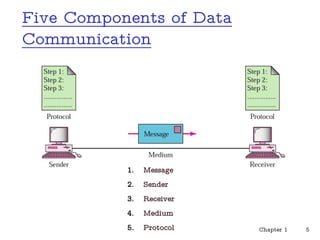
Five Components of Data
Communication
Chapter 1 5
1. Message
2. Sender
3. Receiver
4. Medium
5. Protocol
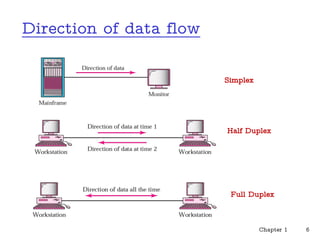
Direction of data flow
Chapter 1 6
Simplex
Half Duplex
Full Duplex
Multiaccess vs. Point-to-point
• Multiaccess means shared medium.
• many end-systems share the same physical communication
resources (wire, frequency, ...)
• There must be some arbitration mechanism.
• Point-to-point
• only 2 systems involved
• no doubt about where data came from !
Chapter 1 7
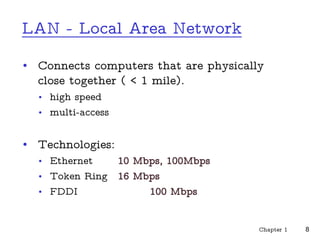
LAN - Local Area Network
• Connects computers that are physically
close together ( < 1 mile).
• high speed
• multi-access
• Technologies:
• Ethernet 10 Mbps, 100Mbps
• Token Ring 16 Mbps
• FDDI 100 Mbps
Chapter 1 8
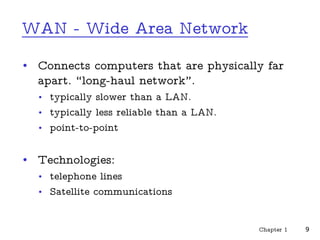
WAN - Wide Area Network
• Connects computers that are physically far
apart. “long-haul network”.
• typically slower than a LAN.
• typically less reliable than a LAN.
• point-to-point
• Technologies:
• telephone lines
• Satellite communications
Chapter 1 9
MAN - Metropolitan Area Network
• Larger than a LAN and smaller than a
WAN
- example: campus-wide network
- multi-access network
• Technologies:
• coaxial cable
• microwave
Chapter 1 10
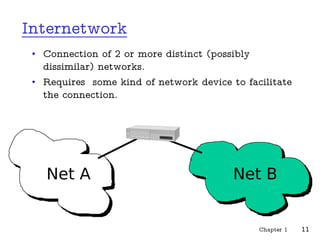
Internetwork
• Connection of 2 or more distinct (possibly
dissimilar) networks.
• Requires some kind of network device to facilitate
the connection.
Net A Net B
Chapter 1 11
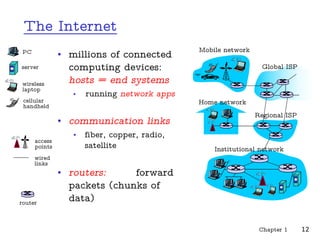
The Internet
• millions of connected
computing devices:
hosts = end systems
• running network apps
• communication links
• fiber, copper, radio,
satellite
• routers: forward
packets (chunks of
data)
Chapter 1 12
Home network
Institutional network
Mobile network
Global ISP
Regional ISP
router
PC
server
wireless
laptop
cellular
handheld
wired
links
access
points
The Internet
Chapter 1 13
Internet Mapping Project, Bill Cheswick
A Network of Networks
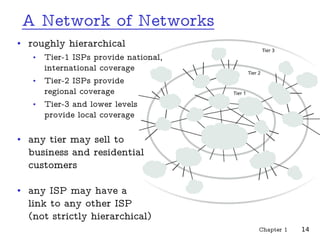
• roughly hierarchical
• Tier-1 ISPs provide national,
international coverage
• Tier-2 ISPs provide
regional coverage
• Tier-3 and lower levels
provide local coverage
• any tier may sell to
business and residential
customers
• any ISP may have a
link to any other ISP
(not strictly hierarchical)
Chapter 1 14
Many Different Internet Service
Providers
• Each network is
independent
• Interoperability requires
using Internet standards:
IP, TCP
• the Internet is global and
must run these standards
• your private intranet can do
whatever you want it to do
Chapter 1 15
Internet Design Principles
• minimal assumptions about services network
should support
• ability to send packets
• no reliability or security
• end-to-end principle
• keep the core of the network as simple as possible,
• put complex functionality at the edges
• exception: significant performance improvement
Chapter 1 16
What’s a protocol?
human protocols:
• “what’s the time?”
• “I have a question”
• introductions
… specific msgs sent
… specific actions taken
when msgs received, or
other events
network protocols:
• machines rather than
humans
• all communication
activity in Internet
governed by protocols
Chapter 1 17
What’s a protocol?
a human protocol and a
computer network
protocol:
Chapter 1 18
Q: Other human protocols?
Hi
Hi
Got the
time?
2:00
TCP connection
request
TCP connection
response
Get http://www.awl.com/kurose-ross
<file>
time
Protocol
• An agreed upon convention for communication.
• both endpoints need to understand the protocol.
• Protocols must be formally defined and unambiguous!
• Protocols define
• format,
• order of msgs sent and received among network entities,
• actions taken on msg transmission, receipt
• We will study lots of existing protocols and perhaps
develop a few of our own.
Chapter 1 19
Programs & Processes
• A program is an executable file.
• A process or task is an instance of a
program that is being executed.
• A single program can generate multiple
processes.
Chapter 1 20
Client - Server
• A server is a process - not a machine !
• A server waits for a request from a client.
• A client is a process that sends a request to
an existing server and (usually) waits for a
reply.
Chapter 1 21
Client - Server Examples
• Server returns the time-of-day.
• Server returns a document.
• Server prints a file for client.
• Server does a disk read or write.
• Server records a transaction.
Chapter 1 22
Servers
• Servers are generally more complex (more
interesting).
• Basic types of servers:
¨ Iterative - server handles one client at a time.
¨ Concurrent - server handles many clients at a time.
• We will study the differences later.
Chapter 1 23
Question??
Chapter 1 24

CH1-LECTURE_1.pdf

  • 1.
    Lecture 1 Basics ofData communication and Computer Networks Tameru H. AASTU, Depart of Software Engineering 1 Chapter 1
  • 2.
    Network “ ... communicationsystem for connecting end-systems” End-systems a.k.a. “hosts” PCs, workstations dedicated computers network components Chapter 1 2
  • 3.
  • 4.
    Fundamental Characteristics • Theeffectiveness of a data communication system depend on four fundamental characteristics: • Delivery • Accuracy • Timelines • Jitter Chapter 1 4
  • 5.
    Five Components ofData Communication Chapter 1 5 1. Message 2. Sender 3. Receiver 4. Medium 5. Protocol
  • 6.
    Direction of dataflow Chapter 1 6 Simplex Half Duplex Full Duplex
  • 7.
    Multiaccess vs. Point-to-point •Multiaccess means shared medium. • many end-systems share the same physical communication resources (wire, frequency, ...) • There must be some arbitration mechanism. • Point-to-point • only 2 systems involved • no doubt about where data came from ! Chapter 1 7
  • 8.
    LAN - LocalArea Network • Connects computers that are physically close together ( < 1 mile). • high speed • multi-access • Technologies: • Ethernet 10 Mbps, 100Mbps • Token Ring 16 Mbps • FDDI 100 Mbps Chapter 1 8
  • 9.
    WAN - WideArea Network • Connects computers that are physically far apart. “long-haul network”. • typically slower than a LAN. • typically less reliable than a LAN. • point-to-point • Technologies: • telephone lines • Satellite communications Chapter 1 9
  • 10.
    MAN - MetropolitanArea Network • Larger than a LAN and smaller than a WAN - example: campus-wide network - multi-access network • Technologies: • coaxial cable • microwave Chapter 1 10
  • 11.
    Internetwork • Connection of2 or more distinct (possibly dissimilar) networks. • Requires some kind of network device to facilitate the connection. Net A Net B Chapter 1 11
  • 12.
    The Internet • millionsof connected computing devices: hosts = end systems • running network apps • communication links • fiber, copper, radio, satellite • routers: forward packets (chunks of data) Chapter 1 12 Home network Institutional network Mobile network Global ISP Regional ISP router PC server wireless laptop cellular handheld wired links access points
  • 13.
    The Internet Chapter 113 Internet Mapping Project, Bill Cheswick
  • 14.
    A Network ofNetworks • roughly hierarchical • Tier-1 ISPs provide national, international coverage • Tier-2 ISPs provide regional coverage • Tier-3 and lower levels provide local coverage • any tier may sell to business and residential customers • any ISP may have a link to any other ISP (not strictly hierarchical) Chapter 1 14
  • 15.
    Many Different InternetService Providers • Each network is independent • Interoperability requires using Internet standards: IP, TCP • the Internet is global and must run these standards • your private intranet can do whatever you want it to do Chapter 1 15
  • 16.
    Internet Design Principles •minimal assumptions about services network should support • ability to send packets • no reliability or security • end-to-end principle • keep the core of the network as simple as possible, • put complex functionality at the edges • exception: significant performance improvement Chapter 1 16
  • 17.
    What’s a protocol? humanprotocols: • “what’s the time?” • “I have a question” • introductions … specific msgs sent … specific actions taken when msgs received, or other events network protocols: • machines rather than humans • all communication activity in Internet governed by protocols Chapter 1 17
  • 18.
    What’s a protocol? ahuman protocol and a computer network protocol: Chapter 1 18 Q: Other human protocols? Hi Hi Got the time? 2:00 TCP connection request TCP connection response Get http://www.awl.com/kurose-ross <file> time
  • 19.
    Protocol • An agreedupon convention for communication. • both endpoints need to understand the protocol. • Protocols must be formally defined and unambiguous! • Protocols define • format, • order of msgs sent and received among network entities, • actions taken on msg transmission, receipt • We will study lots of existing protocols and perhaps develop a few of our own. Chapter 1 19
  • 20.
    Programs & Processes •A program is an executable file. • A process or task is an instance of a program that is being executed. • A single program can generate multiple processes. Chapter 1 20
  • 21.
    Client - Server •A server is a process - not a machine ! • A server waits for a request from a client. • A client is a process that sends a request to an existing server and (usually) waits for a reply. Chapter 1 21
  • 22.
    Client - ServerExamples • Server returns the time-of-day. • Server returns a document. • Server prints a file for client. • Server does a disk read or write. • Server records a transaction. Chapter 1 22
  • 23.
    Servers • Servers aregenerally more complex (more interesting). • Basic types of servers: ¨ Iterative - server handles one client at a time. ¨ Concurrent - server handles many clients at a time. • We will study the differences later. Chapter 1 23
  • 24.