Fundamentals of
Computer Programming
Chapter 7
User Defined Data types
(Structure in C++ )
Chere L. (M.Tech)
Lecturer, SWEG, AASTU
1
Outline
▪ Introduction to User defined Data type
▪ Defining structure (with tag and without tag)
▪ Declaring structure variable
▪ Initializing structure elements
▪ Accessing structure elements
▪ Nested structure
 Defining structure within structure
 Structure variable within other structure definition
▪ Array of structure
▪ Structure pointer
▪ Structure with function
 Structure variable as parameter
 Structure as a return type
Chapter 7 2
Outline
▪ Other User defined Data types
 Type definition (typedef)
 Enumerated types (enum)
 Anonymous unions (union)
▪ Class and Object as user defined data type
 Class and Object Basics
 Class and Object Creation
Chapter 7 3
(1) User Defined Data Types
Chapter 7 4
CONTENTS
User Defined DT
Structure Basics
Nested Structures
Array of Structures
Struct manipulation
Structure Pointer
Structure & Function
Other User Defined DT
Class and Objects
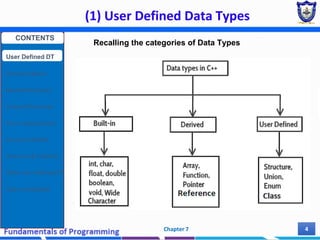
Recalling the categories of Data Types
(1) User Defined Data Types
Chapter 7 5
Why User Defined Data Types?
1. Flexibility
• They provide us the ability to create a data structure
as per our requirements and needs.
2. Reusability
• Once defined, these data types can be reused within
many definitions, saving coding time.
3. Encapsulation
• In C++/Java/Python the variables and data values
stored in User Defined Data types are hidden from
other classes as per their accessibility declaration i.e.
public, private, protected. The data values remain
hidden and safe.
CONTENTS
User Defined DT
Structure Basics
Nested Structures
Array of Structures
Struct manipulation
Structure Pointer
Structure & Function
Other User Defined DT
Class and Objects
(2) Structure Basics
Chapter 7 6
2.1 Structure
 A Structure is a collection of related data items,
possibly of different types.
 Examples:
 Student record:
student id, name, major, gender, start year, …
 Bank account:
account number, name, currency, balance, …
 Address book:
name, address, telephone number, …
 In database applications, structures are called records.
CONTENTS
User Defined DT
Structure Basics
Nested Structures
Array of Structures
Struct manipulation
Structure Pointer
Structure & Function
Other User Defined DT
Class and Objects
(2) Structure Basics (Cont’d)
Chapter 7 7
2.2 C++ Structure
 Structure is a user defined data type that is an
aggregate container
 A simple variable can store only one value at a time of
single type (atomic)
 A structure is can be considered as a collection of those
simple variables.
 i.e. It used to join simple variables together to form a bit
complex variables.
 In other words, it contains other data types, which are
grouped together into a single user-defined type.
 Unlike arrays (homogeneous), structures can store
variables of many different types (heterogeneous)
 Structures are used when it makes sense to associate
two or more data variables.
CONTENTS
User Defined DT
Structure Basics
Nested Structures
Array of Structures
Struct manipulation
Structure Pointer
Structure & Function
Other User Defined DT
Class and Objects
(2) Structure Basics (Cont’d)
Chapter 7 8
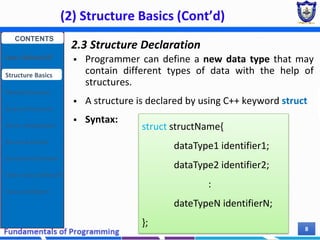
2.3 Structure Declaration
 Programmer can define a new data type that may
contain different types of data with the help of
structures.
 A structure is declared by using C++ keyword struct
 Syntax:
struct structName{
dataType1 identifier1;
dataType2 identifier2;
:
dateTypeN identifierN;
};
CONTENTS
User Defined DT
Structure Basics
Nested Structures
Array of Structures
Struct manipulation
Structure Pointer
Structure & Function
Other User Defined DT
Class and Objects
(2) Structure Basics (Cont’d)
Chapter 7 9
Descriptions
 The structure name also called structure tag and
used as the name of newly created user defined DT.
 Individual components of a structure type are called
members (or fields).
 The structure members are defined with their data-type
(simple, array or struct type) inside the opening and
closing curly braces..
 Must have unique names within the structure definition
 The closing brace is ended with a semicolon.
 Structure can be declared inside or outside main
function/any other functions
 Complex data structures can be formed by defining
arrays of structs.
CONTENTS
User Defined DT
Structure Basics
Nested Structures
Array of Structures
Struct manipulation
Structure Pointer
Structure & Function
Other User Defined DT
Class and Objects
(2) Structure Basics (Cont’d)
Chapter 7 10
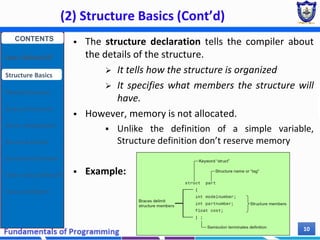
 The structure declaration tells the compiler about
the details of the structure.
 It tells how the structure is organized
 It specifies what members the structure will
have.
 However, memory is not allocated.
 Unlike the definition of a simple variable,
Structure definition don’t reserve memory
 Example:
CONTENTS
User Defined DT
Structure Basics
Nested Structures
Array of Structures
Struct manipulation
Structure Pointer
Structure & Function
Other User Defined DT
Class and Objects
(2) Structure Basics (Cont’d)
Chapter 7 11
More Examples
struct BankAccount{
char Name[15];
int AcountNo[10];
double balance;
Date Birthday;
};
struct StudentRecord{
char Name[15];
int Id;
char Dept[5];
char Gender;
};
Exercise:
 Write a structure specification that includes three members
student id, age, and mark. Call this structure student
The “StudentRecord”
structure has 4
members.
The “BankAcount”
structure has simple,
array and structure
types as members.
CONTENTS
User Defined DT
Structure Basics
Nested Structures
Array of Structures
Struct manipulation
Structure Pointer
Structure & Function
Other User Defined DT
Class and Objects
(2) Structure Basics (Cont’d)
Chapter 7 12
2.4 Structure Definition
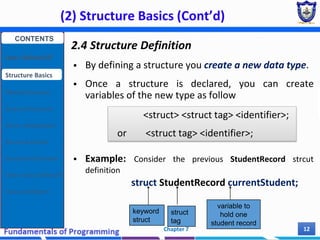
 By defining a structure you create a new data type.
 Once a structure is declared, you can create
variables of the new type as follow
 Example: Consider the previous StudentRecord strcut
definition
struct StudentRecord currentStudent;
<struct> <struct tag> <identifier>;
or <struct tag> <identifier>;
keyword
struct
struct
tag
variable to
hold one
student record
CONTENTS
User Defined DT
Structure Basics
Nested Structures
Array of Structures
Struct manipulation
Structure Pointer
Structure & Function
Other User Defined DT
Class and Objects
(2) Structure Basics (Cont’d)
Chapter 7 13
Descriptions
 The structure variable can be defined after the
declaration or the time of structure declaration.
 The process of defining a structure variable is same
as defining a variable of basic types such as int, char
 The definition of the structure variable
 Tells the compiler to allocate memory space for the
variable.
 The compiler automatically allocates sufficient
memory according to the elements of the structure.
 The memory occupied by the structure variable is
equal to the sum of the memory occupied by each
member of the structure
CONTENTS
User Defined DT
Structure Basics
Nested Structures
Array of Structures
Struct manipulation
Structure Pointer
Structure & Function
Other User Defined DT
Class and Objects
(2) Structure Basics (Cont’d)
Chapter 7 14
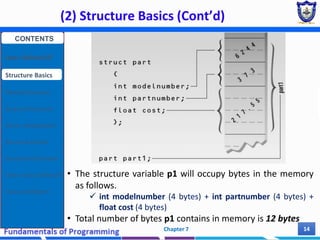
• The structure variable p1 will occupy bytes in the memory
as follows.
 int modelnumber (4 bytes) + int partnumber (4 bytes) +
float cost (4 bytes)
• Total number of bytes p1 contains in memory is 12 bytes
CONTENTS
User Defined DT
Structure Basics
Nested Structures
Array of Structures
Struct manipulation
Structure Pointer
Structure & Function
Other User Defined DT
Class and Objects
(2) Structure Basics (Cont’d)
Chapter 7 15
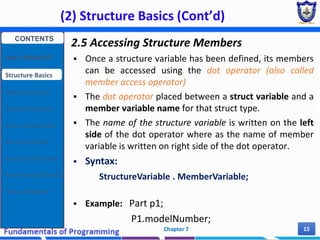
2.5 Accessing Structure Members
 Once a structure variable has been defined, its members
can be accessed using the dot operator (also called
member access operator)
 The dot operator placed between a struct variable and a
member variable name for that struct type.
 The name of the structure variable is written on the left
side of the dot operator where as the name of member
variable is written on right side of the dot operator.
 Syntax:
StructureVariable . MemberVariable;
 Example: Part p1;
P1.modelNumber;
CONTENTS
User Defined DT
Structure Basics
Nested Structures
Array of Structures
Struct manipulation
Structure Pointer
Structure & Function
Other User Defined DT
Class and Objects
(2) Structure Basics (Cont’d)
Chapter 7 16
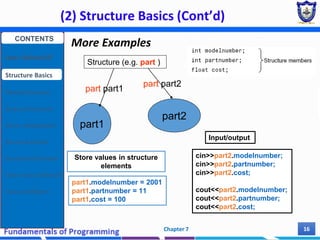
More Examples
Structure (e.g. part )
part1
part2
part part1
part part2
Store values in structure
elements
part1.modelnumber = 2001
part1.partnumber = 11
part1.cost = 100
Input/output
cin>>part2.modelnumber;
cin>>part2.partnumber;
cin>>part2.cost;
cout<<part2.modelnumber;
cout<<part2.partnumber;
cout<<part2.cost;
CONTENTS
User Defined DT
Structure Basics
Nested Structures
Array of Structures
Struct manipulation
Structure Pointer
Structure & Function
Other User Defined DT
Class and Objects
(2) Structure Basics (Cont’d)
Chapter 7 17
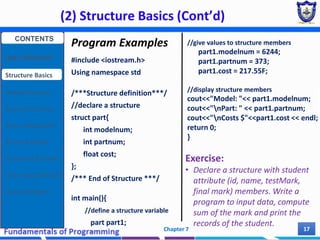
Program Examples
#include <iostream.h>
Using namespace std
/***Structure definition***/
//declare a structure
struct part{
int modelnum;
int partnum;
float cost;
};
/*** End of Structure ***/
int main(){
//define a structure variable
part part1;
//give values to structure members
part1.modelnum = 6244;
part1.partnum = 373;
part1.cost = 217.55F;
//display structure members
cout<<"Model: "<< part1.modelnum;
cout<<"nPart: " << part1.partnum;
cout<<"nCosts $"<<part1.cost << endl;
return 0;
}
Exercise:
• Declare a structure with student
attribute (id, name, testMark,
final mark) members. Write a
program to input data, compute
sum of the mark and print the
records of the student.
CONTENTS
User Defined DT
Structure Basics
Nested Structures
Array of Structures
Struct manipulation
Structure Pointer
Structure & Function
Other User Defined DT
Class and Objects
(2) Structure Basics (Cont’d)
Chapter 7 18
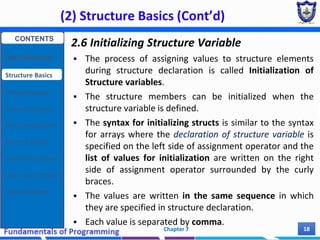
2.6 Initializing Structure Variable
 The process of assigning values to structure elements
during structure declaration is called Initialization of
Structure variables.
 The structure members can be initialized when the
structure variable is defined.
 The syntax for initializing structs is similar to the syntax
for arrays where the declaration of structure variable is
specified on the left side of assignment operator and the
list of values for initialization are written on the right
side of assignment operator surrounded by the curly
braces.
 The values are written in the same sequence in which
they are specified in structure declaration.
 Each value is separated by comma.
CONTENTS
User Defined DT
Structure Basics
Nested Structures
Array of Structures
Struct manipulation
Structure Pointer
Structure & Function
Other User Defined DT
Class and Objects
(2) Structure Basics (Cont’d)
Chapter 7 19
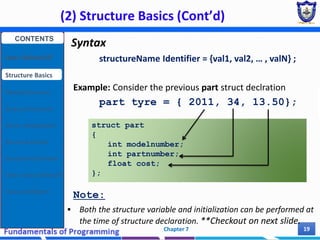
Syntax
structureName Identifier = {val1, val2, … , valN} ;
Example: Consider the previous part struct declration
part tyre = { 2011, 34, 13.50};
Note:
 Both the structure variable and initialization can be performed at
the time of structure declaration. **Checkout on next slide.
struct part
{
int modelnumber;
int partnumber;
float cost;
};
CONTENTS
User Defined DT
Structure Basics
Nested Structures
Array of Structures
Struct manipulation
Structure Pointer
Structure & Function
Other User Defined DT
Class and Objects
(2) Structure Basics (Cont’d)
Chapter 7 20
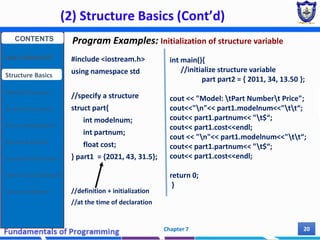
#include <iostream.h>
using namespace std
//specify a structure
struct part{
int modelnum;
int partnum;
float cost;
} part1 = {2021, 43, 31.5};
//definition + initialization
//at the time of declaration
int main(){
//initialize structure variable
part part2 = { 2011, 34, 13.50 };
cout << "Model: tPart Numbert Price";
cout<<"n"<< part1.modelnum<<"tt“;
cout<< part1.partnum<< "t$“;
cout<< part1.cost<<endl;
cout << "n"<< part1.modelnum<<"tt“;
cout<< part1.partnum<< "t$“;
cout<< part1.cost<<endl;
return 0;
}
Program Examples: Initialization of structure variable
CONTENTS
User Defined DT
Structure Basics
Nested Structures
Array of Structures
Struct manipulation
Structure Pointer
Structure & Function
Other User Defined DT
Class and Objects
(2) Structure Basics (Cont’d)
Chapter 7 21
Structure Declaration and Definition without tag
 Structure without tag and definition
 Structure without tag but with definition
struct {
char name[20];
int age;
Date dateOfBirth;
};
struct {
char name[20];
int age;
Date dateOfBirth;
}Stud1, Stud2;
This kind of structure
declaration is useless
This kind of structure declaration
is not recommendable because
the you cannot define a
structure of this type some
where else
CONTENTS
User Defined DT
Structure Basics
Nested Structures
Array of Structures
Struct manipulation
Structure Pointer
Structure & Function
Other User Defined DT
Class and Objects
(2) Structure Basics (Cont’d)
Chapter 7 22
CONTENTS
User Defined DT
Structure Basics
Nested Structures
Array of Structures
Struct manipulation
Structure Pointer
Structure & Function
Other User Defined DT
Class and Objects
2.7 Array as Member of Structure
 As discussed earlier a structure may consist of different types of
data and the member variables can be simple data types such
as int, char and float or can be complex like arrays.
 Example: array as a member of structure
struct Student{
int Roll_number;
int Marks[5];
};
 In the above example, the first member is a simple variable of
type int where as he second member is an array of integers
that can be used to store the marks of five subjects.
 Student sweg_2012_Batch;
CONTENTS
User Defined DT
Structure Basics
Nested Structures
Array of Structures
Struct manipulation
Structure Pointer
Structure & Function
Other User Defined DT
Class and Objects
(2) Structure Basics (Cont’d)
Chapter 7 23
Accessing array elements
 The array stored in a structure can be accessed by using the
following
1. Name of Structure Variable - in which an array is defined
2. Dot Operator - used to refer the array.
3. Name of Array
4. Index of desired element - used to access the individual
element of the array.
 Example
# include <iostream.h>
struct studen{
int roll_number;
int marks[5];
};
student usman;
int main(){
usman.roll_number = 101;
for(int i = 0; i < 5 ; i++)
usman.marks[i] = 1 + rand() % 100
cout<<endl;
for(int i = 0; i < 5 ; i++)
cout << usman.marks[i] << endl;
return 0;
}
CONTENTS
User Defined DT
Structure Basics
Nested Structures
Array of Structures
Struct manipulation
Structure Pointer
Structure & Function
Other User Defined DT
Class and Objects
(2) Structure Basics (Cont’d)
Chapter 7 24
Initializing array elements
 The structure that contains an array as member variable can be
initialized in the same the same way as initializing a simple
structure variable.
 The values are written in braces and each value is separated by
comma.
 additionally, the values for the member array are written in
nested braces, in proper order.
 Example
# include <iostream.h>
Using namespace std;
struct studen{
int roll_number;
int marks[5];
};
int main() {
student usman = {101,
{60,75,85,52,53}};
for(int i = 0; i < 5 ; i++) {
cout << "Marks: " << usman.marks[i]
cout<< endl;}
return 0;
}
CONTENTS
User Defined DT
Structure Basics
Nested Structures
Array of Structures
Struct manipulation
Structure Pointer
Structure & Function
Other User Defined DT
Class and Objects
(3) Nested Structure
Chapter 7 25
3.1 Nested Structure
 Refers to a structure within a structure
 A nested structure is created when the member of a
structure is itself a structure or
 When the structure definition placed within an other
structure definition
 Example
 In the example above the structure Date contains simple
member variables day, month, year of data type int.
 Second structure Student contains three member variables.
 The first two members are of basic data type, but the third
member of Structure Student is itself a structure variable.
struct Date{
int date, month, year;
};
struct Student{
char name[20];
int age;
Date dateOfBirth;
};
CONTENTS
User Defined DT
Structure Basics
Nested Structures
Array of Structures
Struct manipulation
Structure Pointer
Structure & Function
Other User Defined DT
Class and Objects
(3) Nested Structure (Cont’d)
Chapter 7 26
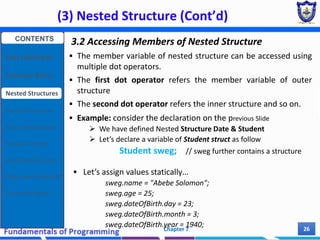
3.2 Accessing Members of Nested Structure
 The member variable of nested structure can be accessed using
multiple dot operators.
 The first dot operator refers the member variable of outer
structure
 The second dot operator refers the inner structure and so on.
 Example: consider the declaration on the previous Slide
 We have defined Nested Structure Date & Student
 Let’s declare a variable of Student struct as follow
Student sweg; // sweg further contains a structure
 Let’s assign values statically…
sweg.name = "Abebe Solomon";
sweg.age = 25;
sweg.dateOfBirth.day = 23;
sweg.dateOfBirth.month = 3;
sweg.dateOfBirth.year = 1940;
CONTENTS
User Defined DT
Structure Basics
Nested Structures
Array of Structures
Struct manipulation
Structure Pointer
Structure & Function
Other User Defined DT
Class and Objects
(3) Nested Structure (Cont’d)
Chapter 7 27
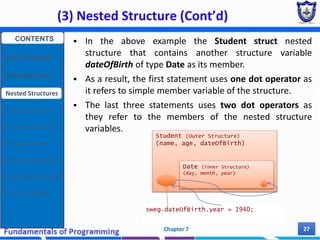
 In the above example the Student struct nested
structure that contains another structure variable
dateOfBirth of type Date as its member.
 As a result, the first statement uses one dot operator as
it refers to simple member variable of the structure.
 The last three statements uses two dot operators as
they refer to the members of the nested structure
variables.
Student (Outer Structure)
(name, age, dateOfBirth)
Date (inner Structure)
(day, month, year)
sweg.dateOfBirth.year = 1940;
CONTENTS
User Defined DT
Structure Basics
Nested Structures
Array of Structures
Struct manipulation
Structure Pointer
Structure & Function
Other User Defined DT
Class and Objects
(3) Nested Structure (Cont’d)
Chapter 7 28
3.3 Defining Structure in Structure (not good practice)
struct moment{
int evnetID;
char eventVenue[20];
struct date{
int day, month, year;
}theDate;
struct time{
int second, minute, hour;
} theTime;
};
How to access an elements of this structure?
Moment event;
event.theDate.day = 25;
event.theTime.hour = 4;
CONTENTS
User Defined DT
Structure Basics
Nested Structures
Array of Structures
Struct manipulation
Structure Pointer
Structure & Function
Other User Defined DT
Class and Objects
(3) Nested Structure (Cont’d)
Chapter 7 29
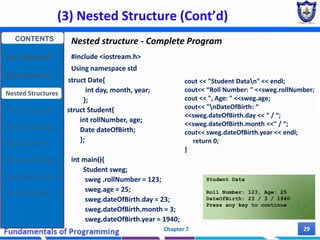
Nested structure - Complete Program
#include <iostream.h>
Using namespace std
struct Date{
int day, month, year;
};
struct Student{
int rollNumber, age;
Date dateOfBirth;
};
int main(){
Student sweg;
sweg .rollNumber = 123;
sweg.age = 25;
sweg.dateOfBirth.day = 23;
sweg.dateOfBirth.month = 3;
sweg.dateOfBirth.year = 1940;
cout << "Student Datan" << endl;
cout<< “Roll Number: " <<sweg.rollNumber;
cout << ", Age: " <<sweg.age;
cout<< "nDateOfBirth: “
<<sweg.dateOfBirth.day << " / “;
<<sweg.dateOfBirth.month <<" / “;
cout<< sweg.dateOfBirth.year << endl;
return 0;
}
Student Data
Roll Number: 123, Age: 25
DateOfBirth: 23 / 3 / 1940
Press any key to continue . . .
CONTENTS
User Defined DT
Structure Basics
Nested Structures
Array of Structures
Struct manipulation
Structure Pointer
Structure & Function
Other User Defined DT
Class and Objects
(3) Nested Structure (Cont’d)
Chapter 7 30
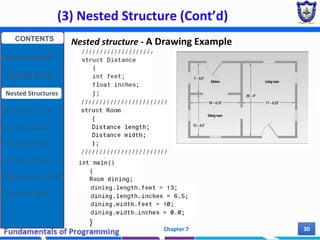
Nested structure - A Drawing Example
}
CONTENTS
User Defined DT
Structure Basics
Nested Structures
Array of Structures
Struct manipulation
Structure Pointer
Structure & Function
Other User Defined DT
Class and Objects
(4) Array of Structure
Chapter 7 31
4.1 Array of Structure Definition
 An array can be of user-defined type such as a structure.
 An array of structure is a type of array in which each
element contains a complete structure.
 It can be used to store many records
 Example
struct Book{
int BookID;
int Pages;
float Price;
}b[3];
 The above example declares a structure Book and defines
an array of structure, b[3] of structure Book.
 The array structure b[3] can store the records of three
books.
CONTENTS
User Defined DT
Structure Basics
Nested Structures
Array of Structures
Struct manipulation
Structure Pointer
Structure & Function
Other User Defined DT
Class and Objects
(4) Array of Structure (Cont’d)
Chapter 7 32
4.2 Manipulating array of Structure
 Like simple array, structure array is accessed by using its index.
 The structure element is accessed by using dot operator.
 Example: Consider the previous declaration of book struct
b[0].BookID= 154;
b[0].Pages = 1036;
b[0].Price = 425;
And simply…
cout << “Book ID: ” << b[0].BookID << endl;
cout << “Book Pages: ” << b[0].Pages << endl;
cout << “Book Price: ” << b[0].Price << endl;
Book b[3];
CONTENTS
User Defined DT
Structure Basics
Nested Structures
Array of Structures
Struct manipulation
Structure Pointer
Structure & Function
Other User Defined DT
Class and Objects
(4) Array of Structure (Cont’d)
Chapter 7 33
4.3 Initializing array of Structure
 An array of structures can be initialized at the time of
declaration by writing the values in braces.
 The values for each element of the array are written in separate
inner braces.
 Example
struct Book{int BookID, Pages; float Price; };
Book b[3] = { { 11, 125, 50.0},
{ 31, 480, 185.75},
{ 45, 360, 145.50} };
 This example declares an array of structure and initializes it.
 The values are written in braces with the help of nested braces,
separated by commas, to refer each book in the Structure
Array.
 Each inner pair of braces is used to initialize one element of the
array.
b[0]
b[1]
b[2]
CONTENTS
User Defined DT
Structure Basics
Nested Structures
Array of Structures
Struct manipulation
Structure Pointer
Structure & Function
Other User Defined DT
Class and Objects
(5) Manipulation of Structure
Chapter 7 34
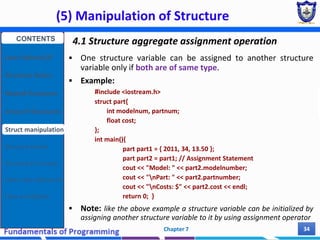
4.1 Structure aggregate assignment operation
 One structure variable can be assigned to another structure
variable only if both are of same type.
 Example:
#include <iostream.h>
struct part{
int modelnum, partnum;
float cost;
};
int main(){
part part1 = { 2011, 34, 13.50 };
part part2 = part1; // Assignment Statement
cout << "Model: " << part2.modelnumber;
cout << "nPart: " << part2.partnumber;
cout << "nCosts: $" << part2.cost << endl;
return 0; }
 Note: like the above example a structure variable can be initialized by
assigning another structure variable to it by using assignment operator
CONTENTS
User Defined DT
Structure Basics
Nested Structures
Array of Structures
Struct manipulation
Structure Pointer
Structure & Function
Other User Defined DT
Class and Objects
(5) Manipulation of Structure (Cont’d)
Chapter 7 35
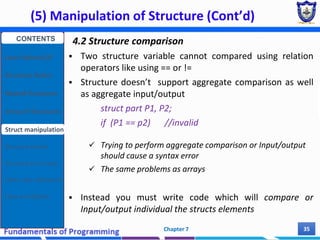
4.2 Structure comparison
 Two structure variable cannot compared using relation
operators like using == or !=
 Structure doesn’t support aggregate comparison as well
as aggregate input/output
struct part P1, P2;
if (P1 == p2) //invalid
 Trying to perform aggregate comparison or Input/output
should cause a syntax error
 The same problems as arrays
 Instead you must write code which will compare or
Input/output individual the structs elements
CONTENTS
User Defined DT
Structure Basics
Nested Structures
Array of Structures
Struct manipulation
Structure Pointer
Structure & Function
Other User Defined DT
Class and Objects
(5) Structure Pointer
Chapter 7 36
Will discussed In the next
Chapter
CONTENTS
User Defined DT
Structure Basics
Nested Structures
Array of Structures
Struct manipulation
Structure Pointer
Structure & Function
Other User Defined DT
Class and Objects
(6) Structure with Function
Chapter 7 37
 Both structure variables and structure elements can be passed to
a function and returned in a similar way as normal arguments.
 Moreover, structure passing can be achieved both by call by
value and call by reference method.
 Example 1: Passing Structure Elements to Functions
#include <iostream>
using namespace std;
struct Student {
char id[10];
float mark[5];
};
float avgMark(float sMark[]){
float total = 0;
for(int i = 0; i<5; i++)
total += sMark[i];
return (total/5);
}
int main() {
Student S1;
cout<<"Enter student marks:n";
for(int i = 0; i<5; i++){
cout<<"Enter "<<i+1<<" Mark: ";
cin>>S1.mark[i];
}
cout<<"Average score: “
<<avgMark(S1.mark)<<endl;
return 0;
}
CONTENTS
User Defined DT
Structure Basics
Nested Structures
Array of Structures
Struct manipulation
Structure Pointer
Structure & Function
Other User Defined DT
Class and Objects
(6) Structure with Function (Cont’d)
Chapter 7 38
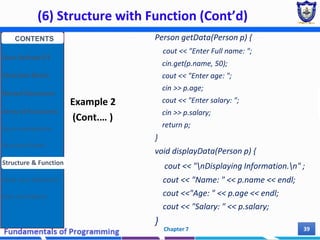
 Example 2: Passing Structure variable by Value and return
structure variable (entire structure).
#include <iostream>
using namespace std;
struct Person {
char name[50];
int age;
float salary;
};
Person getData();
void displayData(Person);
int main() {
Person p1, P2;
p2 = getData(p1);
displayData(p2);
return 0;
}
CONTENTS
User Defined DT
Structure Basics
Nested Structures
Array of Structures
Struct manipulation
Structure Pointer
Structure & Function
Other User Defined DT
Class and Objects
(6) Structure with Function (Cont’d)
Chapter 7 39
Example 2
(Cont.… )
Person getData(Person p) {
cout << "Enter Full name: ";
cin.get(p.name, 50);
cout << "Enter age: ";
cin >> p.age;
cout << "Enter salary: ";
cin >> p.salary;
return p;
}
void displayData(Person p) {
cout << "nDisplaying Information.n" ;
cout << "Name: " << p.name << endl;
cout <<"Age: " << p.age << endl;
cout << "Salary: " << p.salary;
}
CONTENTS
User Defined DT
Structure Basics
Nested Structures
Array of Structures
Struct manipulation
Structure Pointer
Structure & Function
Other User Defined DT
Class and Objects
(6) Structure with Function (Cont’d)
Chapter 7 40
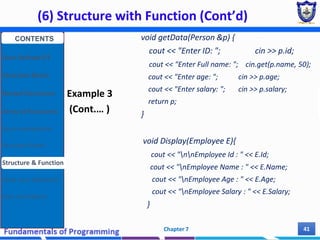
 Example 3: Passing Structure variable by reference
#include <iostream>
using namespace std;
struct Employee {
int Id;
char Name[25];
int Age;
long Salary;
};
void Display(Employee);
Void getData(Employee &);
int main() {
Employee Emp =
{1,"Kumar",29,45000};
Display(Emp);
getData(EMp);
Display(Emp);
return 0;
}
CONTENTS
User Defined DT
Structure Basics
Nested Structures
Array of Structures
Struct manipulation
Structure Pointer
Structure & Function
Other User Defined DT
Class and Objects
(6) Structure with Function (Cont’d)
Chapter 7 41
Example 3
(Cont.… )
void getData(Person &p) {
cout << "Enter ID: "; cin >> p.id;
cout << "Enter Full name: "; cin.get(p.name, 50);
cout << "Enter age: "; cin >> p.age;
cout << "Enter salary: "; cin >> p.salary;
return p;
}
void Display(Employee E){
cout << "nnEmployee Id : " << E.Id;
cout << "nEmployee Name : " << E.Name;
cout << "nEmployee Age : " << E.Age;
cout << "nEmployee Salary : " << E.Salary;
}
CONTENTS
User Defined DT
Structure Basics
Nested Structures
Array of Structures
Struct manipulation
Structure Pointer
Structure & Function
Other User Defined DT
Class and Objects
(6) Structure with Function (Cont’d)
Chapter 7 42
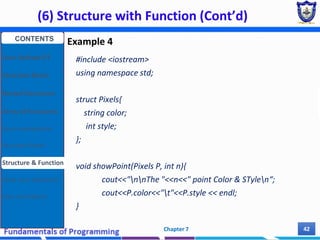
Example 4
#include <iostream>
using namespace std;
struct Pixels{
string color;
int style;
};
void showPoint(Pixels P, int n){
cout<<"nnThe "<<n<<" point Color & STylen“;
cout<<P.color<<"t"<<P.style << endl;
}
CONTENTS
User Defined DT
Structure Basics
Nested Structures
Array of Structures
Struct manipulation
Structure Pointer
Structure & Function
Other User Defined DT
Class and Objects
(6) Structure with Function (Cont’d)
Chapter 7 43
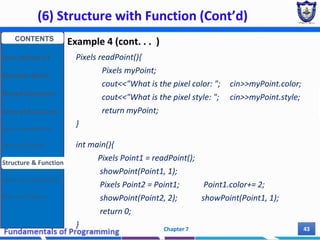
Example 4 (cont. . . )
Pixels readPoint(){
Pixels myPoint;
cout<<"What is the pixel color: "; cin>>myPoint.color;
cout<<"What is the pixel style: "; cin>>myPoint.style;
return myPoint;
}
int main(){
Pixels Point1 = readPoint();
showPoint(Point1, 1);
Pixels Point2 = Point1; Point1.color+= 2;
showPoint(Point2, 2); showPoint(Point1, 1);
return 0;
}
CONTENTS
User Defined DT
Structure Basics
Nested Structures
Array of Structures
Struct manipulation
Structure Pointer
Structure & Function
Other User Defined DT
Class and Objects
Summary
Chapter 7 44
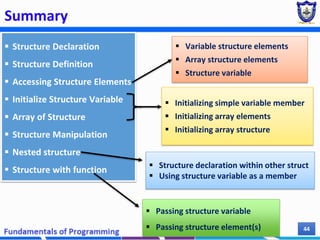
 Structure Declaration
 Structure Definition
 Accessing Structure Elements
 Initialize Structure Variable
 Array of Structure
 Structure Manipulation
 Nested structure
 Structure with function
 Variable structure elements
 Array structure elements
 Structure variable
 Passing structure variable
 Passing structure element(s)
 Initializing simple variable member
 Initializing array elements
 Initializing array structure
 Structure declaration within other struct
 Using structure variable as a member
Practical Exercise
1. [structure Declaration, Definition, initialization and accessing elements]
A phone number, such as (212) 767-8900, can be thought of as having three parts:
the area code (212), the exchange (767), and the number (8900). Write a program
that uses a structure to store these three parts of a phone number separately. Call
the structure phone.
 Create two structure variables of type phone. Initialize one, and have the
user input a number for the other one. Then display both numbers.
2. [Nested & array of structure]
Modify the program you design for Ex. 1 so that the program asks names of 10
persons and also phone numbers. Use the phone structure in the previous exercise
and create another structure that includes names of persons and phone structure.
Chapter 7 45
Practical Exercise
3. [structure with function]
Declare a structure to represent a complex number (a number having a real part
and imaginary part). Write C++ functions to add, subtract, multiply and divide two
complex numbers.
4. [array of structure]
(Financial) Write a C++program that uses a structure for storing a stock name, its
estimated earnings per share, and its estimated price-to-earnings ratio. Have the
program prompt the user to enter these items for five different stocks, each time
using the same structure to store the entered data. When data has been entered
for a particular stock, have the program compute and display the anticipated
stock price based on the entered earnings and price-per-earnings values. For
example, if a user enters the data XYZ, 1.56, 12, the anticipated price for a share
of XYZ stock is (1.56) × (12) = $18.72.
Chapter 7 46
Practical Exercise
5. [structure array with function]
Given a structure a specification to store the details of 10 students (rollno, name,
marks in five subject, BoD which it’s type is Date struct), write a program to input
each students detail using function and perform the following;
a) Compute average score for each student and print the students’ details in
tabular format along with their scores
b) Determine and print students details who scored average mark below 50
6. [structure array with function]
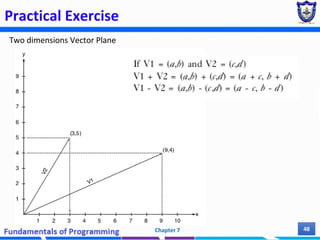
In two dimensions, a vector is a pair of numbers representing directed arrows in a
plane, as shown by vectors V1 and V2 in Figure on the next slide. Two-dimensional
mathematical vectors can be written in the form (a,b), where a and b are called the
x and y components of the vector. Using this information, write a C++program that
defines an array of two mathematical vector structures; each structure consists of
two double-precision components, a and b. Your program should permit a user to
enter two vectors, call two functions that return the sum and difference of the
entered vectors, and display the results calculated by these functions.
Chapter 7 47
Practical Exercise
Two dimensions Vector Plane
Chapter 7 48
MCQ
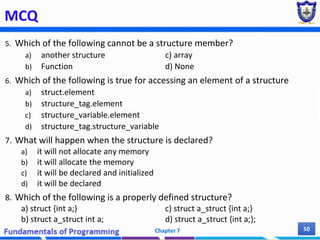
1. Which of keyword is used for structure definition?
a) Structure c) Struct
b) Struct_def d) def_struct e) None of the above
2. An aggregate data type that constructed using other types, is called?
a) Structure c) Class
b) Function d) Pointer e) Elements
3. Which of the following statements is true about C++ structs?
a) All members must be of the same type.
b) Members can be initialized on one line of code.
c) Each member must be passed individually.
d) Functions cannot accept structs as parameters.
4. Structure within a structure is called......
a) Self-Referential Structure c) Nested Structure
b) Array of Structure d) Structure of Structure
Chapter 7 49
MCQ
5. Which of the following cannot be a structure member?
a) another structure c) array
b) Function d) None
6. Which of the following is true for accessing an element of a structure
a) struct.element
b) structure_tag.element
c) structure_variable.element
d) structure_tag.structure_variable
7. What will happen when the structure is declared?
a) it will not allocate any memory
b) it will allocate the memory
c) it will be declared and initialized
d) it will be declared
8. Which of the following is a properly defined structure?
a) struct {int a;} c) struct a_struct {int a;}
b) struct a_struct int a; d) struct a_struct {int a;};
Chapter 7 50
Short answer
1. Why struct keyword is used during structure definition in C?
2. What is preventing the below structure declaration from compiling?
struct Employee { int id; float wage; }
3. What is the output of the following codes?
(3a) (3b)
Chapter 7 51
int main(){
struct student{
int no;
char name[20];
};
struct student s;
s.no = 8;
cout<< s.no;
}
struct MyBox{ int length, breadth, height; };
void dimension (MyBox M){
cout << M.length << "x" << M.breadth << "x";
cout << M.height << endl;
}
int main (){
MyBox B1 = {10, 15, 5}, B2, B3;
++B1.height; dimension(B1);
B3 = B1; ++B3.length;
B3.breadth++; dimension(B3);
B2 = B3; B2.height += 5;
B2.length--; dimension(B2);
return 0; }
Reading Resources/Materials
Chapter 10:
✔ Walter Savitch; Problem Solving With C++ [10th edition],
University of California, San Diego, 2018
Chapter 8:
✔ Bjarne Stroustrup;The C++ Programming Language [4th
Edition], Pearson Education, Inc , 2013
52
Chapter 7
Thank You
For Your Attention!!
53
Chapter 7

Chapter 7 (Part I) - User Defined Datatypes.pdf

  • 1.
    Fundamentals of Computer Programming Chapter7 User Defined Data types (Structure in C++ ) Chere L. (M.Tech) Lecturer, SWEG, AASTU 1
  • 2.
    Outline ▪ Introduction toUser defined Data type ▪ Defining structure (with tag and without tag) ▪ Declaring structure variable ▪ Initializing structure elements ▪ Accessing structure elements ▪ Nested structure  Defining structure within structure  Structure variable within other structure definition ▪ Array of structure ▪ Structure pointer ▪ Structure with function  Structure variable as parameter  Structure as a return type Chapter 7 2
  • 3.
    Outline ▪ Other Userdefined Data types  Type definition (typedef)  Enumerated types (enum)  Anonymous unions (union) ▪ Class and Object as user defined data type  Class and Object Basics  Class and Object Creation Chapter 7 3
  • 4.
    (1) User DefinedData Types Chapter 7 4 CONTENTS User Defined DT Structure Basics Nested Structures Array of Structures Struct manipulation Structure Pointer Structure & Function Other User Defined DT Class and Objects Recalling the categories of Data Types
  • 5.
    (1) User DefinedData Types Chapter 7 5 Why User Defined Data Types? 1. Flexibility • They provide us the ability to create a data structure as per our requirements and needs. 2. Reusability • Once defined, these data types can be reused within many definitions, saving coding time. 3. Encapsulation • In C++/Java/Python the variables and data values stored in User Defined Data types are hidden from other classes as per their accessibility declaration i.e. public, private, protected. The data values remain hidden and safe. CONTENTS User Defined DT Structure Basics Nested Structures Array of Structures Struct manipulation Structure Pointer Structure & Function Other User Defined DT Class and Objects
  • 6.
    (2) Structure Basics Chapter7 6 2.1 Structure  A Structure is a collection of related data items, possibly of different types.  Examples:  Student record: student id, name, major, gender, start year, …  Bank account: account number, name, currency, balance, …  Address book: name, address, telephone number, …  In database applications, structures are called records. CONTENTS User Defined DT Structure Basics Nested Structures Array of Structures Struct manipulation Structure Pointer Structure & Function Other User Defined DT Class and Objects
  • 7.
    (2) Structure Basics(Cont’d) Chapter 7 7 2.2 C++ Structure  Structure is a user defined data type that is an aggregate container  A simple variable can store only one value at a time of single type (atomic)  A structure is can be considered as a collection of those simple variables.  i.e. It used to join simple variables together to form a bit complex variables.  In other words, it contains other data types, which are grouped together into a single user-defined type.  Unlike arrays (homogeneous), structures can store variables of many different types (heterogeneous)  Structures are used when it makes sense to associate two or more data variables. CONTENTS User Defined DT Structure Basics Nested Structures Array of Structures Struct manipulation Structure Pointer Structure & Function Other User Defined DT Class and Objects
  • 8.
    (2) Structure Basics(Cont’d) Chapter 7 8 2.3 Structure Declaration  Programmer can define a new data type that may contain different types of data with the help of structures.  A structure is declared by using C++ keyword struct  Syntax: struct structName{ dataType1 identifier1; dataType2 identifier2; : dateTypeN identifierN; }; CONTENTS User Defined DT Structure Basics Nested Structures Array of Structures Struct manipulation Structure Pointer Structure & Function Other User Defined DT Class and Objects
  • 9.
    (2) Structure Basics(Cont’d) Chapter 7 9 Descriptions  The structure name also called structure tag and used as the name of newly created user defined DT.  Individual components of a structure type are called members (or fields).  The structure members are defined with their data-type (simple, array or struct type) inside the opening and closing curly braces..  Must have unique names within the structure definition  The closing brace is ended with a semicolon.  Structure can be declared inside or outside main function/any other functions  Complex data structures can be formed by defining arrays of structs. CONTENTS User Defined DT Structure Basics Nested Structures Array of Structures Struct manipulation Structure Pointer Structure & Function Other User Defined DT Class and Objects
  • 10.
    (2) Structure Basics(Cont’d) Chapter 7 10  The structure declaration tells the compiler about the details of the structure.  It tells how the structure is organized  It specifies what members the structure will have.  However, memory is not allocated.  Unlike the definition of a simple variable, Structure definition don’t reserve memory  Example: CONTENTS User Defined DT Structure Basics Nested Structures Array of Structures Struct manipulation Structure Pointer Structure & Function Other User Defined DT Class and Objects
  • 11.
    (2) Structure Basics(Cont’d) Chapter 7 11 More Examples struct BankAccount{ char Name[15]; int AcountNo[10]; double balance; Date Birthday; }; struct StudentRecord{ char Name[15]; int Id; char Dept[5]; char Gender; }; Exercise:  Write a structure specification that includes three members student id, age, and mark. Call this structure student The “StudentRecord” structure has 4 members. The “BankAcount” structure has simple, array and structure types as members. CONTENTS User Defined DT Structure Basics Nested Structures Array of Structures Struct manipulation Structure Pointer Structure & Function Other User Defined DT Class and Objects
  • 12.
    (2) Structure Basics(Cont’d) Chapter 7 12 2.4 Structure Definition  By defining a structure you create a new data type.  Once a structure is declared, you can create variables of the new type as follow  Example: Consider the previous StudentRecord strcut definition struct StudentRecord currentStudent; <struct> <struct tag> <identifier>; or <struct tag> <identifier>; keyword struct struct tag variable to hold one student record CONTENTS User Defined DT Structure Basics Nested Structures Array of Structures Struct manipulation Structure Pointer Structure & Function Other User Defined DT Class and Objects
  • 13.
    (2) Structure Basics(Cont’d) Chapter 7 13 Descriptions  The structure variable can be defined after the declaration or the time of structure declaration.  The process of defining a structure variable is same as defining a variable of basic types such as int, char  The definition of the structure variable  Tells the compiler to allocate memory space for the variable.  The compiler automatically allocates sufficient memory according to the elements of the structure.  The memory occupied by the structure variable is equal to the sum of the memory occupied by each member of the structure CONTENTS User Defined DT Structure Basics Nested Structures Array of Structures Struct manipulation Structure Pointer Structure & Function Other User Defined DT Class and Objects
  • 14.
    (2) Structure Basics(Cont’d) Chapter 7 14 • The structure variable p1 will occupy bytes in the memory as follows.  int modelnumber (4 bytes) + int partnumber (4 bytes) + float cost (4 bytes) • Total number of bytes p1 contains in memory is 12 bytes CONTENTS User Defined DT Structure Basics Nested Structures Array of Structures Struct manipulation Structure Pointer Structure & Function Other User Defined DT Class and Objects
  • 15.
    (2) Structure Basics(Cont’d) Chapter 7 15 2.5 Accessing Structure Members  Once a structure variable has been defined, its members can be accessed using the dot operator (also called member access operator)  The dot operator placed between a struct variable and a member variable name for that struct type.  The name of the structure variable is written on the left side of the dot operator where as the name of member variable is written on right side of the dot operator.  Syntax: StructureVariable . MemberVariable;  Example: Part p1; P1.modelNumber; CONTENTS User Defined DT Structure Basics Nested Structures Array of Structures Struct manipulation Structure Pointer Structure & Function Other User Defined DT Class and Objects
  • 16.
    (2) Structure Basics(Cont’d) Chapter 7 16 More Examples Structure (e.g. part ) part1 part2 part part1 part part2 Store values in structure elements part1.modelnumber = 2001 part1.partnumber = 11 part1.cost = 100 Input/output cin>>part2.modelnumber; cin>>part2.partnumber; cin>>part2.cost; cout<<part2.modelnumber; cout<<part2.partnumber; cout<<part2.cost; CONTENTS User Defined DT Structure Basics Nested Structures Array of Structures Struct manipulation Structure Pointer Structure & Function Other User Defined DT Class and Objects
  • 17.
    (2) Structure Basics(Cont’d) Chapter 7 17 Program Examples #include <iostream.h> Using namespace std /***Structure definition***/ //declare a structure struct part{ int modelnum; int partnum; float cost; }; /*** End of Structure ***/ int main(){ //define a structure variable part part1; //give values to structure members part1.modelnum = 6244; part1.partnum = 373; part1.cost = 217.55F; //display structure members cout<<"Model: "<< part1.modelnum; cout<<"nPart: " << part1.partnum; cout<<"nCosts $"<<part1.cost << endl; return 0; } Exercise: • Declare a structure with student attribute (id, name, testMark, final mark) members. Write a program to input data, compute sum of the mark and print the records of the student. CONTENTS User Defined DT Structure Basics Nested Structures Array of Structures Struct manipulation Structure Pointer Structure & Function Other User Defined DT Class and Objects
  • 18.
    (2) Structure Basics(Cont’d) Chapter 7 18 2.6 Initializing Structure Variable  The process of assigning values to structure elements during structure declaration is called Initialization of Structure variables.  The structure members can be initialized when the structure variable is defined.  The syntax for initializing structs is similar to the syntax for arrays where the declaration of structure variable is specified on the left side of assignment operator and the list of values for initialization are written on the right side of assignment operator surrounded by the curly braces.  The values are written in the same sequence in which they are specified in structure declaration.  Each value is separated by comma. CONTENTS User Defined DT Structure Basics Nested Structures Array of Structures Struct manipulation Structure Pointer Structure & Function Other User Defined DT Class and Objects
  • 19.
    (2) Structure Basics(Cont’d) Chapter 7 19 Syntax structureName Identifier = {val1, val2, … , valN} ; Example: Consider the previous part struct declration part tyre = { 2011, 34, 13.50}; Note:  Both the structure variable and initialization can be performed at the time of structure declaration. **Checkout on next slide. struct part { int modelnumber; int partnumber; float cost; }; CONTENTS User Defined DT Structure Basics Nested Structures Array of Structures Struct manipulation Structure Pointer Structure & Function Other User Defined DT Class and Objects
  • 20.
    (2) Structure Basics(Cont’d) Chapter 7 20 #include <iostream.h> using namespace std //specify a structure struct part{ int modelnum; int partnum; float cost; } part1 = {2021, 43, 31.5}; //definition + initialization //at the time of declaration int main(){ //initialize structure variable part part2 = { 2011, 34, 13.50 }; cout << "Model: tPart Numbert Price"; cout<<"n"<< part1.modelnum<<"tt“; cout<< part1.partnum<< "t$“; cout<< part1.cost<<endl; cout << "n"<< part1.modelnum<<"tt“; cout<< part1.partnum<< "t$“; cout<< part1.cost<<endl; return 0; } Program Examples: Initialization of structure variable CONTENTS User Defined DT Structure Basics Nested Structures Array of Structures Struct manipulation Structure Pointer Structure & Function Other User Defined DT Class and Objects
  • 21.
    (2) Structure Basics(Cont’d) Chapter 7 21 Structure Declaration and Definition without tag  Structure without tag and definition  Structure without tag but with definition struct { char name[20]; int age; Date dateOfBirth; }; struct { char name[20]; int age; Date dateOfBirth; }Stud1, Stud2; This kind of structure declaration is useless This kind of structure declaration is not recommendable because the you cannot define a structure of this type some where else CONTENTS User Defined DT Structure Basics Nested Structures Array of Structures Struct manipulation Structure Pointer Structure & Function Other User Defined DT Class and Objects
  • 22.
    (2) Structure Basics(Cont’d) Chapter 7 22 CONTENTS User Defined DT Structure Basics Nested Structures Array of Structures Struct manipulation Structure Pointer Structure & Function Other User Defined DT Class and Objects 2.7 Array as Member of Structure  As discussed earlier a structure may consist of different types of data and the member variables can be simple data types such as int, char and float or can be complex like arrays.  Example: array as a member of structure struct Student{ int Roll_number; int Marks[5]; };  In the above example, the first member is a simple variable of type int where as he second member is an array of integers that can be used to store the marks of five subjects.  Student sweg_2012_Batch; CONTENTS User Defined DT Structure Basics Nested Structures Array of Structures Struct manipulation Structure Pointer Structure & Function Other User Defined DT Class and Objects
  • 23.
    (2) Structure Basics(Cont’d) Chapter 7 23 Accessing array elements  The array stored in a structure can be accessed by using the following 1. Name of Structure Variable - in which an array is defined 2. Dot Operator - used to refer the array. 3. Name of Array 4. Index of desired element - used to access the individual element of the array.  Example # include <iostream.h> struct studen{ int roll_number; int marks[5]; }; student usman; int main(){ usman.roll_number = 101; for(int i = 0; i < 5 ; i++) usman.marks[i] = 1 + rand() % 100 cout<<endl; for(int i = 0; i < 5 ; i++) cout << usman.marks[i] << endl; return 0; } CONTENTS User Defined DT Structure Basics Nested Structures Array of Structures Struct manipulation Structure Pointer Structure & Function Other User Defined DT Class and Objects
  • 24.
    (2) Structure Basics(Cont’d) Chapter 7 24 Initializing array elements  The structure that contains an array as member variable can be initialized in the same the same way as initializing a simple structure variable.  The values are written in braces and each value is separated by comma.  additionally, the values for the member array are written in nested braces, in proper order.  Example # include <iostream.h> Using namespace std; struct studen{ int roll_number; int marks[5]; }; int main() { student usman = {101, {60,75,85,52,53}}; for(int i = 0; i < 5 ; i++) { cout << "Marks: " << usman.marks[i] cout<< endl;} return 0; } CONTENTS User Defined DT Structure Basics Nested Structures Array of Structures Struct manipulation Structure Pointer Structure & Function Other User Defined DT Class and Objects
  • 25.
    (3) Nested Structure Chapter7 25 3.1 Nested Structure  Refers to a structure within a structure  A nested structure is created when the member of a structure is itself a structure or  When the structure definition placed within an other structure definition  Example  In the example above the structure Date contains simple member variables day, month, year of data type int.  Second structure Student contains three member variables.  The first two members are of basic data type, but the third member of Structure Student is itself a structure variable. struct Date{ int date, month, year; }; struct Student{ char name[20]; int age; Date dateOfBirth; }; CONTENTS User Defined DT Structure Basics Nested Structures Array of Structures Struct manipulation Structure Pointer Structure & Function Other User Defined DT Class and Objects
  • 26.
    (3) Nested Structure(Cont’d) Chapter 7 26 3.2 Accessing Members of Nested Structure  The member variable of nested structure can be accessed using multiple dot operators.  The first dot operator refers the member variable of outer structure  The second dot operator refers the inner structure and so on.  Example: consider the declaration on the previous Slide  We have defined Nested Structure Date & Student  Let’s declare a variable of Student struct as follow Student sweg; // sweg further contains a structure  Let’s assign values statically… sweg.name = "Abebe Solomon"; sweg.age = 25; sweg.dateOfBirth.day = 23; sweg.dateOfBirth.month = 3; sweg.dateOfBirth.year = 1940; CONTENTS User Defined DT Structure Basics Nested Structures Array of Structures Struct manipulation Structure Pointer Structure & Function Other User Defined DT Class and Objects
  • 27.
    (3) Nested Structure(Cont’d) Chapter 7 27  In the above example the Student struct nested structure that contains another structure variable dateOfBirth of type Date as its member.  As a result, the first statement uses one dot operator as it refers to simple member variable of the structure.  The last three statements uses two dot operators as they refer to the members of the nested structure variables. Student (Outer Structure) (name, age, dateOfBirth) Date (inner Structure) (day, month, year) sweg.dateOfBirth.year = 1940; CONTENTS User Defined DT Structure Basics Nested Structures Array of Structures Struct manipulation Structure Pointer Structure & Function Other User Defined DT Class and Objects
  • 28.
    (3) Nested Structure(Cont’d) Chapter 7 28 3.3 Defining Structure in Structure (not good practice) struct moment{ int evnetID; char eventVenue[20]; struct date{ int day, month, year; }theDate; struct time{ int second, minute, hour; } theTime; }; How to access an elements of this structure? Moment event; event.theDate.day = 25; event.theTime.hour = 4; CONTENTS User Defined DT Structure Basics Nested Structures Array of Structures Struct manipulation Structure Pointer Structure & Function Other User Defined DT Class and Objects
  • 29.
    (3) Nested Structure(Cont’d) Chapter 7 29 Nested structure - Complete Program #include <iostream.h> Using namespace std struct Date{ int day, month, year; }; struct Student{ int rollNumber, age; Date dateOfBirth; }; int main(){ Student sweg; sweg .rollNumber = 123; sweg.age = 25; sweg.dateOfBirth.day = 23; sweg.dateOfBirth.month = 3; sweg.dateOfBirth.year = 1940; cout << "Student Datan" << endl; cout<< “Roll Number: " <<sweg.rollNumber; cout << ", Age: " <<sweg.age; cout<< "nDateOfBirth: “ <<sweg.dateOfBirth.day << " / “; <<sweg.dateOfBirth.month <<" / “; cout<< sweg.dateOfBirth.year << endl; return 0; } Student Data Roll Number: 123, Age: 25 DateOfBirth: 23 / 3 / 1940 Press any key to continue . . . CONTENTS User Defined DT Structure Basics Nested Structures Array of Structures Struct manipulation Structure Pointer Structure & Function Other User Defined DT Class and Objects
  • 30.
    (3) Nested Structure(Cont’d) Chapter 7 30 Nested structure - A Drawing Example } CONTENTS User Defined DT Structure Basics Nested Structures Array of Structures Struct manipulation Structure Pointer Structure & Function Other User Defined DT Class and Objects
  • 31.
    (4) Array ofStructure Chapter 7 31 4.1 Array of Structure Definition  An array can be of user-defined type such as a structure.  An array of structure is a type of array in which each element contains a complete structure.  It can be used to store many records  Example struct Book{ int BookID; int Pages; float Price; }b[3];  The above example declares a structure Book and defines an array of structure, b[3] of structure Book.  The array structure b[3] can store the records of three books. CONTENTS User Defined DT Structure Basics Nested Structures Array of Structures Struct manipulation Structure Pointer Structure & Function Other User Defined DT Class and Objects
  • 32.
    (4) Array ofStructure (Cont’d) Chapter 7 32 4.2 Manipulating array of Structure  Like simple array, structure array is accessed by using its index.  The structure element is accessed by using dot operator.  Example: Consider the previous declaration of book struct b[0].BookID= 154; b[0].Pages = 1036; b[0].Price = 425; And simply… cout << “Book ID: ” << b[0].BookID << endl; cout << “Book Pages: ” << b[0].Pages << endl; cout << “Book Price: ” << b[0].Price << endl; Book b[3]; CONTENTS User Defined DT Structure Basics Nested Structures Array of Structures Struct manipulation Structure Pointer Structure & Function Other User Defined DT Class and Objects
  • 33.
    (4) Array ofStructure (Cont’d) Chapter 7 33 4.3 Initializing array of Structure  An array of structures can be initialized at the time of declaration by writing the values in braces.  The values for each element of the array are written in separate inner braces.  Example struct Book{int BookID, Pages; float Price; }; Book b[3] = { { 11, 125, 50.0}, { 31, 480, 185.75}, { 45, 360, 145.50} };  This example declares an array of structure and initializes it.  The values are written in braces with the help of nested braces, separated by commas, to refer each book in the Structure Array.  Each inner pair of braces is used to initialize one element of the array. b[0] b[1] b[2] CONTENTS User Defined DT Structure Basics Nested Structures Array of Structures Struct manipulation Structure Pointer Structure & Function Other User Defined DT Class and Objects
  • 34.
    (5) Manipulation ofStructure Chapter 7 34 4.1 Structure aggregate assignment operation  One structure variable can be assigned to another structure variable only if both are of same type.  Example: #include <iostream.h> struct part{ int modelnum, partnum; float cost; }; int main(){ part part1 = { 2011, 34, 13.50 }; part part2 = part1; // Assignment Statement cout << "Model: " << part2.modelnumber; cout << "nPart: " << part2.partnumber; cout << "nCosts: $" << part2.cost << endl; return 0; }  Note: like the above example a structure variable can be initialized by assigning another structure variable to it by using assignment operator CONTENTS User Defined DT Structure Basics Nested Structures Array of Structures Struct manipulation Structure Pointer Structure & Function Other User Defined DT Class and Objects
  • 35.
    (5) Manipulation ofStructure (Cont’d) Chapter 7 35 4.2 Structure comparison  Two structure variable cannot compared using relation operators like using == or !=  Structure doesn’t support aggregate comparison as well as aggregate input/output struct part P1, P2; if (P1 == p2) //invalid  Trying to perform aggregate comparison or Input/output should cause a syntax error  The same problems as arrays  Instead you must write code which will compare or Input/output individual the structs elements CONTENTS User Defined DT Structure Basics Nested Structures Array of Structures Struct manipulation Structure Pointer Structure & Function Other User Defined DT Class and Objects
  • 36.
    (5) Structure Pointer Chapter7 36 Will discussed In the next Chapter CONTENTS User Defined DT Structure Basics Nested Structures Array of Structures Struct manipulation Structure Pointer Structure & Function Other User Defined DT Class and Objects
  • 37.
    (6) Structure withFunction Chapter 7 37  Both structure variables and structure elements can be passed to a function and returned in a similar way as normal arguments.  Moreover, structure passing can be achieved both by call by value and call by reference method.  Example 1: Passing Structure Elements to Functions #include <iostream> using namespace std; struct Student { char id[10]; float mark[5]; }; float avgMark(float sMark[]){ float total = 0; for(int i = 0; i<5; i++) total += sMark[i]; return (total/5); } int main() { Student S1; cout<<"Enter student marks:n"; for(int i = 0; i<5; i++){ cout<<"Enter "<<i+1<<" Mark: "; cin>>S1.mark[i]; } cout<<"Average score: “ <<avgMark(S1.mark)<<endl; return 0; } CONTENTS User Defined DT Structure Basics Nested Structures Array of Structures Struct manipulation Structure Pointer Structure & Function Other User Defined DT Class and Objects
  • 38.
    (6) Structure withFunction (Cont’d) Chapter 7 38  Example 2: Passing Structure variable by Value and return structure variable (entire structure). #include <iostream> using namespace std; struct Person { char name[50]; int age; float salary; }; Person getData(); void displayData(Person); int main() { Person p1, P2; p2 = getData(p1); displayData(p2); return 0; } CONTENTS User Defined DT Structure Basics Nested Structures Array of Structures Struct manipulation Structure Pointer Structure & Function Other User Defined DT Class and Objects
  • 39.
    (6) Structure withFunction (Cont’d) Chapter 7 39 Example 2 (Cont.… ) Person getData(Person p) { cout << "Enter Full name: "; cin.get(p.name, 50); cout << "Enter age: "; cin >> p.age; cout << "Enter salary: "; cin >> p.salary; return p; } void displayData(Person p) { cout << "nDisplaying Information.n" ; cout << "Name: " << p.name << endl; cout <<"Age: " << p.age << endl; cout << "Salary: " << p.salary; } CONTENTS User Defined DT Structure Basics Nested Structures Array of Structures Struct manipulation Structure Pointer Structure & Function Other User Defined DT Class and Objects
  • 40.
    (6) Structure withFunction (Cont’d) Chapter 7 40  Example 3: Passing Structure variable by reference #include <iostream> using namespace std; struct Employee { int Id; char Name[25]; int Age; long Salary; }; void Display(Employee); Void getData(Employee &); int main() { Employee Emp = {1,"Kumar",29,45000}; Display(Emp); getData(EMp); Display(Emp); return 0; } CONTENTS User Defined DT Structure Basics Nested Structures Array of Structures Struct manipulation Structure Pointer Structure & Function Other User Defined DT Class and Objects
  • 41.
    (6) Structure withFunction (Cont’d) Chapter 7 41 Example 3 (Cont.… ) void getData(Person &p) { cout << "Enter ID: "; cin >> p.id; cout << "Enter Full name: "; cin.get(p.name, 50); cout << "Enter age: "; cin >> p.age; cout << "Enter salary: "; cin >> p.salary; return p; } void Display(Employee E){ cout << "nnEmployee Id : " << E.Id; cout << "nEmployee Name : " << E.Name; cout << "nEmployee Age : " << E.Age; cout << "nEmployee Salary : " << E.Salary; } CONTENTS User Defined DT Structure Basics Nested Structures Array of Structures Struct manipulation Structure Pointer Structure & Function Other User Defined DT Class and Objects
  • 42.
    (6) Structure withFunction (Cont’d) Chapter 7 42 Example 4 #include <iostream> using namespace std; struct Pixels{ string color; int style; }; void showPoint(Pixels P, int n){ cout<<"nnThe "<<n<<" point Color & STylen“; cout<<P.color<<"t"<<P.style << endl; } CONTENTS User Defined DT Structure Basics Nested Structures Array of Structures Struct manipulation Structure Pointer Structure & Function Other User Defined DT Class and Objects
  • 43.
    (6) Structure withFunction (Cont’d) Chapter 7 43 Example 4 (cont. . . ) Pixels readPoint(){ Pixels myPoint; cout<<"What is the pixel color: "; cin>>myPoint.color; cout<<"What is the pixel style: "; cin>>myPoint.style; return myPoint; } int main(){ Pixels Point1 = readPoint(); showPoint(Point1, 1); Pixels Point2 = Point1; Point1.color+= 2; showPoint(Point2, 2); showPoint(Point1, 1); return 0; } CONTENTS User Defined DT Structure Basics Nested Structures Array of Structures Struct manipulation Structure Pointer Structure & Function Other User Defined DT Class and Objects
  • 44.
    Summary Chapter 7 44 Structure Declaration  Structure Definition  Accessing Structure Elements  Initialize Structure Variable  Array of Structure  Structure Manipulation  Nested structure  Structure with function  Variable structure elements  Array structure elements  Structure variable  Passing structure variable  Passing structure element(s)  Initializing simple variable member  Initializing array elements  Initializing array structure  Structure declaration within other struct  Using structure variable as a member
  • 45.
    Practical Exercise 1. [structureDeclaration, Definition, initialization and accessing elements] A phone number, such as (212) 767-8900, can be thought of as having three parts: the area code (212), the exchange (767), and the number (8900). Write a program that uses a structure to store these three parts of a phone number separately. Call the structure phone.  Create two structure variables of type phone. Initialize one, and have the user input a number for the other one. Then display both numbers. 2. [Nested & array of structure] Modify the program you design for Ex. 1 so that the program asks names of 10 persons and also phone numbers. Use the phone structure in the previous exercise and create another structure that includes names of persons and phone structure. Chapter 7 45
  • 46.
    Practical Exercise 3. [structurewith function] Declare a structure to represent a complex number (a number having a real part and imaginary part). Write C++ functions to add, subtract, multiply and divide two complex numbers. 4. [array of structure] (Financial) Write a C++program that uses a structure for storing a stock name, its estimated earnings per share, and its estimated price-to-earnings ratio. Have the program prompt the user to enter these items for five different stocks, each time using the same structure to store the entered data. When data has been entered for a particular stock, have the program compute and display the anticipated stock price based on the entered earnings and price-per-earnings values. For example, if a user enters the data XYZ, 1.56, 12, the anticipated price for a share of XYZ stock is (1.56) × (12) = $18.72. Chapter 7 46
  • 47.
    Practical Exercise 5. [structurearray with function] Given a structure a specification to store the details of 10 students (rollno, name, marks in five subject, BoD which it’s type is Date struct), write a program to input each students detail using function and perform the following; a) Compute average score for each student and print the students’ details in tabular format along with their scores b) Determine and print students details who scored average mark below 50 6. [structure array with function] In two dimensions, a vector is a pair of numbers representing directed arrows in a plane, as shown by vectors V1 and V2 in Figure on the next slide. Two-dimensional mathematical vectors can be written in the form (a,b), where a and b are called the x and y components of the vector. Using this information, write a C++program that defines an array of two mathematical vector structures; each structure consists of two double-precision components, a and b. Your program should permit a user to enter two vectors, call two functions that return the sum and difference of the entered vectors, and display the results calculated by these functions. Chapter 7 47
  • 48.
    Practical Exercise Two dimensionsVector Plane Chapter 7 48
  • 49.
    MCQ 1. Which ofkeyword is used for structure definition? a) Structure c) Struct b) Struct_def d) def_struct e) None of the above 2. An aggregate data type that constructed using other types, is called? a) Structure c) Class b) Function d) Pointer e) Elements 3. Which of the following statements is true about C++ structs? a) All members must be of the same type. b) Members can be initialized on one line of code. c) Each member must be passed individually. d) Functions cannot accept structs as parameters. 4. Structure within a structure is called...... a) Self-Referential Structure c) Nested Structure b) Array of Structure d) Structure of Structure Chapter 7 49
  • 50.
    MCQ 5. Which ofthe following cannot be a structure member? a) another structure c) array b) Function d) None 6. Which of the following is true for accessing an element of a structure a) struct.element b) structure_tag.element c) structure_variable.element d) structure_tag.structure_variable 7. What will happen when the structure is declared? a) it will not allocate any memory b) it will allocate the memory c) it will be declared and initialized d) it will be declared 8. Which of the following is a properly defined structure? a) struct {int a;} c) struct a_struct {int a;} b) struct a_struct int a; d) struct a_struct {int a;}; Chapter 7 50
  • 51.
    Short answer 1. Whystruct keyword is used during structure definition in C? 2. What is preventing the below structure declaration from compiling? struct Employee { int id; float wage; } 3. What is the output of the following codes? (3a) (3b) Chapter 7 51 int main(){ struct student{ int no; char name[20]; }; struct student s; s.no = 8; cout<< s.no; } struct MyBox{ int length, breadth, height; }; void dimension (MyBox M){ cout << M.length << "x" << M.breadth << "x"; cout << M.height << endl; } int main (){ MyBox B1 = {10, 15, 5}, B2, B3; ++B1.height; dimension(B1); B3 = B1; ++B3.length; B3.breadth++; dimension(B3); B2 = B3; B2.height += 5; B2.length--; dimension(B2); return 0; }
  • 52.
    Reading Resources/Materials Chapter 10: ✔Walter Savitch; Problem Solving With C++ [10th edition], University of California, San Diego, 2018 Chapter 8: ✔ Bjarne Stroustrup;The C++ Programming Language [4th Edition], Pearson Education, Inc , 2013 52 Chapter 7
  • 53.
    Thank You For YourAttention!! 53 Chapter 7