Principles of Management
Making Decisions
Describe the eight steps in the decision-making process and
can use it in daily life
 Explain the three ways through which managers make
decisions.
 Classify decisions and decision-making conditions.
 Describe different decision-making styles and discuss how
biases effect decision making.
 Identify effective decision making techniques.
 Recognize, analyze and use alternatives, while making
decisions
Students will be able to :
Student
Gain
Decision
Making a choice from two or more
alternatives.
Why Decision-making
Decision Making
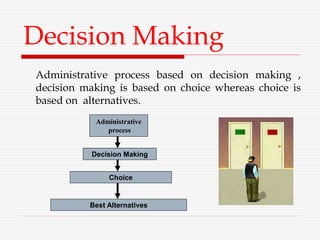
Administrative process based on decision making ,
decision making is based on choice whereas choice is
based on alternatives.
Administrative
process
Decision Making
Choice
Best Alternatives
The Decision-Making Process
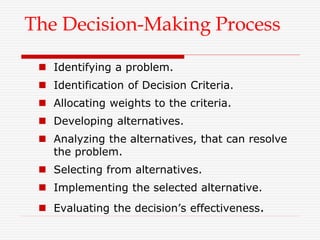
 Identifying a problem.
 Identification of Decision Criteria.
 Allocating weights to the criteria.
 Developing alternatives.
 Analyzing the alternatives, that can resolve
the problem.
 Selecting from alternatives.
 Implementing the selected alternative.
 Evaluating the decision’s effectiveness.
6–7
The Decision Making
Process
Step 1:
Identifying the Problem
Problem
A discrepancy between an existing and desired state of
affairs.
 The decision making process begins by determining that a
problem exists: that is, there is an unsatisfactory condition.
This is frequently expressed as a disparity between what is
and what should be.
 Whether a decision is necessary or not depends on the
administrator’s perception. What one person sees as a
“problem” another may see as perfectly acceptable state of
affairs. So, the decision process begins with administrator’s
recognition that there is a gap between what is desired and
what actually is.
 e.g. Purchase a new Laptop
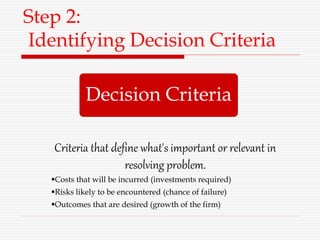
Step 2:
Identifying Decision Criteria
Decision Criteria
Criteria that define what's important or relevant in
resolving problem.
Costs that will be incurred (investments required)
Risks likely to be encountered (chance of failure)
Outcomes that are desired (growth of the firm)
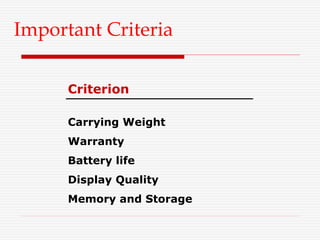
Important Criteria
Criterion
Carrying Weight
Warranty
Battery life
Display Quality
Memory and Storage
Step 3:
Allocating Weights to the Criteria
Assigning a weight to each item
places the items in the correct
priority order of their importance
in the decision making process.(1-
10)
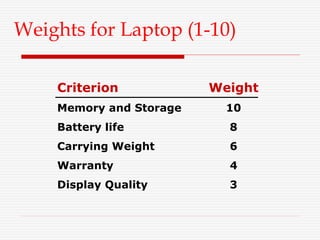
Weights for Laptop (1-10)
Criterion Weight
Memory and Storage 10
Battery life 8
Carrying Weight 6
Warranty 4
Display Quality 3
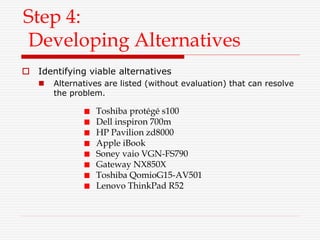
Step 4:
Developing Alternatives
Toshiba protégé s100
Dell inspiron 700m
HP Pavilion zd8000
Apple iBook
Soney vaio VGN-FS790
Gateway NX850X
Toshiba QomioG15-AV501
Lenovo ThinkPad R52
 Identifying viable alternatives
 Alternatives are listed (without evaluation) that can resolve
the problem.
Step 5:
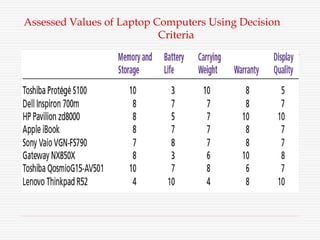
Analyzing Alternatives
• Appraising each alternative’s strengths and
weaknesses
An alternative’s appraisal is based on its ability to
resolve the issues identified in steps 2 and 3.
Assessed Values of Laptop Computers Using Decision
Criteria
Step 6:
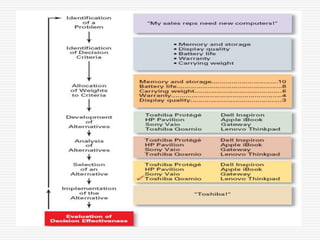
Selecting an Alternative
Choosing the best alternative
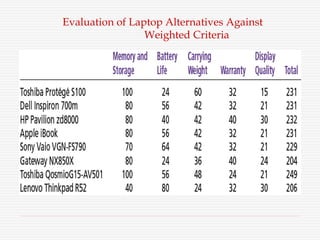
 The alternative with the highest total weight is chosen.
The final step in decision making process takes place when
all the alternatives have been enumerated and evaluated
against the decision criteria. This final step is the selection of
the best alternative which has quantitatively been
determined.
Evaluation of Laptop Alternatives Against
Weighted Criteria
Step 7:
Implementing the Alternative
• Putting the chosen alternative into action.
Conveying the decision to and gaining
commitment from those who will carry out the
decision.
Step 8:
Evaluating the Decision’s Effectiveness
 The soundness of the decision is judged by its
outcomes.
 How effectively was the problem resolved by
outcomes resulting from the chosen alternatives?
 If the problem was not resolved, what went wrong?
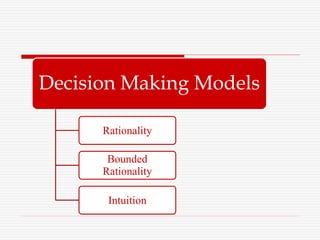
Decision Making Models
Rationality
Bounded
Rationality
Intuition
Rational decision-making model
 Managers make consistent, value-
maximizing choices with specified
constraints.
 Assumptions are that, decision makers:
 Are perfectly rational, fully objective, and logical.
 Have carefully defined the problem and identified
all viable alternatives.
 Have a clear and specific goal
 Will select the alternative that maximizes
outcomes in the organization’s interests rather
than in their personal interests.
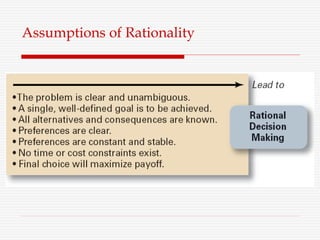
Assumptions of Rationality
 Managers make decisions rationally, but are limited
(bounded) by their ability to process information.
 Assumptions are that decision makers:
 Will not seek out or have knowledge of all alternatives
 Will satisfice—choose the first alternative encountered
that satisfactorily solves the problem—rather than
maximize the outcome of their decision by considering
all alternatives and choosing the best.
 Influence on decision making
 Escalation of commitment: an increased commitment to
a previous decision despite evidence that it may have
been wrong.
Bounded Rational decision-making
model
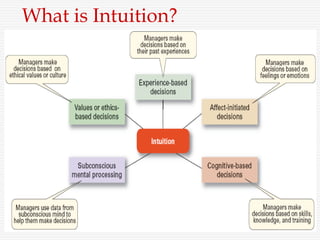
The Role of Intuition
 Intuitive decision making
 Making decisions on the basis of
experience, feelings, and accumulated
judgment.
What is Intuition?
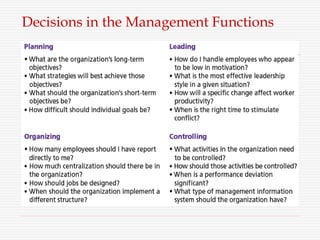
Decisions in the Management Functions
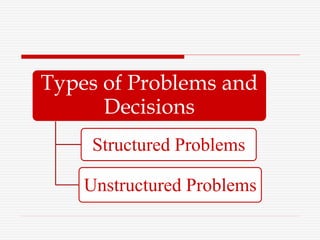
Types of Problems and
Decisions
Structured Problems
Unstructured Problems
Structured Problems
 Involve goals that are clear.
 Are familiar (have occurred before).
 Are easily and completely defined—
information about the problem is available
and complete.
 Programmed Decision
 A repetitive decision that can be handled by
a routine approach.
Types of Programmed Decisions
 Policy
 A general guideline for making a decision about a
structured problem.
 Procedure
 A series of interrelated steps that a manager can use
to respond (applying a policy) to a structured
problem.
 Rule
 An explicit statement that limits what a manager or
employee can or cannot do.
 Problems that are new or unusual and for which
information is ambiguous or incomplete.
 Problems that will require custom-made solutions.
 Non-programmed Decisions
 Decisions that are unique and nonrecurring.
 Decisions that generate unique responses.
Unstructured Problems
EXAMPLE
 Strategies
 Budgets
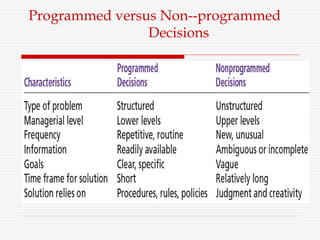
Programmed versus Non--programmed
Decisions
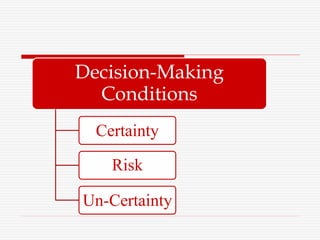
Decision-Making
Conditions
Certainty
Risk
Un-Certainty
Certainty
A situation in which a manager can make an
accurate decision because the outcome of every
alternative choice is known.
Risk
A situation in which the manager is able to
estimate the likelihood (probability) of
outcomes that result from the choice of
particular alternatives.
Uncertainty
 Limited information prevents estimation of
outcome probabilities for alternatives associated
with the problem and may force managers to rely
on intuition, hunches, and “gut feelings”.
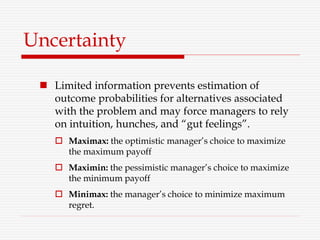
 Maximax: the optimistic manager’s choice to maximize
the maximum payoff
 Maximin: the pessimistic manager’s choice to maximize
the minimum payoff
 Minimax: the manager’s choice to minimize maximum
regret.
Decision-Making Styles
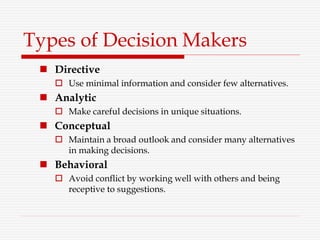
Types of Decision Makers
 Directive
 Use minimal information and consider few alternatives.
 Analytic
 Make careful decisions in unique situations.
 Conceptual
 Maintain a broad outlook and consider many alternatives
in making decisions.
 Behavioral
 Avoid conflict by working well with others and being
receptive to suggestions.
Decision-Making
Biases & Errors
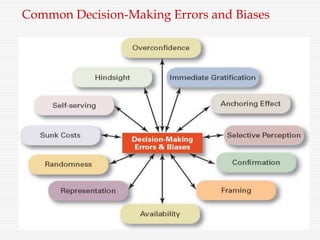
Common Decision-Making Errors and Biases
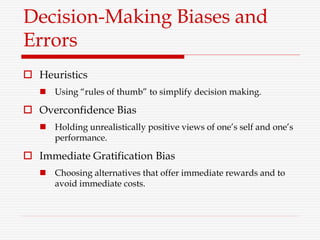
Decision-Making Biases and
Errors
 Heuristics
 Using “rules of thumb” to simplify decision making.
 Overconfidence Bias
 Holding unrealistically positive views of one’s self and one’s
performance.
 Immediate Gratification Bias
 Choosing alternatives that offer immediate rewards and to
avoid immediate costs.
 Anchoring Effect
 Fixating on initial information and ignoring subsequent
information.
 Selective Perception Bias
 Selecting organizing and interpreting events based on the
decision maker’s biased perceptions.
 Confirmation Bias
 Seeking out information that reaffirms past choices and
discounting contradictory information.
 Framing Bias
 Selecting and highlighting certain aspects of a situation while
ignoring other aspects.
 Availability Bias
 Losing decision-making objectivity by focusing on the most
recent events.
 Representation Bias
 Drawing analogies and seeing identical situations when none
exist.
 Randomness Bias
 Creating unfounded meaning out of random events.
 Sunk Costs Errors
 Forgetting that current actions cannot influence past events
and relate only to future consequences.
 Self-Serving Bias
 Taking quick credit for successes and blaming outside factors
for failures.
 Hindsight Bias
 Mistakenly believing that an event could have been predicted
once the actual outcome is known (after-the-fact).

CH 2 MAKING DECISIONS.pptx

  • 1.
  • 2.
    Describe the eightsteps in the decision-making process and can use it in daily life  Explain the three ways through which managers make decisions.  Classify decisions and decision-making conditions.  Describe different decision-making styles and discuss how biases effect decision making.  Identify effective decision making techniques.  Recognize, analyze and use alternatives, while making decisions Students will be able to : Student Gain
  • 3.
    Decision Making a choicefrom two or more alternatives.
  • 4.
  • 5.
    Decision Making Administrative processbased on decision making , decision making is based on choice whereas choice is based on alternatives. Administrative process Decision Making Choice Best Alternatives
  • 6.
    The Decision-Making Process Identifying a problem.  Identification of Decision Criteria.  Allocating weights to the criteria.  Developing alternatives.  Analyzing the alternatives, that can resolve the problem.  Selecting from alternatives.  Implementing the selected alternative.  Evaluating the decision’s effectiveness.
  • 7.
  • 8.
    Step 1: Identifying theProblem Problem A discrepancy between an existing and desired state of affairs.
  • 9.
     The decisionmaking process begins by determining that a problem exists: that is, there is an unsatisfactory condition. This is frequently expressed as a disparity between what is and what should be.  Whether a decision is necessary or not depends on the administrator’s perception. What one person sees as a “problem” another may see as perfectly acceptable state of affairs. So, the decision process begins with administrator’s recognition that there is a gap between what is desired and what actually is.  e.g. Purchase a new Laptop
  • 10.
    Step 2: Identifying DecisionCriteria Decision Criteria Criteria that define what's important or relevant in resolving problem. Costs that will be incurred (investments required) Risks likely to be encountered (chance of failure) Outcomes that are desired (growth of the firm)
  • 11.
  • 12.
    Step 3: Allocating Weightsto the Criteria Assigning a weight to each item places the items in the correct priority order of their importance in the decision making process.(1- 10)
  • 13.
    Weights for Laptop(1-10) Criterion Weight Memory and Storage 10 Battery life 8 Carrying Weight 6 Warranty 4 Display Quality 3
  • 14.
    Step 4: Developing Alternatives Toshibaprotégé s100 Dell inspiron 700m HP Pavilion zd8000 Apple iBook Soney vaio VGN-FS790 Gateway NX850X Toshiba QomioG15-AV501 Lenovo ThinkPad R52  Identifying viable alternatives  Alternatives are listed (without evaluation) that can resolve the problem.
  • 15.
    Step 5: Analyzing Alternatives •Appraising each alternative’s strengths and weaknesses An alternative’s appraisal is based on its ability to resolve the issues identified in steps 2 and 3.
  • 16.
    Assessed Values ofLaptop Computers Using Decision Criteria
  • 17.
    Step 6: Selecting anAlternative Choosing the best alternative  The alternative with the highest total weight is chosen. The final step in decision making process takes place when all the alternatives have been enumerated and evaluated against the decision criteria. This final step is the selection of the best alternative which has quantitatively been determined.
  • 18.
    Evaluation of LaptopAlternatives Against Weighted Criteria
  • 19.
    Step 7: Implementing theAlternative • Putting the chosen alternative into action. Conveying the decision to and gaining commitment from those who will carry out the decision.
  • 20.
    Step 8: Evaluating theDecision’s Effectiveness  The soundness of the decision is judged by its outcomes.  How effectively was the problem resolved by outcomes resulting from the chosen alternatives?  If the problem was not resolved, what went wrong?
  • 22.
  • 23.
    Rational decision-making model Managers make consistent, value- maximizing choices with specified constraints.  Assumptions are that, decision makers:  Are perfectly rational, fully objective, and logical.  Have carefully defined the problem and identified all viable alternatives.  Have a clear and specific goal  Will select the alternative that maximizes outcomes in the organization’s interests rather than in their personal interests.
  • 24.
  • 25.
     Managers makedecisions rationally, but are limited (bounded) by their ability to process information.  Assumptions are that decision makers:  Will not seek out or have knowledge of all alternatives  Will satisfice—choose the first alternative encountered that satisfactorily solves the problem—rather than maximize the outcome of their decision by considering all alternatives and choosing the best.  Influence on decision making  Escalation of commitment: an increased commitment to a previous decision despite evidence that it may have been wrong. Bounded Rational decision-making model
  • 26.
    The Role ofIntuition  Intuitive decision making  Making decisions on the basis of experience, feelings, and accumulated judgment.
  • 27.
  • 28.
    Decisions in theManagement Functions
  • 29.
    Types of Problemsand Decisions Structured Problems Unstructured Problems
  • 30.
    Structured Problems  Involvegoals that are clear.  Are familiar (have occurred before).  Are easily and completely defined— information about the problem is available and complete.  Programmed Decision  A repetitive decision that can be handled by a routine approach.
  • 31.
    Types of ProgrammedDecisions  Policy  A general guideline for making a decision about a structured problem.  Procedure  A series of interrelated steps that a manager can use to respond (applying a policy) to a structured problem.  Rule  An explicit statement that limits what a manager or employee can or cannot do.
  • 32.
     Problems thatare new or unusual and for which information is ambiguous or incomplete.  Problems that will require custom-made solutions.  Non-programmed Decisions  Decisions that are unique and nonrecurring.  Decisions that generate unique responses. Unstructured Problems
  • 33.
  • 34.
  • 35.
  • 36.
    Certainty A situation inwhich a manager can make an accurate decision because the outcome of every alternative choice is known.
  • 37.
    Risk A situation inwhich the manager is able to estimate the likelihood (probability) of outcomes that result from the choice of particular alternatives.
  • 38.
    Uncertainty  Limited informationprevents estimation of outcome probabilities for alternatives associated with the problem and may force managers to rely on intuition, hunches, and “gut feelings”.  Maximax: the optimistic manager’s choice to maximize the maximum payoff  Maximin: the pessimistic manager’s choice to maximize the minimum payoff  Minimax: the manager’s choice to minimize maximum regret.
  • 39.
  • 40.
    Types of DecisionMakers  Directive  Use minimal information and consider few alternatives.  Analytic  Make careful decisions in unique situations.  Conceptual  Maintain a broad outlook and consider many alternatives in making decisions.  Behavioral  Avoid conflict by working well with others and being receptive to suggestions.
  • 41.
  • 42.
  • 43.
    Decision-Making Biases and Errors Heuristics  Using “rules of thumb” to simplify decision making.  Overconfidence Bias  Holding unrealistically positive views of one’s self and one’s performance.  Immediate Gratification Bias  Choosing alternatives that offer immediate rewards and to avoid immediate costs.
  • 44.
     Anchoring Effect Fixating on initial information and ignoring subsequent information.  Selective Perception Bias  Selecting organizing and interpreting events based on the decision maker’s biased perceptions.  Confirmation Bias  Seeking out information that reaffirms past choices and discounting contradictory information.
  • 45.
     Framing Bias Selecting and highlighting certain aspects of a situation while ignoring other aspects.  Availability Bias  Losing decision-making objectivity by focusing on the most recent events.  Representation Bias  Drawing analogies and seeing identical situations when none exist.  Randomness Bias  Creating unfounded meaning out of random events.
  • 46.
     Sunk CostsErrors  Forgetting that current actions cannot influence past events and relate only to future consequences.  Self-Serving Bias  Taking quick credit for successes and blaming outside factors for failures.  Hindsight Bias  Mistakenly believing that an event could have been predicted once the actual outcome is known (after-the-fact).