13-1
ANSYS, Inc. Proprietary
© 2009 ANSYS, Inc. All rights reserved.
April 28, 2009
Inventory #002598
Chapter 13
Solver .out File and CCL
Introduction to CFX
Out File
13-2
ANSYS, Inc. Proprietary
© 2009 ANSYS, Inc. All rights reserved.
April 28, 2009
Inventory #002598
Training ManualSolver Output File
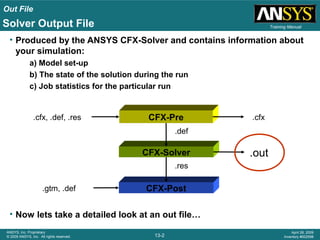
• Produced by the ANSYS CFX-Solver and contains information about
your simulation:
a) Model set-up
b) The state of the solution during the run
c) Job statistics for the particular run
• Now lets take a detailed look at an out file…
CFX-Solver
CFX-Pre
CFX-Post
.def
.res
.cfx.cfx, .def, .res
.out
.gtm, .def
Out File
13-3
ANSYS, Inc. Proprietary
© 2009 ANSYS, Inc. All rights reserved.
April 28, 2009
Inventory #002598
Training Manual
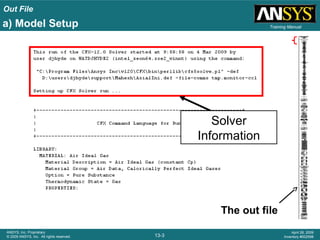
Solver
Information
a) Model Setup
The out file
Out File
13-4
ANSYS, Inc. Proprietary
© 2009 ANSYS, Inc. All rights reserved.
April 28, 2009
Inventory #002598
Training Manual
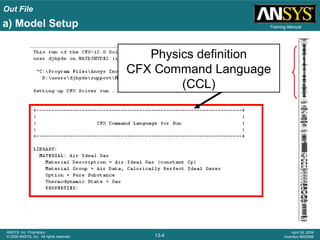
Physics definition
CFX Command Language
(CCL)
a) Model Setup
Out File
13-5
ANSYS, Inc. Proprietary
© 2009 ANSYS, Inc. All rights reserved.
April 28, 2009
Inventory #002598
Training Manual
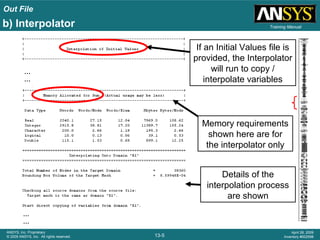
If an Initial Values file is
provided, the Interpolator
will run to copy /
interpolate variables
b) Interpolator
…
…
…
…
Memory requirements
shown here are for
the interpolator only
Details of the
interpolation process
are shown
Out File
13-6
ANSYS, Inc. Proprietary
© 2009 ANSYS, Inc. All rights reserved.
April 28, 2009
Inventory #002598
Training Manual
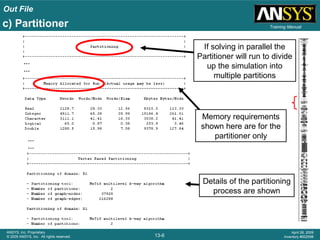
If solving in parallel the
Partitioner will run to divide
up the simulation into
multiple partitions
c) Partitioner
…
…
…
…
Memory requirements
shown here are for the
partitioner only
Details of the partitioning
process are shown
Out File
13-7
ANSYS, Inc. Proprietary
© 2009 ANSYS, Inc. All rights reserved.
April 28, 2009
Inventory #002598
Training Manuald) Solver
…
…
…
…
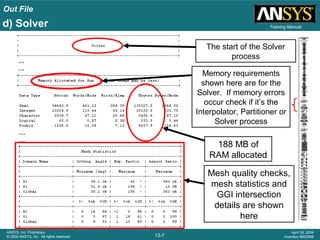
Mesh quality checks,
mesh statistics and
GGI intersection
details are shown
here
188 MB of
RAM allocated
The start of the Solver
process
Memory requirements
shown here are for the
Solver. If memory errors
occur check if it’s the
Interpolator, Partitioner or
Solver process
Out File
13-8
ANSYS, Inc. Proprietary
© 2009 ANSYS, Inc. All rights reserved.
April 28, 2009
Inventory #002598
Training Manual
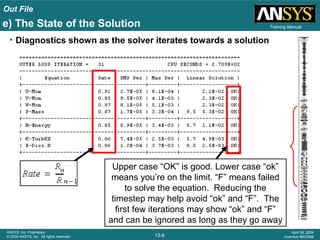
• Diagnostics shown as the solver iterates towards a solution
Upper case “OK” is good. Lower case “ok”
means you’re on the limit. “F” means failed
to solve the equation. Reducing the
timestep may help avoid “ok” and “F”. The
first few iterations may show “ok” and “F”
and can be ignored as long as they go away
e) The State of the Solution
Out File
13-9
ANSYS, Inc. Proprietary
© 2009 ANSYS, Inc. All rights reserved.
April 28, 2009
Inventory #002598
Training Manual
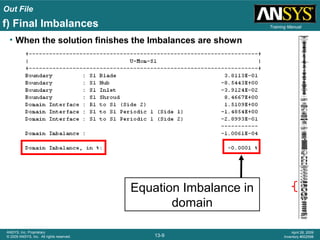
• When the solution finishes the Imbalances are shown
Equation Imbalance in
domain
f) Final Imbalances
Out File
13-10
ANSYS, Inc. Proprietary
© 2009 ANSYS, Inc. All rights reserved.
April 28, 2009
Inventory #002598
Training Manual
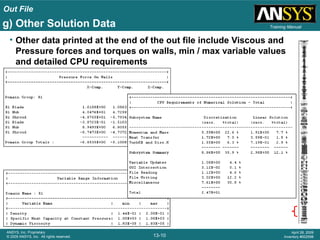
• Other data printed at the end of the out file include Viscous and
Pressure forces and torques on walls, min / max variable values
and detailed CPU requirements
g) Other Solution Data
Out File
13-11
ANSYS, Inc. Proprietary
© 2009 ANSYS, Inc. All rights reserved.
April 28, 2009
Inventory #002598
Training ManualKey Point
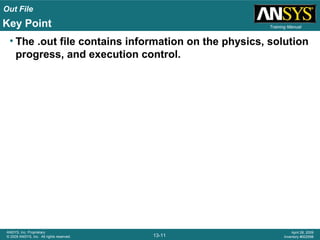
• The .out file contains information on the physics, solution
progress, and execution control.
CCL
13-12
ANSYS, Inc. Proprietary
© 2009 ANSYS, Inc. All rights reserved.
April 28, 2009
Inventory #002598
Training Manual
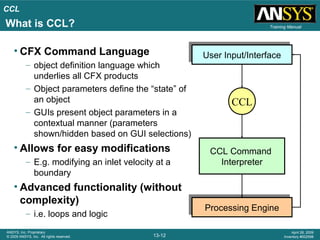
• CFX Command Language
– object definition language which
underlies all CFX products
– Object parameters define the “state” of
an object
– GUIs present object parameters in a
contextual manner (parameters
shown/hidden based on GUI selections)
• Allows for easy modifications
– E.g. modifying an inlet velocity at a
boundary
• Advanced functionality (without
complexity)
– i.e. loops and logic
CCL Command
Interpreter
User Input/InterfaceUser Input/Interface
Processing EngineProcessing Engine
CCL
What is CCL?
CCL
13-13
ANSYS, Inc. Proprietary
© 2009 ANSYS, Inc. All rights reserved.
April 28, 2009
Inventory #002598
Training Manual
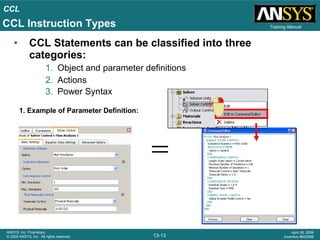
• CCL Statements can be classified into three
categories:
1. Object and parameter definitions
2. Actions
3. Power Syntax
1. Example of Parameter Definition:
CCL Instruction Types
CCL
13-14
ANSYS, Inc. Proprietary
© 2009 ANSYS, Inc. All rights reserved.
April 28, 2009
Inventory #002598
Training Manual
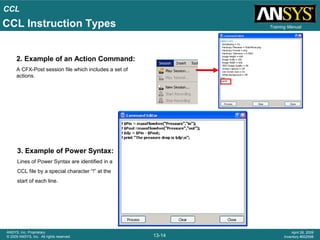
2. Example of an Action Command:
A CFX-Post session file which includes a set of
actions.
3. Example of Power Syntax:
Lines of Power Syntax are identified in a
CCL file by a special character “!” at the
start of each line.
CCL Instruction Types
CCL
13-15
ANSYS, Inc. Proprietary
© 2009 ANSYS, Inc. All rights reserved.
April 28, 2009
Inventory #002598
Training Manual
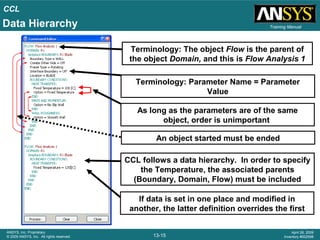
Terminology: Parameter Name = Parameter
Value
CCL follows a data hierarchy. In order to specify
the Temperature, the associated parents
(Boundary, Domain, Flow) must be included
As long as the parameters are of the same
object, order is unimportant
An object started must be ended
If data is set in one place and modified in
another, the latter definition overrides the first
Terminology: The object Flow is the parent of
the object Domain, and this is Flow Analysis 1
Data Hierarchy
CCL
13-16
ANSYS, Inc. Proprietary
© 2009 ANSYS, Inc. All rights reserved.
April 28, 2009
Inventory #002598
Training Manual
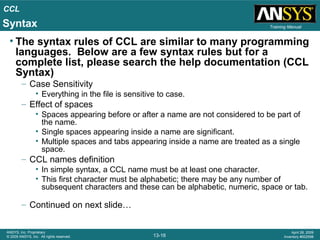
• The syntax rules of CCL are similar to many programming
languages. Below are a few syntax rules but for a
complete list, please search the help documentation (CCL
Syntax)
– Case Sensitivity
• Everything in the file is sensitive to case.
– Effect of spaces
• Spaces appearing before or after a name are not considered to be part of
the name.
• Single spaces appearing inside a name are significant.
• Multiple spaces and tabs appearing inside a name are treated as a single
space.
– CCL names definition
• In simple syntax, a CCL name must be at least one character.
• This first character must be alphabetic; there may be any number of
subsequent characters and these can be alphabetic, numeric, space or tab.
– Continued on next slide…
Syntax
CCL
13-17
ANSYS, Inc. Proprietary
© 2009 ANSYS, Inc. All rights reserved.
April 28, 2009
Inventory #002598
Training Manual
– Parameter Values
• STRING
– The characters $ and # have a special meaning. A string beginning with $ is evaluated as
a Power Syntax variable, even if it occurs within a simple syntax statement.
– The characters such as [, ],{ and } are special only if used in conjunction with $. Following
a $, such characters terminate the preceding Perl variable name
• STRING LIST
– A list of string items separated by commas.
– e.g names = one, two, three, four
• INTEGER
– If a real is specified when an integer is needed, the real is rounded to the nearest integer.
• REAL
a = 12.24
a = 1.224E01
a = 12.24 [m s^-1]
• REAL LIST
– All items in the list must have the same dimensions
• LOGICAL
– Several forms are acceptable: YES, TRUE, 1 or ON are all equivalent; NO or FALSE or 0
or OFF are all equivalent; initial letter variants Y, T, N, F are accepted
– Continuation character 
Syntax
CCL
13-18
ANSYS, Inc. Proprietary
© 2009 ANSYS, Inc. All rights reserved.
April 28, 2009
Inventory #002598
Training Manual
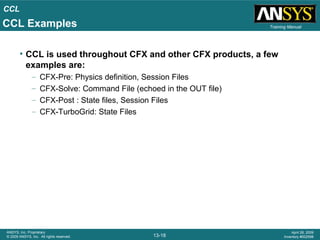
• CCL is used throughout CFX and other CFX products, a few
examples are:
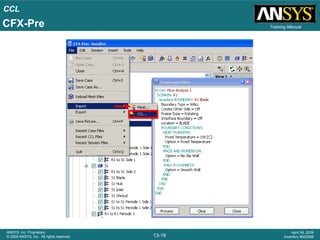
– CFX-Pre: Physics definition, Session Files
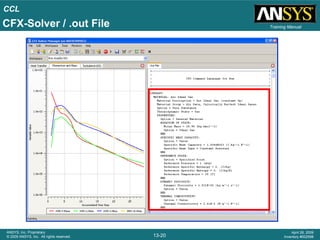
– CFX-Solve: Command File (echoed in the OUT file)
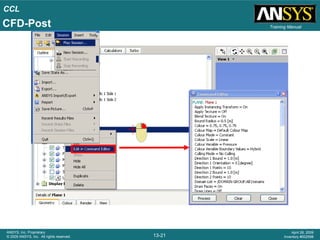
– CFX-Post : State files, Session Files
– CFX-TurboGrid: State Files
CCL Examples
CCL
13-19
ANSYS, Inc. Proprietary
© 2009 ANSYS, Inc. All rights reserved.
April 28, 2009
Inventory #002598
Training ManualCFX-Pre
CCL
13-20
ANSYS, Inc. Proprietary
© 2009 ANSYS, Inc. All rights reserved.
April 28, 2009
Inventory #002598
Training ManualCFX-Solver / .out File
CCL
13-21
ANSYS, Inc. Proprietary
© 2009 ANSYS, Inc. All rights reserved.
April 28, 2009
Inventory #002598
Training ManualCFD-Post
CCL
13-22
ANSYS, Inc. Proprietary
© 2009 ANSYS, Inc. All rights reserved.
April 28, 2009
Inventory #002598
Training Manual
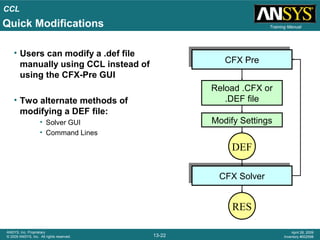
• Users can modify a .def file
manually using CCL instead of
using the CFX-Pre GUI
• Two alternate methods of
modifying a DEF file:
• Solver GUI
• Command Lines
CFX PreCFX Pre
DEF
CFX SolverCFX Solver
RES
Reload .CFX or
.DEF file
Modify Settings
Quick Modifications
CCL
13-23
ANSYS, Inc. Proprietary
© 2009 ANSYS, Inc. All rights reserved.
April 28, 2009
Inventory #002598
Training Manual
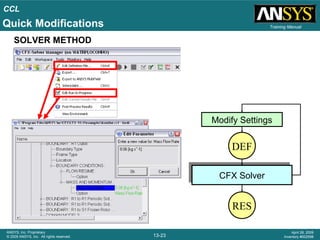
SOLVER METHOD
DEF
CFX SolverCFX Solver
RES
Modify Settings
Quick Modifications
CCL
13-24
ANSYS, Inc. Proprietary
© 2009 ANSYS, Inc. All rights reserved.
April 28, 2009
Inventory #002598
Training Manual
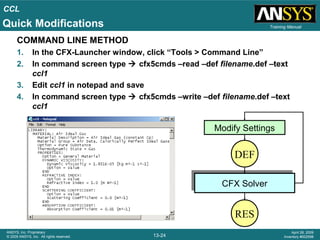
COMMAND LINE METHOD
1. In the CFX-Launcher window, click “Tools > Command Line”
2. In command screen type  cfx5cmds –read –def filename.def –text
ccl1
3. Edit ccl1 in notepad and save
4. In command screen type  cfx5cmds –write –def filename.def –text
ccl1
DEF
CFX SolverCFX Solver
RES
Modify Settings
Quick Modifications
CCL
13-25
ANSYS, Inc. Proprietary
© 2009 ANSYS, Inc. All rights reserved.
April 28, 2009
Inventory #002598
Training ManualQuick Modifications
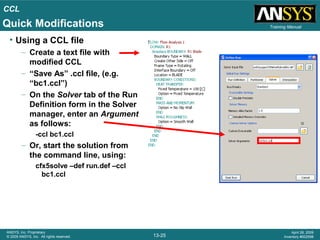
• Using a CCL file
– Create a text file with
modified CCL
– “Save As” .ccl file, (e.g.
“bc1.ccl”)
– On the Solver tab of the Run
Definition form in the Solver
manager, enter an Argument
as follows:
-ccl bc1.ccl
– Or, start the solution from
the command line, using:
cfx5solve –def run.def –ccl
bc1.ccl
CCL
13-26
ANSYS, Inc. Proprietary
© 2009 ANSYS, Inc. All rights reserved.
April 28, 2009
Inventory #002598
Training Manual
• CCL is the language which links the user with the software.
Sometimes, it is more efficient to bypass the GUI and
manipulate the CCL manually.
Key Point

Cfx12 13 ccl_out_file

  • 1.
    13-1 ANSYS, Inc. Proprietary ©2009 ANSYS, Inc. All rights reserved. April 28, 2009 Inventory #002598 Chapter 13 Solver .out File and CCL Introduction to CFX
  • 2.
    Out File 13-2 ANSYS, Inc.Proprietary © 2009 ANSYS, Inc. All rights reserved. April 28, 2009 Inventory #002598 Training ManualSolver Output File • Produced by the ANSYS CFX-Solver and contains information about your simulation: a) Model set-up b) The state of the solution during the run c) Job statistics for the particular run • Now lets take a detailed look at an out file… CFX-Solver CFX-Pre CFX-Post .def .res .cfx.cfx, .def, .res .out .gtm, .def
  • 3.
    Out File 13-3 ANSYS, Inc.Proprietary © 2009 ANSYS, Inc. All rights reserved. April 28, 2009 Inventory #002598 Training Manual Solver Information a) Model Setup The out file
  • 4.
    Out File 13-4 ANSYS, Inc.Proprietary © 2009 ANSYS, Inc. All rights reserved. April 28, 2009 Inventory #002598 Training Manual Physics definition CFX Command Language (CCL) a) Model Setup
  • 5.
    Out File 13-5 ANSYS, Inc.Proprietary © 2009 ANSYS, Inc. All rights reserved. April 28, 2009 Inventory #002598 Training Manual If an Initial Values file is provided, the Interpolator will run to copy / interpolate variables b) Interpolator … … … … Memory requirements shown here are for the interpolator only Details of the interpolation process are shown
  • 6.
    Out File 13-6 ANSYS, Inc.Proprietary © 2009 ANSYS, Inc. All rights reserved. April 28, 2009 Inventory #002598 Training Manual If solving in parallel the Partitioner will run to divide up the simulation into multiple partitions c) Partitioner … … … … Memory requirements shown here are for the partitioner only Details of the partitioning process are shown
  • 7.
    Out File 13-7 ANSYS, Inc.Proprietary © 2009 ANSYS, Inc. All rights reserved. April 28, 2009 Inventory #002598 Training Manuald) Solver … … … … Mesh quality checks, mesh statistics and GGI intersection details are shown here 188 MB of RAM allocated The start of the Solver process Memory requirements shown here are for the Solver. If memory errors occur check if it’s the Interpolator, Partitioner or Solver process
  • 8.
    Out File 13-8 ANSYS, Inc.Proprietary © 2009 ANSYS, Inc. All rights reserved. April 28, 2009 Inventory #002598 Training Manual • Diagnostics shown as the solver iterates towards a solution Upper case “OK” is good. Lower case “ok” means you’re on the limit. “F” means failed to solve the equation. Reducing the timestep may help avoid “ok” and “F”. The first few iterations may show “ok” and “F” and can be ignored as long as they go away e) The State of the Solution
  • 9.
    Out File 13-9 ANSYS, Inc.Proprietary © 2009 ANSYS, Inc. All rights reserved. April 28, 2009 Inventory #002598 Training Manual • When the solution finishes the Imbalances are shown Equation Imbalance in domain f) Final Imbalances
  • 10.
    Out File 13-10 ANSYS, Inc.Proprietary © 2009 ANSYS, Inc. All rights reserved. April 28, 2009 Inventory #002598 Training Manual • Other data printed at the end of the out file include Viscous and Pressure forces and torques on walls, min / max variable values and detailed CPU requirements g) Other Solution Data
  • 11.
    Out File 13-11 ANSYS, Inc.Proprietary © 2009 ANSYS, Inc. All rights reserved. April 28, 2009 Inventory #002598 Training ManualKey Point • The .out file contains information on the physics, solution progress, and execution control.
  • 12.
    CCL 13-12 ANSYS, Inc. Proprietary ©2009 ANSYS, Inc. All rights reserved. April 28, 2009 Inventory #002598 Training Manual • CFX Command Language – object definition language which underlies all CFX products – Object parameters define the “state” of an object – GUIs present object parameters in a contextual manner (parameters shown/hidden based on GUI selections) • Allows for easy modifications – E.g. modifying an inlet velocity at a boundary • Advanced functionality (without complexity) – i.e. loops and logic CCL Command Interpreter User Input/InterfaceUser Input/Interface Processing EngineProcessing Engine CCL What is CCL?
  • 13.
    CCL 13-13 ANSYS, Inc. Proprietary ©2009 ANSYS, Inc. All rights reserved. April 28, 2009 Inventory #002598 Training Manual • CCL Statements can be classified into three categories: 1. Object and parameter definitions 2. Actions 3. Power Syntax 1. Example of Parameter Definition: CCL Instruction Types
  • 14.
    CCL 13-14 ANSYS, Inc. Proprietary ©2009 ANSYS, Inc. All rights reserved. April 28, 2009 Inventory #002598 Training Manual 2. Example of an Action Command: A CFX-Post session file which includes a set of actions. 3. Example of Power Syntax: Lines of Power Syntax are identified in a CCL file by a special character “!” at the start of each line. CCL Instruction Types
  • 15.
    CCL 13-15 ANSYS, Inc. Proprietary ©2009 ANSYS, Inc. All rights reserved. April 28, 2009 Inventory #002598 Training Manual Terminology: Parameter Name = Parameter Value CCL follows a data hierarchy. In order to specify the Temperature, the associated parents (Boundary, Domain, Flow) must be included As long as the parameters are of the same object, order is unimportant An object started must be ended If data is set in one place and modified in another, the latter definition overrides the first Terminology: The object Flow is the parent of the object Domain, and this is Flow Analysis 1 Data Hierarchy
  • 16.
    CCL 13-16 ANSYS, Inc. Proprietary ©2009 ANSYS, Inc. All rights reserved. April 28, 2009 Inventory #002598 Training Manual • The syntax rules of CCL are similar to many programming languages. Below are a few syntax rules but for a complete list, please search the help documentation (CCL Syntax) – Case Sensitivity • Everything in the file is sensitive to case. – Effect of spaces • Spaces appearing before or after a name are not considered to be part of the name. • Single spaces appearing inside a name are significant. • Multiple spaces and tabs appearing inside a name are treated as a single space. – CCL names definition • In simple syntax, a CCL name must be at least one character. • This first character must be alphabetic; there may be any number of subsequent characters and these can be alphabetic, numeric, space or tab. – Continued on next slide… Syntax
  • 17.
    CCL 13-17 ANSYS, Inc. Proprietary ©2009 ANSYS, Inc. All rights reserved. April 28, 2009 Inventory #002598 Training Manual – Parameter Values • STRING – The characters $ and # have a special meaning. A string beginning with $ is evaluated as a Power Syntax variable, even if it occurs within a simple syntax statement. – The characters such as [, ],{ and } are special only if used in conjunction with $. Following a $, such characters terminate the preceding Perl variable name • STRING LIST – A list of string items separated by commas. – e.g names = one, two, three, four • INTEGER – If a real is specified when an integer is needed, the real is rounded to the nearest integer. • REAL a = 12.24 a = 1.224E01 a = 12.24 [m s^-1] • REAL LIST – All items in the list must have the same dimensions • LOGICAL – Several forms are acceptable: YES, TRUE, 1 or ON are all equivalent; NO or FALSE or 0 or OFF are all equivalent; initial letter variants Y, T, N, F are accepted – Continuation character Syntax
  • 18.
    CCL 13-18 ANSYS, Inc. Proprietary ©2009 ANSYS, Inc. All rights reserved. April 28, 2009 Inventory #002598 Training Manual • CCL is used throughout CFX and other CFX products, a few examples are: – CFX-Pre: Physics definition, Session Files – CFX-Solve: Command File (echoed in the OUT file) – CFX-Post : State files, Session Files – CFX-TurboGrid: State Files CCL Examples
  • 19.
    CCL 13-19 ANSYS, Inc. Proprietary ©2009 ANSYS, Inc. All rights reserved. April 28, 2009 Inventory #002598 Training ManualCFX-Pre
  • 20.
    CCL 13-20 ANSYS, Inc. Proprietary ©2009 ANSYS, Inc. All rights reserved. April 28, 2009 Inventory #002598 Training ManualCFX-Solver / .out File
  • 21.
    CCL 13-21 ANSYS, Inc. Proprietary ©2009 ANSYS, Inc. All rights reserved. April 28, 2009 Inventory #002598 Training ManualCFD-Post
  • 22.
    CCL 13-22 ANSYS, Inc. Proprietary ©2009 ANSYS, Inc. All rights reserved. April 28, 2009 Inventory #002598 Training Manual • Users can modify a .def file manually using CCL instead of using the CFX-Pre GUI • Two alternate methods of modifying a DEF file: • Solver GUI • Command Lines CFX PreCFX Pre DEF CFX SolverCFX Solver RES Reload .CFX or .DEF file Modify Settings Quick Modifications
  • 23.
    CCL 13-23 ANSYS, Inc. Proprietary ©2009 ANSYS, Inc. All rights reserved. April 28, 2009 Inventory #002598 Training Manual SOLVER METHOD DEF CFX SolverCFX Solver RES Modify Settings Quick Modifications
  • 24.
    CCL 13-24 ANSYS, Inc. Proprietary ©2009 ANSYS, Inc. All rights reserved. April 28, 2009 Inventory #002598 Training Manual COMMAND LINE METHOD 1. In the CFX-Launcher window, click “Tools > Command Line” 2. In command screen type  cfx5cmds –read –def filename.def –text ccl1 3. Edit ccl1 in notepad and save 4. In command screen type  cfx5cmds –write –def filename.def –text ccl1 DEF CFX SolverCFX Solver RES Modify Settings Quick Modifications
  • 25.
    CCL 13-25 ANSYS, Inc. Proprietary ©2009 ANSYS, Inc. All rights reserved. April 28, 2009 Inventory #002598 Training ManualQuick Modifications • Using a CCL file – Create a text file with modified CCL – “Save As” .ccl file, (e.g. “bc1.ccl”) – On the Solver tab of the Run Definition form in the Solver manager, enter an Argument as follows: -ccl bc1.ccl – Or, start the solution from the command line, using: cfx5solve –def run.def –ccl bc1.ccl
  • 26.
    CCL 13-26 ANSYS, Inc. Proprietary ©2009 ANSYS, Inc. All rights reserved. April 28, 2009 Inventory #002598 Training Manual • CCL is the language which links the user with the software. Sometimes, it is more efficient to bypass the GUI and manipulate the CCL manually. Key Point

Editor's Notes

  • #9 The first column is the average number of iterations the linear solvers attempted to obtain the specified linear equation convergence criteria (within a specified number of iterations). The second column gives the normalized residuals for the solutions to the linear equation. The last column can have one of four entries: * indicates that there was a numerical floating point exception and this resulted in the failure of the linear solvers. F indicates that the linear solvers did not reduce the residuals (i.e., the solution was diverging), but the linear solvers may carry on if the divergence is not catastrophic. ok indicates that the residuals were reduced, but that the degree of reduction did not meet the specified criteria. OK indicates that the specified convergence criteria for the reduction of residuals was achieved.
  • #17 CASE SENSITIVITY Everything in the file is sensitive to case. EFFECT OF SPACES Spaces appearing before or after a name are not considered to be part of the name. Single spaces appearing inside a name are significant. Multiple spaces and tabs appearing inside a name are treated as a single space. CCL NAMES DEFINITION In simple syntax, a CCL name must be at least one character. This first character must be alphabetic; there may be any number of subsequent characters and these can be alphabetic, numeric, space or tab. PARAMETER VALUES STRING The characters $ and # have a special meaning. A string beginning with $ is evaluated as a Power Syntax variable, even if it occurs within a simple syntax statement. The characters such as [, ],{ and } are special only if used in conjunction with $. Following a $, such characters terminate the preceding Perl variable name STRING LIST A list of string items separated by commas. e.g names = one, two, three, four INTEGER If a real is specified when an integer is needed, the real is rounded to the nearest integer. REAL a = 12.24 a = 1.224E01 a = 12.24 [m s^-1] REAL LIST All items in the list must have the same dimensions LOGICAL Several forms are acceptable: YES, TRUE, 1 or ON are all equivalent; NO or FALSE or 0 or OFF are all equivalent; initial letter variants Y, T, N, F are accepted
  • #18 CASE SENSITIVITY Everything in the file is sensitive to case. EFFECT OF SPACES Spaces appearing before or after a name are not considered to be part of the name. Single spaces appearing inside a name are significant. Multiple spaces and tabs appearing inside a name are treated as a single space. CCL NAMES DEFINITION In simple syntax, a CCL name must be at least one character. This first character must be alphabetic; there may be any number of subsequent characters and these can be alphabetic, numeric, space or tab. PARAMETER VALUES STRING The characters $ and # have a special meaning. A string beginning with $ is evaluated as a Power Syntax variable, even if it occurs within a simple syntax statement. The characters such as [, ],{ and } are special only if used in conjunction with $. Following a $, such characters terminate the preceding Perl variable name STRING LIST A list of string items separated by commas. e.g names = one, two, three, four INTEGER If a real is specified when an integer is needed, the real is rounded to the nearest integer. REAL a = 12.24 a = 1.224E01 a = 12.24 [m s^-1] REAL LIST All items in the list must have the same dimensions LOGICAL Several forms are acceptable: YES, TRUE, 1 or ON are all equivalent; NO or FALSE or 0 or OFF are all equivalent; initial letter variants Y, T, N, F are accepted