Supported by:
Aspen HYSYS Training
Module 6: Subflowsheet
Tutor:
M. Ersharry Yunashtanto
Zayyanatun Zulfa
Ikha Muliawati
Mada Harahap
• The subflowsheet operation uses a multi-level flowsheet
architecture and provides a flexible and simplified method for
building a simulation.
• It is very useful when simulating a large, complex processing
facility with a number of individual process units.
Subflowsheet in Aspen HYSYS
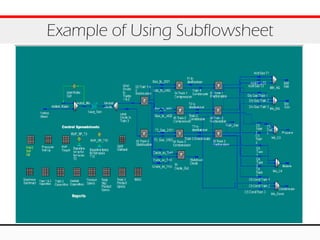
Example of Using Subflowsheet
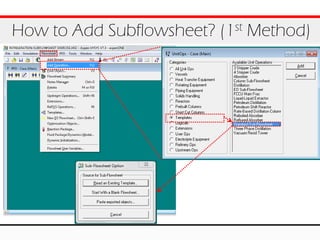
How to Add Subflowsheet? (1st Method)
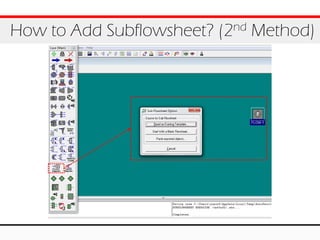
How to Add Subflowsheet? (2nd Method)
Source for Subflowsheet
1. Read an Existing Template: Using existing
template available in Hysys (.tpl)
2. Start With a Blank Flowsheet: Using our own
template
3. Paste Exported Objects: Hysys imports
previously exported object (.hfl) into a new
subflowsheet
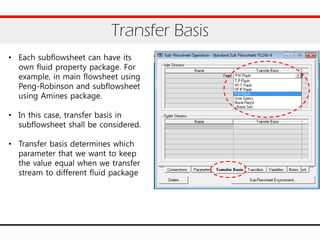
Transfer Basis
• Each subflowsheet can have its
own fluid property package. For
example, in main flowsheet using
Peng-Robinson and subflowsheet
using Amines package.
• In this case, transfer basis in
subflowsheet shall be considered.
• Transfer basis determines which
parameter that we want to keep
the value equal when we transfer
stream to different fluid package
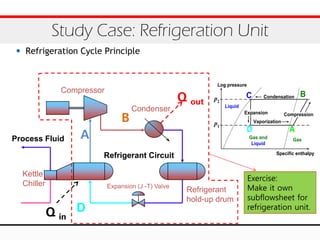
• Refrigeration Cycle Principle
Study Case: Refrigeration Unit
Process Fluid
Compressor
Condenser
Expansion (J -T) Valve
Kettle
Chiller
Refrigerant
hold-up drum
Refrigerant Circuit
A
B
D
Q out
Q in
A
Condensation BC
Vaporization
D
Specific enthalpy
Log pressure
p1
p2
Expansion Compression
GasGas and
Liquid
Liquid
Exercise:
Make it own
subflowsheet for
refrigeration unit.
Study Case: Refrigeration Unit (2)
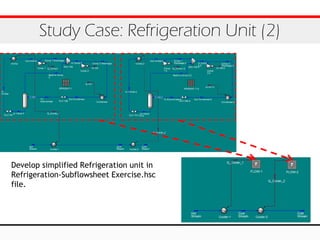
Develop simplified Refrigeration unit in
Refrigeration-Subflowsheet Exercise.hsc
file.
Thank You
M. Ersharry Yunashtanto
Zayyanatun Zulfa
Ikha Muliawati
Mada Harahap

Module 6 - Subflowsheet

  • 1.
    Supported by: Aspen HYSYSTraining Module 6: Subflowsheet Tutor: M. Ersharry Yunashtanto Zayyanatun Zulfa Ikha Muliawati Mada Harahap
  • 2.
    • The subflowsheetoperation uses a multi-level flowsheet architecture and provides a flexible and simplified method for building a simulation. • It is very useful when simulating a large, complex processing facility with a number of individual process units. Subflowsheet in Aspen HYSYS
  • 3.
    Example of UsingSubflowsheet
  • 4.
    How to AddSubflowsheet? (1st Method)
  • 5.
    How to AddSubflowsheet? (2nd Method)
  • 6.
    Source for Subflowsheet 1.Read an Existing Template: Using existing template available in Hysys (.tpl) 2. Start With a Blank Flowsheet: Using our own template 3. Paste Exported Objects: Hysys imports previously exported object (.hfl) into a new subflowsheet
  • 7.
    Transfer Basis • Eachsubflowsheet can have its own fluid property package. For example, in main flowsheet using Peng-Robinson and subflowsheet using Amines package. • In this case, transfer basis in subflowsheet shall be considered. • Transfer basis determines which parameter that we want to keep the value equal when we transfer stream to different fluid package
  • 8.
    • Refrigeration CyclePrinciple Study Case: Refrigeration Unit Process Fluid Compressor Condenser Expansion (J -T) Valve Kettle Chiller Refrigerant hold-up drum Refrigerant Circuit A B D Q out Q in A Condensation BC Vaporization D Specific enthalpy Log pressure p1 p2 Expansion Compression GasGas and Liquid Liquid Exercise: Make it own subflowsheet for refrigeration unit.
  • 9.
    Study Case: RefrigerationUnit (2) Develop simplified Refrigeration unit in Refrigeration-Subflowsheet Exercise.hsc file.
  • 10.
    Thank You M. ErsharryYunashtanto Zayyanatun Zulfa Ikha Muliawati Mada Harahap