

©2016 Magic Mirror is a trademark application of Magic Mirror in various
jurisdictions. We reserve the right to introduce modifications without notice. All
other company names and products are trademarks of their respective
companies..
Magic Mirror As Sales Assistant
• Also as Your In-Store..
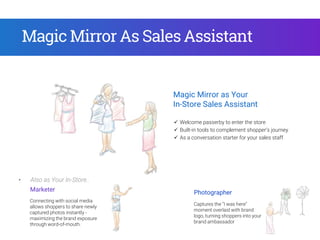
Magic Mirror as Your
In-Store Sales Assistant
 Welcome passerby to enter the store
 Built-in tools to complement shopper’s journey
 As a conversation starter for your sales staff
Connecting with social media
allows shoppers to share newly
captured photos instantly -
maximizing the brand exposure
through word-of-mouth.
Marketer Photographer
Captures the “I was here”
moment overlaid with brand
logo, turning shoppers into your
brand ambassador
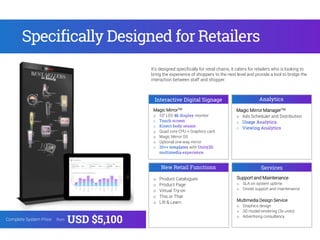
Magic MirrorTM
o 55” LED monitor
o Quad core CPU + Graphics card
o Magic Mirror OS
o Optional one-way mirror
with
Interactive Digital Signage Analytics
Services
Magic Mirror ManagerTM
o Ads Scheduler and Distribution
Support and Maintenance
o SLA on system uptime
o Onsite support and maintenance
Multimedia Design Service
o Graphics design
o 3D model rendering (3x units)
o Advertising consultancy
It’s designed specifically for retail chains, it caters for retailers who is looking to
bring the experience of shoppers to the next level and provide a tool to bridge the
interaction between staff and shopper.
Specifically Designed for Retailers
Complete System Price: from
USD $5,100
New Retail Functions
o Product Catalogues
o Product Page
o Virtual Try-on
o This or That
o Lift & Learn
How to Use Magic Mirror to
Engage Shoppers?
Endless AisleGuides SelectionApps Selection
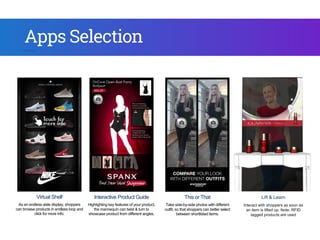
Virtual Shelf
As an endless aisle display, shoppers
can browse products in endless loop and
click for more info.
Interactive Product Guide
Highlighting key features of your product,
the mannequin can twist & turn to
showcase product from different angles.
Endless Aisle
Omni-channel web browser -
Connecting online to offline store,
shoppers can browse, search and
checkout directly in store.
Apps Selection
Lift & Learn
Interact with shoppers as soon as
an item is lifted up. Note: RFID
tagged products are used
This or That
Take side-by-side photos with different
outfit, so that shoppers can better select
between shortlisted items.
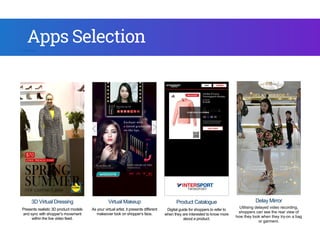
3D Virtual Dressing
Presents realistic 3D product models
and sync with shopper’s movement
within the live video feed.
As you
mak
different
er select
s.
3D Virtual Dressing
Presents realistic 3D product models
and sync with shopper’s movement
within the live video feed.
Virtual Makeup
As your virtual artist, it presents different
makeover look on shopper’s face.
Product Catalogue
Digital guide for shoppers to refer to
when they are interested to know more
about a product.
Delay Mirror
Utilising delayed video recording,
shoppers can see the rear view of
how they look when they try-on a bag
or garment.
For per
Ma
Apps Selection
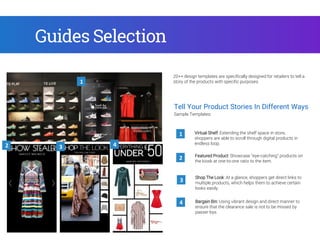
Tell Your Product Stories In Different Ways
Shop The Look: At a glance, shoppers get direct links to
multiple products, which helps them to achieve certain
looks easily.
1
3
2
Sample Templates:
Featured Product: Showcase “eye-catching” products on
the kiosk at one-to-one ratio to the item.
Virtual Shelf: Extending the shelf space in store,
shoppers are able to scroll through digital products in
endless loop.
Bargain Bin: Using vibrant design and direct manner to
ensure that the clearance sale is not to be missed by
passer-bys.
4
20++ design templates are specifically designed for retailers to tell a
story of the products with specific purposes.1
2 3 4
Guides Selection
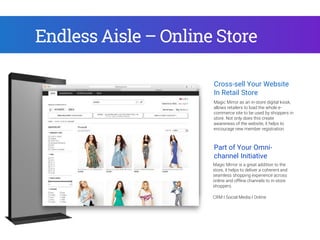
Why Magic Mirror?Endless Aisle – Online Store
Magic Mirror is a great addition to the
store, it helps to deliver a coherent and
seamless shopping experience across
online and offline channels to in-store
shoppers.
Cross-sell Your Website
In Retail Store
Part of Your Omni-
channel Initiative
Magic Mirror as an in-store digital kiosk,
allows retailers to load the whole e-
commerce site to be used by shoppers in
store. Not only does this create
awareness of the website, it helps to
encourage new member registration.
CRM I Social Media I Online
How to Use Magic Mirror As
Guided Sales Tool?
Utilising different Magic Mirror functions, retailers can integrate the functionalities into every step of a shopper’s journey in
store. Managers and directors can now have a more direct involvement in shopper’s experience.
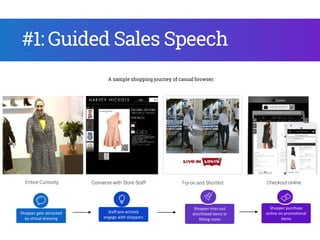
Entice Curiosity Converse with Store Staff Try-on and Shortlist Checkout online
#1: Guided Sales Speech
Shopper gets attracted
by virtual dressing
Staff pro-actively
engage with shoppers
Shopper tries out
shortlisted items in
fitting room
Shopper purchase
online on promotional
items
A sample shopping journey of casual browser:
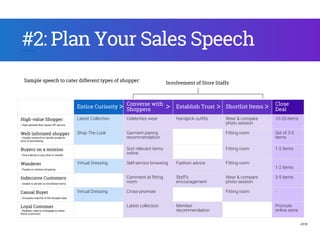
Entice Curiosity
Converse with
Shoppers
Establish Trust Shortlist Items
Close
Deal
High-value Shopper
- High spender that values VIP service
Latest Collection Celebrities wear Handpick outfits Wear & compare
photo session
10-20 items
Well-informed shopper
- Usually research on similar products
prior to purchasing
Shop The Look Garment pairing
recommendation
Fitting room Set of 3-5
items
Buyers on a mission
- Only intends to buy what is needed
Sort relevant items
online
Fitting room 1-2 items
Wanderer
- People on window shopping
Virtual Dressing Self-service browsing Fashion advice Fitting room
1-2 items
Indecisive Customers
- Unable to decide on shortlisted items
Comment at fitting
room
Staff’s
encouragement
Wear & compare
photo session
3-5 items
Casual Buyer
- Occupies majority of the shopper type
Virtual Dressing Cross-promote Fitting room -
Loyal Customer
- Retailers need to re-engage to retain
these customers
Latest collection Member
recommendation
Promote
online store
#2: Plan Your Sales Speech
Sample speech to cater different types of shopper:
> > >
Involvement of Store Staffs
>
2018
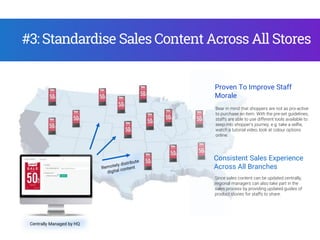
#3: Standardise Sales Content Across All Stores
Centrally Managed by HQ
Consistent Sales Experience
Across All Branches
Since sales content can be updated centrally,
regional managers can also take part in the
sales process by providing updated guides of
product stories for staffs to share.
Bear in mind that shoppers are not as pro-active
to purchase an item. With the pre-set guidelines,
staffs are able to use different tools available to
seep into shopper’s journey. e.g. take a selfie,
watch a tutorial video, look at colour options
online.
Proven To Improve Staff
Morale
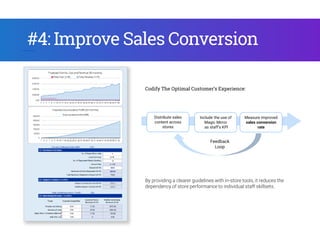
Include the use of
Magic Mirror
as staff’s KPI
Feedback
Loop
Measure improved
sales conversion
rate
Distribute sales
content across
stores
Codify The Optimal Customer’s Experience:
#4: Improve Sales Conversion
By providing a clearer guidelines with in-store tools, it reduces the
dependency of store performance to individual staff skillsets.
Showcasing some of the successful stories of our retail chain customers. Being a part of the store DNA of
shoppers journey.
Case Studies
Centre Piece of
the VIP Fitting
Rooms
Providing premium concierge service to the
VIP shoppers, with “Wear and Compare” mirror
as the decision making tool.
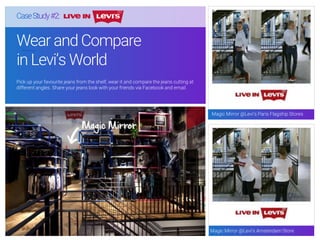
Wear and Compare
in Levi’s World
Pick up your favourite jeans from the shelf, wear it and compare the jeans cutting at
different angles. Share your jeans look with your friends via Facebook and email.
Magic Mirror @Levi’s Paris Flagship Stores
Magic Mirror @Levi’s Amsterdam Store

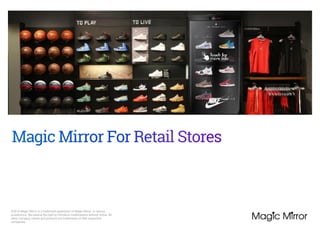
Magic Mirror For Retail Stores

  • 1.
    ©2016 Magic Mirroris a trademark application of Magic Mirror in various jurisdictions. We reserve the right to introduce modifications without notice. All other company names and products are trademarks of their respective companies..
  • 2.
    Magic Mirror AsSales Assistant • Also as Your In-Store.. Magic Mirror as Your In-Store Sales Assistant  Welcome passerby to enter the store  Built-in tools to complement shopper’s journey  As a conversation starter for your sales staff Connecting with social media allows shoppers to share newly captured photos instantly - maximizing the brand exposure through word-of-mouth. Marketer Photographer Captures the “I was here” moment overlaid with brand logo, turning shoppers into your brand ambassador
  • 3.
    Magic MirrorTM o 55”LED monitor o Quad core CPU + Graphics card o Magic Mirror OS o Optional one-way mirror with Interactive Digital Signage Analytics Services Magic Mirror ManagerTM o Ads Scheduler and Distribution Support and Maintenance o SLA on system uptime o Onsite support and maintenance Multimedia Design Service o Graphics design o 3D model rendering (3x units) o Advertising consultancy It’s designed specifically for retail chains, it caters for retailers who is looking to bring the experience of shoppers to the next level and provide a tool to bridge the interaction between staff and shopper. Specifically Designed for Retailers Complete System Price: from USD $5,100 New Retail Functions o Product Catalogues o Product Page o Virtual Try-on o This or That o Lift & Learn
  • 4.
    How to UseMagic Mirror to Engage Shoppers? Endless AisleGuides SelectionApps Selection
  • 5.
    Virtual Shelf As anendless aisle display, shoppers can browse products in endless loop and click for more info. Interactive Product Guide Highlighting key features of your product, the mannequin can twist & turn to showcase product from different angles. Endless Aisle Omni-channel web browser - Connecting online to offline store, shoppers can browse, search and checkout directly in store. Apps Selection Lift & Learn Interact with shoppers as soon as an item is lifted up. Note: RFID tagged products are used This or That Take side-by-side photos with different outfit, so that shoppers can better select between shortlisted items. 3D Virtual Dressing Presents realistic 3D product models and sync with shopper’s movement within the live video feed. As you mak
  • 6.
    different er select s. 3D VirtualDressing Presents realistic 3D product models and sync with shopper’s movement within the live video feed. Virtual Makeup As your virtual artist, it presents different makeover look on shopper’s face. Product Catalogue Digital guide for shoppers to refer to when they are interested to know more about a product. Delay Mirror Utilising delayed video recording, shoppers can see the rear view of how they look when they try-on a bag or garment. For per Ma Apps Selection
  • 7.
    Tell Your ProductStories In Different Ways Shop The Look: At a glance, shoppers get direct links to multiple products, which helps them to achieve certain looks easily. 1 3 2 Sample Templates: Featured Product: Showcase “eye-catching” products on the kiosk at one-to-one ratio to the item. Virtual Shelf: Extending the shelf space in store, shoppers are able to scroll through digital products in endless loop. Bargain Bin: Using vibrant design and direct manner to ensure that the clearance sale is not to be missed by passer-bys. 4 20++ design templates are specifically designed for retailers to tell a story of the products with specific purposes.1 2 3 4 Guides Selection
  • 8.
    Why Magic Mirror?EndlessAisle – Online Store Magic Mirror is a great addition to the store, it helps to deliver a coherent and seamless shopping experience across online and offline channels to in-store shoppers. Cross-sell Your Website In Retail Store Part of Your Omni- channel Initiative Magic Mirror as an in-store digital kiosk, allows retailers to load the whole e- commerce site to be used by shoppers in store. Not only does this create awareness of the website, it helps to encourage new member registration. CRM I Social Media I Online
  • 9.
    How to UseMagic Mirror As Guided Sales Tool? Utilising different Magic Mirror functions, retailers can integrate the functionalities into every step of a shopper’s journey in store. Managers and directors can now have a more direct involvement in shopper’s experience.
  • 10.
    Entice Curiosity Conversewith Store Staff Try-on and Shortlist Checkout online #1: Guided Sales Speech Shopper gets attracted by virtual dressing Staff pro-actively engage with shoppers Shopper tries out shortlisted items in fitting room Shopper purchase online on promotional items A sample shopping journey of casual browser:
  • 11.
    Entice Curiosity Converse with Shoppers EstablishTrust Shortlist Items Close Deal High-value Shopper - High spender that values VIP service Latest Collection Celebrities wear Handpick outfits Wear & compare photo session 10-20 items Well-informed shopper - Usually research on similar products prior to purchasing Shop The Look Garment pairing recommendation Fitting room Set of 3-5 items Buyers on a mission - Only intends to buy what is needed Sort relevant items online Fitting room 1-2 items Wanderer - People on window shopping Virtual Dressing Self-service browsing Fashion advice Fitting room 1-2 items Indecisive Customers - Unable to decide on shortlisted items Comment at fitting room Staff’s encouragement Wear & compare photo session 3-5 items Casual Buyer - Occupies majority of the shopper type Virtual Dressing Cross-promote Fitting room - Loyal Customer - Retailers need to re-engage to retain these customers Latest collection Member recommendation Promote online store #2: Plan Your Sales Speech Sample speech to cater different types of shopper: > > > Involvement of Store Staffs > 2018
  • 12.
    #3: Standardise SalesContent Across All Stores Centrally Managed by HQ Consistent Sales Experience Across All Branches Since sales content can be updated centrally, regional managers can also take part in the sales process by providing updated guides of product stories for staffs to share. Bear in mind that shoppers are not as pro-active to purchase an item. With the pre-set guidelines, staffs are able to use different tools available to seep into shopper’s journey. e.g. take a selfie, watch a tutorial video, look at colour options online. Proven To Improve Staff Morale
  • 13.
    Include the useof Magic Mirror as staff’s KPI Feedback Loop Measure improved sales conversion rate Distribute sales content across stores Codify The Optimal Customer’s Experience: #4: Improve Sales Conversion By providing a clearer guidelines with in-store tools, it reduces the dependency of store performance to individual staff skillsets.
  • 14.
    Showcasing some ofthe successful stories of our retail chain customers. Being a part of the store DNA of shoppers journey. Case Studies
  • 15.
    Centre Piece of theVIP Fitting Rooms Providing premium concierge service to the VIP shoppers, with “Wear and Compare” mirror as the decision making tool.
  • 16.
    Wear and Compare inLevi’s World Pick up your favourite jeans from the shelf, wear it and compare the jeans cutting at different angles. Share your jeans look with your friends via Facebook and email. Magic Mirror @Levi’s Paris Flagship Stores Magic Mirror @Levi’s Amsterdam Store