CDN Technology overview
2018.11 | Yoohyun Kim
C O N T E N T
1. Internet Technology Basics
2. CDN Overview
3. Content Networking Techniques
4. Dynamic Site Acceleration
1. Internet Technology Basics
- 4 -
Internet Basics
• The Internet is the global system of interconnected computer networks that use the Internet
protocol suite (TCP/IP) to link devices (Computer or Smart devices) worldwide.
• The terms Internet and World Wide Web are often used interchangeably in everyday speech; it is
common to speak of "going on the Internet" when invoking a web browser to view web pages.
However, the World Wide Web or the Web is only one of a large number of Internet services. The
Web is a collection of interconnected documents (web pages) and other web resources, linked by
hyperlinks and URLs..
• In computing, a hyperlink, or simply a link, is a reference to data that the reader can directly follow
either by clicking, tapping, or hovering.
• Internet is a network of networks that consists of private, public, academic, business, and
government networks of local to global scope, linked by a broad array of electronic, wireless, and
optical networking technologies.
• The Internet carries many network services, most prominently mobile apps such as social media
apps, the World Wide Web, electronic mail, multiplayer online games, Internet telephony, and file
sharing services.
- 5 -
Web Browsing
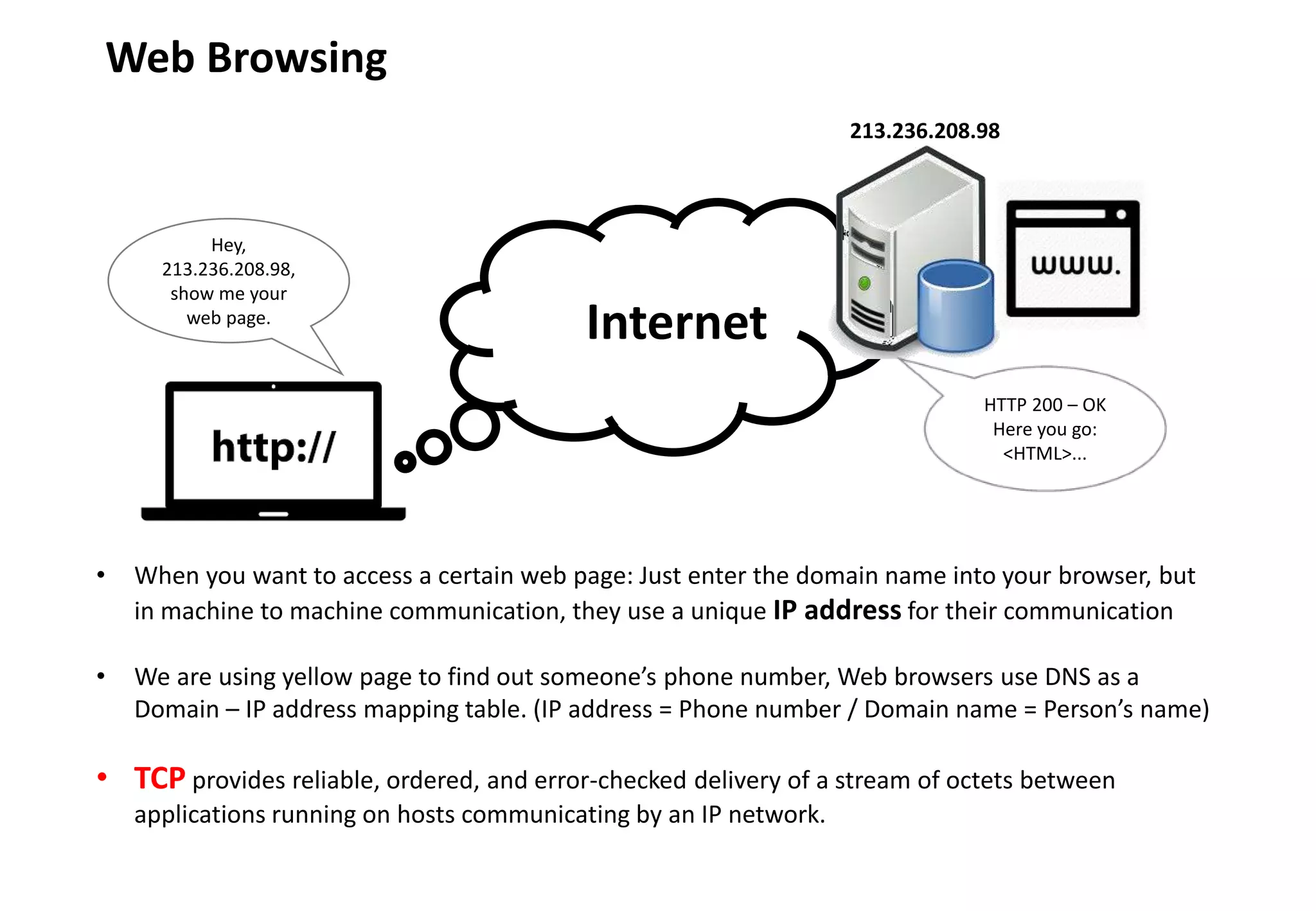
• When you want to access a certain web page: Just enter the domain name into your browser, but
in machine to machine communication, they use a unique IP address for their communication
• We are using yellow page to find out someone’s phone number, Web browsers use DNS as a
Domain – IP address mapping table. (IP address = Phone number / Domain name = Person’s name)
• TCP provides reliable, ordered, and error-checked delivery of a stream of octets between
applications running on hosts communicating by an IP network.
Internet
Hey,
213.236.208.98,
show me your
web page.
HTTP 200 – OK
Here you go:
<HTML>...
213.236.208.98
- 6 -
Proxy server
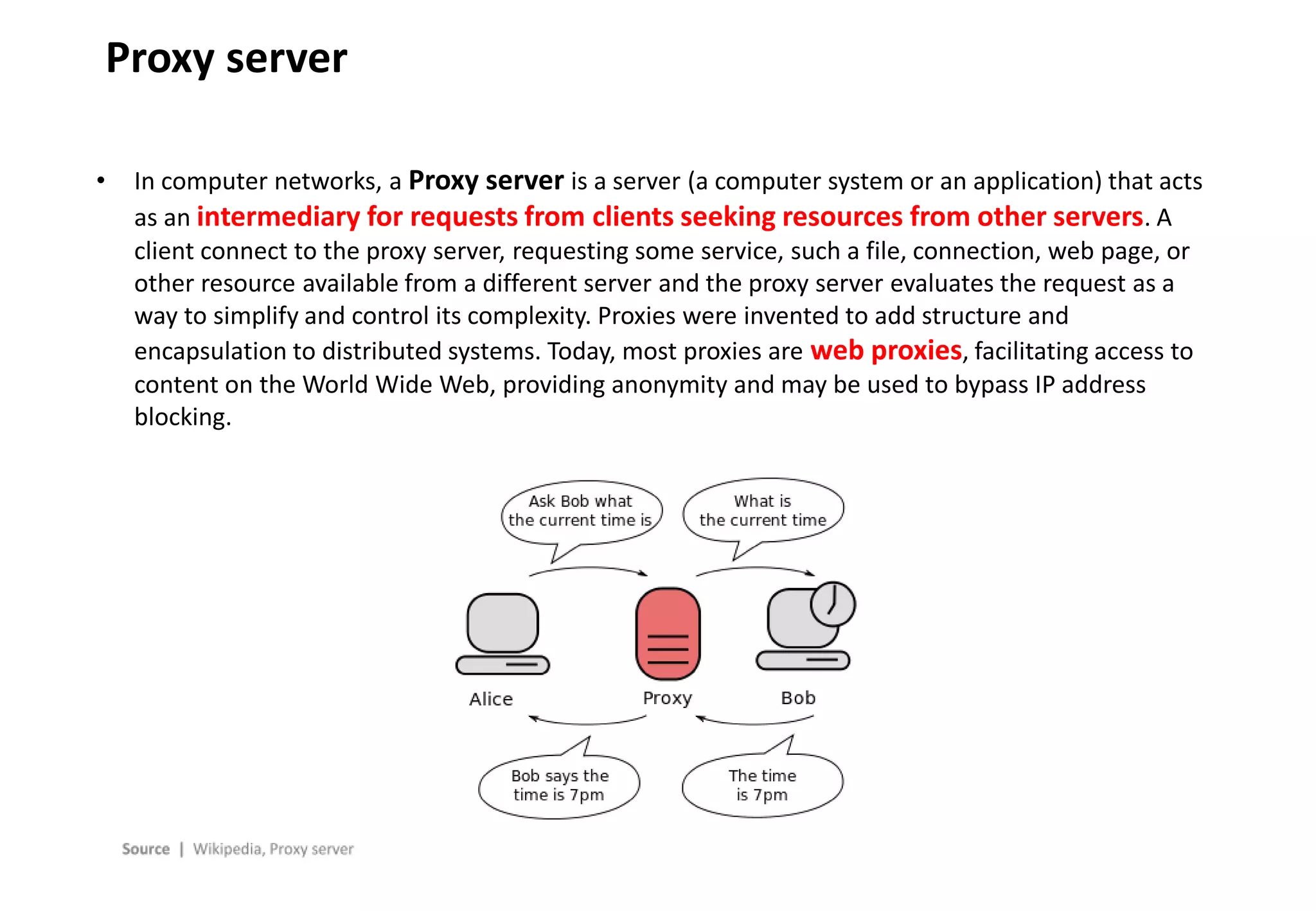
• In computer networks, a Proxy server is a server (a computer system or an application) that acts
as an intermediary for requests from clients seeking resources from other servers. A
client connect to the proxy server, requesting some service, such a file, connection, web page, or
other resource available from a different server and the proxy server evaluates the request as a
way to simplify and control its complexity. Proxies were invented to add structure and
encapsulation to distributed systems. Today, most proxies are web proxies, facilitating access to
content on the World Wide Web, providing anonymity and may be used to bypass IP address
blocking.
- 7 -
Memory Cache
• Cache is a hardware or software component that stores data so future requests for that data can
be served faster; the data stored in cache might be the result of an earlier computation
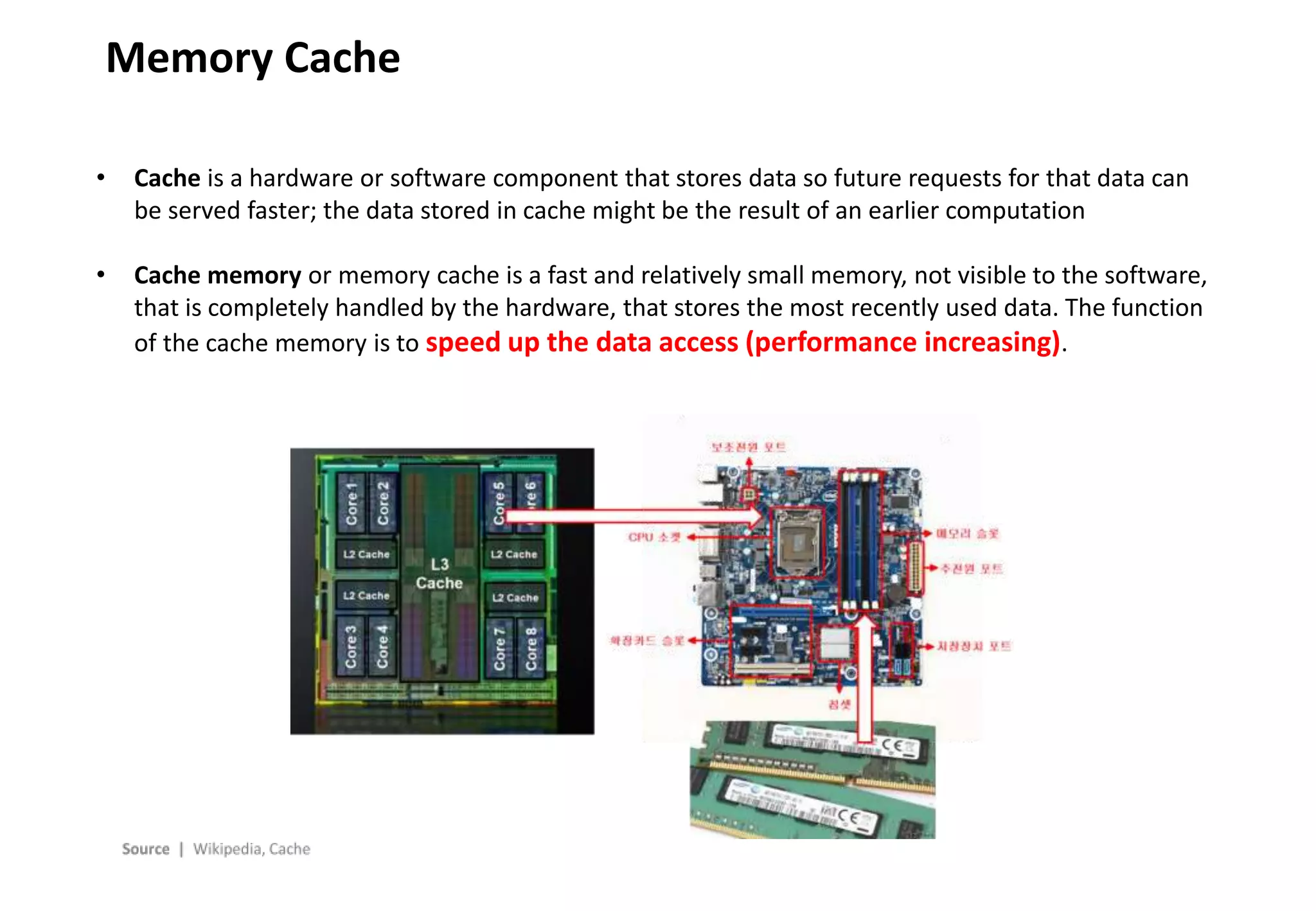
• Cache memory or memory cache is a fast and relatively small memory, not visible to the software,
that is completely handled by the hardware, that stores the most recently used data. The function
of the cache memory is to speed up the data access (performance increasing).
- 8 -
Web Cache
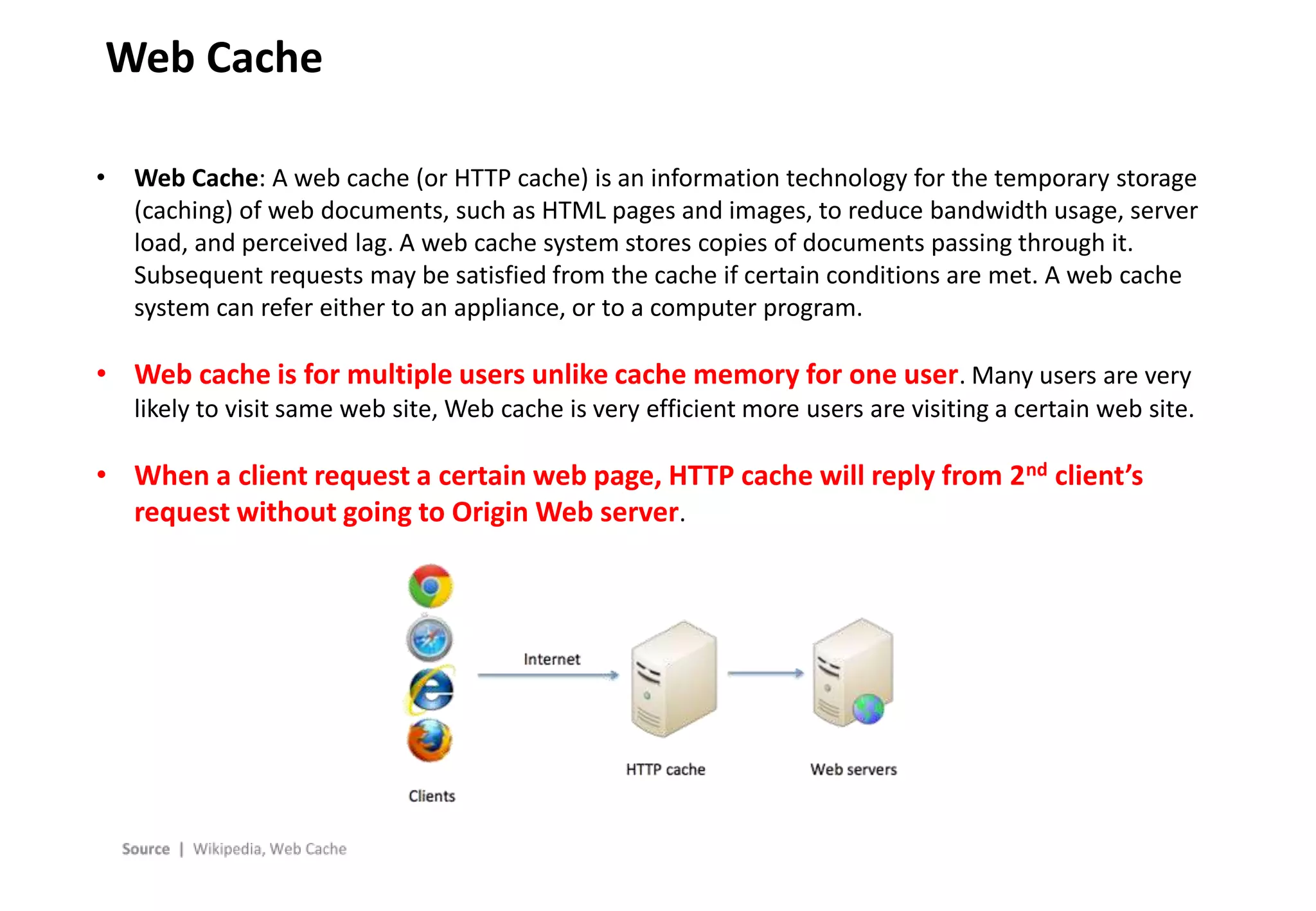
• Web Cache: A web cache (or HTTP cache) is an information technology for the temporary storage
(caching) of web documents, such as HTML pages and images, to reduce bandwidth usage, server
load, and perceived lag. A web cache system stores copies of documents passing through it.
Subsequent requests may be satisfied from the cache if certain conditions are met. A web cache
system can refer either to an appliance, or to a computer program.
• Web cache is for multiple users unlike cache memory for one user. Many users are very
likely to visit same web site, Web cache is very efficient more users are visiting a certain web site.
• When a client request a certain web page, HTTP cache will reply from 2nd client’s
request without going to Origin Web server.
- 9 -
Forward Cache System
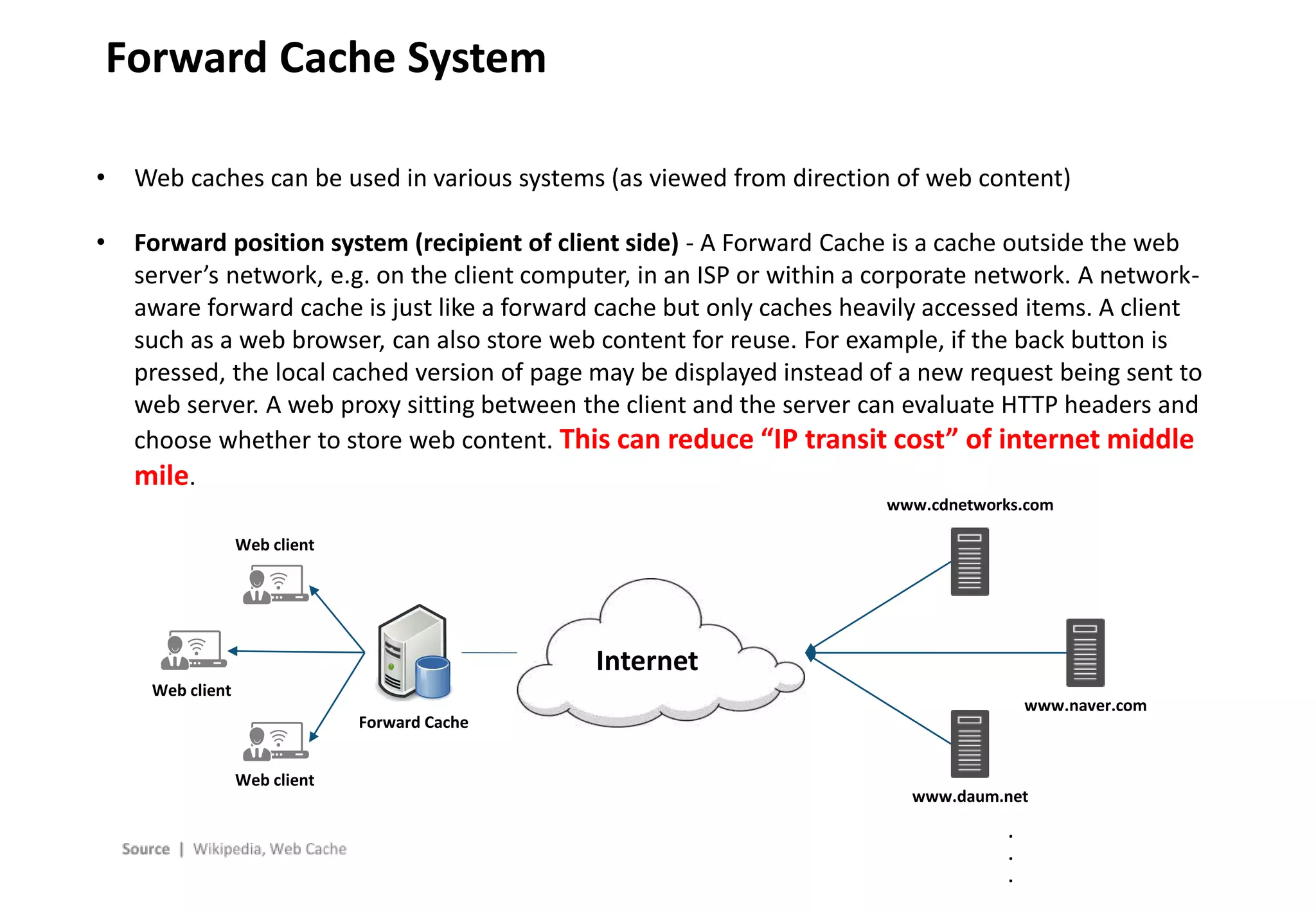
• Web caches can be used in various systems (as viewed from direction of web content)
• Forward position system (recipient of client side) - A Forward Cache is a cache outside the web
server’s network, e.g. on the client computer, in an ISP or within a corporate network. A network-
aware forward cache is just like a forward cache but only caches heavily accessed items. A client
such as a web browser, can also store web content for reuse. For example, if the back button is
pressed, the local cached version of page may be displayed instead of a new request being sent to
web server. A web proxy sitting between the client and the server can evaluate HTTP headers and
choose whether to store web content. This can reduce “IP transit cost” of internet middle
mile.
Internet
Web client
Web client
Web client
Forward Cache
www.cdnetworks.com
www.daum.net
www.naver.com
.
.
.
- 10 -
Reverse Cache System
Internet
Web client
Web client
Web client
Reverse Cache
Web server
Reverse cache = 192.168.10.1
W1=192.168.10.2
W1=192.168.10.3
W1=192.168.10.4
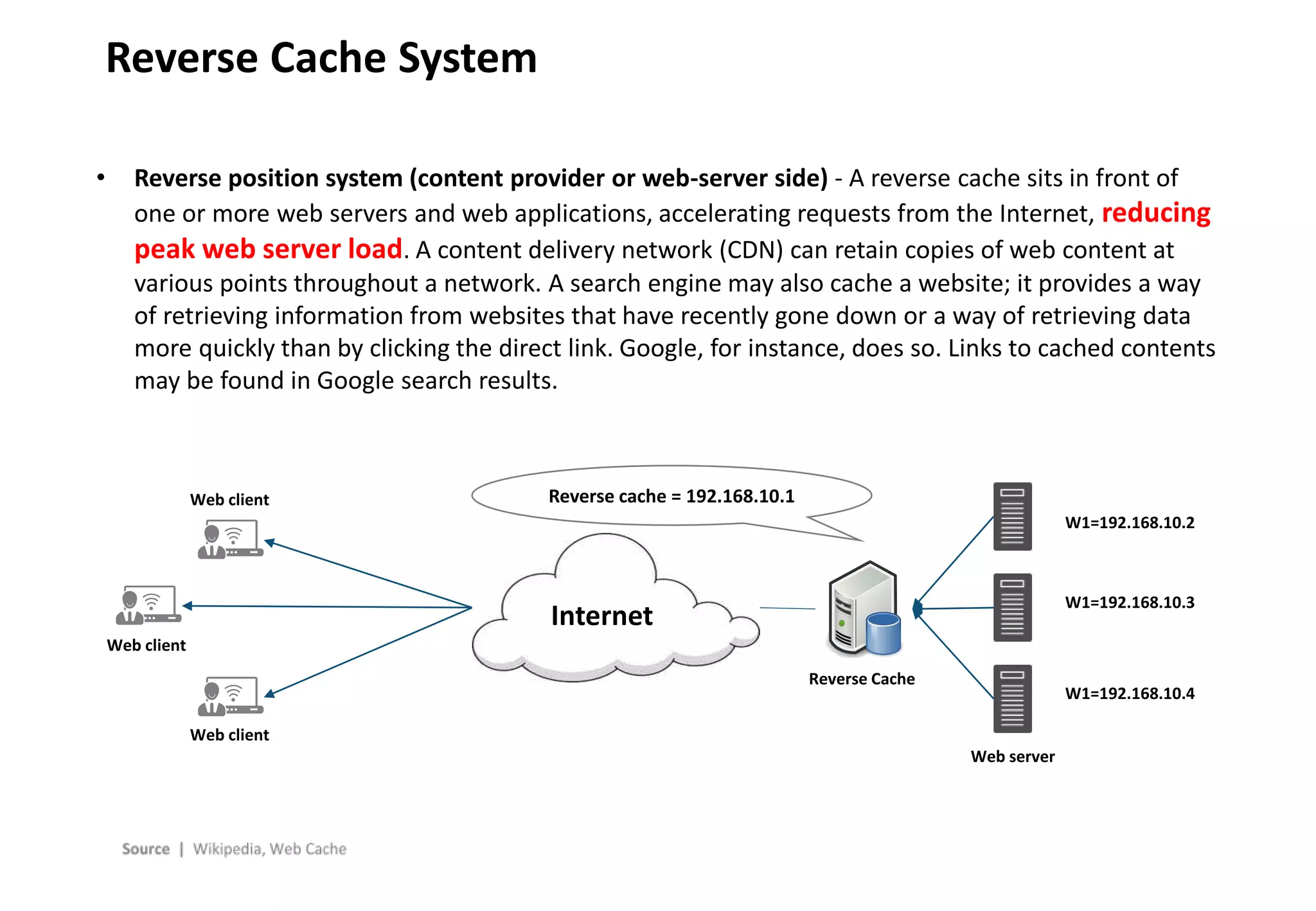
• Reverse position system (content provider or web-server side) - A reverse cache sits in front of
one or more web servers and web applications, accelerating requests from the Internet, reducing
peak web server load. A content delivery network (CDN) can retain copies of web content at
various points throughout a network. A search engine may also cache a website; it provides a way
of retrieving information from websites that have recently gone down or a way of retrieving data
more quickly than by clicking the direct link. Google, for instance, does so. Links to cached contents
may be found in Google search results.
- 11 -
Cache Hit / Cache Miss
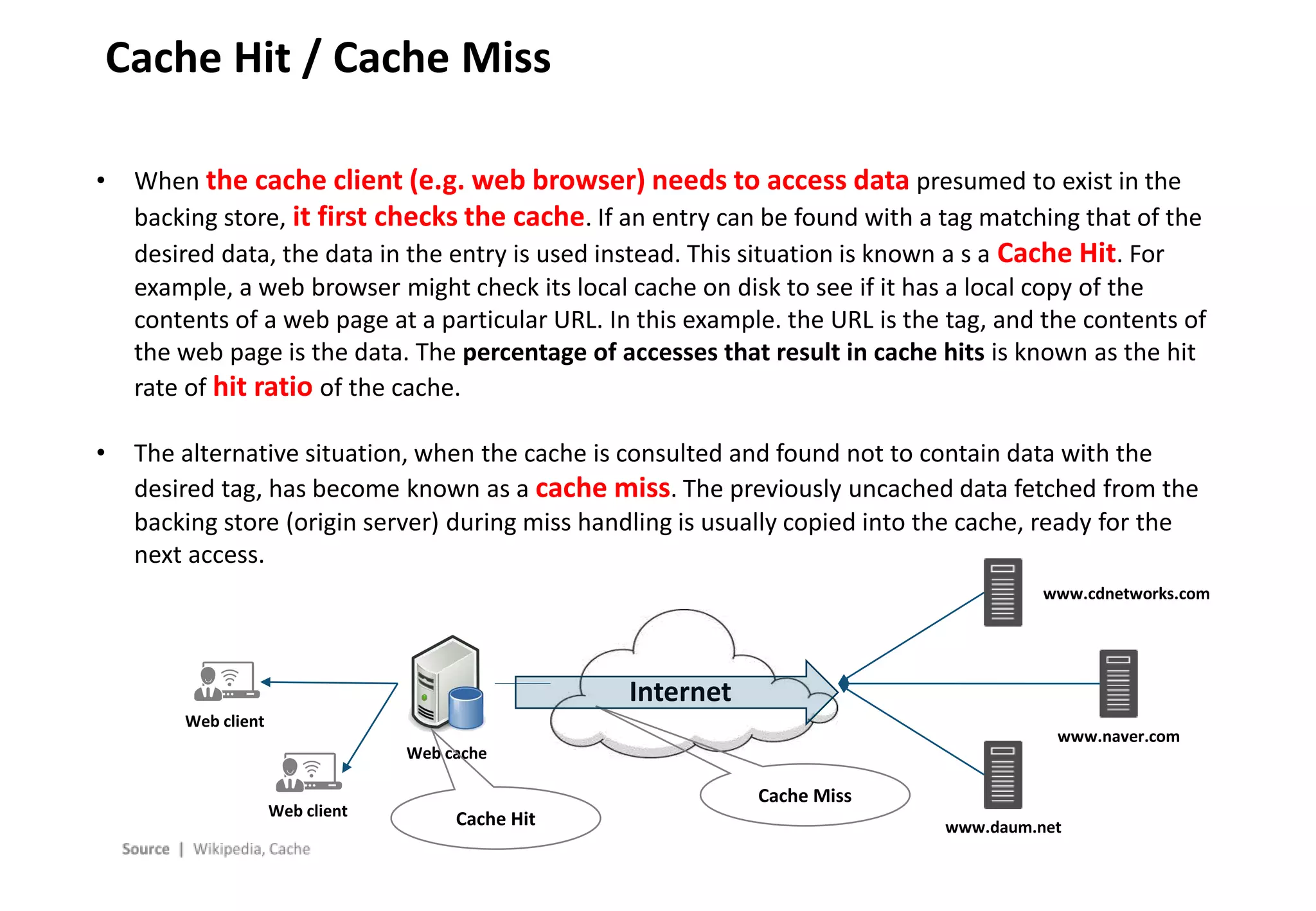
• When the cache client (e.g. web browser) needs to access data presumed to exist in the
backing store, it first checks the cache. If an entry can be found with a tag matching that of the
desired data, the data in the entry is used instead. This situation is known a s a Cache Hit. For
example, a web browser might check its local cache on disk to see if it has a local copy of the
contents of a web page at a particular URL. In this example. the URL is the tag, and the contents of
the web page is the data. The percentage of accesses that result in cache hits is known as the hit
rate of hit ratio of the cache.
• The alternative situation, when the cache is consulted and found not to contain data with the
desired tag, has become known as a cache miss. The previously uncached data fetched from the
backing store (origin server) during miss handling is usually copied into the cache, ready for the
next access.
Internet
Web client
Web client
Web cache
www.cdnetworks.com
www.daum.net
www.naver.com
Cache Hit
Cache Miss
- 12 -
Cache control
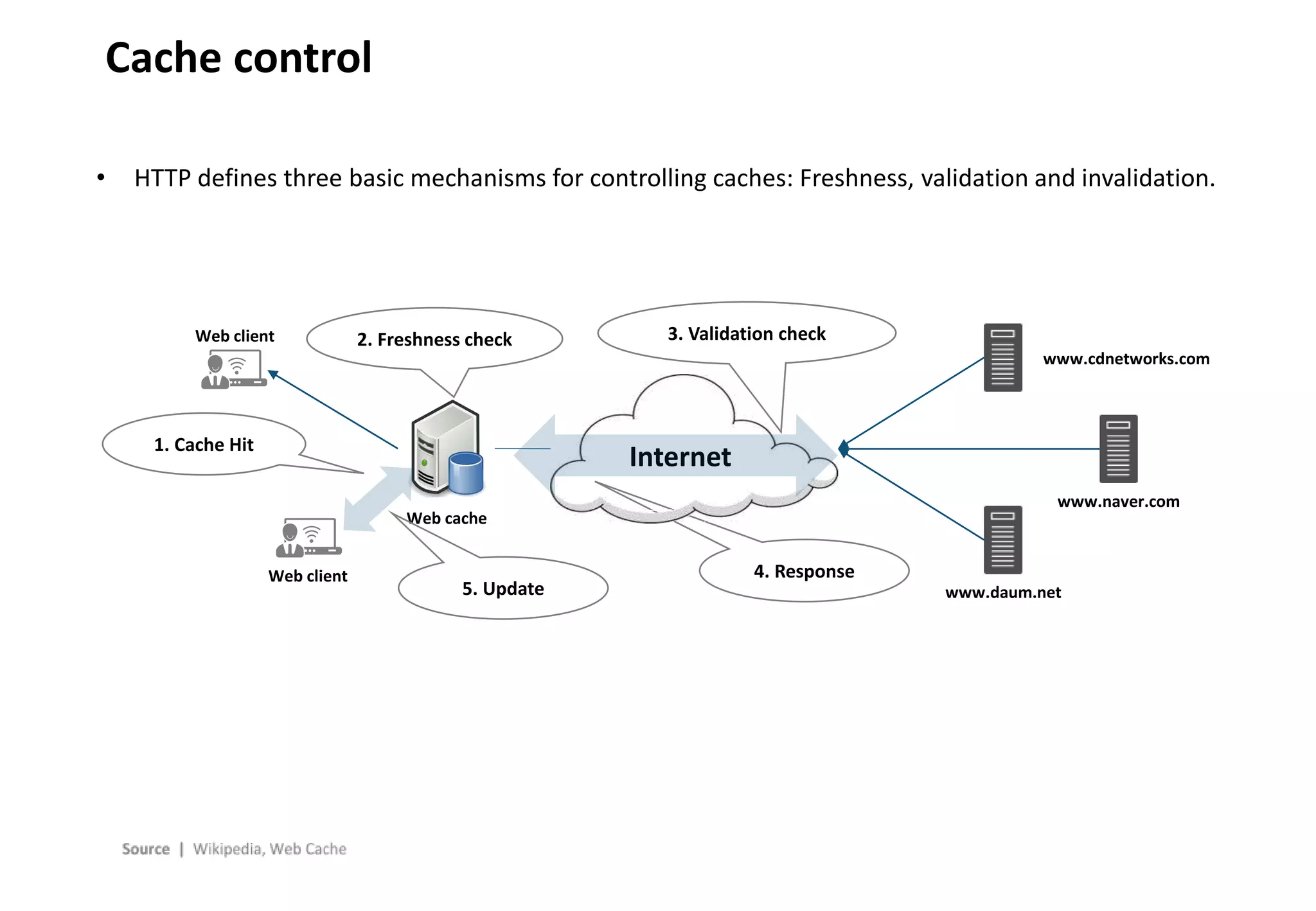
• HTTP defines three basic mechanisms for controlling caches: Freshness, validation and invalidation.
• Freshness allows a response to be used without re-checking it on the origin server and
can be controlled by both the sever and the client. For example, the Expires response header gives
a date when the document becomes stale, and the Cache Control: max-age directive (TTL – Time To
Live) tells the cache how many seconds the response is fresh for.
• Validation can be used to check whether a cached response is still good after it becomes
stale. For example, if the response has a Last-Modified header, a cache can make a conditional
request using If-Modified-Since header to see is it has changed. The ETag (entity tag) mechanism
also allows for both strong and weak validation.
• Invalidation is usually a side effect of another request that passes through the cache. For example,
if a URL associated with a cached response subsequently gets a POST, PUT or DELETE request, the
cached response will be invalidated.
• Many CDNs and manufacturers of network equipment have replaced this HTTP cache control with
dynamic caching.
- 13 -
Cache control
• HTTP defines three basic mechanisms for controlling caches: Freshness, validation and invalidation.
Internet
Web client
Web client
Web cache
www.cdnetworks.com
www.daum.net
www.naver.com
5. Update
4. Response
3. Validation check
2. Freshness check
1. Cache Hit
- 14 -
A Sample DNS Request
www.google.com. IN A
Request Domain requested for lookup
Requested record type
www.google.com. 37872 IN CNAME www.l.google.com.
www.l.google.com. 75 IN A 173.194.33.20
Response
Time-To-Live of this record
Record type
“Answer”, or resolved addr
ess
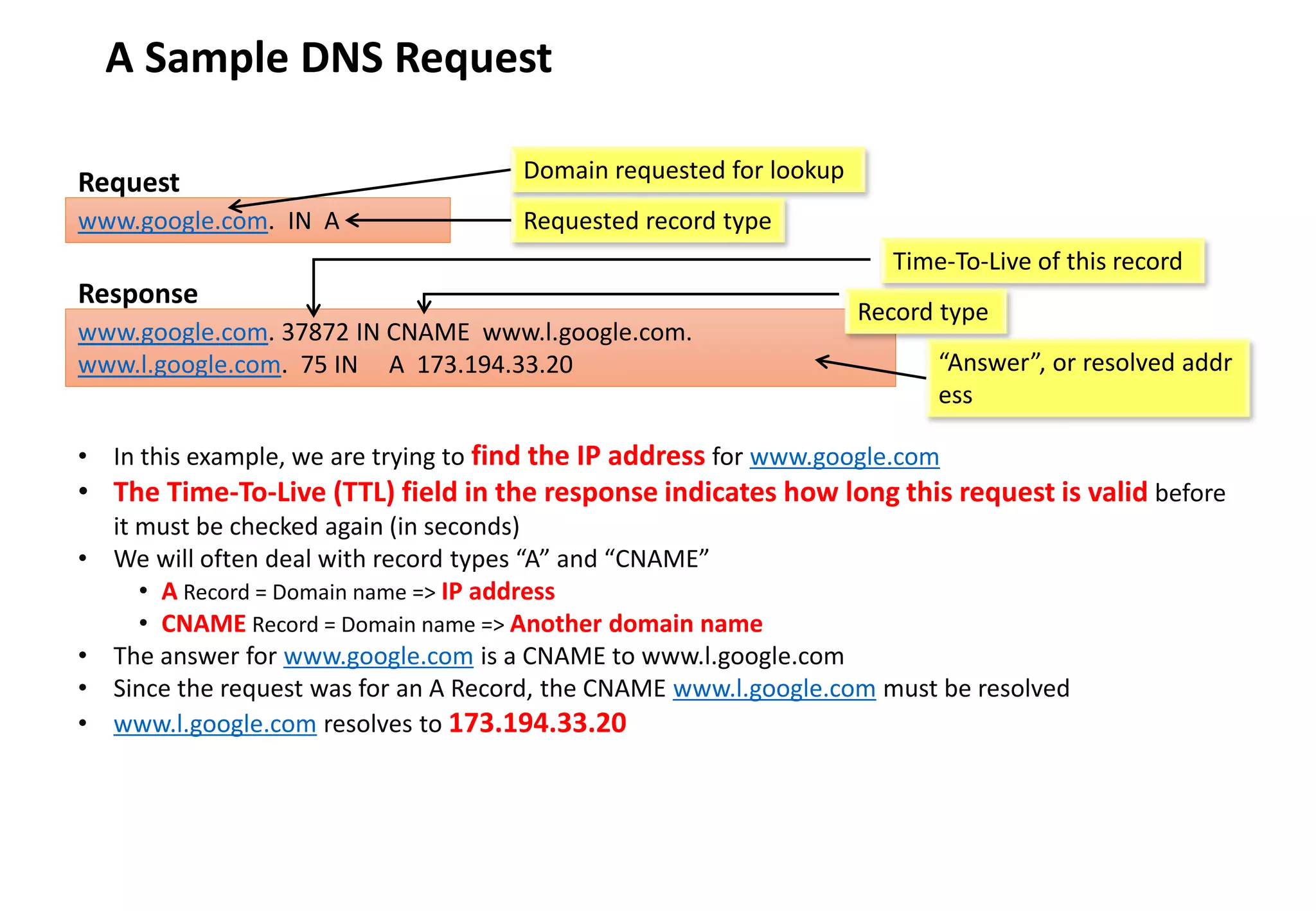
• In this example, we are trying to find the IP address for www.google.com
• The Time-To-Live (TTL) field in the response indicates how long this request is valid before
it must be checked again (in seconds)
• We will often deal with record types “A” and “CNAME”
• A Record = Domain name => IP address
• CNAME Record = Domain name => Another domain name
• The answer for www.google.com is a CNAME to www.l.google.com
• Since the request was for an A Record, the CNAME www.l.google.com must be resolved
• www.l.google.com resolves to 173.194.33.20
- 15 -
Recursive Query
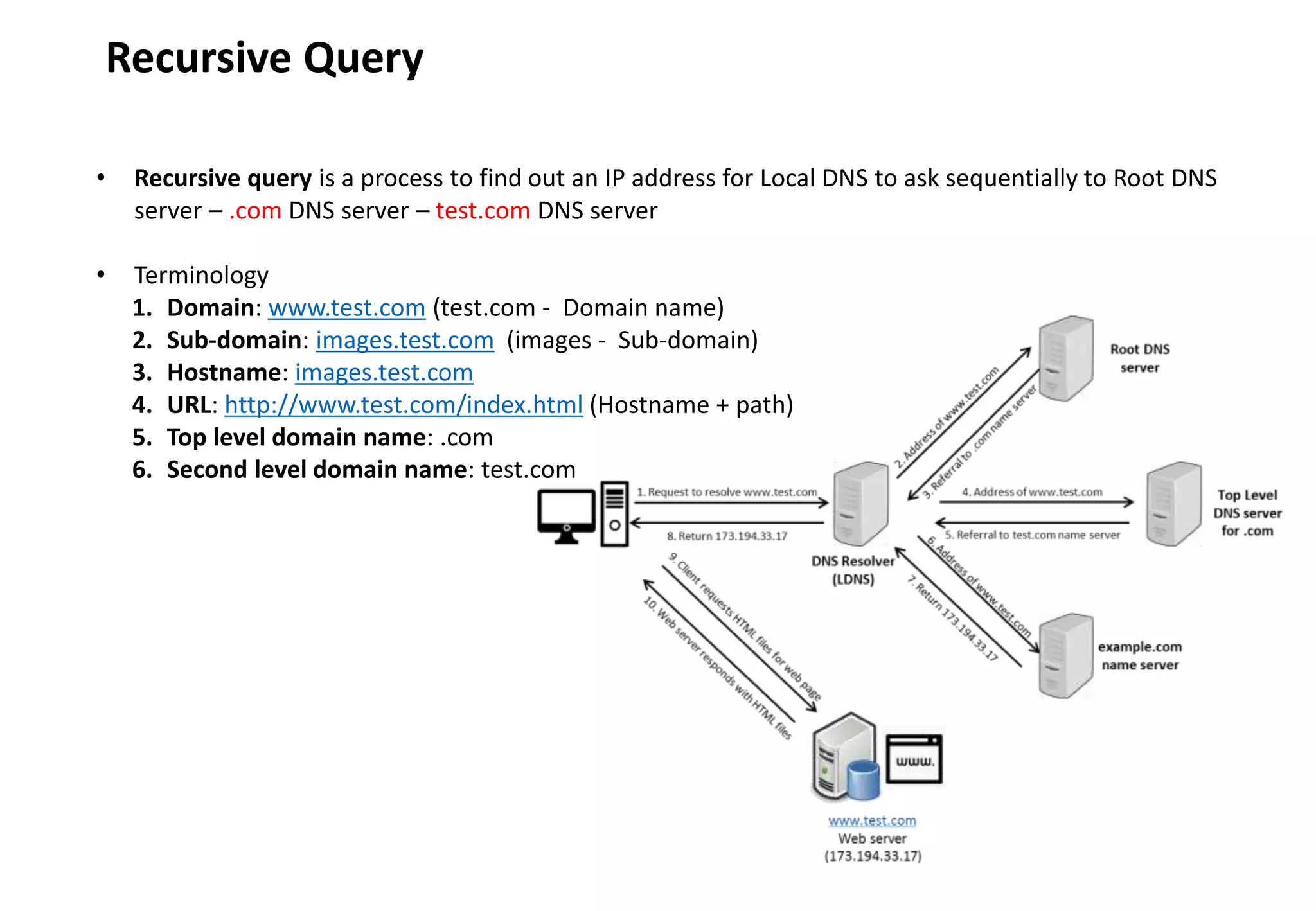
• Recursive query is a process to find out an IP address for Local DNS to ask sequentially to Root DNS
server – .com DNS server – test.com DNS server
• Terminology
1. Domain: www.test.com (test.com - Domain name)
2. Sub-domain: images.test.com (images - Sub-domain)
3. Hostname: images.test.com
4. URL: http://www.test.com/index.html (Hostname + path)
5. Top level domain name: .com
6. Second level domain name: test.com
- 16 -
DNS resolving
Client requests IP
address of
www.test.com from
DNS server
DNS Resolver
(LDNS)
1. Request to resolve www.test.com
Root DNS
server
Top Level
DNS server
for .com
example.com
name server
www.test.com
Web server
(173.194.33.17)
4. Address of www.test.com
5. Referral to test.com name server
8. Return 173.194.33.17
www.test.com. IN A
Request
www.test.com 37872 IN CNAME www.test.com.cdnvendor.net
www.test.com.cdnvendor.net 75 IN A 173.194.33.20
Response
Domain requested for lookup
Requested record type
Time-To-Live of record
DNS record type
Resolved
IP address
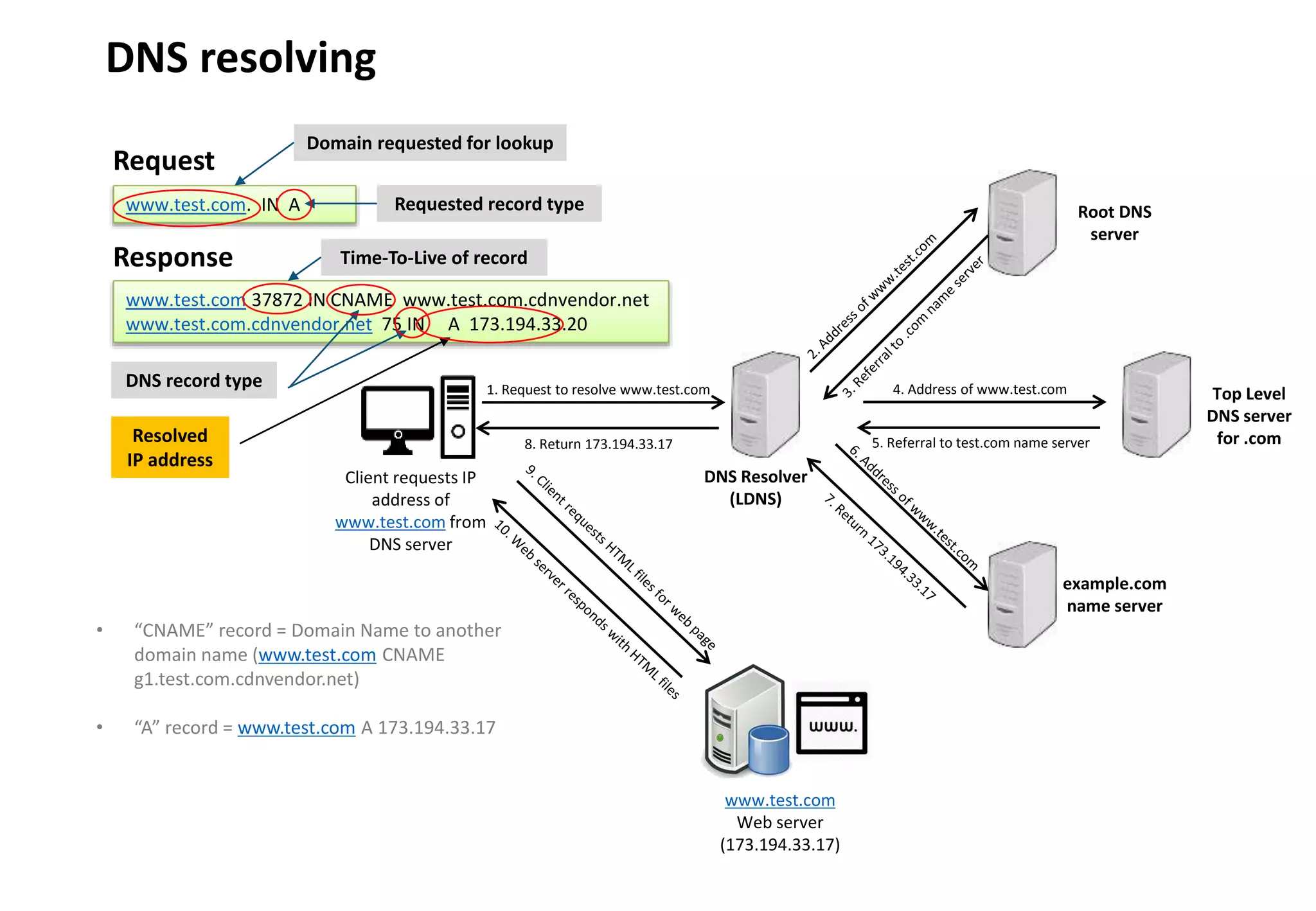
• “CNAME” record = Domain Name to another
domain name (www.test.com CNAME
g1.test.com.cdnvendor.net)
• “A” record = www.test.com A 173.194.33.17
- 17 -
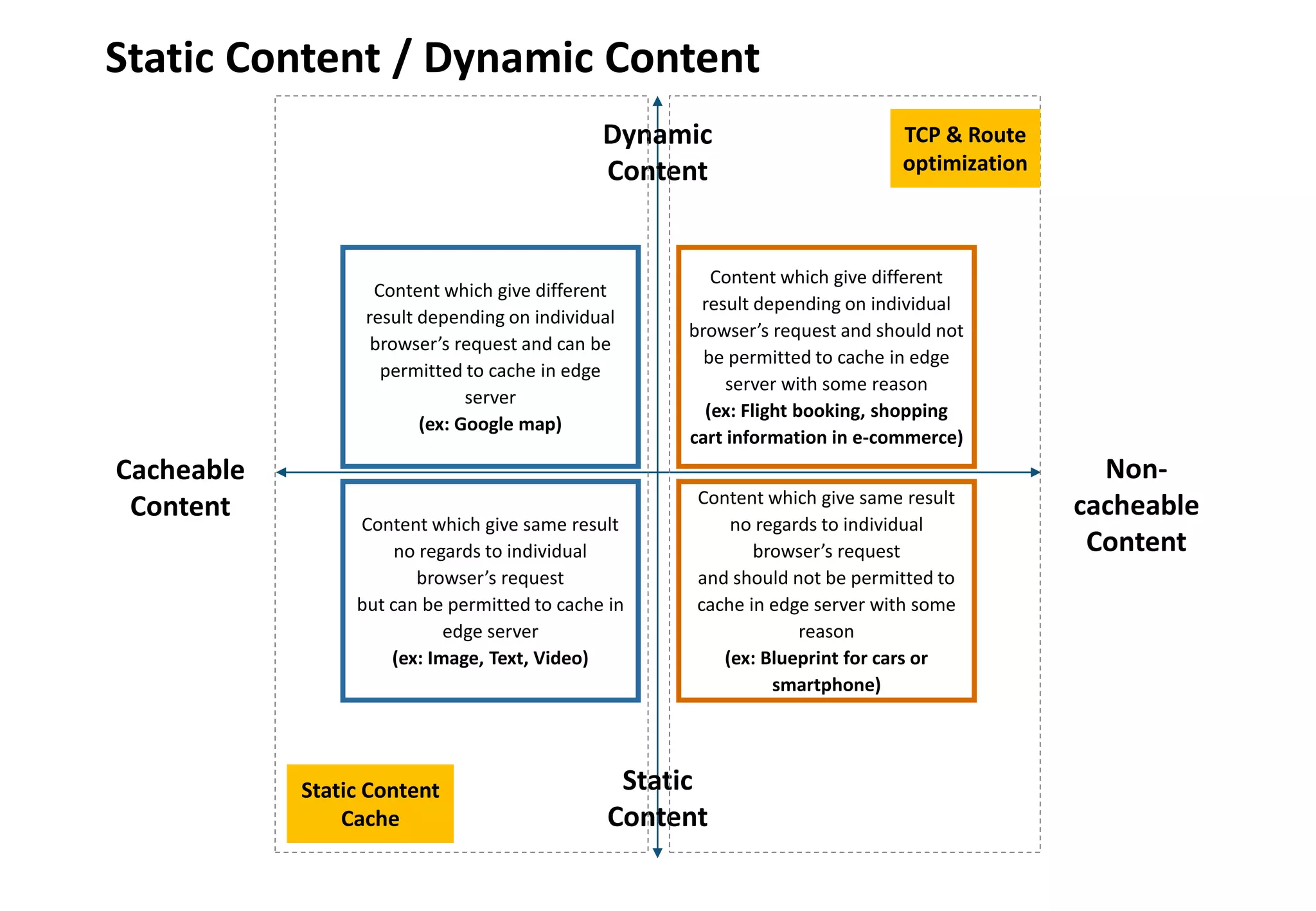
Static Content / Dynamic Content
Dynamic
Content
Static
Content
Cacheable
Content
Non-
cacheable
Content
Content which give same result
no regards to individual
browser’s request
but can be permitted to cache in
edge server
(ex: Image, Text, Video)
Content which give same result
no regards to individual
browser’s request
and should not be permitted to
cache in edge server with some
reason
(ex: Blueprint for cars or
smartphone)
Content which give different
result depending on individual
browser’s request and should not
be permitted to cache in edge
server with some reason
(ex: Flight booking, shopping
cart information in e-commerce)
Content which give different
result depending on individual
browser’s request and can be
permitted to cache in edge
server
(ex: Google map)
Static Content
Cache
TCP & Route
optimization
2. CDN Overview
- 19 -
Content Delivery Network
• A content delivery network or content distribution network (CDN) is a globally distributed
network of proxy servers deployed in multiple Internet Data Centers. The goal of a CDN is to serve
content to end-users with high availability and high performance. CDNs serve a large fraction
of the Internet content today, including web objects (text, graphics and scripts), downloadable
objects (media files, software, documents), applications (e-commerce, portals), live streaming
media, on-demand streaming media, and social networks.
• The term CDN means many things to different people and is an umbrella term that covers a lot of
different types of content delivery services. Video streaming, software downloads, web and
mobile content acceleration, licensed/managed CDN, transparent caching, and services to
measure CDN performance, load balancing, multi-CDN switching and analytics and cloud
intelligence. It’s a complex ecosystem with a lot of vendors both large and small and some CDN
vendors cross over into other industries like security and WAN optimization.
• Content owners such as media companies and e-commerce vendors pay CDN operators to
delivery their content to their end-users. In turn, a CDN pays ISPs, carriers, and networks
operators for hosting its severs in their data centers.
- 20 -
Content Delivery Network
• CDN nodes are usually deployed in multiple locations, often over multiple backbones. Benefits
include reducing bandwidth costs, improving page load times, or increasing global
availability of content. The number of nodes and servers making up a CDN varies, depending on
the architecture, some reaching thousands of nodes with tens of thousands of severs on many
remote point of presence (Pops). Others build a global network and have a small number of
geographical Pops.
• A Point of presence (Pop) is an artificial demarcation point of interface point between
communicating entities. An Internet Point of presence typically houses servers, routers,
network switches, multiplexers, and other network interface equipment. It is typically
located in a Internet Data Center. ISPs typically have multiple Pops. Pops are often located at
Internet exchange points and colocation centers.
• Requests for content are typically algorithmically directed to nodes that are optimal in some way.
When optimizing for performance, locations that are best for serving content to the user may be
chosen. This may be measured by choosing locations that are the fewest hops, the last number of
network seconds away from the requesting client, or the highest availability in terms of server
performance (both current and historical), so as to optimize delivery across local networks. When
optimizing for cost, locations that are least expensive may be chosen instead. In an optimal
scenario, these two goals tend to align, as ‘edge severs’ that are close to the end-user
at the edge of the network may have and advantage in performance of cost.
- 21 -
Content Delivery Network
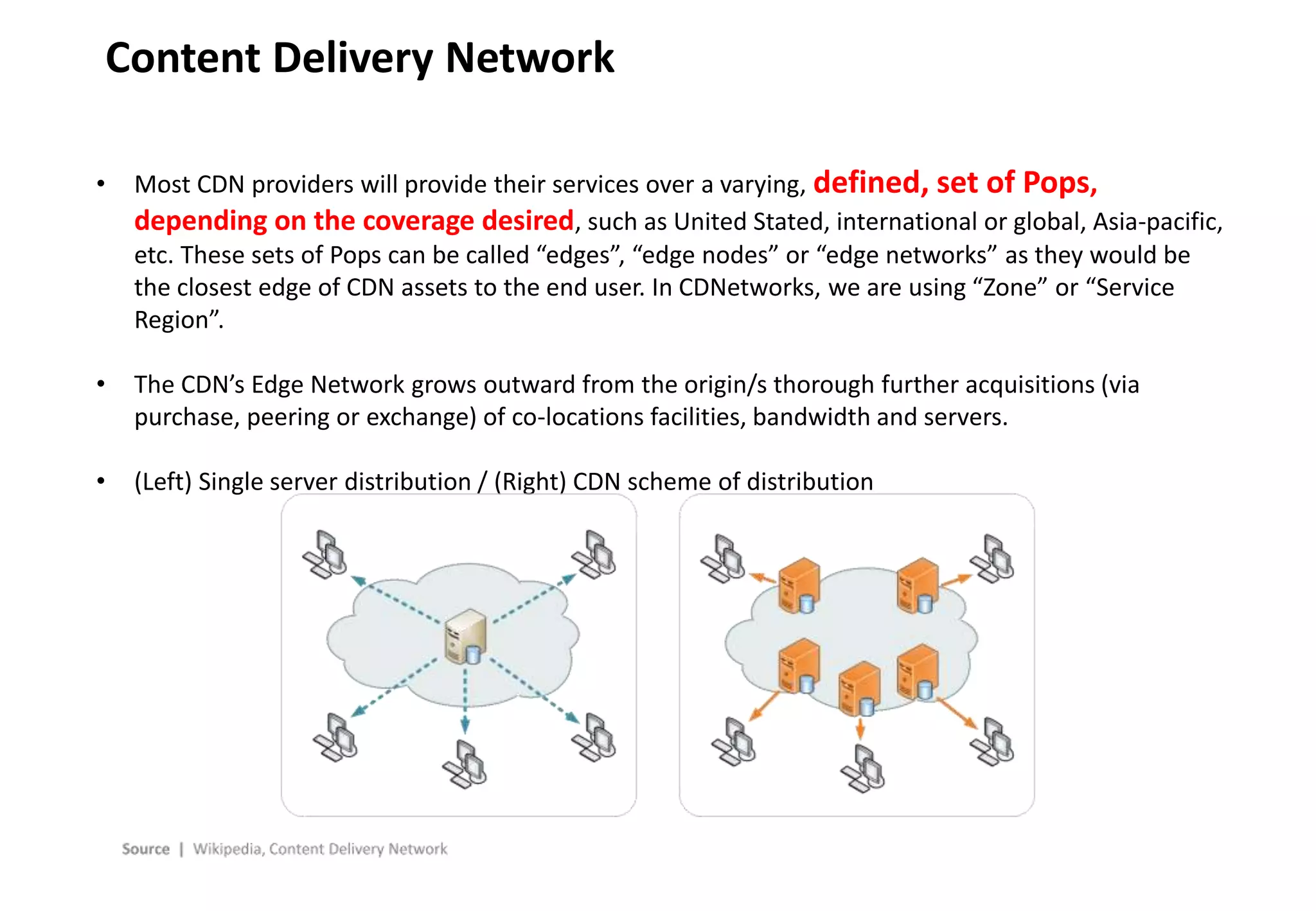
• Most CDN providers will provide their services over a varying, defined, set of Pops,
depending on the coverage desired, such as United Stated, international or global, Asia-pacific,
etc. These sets of Pops can be called “edges”, “edge nodes” or “edge networks” as they would be
the closest edge of CDN assets to the end user. In CDNetworks, we are using “Zone” or “Service
Region”.
• The CDN’s Edge Network grows outward from the origin/s thorough further acquisitions (via
purchase, peering or exchange) of co-locations facilities, bandwidth and servers.
• (Left) Single server distribution / (Right) CDN scheme of distribution
3. Content Networking Techniques
- 23 -
Content networking techniques
• The internet was designed according to the end-to-end principle. This principle keeps the core
network relatively simple and moves the intelligence as much as possible to the network end-
points: the hosts and clients. As a result the core network is specialized, simplified, and
optimized to only forward data packets.
• Content Delivery Networks augment the end-to-end transport network by distributing on it a
variety of intelligence applications employing techniques designed to optimize content delivery.
The resulting tightly integrated overlay uses web caching, server load balancing, request
routing, and content services.
- 24 -
Content networking techniques
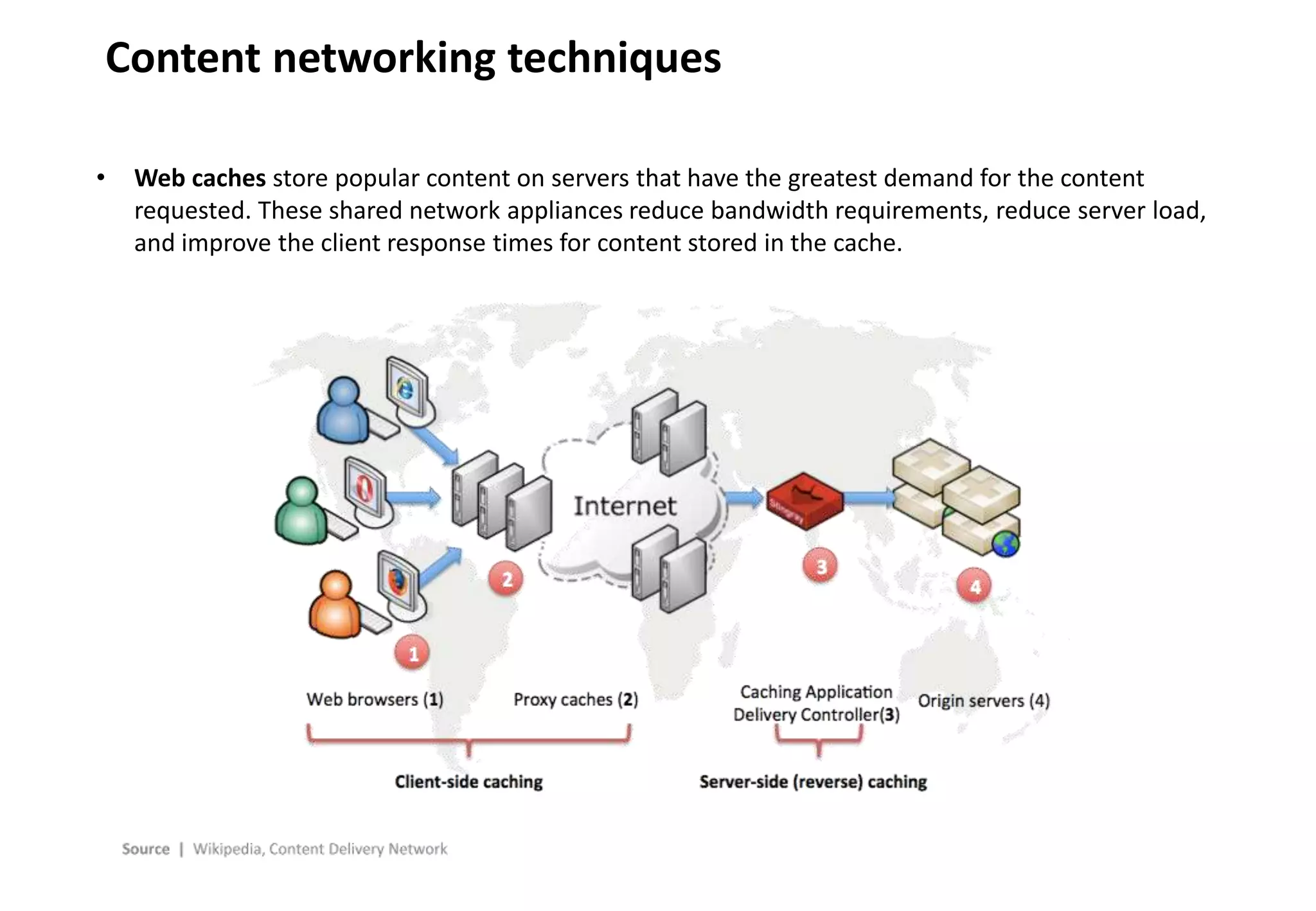
• Web caches store popular content on servers that have the greatest demand for the content
requested. These shared network appliances reduce bandwidth requirements, reduce server load,
and improve the client response times for content stored in the cache.
- 25 -
Web accelerator
• A web accelerator is a proxy server that reduces web site access time. They can be a self-contained
hardware appliance or installable software.
• Web accelerators may be installed on the client (browsing) computer or mobile device, on ISP
servers, on the server computer/network, or a combination. Accelerating delivery through
compression requires some type of host-based server to collect, compress and then delivery
content to a client computer.
• Web accelerators may use several techniques to achieve this reduction in access time: They may
• cache recently or frequently accessed documents so they may be sent to the client with less latency or at a
faster transfer rate than the remote server could.
• freshen objects in the cache ensuring that frequently accessed content is readily available for display.
• preemptively resolve hostnames present in a document (HTML or JavaScript) in order to reduce latency.
• prefetch documents that are likely to be accessed in the near future.
• compress documents to a smaller size, for example by reducing the quality of images or by sending only
what’s changed since the document was last requested.
• optimize the code from certain documents (such as HTML or JavaScript)
• filter out ads and other undesirable objects so they are not sent to the client at all.
• maintain persistent TCP connections between the client and the proxy server.
• improve the performance via protocol level accelerations, such as TCP acceleration.
- 26 -
Content networking techniques
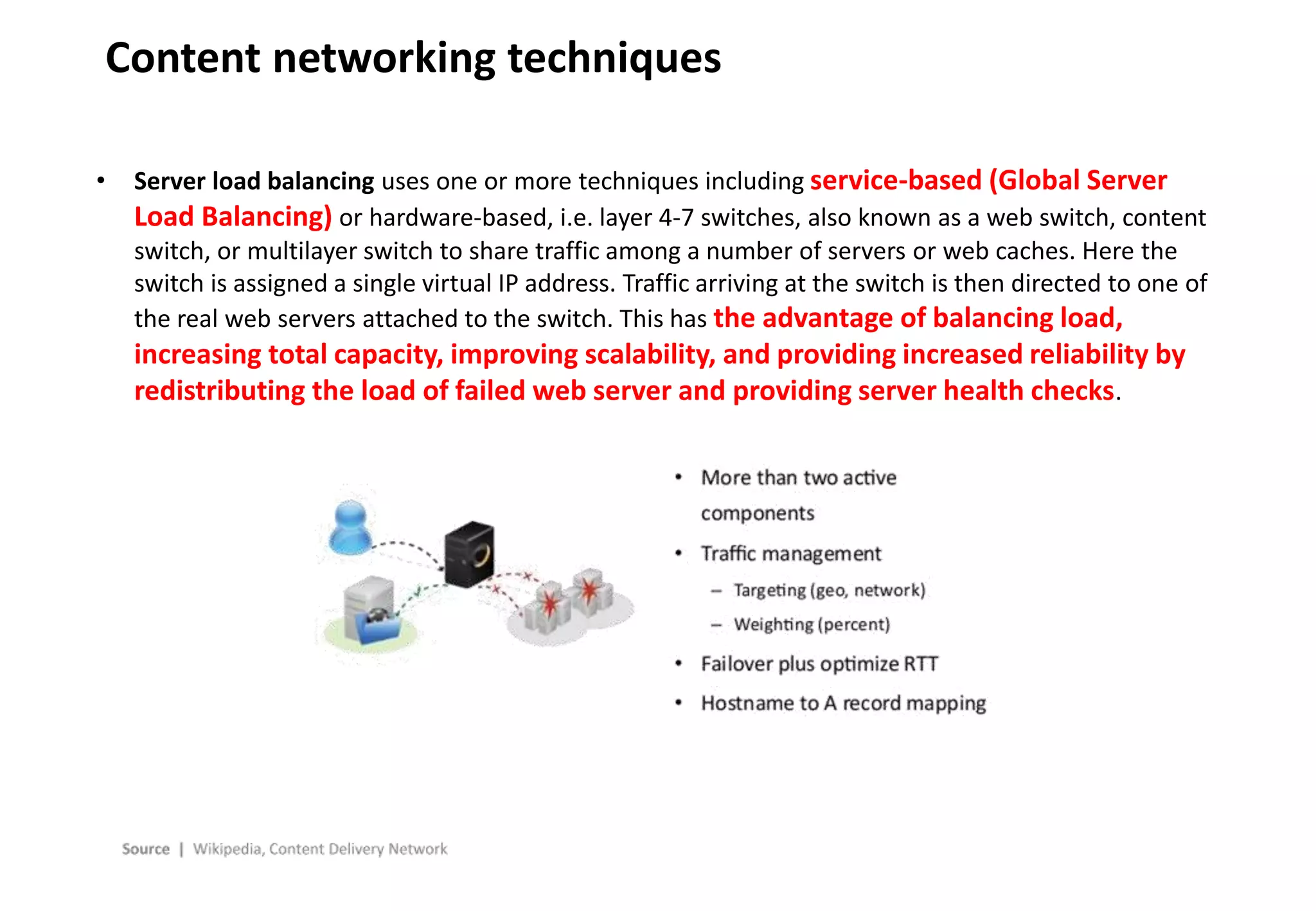
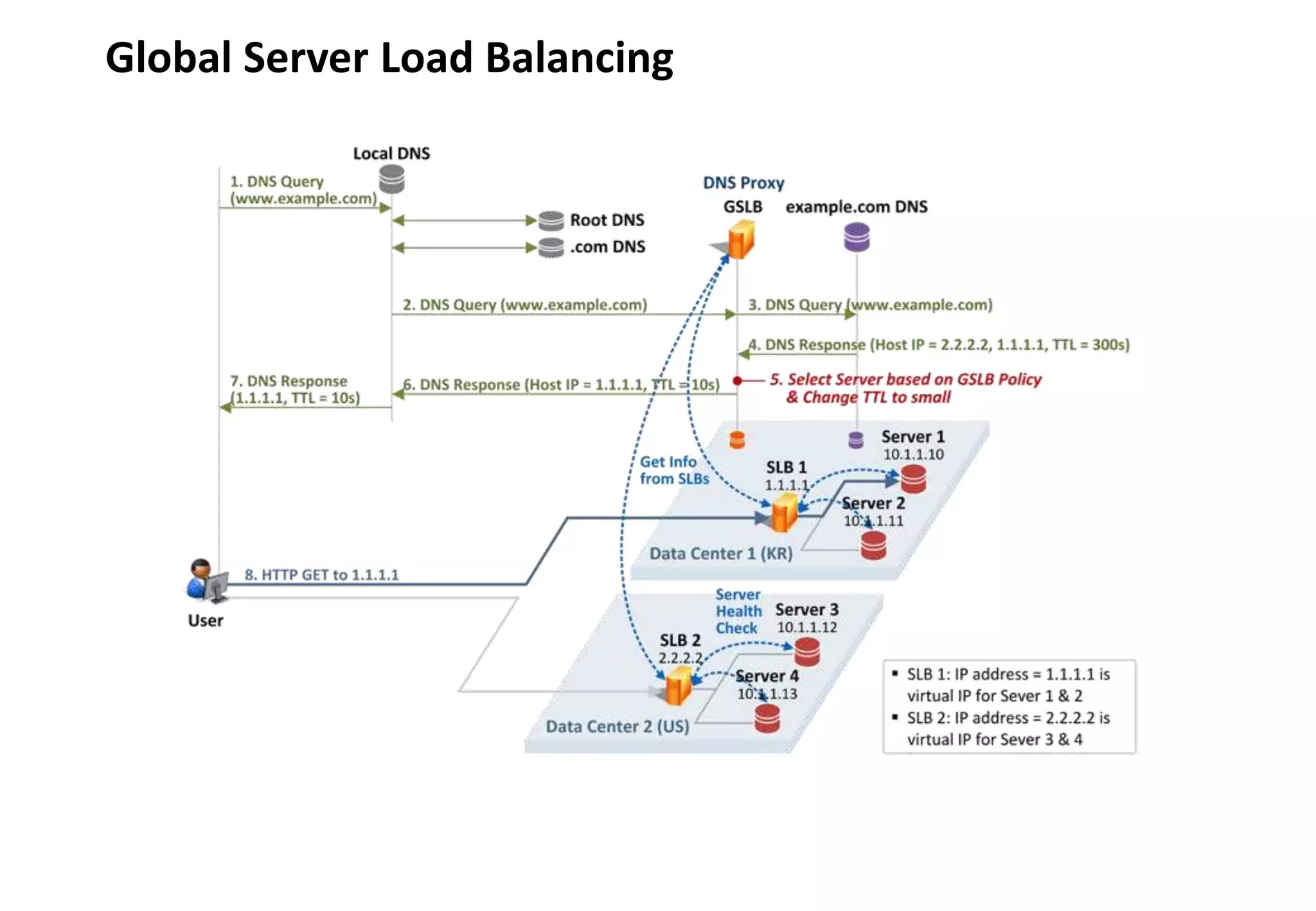
• Server load balancing uses one or more techniques including service-based (Global Server
Load Balancing) or hardware-based, i.e. layer 4-7 switches, also known as a web switch, content
switch, or multilayer switch to share traffic among a number of servers or web caches. Here the
switch is assigned a single virtual IP address. Traffic arriving at the switch is then directed to one of
the real web servers attached to the switch. This has the advantage of balancing load,
increasing total capacity, improving scalability, and providing increased reliability by
redistributing the load of failed web server and providing server health checks.
- 27 -
Global Server Load Balancing
- 28 -
Content networking techniques
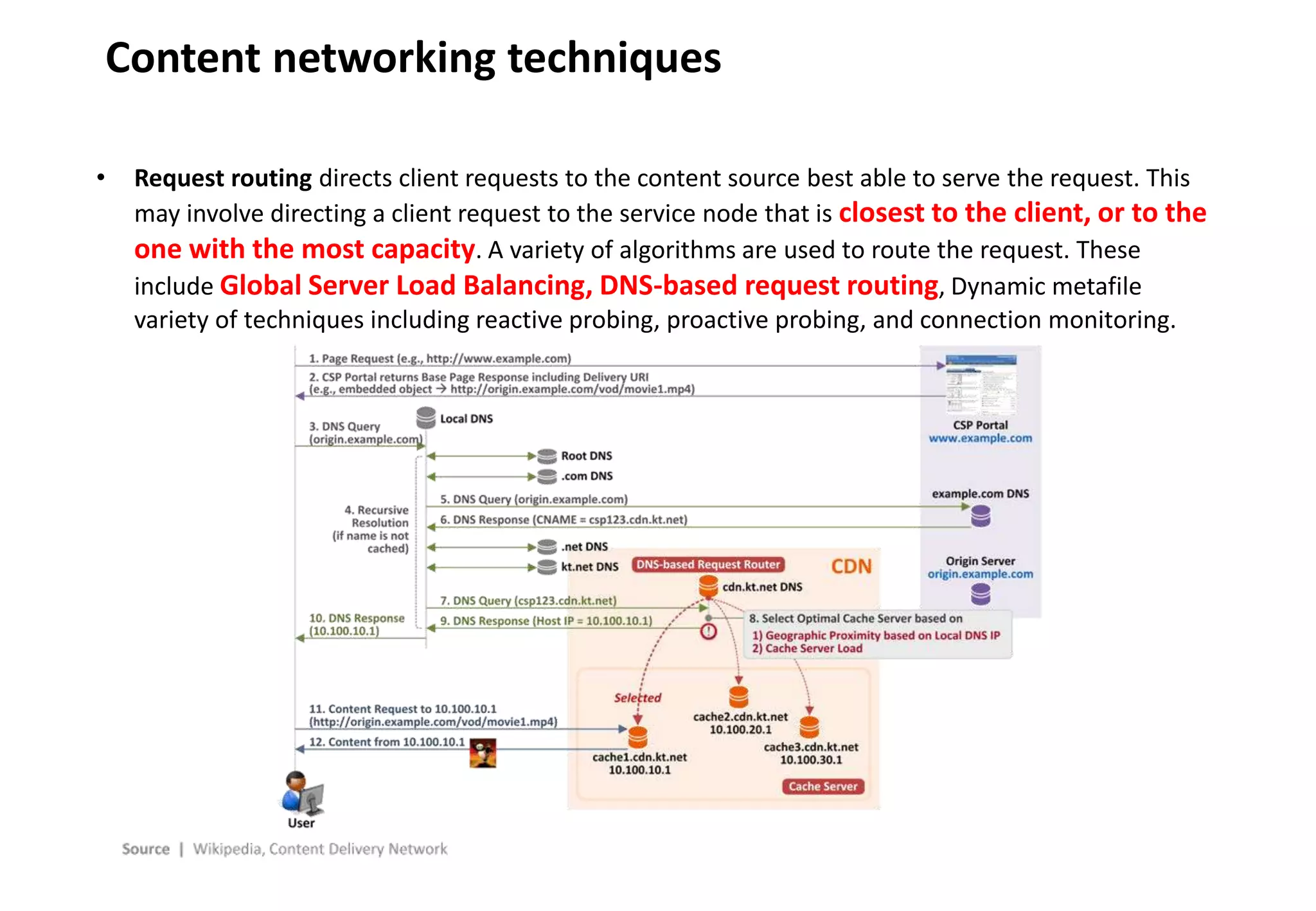
• Request routing directs client requests to the content source best able to serve the request. This
may involve directing a client request to the service node that is closest to the client, or to the
one with the most capacity. A variety of algorithms are used to route the request. These
include Global Server Load Balancing, DNS-based request routing, Dynamic metafile
variety of techniques including reactive probing, proactive probing, and connection monitoring.
4. Dynamic Site Acceleration
- 30 -
Static and Dynamic Web page
• A static web page (sometimes called a flat page/stationary page) is a web page that is delivered
to the user exactly as stored, in contrast to dynamic web pages which are generated by a web
application.
• Consequently, a static web page displays the same information for all users, from all
contexts, subject to modern capabilities of a web server to negotiate content-type of language of
the document where such versions are available and the server is configured to do so.
• Static web pages are often HTML documents stores as files in the file system and made available by
the web server over HTTP.
• Static web pages are suitable for the contents that never or rarely need to be updated,
though modern static site generators are changing. Maintaining large numbers of static pages as
files can be impractical without automated tools, such as Static site generators described in Web
template system.
• A server-side dynamic web page is a web page whose construction is controlled by an
application server processing server-side scripts. In server-side scripting, parameters
determine how the assembly of every new web page proceeds, including the setting up of more
client-side processing.
- 31 -
Dynamic Site Acceleration
• Dynamic site acceleration is a group of techniques that make the delivery of dynamic websites
more efficient. Manufacturers of application delivery controllers and content delivery networks
(CDNs) use the following techniques to accelerate dynamic sites:
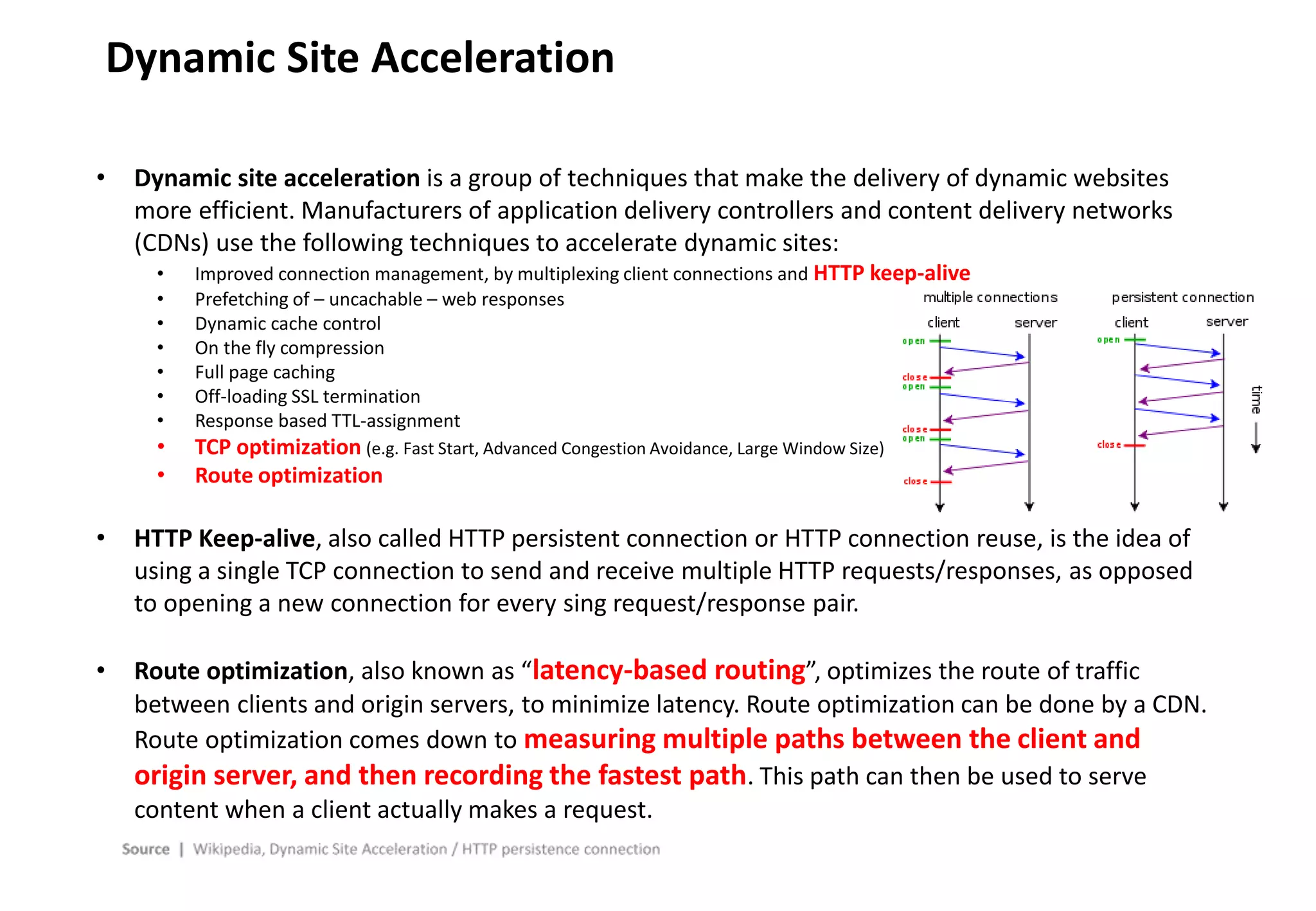
• Improved connection management, by multiplexing client connections and HTTP keep-alive
• Prefetching of – uncachable – web responses
• Dynamic cache control
• On the fly compression
• Full page caching
• Off-loading SSL termination
• Response based TTL-assignment
• TCP optimization (e.g. Fast Start, Advanced Congestion Avoidance, Large Window Size)
• Route optimization
• HTTP Keep-alive, also called HTTP persistent connection or HTTP connection reuse, is the idea of
using a single TCP connection to send and receive multiple HTTP requests/responses, as opposed
to opening a new connection for every sing request/response pair.
• Route optimization, also known as “latency-based routing”, optimizes the route of traffic
between clients and origin servers, to minimize latency. Route optimization can be done by a CDN.
Route optimization comes down to measuring multiple paths between the client and
origin server, and then recording the fastest path. This path can then be used to serve
content when a client actually makes a request.

Cdn technology overview

  • 1.
  • 2.
    C O NT E N T 1. Internet Technology Basics 2. CDN Overview 3. Content Networking Techniques 4. Dynamic Site Acceleration
  • 3.
  • 4.
    - 4 - InternetBasics • The Internet is the global system of interconnected computer networks that use the Internet protocol suite (TCP/IP) to link devices (Computer or Smart devices) worldwide. • The terms Internet and World Wide Web are often used interchangeably in everyday speech; it is common to speak of "going on the Internet" when invoking a web browser to view web pages. However, the World Wide Web or the Web is only one of a large number of Internet services. The Web is a collection of interconnected documents (web pages) and other web resources, linked by hyperlinks and URLs.. • In computing, a hyperlink, or simply a link, is a reference to data that the reader can directly follow either by clicking, tapping, or hovering. • Internet is a network of networks that consists of private, public, academic, business, and government networks of local to global scope, linked by a broad array of electronic, wireless, and optical networking technologies. • The Internet carries many network services, most prominently mobile apps such as social media apps, the World Wide Web, electronic mail, multiplayer online games, Internet telephony, and file sharing services.
  • 5.
    - 5 - WebBrowsing • When you want to access a certain web page: Just enter the domain name into your browser, but in machine to machine communication, they use a unique IP address for their communication • We are using yellow page to find out someone’s phone number, Web browsers use DNS as a Domain – IP address mapping table. (IP address = Phone number / Domain name = Person’s name) • TCP provides reliable, ordered, and error-checked delivery of a stream of octets between applications running on hosts communicating by an IP network. Internet Hey, 213.236.208.98, show me your web page. HTTP 200 – OK Here you go: <HTML>... 213.236.208.98
  • 6.
    - 6 - Proxyserver • In computer networks, a Proxy server is a server (a computer system or an application) that acts as an intermediary for requests from clients seeking resources from other servers. A client connect to the proxy server, requesting some service, such a file, connection, web page, or other resource available from a different server and the proxy server evaluates the request as a way to simplify and control its complexity. Proxies were invented to add structure and encapsulation to distributed systems. Today, most proxies are web proxies, facilitating access to content on the World Wide Web, providing anonymity and may be used to bypass IP address blocking.
  • 7.
    - 7 - MemoryCache • Cache is a hardware or software component that stores data so future requests for that data can be served faster; the data stored in cache might be the result of an earlier computation • Cache memory or memory cache is a fast and relatively small memory, not visible to the software, that is completely handled by the hardware, that stores the most recently used data. The function of the cache memory is to speed up the data access (performance increasing).
  • 8.
    - 8 - WebCache • Web Cache: A web cache (or HTTP cache) is an information technology for the temporary storage (caching) of web documents, such as HTML pages and images, to reduce bandwidth usage, server load, and perceived lag. A web cache system stores copies of documents passing through it. Subsequent requests may be satisfied from the cache if certain conditions are met. A web cache system can refer either to an appliance, or to a computer program. • Web cache is for multiple users unlike cache memory for one user. Many users are very likely to visit same web site, Web cache is very efficient more users are visiting a certain web site. • When a client request a certain web page, HTTP cache will reply from 2nd client’s request without going to Origin Web server.
  • 9.
    - 9 - ForwardCache System • Web caches can be used in various systems (as viewed from direction of web content) • Forward position system (recipient of client side) - A Forward Cache is a cache outside the web server’s network, e.g. on the client computer, in an ISP or within a corporate network. A network- aware forward cache is just like a forward cache but only caches heavily accessed items. A client such as a web browser, can also store web content for reuse. For example, if the back button is pressed, the local cached version of page may be displayed instead of a new request being sent to web server. A web proxy sitting between the client and the server can evaluate HTTP headers and choose whether to store web content. This can reduce “IP transit cost” of internet middle mile. Internet Web client Web client Web client Forward Cache www.cdnetworks.com www.daum.net www.naver.com . . .
  • 10.
    - 10 - ReverseCache System Internet Web client Web client Web client Reverse Cache Web server Reverse cache = 192.168.10.1 W1=192.168.10.2 W1=192.168.10.3 W1=192.168.10.4 • Reverse position system (content provider or web-server side) - A reverse cache sits in front of one or more web servers and web applications, accelerating requests from the Internet, reducing peak web server load. A content delivery network (CDN) can retain copies of web content at various points throughout a network. A search engine may also cache a website; it provides a way of retrieving information from websites that have recently gone down or a way of retrieving data more quickly than by clicking the direct link. Google, for instance, does so. Links to cached contents may be found in Google search results.
  • 11.
    - 11 - CacheHit / Cache Miss • When the cache client (e.g. web browser) needs to access data presumed to exist in the backing store, it first checks the cache. If an entry can be found with a tag matching that of the desired data, the data in the entry is used instead. This situation is known a s a Cache Hit. For example, a web browser might check its local cache on disk to see if it has a local copy of the contents of a web page at a particular URL. In this example. the URL is the tag, and the contents of the web page is the data. The percentage of accesses that result in cache hits is known as the hit rate of hit ratio of the cache. • The alternative situation, when the cache is consulted and found not to contain data with the desired tag, has become known as a cache miss. The previously uncached data fetched from the backing store (origin server) during miss handling is usually copied into the cache, ready for the next access. Internet Web client Web client Web cache www.cdnetworks.com www.daum.net www.naver.com Cache Hit Cache Miss
  • 12.
    - 12 - Cachecontrol • HTTP defines three basic mechanisms for controlling caches: Freshness, validation and invalidation. • Freshness allows a response to be used without re-checking it on the origin server and can be controlled by both the sever and the client. For example, the Expires response header gives a date when the document becomes stale, and the Cache Control: max-age directive (TTL – Time To Live) tells the cache how many seconds the response is fresh for. • Validation can be used to check whether a cached response is still good after it becomes stale. For example, if the response has a Last-Modified header, a cache can make a conditional request using If-Modified-Since header to see is it has changed. The ETag (entity tag) mechanism also allows for both strong and weak validation. • Invalidation is usually a side effect of another request that passes through the cache. For example, if a URL associated with a cached response subsequently gets a POST, PUT or DELETE request, the cached response will be invalidated. • Many CDNs and manufacturers of network equipment have replaced this HTTP cache control with dynamic caching.
  • 13.
    - 13 - Cachecontrol • HTTP defines three basic mechanisms for controlling caches: Freshness, validation and invalidation. Internet Web client Web client Web cache www.cdnetworks.com www.daum.net www.naver.com 5. Update 4. Response 3. Validation check 2. Freshness check 1. Cache Hit
  • 14.
    - 14 - ASample DNS Request www.google.com. IN A Request Domain requested for lookup Requested record type www.google.com. 37872 IN CNAME www.l.google.com. www.l.google.com. 75 IN A 173.194.33.20 Response Time-To-Live of this record Record type “Answer”, or resolved addr ess • In this example, we are trying to find the IP address for www.google.com • The Time-To-Live (TTL) field in the response indicates how long this request is valid before it must be checked again (in seconds) • We will often deal with record types “A” and “CNAME” • A Record = Domain name => IP address • CNAME Record = Domain name => Another domain name • The answer for www.google.com is a CNAME to www.l.google.com • Since the request was for an A Record, the CNAME www.l.google.com must be resolved • www.l.google.com resolves to 173.194.33.20
  • 15.
    - 15 - RecursiveQuery • Recursive query is a process to find out an IP address for Local DNS to ask sequentially to Root DNS server – .com DNS server – test.com DNS server • Terminology 1. Domain: www.test.com (test.com - Domain name) 2. Sub-domain: images.test.com (images - Sub-domain) 3. Hostname: images.test.com 4. URL: http://www.test.com/index.html (Hostname + path) 5. Top level domain name: .com 6. Second level domain name: test.com
  • 16.
    - 16 - DNSresolving Client requests IP address of www.test.com from DNS server DNS Resolver (LDNS) 1. Request to resolve www.test.com Root DNS server Top Level DNS server for .com example.com name server www.test.com Web server (173.194.33.17) 4. Address of www.test.com 5. Referral to test.com name server 8. Return 173.194.33.17 www.test.com. IN A Request www.test.com 37872 IN CNAME www.test.com.cdnvendor.net www.test.com.cdnvendor.net 75 IN A 173.194.33.20 Response Domain requested for lookup Requested record type Time-To-Live of record DNS record type Resolved IP address • “CNAME” record = Domain Name to another domain name (www.test.com CNAME g1.test.com.cdnvendor.net) • “A” record = www.test.com A 173.194.33.17
  • 17.
    - 17 - StaticContent / Dynamic Content Dynamic Content Static Content Cacheable Content Non- cacheable Content Content which give same result no regards to individual browser’s request but can be permitted to cache in edge server (ex: Image, Text, Video) Content which give same result no regards to individual browser’s request and should not be permitted to cache in edge server with some reason (ex: Blueprint for cars or smartphone) Content which give different result depending on individual browser’s request and should not be permitted to cache in edge server with some reason (ex: Flight booking, shopping cart information in e-commerce) Content which give different result depending on individual browser’s request and can be permitted to cache in edge server (ex: Google map) Static Content Cache TCP & Route optimization
  • 18.
  • 19.
    - 19 - ContentDelivery Network • A content delivery network or content distribution network (CDN) is a globally distributed network of proxy servers deployed in multiple Internet Data Centers. The goal of a CDN is to serve content to end-users with high availability and high performance. CDNs serve a large fraction of the Internet content today, including web objects (text, graphics and scripts), downloadable objects (media files, software, documents), applications (e-commerce, portals), live streaming media, on-demand streaming media, and social networks. • The term CDN means many things to different people and is an umbrella term that covers a lot of different types of content delivery services. Video streaming, software downloads, web and mobile content acceleration, licensed/managed CDN, transparent caching, and services to measure CDN performance, load balancing, multi-CDN switching and analytics and cloud intelligence. It’s a complex ecosystem with a lot of vendors both large and small and some CDN vendors cross over into other industries like security and WAN optimization. • Content owners such as media companies and e-commerce vendors pay CDN operators to delivery their content to their end-users. In turn, a CDN pays ISPs, carriers, and networks operators for hosting its severs in their data centers.
  • 20.
    - 20 - ContentDelivery Network • CDN nodes are usually deployed in multiple locations, often over multiple backbones. Benefits include reducing bandwidth costs, improving page load times, or increasing global availability of content. The number of nodes and servers making up a CDN varies, depending on the architecture, some reaching thousands of nodes with tens of thousands of severs on many remote point of presence (Pops). Others build a global network and have a small number of geographical Pops. • A Point of presence (Pop) is an artificial demarcation point of interface point between communicating entities. An Internet Point of presence typically houses servers, routers, network switches, multiplexers, and other network interface equipment. It is typically located in a Internet Data Center. ISPs typically have multiple Pops. Pops are often located at Internet exchange points and colocation centers. • Requests for content are typically algorithmically directed to nodes that are optimal in some way. When optimizing for performance, locations that are best for serving content to the user may be chosen. This may be measured by choosing locations that are the fewest hops, the last number of network seconds away from the requesting client, or the highest availability in terms of server performance (both current and historical), so as to optimize delivery across local networks. When optimizing for cost, locations that are least expensive may be chosen instead. In an optimal scenario, these two goals tend to align, as ‘edge severs’ that are close to the end-user at the edge of the network may have and advantage in performance of cost.
  • 21.
    - 21 - ContentDelivery Network • Most CDN providers will provide their services over a varying, defined, set of Pops, depending on the coverage desired, such as United Stated, international or global, Asia-pacific, etc. These sets of Pops can be called “edges”, “edge nodes” or “edge networks” as they would be the closest edge of CDN assets to the end user. In CDNetworks, we are using “Zone” or “Service Region”. • The CDN’s Edge Network grows outward from the origin/s thorough further acquisitions (via purchase, peering or exchange) of co-locations facilities, bandwidth and servers. • (Left) Single server distribution / (Right) CDN scheme of distribution
  • 22.
  • 23.
    - 23 - Contentnetworking techniques • The internet was designed according to the end-to-end principle. This principle keeps the core network relatively simple and moves the intelligence as much as possible to the network end- points: the hosts and clients. As a result the core network is specialized, simplified, and optimized to only forward data packets. • Content Delivery Networks augment the end-to-end transport network by distributing on it a variety of intelligence applications employing techniques designed to optimize content delivery. The resulting tightly integrated overlay uses web caching, server load balancing, request routing, and content services.
  • 24.
    - 24 - Contentnetworking techniques • Web caches store popular content on servers that have the greatest demand for the content requested. These shared network appliances reduce bandwidth requirements, reduce server load, and improve the client response times for content stored in the cache.
  • 25.
    - 25 - Webaccelerator • A web accelerator is a proxy server that reduces web site access time. They can be a self-contained hardware appliance or installable software. • Web accelerators may be installed on the client (browsing) computer or mobile device, on ISP servers, on the server computer/network, or a combination. Accelerating delivery through compression requires some type of host-based server to collect, compress and then delivery content to a client computer. • Web accelerators may use several techniques to achieve this reduction in access time: They may • cache recently or frequently accessed documents so they may be sent to the client with less latency or at a faster transfer rate than the remote server could. • freshen objects in the cache ensuring that frequently accessed content is readily available for display. • preemptively resolve hostnames present in a document (HTML or JavaScript) in order to reduce latency. • prefetch documents that are likely to be accessed in the near future. • compress documents to a smaller size, for example by reducing the quality of images or by sending only what’s changed since the document was last requested. • optimize the code from certain documents (such as HTML or JavaScript) • filter out ads and other undesirable objects so they are not sent to the client at all. • maintain persistent TCP connections between the client and the proxy server. • improve the performance via protocol level accelerations, such as TCP acceleration.
  • 26.
    - 26 - Contentnetworking techniques • Server load balancing uses one or more techniques including service-based (Global Server Load Balancing) or hardware-based, i.e. layer 4-7 switches, also known as a web switch, content switch, or multilayer switch to share traffic among a number of servers or web caches. Here the switch is assigned a single virtual IP address. Traffic arriving at the switch is then directed to one of the real web servers attached to the switch. This has the advantage of balancing load, increasing total capacity, improving scalability, and providing increased reliability by redistributing the load of failed web server and providing server health checks.
  • 27.
    - 27 - GlobalServer Load Balancing
  • 28.
    - 28 - Contentnetworking techniques • Request routing directs client requests to the content source best able to serve the request. This may involve directing a client request to the service node that is closest to the client, or to the one with the most capacity. A variety of algorithms are used to route the request. These include Global Server Load Balancing, DNS-based request routing, Dynamic metafile variety of techniques including reactive probing, proactive probing, and connection monitoring.
  • 29.
    4. Dynamic SiteAcceleration
  • 30.
    - 30 - Staticand Dynamic Web page • A static web page (sometimes called a flat page/stationary page) is a web page that is delivered to the user exactly as stored, in contrast to dynamic web pages which are generated by a web application. • Consequently, a static web page displays the same information for all users, from all contexts, subject to modern capabilities of a web server to negotiate content-type of language of the document where such versions are available and the server is configured to do so. • Static web pages are often HTML documents stores as files in the file system and made available by the web server over HTTP. • Static web pages are suitable for the contents that never or rarely need to be updated, though modern static site generators are changing. Maintaining large numbers of static pages as files can be impractical without automated tools, such as Static site generators described in Web template system. • A server-side dynamic web page is a web page whose construction is controlled by an application server processing server-side scripts. In server-side scripting, parameters determine how the assembly of every new web page proceeds, including the setting up of more client-side processing.
  • 31.
    - 31 - DynamicSite Acceleration • Dynamic site acceleration is a group of techniques that make the delivery of dynamic websites more efficient. Manufacturers of application delivery controllers and content delivery networks (CDNs) use the following techniques to accelerate dynamic sites: • Improved connection management, by multiplexing client connections and HTTP keep-alive • Prefetching of – uncachable – web responses • Dynamic cache control • On the fly compression • Full page caching • Off-loading SSL termination • Response based TTL-assignment • TCP optimization (e.g. Fast Start, Advanced Congestion Avoidance, Large Window Size) • Route optimization • HTTP Keep-alive, also called HTTP persistent connection or HTTP connection reuse, is the idea of using a single TCP connection to send and receive multiple HTTP requests/responses, as opposed to opening a new connection for every sing request/response pair. • Route optimization, also known as “latency-based routing”, optimizes the route of traffic between clients and origin servers, to minimize latency. Route optimization can be done by a CDN. Route optimization comes down to measuring multiple paths between the client and origin server, and then recording the fastest path. This path can then be used to serve content when a client actually makes a request.