APPLICATION LAYER
• Learnabout protocols by examining popular application-level protocols
1. HTTP
• User-Server Interaction: Cookies
• WebCaching ( Proxy Servers)
2. FTP
3. SMTP / POP3 / IMAP
4. DNS
3.
User-Server Interaction:
Cookies
We mentionedabove that an HTTP server is stateless. This simplifies server
design and has permitted engineers to develop high-performance Web servers
that can handle thousands of simultaneous TCP connections. However, it is
often desirable for a Web site to identify users, either because the server
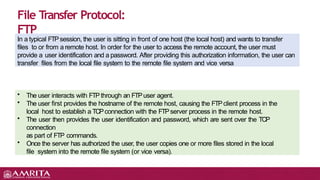
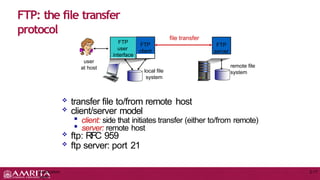
wishes to restrict user access or because it wants to serve content as a
function of the user identity. For these purposes, HTTP uses cookies. Cookies,
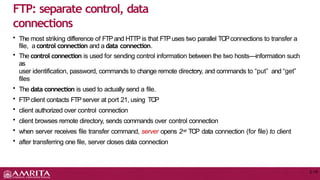
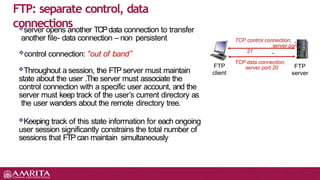
defined in [RFC 6265], allow sites to keep track of users. Most major
commercial Web sites use cookies today
4.
Application
Layer
2-4
User-server state:
cookies
many Websites use
cookies
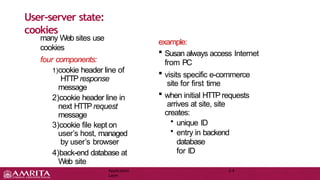
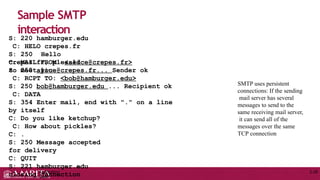
four components:
1)cookie header line of
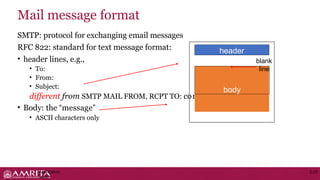
HTTP response
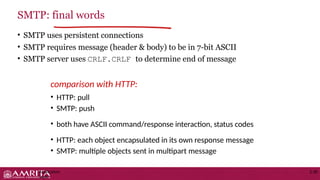
message
2)cookie header line in
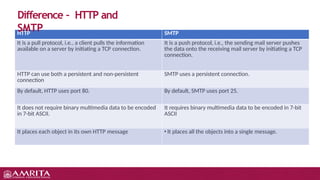
next HTTPrequest
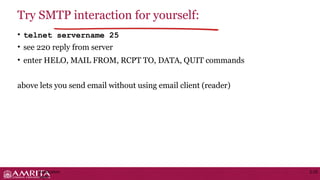
message
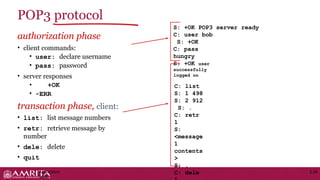
3)cookie file kept on
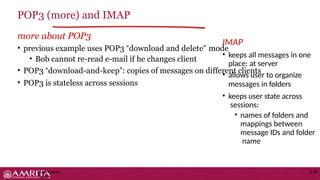
user’s host, managed
by user’s browser
4)back-end database at
Web site
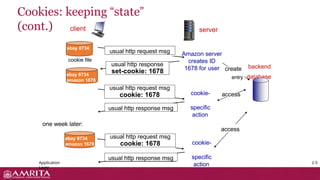
example:
Susan always access Internet
from PC
visits specific e-commerce
site for first time
when initial HTTP requests
arrives at site, site
creates:
• unique ID
• entry in backend
database
for ID
Cookies
(continued)
2-6
what cookies canbe used for:
• authorization
• shopping carts
• recommendations
how to keep “state”:
protocol endpoints: maintain state
at sender/receiver over multiple
transactions
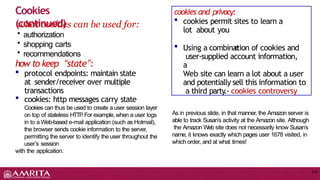
cookies: http messages carry state
Cookies can thus be used to create a user session layer
on top of stateless HTTP
.For example, when a user logs
in to a Web-based e-mail application (such as Hotmail),
the browser sends cookie information to the server,
permitting the server to identify the user throughout the
user’s session
with the application.
nam
e
cookies and privacy:
cookies permit sites to learn a
lot about you
Using a combination of cookies and
user-supplied account information,
a
Web site can learn a lot about a user
and potentially sell this information to
a third party
.- cookies controversy
As in previous slide, in that manner, the Amazon server is
able to track Susan’s activity at the Amazon site. Although
the Amazon Web site does not necessarily know Susan’s
name, it knows exactly which pages user 1678 visited, in
which order, and at what times!
7.
Web caches (proxy
server)
2-7
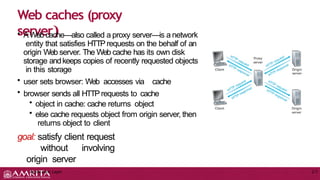
•AWeb cache—also called a proxy server—is a network
entity that satisfies HTTPrequests on the behalf of an
origin Web server. The Web cache has its own disk
storage andkeeps copies of recently requested objects
in this storage
• user sets browser: Web accesses via cache
• browser sends all HTTPrequests to cache
• object in cache: cache returns object
• else cache requests object from origin server, then
returns object to client
goal: satisfy client request
without involving
origin server
Application Layer
8.
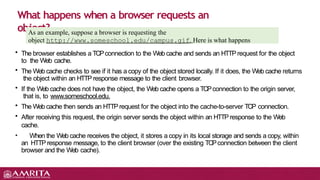
• The browserestablishes a TCPconnection to the Web cache and sends an HTTPrequest for the object
to the Web cache.
• The Web cache checks to see if it has a copy of the object stored locally. If it does, the Web cache returns
the object within an HTTP response message to the client browser.
• If the Web cache does not have the object, the Web cache opens a TCPconnection to the origin server,
that is, to www.someschool.edu.
• The Web cache then sends an HTTPrequest for the object into the cache-to-server TCP connection.
• After receiving this request, the origin server sends the object within an HTTP response to the Web
cache.
• When the Web cache receives the object, it stores a copy in its local storage and sends a copy, within
an HTTPresponse message, to the client browser (over the existing TCPconnection between the client
browser and the Web cache).
What happens when a browser requests an
object?
As an example, suppose a browser is requesting the
object http://www.someschool.edu/campus.gif. Here is what happens
9.
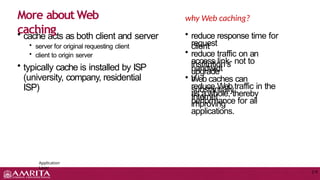
• cache actsas both client and server
• server for original requesting client
• client to origin server
• typically cache is installed by ISP
(university, company, residential
ISP)
More about Web
caching
Application
Layer
2-9
why Web caching?
• reduce response time for
client
request
• reduce traffic on an
institution’s
access link- not to
upgrade
bandwidt
h
• Web caches can
substantially
reduce Web traffic in the
Internet
as a whole, thereby
improving
performance for all
applications.
10.
Caching
example:
assumptions:
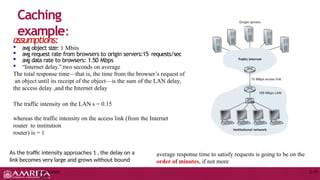
avg objectsize: 1 Mbits
avg request rate from browsers to origin servers:15 requests/sec
avg data rate to browsers: 1.50 Mbps
“Internet delay.”:two seconds on average
The total response time—that is, the time from the browser’s request of
an object until its receipt of the object—is the sum of the LAN delay,
the access delay ,and the Internet delay
The traffic intensity on the LAN s = 0.15
whereas the traffic intensity on the access link (from the Internet
router to institution
router) is = 1
As the traffic intensity approaches 1 , the delay on a
link becomes very large and grows without bound
average response time to satisfy requests is going to be on the
order of minutes, if not more
Application
Layer
2-10
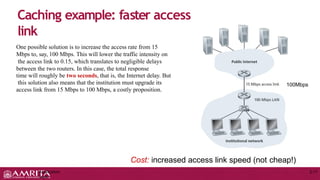
11.
Caching example: fasteraccess
link
origin
servers
1.54 Mbps
access link
Cost: increased access link speed (not cheap!)
Application
Layer
2-11
One possible solution is to increase the access rate from 15
Mbps to, say, 100 Mbps. This will lower the traffic intensity on
the access link to 0.15, which translates to negligible delays
between the two routers. In this case, the total response
time will roughly be two seconds, that is, the Internet delay. But
this solution also means that the institution must upgrade its
access link from 15 Mbps to 100 Mbps, a costly proposition.
100Mbps
12.
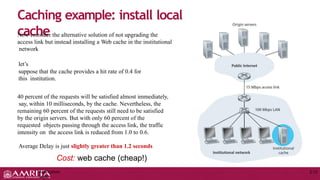
Caching example: installlocal
cache
Now consider the alternative solution of not upgrading the
access link but instead installing a Web cache in the institutional
network
let’s
suppose that the cache provides a hit rate of 0.4 for
this institution.
40 percent of the requests will be satisfied almost immediately,
say, within 10 milliseconds, by the cache. Nevertheless, the
remaining 60 percent of the requests still need to be satisfied
by the origin servers. But with only 60 percent of the
requested objects passing through the access link, the traffic
intensity on the access link is reduced from 1.0 to 0.6.
Average Delay is just slightly greater than 1.2 seconds
Cost: web cache (cheap!)
Application
Layer
2-12
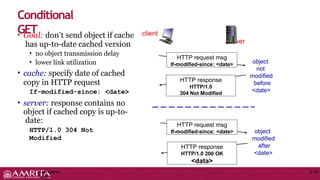
13.
• Goal: don’tsend object if cache
has up-to-date cached version
• no object transmission delay
• lower link utilization
• cache: specify date of cached
copy in HTTP request
If-modified-since: <date>
• server: response contains no
object if cached copy is up-to-
date:
HTTP/1.0 304 Not
Modified
Conditional
GET
HTTP request msg
If-modified-since: <date>
HTTP response
HTTP/1.0
304 Not Modified
object
not
modified
before
<date>
HTTP request msg
If-modified-since: <date>
HTTP response
HTTP/1.0 200 OK
<data>
object
modified
after
<date>
client
server
Application
Layer
2-13
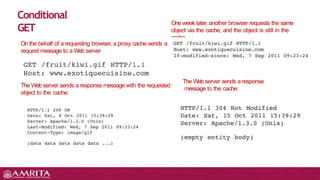
14.
Conditional
GET
On the behalfof a requesting browser, a proxy cache sends a
request message to a Web server
The Web server sends a response message with the requested
object to the cache:
One week later, another browser requests the same
object via the cache, and the object is still in the
cache
The Web server sends a response
message to the cache:
15.
File Transfer Protocol:
FTP
Ina typical FTPsession, the user is sitting in front of one host (the local host) and wants to transfer
files to or from a remote host. In order for the user to access the remote account, the user must
provide a user identification and a password. After providing this authorization information, the user can
transfer files from the local file system to the remote file system and vice versa
• The user interacts with FTPthrough an FTPuser agent.
• The user first provides the hostname of the remote host, causing the FTPclient process in the
local host to establish a TCPconnection with the FTPserver process in the remote host.
• The user then provides the user identification and password, which are sent over the TCP
connection
as part of FTP commands.
• Once the server has authorized the user, the user copies one or more files stored in the local
file system into the remote file system (or vice versa).
16.
FTP: the filetransfer
protocol
Application
Layer
2-17
file transfer
FTP
server
FTP
user
interface
FTP
client
local file
system
remote file
system
user
at host
transfer file to/from remote host
client/server model
client: side that initiates transfer (either to/from remote)
server: remote host
ftp: RFC 959
ftp server: port 21
17.
• The moststriking difference of FTPand HTTP is that FTPuses two parallel TCPconnections to transfer a
file, a control connection and a data connection.
• The control connection is used for sending control information between the two hosts—information such
as
user identification, password, commands to change remote directory, and commands to “put” and “get”
files
• The data connection is used to actually send a file.
• FTPclient contacts FTPserver at port 21, using TCP
• client authorized over control connection
• client browses remote directory, sends commands over control connection
• when server receives file transfer command, server opens 2nd TCP data connection (for file) to client
• after transferring one file, server closes data connection
FTP: separate control, data
connections
2-18
18.
TCP control connection,
serverport
21
FTP
client
FTP
server
TCP data connection,
server port 20
server opens another TCPdata connection to transfer
another file- data connection – non persistent
control connection: “out of band”
Throughout a session, the FTPserver must maintain
state about the user .The server must associate the
control connection with a specific user account, and the
server must keep track of the user’s current directory as
the user wanders about the remote directory tree.
Keeping track of this state information for each ongoing
user session significantly constrains the total number of
sessions that FTPcan maintain simultaneously
FTP: separate control, data
connections
19.
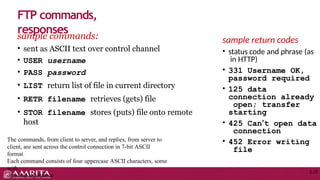
sample commands:
• sentas ASCII text over control channel
• USER username
• PASS password
• LIST return list of file in current directory
• RETR filename retrieves (gets) file
• STOR filename stores (puts) file onto remote
host
FTP commands,
responses
2-20
The commands, from client to server, and replies, from server to
client, are sent across the control connection in 7-bit ASCII
format
Each command consists of four uppercase ASCII characters, some
with
optional arguments
sample return codes
• status code and phrase (as
in HTTP)
• 331 Username OK,
password required
• 125 data
connection already
open; transfer
starting
• 425 Can’t open data
connection
• 452 Error writing
file
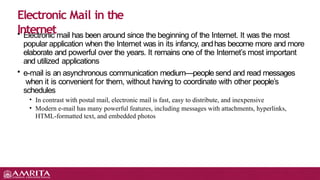
• Electronic mailhas been around since the beginning of the Internet. It was the most
popular application when the Internet was in its infancy, andhas become more and more
elaborate and powerful over the years. It remains one of the Internet’s most important
and utilized applications
• e-mail is an asynchronous communication medium—people send and read messages
when it is convenient for them, without having to coordinate with other people’s
schedules
• In contrast with postal mail, electronic mail is fast, easy to distribute, and inexpensive
• Modern e-mail has many powerful features, including messages with attachments, hyperlinks,
HTML-formatted text, and embedded photos
Electronic Mail in the
Internet
22.
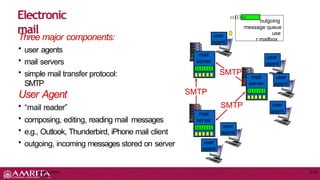
Three major components:
•user agents
• mail servers
• simple mail transfer protocol:
SMTP
User Agent
• “mail reader”
• composing, editing, reading mail messages
• e.g., Outlook, Thunderbird, iPhone mail client
• outgoing, incoming messages stored on server
Electronic
mail
outgoing
message queue
use
r mailbox
mail
server
mail
server
mail
server
SMTP
SMTP
SMTP
user
agent
user
agent
user
agent
user
agent
user
agent
user
agent
Application
Layer
2-22
23.
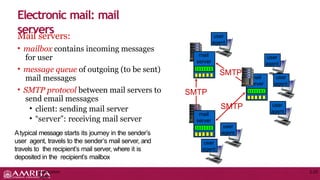
Mail servers:
• mailboxcontains incoming messages
for user
• message queue of outgoing (to be sent)
mail messages
• SMTP protocol between mail servers to
send email messages
• client: sending mail server
• “server”: receiving mail server
Atypical message starts its journey in the sender’s
user agent, travels to the sender’s mail server, and
travels to the recipient’s mail server, where it is
deposited in the recipient’s mailbox
Electronic mail: mail
servers
mail
server
SMTP
mail
server
mail
server
SMTP
SMTP
user
agent
user
agent
user
agent
user
agent
user
agent
user
agent
Application
Layer
2-23
24.
• uses TCPto reliably transfer email message from client to server, port
25
• direct transfer: sending server to receiving server
Application
Layer
2-24
• three phases of transfer
• handshaking (greeting)
• transfer of messages
• closure
• command/response interaction (like
HTTP)
• commands: ASCII text
• response: status code and phrase
• messages must be in 7-bit ASCII
Electronic Mail: SMTP [RFC
2821]
• SMTP restricts the body (not just the
headers) of all mail messages to simple 7-bit
ASCII.But today, in the multimedia era, the
7-bit ASCII restriction is a bit of a pain—it
requires binary multimedia data to be
encoded to ASCII before being sent over
SMTP; and it requires the corresponding
ASCII message to be decoded back to binary
after SMTP transport
• HTTP does not require multimedia data to
be
ASCII encoded before transfer.
25.
Scenario: Alice sendsmessage to
Bob
1
3
user
agent
mail
server
mail
server
2
4 6
Alice’s mail server
5
Bob’s mail server
user
agent
Application
Layer
2-25
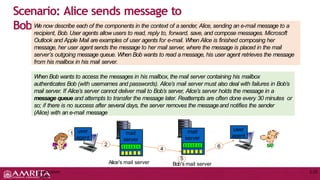
When Bob wants to access the messages in his mailbox, the mail server containing his mailbox
authenticates Bob (with usernames and passwords). Alice’s mail server must also deal with failures in Bob’s
mail server. If Alice’s server cannot deliver mail to Bob’s server, Alice’s server holds the message in a
message queue and attempts to transfer the message later. Reattempts are often done every 30 minutes or
so; if there is no success after several days, the server removes the messageand notifies the sender
(Alice) with an e-mail message
We now describe each of the components in the context of a sender, Alice, sending an e-mail message to a
recipient, Bob. User agents allow users to read, reply to, forward, save, and compose messages. Microsoft
Outlook and Apple Mail areexamples of user agents for e-mail. When Alice is finished composing her
message, her user agent sends the message to her mail server, where the message is placed in the mail
server’s outgoing message queue. When Bob wants to read a message, his user agent retrieves the message
from his mailbox in his mail server.
26.
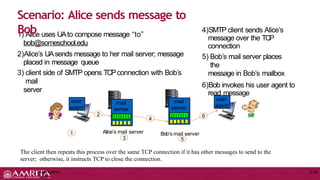
1) Alice usesUAto compose message “to”
bob@someschool.edu
2)Alice’s UAsends message to her mail server; message
placed in message queue
3) client side of SMTP opens TCPconnection with Bob’s
mail
server
Scenario: Alice sends message to
Bob 4)SMTP client sends Alice’s
message over the TCP
connection
5) Bob’s mail server places
the
message in Bob’s mailbox
6)Bob invokes his user agent to
read message
1 Alice’s mail server
3
Bob’s mail server
5
user
agent
mail
server
mail
server
2
4 6
user
agent
Application
Layer
2-26
The client then repeats this process over the same TCP connection if it has other messages to send to the
server; otherwise, it instructs TCP to close the connection.
27.
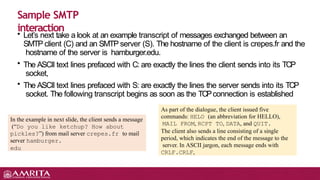
• Let’s nexttake a look at an example transcript of messages exchanged between an
SMTP client (C) and an SMTP server (S). The hostname of the client is crepes.fr and the
hostname of the server is hamburger.edu.
• The ASCII text lines prefaced with C: are exactly the lines the client sends into its TCP
socket,
• The ASCII text lines prefaced with S: are exactly the lines the server sends into its TCP
socket. The following transcript begins as soon as the TCPconnection is established
Sample SMTP
interaction
In the example in next slide, the client sends a message
(“Do you like ketchup? How about
pickles?”) from mail server crepes.fr to mail
server hamburger.
edu
As part of the dialogue, the client issued five
commands: HELO (an abbreviation for HELLO),
MAIL FROM, RCPT TO, DATA, and QUIT.
The client also sends a line consisting of a single
period, which indicates the end of the message to the
server. In ASCII jargon, each message ends with
CRLF.CRLF,
28.
Sample SMTP
interaction
Application
Layer
2-28
S: 220hamburger.edu
C: HELO crepes.fr
S: 250 Hello
crepes.fr, pleased
to meet you
C: MAIL FROM: <alice@crepes.fr>
S: 250 alice@crepes.fr... Sender ok
C: RCPT TO: <bob@hamburger.edu>
S: 250 bob@hamburger.edu ... Recipient ok
C: DATA
S: 354 Enter mail, end with "." on a line
by itself
C: Do you like ketchup?
C: How about pickles?
C: .
S: 250 Message accepted
for delivery
C: QUIT
S: 221 hamburger.edu
closing connection
SMTP uses persistent
connections: If the sending
mail server has several
messages to send to the
same receiving mail server,
it can send all of the
messages over the same
TCP connection
29.
SMTP: protocol forexchanging email messages
RFC 822: standard for text message format:
• header lines, e.g.,
• To:
• From:
• Subject:
different from SMTP MAIL FROM, RCPT TO: commands!
• Body: the “message”
• ASCII characters only
Mail message format
header
blank
line
body
Application
Layer
2-29
30.
• SMTP usespersistent connections
• SMTP requires message (header & body) to be in 7-bit ASCII
• SMTP server uses CRLF.CRLF to determine end of message
comparison with HTTP:
• HTTP: pull
• SMTP: push
• both have ASCII command/response interaction, status codes
• HTTP: each object encapsulated in its own response message
• SMTP: multiple objects sent in multipart message
SMTP: final words
Application
Layer
2-30
31.
• SMTP: delivery/storageto receiver’s server
• mail access protocol: retrieval from server
• POP: Post Office Protocol [RFC 1939]: authorization, download
• IMAP: Internet Mail Access Protocol [RFC 1730]: more features, including
manipulation of stored messages on server
• HTTP: gmail, Hotmail, Yahoo! Mail, etc.
Mail access protocols
sender’s mail
server
SMTP SMTP
mail access
protocol
receiver’s mail
server
(e.g., POP,
IMAP)
user
agent
user
agent
Application
Layer
2-31
32.
HTTP SMTP
It isa pull protocol, i.e., a client pulls the information
available on a server by initiating a TCP connection.
It is a push protocol, i.e., the sending mail server pushes
the data onto the receiving mail server by initiating a TCP
connection.
HTTP can use both a persistent and non-persistent
connection
SMTP uses a persistent connection.
By default, HTTP uses port 80. By default, SMTP uses port 25.
It does not require binary multimedia data to be encoded
in 7-bit ASCII.
It requires binary multimedia data to be encoded in 7-bit
ASCII
It places each object in its own HTTP message • It places all the objects into a single message.
Difference – HTTP and
SMTP
33.
• telnet servername25
• see 220 reply from server
• enter HELO, MAIL FROM, RCPT TO, DATA, QUIT commands
above lets you send email without using email client (reader)
Try SMTP interaction for yourself:
Application
Layer
2-33
34.
authorization phase
• clientcommands:
• user: declare username
• pass: password
• server responses
• +OK
• -ERR
transaction phase, client:
• list: list message numbers
• retr: retrieve message by
number
• dele: delete
• quit
POP3 protocol
S: +OK POP3 server ready
C: user bob
S: +OK
C: pass
hungry
S: +OK user
successfully
logged on
C: list
S: 1 498
S: 2 912
S: .
C: retr
1
S:
<message
1
contents
>
S: .
C: dele
Application
Layer
2-34
35.
more about POP3
•previous example uses POP3 “download and delete”
• Bob cannot re-read e-mail if he changes client
mode
• POP3 “download-and-keep”: copies of messages on different clients
• POP3 is stateless across sessions
POP3 (more) and IMAP
IMAP
• keeps all messages in one
place: at server
• allows user to organize
messages in folders
• keeps user state across
sessions:
• names of folders and
mappings between
message IDs and folder
name
Application
Layer
2-35
36.
1. principles ofnetwork
applications
2. Web and HTTP
3. electronic mail
• SMTP
, POP3, IMAP
4. DNS
Application
Layer
2-36
Chapter 2: outline
5. P2P applications
6. video streaming and
content distribution
networks
7. socket programming
with UDP and TCP


![User-Server Interaction:
Cookies
We mentioned above that an HTTP server is stateless. This simplifies server
design and has permitted engineers to develop high-performance Web servers
that can handle thousands of simultaneous TCP connections. However, it is
often desirable for a Web site to identify users, either because the server
wishes to restrict user access or because it wants to serve content as a
function of the user identity. For these purposes, HTTP uses cookies. Cookies,
defined in [RFC 6265], allow sites to keep track of users. Most major
commercial Web sites use cookies today](https://image.slidesharecdn.com/applicationlayer-2-250921055333-f5cda706/85/Application-Layer-protocols-Basics-pptx-3-320.jpg)
![• uses TCP to reliably transfer email message from client to server, port
25
• direct transfer: sending server to receiving server
Application
Layer
2-24
• three phases of transfer
• handshaking (greeting)
• transfer of messages
• closure
• command/response interaction (like
HTTP)
• commands: ASCII text
• response: status code and phrase
• messages must be in 7-bit ASCII
Electronic Mail: SMTP [RFC
2821]
• SMTP restricts the body (not just the
headers) of all mail messages to simple 7-bit
ASCII.But today, in the multimedia era, the
7-bit ASCII restriction is a bit of a pain—it
requires binary multimedia data to be
encoded to ASCII before being sent over
SMTP; and it requires the corresponding
ASCII message to be decoded back to binary
after SMTP transport
• HTTP does not require multimedia data to
be
ASCII encoded before transfer.](https://image.slidesharecdn.com/applicationlayer-2-250921055333-f5cda706/85/Application-Layer-protocols-Basics-pptx-24-320.jpg)
![• SMTP: delivery/storage to receiver’s server
• mail access protocol: retrieval from server
• POP: Post Office Protocol [RFC 1939]: authorization, download
• IMAP: Internet Mail Access Protocol [RFC 1730]: more features, including
manipulation of stored messages on server
• HTTP: gmail, Hotmail, Yahoo! Mail, etc.
Mail access protocols
sender’s mail
server
SMTP SMTP
mail access
protocol
receiver’s mail
server
(e.g., POP,
IMAP)
user
agent
user
agent
Application
Layer
2-31](https://image.slidesharecdn.com/applicationlayer-2-250921055333-f5cda706/85/Application-Layer-protocols-Basics-pptx-31-320.jpg)


![01._Application_Layer_Protocols [1].pptx](https://cdn.slidesharecdn.com/ss_thumbnails/01-251105074214-145a762e-thumbnail.jpg?width=640&height=640&fit=bounds)


