
Troubleshooting


              Working at a Small-to-Medium Business or ISP –
              Chapter 9


Version 4.1                                 © 2007 Cisco Systems, Inc. All rights reserved.   Cisco Public   1
Objectives
 Use the OSI model as a framework for troubleshooting
  network problems.
 Identify and correct problems with hardware and operation at
  Layer 1 and Layer 2.
 Troubleshoot IP addressing problems, including subnet
  mask, host range errors, DHCP and NAT issues.
 Identify and correct problems with RIPv2 configuration and
  implementation.
 Explain possible causes of problems occurring with user
  applications and how to recognize symptoms of DNS
  failures.
 Create a plan to prepare to take the ICND1 examination in
  order to obtain a CCENT certification.
                              © 2007 Cisco Systems, Inc. All rights reserved.   Cisco Public   2
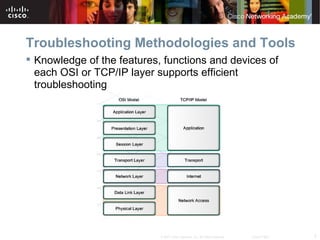
Troubleshooting Methodologies and Tools
 Knowledge of the features, functions and devices of
  each OSI or TCP/IP layer supports efficient
  troubleshooting


                            © 2007 Cisco Systems, Inc. All rights reserved.   Cisco Public   3
Troubleshooting Methodologies and Tools
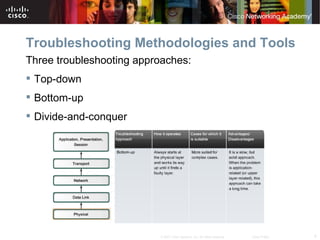
Three troubleshooting approaches:
 Top-down
 Bottom-up
 Divide-and-conquer


                          © 2007 Cisco Systems, Inc. All rights reserved.   Cisco Public   4
Troubleshooting Methodologies and Tools
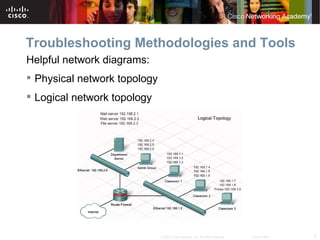
Helpful network diagrams:
 Physical network topology
 Logical network topology


                              © 2007 Cisco Systems, Inc. All rights reserved.   Cisco Public   5
Troubleshooting Methodologies and Tools
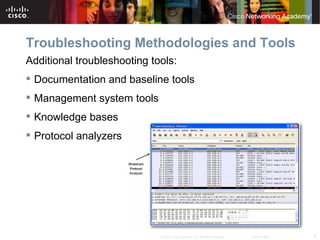
Additional troubleshooting tools:
 Documentation and baseline tools
 Management system tools
 Knowledge bases
 Protocol analyzers


                             © 2007 Cisco Systems, Inc. All rights reserved.   Cisco Public   6
Troubleshooting Methodologies and Tools
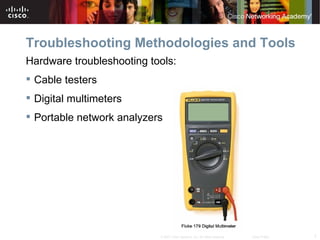
Hardware troubleshooting tools:
 Cable testers
 Digital multimeters
 Portable network analyzers


                           © 2007 Cisco Systems, Inc. All rights reserved.   Cisco Public   7
Troubleshooting Layer 1 and Layer 2 Issues
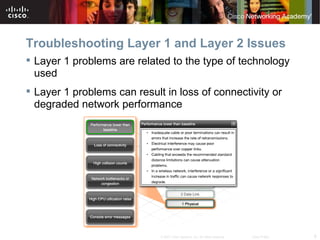
 Layer 1 problems are related to the type of technology
  used
 Layer 1 problems can result in loss of connectivity or
  degraded network performance


                             © 2007 Cisco Systems, Inc. All rights reserved.   Cisco Public   8
Troubleshooting Layer 1 and Layer 2 Issues
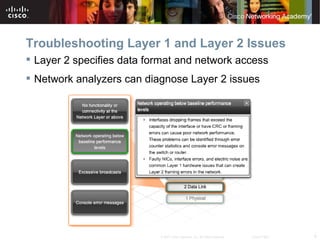
 Layer 2 specifies data format and network access
 Network analyzers can diagnose Layer 2 issues


                           © 2007 Cisco Systems, Inc. All rights reserved.   Cisco Public   9
Troubleshooting Layer 1 and Layer 2 Issues
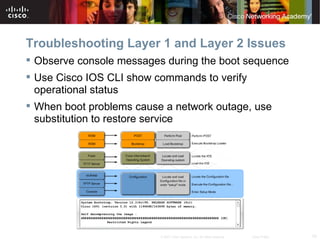
 Observe console messages during the boot sequence
 Use Cisco IOS CLI show commands to verify
  operational status
 When boot problems cause a network outage, use
  substitution to restore service


                          © 2007 Cisco Systems, Inc. All rights reserved.   Cisco Public   10
Troubleshooting Layer 1 and Layer 2 Issues
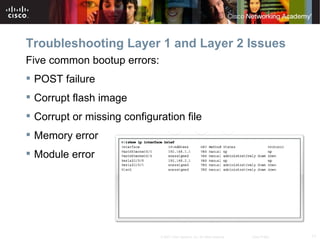
Five common bootup errors:
 POST failure
 Corrupt flash image
 Corrupt or missing configuration file
 Memory error
 Module error


                             © 2007 Cisco Systems, Inc. All rights reserved.   Cisco Public   11
Troubleshooting Layer 1 and Layer 2 Issues
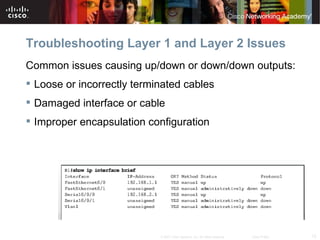
Common issues causing up/down or down/down outputs:
 Loose or incorrectly terminated cables
 Damaged interface or cable
 Improper encapsulation configuration


                            © 2007 Cisco Systems, Inc. All rights reserved.   Cisco Public   12
Troubleshooting Layer 1 and Layer 2 Issues
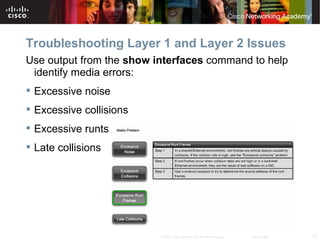
Use output from the show interfaces command to help
 identify media errors:
 Excessive noise
 Excessive collisions
 Excessive runts
 Late collisions


                          © 2007 Cisco Systems, Inc. All rights reserved.   Cisco Public   13
Troubleshooting Layer 1 and Layer 2 Issues
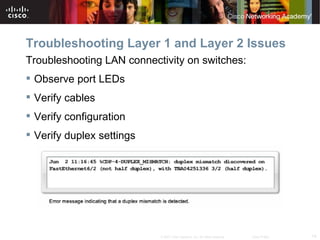
Troubleshooting LAN connectivity on switches:
 Observe port LEDs
 Verify cables
 Verify configuration
 Verify duplex settings


                           © 2007 Cisco Systems, Inc. All rights reserved.   Cisco Public   14
Troubleshooting Layer 1 and Layer 2 Issues
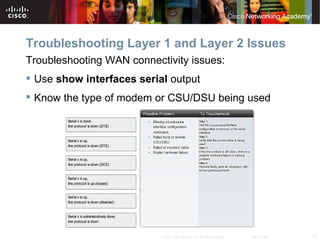
Troubleshooting WAN connectivity issues:
 Use show interfaces serial output
 Know the type of modem or CSU/DSU being used


                           © 2007 Cisco Systems, Inc. All rights reserved.   Cisco Public   15
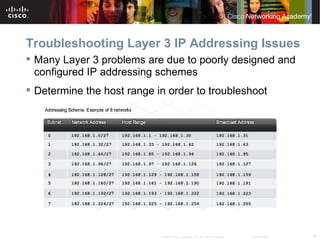
Troubleshooting Layer 3 IP Addressing Issues
 Many Layer 3 problems are due to poorly designed and
  configured IP addressing schemes
 Determine the host range in order to troubleshoot


                            © 2007 Cisco Systems, Inc. All rights reserved.   Cisco Public   16
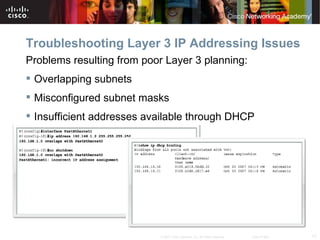
Troubleshooting Layer 3 IP Addressing Issues
Problems resulting from poor Layer 3 planning:
 Overlapping subnets
 Misconfigured subnet masks
 Insufficient addresses available through DHCP


                           © 2007 Cisco Systems, Inc. All rights reserved.   Cisco Public   17
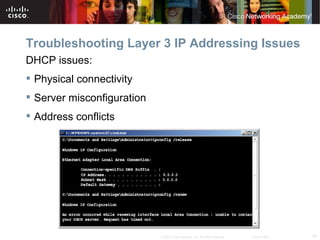
Troubleshooting Layer 3 IP Addressing Issues
DHCP issues:
 Physical connectivity
 Server misconfiguration
 Address conflicts


                            © 2007 Cisco Systems, Inc. All rights reserved.   Cisco Public   18
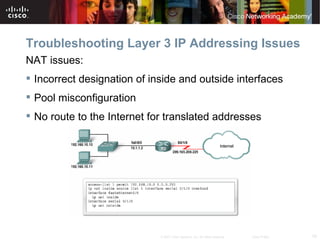
Troubleshooting Layer 3 IP Addressing Issues
NAT issues:
 Incorrect designation of inside and outside interfaces
 Pool misconfiguration
 No route to the Internet for translated addresses


                             © 2007 Cisco Systems, Inc. All rights reserved.   Cisco Public   19
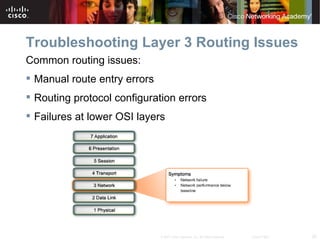
Troubleshooting Layer 3 Routing Issues
Common routing issues:
 Manual route entry errors
 Routing protocol configuration errors
 Failures at lower OSI layers


                              © 2007 Cisco Systems, Inc. All rights reserved.   Cisco Public   20
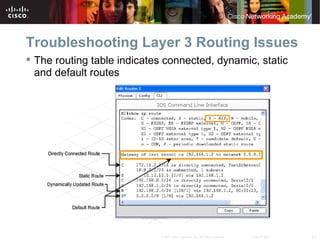
Troubleshooting Layer 3 Routing Issues
 The routing table indicates connected, dynamic, static
  and default routes


                            © 2007 Cisco Systems, Inc. All rights reserved.   Cisco Public   21
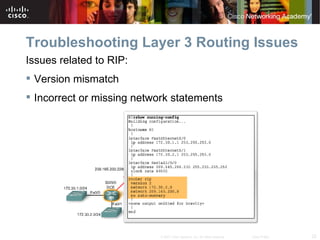
Troubleshooting Layer 3 Routing Issues
Issues related to RIP:
 Version mismatch
 Incorrect or missing network statements


                            © 2007 Cisco Systems, Inc. All rights reserved.   Cisco Public   22
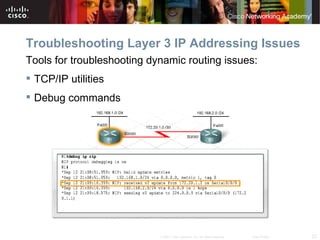
Troubleshooting Layer 3 IP Addressing Issues
Tools for troubleshooting dynamic routing issues:
 TCP/IP utilities
 Debug commands


                            © 2007 Cisco Systems, Inc. All rights reserved.   Cisco Public   23
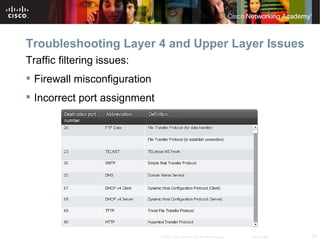
Troubleshooting Layer 4 and Upper Layer Issues
Traffic filtering issues:
 Firewall misconfiguration
 Incorrect port assignment


                              © 2007 Cisco Systems, Inc. All rights reserved.   Cisco Public   24
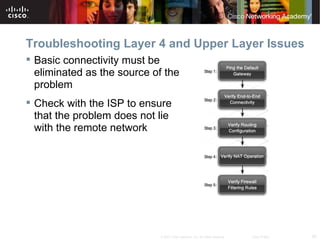
Troubleshooting Layer 4 and Upper Layer Issues
 Basic connectivity must be
  eliminated as the source of the
  problem
 Check with the ISP to ensure
  that the problem does not lie
  with the remote network


                            © 2007 Cisco Systems, Inc. All rights reserved.   Cisco Public   25
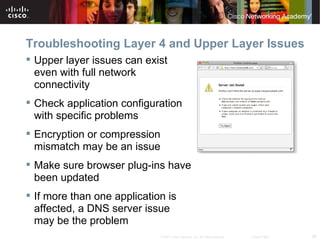
Troubleshooting Layer 4 and Upper Layer Issues
 Upper layer issues can exist
  even with full network
  connectivity
 Check application configuration
  with specific problems
 Encryption or compression
  mismatch may be an issue
 Make sure browser plug-ins have
  been updated
 If more than one application is
  affected, a DNS server issue
  may be the problem
                              © 2007 Cisco Systems, Inc. All rights reserved.   Cisco Public   26
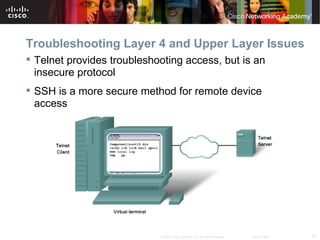
Troubleshooting Layer 4 and Upper Layer Issues
 Telnet provides troubleshooting access, but is an
  insecure protocol
 SSH is a more secure method for remote device
  access


                            © 2007 Cisco Systems, Inc. All rights reserved.   Cisco Public   27
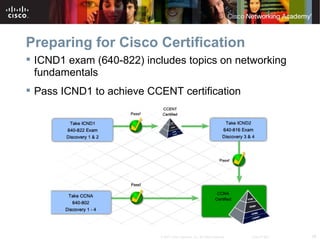
Preparing for Cisco Certification
 ICND1 exam (640-822) includes topics on networking
  fundamentals
 Pass ICND1 to achieve CCENT certification


                          © 2007 Cisco Systems, Inc. All rights reserved.   Cisco Public   28
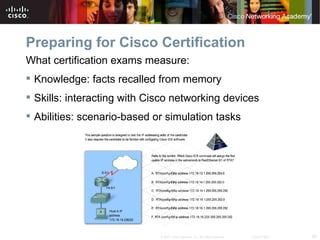
Preparing for Cisco Certification
What certification exams measure:
 Knowledge: facts recalled from memory
 Skills: interacting with Cisco networking devices
 Abilities: scenario-based or simulation tasks


                             © 2007 Cisco Systems, Inc. All rights reserved.   Cisco Public   29
Preparing for Cisco Certification
 Make the commitment
 Create a study plan
 Practice test taking


                         © 2007 Cisco Systems, Inc. All rights reserved.   Cisco Public   30
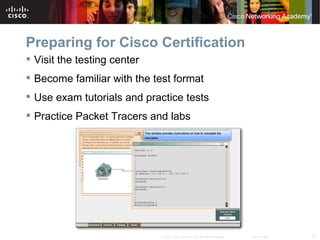
Preparing for Cisco Certification
 Visit the testing center
 Become familiar with the test format
 Use exam tutorials and practice tests
 Practice Packet Tracers and labs


                             © 2007 Cisco Systems, Inc. All rights reserved.   Cisco Public   31
Summary
 Networking models provide a framework for efficient
  troubleshooting.
 Good troubleshooting involves using a methodology,
  such as top-down, bottom-up, or divide-and-conquer.
 The majority of Layer 3 problems result from poor or
  incorrect addressing schemes.
 Firewall misconfiguration can result in problems with
  upper layer protocols.
 Success on certification tests depends on building
  knowledge, skills, and abilities.


                             © 2007 Cisco Systems, Inc. All rights reserved.   Cisco Public   32
© 2007 Cisco Systems, Inc. All rights reserved.   Cisco Public   33

CCNA Discovery 2 - Chapter 9

  • 1.
    Troubleshooting Working at a Small-to-Medium Business or ISP – Chapter 9 Version 4.1 © 2007 Cisco Systems, Inc. All rights reserved. Cisco Public 1
  • 2.
    Objectives  Use theOSI model as a framework for troubleshooting network problems.  Identify and correct problems with hardware and operation at Layer 1 and Layer 2.  Troubleshoot IP addressing problems, including subnet mask, host range errors, DHCP and NAT issues.  Identify and correct problems with RIPv2 configuration and implementation.  Explain possible causes of problems occurring with user applications and how to recognize symptoms of DNS failures.  Create a plan to prepare to take the ICND1 examination in order to obtain a CCENT certification. © 2007 Cisco Systems, Inc. All rights reserved. Cisco Public 2
  • 3.
    Troubleshooting Methodologies andTools  Knowledge of the features, functions and devices of each OSI or TCP/IP layer supports efficient troubleshooting © 2007 Cisco Systems, Inc. All rights reserved. Cisco Public 3
  • 4.
    Troubleshooting Methodologies andTools Three troubleshooting approaches:  Top-down  Bottom-up  Divide-and-conquer © 2007 Cisco Systems, Inc. All rights reserved. Cisco Public 4
  • 5.
    Troubleshooting Methodologies andTools Helpful network diagrams:  Physical network topology  Logical network topology © 2007 Cisco Systems, Inc. All rights reserved. Cisco Public 5
  • 6.
    Troubleshooting Methodologies andTools Additional troubleshooting tools:  Documentation and baseline tools  Management system tools  Knowledge bases  Protocol analyzers © 2007 Cisco Systems, Inc. All rights reserved. Cisco Public 6
  • 7.
    Troubleshooting Methodologies andTools Hardware troubleshooting tools:  Cable testers  Digital multimeters  Portable network analyzers © 2007 Cisco Systems, Inc. All rights reserved. Cisco Public 7
  • 8.
    Troubleshooting Layer 1and Layer 2 Issues  Layer 1 problems are related to the type of technology used  Layer 1 problems can result in loss of connectivity or degraded network performance © 2007 Cisco Systems, Inc. All rights reserved. Cisco Public 8
  • 9.
    Troubleshooting Layer 1and Layer 2 Issues  Layer 2 specifies data format and network access  Network analyzers can diagnose Layer 2 issues © 2007 Cisco Systems, Inc. All rights reserved. Cisco Public 9
  • 10.
    Troubleshooting Layer 1and Layer 2 Issues  Observe console messages during the boot sequence  Use Cisco IOS CLI show commands to verify operational status  When boot problems cause a network outage, use substitution to restore service © 2007 Cisco Systems, Inc. All rights reserved. Cisco Public 10
  • 11.
    Troubleshooting Layer 1and Layer 2 Issues Five common bootup errors:  POST failure  Corrupt flash image  Corrupt or missing configuration file  Memory error  Module error © 2007 Cisco Systems, Inc. All rights reserved. Cisco Public 11
  • 12.
    Troubleshooting Layer 1and Layer 2 Issues Common issues causing up/down or down/down outputs:  Loose or incorrectly terminated cables  Damaged interface or cable  Improper encapsulation configuration © 2007 Cisco Systems, Inc. All rights reserved. Cisco Public 12
  • 13.
    Troubleshooting Layer 1and Layer 2 Issues Use output from the show interfaces command to help identify media errors:  Excessive noise  Excessive collisions  Excessive runts  Late collisions © 2007 Cisco Systems, Inc. All rights reserved. Cisco Public 13
  • 14.
    Troubleshooting Layer 1and Layer 2 Issues Troubleshooting LAN connectivity on switches:  Observe port LEDs  Verify cables  Verify configuration  Verify duplex settings © 2007 Cisco Systems, Inc. All rights reserved. Cisco Public 14
  • 15.
    Troubleshooting Layer 1and Layer 2 Issues Troubleshooting WAN connectivity issues:  Use show interfaces serial output  Know the type of modem or CSU/DSU being used © 2007 Cisco Systems, Inc. All rights reserved. Cisco Public 15
  • 16.
    Troubleshooting Layer 3IP Addressing Issues  Many Layer 3 problems are due to poorly designed and configured IP addressing schemes  Determine the host range in order to troubleshoot © 2007 Cisco Systems, Inc. All rights reserved. Cisco Public 16
  • 17.
    Troubleshooting Layer 3IP Addressing Issues Problems resulting from poor Layer 3 planning:  Overlapping subnets  Misconfigured subnet masks  Insufficient addresses available through DHCP © 2007 Cisco Systems, Inc. All rights reserved. Cisco Public 17
  • 18.
    Troubleshooting Layer 3IP Addressing Issues DHCP issues:  Physical connectivity  Server misconfiguration  Address conflicts © 2007 Cisco Systems, Inc. All rights reserved. Cisco Public 18
  • 19.
    Troubleshooting Layer 3IP Addressing Issues NAT issues:  Incorrect designation of inside and outside interfaces  Pool misconfiguration  No route to the Internet for translated addresses © 2007 Cisco Systems, Inc. All rights reserved. Cisco Public 19
  • 20.
    Troubleshooting Layer 3Routing Issues Common routing issues:  Manual route entry errors  Routing protocol configuration errors  Failures at lower OSI layers © 2007 Cisco Systems, Inc. All rights reserved. Cisco Public 20
  • 21.
    Troubleshooting Layer 3Routing Issues  The routing table indicates connected, dynamic, static and default routes © 2007 Cisco Systems, Inc. All rights reserved. Cisco Public 21
  • 22.
    Troubleshooting Layer 3Routing Issues Issues related to RIP:  Version mismatch  Incorrect or missing network statements © 2007 Cisco Systems, Inc. All rights reserved. Cisco Public 22
  • 23.
    Troubleshooting Layer 3IP Addressing Issues Tools for troubleshooting dynamic routing issues:  TCP/IP utilities  Debug commands © 2007 Cisco Systems, Inc. All rights reserved. Cisco Public 23
  • 24.
    Troubleshooting Layer 4and Upper Layer Issues Traffic filtering issues:  Firewall misconfiguration  Incorrect port assignment © 2007 Cisco Systems, Inc. All rights reserved. Cisco Public 24
  • 25.
    Troubleshooting Layer 4and Upper Layer Issues  Basic connectivity must be eliminated as the source of the problem  Check with the ISP to ensure that the problem does not lie with the remote network © 2007 Cisco Systems, Inc. All rights reserved. Cisco Public 25
  • 26.
    Troubleshooting Layer 4and Upper Layer Issues  Upper layer issues can exist even with full network connectivity  Check application configuration with specific problems  Encryption or compression mismatch may be an issue  Make sure browser plug-ins have been updated  If more than one application is affected, a DNS server issue may be the problem © 2007 Cisco Systems, Inc. All rights reserved. Cisco Public 26
  • 27.
    Troubleshooting Layer 4and Upper Layer Issues  Telnet provides troubleshooting access, but is an insecure protocol  SSH is a more secure method for remote device access © 2007 Cisco Systems, Inc. All rights reserved. Cisco Public 27
  • 28.
    Preparing for CiscoCertification  ICND1 exam (640-822) includes topics on networking fundamentals  Pass ICND1 to achieve CCENT certification © 2007 Cisco Systems, Inc. All rights reserved. Cisco Public 28
  • 29.
    Preparing for CiscoCertification What certification exams measure:  Knowledge: facts recalled from memory  Skills: interacting with Cisco networking devices  Abilities: scenario-based or simulation tasks © 2007 Cisco Systems, Inc. All rights reserved. Cisco Public 29
  • 30.
    Preparing for CiscoCertification  Make the commitment  Create a study plan  Practice test taking © 2007 Cisco Systems, Inc. All rights reserved. Cisco Public 30
  • 31.
    Preparing for CiscoCertification  Visit the testing center  Become familiar with the test format  Use exam tutorials and practice tests  Practice Packet Tracers and labs © 2007 Cisco Systems, Inc. All rights reserved. Cisco Public 31
  • 32.
    Summary  Networking modelsprovide a framework for efficient troubleshooting.  Good troubleshooting involves using a methodology, such as top-down, bottom-up, or divide-and-conquer.  The majority of Layer 3 problems result from poor or incorrect addressing schemes.  Firewall misconfiguration can result in problems with upper layer protocols.  Success on certification tests depends on building knowledge, skills, and abilities. © 2007 Cisco Systems, Inc. All rights reserved. Cisco Public 32
  • 33.
    © 2007 CiscoSystems, Inc. All rights reserved. Cisco Public 33