



Get Creative, Get Tech-Savvy
Introductions To what level is technology already integrated into your volunteer management practices? To what level is technology already integrated into your volunteer management practices? To what level is technology already integrated into your volunteer management practices?
What value does technology have to  your  work?
Why use technology? Improves efficiency & productivity Outreach to “hard to reach” populations (youth, volunteers in rural areas)  Cheap!  Viral - gets information out & gets it out quick!
Why use technology? Breaks down barriers between organizations (networking tool) Keeps members & clients informed  Contributes to an innovative, fast-paced, energized organizational culture Improves internal communication and knowledge-sharing
What do you want to see discussed? Raising organizational profile via technology “ Web 2.0”  Facebook, Twitter, Google groups, applications, message boards, blogs, podcasts Volunteer recruitment opportunities Volunteer management strategies
Web 2.0 The “second generation” of web development on the Internet  Web 2.0 emphasizes  viewer/reader participation ,  collaboration , and  exchange   Blogs with comment features, wikis, and message boards are examples of Web 2.0
Social Media  Social media promotes user-created content and accessibility “democratization of the media” transmission of information that is  unregulated,  but inclusive  examples: blogs, Wikipedia  social networking
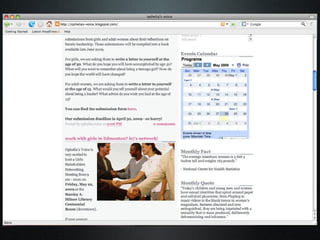
Blogging 101 blog is abbreviated for “web log”; intended to be like a journal entry or editorial  blogging has now involved into  vlogging  (video blogging)  an excellent resource for non-profits to offer  news updates   free blog-hosting sites include  www.blogger.com  and  www.wordpress.com
 
Facebook 101 free-access social networking site users create profiles, join groups and fan pages, and align themselves with school, corporate, geographic networks users send messages and comments to “friends”, can upload images, and add  applications  to their account  applications/apps: user-designed specialized programs (games, quizzes, etc)
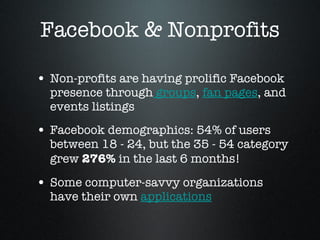
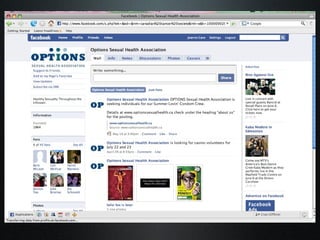
Facebook & Nonprofits Non-profits are having prolific Facebook presence through  groups ,  fan pages , and events listings  Facebook demographics: 54% of users between 18 - 24, but the 35 - 54 category grew  276%  in the last 6 months!  Some computer-savvy organizations have their own  applications
 
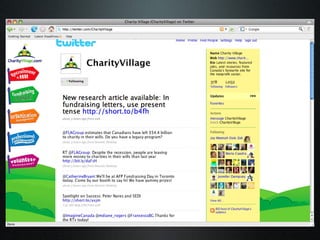
Twitter 101 Often called “micro blogging” You have  140 characters  to express your message; like a “mini update”  On Twitter you “follow” people and have “followers”, these updates from others appear on your main page  Everyone’s joined the Twitter bandwagon - celebrities,  non-profits  & even  funders
 
Raising Organizational Profile Twitter, Facebook & blogs may not be direct strategies for volunteer recruitment, but they build profile Information about your work (available in easily “digestible” formats) keeps members & the public engaged  the value of Google hits
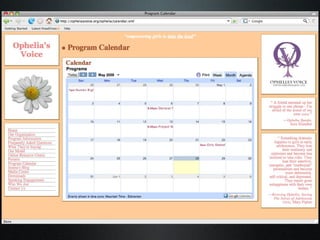
Building Profile Further Mailing lists /e-newsletters  news feeds on your website event/program calendars   Youtube videos of events/projects  Photo-sharing (Flickr, Facebook, Photobucket)
 
podcasting  70 million people in the world own an iPod  podcasting: “amateur radio” (far less labour intensive & resource-dependent) give weekly/monthly updates on your organization’s work, offer testimonials/interviews from clients or volunteers  you can also podcast orientation sessions, presentations/workshops you deliver free audio recording here:  http://audacity.sourceforge.net
podcasting you’ll need a microphone connected to your computer (noise-canceling headsets are great) and some software (often free to download)  many resources/videos on how to create a podcast it does require knowledge about RSS feeds and uploading .mp3 (sound) files Examples  of podcasts
Volunteer Recruitment:  How does your organization currently recruit volunteers? What is effective/ineffective about it? What is effective/ineffective about it? What is effective/ineffective about it?
Volunteer Recruitment with Technology Tools Use your Twitter following to send out “blasts” about volunteer opportunities (same with blogs, Facebook fan pages) Tap into list-servs or mailing lists related to your work  Audio (podcasts) or video (Youtube) testimonials from current volunteers information sessions or orientations via  webinar  ( www.vyew.com ) Accessibility: online volunteer applications, online volunteer manuals, orientation guides Submit volunteer requests to online volunteer databases (govolunteer.ca, volweb.ca)
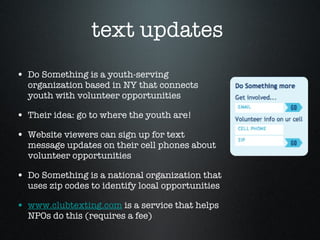
text updates  Do Something is a youth-serving organization based in NY that connects youth with volunteer opportunities Their idea: go to where the youth are!  Website viewers can sign up for text message updates on their cell phones about volunteer opportunities  Do Something is a national organization that uses zip codes to identify local opportunities  www.clubtexting.com  is a service that helps NPOs do this (requires a fee)
Virtual Volunteering: A Possible Consideration “ Virtual volunteering” is a practice of creating volunteer positions that can be fulfilled online (data entry, graphic design, updating websites)  You may never meet this volunteer, but regular volunteer screening practices can apply  Especially useful for organizations with national/international scopes, organizations based in rural settings, etc.
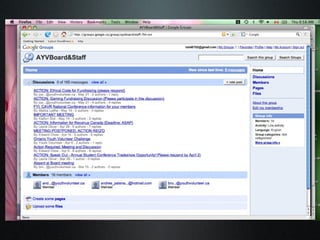
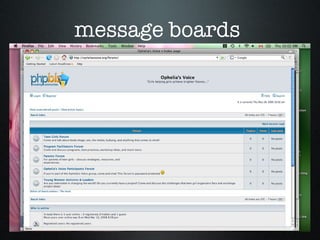
Volunteer Management Strategies Google groups:  central hub for discussion boards, enables administrators to send messages to the larger group/smaller committees (like an internal list-serv) Free to use and available from google.com with an gmail address (requires all members to have gmail address)
 
message boards
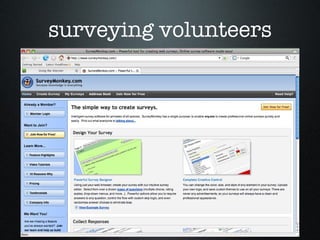
surveying volunteers
what about innovative ways to host meetings, orientations, or check-ins with volunteers?
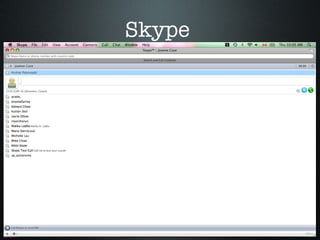
Skype
benefits of Skype free telephone calls to anyone, anywhere in the world (no phone bills!) conference calling made free & easy  during Skype calls, you can instant message members of the call, send documents for the group to review, stream video of call participants (if they have webcam access) very user friendly resource, available for download at skype.com
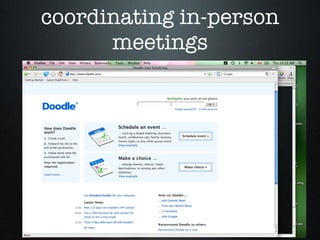
coordinating in-person meetings
Important Technology Considerations
Do we realistically have the  staff time, expertise  and  resources  to  maintain  our online presence?
Do we understand the  risks  involved with integrating technology?
Have we evaluated appropriate venues for online presence? (consider your volunteer demographics) Have we consulted with our target group to see what would be most appropriate?
Has our organization adopted policies to ensure safety, accountability, and effective monitoring?
Additional Considerations Using technology tools  does   require the input of time, energy, and expertise In the age of Web 2.0, be prepared to mitigate/moderate inappropriate comments or criticisms  There are varying levels of technology integration: do what is manageable and appropriate for your organization
Break-Out Discussion Groups  Does anyone have particular topics or challenges they’d like to discuss related to technology & volunteer management? Some suggestions: building capacity, staff training, specific outreach to youth/seniors/other groups, integrating technology in traditional/adverse organizations
Final Comments Using technology is more than efficiency or outreach; it’s about  creating a climate that is inclusive, open, and accessible Using technology promotes creativity, innovation, and original thinking within an organization  Technology promotes ongoing dialogue about the cause your organization is working towards It’s a tool to  connect people and ideas   It’s not an asset to your organization unless it makes processes  easier  and more  efficient !
Resources www.techsoup.org  - technology for NPOs www.takingitglobal.org  - an excellent model of IT integration! “Nonprofit Internet Strategies: Best Practices for Marketing” (Ted Hart) www.charityvillage.com  (Technology QuickGuide)

CAVR 2009 Joanne Cave Presentation

  • 1.
  • 2.
    Introductions To whatlevel is technology already integrated into your volunteer management practices? To what level is technology already integrated into your volunteer management practices? To what level is technology already integrated into your volunteer management practices?
  • 3.
    What value doestechnology have to your work?
  • 4.
    Why use technology?Improves efficiency & productivity Outreach to “hard to reach” populations (youth, volunteers in rural areas) Cheap! Viral - gets information out & gets it out quick!
  • 5.
    Why use technology?Breaks down barriers between organizations (networking tool) Keeps members & clients informed Contributes to an innovative, fast-paced, energized organizational culture Improves internal communication and knowledge-sharing
  • 6.
    What do youwant to see discussed? Raising organizational profile via technology “ Web 2.0” Facebook, Twitter, Google groups, applications, message boards, blogs, podcasts Volunteer recruitment opportunities Volunteer management strategies
  • 7.
    Web 2.0 The“second generation” of web development on the Internet Web 2.0 emphasizes viewer/reader participation , collaboration , and exchange Blogs with comment features, wikis, and message boards are examples of Web 2.0
  • 8.
    Social Media Social media promotes user-created content and accessibility “democratization of the media” transmission of information that is unregulated, but inclusive examples: blogs, Wikipedia social networking
  • 9.
    Blogging 101 blogis abbreviated for “web log”; intended to be like a journal entry or editorial blogging has now involved into vlogging (video blogging) an excellent resource for non-profits to offer news updates free blog-hosting sites include www.blogger.com and www.wordpress.com
  • 10.
  • 11.
    Facebook 101 free-accesssocial networking site users create profiles, join groups and fan pages, and align themselves with school, corporate, geographic networks users send messages and comments to “friends”, can upload images, and add applications to their account applications/apps: user-designed specialized programs (games, quizzes, etc)
  • 12.
    Facebook & NonprofitsNon-profits are having prolific Facebook presence through groups , fan pages , and events listings Facebook demographics: 54% of users between 18 - 24, but the 35 - 54 category grew 276% in the last 6 months! Some computer-savvy organizations have their own applications
  • 13.
  • 14.
    Twitter 101 Oftencalled “micro blogging” You have 140 characters to express your message; like a “mini update” On Twitter you “follow” people and have “followers”, these updates from others appear on your main page Everyone’s joined the Twitter bandwagon - celebrities, non-profits & even funders
  • 15.
  • 16.
    Raising Organizational ProfileTwitter, Facebook & blogs may not be direct strategies for volunteer recruitment, but they build profile Information about your work (available in easily “digestible” formats) keeps members & the public engaged the value of Google hits
  • 17.
    Building Profile FurtherMailing lists /e-newsletters news feeds on your website event/program calendars Youtube videos of events/projects Photo-sharing (Flickr, Facebook, Photobucket)
  • 18.
  • 19.
    podcasting 70million people in the world own an iPod podcasting: “amateur radio” (far less labour intensive & resource-dependent) give weekly/monthly updates on your organization’s work, offer testimonials/interviews from clients or volunteers you can also podcast orientation sessions, presentations/workshops you deliver free audio recording here: http://audacity.sourceforge.net
  • 20.
    podcasting you’ll needa microphone connected to your computer (noise-canceling headsets are great) and some software (often free to download) many resources/videos on how to create a podcast it does require knowledge about RSS feeds and uploading .mp3 (sound) files Examples of podcasts
  • 21.
    Volunteer Recruitment: How does your organization currently recruit volunteers? What is effective/ineffective about it? What is effective/ineffective about it? What is effective/ineffective about it?
  • 22.
    Volunteer Recruitment withTechnology Tools Use your Twitter following to send out “blasts” about volunteer opportunities (same with blogs, Facebook fan pages) Tap into list-servs or mailing lists related to your work Audio (podcasts) or video (Youtube) testimonials from current volunteers information sessions or orientations via webinar ( www.vyew.com ) Accessibility: online volunteer applications, online volunteer manuals, orientation guides Submit volunteer requests to online volunteer databases (govolunteer.ca, volweb.ca)
  • 23.
    text updates Do Something is a youth-serving organization based in NY that connects youth with volunteer opportunities Their idea: go to where the youth are! Website viewers can sign up for text message updates on their cell phones about volunteer opportunities Do Something is a national organization that uses zip codes to identify local opportunities www.clubtexting.com is a service that helps NPOs do this (requires a fee)
  • 24.
    Virtual Volunteering: APossible Consideration “ Virtual volunteering” is a practice of creating volunteer positions that can be fulfilled online (data entry, graphic design, updating websites) You may never meet this volunteer, but regular volunteer screening practices can apply Especially useful for organizations with national/international scopes, organizations based in rural settings, etc.
  • 25.
    Volunteer Management StrategiesGoogle groups: central hub for discussion boards, enables administrators to send messages to the larger group/smaller committees (like an internal list-serv) Free to use and available from google.com with an gmail address (requires all members to have gmail address)
  • 26.
  • 27.
  • 28.
  • 29.
    what about innovativeways to host meetings, orientations, or check-ins with volunteers?
  • 30.
  • 31.
    benefits of Skypefree telephone calls to anyone, anywhere in the world (no phone bills!) conference calling made free & easy during Skype calls, you can instant message members of the call, send documents for the group to review, stream video of call participants (if they have webcam access) very user friendly resource, available for download at skype.com
  • 32.
  • 33.
  • 34.
    Do we realisticallyhave the staff time, expertise and resources to maintain our online presence?
  • 35.
    Do we understandthe risks involved with integrating technology?
  • 36.
    Have we evaluatedappropriate venues for online presence? (consider your volunteer demographics) Have we consulted with our target group to see what would be most appropriate?
  • 37.
    Has our organizationadopted policies to ensure safety, accountability, and effective monitoring?
  • 38.
    Additional Considerations Usingtechnology tools does require the input of time, energy, and expertise In the age of Web 2.0, be prepared to mitigate/moderate inappropriate comments or criticisms There are varying levels of technology integration: do what is manageable and appropriate for your organization
  • 39.
    Break-Out Discussion Groups Does anyone have particular topics or challenges they’d like to discuss related to technology & volunteer management? Some suggestions: building capacity, staff training, specific outreach to youth/seniors/other groups, integrating technology in traditional/adverse organizations
  • 40.
    Final Comments Usingtechnology is more than efficiency or outreach; it’s about creating a climate that is inclusive, open, and accessible Using technology promotes creativity, innovation, and original thinking within an organization Technology promotes ongoing dialogue about the cause your organization is working towards It’s a tool to connect people and ideas It’s not an asset to your organization unless it makes processes easier and more efficient !
  • 41.
    Resources www.techsoup.org - technology for NPOs www.takingitglobal.org - an excellent model of IT integration! “Nonprofit Internet Strategies: Best Practices for Marketing” (Ted Hart) www.charityvillage.com (Technology QuickGuide)