Monitoring System
Through Network
Made by: It - Group
Introduction
 This case study is discussing establishing an online surveillance system for
different branches of a Huge company. And we will specify the following:
 1. IP-Surveillance and
 2. tools and equipments with the intermediate Machines
 3.medium for connections
 4.protocols
 5.the limitations of the current system
IP-Surveillance
IP-Surveillance is a term for a security system that gives ability to monitor
and record video and/or audio over an IP (Internet Protocol-based) computer
network such as a local area network (LAN) or the Internet.
 IP-Surveillance components :
 Network Camera
 Network Switch
 PC
IP-Surveillance cont.
 Requirements if system:
1. Windows Server 2008 or later
2. TCP/IP port 1433
3. Microsoft .Net Framework 4.5 or later
4. Network Monitor requires at least 4 GB of memory, in addition to VSA server
requirements. This number can increase depending on the number of networks,
gateways, assets, and monitors configured
Tools And Equipments
 CMS (Content Management System): is a set of related programs that
supports the collection , managing , and publishing of information in any form
or medium that used in our case
 The stages of the content management lifecycle are contain :
 Creator – responsible for creating and editing content.
 Editor – responsible for tuning the content message and the style of delivery, including tra
nslation and localization.
 Publisher – responsible for releasing the content for use.
 Administrator – responsible for managing access permissions to folders and files, usually a
ccomplished by assigning access rights to user groups or roles, Admins may also assist and
support users in various ways.
 Consumer, viewer or guest – the person who reads or otherwise takes in content after it
is published or shared.
Tools And Equipments cont.
 Advantage of using a CMS :
1. Ability to add or edit pages on your website yourself
2. Faster development
 Disadvantages of using a CMS:
1. The overhead on server resources
2. bad design of text
Tools And Equipments
 Towers(3G & 4G) : To connect widely from phones through application or a w
eb browser
 ISP (Internet service provider) : any good isp that provide a high speed conn
ection
Tools And Equipments
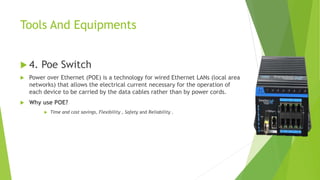
 4. Poe Switch
 Power over Ethernet (POE) is a technology for wired Ethernet LANs (local area
networks) that allows the electrical current necessary for the operation of
each device to be carried by the data cables rather than by power cords.
 Why use POE?
 Time and cost savings, Flexibility , Safety and Reliability .
Tools And Equipments
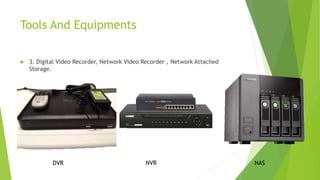
 3. Digital Video Recorder, Network Video Recorder , Network Attached
Storage.
DVR NVR NAS
Tools And Equipments
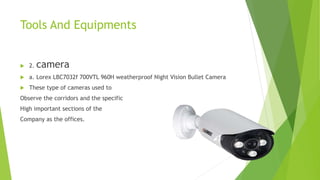
 2. camera
 a. Lorex LBC7032f 700VTL 960H weatherproof Night Vision Bullet Camera
 These type of cameras used to
Observe the corridors and the specific
High important sections of the
Company as the offices.
Tools And Equipments
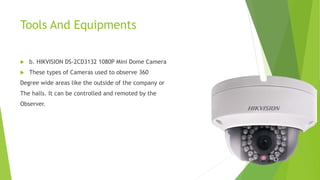
 b. HIKVISION DS-2CD3132 1080P Mini Dome Camera
 These types of Cameras used to observe 360
Degree wide areas like the outside of the company or
The halls. It can be controlled and remoted by the
Observer.
Medium for connections
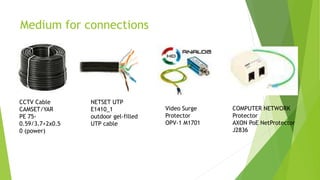
CCTV Cable
CAMSET/YAR
PE 75-
0.59/3.7+2x0.5
0 (power)
NETSET UTP
E1410_1
outdoor gel-filled
UTP cable
Video Surge
Protector
OPV-1 M1701
COMPUTER NETWORK
Protector
AXON PoE NetProtector
J2836
Mediums for Connections
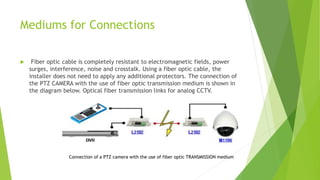
 Fiber optic cable is completely resistant to electromagnetic fields, power
surges, interference, noise and crosstalk. Using a fiber optic cable, the
installer does not need to apply any additional protectors. The connection of
the PTZ CAMERA with the use of fiber optic transmission medium is shown in
the diagram below. Optical fiber transmission links for analog CCTV.
Connection of a PTZ camera with the use of fiber optic TRANSMISSION medium
Protocols
 - At the Transport layer of the IP network stack,
UDP (User Datagram Protocol) is the preferred method for the delivery of live
video streams.
UDP offers reduced latency over the reliability that TCP (Transmission Control
Protocol) provides. It is a faster protocol than TCP and where time sensitive
applications are involved (i.e. live video or VoIP),
it is better to live with a video glitch caused by a dropped packet than to wait
for the retransmission which TCP guarantees (which in not very practical where
live video is concerned).
Protocols
 RTSP: Real-time streaming protocol
 - Establish and control video and audio streams.
 - Does not provide device discovery or camera configuration and the user is
required to manually enter the camera IP address as well as an appropriate
Uniform Resource Identifier (URI) for the stream, which is not standardized
and depends on the camera type and/or model, The NVR then receives a
video stream as it was configured on the camera, with no ability to change it.
Protocols
 RTP: Real-time transport protocol
- Offers a variety of delivery mechanisms to support different network
configurations and performance requirements.
 ONVIF: Open Network Video Interface Forum
- Standard for IP-based physical security products (More active in the area of IP
video than PSIA), covers recorders, displays, video analytics, and access control.
The Limitations
 When storage capacity increased the cost increased conversely
 bullet cameras it’s easy to hack
 Protocols need to be updated periodically
 We need long time to review the records because all records are stored in the
main center branch
 System cost is too high
 A large number of cameras , so we need more than one DVR to accommodate
all cameras
 The fiber-optic cables are difficult to install/ sensitive to strain and ending

Case study

  • 1.
  • 2.
    Introduction  This casestudy is discussing establishing an online surveillance system for different branches of a Huge company. And we will specify the following:  1. IP-Surveillance and  2. tools and equipments with the intermediate Machines  3.medium for connections  4.protocols  5.the limitations of the current system
  • 3.
    IP-Surveillance IP-Surveillance is aterm for a security system that gives ability to monitor and record video and/or audio over an IP (Internet Protocol-based) computer network such as a local area network (LAN) or the Internet.  IP-Surveillance components :  Network Camera  Network Switch  PC
  • 4.
    IP-Surveillance cont.  Requirementsif system: 1. Windows Server 2008 or later 2. TCP/IP port 1433 3. Microsoft .Net Framework 4.5 or later 4. Network Monitor requires at least 4 GB of memory, in addition to VSA server requirements. This number can increase depending on the number of networks, gateways, assets, and monitors configured
  • 5.
    Tools And Equipments CMS (Content Management System): is a set of related programs that supports the collection , managing , and publishing of information in any form or medium that used in our case  The stages of the content management lifecycle are contain :  Creator – responsible for creating and editing content.  Editor – responsible for tuning the content message and the style of delivery, including tra nslation and localization.  Publisher – responsible for releasing the content for use.  Administrator – responsible for managing access permissions to folders and files, usually a ccomplished by assigning access rights to user groups or roles, Admins may also assist and support users in various ways.  Consumer, viewer or guest – the person who reads or otherwise takes in content after it is published or shared.
  • 6.
    Tools And Equipmentscont.  Advantage of using a CMS : 1. Ability to add or edit pages on your website yourself 2. Faster development  Disadvantages of using a CMS: 1. The overhead on server resources 2. bad design of text
  • 7.
    Tools And Equipments Towers(3G & 4G) : To connect widely from phones through application or a w eb browser  ISP (Internet service provider) : any good isp that provide a high speed conn ection
  • 8.
    Tools And Equipments 4. Poe Switch  Power over Ethernet (POE) is a technology for wired Ethernet LANs (local area networks) that allows the electrical current necessary for the operation of each device to be carried by the data cables rather than by power cords.  Why use POE?  Time and cost savings, Flexibility , Safety and Reliability .
  • 9.
    Tools And Equipments 3. Digital Video Recorder, Network Video Recorder , Network Attached Storage. DVR NVR NAS
  • 10.
    Tools And Equipments 2. camera  a. Lorex LBC7032f 700VTL 960H weatherproof Night Vision Bullet Camera  These type of cameras used to Observe the corridors and the specific High important sections of the Company as the offices.
  • 11.
    Tools And Equipments b. HIKVISION DS-2CD3132 1080P Mini Dome Camera  These types of Cameras used to observe 360 Degree wide areas like the outside of the company or The halls. It can be controlled and remoted by the Observer.
  • 12.
    Medium for connections CCTVCable CAMSET/YAR PE 75- 0.59/3.7+2x0.5 0 (power) NETSET UTP E1410_1 outdoor gel-filled UTP cable Video Surge Protector OPV-1 M1701 COMPUTER NETWORK Protector AXON PoE NetProtector J2836
  • 13.
    Mediums for Connections Fiber optic cable is completely resistant to electromagnetic fields, power surges, interference, noise and crosstalk. Using a fiber optic cable, the installer does not need to apply any additional protectors. The connection of the PTZ CAMERA with the use of fiber optic transmission medium is shown in the diagram below. Optical fiber transmission links for analog CCTV. Connection of a PTZ camera with the use of fiber optic TRANSMISSION medium
  • 14.
    Protocols  - Atthe Transport layer of the IP network stack, UDP (User Datagram Protocol) is the preferred method for the delivery of live video streams. UDP offers reduced latency over the reliability that TCP (Transmission Control Protocol) provides. It is a faster protocol than TCP and where time sensitive applications are involved (i.e. live video or VoIP), it is better to live with a video glitch caused by a dropped packet than to wait for the retransmission which TCP guarantees (which in not very practical where live video is concerned).
  • 15.
    Protocols  RTSP: Real-timestreaming protocol  - Establish and control video and audio streams.  - Does not provide device discovery or camera configuration and the user is required to manually enter the camera IP address as well as an appropriate Uniform Resource Identifier (URI) for the stream, which is not standardized and depends on the camera type and/or model, The NVR then receives a video stream as it was configured on the camera, with no ability to change it.
  • 16.
    Protocols  RTP: Real-timetransport protocol - Offers a variety of delivery mechanisms to support different network configurations and performance requirements.  ONVIF: Open Network Video Interface Forum - Standard for IP-based physical security products (More active in the area of IP video than PSIA), covers recorders, displays, video analytics, and access control.
  • 17.
    The Limitations  Whenstorage capacity increased the cost increased conversely  bullet cameras it’s easy to hack  Protocols need to be updated periodically  We need long time to review the records because all records are stored in the main center branch  System cost is too high  A large number of cameras , so we need more than one DVR to accommodate all cameras  The fiber-optic cables are difficult to install/ sensitive to strain and ending