Canvas LMS: 
#gotcanvas? 
Please sign in for both 
contracts and clock hours. 
Log into your laptop.
What is a 
Learning 
Management 
System?
Agenda 4:00 – 6:00pm 
1. Sign In 
2. Log into iTunes U 
3. Create Canvas Account / Sign 
into Canvas Account 
4. Canvas Navigation as 
student/teacher 
5. Canvas Apps 
6. Work Session Create/Load 
Content 
• Course, Lesson, Quiz, 
Discussion, etc… 
• Sign-ins for 
contracts & 
clock hours 
• Introductions
Learning Target: 
• Develop an understanding of what a Learning 
Management System is and how it is used. 
• Create a functional understanding of how to 
use Canvas in the classroom. 
Success criteria: 
• I can log into and navigate the Canvas 
interface. 
• I can create/load content into Canvas.
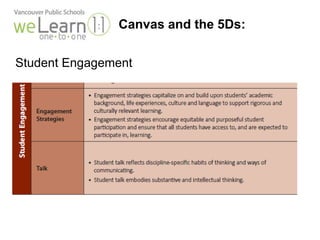
Canvas and the 5Ds: 
Student Engagement
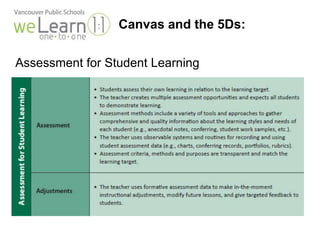
Canvas and the 5Ds: 
Assessment for Student Learning
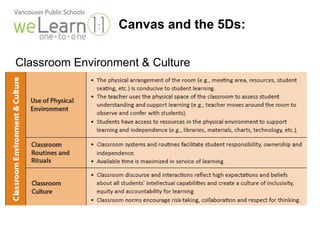
Canvas and the 5Ds: 
Classroom Environment & Culture
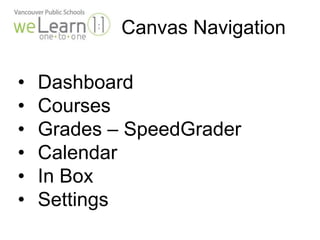
Canvas Navigation 
• Dashboard 
• Courses 
• Grades – SpeedGrader 
• Calendar 
• In Box 
• Settings
Adding Content 
• Assignments - Modules 
• Discussions 
• Quizzes
Canvas Apps 
• Canvas App 
• SpeedGrader 
• Safari / Web Browser 
• Canvas Pools
Canvas 
Your Turn
Wrap-Up 
•Final Q & A 
• Did we mention you need to sign in?
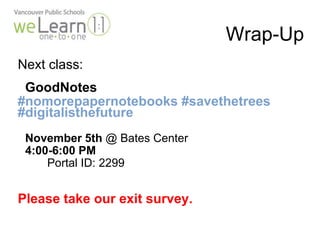
Wrap-Up 
Next class: 
GoodNotes 
#nomorepapernotebooks #savethetrees 
#digitalisthefuture 
November 5th @ Bates Center 
4:00-6:00 PM 
Portal ID: 2299 
Please take our exit survey.

Canvas welearn Training

  • 1.
    Canvas LMS: #gotcanvas? Please sign in for both contracts and clock hours. Log into your laptop.
  • 2.
    What is a Learning Management System?
  • 3.
    Agenda 4:00 –6:00pm 1. Sign In 2. Log into iTunes U 3. Create Canvas Account / Sign into Canvas Account 4. Canvas Navigation as student/teacher 5. Canvas Apps 6. Work Session Create/Load Content • Course, Lesson, Quiz, Discussion, etc… • Sign-ins for contracts & clock hours • Introductions
  • 4.
    Learning Target: •Develop an understanding of what a Learning Management System is and how it is used. • Create a functional understanding of how to use Canvas in the classroom. Success criteria: • I can log into and navigate the Canvas interface. • I can create/load content into Canvas.
  • 5.
    Canvas and the5Ds: Student Engagement
  • 6.
    Canvas and the5Ds: Assessment for Student Learning
  • 7.
    Canvas and the5Ds: Classroom Environment & Culture
  • 8.
    Canvas Navigation •Dashboard • Courses • Grades – SpeedGrader • Calendar • In Box • Settings
  • 9.
    Adding Content •Assignments - Modules • Discussions • Quizzes
  • 10.
    Canvas Apps •Canvas App • SpeedGrader • Safari / Web Browser • Canvas Pools
  • 11.
  • 12.
    Wrap-Up •Final Q& A • Did we mention you need to sign in?
  • 13.
    Wrap-Up Next class: GoodNotes #nomorepapernotebooks #savethetrees #digitalisthefuture November 5th @ Bates Center 4:00-6:00 PM Portal ID: 2299 Please take our exit survey.

Editor's Notes

  • #5 Remember you don't have to do it all at once You don't ave to go straight to MR on SAMR....sa are legitimate places to start in fact you have to start there Hall davidson's 4 factors