Website Content Worksheet
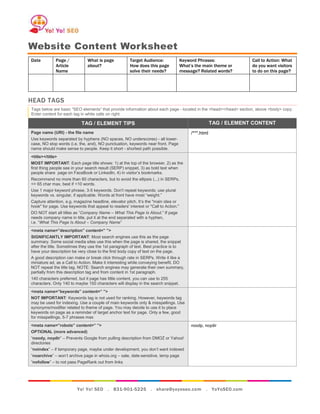
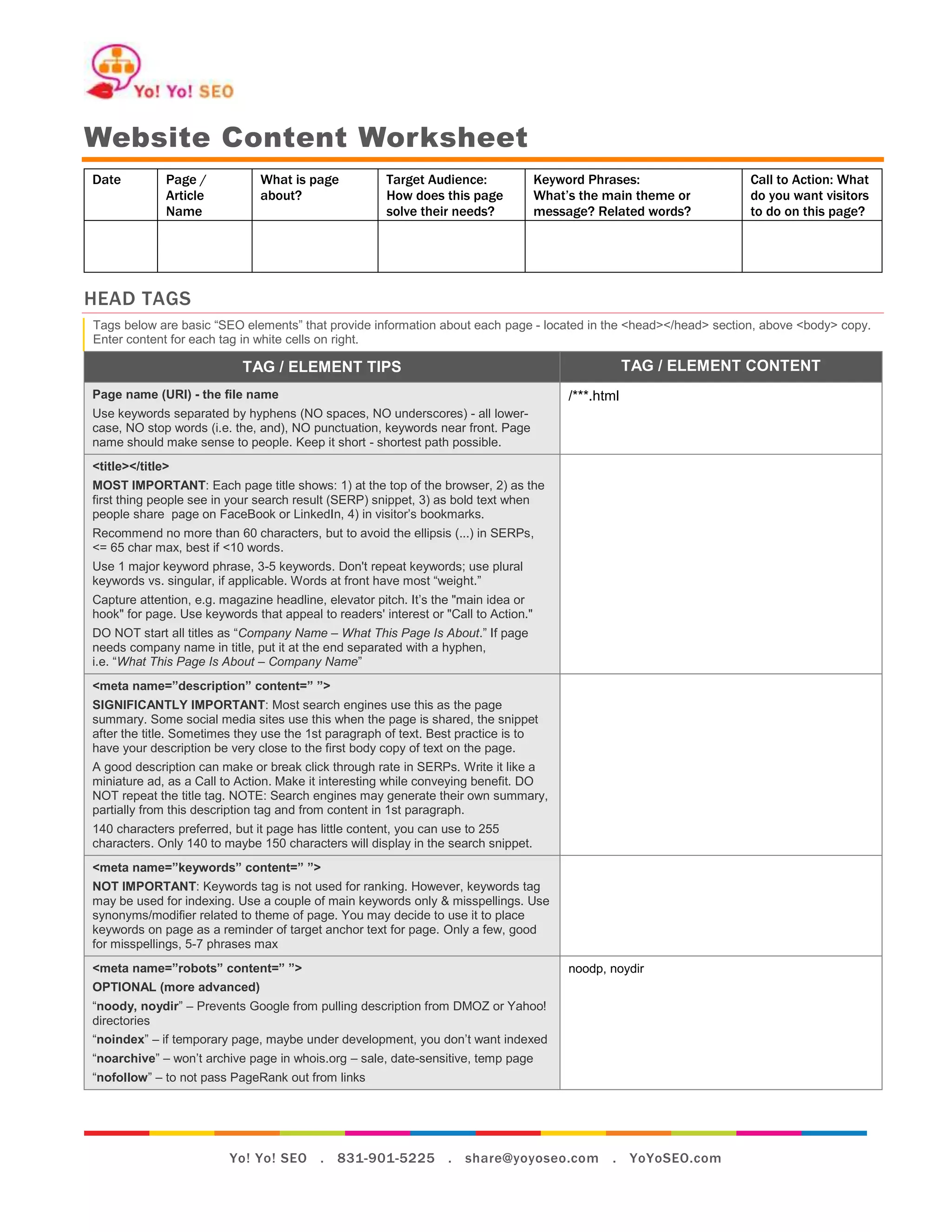
Date          Page /           What is page           Target Audience:               Keyword Phrases:              Call to Action: What
              Article          about?                 How does this page             What’s the main theme or      do you want visitors
              Name                                    solve their needs?             message? Related words?       to do on this page?


HEAD TAGS
Tags below are basic “SEO elements” that provide information about each page - located in the <head></head> section, above <body> copy.
Enter content for each tag in white cells on right.

                           TAG / ELEMENT TIPS                                                         TAG / ELEMENT CONTENT
Page name (URI) - the file name                                                           /***.html
Use keywords separated by hyphens (NO spaces, NO underscores) - all lower-
case, NO stop words (i.e. the, and), NO punctuation, keywords near front. Page
name should make sense to people. Keep it short - shortest path possible.
<title></title>
MOST IMPORTANT: Each page title shows: 1) at the top of the browser, 2) as the
first thing people see in your search result (SERP) snippet, 3) as bold text when
people share page on FaceBook or LinkedIn, 4) in visitor’s bookmarks.
Recommend no more than 60 characters, but to avoid the ellipsis (...) in SERPs,
<= 65 char max, best if <10 words.
Use 1 major keyword phrase, 3-5 keywords. Don't repeat keywords; use plural
keywords vs. singular, if applicable. Words at front have most “weight.”
Capture attention, e.g. magazine headline, elevator pitch. It’s the "main idea or
hook" for page. Use keywords that appeal to readers' interest or "Call to Action."
DO NOT start all titles as “Company Name – What This Page Is About.” If page
needs company name in title, put it at the end separated with a hyphen,
i.e. “What This Page Is About – Company Name”
<meta name=”description” content=” ”>
SIGNIFICANTLY IMPORTANT: Most search engines use this as the page
summary. Some social media sites use this when the page is shared, the snippet
after the title. Sometimes they use the 1st paragraph of text. Best practice is to
have your description be very close to the first body copy of text on the page.
A good description can make or break click through rate in SERPs. Write it like a
miniature ad, as a Call to Action. Make it interesting while conveying benefit. DO
NOT repeat the title tag. NOTE: Search engines may generate their own summary,
partially from this description tag and from content in 1st paragraph.
140 characters preferred, but it page has little content, you can use to 255
characters. Only 140 to maybe 150 characters will display in the search snippet.
<meta name=”keywords” content=” ”>
NOT IMPORTANT: Keywords tag is not used for ranking. However, keywords tag
may be used for indexing. Use a couple of main keywords only & misspellings. Use
synonyms/modifier related to theme of page. You may decide to use it to place
keywords on page as a reminder of target anchor text for page. Only a few, good
for misspellings, 5-7 phrases max
<meta name=”robots” content=” ”>                                                          noodp, noydir
OPTIONAL (more advanced)
“noody, noydir” – Prevents Google from pulling description from DMOZ or Yahoo!
directories
“noindex” – if temporary page, maybe under development, you don’t want indexed
“noarchive” – won’t archive page in whois.org – sale, date-sensitive, temp page
“nofollow” – to not pass PageRank out from links


                         Yo! Yo! SEO . 831-901-5225 . share@yoyoseo.com                          . YoYoSEO.com
Website Content Worksheet
                                                                                                                                     Page 2 of 3

Body Content (Text)
 Copy in <body></body> of your page is what visitors visually see and what search engines “spider” to index.
 EXTREMELY IMPORTANT: Get to the point quickly! Write to grab readers' attention with target keywords. Use promo messaging in top 300-
 400 pixels, ABOVE the fold. Develop a sense of urgency by using deadline-sensitive promotions & time-sensitive words, such as “now,” when
 applicable
 Use primary keywords in 1st couple sentences, 1st 100 words. Use bulleted lists, short bursts of relative content. Break text up for short
 attention spans. Use bold and italic to emphasize keywords. Use <strong> & <em> around keyword targets to bold and italicize words.
 VERY IMPORTANT: H1 tag is the main headline of each post, like a newspaper article headline. It should NOT match title tag. Make it
 compelling with primary target keywords related to content on page. It creates the "juice" for the Call to Action. Only 1 H1 per page. Must be
 relevant to following paragraphs.
 Use H2s & H3s for secondary & tertiary keyword phrases and sections under main topic. H2 & H3 are one and two levels down in importance
 and structure.
 Links. Include links to other pages of the site using keyword-rich anchor text. Link to external authority resources as well.
          Mark links as follows:
                    Internal links: [words to be linked]</directory-if-any/page-name.html>
                    External links: [words to be linked]<http://www.domain.com/directory-if-any/page-name.html>
          Link Title text: Include <title =”keyword phrase”> on links (to page content, assets). Vary title text from anchor text if possible.

IDENTIFY Page Breadcrumb (if any):
 Not all sites have a breadcrumb. It’s text that shows at the top of the content area to indicate to visitors where they are in the site.
 OPTIONAL: Example “Home > Location > Map”

Home >

Primary Body Content
 Think about your audience’s needs, their need. Don’t write in “we” verbiage but in “you” terms to share what’s in it for them.
 Each page should have a call to action, what you want them to do – call your office, donate, complete form, sign up for newsletter, subscribe to
 RSS, purchase product, watch video, etc.

<h1>Primary Headline Relevant To Following Paragraphs
text
          key points listed out as bullet points
          to explain a series of topics
          where possible
<h2>Title of Sub-Headline
text
<h3> if any...
text


                                                                                                            Creative Commons (CC), Attribution
                                                                                                                  by Yo! Yo! SEO . YoYoSEO.com
Website Content Worksheet
                                                                                                                                        Page 3 of 3

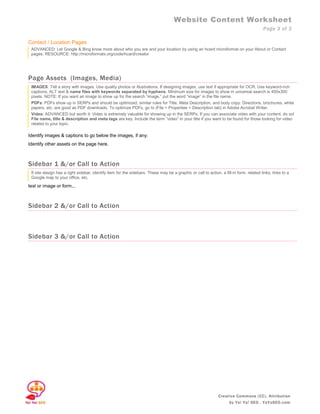
Contact / Location Pages
 ADVANCED: Let Google & Bing know more about who you are and your location by using an hcard microformat on your About or Contact
 pages. RESOURCE: http://microformats.org/code/hcard/creator


Page Assets (Images, Media)
 IMAGES: Tell a story with images. Use quality photos or illustrations. If designing images, use text if appropriate for OCR. Use keyword-rich
 captions, ALT text & name files with keywords separated by hyphens. Minimum size for images to show in universal search is 400x300
 pixels. NOTE: If you want an image to show up for the search “image,” put the word “image” in the file name.
 PDFs: PDFs show up in SERPs and should be optimized, similar rules for Title, Meta Description, and body copy. Directions, brochures, white
 papers, etc. are good as PDF downloads. To optimize PDFs, go to (File > Properties > Description tab) in Adobe Acrobat Writer.
 Video: ADVANCED but worth it: Video is extremely valuable for showing up in the SERPs. If you can associate video with your content, do so!
 File name, title & description and meta tags are key. Include the term “video” in your title if you want to be found for those looking for video
 related to your topic.

Identify images & captions to go below the images, if any:
Identify other assets on the page here.


Sidebar 1 &/or Call to Action
 If site design has a right sidebar, identify item for the sidebars. These may be a graphic or call to action, a fill-in form, related links, links to a
 Google map to your office, etc.

text or image or form...


Sidebar 2 &/or Call to Action


Sidebar 3 &/or Call to Action


                                                                                                              Creative Commons (CC), Attribution
                                                                                                                     by Yo! Yo! SEO . YoYoSEO.com

Website Content Worksheet

  • 1.
    Website Content Worksheet Date Page / What is page Target Audience: Keyword Phrases: Call to Action: What Article about? How does this page What’s the main theme or do you want visitors Name solve their needs? message? Related words? to do on this page? HEAD TAGS Tags below are basic “SEO elements” that provide information about each page - located in the <head></head> section, above <body> copy. Enter content for each tag in white cells on right. TAG / ELEMENT TIPS TAG / ELEMENT CONTENT Page name (URI) - the file name /***.html Use keywords separated by hyphens (NO spaces, NO underscores) - all lower- case, NO stop words (i.e. the, and), NO punctuation, keywords near front. Page name should make sense to people. Keep it short - shortest path possible. <title></title> MOST IMPORTANT: Each page title shows: 1) at the top of the browser, 2) as the first thing people see in your search result (SERP) snippet, 3) as bold text when people share page on FaceBook or LinkedIn, 4) in visitor’s bookmarks. Recommend no more than 60 characters, but to avoid the ellipsis (...) in SERPs, <= 65 char max, best if <10 words. Use 1 major keyword phrase, 3-5 keywords. Don't repeat keywords; use plural keywords vs. singular, if applicable. Words at front have most “weight.” Capture attention, e.g. magazine headline, elevator pitch. It’s the "main idea or hook" for page. Use keywords that appeal to readers' interest or "Call to Action." DO NOT start all titles as “Company Name – What This Page Is About.” If page needs company name in title, put it at the end separated with a hyphen, i.e. “What This Page Is About – Company Name” <meta name=”description” content=” ”> SIGNIFICANTLY IMPORTANT: Most search engines use this as the page summary. Some social media sites use this when the page is shared, the snippet after the title. Sometimes they use the 1st paragraph of text. Best practice is to have your description be very close to the first body copy of text on the page. A good description can make or break click through rate in SERPs. Write it like a miniature ad, as a Call to Action. Make it interesting while conveying benefit. DO NOT repeat the title tag. NOTE: Search engines may generate their own summary, partially from this description tag and from content in 1st paragraph. 140 characters preferred, but it page has little content, you can use to 255 characters. Only 140 to maybe 150 characters will display in the search snippet. <meta name=”keywords” content=” ”> NOT IMPORTANT: Keywords tag is not used for ranking. However, keywords tag may be used for indexing. Use a couple of main keywords only & misspellings. Use synonyms/modifier related to theme of page. You may decide to use it to place keywords on page as a reminder of target anchor text for page. Only a few, good for misspellings, 5-7 phrases max <meta name=”robots” content=” ”> noodp, noydir OPTIONAL (more advanced) “noody, noydir” – Prevents Google from pulling description from DMOZ or Yahoo! directories “noindex” – if temporary page, maybe under development, you don’t want indexed “noarchive” – won’t archive page in whois.org – sale, date-sensitive, temp page “nofollow” – to not pass PageRank out from links Yo! Yo! SEO . 831-901-5225 . share@yoyoseo.com . YoYoSEO.com
  • 2.
    Website Content Worksheet Page 2 of 3 Body Content (Text) Copy in <body></body> of your page is what visitors visually see and what search engines “spider” to index. EXTREMELY IMPORTANT: Get to the point quickly! Write to grab readers' attention with target keywords. Use promo messaging in top 300- 400 pixels, ABOVE the fold. Develop a sense of urgency by using deadline-sensitive promotions & time-sensitive words, such as “now,” when applicable Use primary keywords in 1st couple sentences, 1st 100 words. Use bulleted lists, short bursts of relative content. Break text up for short attention spans. Use bold and italic to emphasize keywords. Use <strong> & <em> around keyword targets to bold and italicize words. VERY IMPORTANT: H1 tag is the main headline of each post, like a newspaper article headline. It should NOT match title tag. Make it compelling with primary target keywords related to content on page. It creates the "juice" for the Call to Action. Only 1 H1 per page. Must be relevant to following paragraphs. Use H2s & H3s for secondary & tertiary keyword phrases and sections under main topic. H2 & H3 are one and two levels down in importance and structure. Links. Include links to other pages of the site using keyword-rich anchor text. Link to external authority resources as well. Mark links as follows: Internal links: [words to be linked]</directory-if-any/page-name.html> External links: [words to be linked]<http://www.domain.com/directory-if-any/page-name.html> Link Title text: Include <title =”keyword phrase”> on links (to page content, assets). Vary title text from anchor text if possible. IDENTIFY Page Breadcrumb (if any): Not all sites have a breadcrumb. It’s text that shows at the top of the content area to indicate to visitors where they are in the site. OPTIONAL: Example “Home > Location > Map” Home > Primary Body Content Think about your audience’s needs, their need. Don’t write in “we” verbiage but in “you” terms to share what’s in it for them. Each page should have a call to action, what you want them to do – call your office, donate, complete form, sign up for newsletter, subscribe to RSS, purchase product, watch video, etc. <h1>Primary Headline Relevant To Following Paragraphs text key points listed out as bullet points to explain a series of topics where possible <h2>Title of Sub-Headline text <h3> if any... text Creative Commons (CC), Attribution by Yo! Yo! SEO . YoYoSEO.com
  • 3.
    Website Content Worksheet Page 3 of 3 Contact / Location Pages ADVANCED: Let Google & Bing know more about who you are and your location by using an hcard microformat on your About or Contact pages. RESOURCE: http://microformats.org/code/hcard/creator Page Assets (Images, Media) IMAGES: Tell a story with images. Use quality photos or illustrations. If designing images, use text if appropriate for OCR. Use keyword-rich captions, ALT text & name files with keywords separated by hyphens. Minimum size for images to show in universal search is 400x300 pixels. NOTE: If you want an image to show up for the search “image,” put the word “image” in the file name. PDFs: PDFs show up in SERPs and should be optimized, similar rules for Title, Meta Description, and body copy. Directions, brochures, white papers, etc. are good as PDF downloads. To optimize PDFs, go to (File > Properties > Description tab) in Adobe Acrobat Writer. Video: ADVANCED but worth it: Video is extremely valuable for showing up in the SERPs. If you can associate video with your content, do so! File name, title & description and meta tags are key. Include the term “video” in your title if you want to be found for those looking for video related to your topic. Identify images & captions to go below the images, if any: Identify other assets on the page here. Sidebar 1 &/or Call to Action If site design has a right sidebar, identify item for the sidebars. These may be a graphic or call to action, a fill-in form, related links, links to a Google map to your office, etc. text or image or form... Sidebar 2 &/or Call to Action Sidebar 3 &/or Call to Action Creative Commons (CC), Attribution by Yo! Yo! SEO . YoYoSEO.com