Caliburn.MicroSolving real word problems implementing MVVMbart.wullems@ordina.behttp://bartwullems.blogspot.com
AgendaMVVM FrameworksCaliburn(.Micro)What is it?PatternsFeatures
MVVM Frameworks
MVVM Frameworks ExplorerSource: http://www.japf.fr/silverlight/mvvm/index.html/
What is Caliburn?
6
What is Caliburn?“Caliburn is a set of libraries designed to aid in the development of WPF, Silverlight and WP7 applications”http://caliburnmicro.codeplex.com
FactImplementing a User Interface is easy
FactImplementing a maintainable User Interface is hard
Goals of CaliburnBuild WPF/SL/WP7 Applications in a TDD friendly waySimplify usage of various UI design patterns in WPF/SL/WP7Simplify common UI tasksProvide solutions to common   UI architecture problemsRemove the boilerplate code    when building MVVM app’s
It’s all about patterns...
Presentation ModelPresentation Model coordinates changes in the ModelPresentationModelView calls operationsViewModelOperationsDataModel alerts the Presentation ModelView synchronizes with PresentationModel
Model – View – ViewModelChangenotificationPresenter coordinates changes in the ModelViewModelViewModelCommandsDataView binds to commands and dataModel alerts the Controller
CommandICommandInvoker+ Execute()+ CanExecute()CommandReceiver
Application Controller“A centralized point for handling screen navigation and the flow of an application.” – Martin Fowler
Service LocatorService AClass ALocatorService B
Dependency Injection ContainerDependencyInjectionContainerComponent
Event AggregatorResults ModelCriteria ModelhubPublishHandlePublishHandleAdvert ModelRecent Searches Model
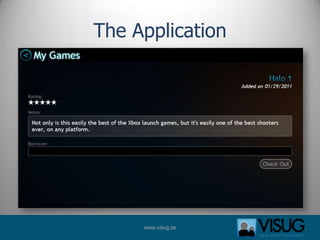
The application
The Application
The ApplicationNo Code BehindNo Event WireupsNo CommandsNo Data BindingNo Data TemplatesNo Async ProgrammingNo Custom ControlsNo 3rd Party Libraries
Features
Features OverviewBasic configuration and bootstrappingActionsScreens, Conductors and CompositionAll about conventionsThe Window ManagerThe Event AggregatorCoroutines
Basic ConfigurationConvention over ConfigurationLimited amount of configuration neededSimple naming convention to locate Views for ViewModels. e.g. MyApp.ViewModels.MyViewModelMyApp.Views.MyView. BootstrapperShould run at startupSpecifies the root view model(=Application Shell)View Model First but can be changedIoCHas it’s own small IoC containerCan be replaced by the IoC of your choice(MEF, Unity,…)
Demo- Basic Configuration
Actions - BasicsCommand implementation for Caliburn.MicroExtend databinding to bind not only data but also methodsLeverages System.Windows.Interactivity for it’s trigger mechanism. Use anything that inherits from TriggerBaseto trigger the sending of an action message(events, …)No need to add a command class and/or property on VMAllows:Execution of methodsPassing data from the UI into methodsSynchronous/Asynchronous calls
Action - GuardsGuard property Handler: “SayHello” messageGuard property: “CanSayHello”CM will observe changes in that property and re-evaluate the guard accordingly.Based on INotifyPropertyChanged to refresh trigger availabilityCan change the state of the bound controlE.g. change a button to disabled, hide a menu item,…
Demo- Actions
UI Lifecycle ManagementOften using MVVM involves tricky UI lifecycle issues for various UI componentsActivationDeactivationShutdownCaliburn.Micro handles this lifecycle with Screens, Conductors and Screen Collections29
UI Lifecycle ManagementScreenA statefulunit of work existing within the presentation tier of an application. Has a lifecycle associated with it.Screen ConductorEnforces the Screen Activation Lifecycle Activates screens. Deactivates screens.Allows graceful shutdown. Screen CollectionMaintains the list of currently opened screens or documents
UI Lifecycle ManagementConductorScreen 1Screen 2ActiveActiveActivate() Screen 2Deactive() Screen 1CanClose()Returns TrueActivate() Screen 2
Demo- Simple Navigation
Demo- Simple MDI
ConventionsRemoves the need to write boiler plate codeFully customizableCan be turned off if you hate themOn by defaultConventions forView/ViewModel resolutionData bindingAction binding
Demo- Conventions
Window ManagerProvides a View-Model-centric way of displaying Windows (ChildWindow in SL and Window in WPF). Available methodsShowDialogShowWindowShowPopupUses a Conductor under the hood
Demo – Window Manager
Event AggregatorCommunicate between objects in a loosely coupled wayFollows a bus-style pub/sub model. Uses weak referencesPublishes on the UI thread.
Demo – Event Aggregator
CoroutinesWikipedia:“In computer science, coroutines are program components that generalize subroutines to allow multiple entry points for suspending and resuming execution at certain locations. Coroutines are well-suited for implementing more familiar program components such as cooperative tasks, iterators, infinite lists and pipes.”
CoroutinesIntroduces asynchronous programming in a simple way.Build on top of iterators.2 required actionsImplement the IResult interface on some class, representing the task you wish to executeYield instances of IResult from an Action
CoroutinesAllows you to execute a method, pause it’s execution, do something else, come back and resume execution where you left off. Extremely powerful in task-based programming
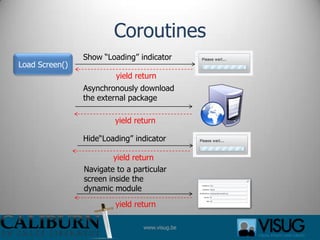
CoroutinesSilverlight example: Dynamically download and show screens not part of the main package.
CoroutinesShow “Loading” indicatorLoad Screen()yieldreturnyieldreturnyieldreturnyieldreturnAsynchronously download the external packageHide“Loading” indicatorNavigate to a particular screen inside the dynamic module
Demo - Coroutines
TODAY’s TALKRemember! Still a lot to discover...CALIBURN
ConclusionsCaliburn.Micro is clean and simpleAllows you to create very rich applications with a strong focus on maintainability and reuseA LOT of UI principles are applied in Caliburn.MicroAlso check it’s big brother Caliburn“If you don’t like the code, use it as a learning tool”47

Caliburn.micro

Editor's Notes

  • #7 The Sword in the Stone about the magician Merlin and King Arthur
  • #13 View has references to PresentationModelPresentationModel also coordinates control state changes (eg: enabled/disabled controls)Contains plumbing code for synchronization.NET Data binding was not yet ready for this
  • #14 View  ViewModel : Binding to commands and dataViewModel: Abstraction of the View, Has no reference to the View (unlike MVP)ViewModel  View : Change notifcation: EventsViewModel  Model : Normal interaction