Buzzword — How’d They Build That? David Coletta Virtual Ubiquity, Inc. [email_address] Blog: http://www.colettas.org
Introduction Developer and co-founder at Virtual Ubiquity Career focus on collaboration software Background in C++ and web applications Started using Flex 2.0 alpha in January 2006
A little history Jan 2006: Started coding with three developers in an attic Oct 2006: First public demo by Kevin Lynch at MAX; Funded by Adobe Nov 2006: Hired designer and three more developers, moved into real offices May, June, July, August 2007: monthly preview releases Fall 2007: Opening up for real use
This talk focuses on Buzzword internals and features Not really related to Flex Worth understanding because of what it demonstrates about the capabilities of the platform Building a real-world app inside the browser in Flex Getting the most out of the platform Dealing with limitations
Structure of this talk Half a dozen (or so) topics For each topic: Demo Describe Dive into some code As interactive as possible This is the first time for this talk You know better than I do what you want to learn
Can I get a volunteer? Can someone please write down (or type) all the questions that are asked during the talk and send them to me later?
The Five Cent Tour Show of hands: who has never actually used Buzzword? Document Organizer Toolbar Lists Graphics Tables Comments Sharing If you’re at the Red Lion, you have an invite already, otherwise get one from me after the talk. It’s only good through August 24, so sign up!
Topics in detail Getting text on the page Testing the app Page-segmented scroll bar Asynchronous completion Modularizing Rich text clipboard
Possible Q&A topics Client/server communications MXML and code-behind .NET back end Fonts Logging and Tracing  Performance Choreography AIR
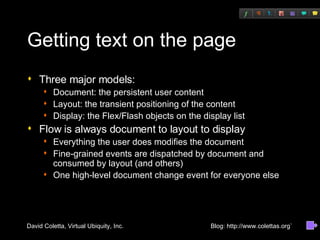
Getting text on the page Three major models: Document: the persistent user content Layout: the transient positioning of the content Display: the Flex/Flash objects on the display list Flow is always document to layout to display Everything the user does modifies the document Fine-grained events are dispatched by document and consumed by layout (and others) One high-level document change event for everyone else
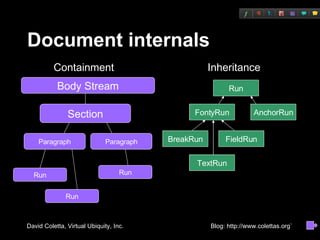
Document internals Paragraph Paragraph Run Run Run Containment Inheritance Run FontyRun AnchorRun BreakRun FieldRun Body Stream Section TextRun
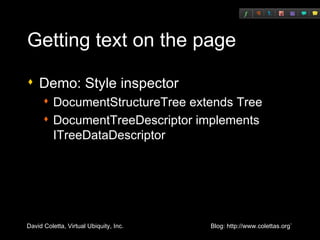
Getting text on the page Demo: Style inspector DocumentStructureTree extends Tree DocumentTreeDescriptor implements ITreeDataDescriptor
Getting text on the page Layout engine Demo: Layout inspector
Getting text on the page Demo: Display element debugging
Getting text on the page Code: TextLineDisplay/renderLine().
Questions?
Testing the app: “LiveTest” Goal of LiveTest: create a test framework that verifies the correctness of  document commands Non-goal: not intended to test the whole UI (can't replace something like QTP) Command pattern: each command knows how to emit ActionScript code to execute itself Demo: recording, debugging, training, and executing a test
Questions?
Page-segmented scroll bar Demo: small document (Welcome to Buzzword) large document (Name that Movie) Not a component but actually two skins: thumb skin and track skin Most of the work is in track skin Pushing a skin pretty far: hard to get skins to draw text Code: PageSegmentedScrollTrackSkin.as
Questions?
Asynchronous completion Demo: Settings and Preferences dialog (modality during network event) Script engine must always unwind before drawing or network activity Any ActionScript code that does any drawing or networking activity is going to have a lot of completion functions Our solution was to build a helper class to manage nesting, app-modality Code: AsyncCompletion.as, SettingsAndPrefsDlg.as
Modularizing Demo: logging in with empty browser cache
Modularizing Advantages Improves build times Permits background downloading Imposes information hiding discipline
Modularizing Risks Can increase overall download Can slow overall build times Increased complexity
Modularizing Debugging across modules is a common problem Since SWF module is loaded at runtime by path, if your production version is a release built, you won’t be able to debug it We solved by building ModulePathLoader subclass of ModuleLoader that tries to load the debug path as well as the release path
Modularizing UI for progress bars handled by ProgressManager class Keeps track of what mode we're in (notified by app frame) Knows what modes are blocked by which downloads  Keeps track of which downloads are in progress (monitors events from Module loading process) Code: ProgressManager.as
Questions?
Rich Text Clipboard Demo: copying and pasting between Buzzword and MS Word
Rich Text Clipboard Flash does not support rich text at all Flash provides limited support for putting plain text only on system clipboard Flash provides no support for getting contents of system clipboard Clearly a hack is required
Rich Text Clipboard Browser contains both the Flash plug-in and a hidden editable IFRAME (or DIV for some browsers) All keystrokes go into the editable IFRAME and are passed into Flex via ExternalInterface Clipboard actions are detected via either clipboard events (in IE) or keyDown/keyPress/keyUp events (other browsers)
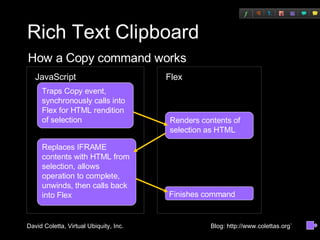
Rich Text Clipboard Flex JavaScript Traps Copy event, synchronously calls into Flex for HTML rendition of selection Renders contents of selection as HTML Replaces IFRAME contents with HTML from selection, allows operation to complete, unwinds, then calls back into Flex  Finishes command How a Copy command works
Rich Text Clipboard Demo: copying and pasting between Buzzword and MS Word This is a giant hack! And it requires a separate instance of the hack for each browser! Unavoidable due to limitations of Flash AIR will make this better, but we'll still need the hack for the browser version
Questions? Reminder of topics we didn’t cover:  Client/server communications MXML and code-behind .NET back end Fonts Logging and Tracing  Performance Choreography AIR

Buzzword, How'd They Build That?

  • 1.
    Buzzword — How’dThey Build That? David Coletta Virtual Ubiquity, Inc. [email_address] Blog: http://www.colettas.org
  • 2.
    Introduction Developer andco-founder at Virtual Ubiquity Career focus on collaboration software Background in C++ and web applications Started using Flex 2.0 alpha in January 2006
  • 3.
    A little historyJan 2006: Started coding with three developers in an attic Oct 2006: First public demo by Kevin Lynch at MAX; Funded by Adobe Nov 2006: Hired designer and three more developers, moved into real offices May, June, July, August 2007: monthly preview releases Fall 2007: Opening up for real use
  • 4.
    This talk focuseson Buzzword internals and features Not really related to Flex Worth understanding because of what it demonstrates about the capabilities of the platform Building a real-world app inside the browser in Flex Getting the most out of the platform Dealing with limitations
  • 5.
    Structure of thistalk Half a dozen (or so) topics For each topic: Demo Describe Dive into some code As interactive as possible This is the first time for this talk You know better than I do what you want to learn
  • 6.
    Can I geta volunteer? Can someone please write down (or type) all the questions that are asked during the talk and send them to me later?
  • 7.
    The Five CentTour Show of hands: who has never actually used Buzzword? Document Organizer Toolbar Lists Graphics Tables Comments Sharing If you’re at the Red Lion, you have an invite already, otherwise get one from me after the talk. It’s only good through August 24, so sign up!
  • 8.
    Topics in detailGetting text on the page Testing the app Page-segmented scroll bar Asynchronous completion Modularizing Rich text clipboard
  • 9.
    Possible Q&A topicsClient/server communications MXML and code-behind .NET back end Fonts Logging and Tracing  Performance Choreography AIR
  • 10.
    Getting text onthe page Three major models: Document: the persistent user content Layout: the transient positioning of the content Display: the Flex/Flash objects on the display list Flow is always document to layout to display Everything the user does modifies the document Fine-grained events are dispatched by document and consumed by layout (and others) One high-level document change event for everyone else
  • 11.
    Document internals ParagraphParagraph Run Run Run Containment Inheritance Run FontyRun AnchorRun BreakRun FieldRun Body Stream Section TextRun
  • 12.
    Getting text onthe page Demo: Style inspector DocumentStructureTree extends Tree DocumentTreeDescriptor implements ITreeDataDescriptor
  • 13.
    Getting text onthe page Layout engine Demo: Layout inspector
  • 14.
    Getting text onthe page Demo: Display element debugging
  • 15.
    Getting text onthe page Code: TextLineDisplay/renderLine().
  • 16.
  • 17.
    Testing the app:“LiveTest” Goal of LiveTest: create a test framework that verifies the correctness of document commands Non-goal: not intended to test the whole UI (can't replace something like QTP) Command pattern: each command knows how to emit ActionScript code to execute itself Demo: recording, debugging, training, and executing a test
  • 18.
  • 19.
    Page-segmented scroll barDemo: small document (Welcome to Buzzword) large document (Name that Movie) Not a component but actually two skins: thumb skin and track skin Most of the work is in track skin Pushing a skin pretty far: hard to get skins to draw text Code: PageSegmentedScrollTrackSkin.as
  • 20.
  • 21.
    Asynchronous completion Demo:Settings and Preferences dialog (modality during network event) Script engine must always unwind before drawing or network activity Any ActionScript code that does any drawing or networking activity is going to have a lot of completion functions Our solution was to build a helper class to manage nesting, app-modality Code: AsyncCompletion.as, SettingsAndPrefsDlg.as
  • 22.
    Modularizing Demo: loggingin with empty browser cache
  • 23.
    Modularizing Advantages Improvesbuild times Permits background downloading Imposes information hiding discipline
  • 24.
    Modularizing Risks Canincrease overall download Can slow overall build times Increased complexity
  • 25.
    Modularizing Debugging acrossmodules is a common problem Since SWF module is loaded at runtime by path, if your production version is a release built, you won’t be able to debug it We solved by building ModulePathLoader subclass of ModuleLoader that tries to load the debug path as well as the release path
  • 26.
    Modularizing UI forprogress bars handled by ProgressManager class Keeps track of what mode we're in (notified by app frame) Knows what modes are blocked by which downloads Keeps track of which downloads are in progress (monitors events from Module loading process) Code: ProgressManager.as
  • 27.
  • 28.
    Rich Text ClipboardDemo: copying and pasting between Buzzword and MS Word
  • 29.
    Rich Text ClipboardFlash does not support rich text at all Flash provides limited support for putting plain text only on system clipboard Flash provides no support for getting contents of system clipboard Clearly a hack is required
  • 30.
    Rich Text ClipboardBrowser contains both the Flash plug-in and a hidden editable IFRAME (or DIV for some browsers) All keystrokes go into the editable IFRAME and are passed into Flex via ExternalInterface Clipboard actions are detected via either clipboard events (in IE) or keyDown/keyPress/keyUp events (other browsers)
  • 31.
    Rich Text ClipboardFlex JavaScript Traps Copy event, synchronously calls into Flex for HTML rendition of selection Renders contents of selection as HTML Replaces IFRAME contents with HTML from selection, allows operation to complete, unwinds, then calls back into Flex Finishes command How a Copy command works
  • 32.
    Rich Text ClipboardDemo: copying and pasting between Buzzword and MS Word This is a giant hack! And it requires a separate instance of the hack for each browser! Unavoidable due to limitations of Flash AIR will make this better, but we'll still need the hack for the browser version
  • 33.
    Questions? Reminder oftopics we didn’t cover: Client/server communications MXML and code-behind .NET back end Fonts Logging and Tracing  Performance Choreography AIR