Developing maintainable
Cordova applications

Ivano Malavolta
DISIM | University of L’Aquila
Roadmap
•
•
•
•
•

Introduction

Backbone

I implemented all best practices and advices in this
presentation in a generic app template available here:

Require JS

Handlebars
Conclusions

https://github.com/iivanoo/cordovaboilerplate
Introduction
We are building apps, not web sites

If your code is not structured:

•

it is extremely easy that your web app becomes a
big mess of HTML + CSS + JavaScript

•

maintaining each part of your app asks for a
deep analysis of ALL its aspects (logic, presentation, etc.)
•

you may waste a whole day due to a missing <
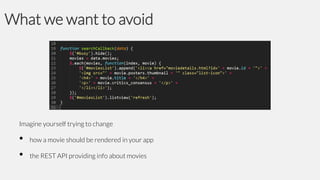
What we want to avoid

Imagine yourself trying to change

•
•

how a movie should be rendered in your app
the REST API providing info about movies
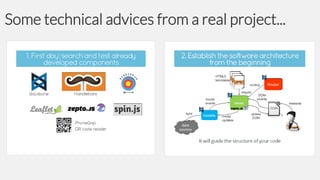
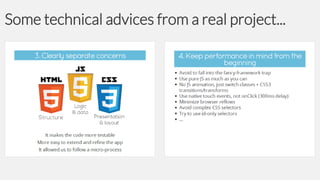
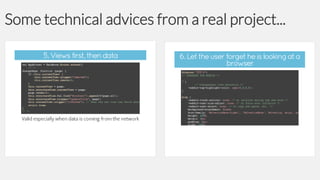
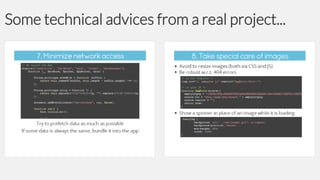
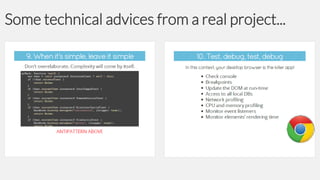
Some technical advices from a real project...
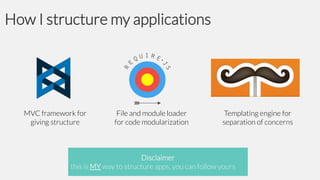
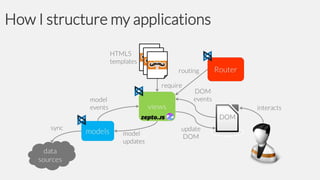
How I structure my applications

MVC framework for
giving structure

File and module loader
for code modularization

Templating engine for
separation of concerns

Disclaimer
this is MY way to structure apps, you can follow yours
How I structure my applications
Backbone
•
•
•
•
•
•
•

Why Backbone

Events
Models

Collections
Views
Routers
Summary
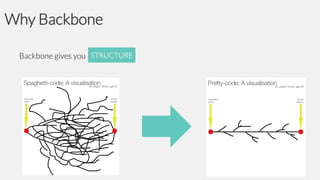
Why Backbone
Backbone gives you STRUCTURE
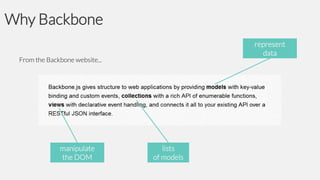
Why Backbone
represent
data

From the Backbone website...

manipulate
the DOM

lists
of models
Why Backbone
Additionally, Backbone provides also features for:
sync
for managing how to persist models (default is via REST)
events
for managing how data and control are exchanged within your app
router
for managing the interaction flow among views
Who is using Backbone?
Backbone
•
•
•
•
•
•
•

Why Backbone

Events
Models

Collections
Views
Routers
Summary
Events
Any object communicates with other objects via events

It gives the object the ability to bind and trigger custom named events

It is extremely useful for exchanging data and control among objects
Events

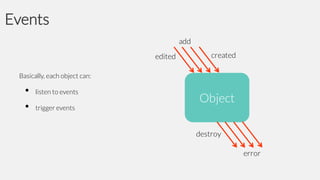
Basically, each object can:

•
•

listen to events
trigger events
Events
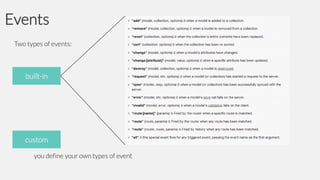
Two types of events:

built-in

custom
you define your own types of event
Events API
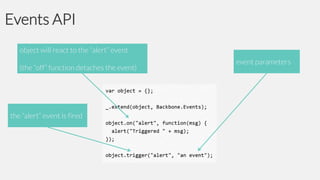
object will react to the “alert” event
(the “off” function detaches the event)

the “alert” event is fired

event parameters
Events API
Events methods:
on

listenTo
object.on(event, callback, [context])

off

object.listenTo(other, event, callback)
stopListening

object.off([event], [callback], [context])
once

object.stopListening([other], [event], [callback])
listenToOnce

object.once(event, callback, [context])
trigger

object.trigger(event, [*args])

object.listenToOnce(other, event, callback)
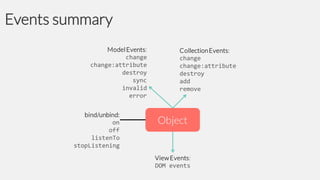
Events summary
Backbone
•
•
•
•
•
•
•

Why Backbone

Events
Models

Collections
Views
Routers
Summary
Models

MVC: Notify their observers about
state using the Observer pattern

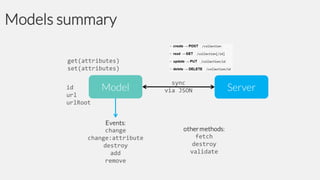
Models represent your data

Each model represents a data type in your app, together with the logic surrounding it, like:

•
•
•
•
•

persistence
conversions

validation
computed properties

access control
Models
You extend Backbone.Model with your domain-specific methods, and Model provides a basic set of
functionality for managing changes, like:

•
•
•
•

getter and setter
id

constructor
REST-based persistence
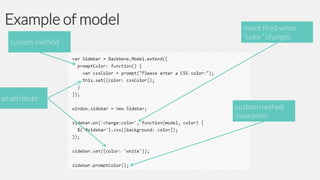
Example of model
custom method

an attribute

event fired when
“color” changes

custom method
invocation
Model constructore and attributes
initialize()
it is triggered every time you create a new instance of a model
it works also for collections and views
it can take a JS object for setting also attributes
get() & set()
they are used to set and retrieve the value of certain attributes
defaults

a property named 'defaults' in your model declaration
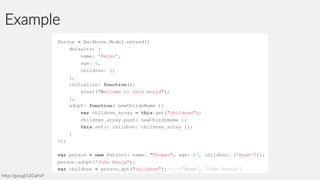
Example

http://goo.gl/UOahsP
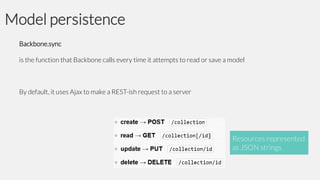
Model persistence
Backbone.sync
is the function that Backbone calls every time it attempts to read or save a model

By default, it uses Ajax to make a REST-ish request to a server

Resources represented
as JSON strings
Sync signature
sync(method, model, [options])
method
the CRUD method ("create“, "read“, "update", or "delete")
model
the model (or collection) to be synced

example of overriden sync:
http://bit.ly/KWdxNN

options
success and error callbacks, and all other jQuery request options

Sync returns a jQuery XMLHttpRequest (jqXHR) object

It implements the Promise
interface
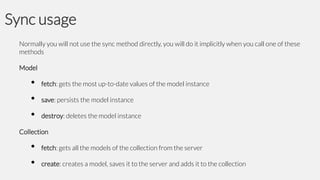
Sync usage
Normally you will not use the sync method directly, you will do it implicitly when you call one of these
methods

Model

•
•
•

fetch: gets the most up-to-date values of the model instance

save: persists the model instance
destroy: deletes the model instance

Collection

•
•

fetch: gets all the models of the collection from the server

create: creates a model, saves it to the server and adds it to the collection
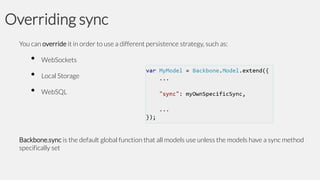
Overriding sync
You can override it in order to use a different persistence strategy, such as:

•
•
•

WebSockets
Local Storage
WebSQL

Backbone.sync is the default global function that all models use unless the models have a sync method
specifically set
Models summary
Backbone
•
•
•
•
•
•
•

Why Backbone

Events
Models

Collections
Views
Routers
Summary
Collections

MVC: Notify their observers about
state using the Observer pattern
(same as models)

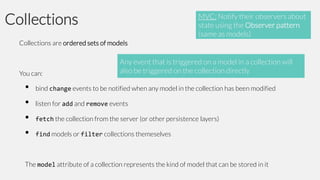
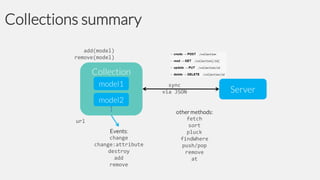
Collections are ordered sets of models

You can:

•
•
•
•

Any event that is triggered on a model in a collection will
also be triggered on the collection directly

bind change events to be notified when any model in the collection has been modified
listen for add and remove events
fetch the collection from the server (or other persistence layers)

find models or filter collections themeselves

The model attribute of a collection represents the kind of model that can be stored in it
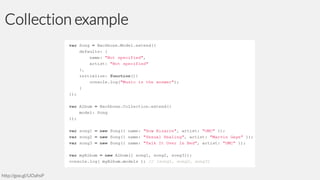
Collection example

http://goo.gl/UOahsP
Collections summary
Backbone
•
•
•
•
•
•
•

Why Backbone

Events
Models

Collections
Views
Routers
Summary
Views
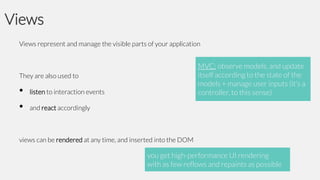
Views represent and manage the visible parts of your application

MVC: observe models, and update
itself according to the state of the
models + manage user inputs (it’s a
controller, to this sense)

They are also used to

•
•

listen to interaction events
and react accordingly

views can be rendered at any time, and inserted into the DOM

you get high-performance UI rendering
with as few reflows and repaints as possible
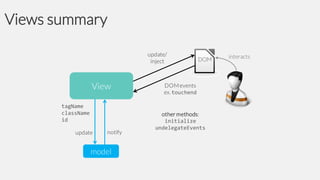
Interaction with the DOM
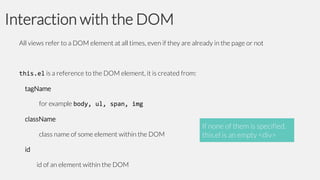
All views refer to a DOM element at all times, even if they are already in the page or not

this.el is a reference to the DOM element, it is created from:
tagName
for example body, ul, span, img
className

class name of some element within the DOM
id

id of an element within the DOM

If none of them is specified,
this.el is an empty <div>
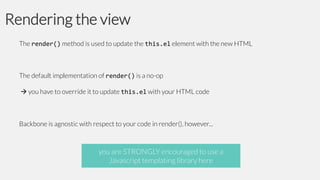
Rendering the view
The render() method is used to update the this.el element with the new HTML

The default implementation of render() is a no-op
 you have to override it to update this.el with your HTML code

Backbone is agnostic with respect to your code in render(), however...

you are STRONGLY encouraged to use a
Javascript templating library here
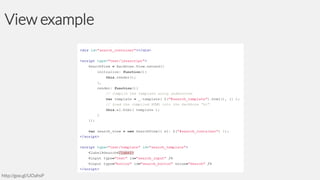
View example

http://goo.gl/UOahsP
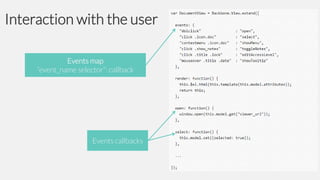
Interaction with the user
Events map
“event_name selector”: callback

Events callbacks
Views summary
Backbone
•
•
•
•
•
•
•

Why Backbone

Events
Models

Collections
Views
Routers
Summary
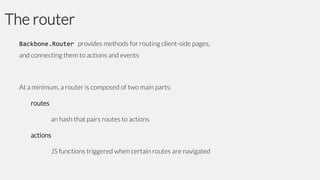
The router
Backbone.Router provides methods for routing client-side pages,
and connecting them to actions and events

At a minimum, a router is composed of two main parts:

routes
an hash that pairs routes to actions

actions
JS functions triggered when certain routes are navigated
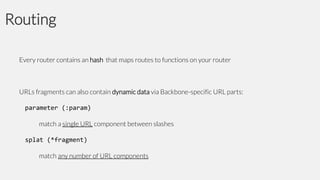
Routing
Every router contains an hash that maps routes to functions on your router

URLs fragments can also contain dynamic data via Backbone-specific URL parts:
parameter (:param)
match a single URL component between slashes
splat (*fragment)
match any number of URL components
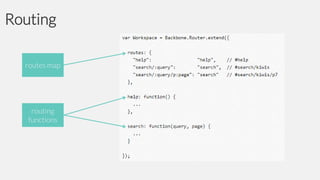
Routing
routes map

routing
functions
History
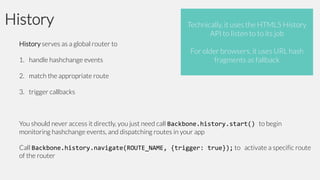
History serves as a global router to
1. handle hashchange events

Technically, it uses the HTML5 History
API to listen to to its job
For older browsers, it uses URL hash
fragments as fallback

2. match the appropriate route
3. trigger callbacks

You should never access it directly, you just need call Backbone.history.start() to begin
monitoring hashchange events, and dispatching routes in your app
Call Backbone.history.navigate(ROUTE_NAME, {trigger: true}); to activate a specific route
of the router
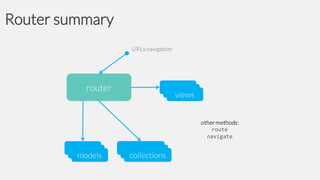
Router summary
Backbone
•
•
•
•
•
•
•

Why Backbone

Events
Models

Collections
Views
Routers
Summary
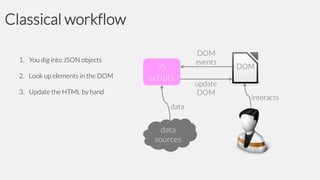
Classical workflow
1. You dig into JSON objects
2. Look up elements in the DOM
3. Update the HTML by hand
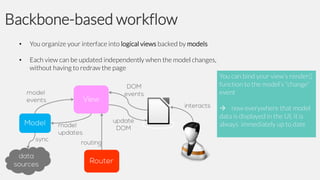
Backbone-based workflow
•

You organize your interface into logical views backed by models

•

Each view can be updated independently when the model changes,
without having to redraw the page
You can bind your view‘s render()
function to the model‘s "change”
event
 now everywhere that model
data is displayed in the UI, it is
always immediately up to date
Is Backbone real MVC?
Let’s look at the description of the Model-View-Presenter pattern on Wikipedia:
Model
an interface defining the data to be displayed or otherwise acted upon in the user interface
View
passive interface that displays data (the model) and routes user commands (events) to the
presenter to act upon that data
Presenter
acts upon the model and the view. It retrieves data from repositories (the model), and formats it
for display in the view
Roadmap
•
•
•
•
•

Introduction

Backbone
Require JS

Handlebars
Conclusions
Require JS
•
•
•
•

Why Require JS

Using modules
Defining modules

Configuring Require JS
Why Require JS
We are building apps, not website

We need well-specified and isolated JS files/modules

Code complexity grows as the app gets bigger
 we need some sort of #include/import/require
 ability to load nested dependencies
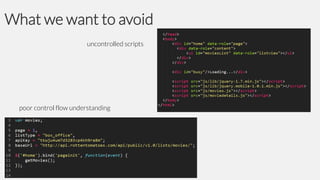
What we want to avoid
uncontrolled scripts

poor control flow understanding
Require JS
JavaScript and module loader
RequireJS is a JavaScript file file and module loader
Using a modular script loader like Require JS will improve the modularity of your code
 speed in implementing changes
 better undestanding of the code

Require JS allows modules to be loaded as fast as possible, even out of order, but evaluated in the
correct dependency order

Built on the Module Pattern
The module pattern
A JavaScript code module is some JavaScript code located in a registered location (e.g., a function)

All of the code that runs inside the function lives in a closure, which provides
•

privacy

•

state

throughout the lifetime of the module
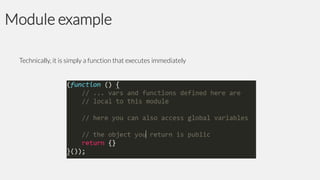
Module example
Technically, it is simply a function that executes immediately
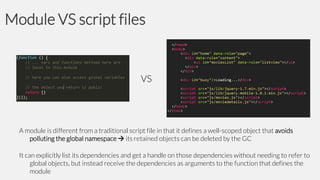
Module VS script files

VS

A module is different from a traditional script file in that it defines a well-scoped object that avoids
polluting the global namespace  its retained objects can be deleted by the GC
It can explicitly list its dependencies and get a handle on those dependencies without needing to refer to
global objects, but instead receive the dependencies as arguments to the function that defines the
module
Require JS
•
•
•
•

Why Require JS

Using modules
Defining modules

Configuring Require JS
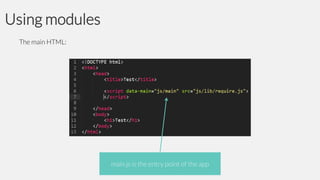
Using modules
The main HTML:

main.js is the entry point of the app
Using modules
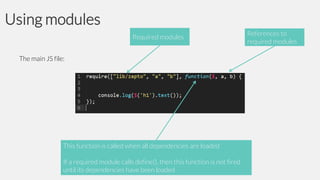
Required modules
The main JS file:

This function is called when all dependencies are loaded

If a required module calls define(), then this function is not fired
until its dependencies have been loaded

References to
required modules
Require JS
•
•
•
•

Why Require JS

Using modules
Defining modules

Configuring Require JS
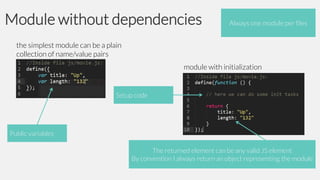
Module without dependencies

Always one module per files

the simplest module can be a plain
collection of name/value pairs
module with initialization

Setup code

Public variables

The returned element can be any valid JS element
By convention I always return an object representing the module
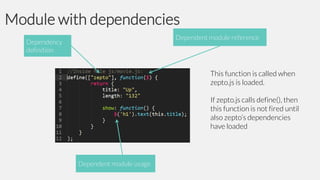
Module with dependencies
Dependent module reference

Dependency
definition

This function is called when
zepto.js is loaded.
If zepto.js calls define(), then
this function is not fired until
also zepto’s dependencies
have loaded

Dependent module usage
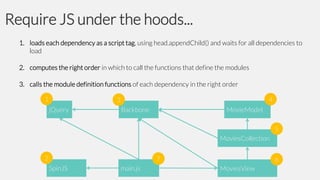
Require JS under the hoods...
1. loads each dependency as a script tag, using head.appendChild() and waits for all dependencies to
load
2. computes the right order in which to call the functions that define the modules
3. calls the module definition functions of each dependency in the right order
1

4

3
jQuery

Backbone

MovieModel

5
MoviesCollection
2

7

SpinJS

main.js

6

MoviesView
Require JS
•
•
•
•

Why Require JS

Using modules
Defining modules

Configuring Require JS
Require refers to a global configuration options

It allows developers to:

•
•
•
•

set the paths to all used frameworks in one place
use older frameworks as modules (shim)
define configuration params for the modules
etc.
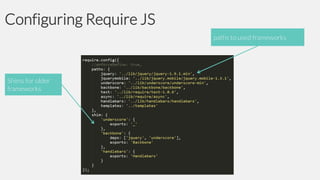
Configuring Require JS
paths to used frameworks

Shims for older
frameworks

Dependent module usage
Roadmap
•
•
•
•
•

Introduction

Backbone
Require JS

Handlebars
Conclusions
Handlebars
•

Why Handlebars

•

Handlebars basics

•

Usage with Backbone and Require JS
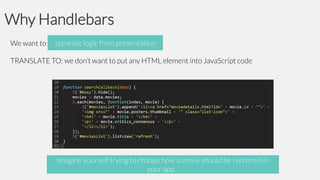
Why Handlebars
separate logic from from logic
We want to separate presentationpresentation
TRANSLATE TO: we don’t want to put any HTML element into JavaScript code

Imagine yourself trying to change how a movie should be rendered in
your app...
Handlebars
•

Why Handlebars

•

Handlebars basics

•

Usage with Backbone and Require JS
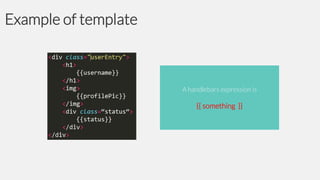
Example of template

A handlebars expression is

{{ something }}
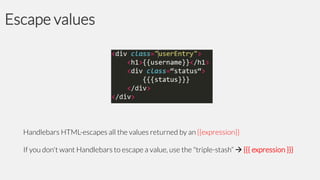
Escape values

Handlebars HTML-escapes all the values returned by an {{expression}}
If you don't want Handlebars to escape a value, use the "triple-stash“  {{{ expression }}}
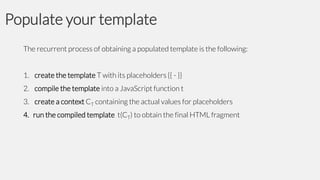
Populate your template
The recurrent process of obtaining a populated template is the following:
1. create the template T with its placeholders {{ - }}
2. compile the template into a JavaScript function t
3. create a context CT containing the actual values for placeholders

4. run the compiled template t(CT) to obtain the final HTML fragment
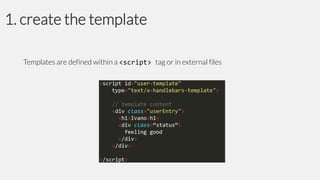
1. create the template
Templates are defined within a <script> tag or in external files
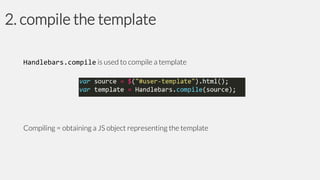
2. compile the template
Handlebars.compile is used to compile a template

Compiling = obtaining a JS object representing the template
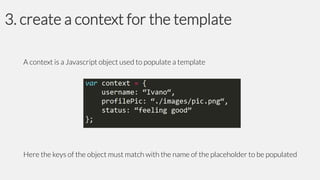
3. create a context for the template
A context is a Javascript object used to populate a template

Here the keys of the object must match with the name of the placeholder to be populated
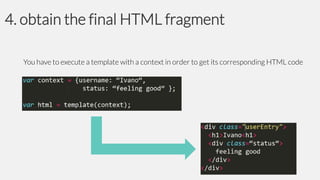
4. obtain the final HTML fragment
You have to execute a template with a context in order to get its corresponding HTML code
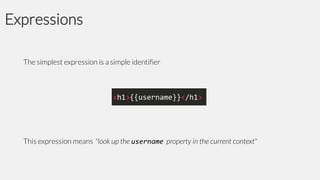
Expressions
The simplest expression is a simple identifier

This expression means "look up the username property in the current context"
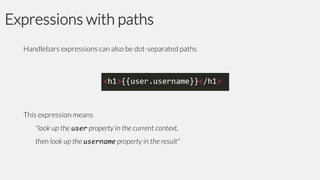
Expressions with paths
Handlebars expressions can also be dot-separated paths

This expression means
"look up the user property in the current context,
then look up the username property in the result"
Helpers
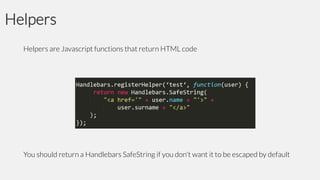
Helpers are Javascript functions that return HTML code

You should return a Handlebars SafeString if you don't want it to be escaped by default
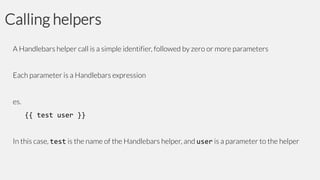
Calling helpers
A Handlebars helper call is a simple identifier, followed by zero or more parameters
Each parameter is a Handlebars expression
es.

{{ test user }}
In this case, test is the name of the Handlebars helper, and user is a parameter to the helper
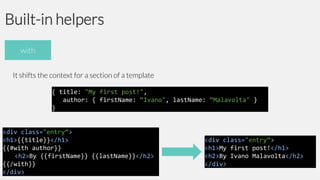
Built-in helpers
with
It shifts the context for a section of a template
{ title: "My first post!",
author: { firstName: “Ivano", lastName: “Malavolta" }
}

<div class="entry“>
<h1>{{title}}</h1>
{{#with author}}
<h2>By {{firstName}} {{lastName}}</h2>
{{/with}}
</div>

<div class="entry“>
<h1>My first post!</h1>
<h2>By Ivano Malavolta</h2>
</div>
Built-in helpers

Inside the block, you can use
this
to reference the element being iterated

each
To iterate over a list

{ people: [ “Ivano", “Andrea", “Paolo" ] }

<ul class="people_list">
{{#each people}}
<li>{{this}}</li>
{{/each}}
</ul>

<ul class="people_list">
<li>Ivano</li>
<li>Andrea</li>
<li>Paolo</li>
</ul>
Built-in helpers

The unless helper is the inverse of if

If / Else
It renders the block if its argument is not equal to false, undefined, null, []
{ title: "My first post!",
author: undefined }
}
<div class="entry“>
<h1>{{title}}</h1>
{{#if author}}
<h2>By {{firstName}} {{lastName}}</h2>
{{#else}}
<h2>Unknown author</h1>
{{/if}}

<div class="entry“>
<h1>My first post!</h1>
<h2>Unknown author</h2>
</div>
handlebars summary
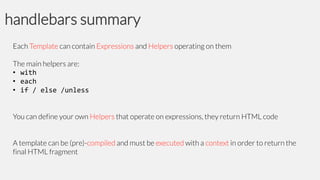
Each Template can contain Expressions and Helpers operating on them
The main helpers are:
• with
• each
• if / else /unless
You can define your own Helpers that operate on expressions, they return HTML code

A template can be (pre)-compiled and must be executed with a context in order to return the
final HTML fragment
Handlebars
•

Why Handlebars

•

Handlebars basics

•

Usage with Backbone and Require JS
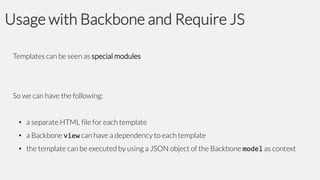
Templates can be seen as special modules

So we can have the following:
• a separate HTML file for each template
• a Backbone view can have a dependency to each template
• the template can be executed by using a JSON object of the Backbone model as context
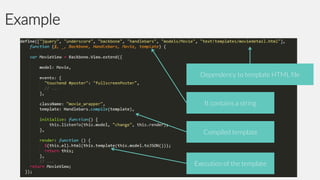
Example

Dependency to template HTML file

It contains a string

Compiled template

Execution of the template
References

http://backbonejs.org
http://requirejs.org
http://handlebarsjs.com
https://github.com/iivanoo/cordovaboilerplate
Contact

Ivano Malavolta | DISIM
+ 39 380 70 21 600

iivanoo
ivano.malavolta@univaq.it
www.ivanomalavolta.com

Developing maintainable Cordova applications

  • 1.
    Developing maintainable Cordova applications IvanoMalavolta DISIM | University of L’Aquila
  • 2.
    Roadmap • • • • • Introduction Backbone I implemented allbest practices and advices in this presentation in a generic app template available here: Require JS Handlebars Conclusions https://github.com/iivanoo/cordovaboilerplate
  • 3.
    Introduction We are buildingapps, not web sites If your code is not structured: • it is extremely easy that your web app becomes a big mess of HTML + CSS + JavaScript • maintaining each part of your app asks for a deep analysis of ALL its aspects (logic, presentation, etc.) • you may waste a whole day due to a missing <
  • 4.
    What we wantto avoid Imagine yourself trying to change • • how a movie should be rendered in your app the REST API providing info about movies
  • 5.
    Some technical advicesfrom a real project...
  • 6.
    Some technical advicesfrom a real project...
  • 7.
    Some technical advicesfrom a real project...
  • 8.
    Some technical advicesfrom a real project...
  • 9.
    Some technical advicesfrom a real project...
  • 10.
    How I structuremy applications MVC framework for giving structure File and module loader for code modularization Templating engine for separation of concerns Disclaimer this is MY way to structure apps, you can follow yours
  • 11.
    How I structuremy applications
  • 12.
  • 13.
  • 14.
    Why Backbone represent data From theBackbone website... manipulate the DOM lists of models
  • 15.
    Why Backbone Additionally, Backboneprovides also features for: sync for managing how to persist models (default is via REST) events for managing how data and control are exchanged within your app router for managing the interaction flow among views
  • 16.
    Who is usingBackbone?
  • 17.
  • 18.
    Events Any object communicateswith other objects via events It gives the object the ability to bind and trigger custom named events It is extremely useful for exchanging data and control among objects
  • 19.
    Events Basically, each objectcan: • • listen to events trigger events
  • 20.
    Events Two types ofevents: built-in custom you define your own types of event
  • 21.
    Events API object willreact to the “alert” event (the “off” function detaches the event) the “alert” event is fired event parameters
  • 22.
    Events API Events methods: on listenTo object.on(event,callback, [context]) off object.listenTo(other, event, callback) stopListening object.off([event], [callback], [context]) once object.stopListening([other], [event], [callback]) listenToOnce object.once(event, callback, [context]) trigger object.trigger(event, [*args]) object.listenToOnce(other, event, callback)
  • 23.
  • 24.
  • 25.
    Models MVC: Notify theirobservers about state using the Observer pattern Models represent your data Each model represents a data type in your app, together with the logic surrounding it, like: • • • • • persistence conversions validation computed properties access control
  • 26.
    Models You extend Backbone.Modelwith your domain-specific methods, and Model provides a basic set of functionality for managing changes, like: • • • • getter and setter id constructor REST-based persistence
  • 27.
    Example of model custommethod an attribute event fired when “color” changes custom method invocation
  • 28.
    Model constructore andattributes initialize() it is triggered every time you create a new instance of a model it works also for collections and views it can take a JS object for setting also attributes get() & set() they are used to set and retrieve the value of certain attributes defaults a property named 'defaults' in your model declaration
  • 29.
  • 30.
    Model persistence Backbone.sync is thefunction that Backbone calls every time it attempts to read or save a model By default, it uses Ajax to make a REST-ish request to a server Resources represented as JSON strings
  • 31.
    Sync signature sync(method, model,[options]) method the CRUD method ("create“, "read“, "update", or "delete") model the model (or collection) to be synced example of overriden sync: http://bit.ly/KWdxNN options success and error callbacks, and all other jQuery request options Sync returns a jQuery XMLHttpRequest (jqXHR) object It implements the Promise interface
  • 32.
    Sync usage Normally youwill not use the sync method directly, you will do it implicitly when you call one of these methods Model • • • fetch: gets the most up-to-date values of the model instance save: persists the model instance destroy: deletes the model instance Collection • • fetch: gets all the models of the collection from the server create: creates a model, saves it to the server and adds it to the collection
  • 33.
    Overriding sync You canoverride it in order to use a different persistence strategy, such as: • • • WebSockets Local Storage WebSQL Backbone.sync is the default global function that all models use unless the models have a sync method specifically set
  • 34.
  • 35.
  • 36.
    Collections MVC: Notify theirobservers about state using the Observer pattern (same as models) Collections are ordered sets of models You can: • • • • Any event that is triggered on a model in a collection will also be triggered on the collection directly bind change events to be notified when any model in the collection has been modified listen for add and remove events fetch the collection from the server (or other persistence layers) find models or filter collections themeselves The model attribute of a collection represents the kind of model that can be stored in it
  • 37.
  • 38.
  • 39.
  • 40.
    Views Views represent andmanage the visible parts of your application MVC: observe models, and update itself according to the state of the models + manage user inputs (it’s a controller, to this sense) They are also used to • • listen to interaction events and react accordingly views can be rendered at any time, and inserted into the DOM you get high-performance UI rendering with as few reflows and repaints as possible
  • 41.
    Interaction with theDOM All views refer to a DOM element at all times, even if they are already in the page or not this.el is a reference to the DOM element, it is created from: tagName for example body, ul, span, img className class name of some element within the DOM id id of an element within the DOM If none of them is specified, this.el is an empty <div>
  • 42.
    Rendering the view Therender() method is used to update the this.el element with the new HTML The default implementation of render() is a no-op  you have to override it to update this.el with your HTML code Backbone is agnostic with respect to your code in render(), however... you are STRONGLY encouraged to use a Javascript templating library here
  • 43.
  • 44.
    Interaction with theuser Events map “event_name selector”: callback Events callbacks
  • 45.
  • 46.
  • 47.
    The router Backbone.Router providesmethods for routing client-side pages, and connecting them to actions and events At a minimum, a router is composed of two main parts: routes an hash that pairs routes to actions actions JS functions triggered when certain routes are navigated
  • 48.
    Routing Every router containsan hash that maps routes to functions on your router URLs fragments can also contain dynamic data via Backbone-specific URL parts: parameter (:param) match a single URL component between slashes splat (*fragment) match any number of URL components
  • 49.
  • 50.
    History History serves asa global router to 1. handle hashchange events Technically, it uses the HTML5 History API to listen to to its job For older browsers, it uses URL hash fragments as fallback 2. match the appropriate route 3. trigger callbacks You should never access it directly, you just need call Backbone.history.start() to begin monitoring hashchange events, and dispatching routes in your app Call Backbone.history.navigate(ROUTE_NAME, {trigger: true}); to activate a specific route of the router
  • 51.
  • 52.
  • 53.
    Classical workflow 1. Youdig into JSON objects 2. Look up elements in the DOM 3. Update the HTML by hand
  • 54.
    Backbone-based workflow • You organizeyour interface into logical views backed by models • Each view can be updated independently when the model changes, without having to redraw the page You can bind your view‘s render() function to the model‘s "change” event  now everywhere that model data is displayed in the UI, it is always immediately up to date
  • 55.
    Is Backbone realMVC? Let’s look at the description of the Model-View-Presenter pattern on Wikipedia: Model an interface defining the data to be displayed or otherwise acted upon in the user interface View passive interface that displays data (the model) and routes user commands (events) to the presenter to act upon that data Presenter acts upon the model and the view. It retrieves data from repositories (the model), and formats it for display in the view
  • 56.
  • 57.
    Require JS • • • • Why RequireJS Using modules Defining modules Configuring Require JS
  • 58.
    Why Require JS Weare building apps, not website We need well-specified and isolated JS files/modules Code complexity grows as the app gets bigger  we need some sort of #include/import/require  ability to load nested dependencies
  • 59.
    What we wantto avoid uncontrolled scripts poor control flow understanding
  • 60.
    Require JS JavaScript andmodule loader RequireJS is a JavaScript file file and module loader Using a modular script loader like Require JS will improve the modularity of your code  speed in implementing changes  better undestanding of the code Require JS allows modules to be loaded as fast as possible, even out of order, but evaluated in the correct dependency order Built on the Module Pattern
  • 61.
    The module pattern AJavaScript code module is some JavaScript code located in a registered location (e.g., a function) All of the code that runs inside the function lives in a closure, which provides • privacy • state throughout the lifetime of the module
  • 62.
    Module example Technically, itis simply a function that executes immediately
  • 63.
    Module VS scriptfiles VS A module is different from a traditional script file in that it defines a well-scoped object that avoids polluting the global namespace  its retained objects can be deleted by the GC It can explicitly list its dependencies and get a handle on those dependencies without needing to refer to global objects, but instead receive the dependencies as arguments to the function that defines the module
  • 64.
    Require JS • • • • Why RequireJS Using modules Defining modules Configuring Require JS
  • 65.
    Using modules The mainHTML: main.js is the entry point of the app
  • 66.
    Using modules Required modules Themain JS file: This function is called when all dependencies are loaded If a required module calls define(), then this function is not fired until its dependencies have been loaded References to required modules
  • 67.
    Require JS • • • • Why RequireJS Using modules Defining modules Configuring Require JS
  • 68.
    Module without dependencies Alwaysone module per files the simplest module can be a plain collection of name/value pairs module with initialization Setup code Public variables The returned element can be any valid JS element By convention I always return an object representing the module
  • 69.
    Module with dependencies Dependentmodule reference Dependency definition This function is called when zepto.js is loaded. If zepto.js calls define(), then this function is not fired until also zepto’s dependencies have loaded Dependent module usage
  • 70.
    Require JS underthe hoods... 1. loads each dependency as a script tag, using head.appendChild() and waits for all dependencies to load 2. computes the right order in which to call the functions that define the modules 3. calls the module definition functions of each dependency in the right order 1 4 3 jQuery Backbone MovieModel 5 MoviesCollection 2 7 SpinJS main.js 6 MoviesView
  • 71.
    Require JS • • • • Why RequireJS Using modules Defining modules Configuring Require JS
  • 72.
    Configuring Require JS Requirerefers to a global configuration options It allows developers to: • • • • set the paths to all used frameworks in one place use older frameworks as modules (shim) define configuration params for the modules etc.
  • 73.
    Configuring Require JS pathsto used frameworks Shims for older frameworks Dependent module usage
  • 74.
  • 75.
  • 76.
    Why Handlebars separate logicfrom from logic We want to separate presentationpresentation TRANSLATE TO: we don’t want to put any HTML element into JavaScript code Imagine yourself trying to change how a movie should be rendered in your app...
  • 77.
  • 78.
    Example of template Ahandlebars expression is {{ something }}
  • 79.
    Escape values Handlebars HTML-escapesall the values returned by an {{expression}} If you don't want Handlebars to escape a value, use the "triple-stash“  {{{ expression }}}
  • 80.
    Populate your template Therecurrent process of obtaining a populated template is the following: 1. create the template T with its placeholders {{ - }} 2. compile the template into a JavaScript function t 3. create a context CT containing the actual values for placeholders 4. run the compiled template t(CT) to obtain the final HTML fragment
  • 81.
    1. create thetemplate Templates are defined within a <script> tag or in external files
  • 82.
    2. compile thetemplate Handlebars.compile is used to compile a template Compiling = obtaining a JS object representing the template
  • 83.
    3. create acontext for the template A context is a Javascript object used to populate a template Here the keys of the object must match with the name of the placeholder to be populated
  • 84.
    4. obtain thefinal HTML fragment You have to execute a template with a context in order to get its corresponding HTML code
  • 85.
    Expressions The simplest expressionis a simple identifier This expression means "look up the username property in the current context"
  • 86.
    Expressions with paths Handlebarsexpressions can also be dot-separated paths This expression means "look up the user property in the current context, then look up the username property in the result"
  • 87.
    Helpers Helpers are Javascriptfunctions that return HTML code You should return a Handlebars SafeString if you don't want it to be escaped by default
  • 88.
    Calling helpers A Handlebarshelper call is a simple identifier, followed by zero or more parameters Each parameter is a Handlebars expression es. {{ test user }} In this case, test is the name of the Handlebars helper, and user is a parameter to the helper
  • 89.
    Built-in helpers with It shiftsthe context for a section of a template { title: "My first post!", author: { firstName: “Ivano", lastName: “Malavolta" } } <div class="entry“> <h1>{{title}}</h1> {{#with author}} <h2>By {{firstName}} {{lastName}}</h2> {{/with}} </div> <div class="entry“> <h1>My first post!</h1> <h2>By Ivano Malavolta</h2> </div>
  • 90.
    Built-in helpers Inside theblock, you can use this to reference the element being iterated each To iterate over a list { people: [ “Ivano", “Andrea", “Paolo" ] } <ul class="people_list"> {{#each people}} <li>{{this}}</li> {{/each}} </ul> <ul class="people_list"> <li>Ivano</li> <li>Andrea</li> <li>Paolo</li> </ul>
  • 91.
    Built-in helpers The unlesshelper is the inverse of if If / Else It renders the block if its argument is not equal to false, undefined, null, [] { title: "My first post!", author: undefined } } <div class="entry“> <h1>{{title}}</h1> {{#if author}} <h2>By {{firstName}} {{lastName}}</h2> {{#else}} <h2>Unknown author</h1> {{/if}} <div class="entry“> <h1>My first post!</h1> <h2>Unknown author</h2> </div>
  • 92.
    handlebars summary Each Templatecan contain Expressions and Helpers operating on them The main helpers are: • with • each • if / else /unless You can define your own Helpers that operate on expressions, they return HTML code A template can be (pre)-compiled and must be executed with a context in order to return the final HTML fragment
  • 93.
  • 94.
    Usage with Backboneand Require JS Templates can be seen as special modules So we can have the following: • a separate HTML file for each template • a Backbone view can have a dependency to each template • the template can be executed by using a JSON object of the Backbone model as context
  • 95.
    Example Dependency to templateHTML file It contains a string Compiled template Execution of the template
  • 96.
  • 97.
    Contact Ivano Malavolta |DISIM + 39 380 70 21 600 iivanoo ivano.malavolta@univaq.it www.ivanomalavolta.com