World®
’16
CA	IDMS™	Database	Navigation
John	Siraco,	Director,	Software	Engineering
CA	Technologies
MFX72E
MAINFRAME	AND	WORKLOAD	AUTOMATION
2 ©	2016	CA.	ALL	RIGHTS	RESERVED.@CAWORLD				#CAWORLD
Abstract
The	CA	IDMS	Database	Navigation	course	focuses	on	the	
characteristics	of	a	CAIDMS	database	and	the	effects	of	
programming	in	that	environment.	You	will	learn	how	to	
navigate	through	a	network	database	environment	using	
data	structures	and	currency	rather	than	complex	
programming	syntax.	You	will	also	learn	to	how	to	use	
navigational	DML	statements.	
John	Siraco
CA	Technologies
Director,	Software	
Engineering
3 ©	2016	CA.	ALL	RIGHTS	RESERVED.@CAWORLD				#CAWORLD
Agenda
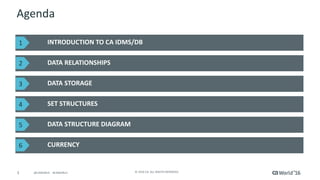
INTRODUCTION	TO	CA	IDMS/DB
DATA	RELATIONSHIPS
CURRENCY
DATA	STORAGE
SET	STRUCTURES
DATA	STRUCTURE	DIAGRAM
1
2
3
4
5
6
4 ©	2016	CA.	ALL	RIGHTS	RESERVED.@CAWORLD				#CAWORLD
Agenda	continued
PREPARING	FOR	DATABASE	ACCESS
VERIFYING	DATABASE	ACCESS	RESULTS
RETRIEVING	DATA
UPDATING	DATA
PROTECTING	DATA	INTEGRITY
7
8
9
10
11
5 ©	2016	CA.	ALL	RIGHTS	RESERVED.@CAWORLD				#CAWORLD
Introduction	to	CA	IDMS/DB
6 ©	2016	CA.	ALL	RIGHTS	RESERVED.@CAWORLD				#CAWORLD
Characteristics	of	CA	IDMS/DB
§ CA	IDMS	is	used	for:
– Centralizing	data
– Controlling	the	corporate	information	environment
– Managing	Communications
– Developing	applications
7 ©	2016	CA.	ALL	RIGHTS	RESERVED.@CAWORLD				#CAWORLD
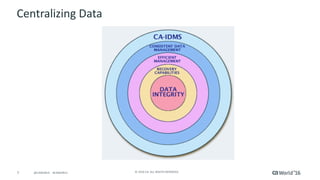
Centralizing	Data
8 ©	2016	CA.	ALL	RIGHTS	RESERVED.@CAWORLD				#CAWORLD
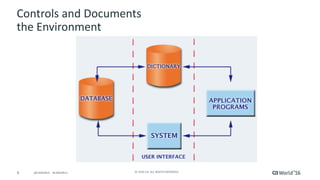
Controls	and	Documents
the	Environment
9 ©	2016	CA.	ALL	RIGHTS	RESERVED.@CAWORLD				#CAWORLD
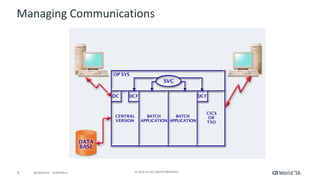
Managing	Communications
10 ©	2016	CA.	ALL	RIGHTS	RESERVED.@CAWORLD				#CAWORLD
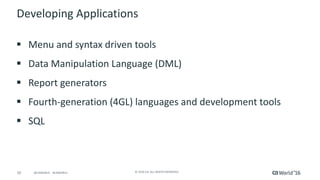
Developing	Applications	
§ Menu	and	syntax	driven	tools
§ Data	Manipulation	Language	(DML)
§ Report	generators
§ Fourth-generation	(4GL)	languages	and	development	tools
§ SQL
11 ©	2016	CA.	ALL	RIGHTS	RESERVED.@CAWORLD				#CAWORLD
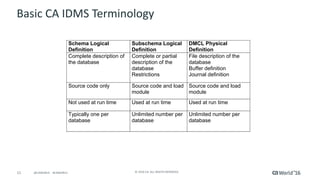
Basic	CA	IDMS	Terminology
Schema Logical
Definition
Subschema Logical
Definition
DMCL Physical
Definition
Complete description of
the database
Complete or partial
description of the
database
Restrictions
File description of the
database
Buffer definition
Journal definition
Source code only Source code and load
module
Source code and load
module
Not used at run time Used at run time Used at run time
Typically one per
database
Unlimited number per
database
Unlimited number per
database
12 ©	2016	CA.	ALL	RIGHTS	RESERVED.@CAWORLD				#CAWORLD
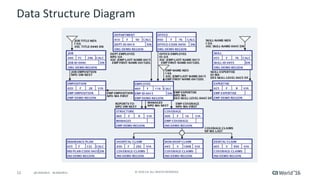
Data	Structure	Diagram
13 ©	2016	CA.	ALL	RIGHTS	RESERVED.@CAWORLD				#CAWORLD
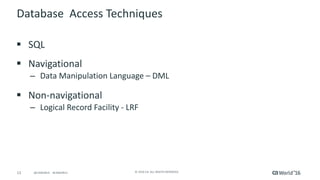
Database		Access	Techniques	
§ SQL
§ Navigational
– Data	Manipulation	Language	– DML
§ Non-navigational
– Logical	Record	Facility	- LRF
14 ©	2016	CA.	ALL	RIGHTS	RESERVED.@CAWORLD				#CAWORLD
Data	Relationships
15 ©	2016	CA.	ALL	RIGHTS	RESERVED.@CAWORLD				#CAWORLD
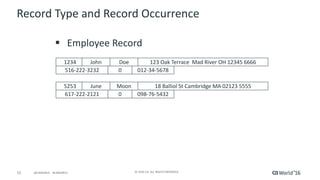
Record	Type	and	Record	Occurrence
§ Employee	Record
1234 John Doe 123	Oak	Terrace		Mad	River	OH	12345	6666
516-222-3232 0 012-34-5678
5253 June Moon 18	Balliol	St	Cambridge	MA	02123	5555
617-222-2121 0 098-76-5432
16 ©	2016	CA.	ALL	RIGHTS	RESERVED.@CAWORLD				#CAWORLD
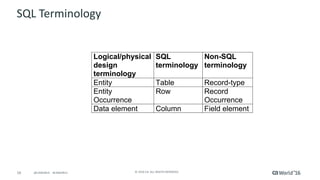
SQL	Terminology	
Logical/physical
design
terminology
SQL
terminology
Non-SQL
terminology
Entity Table Record-type
Entity
Occurrence
Row Record
Occurrence
Data element Column Field element
17 ©	2016	CA.	ALL	RIGHTS	RESERVED.@CAWORLD				#CAWORLD
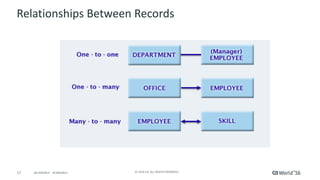
Relationships	Between	Records
18 ©	2016	CA.	ALL	RIGHTS	RESERVED.@CAWORLD				#CAWORLD
Implementing	Relationships	Between	Records
§ Foreign	keys
§ Sets
19 ©	2016	CA.	ALL	RIGHTS	RESERVED.@CAWORLD				#CAWORLD
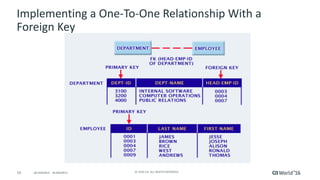
Implementing	a	One-To-One	Relationship	With	a	
Foreign	Key
20 ©	2016	CA.	ALL	RIGHTS	RESERVED.@CAWORLD				#CAWORLD
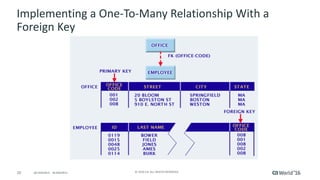
Implementing	a	One-To-Many	Relationship	With	a	
Foreign	Key
21 ©	2016	CA.	ALL	RIGHTS	RESERVED.@CAWORLD				#CAWORLD
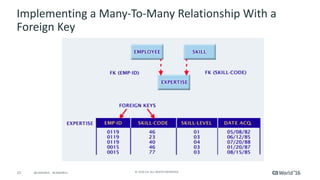
Implementing	a	Many-To-Many	Relationship	With	a	
Foreign	Key
22 ©	2016	CA.	ALL	RIGHTS	RESERVED.@CAWORLD				#CAWORLD
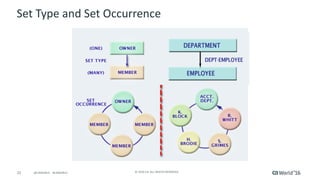
Set	Type	and	Set	Occurrence
23 ©	2016	CA.	ALL	RIGHTS	RESERVED.@CAWORLD				#CAWORLD
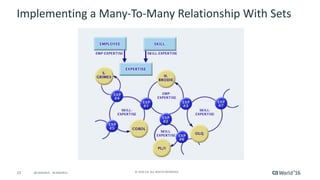
Implementing	a	Many-To-Many	Relationship	With	Sets
24 ©	2016	CA.	ALL	RIGHTS	RESERVED.@CAWORLD				#CAWORLD
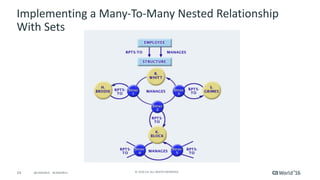
Implementing	a	Many-To-Many	Nested	Relationship	
With	Sets
25 ©	2016	CA.	ALL	RIGHTS	RESERVED.@CAWORLD				#CAWORLD
Data	Storage
26 ©	2016	CA.	ALL	RIGHTS	RESERVED.@CAWORLD				#CAWORLD
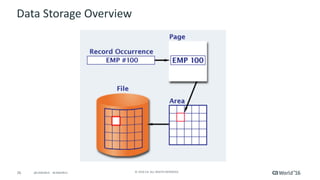
Data	Storage	Overview
27 ©	2016	CA.	ALL	RIGHTS	RESERVED.@CAWORLD				#CAWORLD
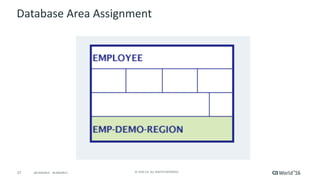
Database	Area	Assignment
28 ©	2016	CA.	ALL	RIGHTS	RESERVED.@CAWORLD				#CAWORLD
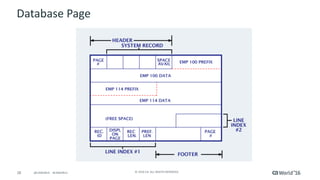
Database	Page
29 ©	2016	CA.	ALL	RIGHTS	RESERVED.@CAWORLD				#CAWORLD
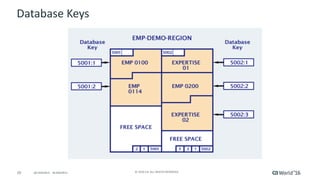
Database	Keys
30 ©	2016	CA.	ALL	RIGHTS	RESERVED.@CAWORLD				#CAWORLD
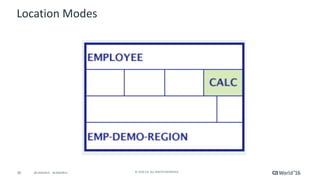
Location	Modes
31 ©	2016	CA.	ALL	RIGHTS	RESERVED.@CAWORLD				#CAWORLD
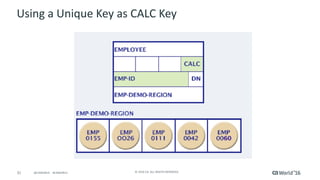
Using	a	Unique	Key	as	CALC	Key
32 ©	2016	CA.	ALL	RIGHTS	RESERVED.@CAWORLD				#CAWORLD
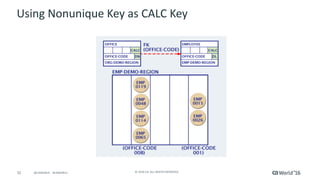
Using	Nonunique	Key	as	CALC	Key
33 ©	2016	CA.	ALL	RIGHTS	RESERVED.@CAWORLD				#CAWORLD
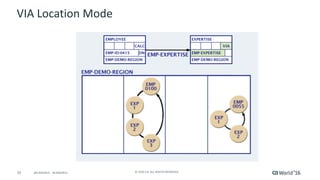
VIA	Location	Mode
34 ©	2016	CA.	ALL	RIGHTS	RESERVED.@CAWORLD				#CAWORLD
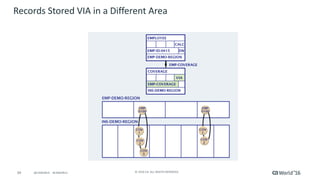
Records	Stored	VIA	in	a	Different	Area
35 ©	2016	CA.	ALL	RIGHTS	RESERVED.@CAWORLD				#CAWORLD
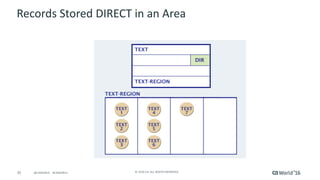
Records	Stored	DIRECT	in	an	Area
36 ©	2016	CA.	ALL	RIGHTS	RESERVED.@CAWORLD				#CAWORLD
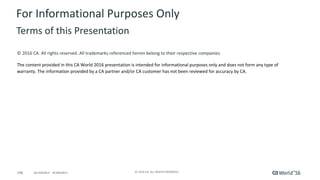
Records	Stored	DIRECT	Related	by	Set
37 ©	2016	CA.	ALL	RIGHTS	RESERVED.@CAWORLD				#CAWORLD
Set	Structures
38 ©	2016	CA.	ALL	RIGHTS	RESERVED.@CAWORLD				#CAWORLD
Chained	Sets
39 ©	2016	CA.	ALL	RIGHTS	RESERVED.@CAWORLD				#CAWORLD
Indexed	Sets
§ System-owned
§ User-owned
40 ©	2016	CA.	ALL	RIGHTS	RESERVED.@CAWORLD				#CAWORLD
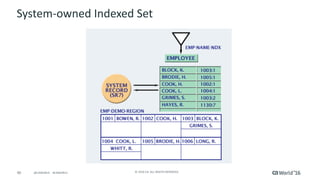
System-owned	Indexed	Set
41 ©	2016	CA.	ALL	RIGHTS	RESERVED.@CAWORLD				#CAWORLD
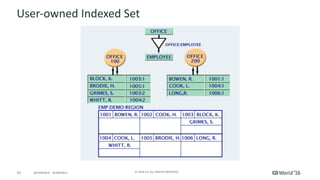
User-owned	Indexed	Set
42 ©	2016	CA.	ALL	RIGHTS	RESERVED.@CAWORLD				#CAWORLD
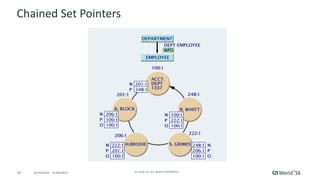
Chained	Set	Pointers
43 ©	2016	CA.	ALL	RIGHTS	RESERVED.@CAWORLD				#CAWORLD
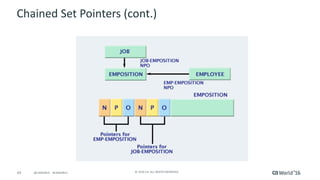
Chained	Set	Pointers	(cont.)
44 ©	2016	CA.	ALL	RIGHTS	RESERVED.@CAWORLD				#CAWORLD
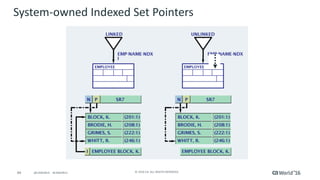
System-owned	Indexed	Set	Pointers
45 ©	2016	CA.	ALL	RIGHTS	RESERVED.@CAWORLD				#CAWORLD
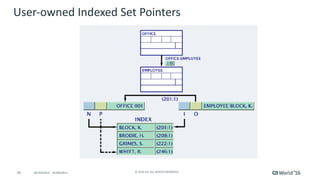
User-owned	Indexed	Set	Pointers
46 ©	2016	CA.	ALL	RIGHTS	RESERVED.@CAWORLD				#CAWORLD
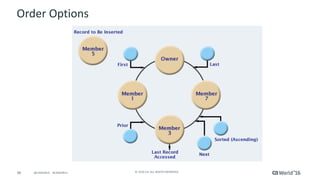
Order	Options
47 ©	2016	CA.	ALL	RIGHTS	RESERVED.@CAWORLD				#CAWORLD
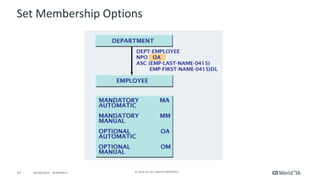
Set	Membership	Options
48 ©	2016	CA.	ALL	RIGHTS	RESERVED.@CAWORLD				#CAWORLD
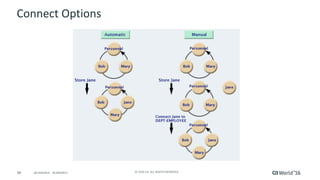
Connect	Options
49 ©	2016	CA.	ALL	RIGHTS	RESERVED.@CAWORLD				#CAWORLD
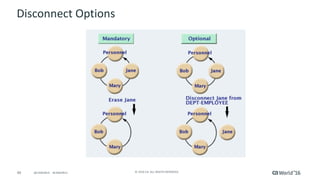
Disconnect	Options
50 ©	2016	CA.	ALL	RIGHTS	RESERVED.@CAWORLD				#CAWORLD
Data	Structure	Diagram
51 ©	2016	CA.	ALL	RIGHTS	RESERVED.@CAWORLD				#CAWORLD
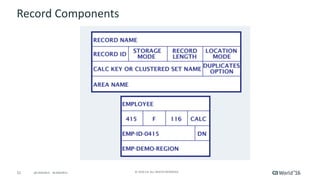
Record	Components
52 ©	2016	CA.	ALL	RIGHTS	RESERVED.@CAWORLD				#CAWORLD
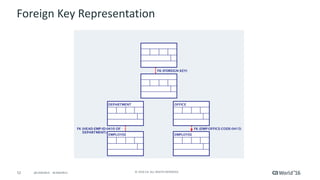
Foreign	Key	Representation
53 ©	2016	CA.	ALL	RIGHTS	RESERVED.@CAWORLD				#CAWORLD
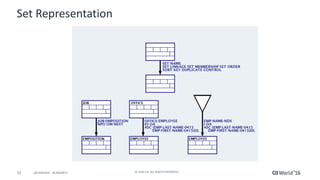
Set	Representation
54 ©	2016	CA.	ALL	RIGHTS	RESERVED.@CAWORLD				#CAWORLD
Currency
55 ©	2016	CA.	ALL	RIGHTS	RESERVED.@CAWORLD				#CAWORLD
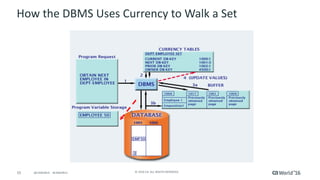
How	the	DBMS	Uses	Currency	to	Walk	a	Set
5
56 ©	2016	CA.	ALL	RIGHTS	RESERVED.@CAWORLD				#CAWORLD
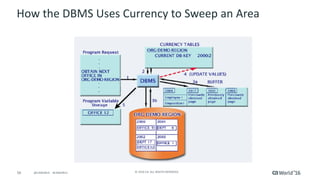
How	the	DBMS	Uses	Currency	to	Sweep	an	Area
57 ©	2016	CA.	ALL	RIGHTS	RESERVED.@CAWORLD				#CAWORLD
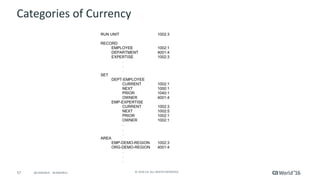
Categories	of	Currency
RUN UNIT 1002:3
RECORD
EMPLOYEE 1002:1
DEPARTMENT 4001:4
EXPERTISE 1002:3
.
.
.
SET
DEPT-EMPLOYEE
CURRENT 1002:1
NEXT 1000:1
PRIOR 1040:1
OWNER 4001:4
EMP-EXPERTISE
CURRENT 1002:3
NEXT 1002:5
PRIOR 1002:1
OWNER 1002:1
.
.
.
AREA
EMP-DEMO-REGION 1002:3
ORG-DEMO-REGION 4001:4
.
.
.
58 ©	2016	CA.	ALL	RIGHTS	RESERVED.@CAWORLD				#CAWORLD
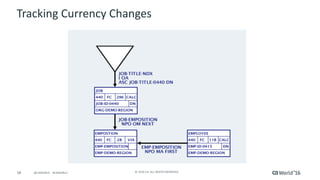
Tracking	Currency	Changes
59 ©	2016	CA.	ALL	RIGHTS	RESERVED.@CAWORLD				#CAWORLD
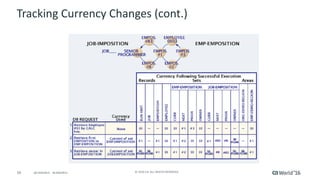
Tracking	Currency	Changes	(cont.)
JOB-EMPOSITION
60 ©	2016	CA.	ALL	RIGHTS	RESERVED.@CAWORLD				#CAWORLD
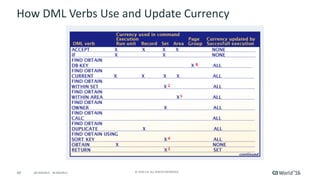
How	DML	Verbs	Use	and	Update	Currency
61 ©	2016	CA.	ALL	RIGHTS	RESERVED.@CAWORLD				#CAWORLD
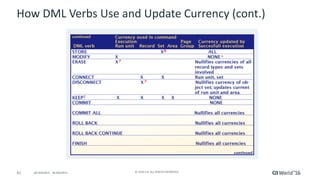
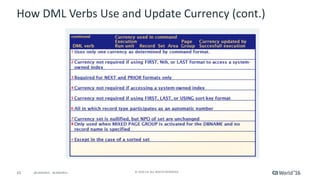
How	DML	Verbs	Use	and	Update	Currency	(cont.)
62 ©	2016	CA.	ALL	RIGHTS	RESERVED.@CAWORLD				#CAWORLD
How	DML	Verbs	Use	and	Update	Currency	(cont.)
63 ©	2016	CA.	ALL	RIGHTS	RESERVED.@CAWORLD				#CAWORLD
Preparing	for	Database	Access
64 ©	2016	CA.	ALL	RIGHTS	RESERVED.@CAWORLD				#CAWORLD
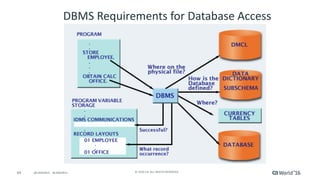
DBMS	Requirements	for	Database	Access
65 ©	2016	CA.	ALL	RIGHTS	RESERVED.@CAWORLD				#CAWORLD
Host	Language	Program	Requirements	
§ Conversion	of	DML	requests
– In	the	batch	environment
§ COBOL
§ PL/I
§ Assembler
– In	the	online	environment
§ COBOL
§ PL/I
§ Assembler
§ Run-time	execution	of	the	program
66 ©	2016	CA.	ALL	RIGHTS	RESERVED.@CAWORLD				#CAWORLD
Converting	DML	Requests
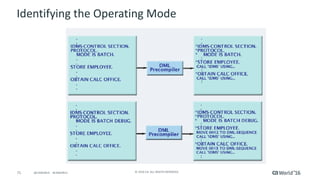
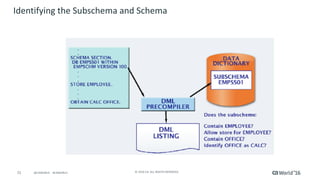
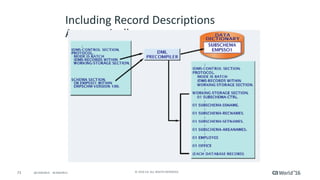
§ Compiler-directive	statements	identify:
– The	operating	mode
– The	subschema	and	schema	names
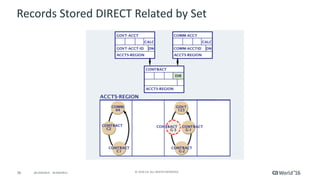
– Record	descriptions
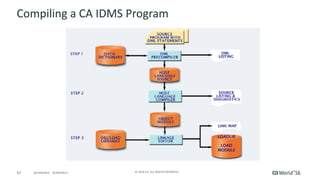
§ Input	to	the	DML	Precompiler
– Host	language	program
– Information	from	the	data	dictionary
§ Output	from	the	DML	precompiler
– Error	listing
– Host	language	program
67 ©	2016	CA.	ALL	RIGHTS	RESERVED.@CAWORLD				#CAWORLD
Compiling	a	CA	IDMS	Program
68 ©	2016	CA.	ALL	RIGHTS	RESERVED.@CAWORLD				#CAWORLD
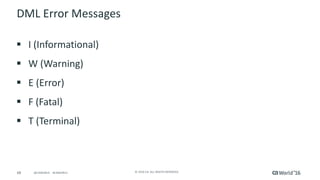
DML	Error	Messages

§ I	(Informational)
§ W	(Warning)
§ E	(Error)
§ F	(Fatal)
§ T	(Terminal)
69 ©	2016	CA.	ALL	RIGHTS	RESERVED.@CAWORLD				#CAWORLD
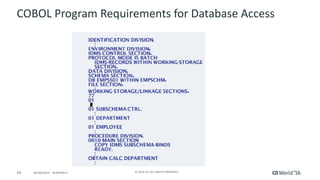
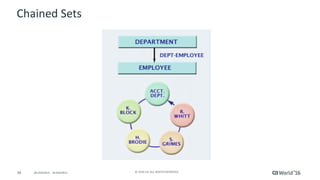
COBOL	Program	Requirements	for	Database	Access
70 ©	2016	CA.	ALL	RIGHTS	RESERVED.@CAWORLD				#CAWORLD
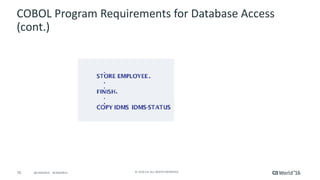
COBOL	Program	Requirements	for	Database	Access	
(cont.)
71 ©	2016	CA.	ALL	RIGHTS	RESERVED.@CAWORLD				#CAWORLD
Identifying	the	Operating	Mode
72 ©	2016	CA.	ALL	RIGHTS	RESERVED.@CAWORLD				#CAWORLD
Identifying	the	Subschema	and	Schema
73 ©	2016	CA.	ALL	RIGHTS	RESERVED.@CAWORLD				#CAWORLD
Including	Record	Descriptions	
Automatically
74 ©	2016	CA.	ALL	RIGHTS	RESERVED.@CAWORLD				#CAWORLD
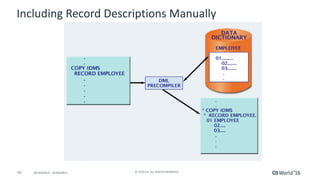
Including	Record	Descriptions	Manually
75 ©	2016	CA.	ALL	RIGHTS	RESERVED.@CAWORLD				#CAWORLD
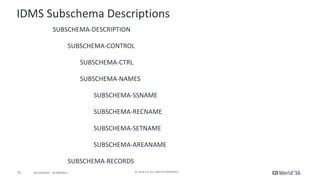
IDMS	Subschema	Descriptions
SUBSCHEMA-DESCRIPTION
SUBSCHEMA-CONTROL
SUBSCHEMA-CTRL
SUBSCHEMA-NAMES
SUBSCHEMA-SSNAME	
SUBSCHEMA-RECNAME
SUBSCHEMA-SETNAME
SUBSCHEMA-AREANAME
SUBSCHEMA-RECORDS
76 ©	2016	CA.	ALL	RIGHTS	RESERVED.@CAWORLD				#CAWORLD
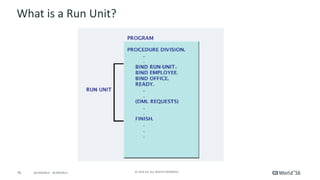
What	is	a	Run	Unit?
77 ©	2016	CA.	ALL	RIGHTS	RESERVED.@CAWORLD				#CAWORLD
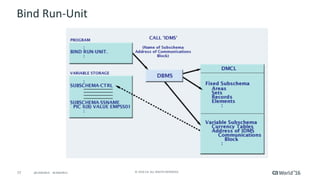
Bind	Run-Unit
78 ©	2016	CA.	ALL	RIGHTS	RESERVED.@CAWORLD				#CAWORLD
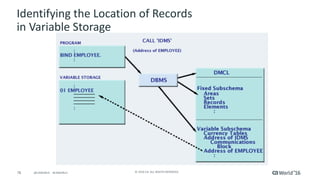
Identifying	the	Location	of	Records
in	Variable	Storage
79 ©	2016	CA.	ALL	RIGHTS	RESERVED.@CAWORLD				#CAWORLD
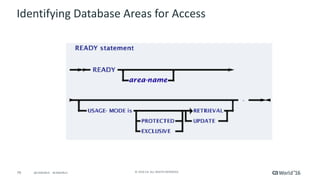
Identifying	Database	Areas	for	Access
80 ©	2016	CA.	ALL	RIGHTS	RESERVED.@CAWORLD				#CAWORLD
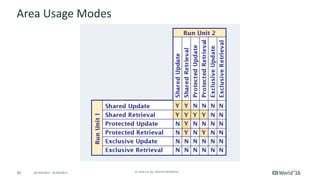
Area	Usage	Modes
81 ©	2016	CA.	ALL	RIGHTS	RESERVED.@CAWORLD				#CAWORLD
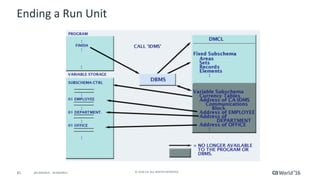
Ending	a	Run	Unit
82 ©	2016	CA.	ALL	RIGHTS	RESERVED.@CAWORLD				#CAWORLD
Verifying	Database	Access	Results
83 ©	2016	CA.	ALL	RIGHTS	RESERVED.@CAWORLD				#CAWORLD
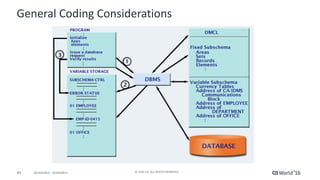
General	Coding	Considerations
84 ©	2016	CA.	ALL	RIGHTS	RESERVED.@CAWORLD				#CAWORLD
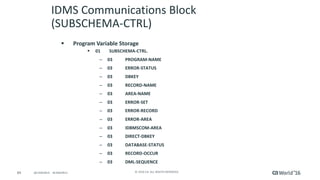
IDMS	Communications	Block	
(SUBSCHEMA-CTRL)	
§ Program	Variable	Storage
§ 01 SUBSCHEMA-CTRL.
– 03 PROGRAM-NAME
– 03 ERROR-STATUS
– 03 DBKEY
– 03 RECORD-NAME
– 03 AREA-NAME
– 03 ERROR-SET
– 03 ERROR-RECORD
– 03 ERROR-AREA
– 03 IDBMSCOM-AREA
– 03 DIRECT-DBKEY
– 03 DATABASE-STATUS
– 03 RECORD-OCCUR
– 03 DML-SEQUENCE
85 ©	2016	CA.	ALL	RIGHTS	RESERVED.@CAWORLD				#CAWORLD
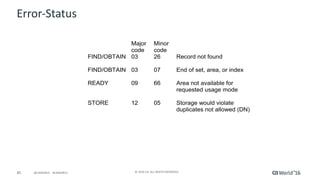
Error-Status
Major
code
Minor
code
FIND/OBTAIN 03 26 Record not found
FIND/OBTAIN 03 07 End of set, area, or index
READY 09 66 Area not available for
requested usage mode
STORE 12 05 Storage would violate
duplicates not allowed (DN)
86 ©	2016	CA.	ALL	RIGHTS	RESERVED.@CAWORLD				#CAWORLD
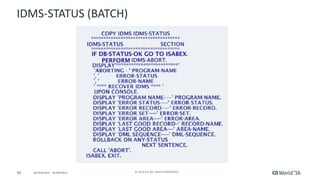
IDMS-STATUS	(BATCH)
87 ©	2016	CA.	ALL	RIGHTS	RESERVED.@CAWORLD				#CAWORLD
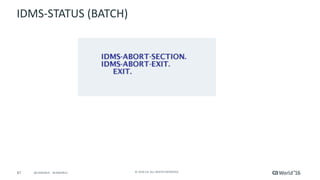
IDMS-STATUS	(BATCH)
88 ©	2016	CA.	ALL	RIGHTS	RESERVED.@CAWORLD				#CAWORLD
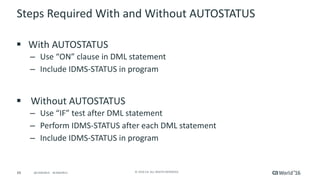
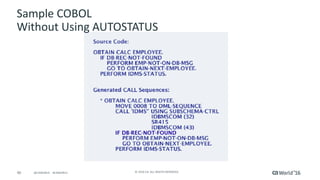
Steps	Required	With	and	Without	AUTOSTATUS
§ With	AUTOSTATUS
– Use	“ON”	clause	in	DML	statement
– Include	IDMS-STATUS	in	program
§ Without	AUTOSTATUS
– Use	“IF”	test	after	DML	statement
– Perform	IDMS-STATUS	after	each	DML	statement
– Include	IDMS-STATUS	in	program
89 ©	2016	CA.	ALL	RIGHTS	RESERVED.@CAWORLD				#CAWORLD
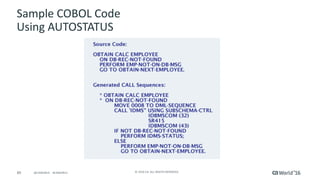
Sample	COBOL	Code
Using	AUTOSTATUS
90 ©	2016	CA.	ALL	RIGHTS	RESERVED.@CAWORLD				#CAWORLD
Sample	COBOL
Without	Using	AUTOSTATUS
91 ©	2016	CA.	ALL	RIGHTS	RESERVED.@CAWORLD				#CAWORLD
Retrieving	Data
92 ©	2016	CA.	ALL	RIGHTS	RESERVED.@CAWORLD				#CAWORLD
Database	Retrieval	
§ FIND
§ GET
§ OBTAIN
§ RETURN
93 ©	2016	CA.	ALL	RIGHTS	RESERVED.@CAWORLD				#CAWORLD
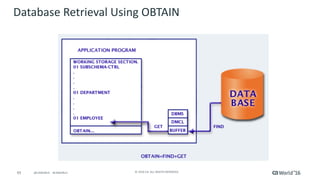
Database	Retrieval	Using	OBTAIN
94 ©	2016	CA.	ALL	RIGHTS	RESERVED.@CAWORLD				#CAWORLD
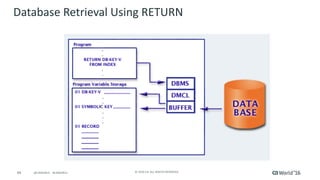
Database	Retrieval	Using	RETURN
95 ©	2016	CA.	ALL	RIGHTS	RESERVED.@CAWORLD				#CAWORLD
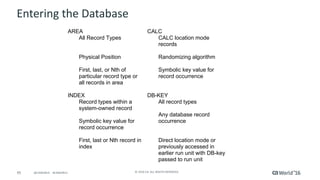
Entering	the	Database
AREA CALC
All Record Types CALC location mode
records
Physical Position Randomizing algorithm
First, last, or Nth of
particular record type or
all records in area
Symbolic key value for
record occurrence
INDEX DB-KEY
Record types within a
system-owned record
All record types
Symbolic key value for
record occurrence
Any database record
occurrence
First, last or Nth record in
index
Direct location mode or
previously accessed in
earlier run unit with DB-key
passed to run unit
96 ©	2016	CA.	ALL	RIGHTS	RESERVED.@CAWORLD				#CAWORLD
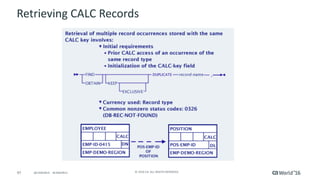
Retrieving	CALC	Records
§ Retrieval	by	CALC	key	involves
– Field	initialization:	Move	the	CALC-key	value	to	the	
CALC-key	field
– Currency	used:	None
– Common	nonzero	status	codes:	0326	(DB-REC-
NOT-FOUND)
97 ©	2016	CA.	ALL	RIGHTS	RESERVED.@CAWORLD				#CAWORLD
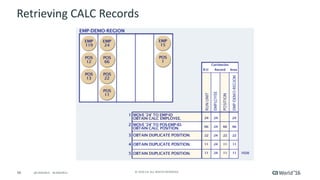
Retrieving	CALC	Records
98 ©	2016	CA.	ALL	RIGHTS	RESERVED.@CAWORLD				#CAWORLD
Retrieving	CALC	Records
99 ©	2016	CA.	ALL	RIGHTS	RESERVED.@CAWORLD				#CAWORLD
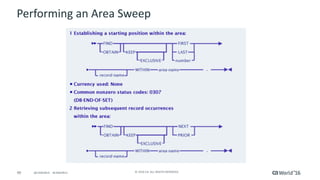
Performing	an	Area	Sweep
100 ©	2016	CA.	ALL	RIGHTS	RESERVED.@CAWORLD				#CAWORLD
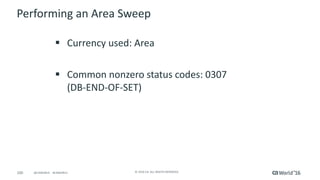
Performing	an	Area	Sweep
§ Currency	used:	Area
§ Common	nonzero	status	codes:	0307
(DB-END-OF-SET)
101 ©	2016	CA.	ALL	RIGHTS	RESERVED.@CAWORLD				#CAWORLD
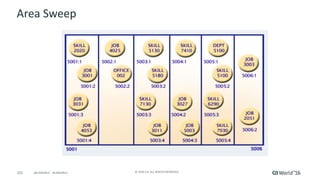
Area	Sweep
102 ©	2016	CA.	ALL	RIGHTS	RESERVED.@CAWORLD				#CAWORLD
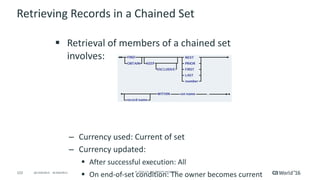
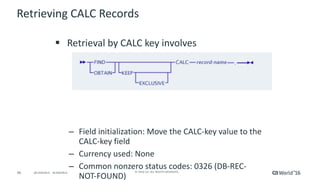
Retrieving	Records	in	a	Chained	Set
§ Retrieval	of	members	of	a	chained	set	
involves:
– Currency	used:	Current	of	set
– Currency	updated:
§ After	successful	execution:	All
§ On	end-of-set	condition:	The	owner	becomes	current
103 ©	2016	CA.	ALL	RIGHTS	RESERVED.@CAWORLD				#CAWORLD
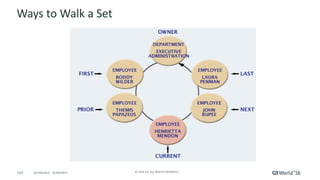
Ways	to	Walk	a	Set
104 ©	2016	CA.	ALL	RIGHTS	RESERVED.@CAWORLD				#CAWORLD
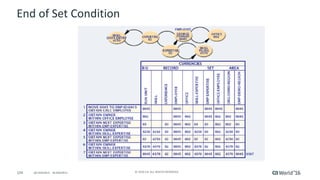
End	of	Set	Condition
105 ©	2016	CA.	ALL	RIGHTS	RESERVED.@CAWORLD				#CAWORLD
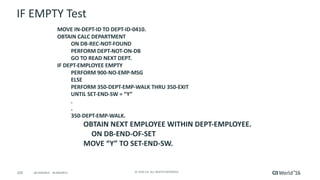
IF	EMPTY	Test
MOVE	IN-DEPT-ID	TO	DEPT-ID-0410.
OBTAIN	CALC	DEPARTMENT
ON	DB-REC-NOT-FOUND
PERFORM	DEPT-NOT-ON-DB
GO	TO	READ	NEXT	DEPT.
IF	DEPT-EMPLOYEE	EMPTY
PERFORM	900-NO-EMP-MSG
ELSE
PERFORM	350-DEPT-EMP-WALK	THRU	350-EXIT
UNTIL	SET-END-SW	=	“Y”
.
.
350-DEPT-EMP-WALK.
OBTAIN	NEXT	EMPLOYEE	WITHIN	DEPT-EMPLOYEE.
ON	DB-END-OF-SET
MOVE	“Y”	TO	SET-END-SW.
106 ©	2016	CA.	ALL	RIGHTS	RESERVED.@CAWORLD				#CAWORLD
Accessing	Multiple	Member	Sets
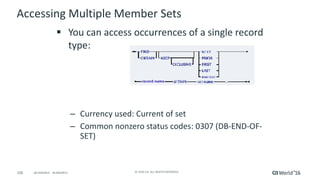
§ You	can	access	occurrences	of	a	single	record	
type:
– Currency	used:	Current	of	set
– Common	nonzero	status	codes:	0307	(DB-END-OF-
SET)
107 ©	2016	CA.	ALL	RIGHTS	RESERVED.@CAWORLD				#CAWORLD
Accessing	Multiple	Member	Sets
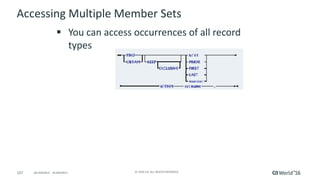
§ You	can	access	occurrences	of	all	record	
types
108 ©	2016	CA.	ALL	RIGHTS	RESERVED.@CAWORLD				#CAWORLD
Accessing	Multiple	Member	Sets
§ Currency	used:	Current	of	set
§ Common	nonzero	status	codes:	0307
(DB-END-OF-SET)
109 ©	2016	CA.	ALL	RIGHTS	RESERVED.@CAWORLD				#CAWORLD
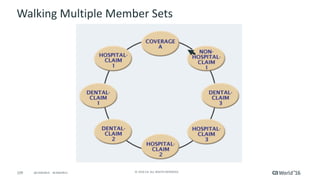
Walking	Multiple	Member	Sets
110 ©	2016	CA.	ALL	RIGHTS	RESERVED.@CAWORLD				#CAWORLD
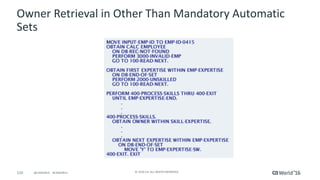
Owner	Retrieval	in	Other	Than	Mandatory	Automatic	
Sets
111 ©	2016	CA.	ALL	RIGHTS	RESERVED.@CAWORLD				#CAWORLD
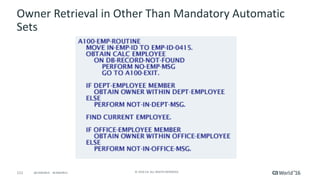
Owner	Retrieval	in	Other	Than	Mandatory	Automatic	
Sets
112 ©	2016	CA.	ALL	RIGHTS	RESERVED.@CAWORLD				#CAWORLD
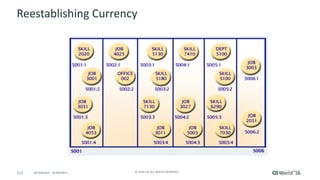
Reestablishing	Currency
113 ©	2016	CA.	ALL	RIGHTS	RESERVED.@CAWORLD				#CAWORLD
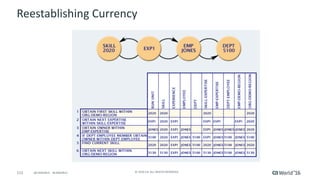
Reestablishing	Currency
114 ©	2016	CA.	ALL	RIGHTS	RESERVED.@CAWORLD				#CAWORLD
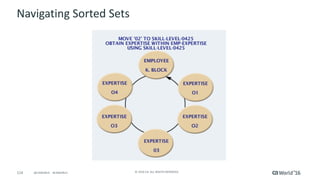
Navigating	Sorted	Sets
115 ©	2016	CA.	ALL	RIGHTS	RESERVED.@CAWORLD				#CAWORLD
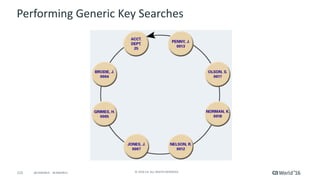
Performing	Generic	Key	Searches
116 ©	2016	CA.	ALL	RIGHTS	RESERVED.@CAWORLD				#CAWORLD
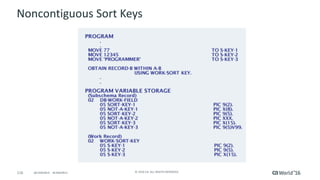
Noncontiguous	Sort	Keys
117 ©	2016	CA.	ALL	RIGHTS	RESERVED.@CAWORLD				#CAWORLD
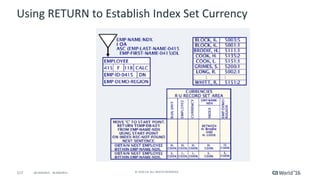
Using	RETURN	to	Establish	Index	Set	Currency
118 ©	2016	CA.	ALL	RIGHTS	RESERVED.@CAWORLD				#CAWORLD
Updating	Data
119 ©	2016	CA.	ALL	RIGHTS	RESERVED.@CAWORLD				#CAWORLD
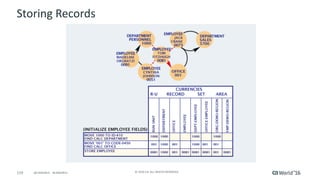
Storing	Records
120 ©	2016	CA.	ALL	RIGHTS	RESERVED.@CAWORLD				#CAWORLD
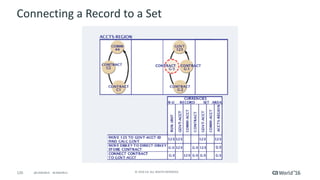
Connecting	a	Record	to	a	Set
121 ©	2016	CA.	ALL	RIGHTS	RESERVED.@CAWORLD				#CAWORLD
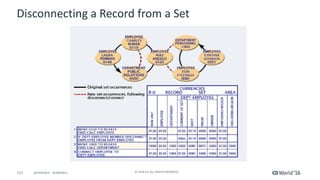
Disconnecting	a	Record	from	a	Set
122 ©	2016	CA.	ALL	RIGHTS	RESERVED.@CAWORLD				#CAWORLD
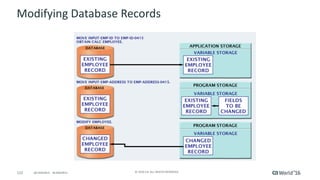
Modifying	Database	Records
123 ©	2016	CA.	ALL	RIGHTS	RESERVED.@CAWORLD				#CAWORLD
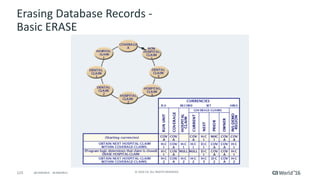
Erasing	Database	Records	-
Basic	ERASE
124 ©	2016	CA.	ALL	RIGHTS	RESERVED.@CAWORLD				#CAWORLD
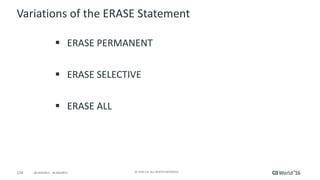
Variations	of	the	ERASE	Statement
§ ERASE	PERMANENT
§ ERASE	SELECTIVE
§ ERASE	ALL
125 ©	2016	CA.	ALL	RIGHTS	RESERVED.@CAWORLD				#CAWORLD
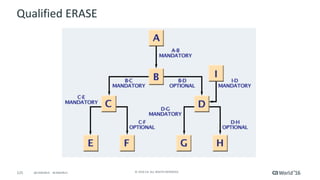
Qualified	ERASE
126 ©	2016	CA.	ALL	RIGHTS	RESERVED.@CAWORLD				#CAWORLD
Updating	Data
127 ©	2016	CA.	ALL	RIGHTS	RESERVED.@CAWORLD				#CAWORLD
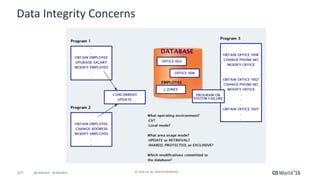
Data	Integrity	Concerns
128 ©	2016	CA.	ALL	RIGHTS	RESERVED.@CAWORLD				#CAWORLD
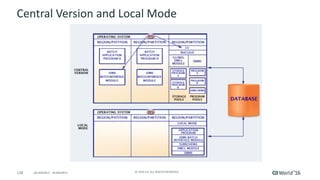
Central	Version	and	Local	Mode
129 ©	2016	CA.	ALL	RIGHTS	RESERVED.@CAWORLD				#CAWORLD
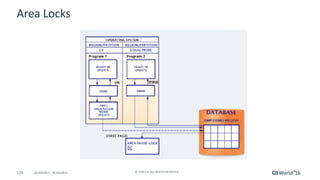
Area	Locks
130 ©	2016	CA.	ALL	RIGHTS	RESERVED.@CAWORLD				#CAWORLD
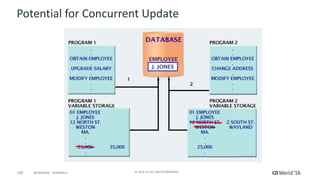
Potential	for	Concurrent	Update
131 ©	2016	CA.	ALL	RIGHTS	RESERVED.@CAWORLD				#CAWORLD
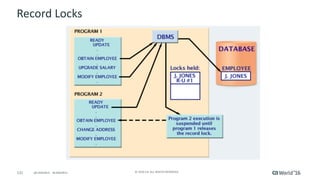
Record	Locks
132 ©	2016	CA.	ALL	RIGHTS	RESERVED.@CAWORLD				#CAWORLD
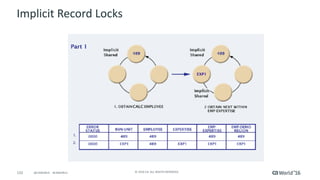
Implicit	Record	Locks
133 ©	2016	CA.	ALL	RIGHTS	RESERVED.@CAWORLD				#CAWORLD
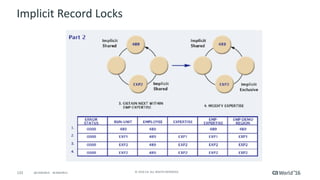
Implicit	Record	Locks
134 ©	2016	CA.	ALL	RIGHTS	RESERVED.@CAWORLD				#CAWORLD
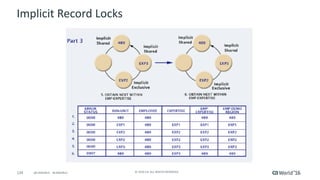
Implicit	Record	Locks
135 ©	2016	CA.	ALL	RIGHTS	RESERVED.@CAWORLD				#CAWORLD
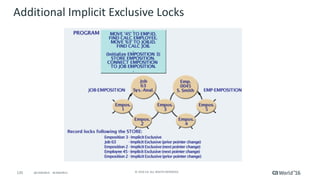
Additional	Implicit	Exclusive	Locks
136 ©	2016	CA.	ALL	RIGHTS	RESERVED.@CAWORLD				#CAWORLD
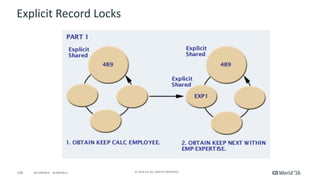
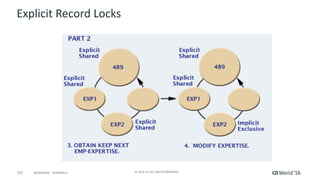
Explicit	Record	Locks
137 ©	2016	CA.	ALL	RIGHTS	RESERVED.@CAWORLD				#CAWORLD
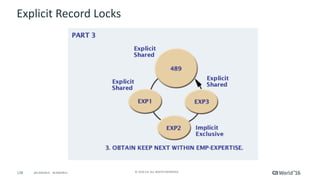
Explicit	Record	Locks
138 ©	2016	CA.	ALL	RIGHTS	RESERVED.@CAWORLD				#CAWORLD
Explicit	Record	Locks
139 ©	2016	CA.	ALL	RIGHTS	RESERVED.@CAWORLD				#CAWORLD
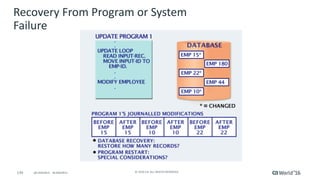
Recovery	From	Program	or	System	
Failure
140 ©	2016	CA.	ALL	RIGHTS	RESERVED.@CAWORLD				#CAWORLD
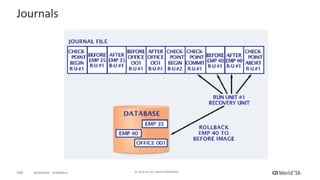
Journals
@CAWORLD					#CAWORLD ©	2016	CA.	All	RIGHTS	RESERVED.141 @CAWORLD					#CAWORLD
Mainframe	and	Workload	Automation
For	more	information	on	Mainframe	and	Workload	Automation,		
please	visit:	http://cainc.to/9GQ2JI
142 ©	2016	CA.	ALL	RIGHTS	RESERVED.@CAWORLD				#CAWORLD
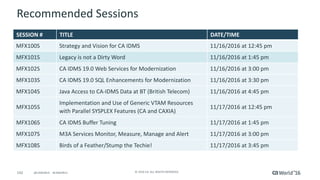
Recommended	Sessions
SESSION	# TITLE DATE/TIME
MFX100S Strategy	and	Vision	for	CA	IDMS 11/16/2016	at	12:45	pm
MFX101S Legacy	is	not	a	Dirty	Word 11/16/2016	at	1:45	pm
MFX102S CA	IDMS	19.0	Web	Services	for	Modernization 11/16/2016	at	3:00	pm
MFX103S CA	IDMS	19.0	SQL	Enhancements	for	Modernization	 11/16/2016	at	3:30	pm
MFX104S Java	Access	to	CA-IDMS	Data	at	BT	(British	Telecom) 11/16/2016	at	4:45	pm
MFX105S
Implementation	and	Use	of	Generic	VTAM	Resources	
with	Parallel	SYSPLEX	Features	(CA and	CAXIA)
11/17/2016	at	12:45	pm
MFX106S CA	IDMS	Buffer	Tuning	 11/17/2016	at	1:45	pm
MFX107S M3A	Services	Monitor,	Measure,	Manage	and	Alert	 11/17/2016	at	3:00	pm
MFX108S Birds	of	a	Feather/Stump	the	Techie!	 11/17/2016	at	3:45	pm
143 ©	2016	CA.	ALL	RIGHTS	RESERVED.@CAWORLD				#CAWORLD
Must	See	Demos
Demo	Name
Product	X
Theater	#	location
Demo	Name
Services	Y
Theater	#	location
Demo	Name
Solution	Y
Theater	#	location
Demo	Name
Product	X
Theater	#	location
144 ©	2016	CA.	ALL	RIGHTS	RESERVED.@CAWORLD				#CAWORLD
Questions?
145 ©	2016	CA.	ALL	RIGHTS	RESERVED.@CAWORLD				#CAWORLD
Thank	you.
Stay	connected	at	communities.ca.com
146 ©	2016	CA.	ALL	RIGHTS	RESERVED.@CAWORLD				#CAWORLD
©	2016	CA.	All	rights	reserved.	All	trademarks	referenced	herein	belong	to	their	respective	companies.
The	content	provided	in	this CA	World	2016	presentation	is	intended	for	informational	purposes	only	and	does	not	form	any	type	of	
warranty. The information	provided	by	a	CA	partner	and/or	CA	customer	has	not	been	reviewed	for	accuracy	by	CA.	
For	Informational	Purposes	Only	
Terms	of	this	Presentation

CA IDMS Database Navigation