World®
’16
Advanced	DBA	– Performance	
Tuning	for	MUF	Part	I
Kevin	Shuma		VP,	Product	Management
CA	Technologies
MAINFRAME	AND	WORKLOAD	AUTOMATION
MFX66EA
2 ©	2016	CA.	ALL	RIGHTS	RESERVED.@CAWORLD				#CAWORLD
Abstract
This	is	a	two	part	session	that	describes	the	various	techniques	
used	to	tune	a	CA	Datacom	environment(MUF)	for	the	best	
possible	performance.	Included	will	be	discussions	on	available	
monitoring	tools.
The	session	will	cover	various	utilities	and	tolls	provided	with	CA	
Datacom®/DB	and	CA	Sysview®	to	measure	the	performance	of	
CA	Datacom	environments.
Kevin	Shuma
VP,	Product	
Management
CA	Technologies
3 ©	2016	CA.	ALL	RIGHTS	RESERVED.@CAWORLD				#CAWORLD
Agenda
I	TUNED	LAST	YEAR	WHY	DO	IT	AGAIN?
WHAT	DRIVES	TCO?
TECHNIQUES	TO	MEASURE	PERFORMANCE
SUMMARY
1
2
3
44
4 ©	2016	CA.	ALL	RIGHTS	RESERVED.@CAWORLD				#CAWORLD
I	Tuned	Last	Year	Why	Do	It	Again?
§ Hardware	changes
– IBM	z13	- The	Processor	Unit	chip	(PU	chip)	measures	678 mm2	
and	consists	of	3.99	billion	transistors	fabricated	using	IBM's	22	nm	
CMOS	silicon	on	insulator	fabrication	process,	using	17	metal	layers	
and	supporting	speeds	of	5.2 GHz,	which	is	less	than	its	predecessor,	the	
zEC12.[3][5]	The	PU	chip	can	have	six,	seven	or	eight	cores	
(or	"processor	units"	in	IBM's	parlance)	enabled	depending	on	
configuration.	New	for	the	z13	is	that	the	PU	chip	comes	packaged	
in	single	chip	modules,	which	is	a	big	change	from	all	previous	
mainframe	processors	that	were	mounted	on	large	multi-chip	modules.	
How	often	do	I	need	to	tune?
It’s	really	fast
5 ©	2016	CA.	ALL	RIGHTS	RESERVED.@CAWORLD				#CAWORLD
I	Tuned	Last	Year	Why	Do	It	Again?
§ Operating	System	changes
– IBM's	z/OS®	V2.2	operating	system	and	latest	IBM®	z13	server	
deliver	innovations	designed	to	help	you	build	the	highly	scalable	
next-generation	infrastructure	you	need.	Together,	they	offer	the	
capacity,	scale,	availability,	and	throughput	required	to	improve	
business	performance,	meet	response	time	objectives,	protect	
sensitive	data	and	transactions,	and	minimize	operational	risk	for	
an	exceptional	customer	experience.	New	economic	efficiencies	
allow	the	z13	with	z/OS	V2.2	to	offer	more	throughput	and	
capabilities	with	less	impact	to	the	IT	budget.
How	often	do	I	need	to	tune?
It’s	really complex
6 ©	2016	CA.	ALL	RIGHTS	RESERVED.@CAWORLD				#CAWORLD
I	Tuned	Last	Year	Why	Do	It	Again?
§ Database	Software	changes
– CA	Datacom	V14.02	and	v15.0	delivered	over	50	major	
enhancements	that	most	likely	will	directly	affect	how	
you	database	applications	run.
How	often	do	I	need	to	tune?
It’s	really	different
7 ©	2016	CA.	ALL	RIGHTS	RESERVED.@CAWORLD				#CAWORLD
That	Sounds	Really	Scary!
§ It	is,	and	yet	it	isn’t
§ Understanding	what	drives	your	business	and	how	that	
business	relates	to	the	database	applications	helps	to	
establish	the	total	cost	of	ownership		(TCO)
§ TCO	can	be	different	for	every	site
– But	in	most	cases,	mainframe	sites	share	a	set	of	typically	TCO	drivers
§ One	constant	is	mainframe	is	the	need	to	drive	down	TCO
How	often	do	I	need	to	tune?
8 ©	2016	CA.	ALL	RIGHTS	RESERVED.@CAWORLD				#CAWORLD
What	drives	TCO?
9 ©	2016	CA.	ALL	RIGHTS	RESERVED.@CAWORLD				#CAWORLD
What	Drives	TCO?	
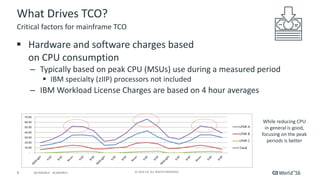
§ Hardware	and	software	charges	based	
on	CPU	consumption
– Typically	based	on	peak	CPU	(MSUs)	use	during	a	measured	period
§ IBM	specialty	(zIIP)	processors	not	included
– IBM	Workload	License	Charges	are	based	on	4	hour	averages
Critical	factors	for	mainframe	TCO
While	reducing	CPU	
in	general	is	good,	
focusing	on	the	peak	
periods	is	better
10 ©	2016	CA.	ALL	RIGHTS	RESERVED.@CAWORLD				#CAWORLD
What	Drives	TCO?	(cont’d)
§ Memory	typically	measured	as	a	“overhead	cost”		
– Cost	typically	spread	across	all	tasks
– Can	be	used	to	reduce	IO,	and	therefore	reduce	CPU
– If	overused,	can	drive	up	CPU	in	the	form	of	system	paging
§ Physical	IO	typically	not	measured	as	a	“cost”
– But	it	consumes	CPU	for	each	IO	used
– Not	available	for	dispatching	on	specialty	processor
Critical	factors	for	mainframe	TCO
11 ©	2016	CA.	ALL	RIGHTS	RESERVED.@CAWORLD				#CAWORLD
What	Drives	TCO?	(cont’d)
§ DASD	Storage
– Physical	costs	for	DASD	“on	the	floor”
– Relatively	low-cost	resource,	but
– The	amount	of	data	is	growing
– Most	shops	are	seeing	an	ever-increasing	DASD	footprint	
Critical	factors	for	mainframe	TCO
12 ©	2016	CA.	ALL	RIGHTS	RESERVED.@CAWORLD				#CAWORLD
How	to	measure	TCO?	(cont’d)
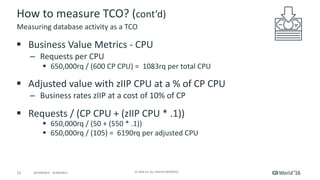
§ Business	Value	Metrics	- CPU
– Requests	per	CPU
§ 650,000rq	/	(600	CP	CPU)	=		1083rq	per	total	CPU
§ Adjusted	value	with	zIIP	CPU	at	a	%	of	CP	CPU
– Business	rates	zIIP	at	a	cost	of	10%	of	CP
§ Requests	/	(CP	CPU	+	(zIIP	CPU	*	.1))
§ 650,000rq	/	(50	+	(550	*	.1))
§ 650,000rq	/	(105)	=		6190rq	per	adjusted	CPU
Measuring	database	activity	as	a	TCO
13 ©	2016	CA.	ALL	RIGHTS	RESERVED.@CAWORLD				#CAWORLD
How	to	measure	TCO?	(cont’d)
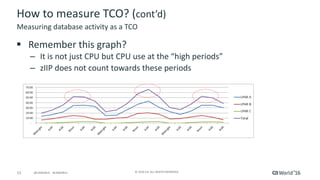
§ Remember	this	graph?	
– It	is	not	just	CPU	but	CPU	use	at	the	“high	periods”
– zIIP	does	not	count	towards	these	periods
Measuring	database	activity	as	a	TCO
14 ©	2016	CA.	ALL	RIGHTS	RESERVED.@CAWORLD				#CAWORLD
How	to	measure	TCO?	(cont’d)
§ Business	Value	Metrics	- IO
– Requests	per	IO
§ 650,000rq	/	(60,000	IOs)	=		10.83rq	per	IO
§ (?)	Business	Value	Metrics	– DASD	in	use
– Request	per	MB,	TB,	other?
– Not	something	regularly	measured	
– Should	it	be?
Measuring	database	activity	as	a	TCO
15 ©	2016	CA.	ALL	RIGHTS	RESERVED.@CAWORLD				#CAWORLD
What’s	in	Your	Toolbox?	
§ Trusted	and	true
– PXX	report
§ New	and	shiny
– Dynamic	system	tables
§ Everything	you	can	find
– AutoInfo,	AutoStatus,	AutoCollect,	Auto	anything	…
What	tools	are	you	using?		What	tools	are	available?
16 ©	2016	CA.	ALL	RIGHTS	RESERVED.@CAWORLD				#CAWORLD
What’s	in	Your	Toolbox?	
§ It	doesn’t	matter	as	long	as	it	meets	your	goals?
§ Improved	performance	of	CA	Datacom	
– Which	should	result	in	reduced	resource	consumption	(per	request)
– Which	should	result	in	a	reduction	in	the	Total	Cost	of	Ownership
What	tools	are	you	using?		What	tools	are	available?
17 ©	2016	CA.	ALL	RIGHTS	RESERVED.@CAWORLD				#CAWORLD
Techniques	to	measure	performance
18 ©	2016	CA.	ALL	RIGHTS	RESERVED.@CAWORLD				#CAWORLD
Techniques	to	measure	performance
§ What	resources	are	being	consumed
§ What	are	the	performance	metrics
§ What	are	the	“key	considerations”
– CPU	consumption
– Resource	utilization
– Response	time
– Locking/Logging/recovery
– DASD	IOs
– More	…	
Before	you	can	improve,	you	need	to	know	what	to	measure
19 ©	2016	CA.	ALL	RIGHTS	RESERVED.@CAWORLD				#CAWORLD
Knowing	what	the	environment	is	doing
§ Resource	consumption	since	MUF	came	up
– General	indication	of	“health”
– Indication	of	high-use	or	trouble	spots
§ Performance	benchmark	or	baseline
– Always	take	snapshot	at	the	“same”	period
– When	problems	occur:
§ Do	a	quick	scan	of	snapshot	for	trouble	spots
§ Compare	current	snapshot	against	“healthy	snapshot”
– Look	for	differences
The	Performance	Snapshot
20 ©	2016	CA.	ALL	RIGHTS	RESERVED.@CAWORLD				#CAWORLD
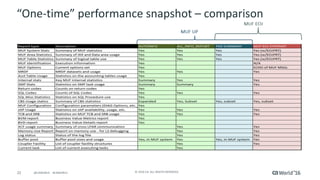
“One-time”	performance	snapshot	– various	options	
§ DBUTLTY	AUTOINFO	(AutoInfo)
– Printed	report
– Option	for	sequential	output	ready	to	upload	into	spreadsheet
§ Console	command	ALL_INFO_REPORT
– Generates	output	to	PXX	or	PXX	SYSOUT	datasets
– Similar	to	MUF	EOJ	plus	PXX	SUMMARY	report
Quick	and	easy
21 ©	2016	CA.	ALL	RIGHTS	RESERVED.@CAWORLD				#CAWORLD
“One-time”	performance	snapshot	– various	options	
(cont’d)
§ MUF	EOJ	SYSPRINT
– Printed	to	SYSPRINT	at	MUF	end	of	job
§ PXX	SYSSTAT=SUMMARY
– On	demand	requires	PXXSTATS=DETAIL
– PXXSTATS=EOJ	or	EOJPRT	only	available	at	MUF	EOJ
22 ©	2016	CA.	ALL	RIGHTS	RESERVED.@CAWORLD				#CAWORLD
“One-time”	performance	snapshot	– comparison
23 ©	2016	CA.	ALL	RIGHTS	RESERVED.@CAWORLD				#CAWORLD
Automated	performance	snapshots	and	deltas
§ AutoCollect
– Automated	snapshot	collection
§ Similar	data	as	AutoInfo
§ Data	placed	in	a	set	of	Datacom	tables	(DBID	1019)
– Automated	creation	of	“deltas”
§ Data	placed	in	a	set	of	Datacom	tables	(DBID	1020)
– Interval	- Difference	between	snapshots	
– Last	– Difference	between	1st	snapshot	and	last	snapshot
DBUTLTY	AUTOCOLL
24 ©	2016	CA.	ALL	RIGHTS	RESERVED.@CAWORLD				#CAWORLD
Automated	performance	snapshots	and	deltas
§ AutoCollect
– On-demand	user	created	deltas
§ Summary	– combining	deltas	together	
§ Baseline	– combine	deltas	together	and	divide	to	get	an	average	baseline
§ Average	performance	– combine	deltas	and	calculate	average	“hour”	of	
performance
DBUTLTY	AUTOCOLL
25 ©	2016	CA.	ALL	RIGHTS	RESERVED.@CAWORLD				#CAWORLD
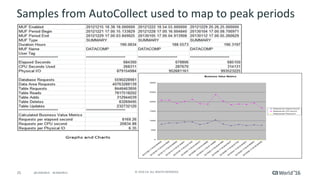
Samples	from	AutoCollect	used	to	map	to	peak	periods
26 ©	2016	CA.	ALL	RIGHTS	RESERVED.@CAWORLD				#CAWORLD
Interactive	performance	measurements
§ CA	SYSVIEW	for	CA	Datacom
– Dynamically	finds	all	CA	Datacom	MUFs
§ Retrieves	key	information	on	the	MUF	address	spaces
§ Integrated	with	the	CA	Datacom	Dynamic	Systems	Tables
§ Displays	real-time	data	for	problem	solving
§ Access	to	historical	and	performance	metrics	for	tuning
§ Quickest	way	to	measure	a	performance	change	while	MUF	is	active	
– Batch	capabilities	allow	the	collection	of	metrics
Real-time	performance	information
27 ©	2016	CA.	ALL	RIGHTS	RESERVED.@CAWORLD				#CAWORLD
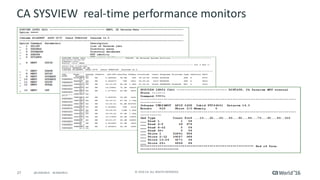
CA	SYSVIEW		real-time	performance	monitors
28 ©	2016	CA.	ALL	RIGHTS	RESERVED.@CAWORLD				#CAWORLD
Summary
A	Few	Words	to	Review
Results	– Part	I
We	addressed	the	need	to	regularly	monitor	performance	to	improve	TCO.
We	discussed	various	on-demand	and	automated	capabilities	to	build	performance	baselines.
We	highlighted	certain	key	measurements	that	can	be	used	to	determine	if	“deep	dive”	tuning	is	needed.
In	part	II,	we	will	go	through	a	series	of	performance	practices	that	can	be	applied	to	Datacom	environments	
to	measure	performance	and		lead	to	improved	TCO.
@CAWORLD					#CAWORLD ©	2016	CA.	All	RIGHTS	RESERVED.29 @CAWORLD					#CAWORLD ©	2016	CA.	All	RIGHTS	RESERVED.29
Mainframe	and	Workload	Automation
For	more	information	on	Mainframe	and	Workload	Automation,		
please	visit:	http://cainc.to/9GQ2JI
30 ©	2016	CA.	ALL	RIGHTS	RESERVED.@CAWORLD				#CAWORLD
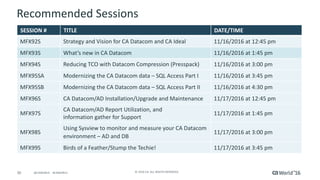
Recommended	Sessions
SESSION	# TITLE DATE/TIME
MFX92S Strategy	and	Vision	for	CA	Datacom	and	CA	Ideal 11/16/2016	at	12:45	pm
MFX93S What’s	new	in	CA	Datacom	 11/16/2016	at	1:45	pm
MFX94S Reducing	TCO	with	Datacom	Compression	(Presspack) 11/16/2016	at	3:00	pm
MFX95SA Modernizing	the	CA	Datacom	data – SQL	Access	Part	I 11/16/2016	at	3:45	pm
MFX95SB Modernizing	the	CA	Datacom	data – SQL	Access	Part	II 11/16/2016	at	4:30	pm
MFX96S CA	Datacom/AD	Installation/Upgrade	and	Maintenance 11/17/2016	at	12:45	pm
MFX97S
CA	Datacom/AD	Report	Utilization,	and
information	gather	for	Support
11/17/2016	at	1:45	pm
MFX98S
Using	Sysview to	monitor	and	measure	your	CA	Datacom	
environment	– AD	and	DB
11/17/2016	at	3:00	pm
MFX99S Birds	of	a	Feather/Stump	the	Techie!	 11/17/2016	at	3:45	pm
31 ©	2016	CA.	ALL	RIGHTS	RESERVED.@CAWORLD				#CAWORLD
Questions?
32 ©	2016	CA.	ALL	RIGHTS	RESERVED.@CAWORLD				#CAWORLD
Thank	you.
Stay	connected	at	communities.ca.com
33 ©	2016	CA.	ALL	RIGHTS	RESERVED.@CAWORLD				#CAWORLD
©	2016	CA.	All	rights	reserved.	All	trademarks	referenced	herein	belong	to	their	respective	companies.
The	content	provided	in	this CA	World	2016	presentation	is	intended	for	informational	purposes	only	and	does	not	form	any	type	of	
warranty. The information	provided	by	a	CA	partner	and/or	CA	customer	has	not	been	reviewed	for	accuracy	by	CA.	
For	Informational	Purposes	Only	
Terms	of	this	Presentation

Advanced DBA – Performance Tuning for MUF Part I