Business Process Management (BPM) 101
Training Workshop
Franco Pang
• At the end of the training, participants will be able to:
– Understand what Business Process Management (BPM) is about
– Understand what APQC’s Process Classification Framework is and
how it is applied
– Model business processes by applying BPMN2.0 standard
– Use Sparx EA software to model business processes
– Facilitate a process mapping workshop independently and confidently
Introduction
Agenda
1. Business Processes Management (BPM)
2. APQC’s Process Classification Framework (PCF)
3. Modelling Business Processes with BPMN2.0
4. Organising a Process Modelling Workshop
5. Modelling Business Processes Using Sparx EA
6. Q&As
Business Process Management (BPM)
• Organised groups of related activities that create values to the customers
What are Business Processes?
Input Output
Process Flow
E.g.: Sort letters at distribution centres
E.g.: Letters arrive
at distribution
centres
E.g.: Letters as
sorted to
destinations
Business Process Management (BPM)
Why are we
doing this?
There is no
process at all
I need to improve the
process in my team but
don’t know where to start
SOPs are so
outdated
Why are process
maps in so many
different formats?
Processes are
not documented
anywhere
I talk to five persons
about the same
process and hear
five different stories
• Are these observations and experience familiar to you?
• Business Process Management is about:
– Defining business processes (understanding / visibility)
– Organising business processes (content management)
– Optimising business processes (maturity)
– Supporting programmes and projects (capability)
– Aligning business processes with business strategies (sustainability)
– Defining the right process modelling and improvement methods, tools
and standards (governance)
• What should we focus? Where is the priority?
Business Process Management (BPM)
Process Maturity
Process Maturity Model
Level 1
Initial
Level 2
Repeatable
Small scale
processes;
understood and
repeatable
Level 3
Defined
Level 4
Managed
Level 5
Optimised
• A key goal of BPM is to raise an organisation’s process maturity level:
Processes are
measure and
controlled
Ad-hoc and
chaotic processes
Processes
documented and
standardised
across organisation
Collaborative,
continuous
improvement
culture
Business Process Management (BPM)
Process Maturity
• Cost Avoidance
• Maximize Value to Customers
• Customers’ Confidence
• Accountability & Efficiency Across All Ranks
• Operational Consistency
•Clarity/Transparency
• Distribution of Policies & Standard Procedures
• Culture of Collaboration & Knowledge Sharing
• Benefits of achieving a high process maturity level:
Discussion: Process Maturity
Process Maturity Model
Level 1
Initial
Level 2
Repeatable
Small scale
processes;
understood and
repeatable
Level 3
Defined
Level 4
Managed
Level 5
Optimised
• Think about 1- 3 business processes that you are familiar with
• Which process maturity level do you think (or feel) each process is sitting
at?
Processes are
measure and
controlled
Ad-hoc and
chaotic processes
Processes
documented and
standardised
across organisation
Collaborative,
continuous
improvement
culture
APQC’s
Process Classification Framework (PCF)
American Productivity & Quality Centre (APQC)
Process Classification Framework (PCF)
• PCF: A framework of cross-functional business processes commonly found
in most organisations (in public and private sectors)
• The framework has a multi-dimensional coverage:
– Horizontal: Twelve process categories which cover major enterprise
functions comprehensively
– Vertifical: Five-level process hierarchy which defines processes from
enterprise-level overview down to task-level view
American Productivity & Quality Centre (APQC)
Process Classification Framework (PCF)
Operating
Processes
Management
&Support
Processes
1.0
Develop
Vision &
Strategy
2.0
Develop &
Manage
Products &
Services
3.0
Market &
Sell
Products &
Services
4.0
Deliver
Products &
Services
5.0
Manage
Customer
Service
6.0
Develop &
Manage
Human
Capital
7.0
Manage
Information
Technology
8.0
Manage
Financial
Resources
9.0
Acquire,
Construct &
Manage
Assets
10.0
Manage
Enterprise
Risk &
Compliance
11.0
Manage
External
Relation-
ships
12.0
Develop &
Manage
Business
Capabilities
Task
Decomposition
of activities
Example:
Call customers
Activity
Key events when
performing a process
Example:
Respond to customer
requests / inquiries
(10396)
Process
Interrelated
activities
Example:
Manage Customer
Service Requests /
Inquiries (10388)
Process Group
Groups of related
processes
Example:
Plan & Manage
Customer Service
Operations (10379)
Category
Highest level of
processes within
an organisation
Example:
Manage Customer
Service (10006)
American Productivity & Quality Centre (APQC)
Process Classification Framework (PCF)
• End-to-end view on business processes within an organisation (clarity)
• Organise business processes more systematically and effectively
(content management)
• Align an organisation’s business processes with its strategic goals
(alignments)
• More rigorous and objective comparisons of process effectiveness
within or across organisations (benchmarking)
• Avoid any ‘federalism’ concerns, e.g. something which only works for
part of the orgnisation but not the other (neutrality)
APQC’s Process Classification Framework (PCF)
How does PCF Help Us?
Modelling Business Processes
with BPMN2.0
• What are the differences between Business Process Modelling and
Business Process Management?
Business Process Modelling Business Process Management
An activity A business function
More defined outputs Less tangible outputs
Specific focus (produce process
models)
Wider focus (drive process maturity and
improvement)
Modelling Business Processes
• Process models: Visual representation of sequential flow and control logic
of a set of related activities
• Two main types of process models:
– Current state (‘As-Is’)
– Future state (‘To-Be’)
• Other common documents which describe business processes are SOPs,
training manuals, etc.
– Review these documents critically before you use them because:
• They may be outdated, incomplete or incorrect
• They may not show hidden processes
Modelling Business Processes
• Determine a suitable approach (top-down vs. bottom-up):
• Define process model boundaries (scope)
Modelling Business Processes
How to Model a Process?
Top-down Bottom-up
Complicated processes Well-defined processes
Involving many business units
Involving a single or a few business
units
Help process modelling to stay in
scope
Increase process modelling’s efficiency
Depend on projects’ requirements
• Conduct SIPOC* and document analysis
– Review existing SOPs, policies, training manuals, etc.
– Develop SIPOC
* SIPOCs: Supplier-Input-Process-Output-Customer Matrix
• Engage with stakeholders involved to discover how the process is being
operated
– The six basic questions: Who, What, When, Why, How & Where
– Process modelling workshops provide good opportunities for
facilitating modelling and stakeholder engagement
Modelling Business Processes
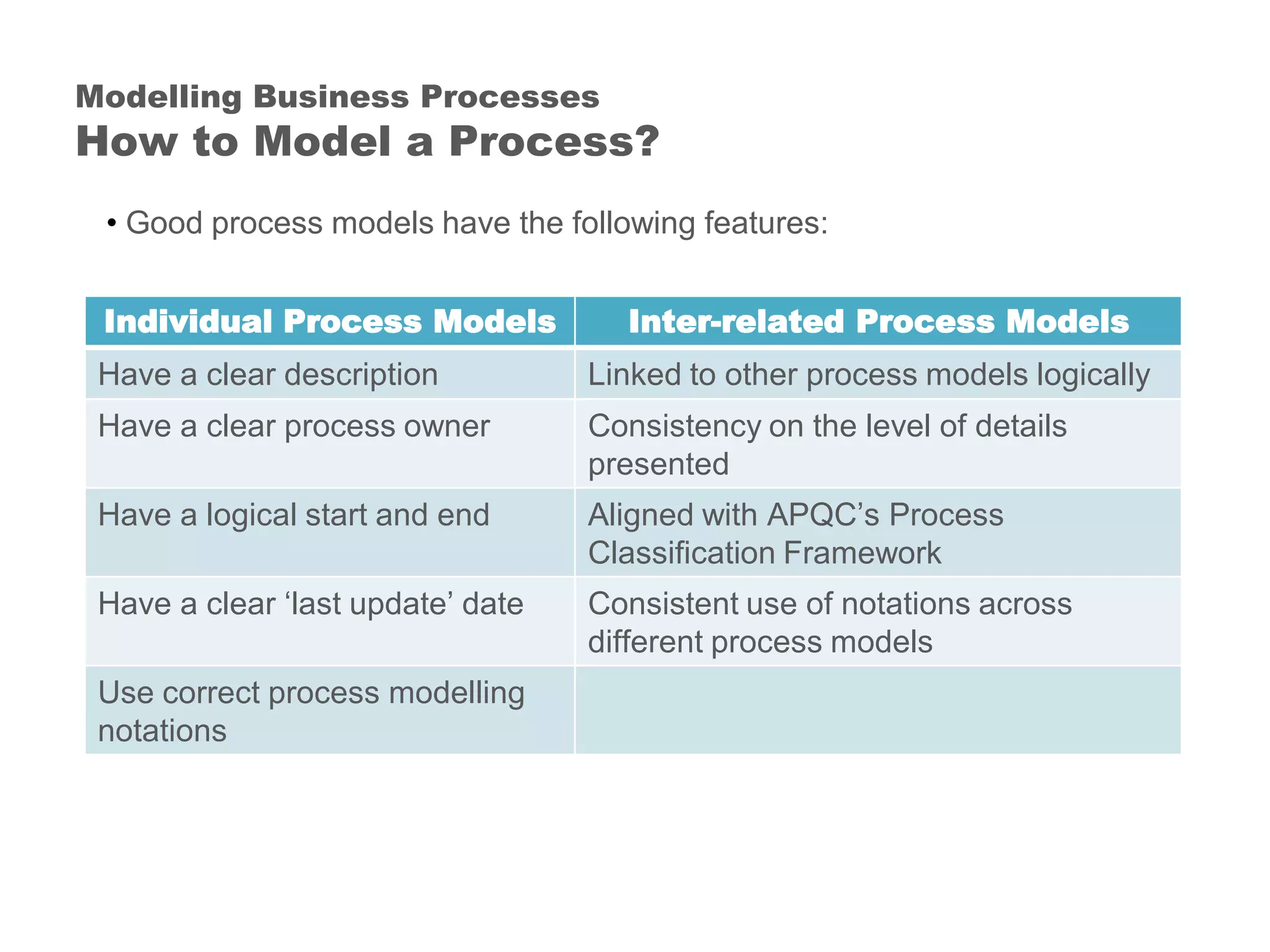
How to Model a Process?
• Good process models have the following features:
Modelling Business Processes
How to Model a Process?
Individual Process Models Inter-related Process Models
Have a clear description Linked to other process models logically
Have a clear process owner Consistency on the level of details
presented
Have a logical start and end Aligned with APQC’s Process
Classification Framework
Have a clear ‘last update’ date Consistent use of notations across
different process models
Use correct process modelling
notations
Discussion: Modelling Business Processes
• What do you think about the qualities of these process model examples?
• What is BPMN2.0?
– A standard of modelling business processes
• Benefits of using BPMN2.0:
– Consistent styles and formatting
– Process model can be compared and reused more easily
– Support enterprise content management
Business Process Modelling Notation (BPMN)
2.0
BPMN2.0 Key Notations
• Pools: Define a group of participants that collaborates within a process
– Examples: Customers, Border Agencies, etc.
• Lanes (Swimlanes): Define a specific participant or role within a process
– Examples: Delivery Branches, Distribution Centres, etc.
BPMN2.0 Key Notations
• Start: Indicate triggers of the process
• End: Indicate end deliverables of the process
BPMN2.0 Key Notations
• Tasks (activities): Describe ‘how’ a process functions or operates
• A ‘verb + noun’ structure
– Examples: deliver items, enter customers’ details, etc.
BPMN2.0 Key Notations
• Sometimes a group of related tasks operate within a process; those tasks
can be grouped indicated as a sub-process
– Example: Border agency inspection (a sub-process)
• Broken into x-ray items, conduct bio-security assessment, etc.
(tasks)
BPMN2.0 Key Notations
• Sequence flows: Indicate sequential order of activities
• Message flows: Indicate information flow
•
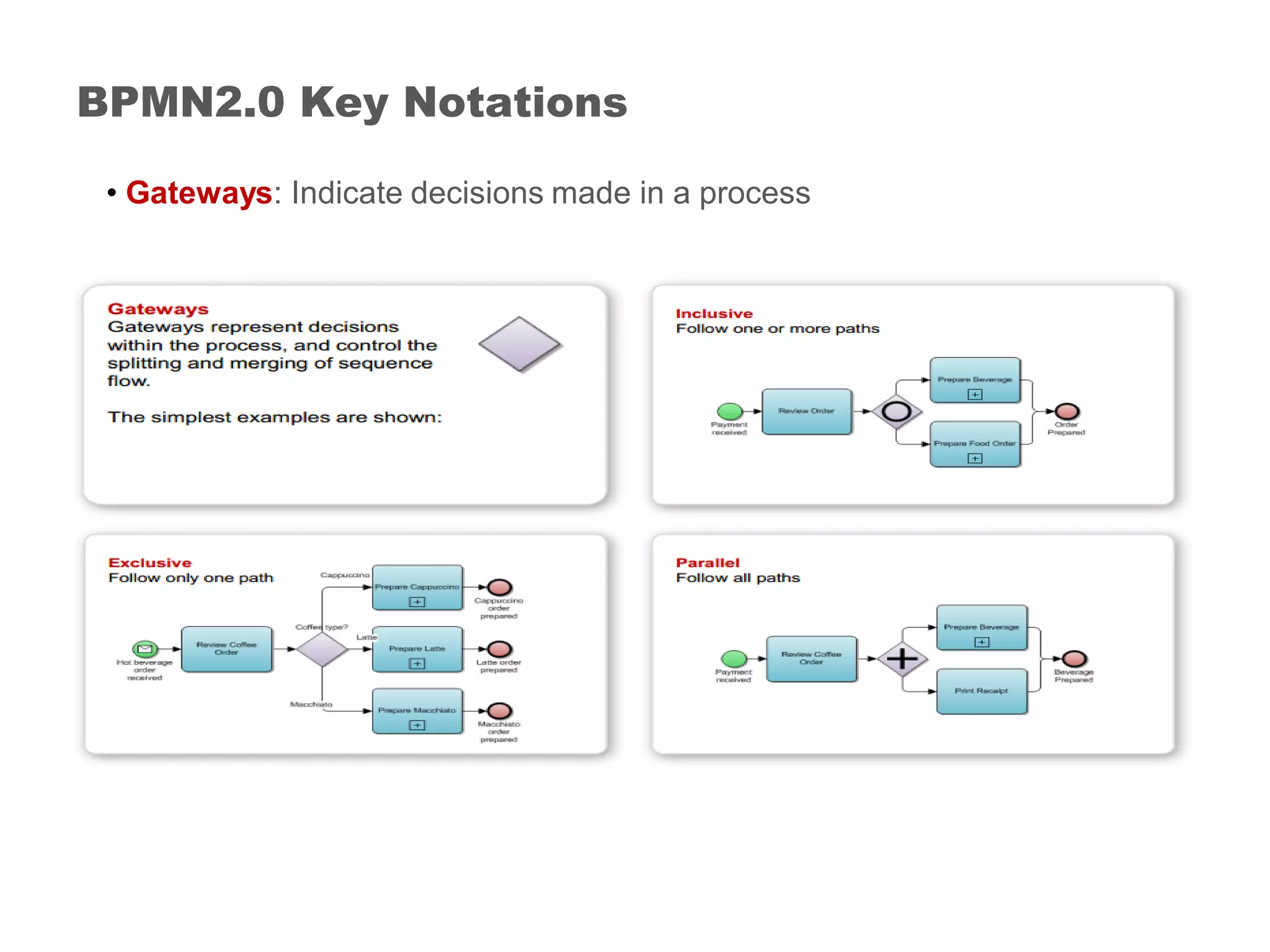
BPMN2.0 Key Notations
• Gateways: Indicate decisions made in a process
BPMN2.0 Key Notations
• Data objects: Indicate artifacts of information which flow through a process
(e.g. notifications, etc.)
• Data stores: Indicate a medium (physical or system) where data is read or
written
• On the sample process model, what BPMN2.0 notations are used
correctly? What notations are used incorrectly?
Discussion: BPMN2.0
Process Modelling Workshops
• What is a process modelling workshop?
– A facilitated session to discuss how a business process operates,
should operate, or will best operate
• Key benefits:
– Help identify and understand a process ‘as you know it’
– Engage with stakeholders on the consultation process
Process Modelling Workshops
• Why do we need to conduct a process modelling workshop?
– A business process usually involves multiple business units
• Important for all stakeholders to provide their inputs
– Most projects involve stakeholders which do not operate the processes
directly but have interests on them, e.g. Legal, Risk & Assurance, etc.
• Workshops ensure that their concerns are expressed
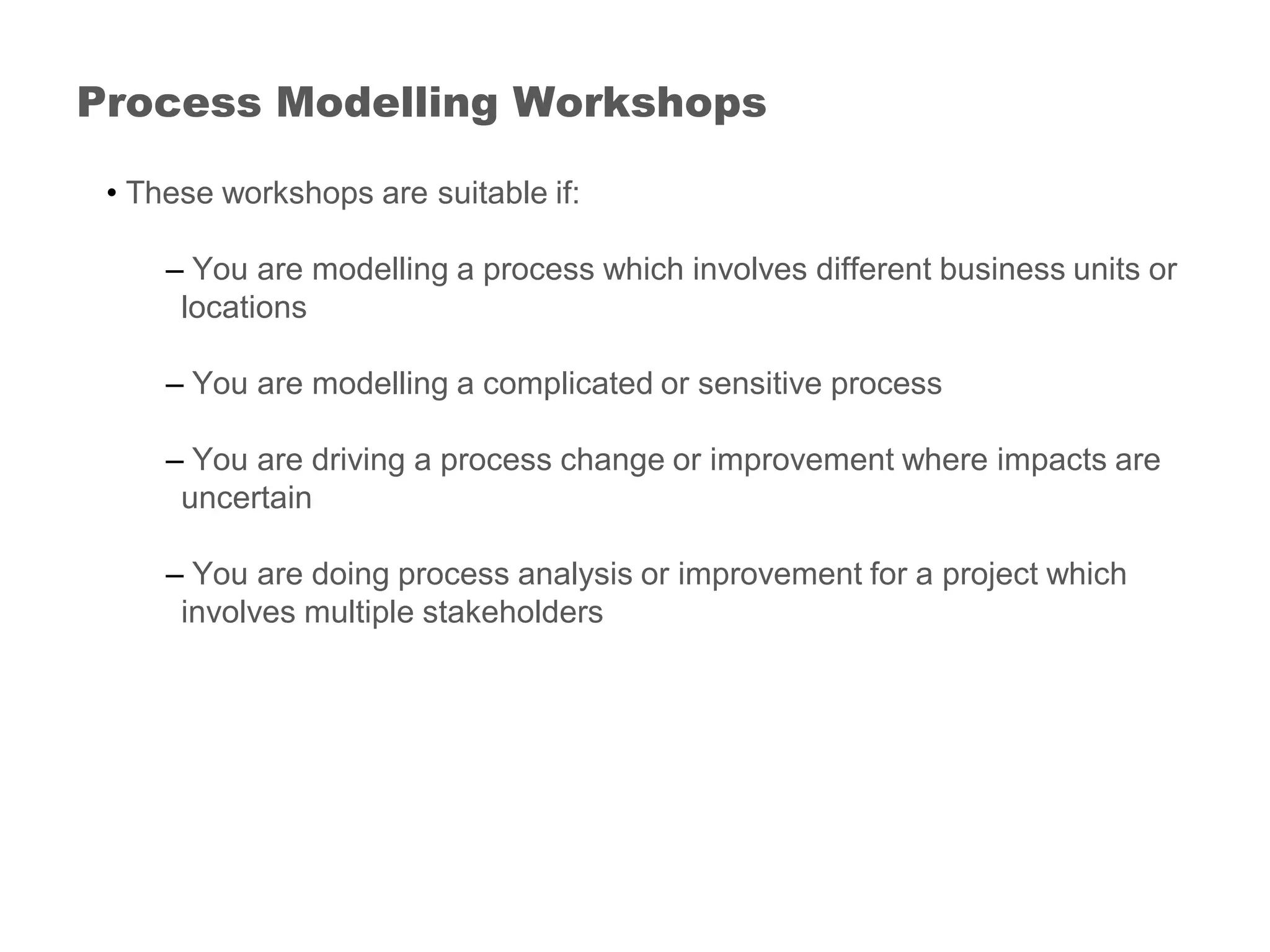
Process Modelling Workshops
• These workshops are suitable if:
– You are modelling a process which involves different business units or
locations
– You are modelling a complicated or sensitive process
– You are driving a process change or improvement where impacts are
uncertain
– You are doing process analysis or improvement for a project which
involves multiple stakeholders
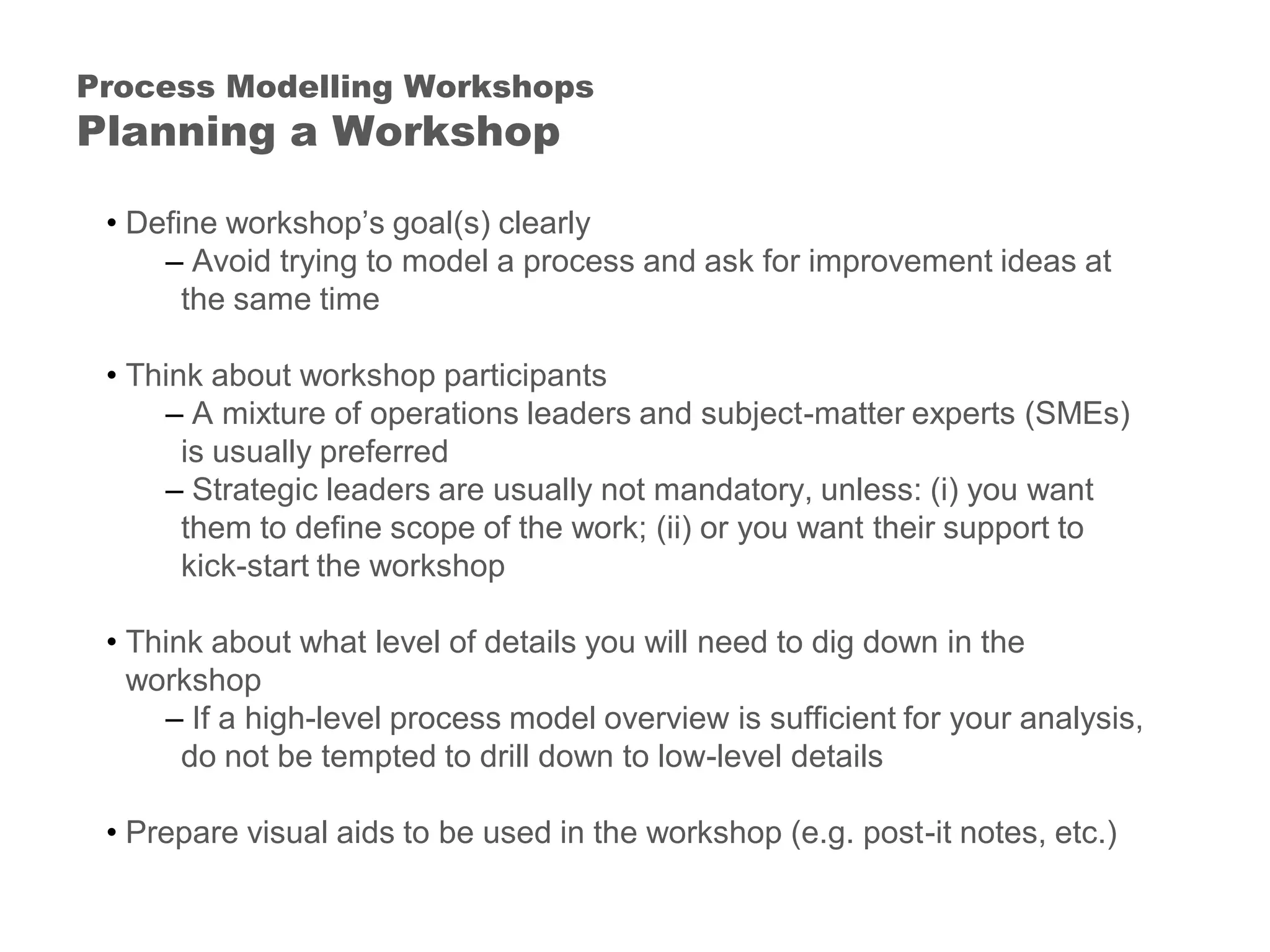
Process Modelling Workshops
• Define workshop’s goal(s) clearly
– Avoid trying to model a process and ask for improvement ideas at
the same time
• Think about workshop participants
– A mixture of operations leaders and subject-matter experts (SMEs)
is usually preferred
– Strategic leaders are usually not mandatory, unless: (i) you want
them to define scope of the work; (ii) or you want their support to
kick-start the workshop
• Think about what level of details you will need to dig down in the
workshop
– If a high-level process model overview is sufficient for your analysis,
do not be tempted to drill down to low-level details
• Prepare visual aids to be used in the workshop (e.g. post-it notes, etc.)
Process Modelling Workshops
Planning a Workshop
• Provide background info to participants – project scope, process
boundaries, etc.
• List down all processes to be covered in the workshop – prioritise with
participants if time is limited
• Draw an empty process model ‘frame’ on a whiteboard (or a wall if it can
be used for this purpose)
• Ask questions (can be generic or specific, depending on participants) –
use post-it notes to show them on the whiteboard or wall
• Ask for exceptions and variations
Process Modelling Workshop
Conducting a Workshop
• Use SIPOC* to build a ‘big-picture’ understanding
• If participants’ understanding (or viewpoints) to a process are conflicting
to others
– Do not rule them out unless you are clear they are unacceptable
legally or policy speaking
• It is a discovery process: Do not try to limit to what you (or participants)
know and think the process should be
Process Modelling Workshop
Conducting a Workshop
Modelling Business Processes
Using Sparx EA
Modelling Business Processes Using Sparx EA
Software Demonstration
Questions & Answers
The End
• Are Business Process Models the same as SOPs? No
Appendix
Business Process Models vs. Standard
Operating Procedures (SOPs)
Business Processes SOPs
• Diagrammatic representation • Written instructions (mainly)
• Show end-to-end organisational
view
• Show sequential flow of activities
(tasks)
• Understand how processes deliver
values
• Ensure a consistent quality of
process outputs
Appendix
Developing SOPs: Recommended Practice
Before Development Starts:
• Chose the right people to develop SOPs
• Develop a SOP checklist
During SOP Development:
• Use a SOP checklist
After SOPs are Developed:
• Chose the right SOP reviewers and approvers
• Conduct peer reviews on SOPs
• Test SOPs
• Place SOPs in visible locations (e.g. labelled binders reachable by end-
users)
• Keep SOPs updated (half-yearly or annually)
Appendix
Developing SOPs: Recommended Practice
Content:
• Use active voice and present-tense verbs (e.g. ‘Remove any empty trays from
holder’, instead of ‘ensure empty tray has been removed from holder’
• Present information in unambiguous ways
Formatting:
• Follow a step-by-step format (e.g. bullet points)
• Keep SOPs concise
• Have a clear ‘table of content’
Organisation:
• Good document controls (e.g. clear SOP title, ID, version number, effective date,
document owner)
• Use flowcharts to illustrate the workflow covered on SOPs
• Be consistent in writing styles if SOPs are developed by different parties

Business Process Management 101 Training

  • 1.
    Business Process Management(BPM) 101 Training Workshop Franco Pang
  • 2.
    • At theend of the training, participants will be able to: – Understand what Business Process Management (BPM) is about – Understand what APQC’s Process Classification Framework is and how it is applied – Model business processes by applying BPMN2.0 standard – Use Sparx EA software to model business processes – Facilitate a process mapping workshop independently and confidently Introduction
  • 3.
    Agenda 1. Business ProcessesManagement (BPM) 2. APQC’s Process Classification Framework (PCF) 3. Modelling Business Processes with BPMN2.0 4. Organising a Process Modelling Workshop 5. Modelling Business Processes Using Sparx EA 6. Q&As
  • 4.
  • 5.
    • Organised groupsof related activities that create values to the customers What are Business Processes? Input Output Process Flow E.g.: Sort letters at distribution centres E.g.: Letters arrive at distribution centres E.g.: Letters as sorted to destinations
  • 6.
    Business Process Management(BPM) Why are we doing this? There is no process at all I need to improve the process in my team but don’t know where to start SOPs are so outdated Why are process maps in so many different formats? Processes are not documented anywhere I talk to five persons about the same process and hear five different stories • Are these observations and experience familiar to you?
  • 7.
    • Business ProcessManagement is about: – Defining business processes (understanding / visibility) – Organising business processes (content management) – Optimising business processes (maturity) – Supporting programmes and projects (capability) – Aligning business processes with business strategies (sustainability) – Defining the right process modelling and improvement methods, tools and standards (governance) • What should we focus? Where is the priority? Business Process Management (BPM)
  • 8.
    Business Process Management(BPM) Process Maturity Process Maturity Model Level 1 Initial Level 2 Repeatable Small scale processes; understood and repeatable Level 3 Defined Level 4 Managed Level 5 Optimised • A key goal of BPM is to raise an organisation’s process maturity level: Processes are measure and controlled Ad-hoc and chaotic processes Processes documented and standardised across organisation Collaborative, continuous improvement culture
  • 9.
    Business Process Management(BPM) Process Maturity • Cost Avoidance • Maximize Value to Customers • Customers’ Confidence • Accountability & Efficiency Across All Ranks • Operational Consistency •Clarity/Transparency • Distribution of Policies & Standard Procedures • Culture of Collaboration & Knowledge Sharing • Benefits of achieving a high process maturity level:
  • 10.
    Discussion: Process Maturity ProcessMaturity Model Level 1 Initial Level 2 Repeatable Small scale processes; understood and repeatable Level 3 Defined Level 4 Managed Level 5 Optimised • Think about 1- 3 business processes that you are familiar with • Which process maturity level do you think (or feel) each process is sitting at? Processes are measure and controlled Ad-hoc and chaotic processes Processes documented and standardised across organisation Collaborative, continuous improvement culture
  • 11.
  • 12.
    American Productivity &Quality Centre (APQC) Process Classification Framework (PCF) • PCF: A framework of cross-functional business processes commonly found in most organisations (in public and private sectors) • The framework has a multi-dimensional coverage: – Horizontal: Twelve process categories which cover major enterprise functions comprehensively – Vertifical: Five-level process hierarchy which defines processes from enterprise-level overview down to task-level view
  • 13.
    American Productivity &Quality Centre (APQC) Process Classification Framework (PCF) Operating Processes Management &Support Processes 1.0 Develop Vision & Strategy 2.0 Develop & Manage Products & Services 3.0 Market & Sell Products & Services 4.0 Deliver Products & Services 5.0 Manage Customer Service 6.0 Develop & Manage Human Capital 7.0 Manage Information Technology 8.0 Manage Financial Resources 9.0 Acquire, Construct & Manage Assets 10.0 Manage Enterprise Risk & Compliance 11.0 Manage External Relation- ships 12.0 Develop & Manage Business Capabilities
  • 14.
    Task Decomposition of activities Example: Call customers Activity Keyevents when performing a process Example: Respond to customer requests / inquiries (10396) Process Interrelated activities Example: Manage Customer Service Requests / Inquiries (10388) Process Group Groups of related processes Example: Plan & Manage Customer Service Operations (10379) Category Highest level of processes within an organisation Example: Manage Customer Service (10006) American Productivity & Quality Centre (APQC) Process Classification Framework (PCF)
  • 15.
    • End-to-end viewon business processes within an organisation (clarity) • Organise business processes more systematically and effectively (content management) • Align an organisation’s business processes with its strategic goals (alignments) • More rigorous and objective comparisons of process effectiveness within or across organisations (benchmarking) • Avoid any ‘federalism’ concerns, e.g. something which only works for part of the orgnisation but not the other (neutrality) APQC’s Process Classification Framework (PCF) How does PCF Help Us?
  • 16.
  • 17.
    • What arethe differences between Business Process Modelling and Business Process Management? Business Process Modelling Business Process Management An activity A business function More defined outputs Less tangible outputs Specific focus (produce process models) Wider focus (drive process maturity and improvement) Modelling Business Processes
  • 18.
    • Process models:Visual representation of sequential flow and control logic of a set of related activities • Two main types of process models: – Current state (‘As-Is’) – Future state (‘To-Be’) • Other common documents which describe business processes are SOPs, training manuals, etc. – Review these documents critically before you use them because: • They may be outdated, incomplete or incorrect • They may not show hidden processes Modelling Business Processes
  • 19.
    • Determine asuitable approach (top-down vs. bottom-up): • Define process model boundaries (scope) Modelling Business Processes How to Model a Process? Top-down Bottom-up Complicated processes Well-defined processes Involving many business units Involving a single or a few business units Help process modelling to stay in scope Increase process modelling’s efficiency Depend on projects’ requirements
  • 20.
    • Conduct SIPOC*and document analysis – Review existing SOPs, policies, training manuals, etc. – Develop SIPOC * SIPOCs: Supplier-Input-Process-Output-Customer Matrix • Engage with stakeholders involved to discover how the process is being operated – The six basic questions: Who, What, When, Why, How & Where – Process modelling workshops provide good opportunities for facilitating modelling and stakeholder engagement Modelling Business Processes How to Model a Process?
  • 21.
    • Good processmodels have the following features: Modelling Business Processes How to Model a Process? Individual Process Models Inter-related Process Models Have a clear description Linked to other process models logically Have a clear process owner Consistency on the level of details presented Have a logical start and end Aligned with APQC’s Process Classification Framework Have a clear ‘last update’ date Consistent use of notations across different process models Use correct process modelling notations
  • 22.
    Discussion: Modelling BusinessProcesses • What do you think about the qualities of these process model examples?
  • 23.
    • What isBPMN2.0? – A standard of modelling business processes • Benefits of using BPMN2.0: – Consistent styles and formatting – Process model can be compared and reused more easily – Support enterprise content management Business Process Modelling Notation (BPMN) 2.0
  • 24.
  • 25.
    BPMN2.0 Key Notations •Pools: Define a group of participants that collaborates within a process – Examples: Customers, Border Agencies, etc. • Lanes (Swimlanes): Define a specific participant or role within a process – Examples: Delivery Branches, Distribution Centres, etc.
  • 26.
    BPMN2.0 Key Notations •Start: Indicate triggers of the process • End: Indicate end deliverables of the process
  • 27.
    BPMN2.0 Key Notations •Tasks (activities): Describe ‘how’ a process functions or operates • A ‘verb + noun’ structure – Examples: deliver items, enter customers’ details, etc.
  • 28.
    BPMN2.0 Key Notations •Sometimes a group of related tasks operate within a process; those tasks can be grouped indicated as a sub-process – Example: Border agency inspection (a sub-process) • Broken into x-ray items, conduct bio-security assessment, etc. (tasks)
  • 29.
    BPMN2.0 Key Notations •Sequence flows: Indicate sequential order of activities • Message flows: Indicate information flow •
  • 30.
    BPMN2.0 Key Notations •Gateways: Indicate decisions made in a process
  • 31.
    BPMN2.0 Key Notations •Data objects: Indicate artifacts of information which flow through a process (e.g. notifications, etc.) • Data stores: Indicate a medium (physical or system) where data is read or written
  • 32.
    • On thesample process model, what BPMN2.0 notations are used correctly? What notations are used incorrectly? Discussion: BPMN2.0
  • 33.
  • 34.
    • What isa process modelling workshop? – A facilitated session to discuss how a business process operates, should operate, or will best operate • Key benefits: – Help identify and understand a process ‘as you know it’ – Engage with stakeholders on the consultation process Process Modelling Workshops
  • 35.
    • Why dowe need to conduct a process modelling workshop? – A business process usually involves multiple business units • Important for all stakeholders to provide their inputs – Most projects involve stakeholders which do not operate the processes directly but have interests on them, e.g. Legal, Risk & Assurance, etc. • Workshops ensure that their concerns are expressed Process Modelling Workshops
  • 36.
    • These workshopsare suitable if: – You are modelling a process which involves different business units or locations – You are modelling a complicated or sensitive process – You are driving a process change or improvement where impacts are uncertain – You are doing process analysis or improvement for a project which involves multiple stakeholders Process Modelling Workshops
  • 37.
    • Define workshop’sgoal(s) clearly – Avoid trying to model a process and ask for improvement ideas at the same time • Think about workshop participants – A mixture of operations leaders and subject-matter experts (SMEs) is usually preferred – Strategic leaders are usually not mandatory, unless: (i) you want them to define scope of the work; (ii) or you want their support to kick-start the workshop • Think about what level of details you will need to dig down in the workshop – If a high-level process model overview is sufficient for your analysis, do not be tempted to drill down to low-level details • Prepare visual aids to be used in the workshop (e.g. post-it notes, etc.) Process Modelling Workshops Planning a Workshop
  • 38.
    • Provide backgroundinfo to participants – project scope, process boundaries, etc. • List down all processes to be covered in the workshop – prioritise with participants if time is limited • Draw an empty process model ‘frame’ on a whiteboard (or a wall if it can be used for this purpose) • Ask questions (can be generic or specific, depending on participants) – use post-it notes to show them on the whiteboard or wall • Ask for exceptions and variations Process Modelling Workshop Conducting a Workshop
  • 39.
    • Use SIPOC*to build a ‘big-picture’ understanding • If participants’ understanding (or viewpoints) to a process are conflicting to others – Do not rule them out unless you are clear they are unacceptable legally or policy speaking • It is a discovery process: Do not try to limit to what you (or participants) know and think the process should be Process Modelling Workshop Conducting a Workshop
  • 40.
  • 41.
    Modelling Business ProcessesUsing Sparx EA Software Demonstration
  • 42.
  • 43.
  • 44.
    • Are BusinessProcess Models the same as SOPs? No Appendix Business Process Models vs. Standard Operating Procedures (SOPs) Business Processes SOPs • Diagrammatic representation • Written instructions (mainly) • Show end-to-end organisational view • Show sequential flow of activities (tasks) • Understand how processes deliver values • Ensure a consistent quality of process outputs
  • 45.
    Appendix Developing SOPs: RecommendedPractice Before Development Starts: • Chose the right people to develop SOPs • Develop a SOP checklist During SOP Development: • Use a SOP checklist After SOPs are Developed: • Chose the right SOP reviewers and approvers • Conduct peer reviews on SOPs • Test SOPs • Place SOPs in visible locations (e.g. labelled binders reachable by end- users) • Keep SOPs updated (half-yearly or annually)
  • 46.
    Appendix Developing SOPs: RecommendedPractice Content: • Use active voice and present-tense verbs (e.g. ‘Remove any empty trays from holder’, instead of ‘ensure empty tray has been removed from holder’ • Present information in unambiguous ways Formatting: • Follow a step-by-step format (e.g. bullet points) • Keep SOPs concise • Have a clear ‘table of content’ Organisation: • Good document controls (e.g. clear SOP title, ID, version number, effective date, document owner) • Use flowcharts to illustrate the workflow covered on SOPs • Be consistent in writing styles if SOPs are developed by different parties