BPM/N 
Lunch’n learn# 
12/15/2009 
# I (Razvan:-) presented these slides at Health Decisions (HD), while I worked there first as Agile Project Manager/Lead Business Analyst (HD360) and, later, as Business Transformation Manager (Business Processes and Corporate Training)
I’m interested in#… 
•learn about putting together flow charts and what all of these silly icons mean! 
•Ideally, the whole team should have these skills at a 101 level 
•quick overview of BPMN and modeling a HD business process in BizAgi (I guess this is our chosen tool) 
•walk through some examples showing when you would use the different types of notations (Gateways, Activities, Data object, Transactions, events, etc…) 
•go over some of the do’s and don’ts 
•the basics and best practices 
•attend, and then see if it fits into some ideas for management training 
•(re-worded) learn about BPM/N and how it fits in the larger Business Analysis & Project Management practice 
# Referring to interests expressed by the audience, ahead of the Lunch ‘n Learn
In scope… 
•Intro to Business Process Management (BPM) 
•Business Process Modeling & Notation (BPM/N)# 
•Some BPMN Examples (PostIt notes and/or BizAgi) 
•Tips and “Best” (Good) Practices 
•Applications of BPMN 
# Renamed since then as “Business Process Model & Notation”
Out of scope (this time)… 
•Details of BPM 
•Advanced/complex BPMN 
•Overview of the BPMS & BPM/N tools (except through use of BizAgi) 
•Other BPM standards (like BPEL, BAM…) 
•BPM and SOA: though, that’d be a GREAT topic for another discussion!
Intro to BPM: Facts, goals, strategy 
Some facts: 
•Processes are everywhere in a business (often “hidden”), a lot more than we perceive them to be 
•Processes are a lot “more” standard than we perceive them to be 
•Despite common myths, managing processes increases an organization’s agility 
•Better BPM = better business 
•From REACTIVE, to PROACTIVE, to PREDICTIVE!! 
•Recent CIOs survey: Implementing BPM = #1 IT strategy
Intro to BPM: Core concepts 
BPM as a process (…of processes): 
–Process (re)Discovery 
–Process (re)Design (our focus today!) 
–Process Execution 
–Process Monitoring & Control 
–Process (re)Analysis 
•Simulation, and What-if scenarios 
•Adaptation (loop-back) 
–Process (re)Optimization: loop back 
•Complex (despite what BPM vendors are saying)! 
•Often iterative and incremental 
•Almost never sequential
Intro to BPM: Context & Framework 
Integration with: 
–Business Objectives & Strategy 
–Business Rules and Policies 
–Operations Management 
–Knowledge Management (including document & content management) 
–Finance Management 
–Time and Schedule Management 
–Resource Management 
–Risk Management
Predecessors & Related practices (few alive, some lingering, many dead) 
•BPR 
•WfMC 
•Six Sigma 
•TQM 
•more… 
Must be aware of silver-bullet claims, fads and fashions… 
… coming-n-going in repeating cycles
Back to main topic: BPMN 
•Core concepts 
•Notation 
•Examples 
•Tips & Best Practices
Business Process Modeling (BPM): Goals 
•Communication & collaboration (our focus today) 
•Feed into other BPM(anagement) processes
Standards 
•BPMN=Business Process Modeling Notation (1st @ BPMI.ORG, now @ OMG) 
•Other BPM standards 
–Definition (e.g. XPDL, WfMC…) 
–Execution (BPEL) 
–Monitoring (BAM) 
–more
BPMN: Core concepts 
•Process vs. activities 
•Process hierarchy 
–Activity=Task or Sub-processes 
•Process types 
–Operations: company’s products/services 
–Supporting/infrastructure (e.g. HR, Finance, IT) 
–Controlling: setting goals/targets and metrics, monitoring & control…
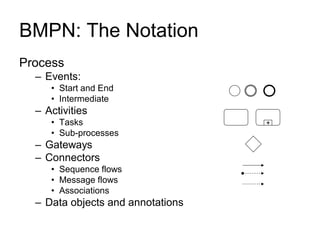
BMPN: The Notation 
Process 
–Events: 
•Start and End 
•Intermediate 
–Activities 
•Tasks 
•Sub-processes 
–Gateways 
–Connectors 
•Sequence flows 
•Message flows 
•Associations 
–Data objects and annotations 
+
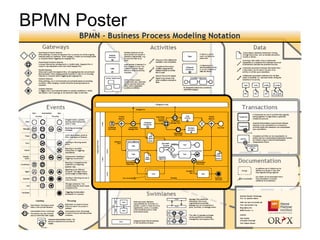
BPMN Poster
Events 
•Influence flow: 
–Start events 
–Intermediate events 
–End events 
–[R] Interrupting events 
•Characteristics: 
–trigger 
•Plain (undefined) 
•Conditional (data) 
•Timer (time, time-outs) 
•Message (receive & send) 
•Signal (broadcast) 
•Errors/exceptions 
•Multiple (complex) 
–Outcomes 
•Activity linked to event 
•Attributes & metrics: 
–Title/name & description
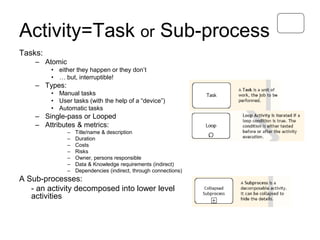
Activity=Task or Sub-process 
Tasks: 
–Atomic 
•either they happen or they don’t 
•… but, interruptible! 
–Types: 
•Manual tasks 
•User tasks (with the help of a “device”) 
•Automatic tasks 
–Single-pass or Looped 
–Attributes & metrics: 
–Title/name & description 
–Duration 
–Costs 
–Risks 
–Owner, persons responsible 
–Data & Knowledge requirements (indirect) 
–Dependencies (indirect, through connections) 
A Sub-processes: 
- an activity decomposed into lower level activities
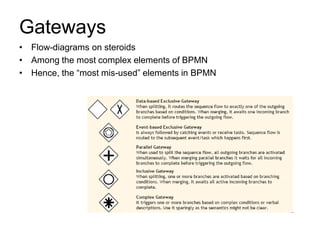
Gateways 
•Flow-diagrams on steroids 
•Among the most complex elements of BPMN 
•Hence, the “most mis-used” elements in BPMN
Flow elements 
•Sequence flows: between tasks and events 
–[basic] 
–Conditional 
–Default 
•Message flows: between processes/pools 
–White box (to/from tasks/events) 
–Black box (between process boundaries) 
•Data objects “flow” (not really a flow)
Other elements 
•Pools (organizations): 
–B2B 
–Communicating through Message Flows 
•Swimlanes (roles w/in organizations): 
–Communicating through Sequence Flows 
•Phases (timeline): 
–Each process as at least one (declared or implied) phase 
•Groups: 
–Logical grouping (even across pools), primarily for clarity and reporting
Examples (using the whiteboard and/or BizAgi) 
•Simple cases 
•Complex cases 
•HD360# examples 
# HD360 was the application/toolset that we developed @ HD in 2008-09
Tips & Best Practices: Do+Don’t (1/2) 
•Know the process type and your perspective (for modeling): 
–operations, support, control 
… but don’t mix them [though, I don’t 100% agree with this one] 
•Use naming conventions for processes and activities: 
–[object] action + subject 
–Example: [Site Coordinator] Enroll(s) Subject 
…but don’t overdue it: 
•Example: Enroll Subject process (or activity) 
•Break-down complex processes: 
–Process  Sub-process  Task 
–Example: Design Study = Identify clinical data + Design CRFs + … 
… but, don’t overdue it: optimal = up to 3 levels (there are exceptions, depending on point-of-view) 
•Use gateways the way they were meant to be used: 
–Know what each gateway does (or, is supposed to do) 
–Split-gateways matched by Joint-gateways: unwise shortcuts create ambiguity! 
… but don’t abuse it: splitting when no split is required
Tips & Best Practices: Do+Don’t (2/2) 
•Work agile 
–right level (just-enough-details) – especially, not down to technical spec level (not BPM)! 
–right time (don’t detail until there’s value in doing that) 
•KISS 
–BPMN (just like UML) is very (quite) complex, but we don’t need it ALL 
–Pick and choose, but be consistent 
•Patterns 
–Take advantage of them 
–Implies, becoming familiar with (learn about) them [again, not all – don’t listen to academics!] 
•Ask, collaborate 
•If you still don’t know where to start… 
… make a list of the activities & players (actors)!
Q&A
Summary 
•While extremely valuable, BPM is quite a complex framework (despite what vendors say) 
•Modeling is at the root of all other BPM processes (execution, monitoring & control, analysis, optimization, etc.) 
•BPMN is the most recognized and accepted standard for modeling business processes 
•While (good) modeling of business processes cannot guarantee success, not modeling them (well) can guarantee failure 
•Managing processes is a critical piece in the organizational efficiency puzzle
I’m interested in… 
•learn about putting together flow charts and what all of these silly icons mean! 
•Ideally, the whole team should have these skills at a 101 level 
•quick overview of BPMN and modeling a HD business process in BizAgi (I guess this is our chosen tool) 
•walk through some examples showing when you would use the different types of notations (Gateways, Activities, Data object, Transactions, events, etc…) 
•go over some of the do’s and don’ts 
•the basics and best practices 
•attend, and then see if it fits into some ideas for management training 
•(re-worded) learn about BPM/N and how it fits in the larger Business Analysis & Project Management practice
What’s next? 
What would you want it to be? 
–… 
–… 
–…

Bpm+bpmn (lunch n-learn,12-15-2009,updated)

  • 1.
    BPM/N Lunch’n learn# 12/15/2009 # I (Razvan:-) presented these slides at Health Decisions (HD), while I worked there first as Agile Project Manager/Lead Business Analyst (HD360) and, later, as Business Transformation Manager (Business Processes and Corporate Training)
  • 2.
    I’m interested in#… •learn about putting together flow charts and what all of these silly icons mean! •Ideally, the whole team should have these skills at a 101 level •quick overview of BPMN and modeling a HD business process in BizAgi (I guess this is our chosen tool) •walk through some examples showing when you would use the different types of notations (Gateways, Activities, Data object, Transactions, events, etc…) •go over some of the do’s and don’ts •the basics and best practices •attend, and then see if it fits into some ideas for management training •(re-worded) learn about BPM/N and how it fits in the larger Business Analysis & Project Management practice # Referring to interests expressed by the audience, ahead of the Lunch ‘n Learn
  • 3.
    In scope… •Introto Business Process Management (BPM) •Business Process Modeling & Notation (BPM/N)# •Some BPMN Examples (PostIt notes and/or BizAgi) •Tips and “Best” (Good) Practices •Applications of BPMN # Renamed since then as “Business Process Model & Notation”
  • 4.
    Out of scope(this time)… •Details of BPM •Advanced/complex BPMN •Overview of the BPMS & BPM/N tools (except through use of BizAgi) •Other BPM standards (like BPEL, BAM…) •BPM and SOA: though, that’d be a GREAT topic for another discussion!
  • 5.
    Intro to BPM:Facts, goals, strategy Some facts: •Processes are everywhere in a business (often “hidden”), a lot more than we perceive them to be •Processes are a lot “more” standard than we perceive them to be •Despite common myths, managing processes increases an organization’s agility •Better BPM = better business •From REACTIVE, to PROACTIVE, to PREDICTIVE!! •Recent CIOs survey: Implementing BPM = #1 IT strategy
  • 6.
    Intro to BPM:Core concepts BPM as a process (…of processes): –Process (re)Discovery –Process (re)Design (our focus today!) –Process Execution –Process Monitoring & Control –Process (re)Analysis •Simulation, and What-if scenarios •Adaptation (loop-back) –Process (re)Optimization: loop back •Complex (despite what BPM vendors are saying)! •Often iterative and incremental •Almost never sequential
  • 7.
    Intro to BPM:Context & Framework Integration with: –Business Objectives & Strategy –Business Rules and Policies –Operations Management –Knowledge Management (including document & content management) –Finance Management –Time and Schedule Management –Resource Management –Risk Management
  • 8.
    Predecessors & Relatedpractices (few alive, some lingering, many dead) •BPR •WfMC •Six Sigma •TQM •more… Must be aware of silver-bullet claims, fads and fashions… … coming-n-going in repeating cycles
  • 9.
    Back to maintopic: BPMN •Core concepts •Notation •Examples •Tips & Best Practices
  • 10.
    Business Process Modeling(BPM): Goals •Communication & collaboration (our focus today) •Feed into other BPM(anagement) processes
  • 11.
    Standards •BPMN=Business ProcessModeling Notation (1st @ BPMI.ORG, now @ OMG) •Other BPM standards –Definition (e.g. XPDL, WfMC…) –Execution (BPEL) –Monitoring (BAM) –more
  • 12.
    BPMN: Core concepts •Process vs. activities •Process hierarchy –Activity=Task or Sub-processes •Process types –Operations: company’s products/services –Supporting/infrastructure (e.g. HR, Finance, IT) –Controlling: setting goals/targets and metrics, monitoring & control…
  • 13.
    BMPN: The Notation Process –Events: •Start and End •Intermediate –Activities •Tasks •Sub-processes –Gateways –Connectors •Sequence flows •Message flows •Associations –Data objects and annotations +
  • 14.
  • 15.
    Events •Influence flow: –Start events –Intermediate events –End events –[R] Interrupting events •Characteristics: –trigger •Plain (undefined) •Conditional (data) •Timer (time, time-outs) •Message (receive & send) •Signal (broadcast) •Errors/exceptions •Multiple (complex) –Outcomes •Activity linked to event •Attributes & metrics: –Title/name & description
  • 16.
    Activity=Task or Sub-process Tasks: –Atomic •either they happen or they don’t •… but, interruptible! –Types: •Manual tasks •User tasks (with the help of a “device”) •Automatic tasks –Single-pass or Looped –Attributes & metrics: –Title/name & description –Duration –Costs –Risks –Owner, persons responsible –Data & Knowledge requirements (indirect) –Dependencies (indirect, through connections) A Sub-processes: - an activity decomposed into lower level activities
  • 17.
    Gateways •Flow-diagrams onsteroids •Among the most complex elements of BPMN •Hence, the “most mis-used” elements in BPMN
  • 18.
    Flow elements •Sequenceflows: between tasks and events –[basic] –Conditional –Default •Message flows: between processes/pools –White box (to/from tasks/events) –Black box (between process boundaries) •Data objects “flow” (not really a flow)
  • 19.
    Other elements •Pools(organizations): –B2B –Communicating through Message Flows •Swimlanes (roles w/in organizations): –Communicating through Sequence Flows •Phases (timeline): –Each process as at least one (declared or implied) phase •Groups: –Logical grouping (even across pools), primarily for clarity and reporting
  • 20.
    Examples (using thewhiteboard and/or BizAgi) •Simple cases •Complex cases •HD360# examples # HD360 was the application/toolset that we developed @ HD in 2008-09
  • 21.
    Tips & BestPractices: Do+Don’t (1/2) •Know the process type and your perspective (for modeling): –operations, support, control … but don’t mix them [though, I don’t 100% agree with this one] •Use naming conventions for processes and activities: –[object] action + subject –Example: [Site Coordinator] Enroll(s) Subject …but don’t overdue it: •Example: Enroll Subject process (or activity) •Break-down complex processes: –Process Sub-process Task –Example: Design Study = Identify clinical data + Design CRFs + … … but, don’t overdue it: optimal = up to 3 levels (there are exceptions, depending on point-of-view) •Use gateways the way they were meant to be used: –Know what each gateway does (or, is supposed to do) –Split-gateways matched by Joint-gateways: unwise shortcuts create ambiguity! … but don’t abuse it: splitting when no split is required
  • 22.
    Tips & BestPractices: Do+Don’t (2/2) •Work agile –right level (just-enough-details) – especially, not down to technical spec level (not BPM)! –right time (don’t detail until there’s value in doing that) •KISS –BPMN (just like UML) is very (quite) complex, but we don’t need it ALL –Pick and choose, but be consistent •Patterns –Take advantage of them –Implies, becoming familiar with (learn about) them [again, not all – don’t listen to academics!] •Ask, collaborate •If you still don’t know where to start… … make a list of the activities & players (actors)!
  • 23.
  • 24.
    Summary •While extremelyvaluable, BPM is quite a complex framework (despite what vendors say) •Modeling is at the root of all other BPM processes (execution, monitoring & control, analysis, optimization, etc.) •BPMN is the most recognized and accepted standard for modeling business processes •While (good) modeling of business processes cannot guarantee success, not modeling them (well) can guarantee failure •Managing processes is a critical piece in the organizational efficiency puzzle
  • 25.
    I’m interested in… •learn about putting together flow charts and what all of these silly icons mean! •Ideally, the whole team should have these skills at a 101 level •quick overview of BPMN and modeling a HD business process in BizAgi (I guess this is our chosen tool) •walk through some examples showing when you would use the different types of notations (Gateways, Activities, Data object, Transactions, events, etc…) •go over some of the do’s and don’ts •the basics and best practices •attend, and then see if it fits into some ideas for management training •(re-worded) learn about BPM/N and how it fits in the larger Business Analysis & Project Management practice
  • 26.
    What’s next? Whatwould you want it to be? –… –… –…