Bugzilla Documentation
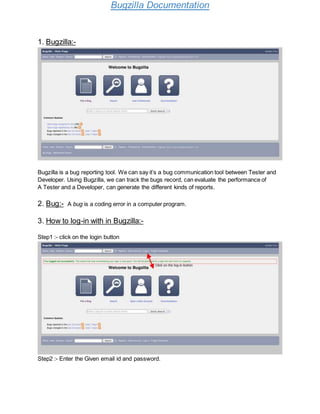
1. Bugzilla:-
Bugzilla is a bug reporting tool. We can say it’s a bug communication tool between Tester and
Developer. Using Bugzilla, we can track the bugs record, can evaluate the performance of
A Tester and a Developer, can generate the different kinds of reports.
2. Bug:- A bug is a coding error in a computer program.
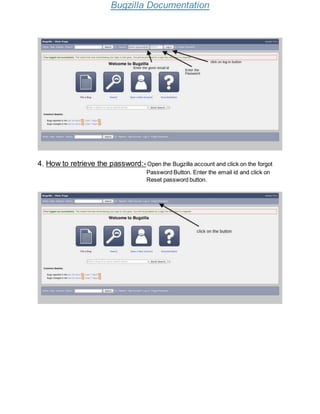
3. How to log-in with in Bugzilla:-
Step1 :- click on the login button
Step2 :- Enter the Given email id and password.
Bugzilla Documentation
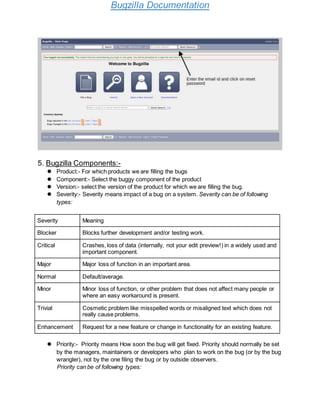
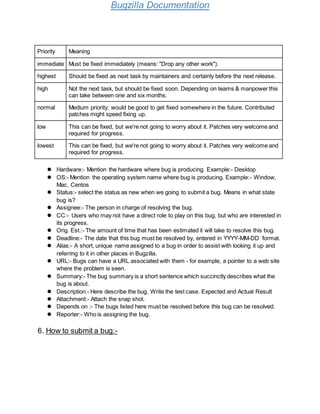
4. How to retrieve the password:-Open the Bugzilla account and click on the forgot
Password Button. Enter the email id and click on
Reset password button.
Bugzilla Documentation
5. Bugzilla Components:-
 Product:- For which products we are filling the bugs
 Component:- Select the buggy component of the product
 Version:- select the version of the product for which we are filling the bug.
 Severity:- Severity means impact of a bug on a system. Severity can be of following
types:
Severity Meaning
Blocker Blocks further development and/or testing work.
Critical Crashes, loss of data (internally, not your edit preview!) in a widely used and
important component.
Major Major loss of function in an important area.
Normal Default/average.
Minor Minor loss of function, or other problem that does not affect many people or
where an easy workaround is present.
Trivial Cosmetic problem like misspelled words or misaligned text which does not
really cause problems.
Enhancement Request for a new feature or change in functionality for an existing feature.
 Priority:- Priority means How soon the bug will get fixed. Priority should normally be set
by the managers, maintainers or developers who plan to work on the bug (or by the bug
wrangler), not by the one filing the bug or by outside observers.
Priority can be of following types:
Bugzilla Documentation
Priority Meaning
immediate Must be fixed immediately (means: "Drop any other work").
highest Should be fixed as next task by maintainers and certainly before the next release.
high Not the next task, but should be fixed soon. Depending on teams & manpower this
can take between one and six months.
normal Medium priority; would be good to get fixed somewhere in the future. Contributed
patches might speed fixing up.
low This can be fixed, but we're not going to worry about it. Patches very welcome and
required for progress.
lowest This can be fixed, but we're not going to worry about it. Patches very welcome and
required for progress.
 Hardware:- Mention the hardware where bug is producing. Example:- Desktop
 OS:- Mention the operating system name where bug is producing. Example:- Window,
Mac, Centos
 Status:- select the status as new when we going to submit a bug. Means in what state
bug is?
 Assignee:- The person in charge of resolving the bug.
 CC:- Users who may not have a direct role to play on this bug, but who are interested in
its progress.
 Orig. Est.:- The amount of time that has been estimated it will take to resolve this bug.
 Deadline:- The date that this bug must be resolved by, entered in YYYY-MM-DD format.
 Alias:- A short, unique name assigned to a bug in order to assist with looking it up and
referring to it in other places in Bugzilla.
 URL:- Bugs can have a URL associated with them - for example, a pointer to a web site
where the problem is seen.
 Summary:- The bug summary is a short sentence which succinctly describes what the
bug is about.
 Description:- Here describe the bug. Write the test case. Expected and Actual Result
 Attachment:- Attach the snap shot.
 Depends on :- The bugs listed here must be resolved before this bug can be resolved.
 Reporter:- Who is assigning the bug.
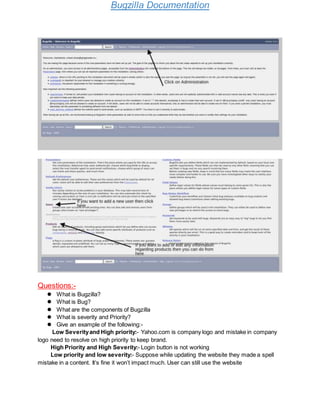
6. How to submit a bug:-
Bugzilla Documentation
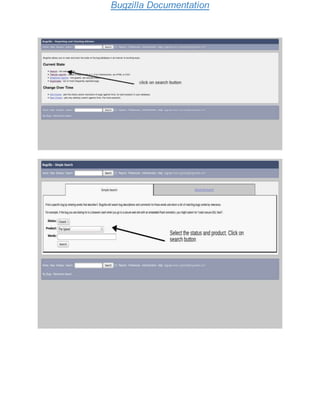
7. How to Generate Reports:-
Bugzilla Documentation
If you want to search all the bugs of a product :-
Bugzilla Documentation
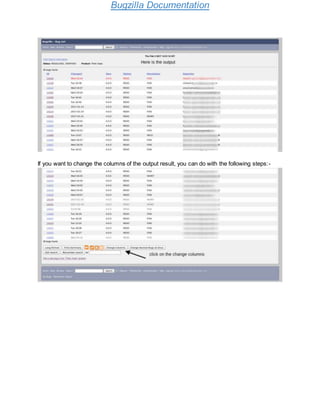
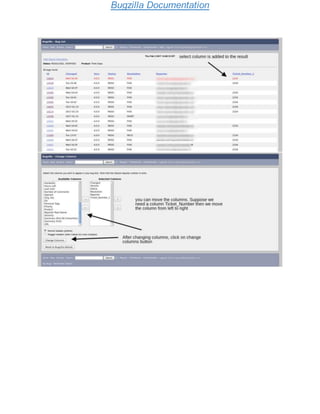
If you want to change the columns of the output result, you can do with the following steps:-
Bugzilla Documentation
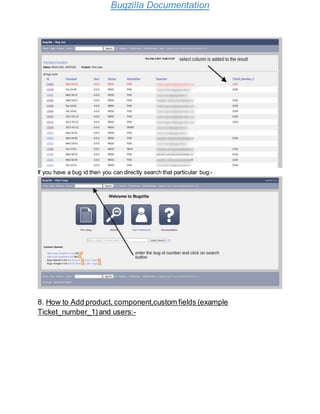
If you have a bug id then you can directly search that particular bug:-
8. How to Add product, component,custom fields (example
Ticket_number_1)and users:-
Bugzilla Documentation
Questions:-
 What is Bugzilla?
 What is Bug?
 What are the components of Bugzilla
 What is severity and Priority?
 Give an example of the following:-
Low Severityand High priority:- Yahoo.com is company logo and mistake in company
logo need to resolve on high priority to keep brand.
High Priority and High Severity:- Login button is not working
Low priority and low severity:- Suppose while updating the website they made a spell
mistake in a content. It’s fine it won’t impact much. User can still use the website
Bugzilla Documentation
Low priority and High severity:- Suppose you have an application which is having
functionality of exporting to Excel File. But that functionality is totally not working. So in this case
the Severityis Very High. But for current release this functionality is not useful, means user
may not use the Export function, so here is have Low Priority.
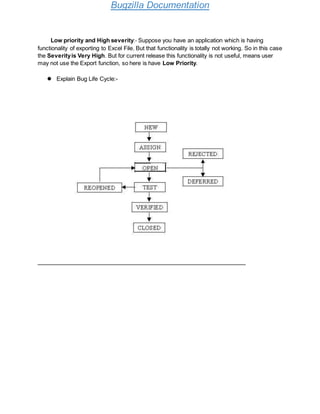
 Explain Bug Life Cycle:-
Bugzilla Documentation
STATUS
The Status field indicates the current state of
a bug. Only certain status transitions are
allowed.
Resolution
The Resolution field indicates what happened
to this bug.
Open Bugs
UNCONFIRMED
This bug has recently been added to the
database. Nobody has confirmed that this
bug is valid. Users who have the "can
confirm" permission set may confirm this bug,
changing its state to CONFIRMED. Or, it may
be directly resolved and marked RESOLVED.
CONFIRMED
This bug is valid and has recently been filed.
Bugs in this state become IN_PROGRESS
when somebody is working on them, or
become resolved and marked RESOLVED.
IN_PROGRESS
This bug is not yet resolved, but is assigned
to the proper person who is working on the
bug. From here, bugs can be given to another
person and become CONFIRMED, or
resolved and become RESOLVED.
No resolution yet. All bugs which are in one of
these "open" states have no resolution set.
Closed Bugs
RESOLVED
A resolution has been performed, and it is
awaiting verification by QA. From here bugs
are either reopened and given some open
status, or are verified by QA and marked
VERIFIED.
VERIFIED
QA has looked at the bug and the resolution
and agrees that the appropriate resolution
has been taken. This is the final status for
bugs.
FIXED
A fix for this bug is checked into the tree and
tested.
INVALID
The problem described is not a bug.
WONTFIX
The problem described is a bug which will
never be fixed.
DUPLICATE
The problem is a duplicate of an existing bug.
When a bug is marked as a DUPLICATE, you
will see which bug it is a duplicate of, next to
the resolution.
WORKSFORME
Bugzilla Documentation
All attempts at reproducing this bug were
futile, and reading the code produces no
clues as to why the described behavior would
occur. If more information appears later, the
bug can be reopened.
Deferred Bug:The bug, changed to deferred state means the bug is expected to be fixed in
next releases. The reasons for changing the bug to this state have many factors. Some of them
are priority of the bug may be low, lack of time for the release or the bug may not have major
effect on the software.
Thankyou for your precioustime.
For any Feedback or Query, kindly contact on (lokeshapj@gmail.com)
Bugzilla Documentation

Bugzilla

  • 1.
    Bugzilla Documentation 1. Bugzilla:- Bugzillais a bug reporting tool. We can say it’s a bug communication tool between Tester and Developer. Using Bugzilla, we can track the bugs record, can evaluate the performance of A Tester and a Developer, can generate the different kinds of reports. 2. Bug:- A bug is a coding error in a computer program. 3. How to log-in with in Bugzilla:- Step1 :- click on the login button Step2 :- Enter the Given email id and password.
  • 2.
    Bugzilla Documentation 4. Howto retrieve the password:-Open the Bugzilla account and click on the forgot Password Button. Enter the email id and click on Reset password button.
  • 3.
    Bugzilla Documentation 5. BugzillaComponents:-  Product:- For which products we are filling the bugs  Component:- Select the buggy component of the product  Version:- select the version of the product for which we are filling the bug.  Severity:- Severity means impact of a bug on a system. Severity can be of following types: Severity Meaning Blocker Blocks further development and/or testing work. Critical Crashes, loss of data (internally, not your edit preview!) in a widely used and important component. Major Major loss of function in an important area. Normal Default/average. Minor Minor loss of function, or other problem that does not affect many people or where an easy workaround is present. Trivial Cosmetic problem like misspelled words or misaligned text which does not really cause problems. Enhancement Request for a new feature or change in functionality for an existing feature.  Priority:- Priority means How soon the bug will get fixed. Priority should normally be set by the managers, maintainers or developers who plan to work on the bug (or by the bug wrangler), not by the one filing the bug or by outside observers. Priority can be of following types:
  • 4.
    Bugzilla Documentation Priority Meaning immediateMust be fixed immediately (means: "Drop any other work"). highest Should be fixed as next task by maintainers and certainly before the next release. high Not the next task, but should be fixed soon. Depending on teams & manpower this can take between one and six months. normal Medium priority; would be good to get fixed somewhere in the future. Contributed patches might speed fixing up. low This can be fixed, but we're not going to worry about it. Patches very welcome and required for progress. lowest This can be fixed, but we're not going to worry about it. Patches very welcome and required for progress.  Hardware:- Mention the hardware where bug is producing. Example:- Desktop  OS:- Mention the operating system name where bug is producing. Example:- Window, Mac, Centos  Status:- select the status as new when we going to submit a bug. Means in what state bug is?  Assignee:- The person in charge of resolving the bug.  CC:- Users who may not have a direct role to play on this bug, but who are interested in its progress.  Orig. Est.:- The amount of time that has been estimated it will take to resolve this bug.  Deadline:- The date that this bug must be resolved by, entered in YYYY-MM-DD format.  Alias:- A short, unique name assigned to a bug in order to assist with looking it up and referring to it in other places in Bugzilla.  URL:- Bugs can have a URL associated with them - for example, a pointer to a web site where the problem is seen.  Summary:- The bug summary is a short sentence which succinctly describes what the bug is about.  Description:- Here describe the bug. Write the test case. Expected and Actual Result  Attachment:- Attach the snap shot.  Depends on :- The bugs listed here must be resolved before this bug can be resolved.  Reporter:- Who is assigning the bug. 6. How to submit a bug:-
  • 5.
  • 6.
  • 7.
    Bugzilla Documentation 7. Howto Generate Reports:-
  • 8.
  • 9.
  • 10.
    Bugzilla Documentation If youwant to search all the bugs of a product :-
  • 11.
  • 12.
    Bugzilla Documentation If youwant to change the columns of the output result, you can do with the following steps:-
  • 13.
  • 14.
    Bugzilla Documentation If youhave a bug id then you can directly search that particular bug:- 8. How to Add product, component,custom fields (example Ticket_number_1)and users:-
  • 15.
    Bugzilla Documentation Questions:-  Whatis Bugzilla?  What is Bug?  What are the components of Bugzilla  What is severity and Priority?  Give an example of the following:- Low Severityand High priority:- Yahoo.com is company logo and mistake in company logo need to resolve on high priority to keep brand. High Priority and High Severity:- Login button is not working Low priority and low severity:- Suppose while updating the website they made a spell mistake in a content. It’s fine it won’t impact much. User can still use the website
  • 16.
    Bugzilla Documentation Low priorityand High severity:- Suppose you have an application which is having functionality of exporting to Excel File. But that functionality is totally not working. So in this case the Severityis Very High. But for current release this functionality is not useful, means user may not use the Export function, so here is have Low Priority.  Explain Bug Life Cycle:-
  • 17.
    Bugzilla Documentation STATUS The Statusfield indicates the current state of a bug. Only certain status transitions are allowed. Resolution The Resolution field indicates what happened to this bug. Open Bugs UNCONFIRMED This bug has recently been added to the database. Nobody has confirmed that this bug is valid. Users who have the "can confirm" permission set may confirm this bug, changing its state to CONFIRMED. Or, it may be directly resolved and marked RESOLVED. CONFIRMED This bug is valid and has recently been filed. Bugs in this state become IN_PROGRESS when somebody is working on them, or become resolved and marked RESOLVED. IN_PROGRESS This bug is not yet resolved, but is assigned to the proper person who is working on the bug. From here, bugs can be given to another person and become CONFIRMED, or resolved and become RESOLVED. No resolution yet. All bugs which are in one of these "open" states have no resolution set. Closed Bugs RESOLVED A resolution has been performed, and it is awaiting verification by QA. From here bugs are either reopened and given some open status, or are verified by QA and marked VERIFIED. VERIFIED QA has looked at the bug and the resolution and agrees that the appropriate resolution has been taken. This is the final status for bugs. FIXED A fix for this bug is checked into the tree and tested. INVALID The problem described is not a bug. WONTFIX The problem described is a bug which will never be fixed. DUPLICATE The problem is a duplicate of an existing bug. When a bug is marked as a DUPLICATE, you will see which bug it is a duplicate of, next to the resolution. WORKSFORME
  • 18.
    Bugzilla Documentation All attemptsat reproducing this bug were futile, and reading the code produces no clues as to why the described behavior would occur. If more information appears later, the bug can be reopened. Deferred Bug:The bug, changed to deferred state means the bug is expected to be fixed in next releases. The reasons for changing the bug to this state have many factors. Some of them are priority of the bug may be low, lack of time for the release or the bug may not have major effect on the software. Thankyou for your precioustime. For any Feedback or Query, kindly contact on (lokeshapj@gmail.com)
  • 19.