Defect Reporting and Tracking
Igor Vysotskiy
June
2014
Agenda
1. What is Bug
2. Defect Report
3. Structure
4. Life cycle of Bug
5. Bug Tracking
6. Conclusion
7. Examples
What is Bug
In testing process when a tester executes the test cases he might observe that the
actual test results do not match from the expected results. The variation in the
expected and actual results is known as defects, or bug.
Term "bug“ used to describe inexplicable defects has been a part of engineering jargon
for many decades and predates computers and computer software; it may have
originally been used in hardware engineering to describe mechanical malfunctions.
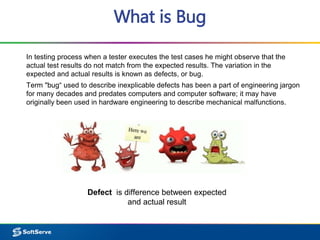
Defect is difference between expected
and actual result
Defect Report
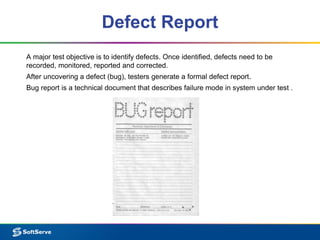
A major test objective is to identify defects. Once identified, defects need to be
recorded, monitored, reported and corrected.
After uncovering a defect (bug), testers generate a formal defect report.
Bug report is a technical document that describes failure mode in system under test .
Structure
Defect report or Bug report consists of the following information:
▪ ID – Unique identifier given to the defect.
▪ Project – Project name
▪ Product – Product name
▪ Release Version – Release version of the product
▪ Detected Build Version – Build version of the product where the defect was
detected
▪ Summary – Brief summary of the defect
▪ Description – Detailed description of the defect.
▪ Steps to Replicate – Step by step description of the way to reproduce the defect.
▪ Actual Result – The actual result you received when you followed the steps.
▪ Expected Results – The expected results.
▪ Attachments – Attach any additional information like screenshots and logs.
▪ Remarks – Any additional comments to the defect.
▪ Reported By – The name of the person who reported the defect.
Structure
▪ Assigned To – The name of the person that is assigned to analyze/fix the defect.
▪ Fixed by – This field includes the details of the developer who fixed it like Name and
ID
▪ Date Closed – This includes the Date when the bug is closed
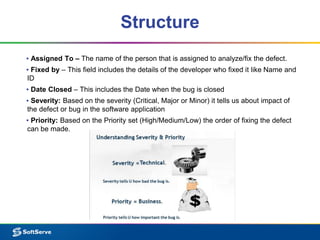
▪ Severity: Based on the severity (Critical, Major or Minor) it tells us about impact of
the defect or bug in the software application
▪ Priority: Based on the Priority set (High/Medium/Low) the order of fixing the defect
can be made.
Structure
DEFECT SEVERITY CLASSIFICATION:
 Critical - this defect is causing system failure. Nothing can proceed further.
 Major - highly severe defect, is causing the system to collapse, however few
parts of the system are still usable, and/or there are a few workarounds for using
the system in the collapsed state too
 Medium - is causing some undesirable behavior, however system / feature is
still usable to a high degree
 Low - is more of a cosmetic issue. No serious impedance to system functionality
is noted.
DEFECT PRIORITY CLASSIFICATION:
 High: Must be fixed in any of the upcoming builds but should be included in the
release.
 Medium: May be fixed after the release / in the next release.
 Low: May or may not be fixed at all
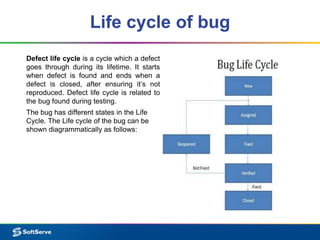
Life cycle of bug
Defect life cycle is a cycle which a defect
goes through during its lifetime. It starts
when defect is found and ends when a
defect is closed, after ensuring it’s not
reproduced. Defect life cycle is related to
the bug found during testing.
The bug has different states in the Life
Cycle. The Life cycle of the bug can be
shown diagrammatically as follows:
Status
▪ New - When a defect is logged and posted for the first time
▪ Assigned - After the tester has posted the bug, the lead of the tester approves that
the bug is genuine and he assigns the bug to corresponding developer and the
developer team.
▪ Open - At this state the developer has started analyzing and working on the defect
fix.
▪ Fixed - When developer makes necessary code changes and verifies the changes
then he/she can make bug status as ‘Fixed’ and the bug is passed to testing team.
▪ Verified - The tester tests the bug again after it got fixed by the developer.
▪ Reopened - If the bug still exists even after the bug is fixed by the developer, the
tester changes the status to “reopened”. The bug goes through the life cycle once
again.
▪ Closed bug - Once the bug is fixed, it is tested by the tester. If the tester feels that
the bug no longer exists in the software, he changes the status of the bug to “closed”.
This state means that the bug is fixed, tested and approved.
Bug tracking
Bug tracking is a process used by quality assurance personnel and programmers to
keep track of software problems and resolutions.
Bug tracking is important since complex software products can have tens of
thousands of defects (or possibly more). Managing, evaluating and prioritizing these
defects is a time consuming task. To help with this task, development teams use bug
tracking software which are database systems that store defects and help team
members manage issues.
Bug tracking systems include a database, which keeps track of facts pertaining to
each bug. These facts might include the time a bug was reported, its severity, incorrect
program behavior, details on how to recreate the bug,who reported the bug and what
the programmers did to fix it. Bug tracking systems are associated with a bug's life
cycle, which is tracked through the status assigned to each bug.
Conclusion
A software bug can cause faulty functionality, instability or even failure within an
application or program. Fortunately, during the development phase, the software
testing and quality assurance (QA) process addresses bug issues. The primary
mission of testing teams and individual software testers is to comb through a program’s
code in order to detect mistakes and defects.
Defect reporting and tracking - it's very important and responsible part of testers work.
Quality indicators for good bug reports
▪– Clear for understanding(especially the summary)
▪– Actionable by development
▪– Move quickly from opened to closed
▪– Include only one problem per report
Example
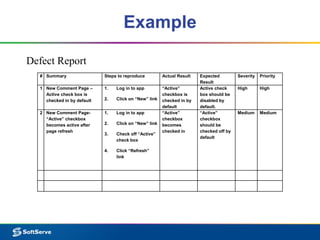
Defect Report
# Summary Steps to reproduce Actual Result Expected
Result
Severity Priority
1 New Comment Page –
Active check box is
checked in by default
1. Log in to app
2. Click on “New” link
“Active”
checkbox is
checked in by
default
Active check
box should be
disabled by
default.
High High
2 New Comment Page-
“Active” checkbox
becomes active after
page refresh
1. Log in to app
2. Click on “New” link
3. Check off “Active”
check box
4. Click “Refresh”
link
“Active”
checkbox
becomes
checked in
“Active”
checkbox
should be
checked off by
default
Medium Medium
Example
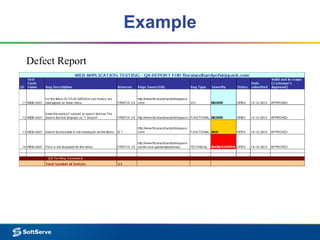
Defect Report
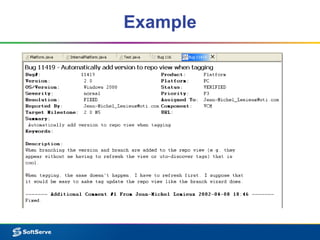
Example
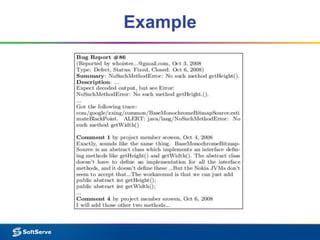
Example
Thank you for attention
Bug reporting and tracking

Bug reporting and tracking

  • 1.
    Defect Reporting andTracking Igor Vysotskiy June 2014
  • 2.
    Agenda 1. What isBug 2. Defect Report 3. Structure 4. Life cycle of Bug 5. Bug Tracking 6. Conclusion 7. Examples
  • 3.
    What is Bug Intesting process when a tester executes the test cases he might observe that the actual test results do not match from the expected results. The variation in the expected and actual results is known as defects, or bug. Term "bug“ used to describe inexplicable defects has been a part of engineering jargon for many decades and predates computers and computer software; it may have originally been used in hardware engineering to describe mechanical malfunctions. Defect is difference between expected and actual result
  • 4.
    Defect Report A majortest objective is to identify defects. Once identified, defects need to be recorded, monitored, reported and corrected. After uncovering a defect (bug), testers generate a formal defect report. Bug report is a technical document that describes failure mode in system under test .
  • 5.
    Structure Defect report orBug report consists of the following information: ▪ ID – Unique identifier given to the defect. ▪ Project – Project name ▪ Product – Product name ▪ Release Version – Release version of the product ▪ Detected Build Version – Build version of the product where the defect was detected ▪ Summary – Brief summary of the defect ▪ Description – Detailed description of the defect. ▪ Steps to Replicate – Step by step description of the way to reproduce the defect. ▪ Actual Result – The actual result you received when you followed the steps. ▪ Expected Results – The expected results. ▪ Attachments – Attach any additional information like screenshots and logs. ▪ Remarks – Any additional comments to the defect. ▪ Reported By – The name of the person who reported the defect.
  • 6.
    Structure ▪ Assigned To– The name of the person that is assigned to analyze/fix the defect. ▪ Fixed by – This field includes the details of the developer who fixed it like Name and ID ▪ Date Closed – This includes the Date when the bug is closed ▪ Severity: Based on the severity (Critical, Major or Minor) it tells us about impact of the defect or bug in the software application ▪ Priority: Based on the Priority set (High/Medium/Low) the order of fixing the defect can be made.
  • 7.
    Structure DEFECT SEVERITY CLASSIFICATION: Critical - this defect is causing system failure. Nothing can proceed further.  Major - highly severe defect, is causing the system to collapse, however few parts of the system are still usable, and/or there are a few workarounds for using the system in the collapsed state too  Medium - is causing some undesirable behavior, however system / feature is still usable to a high degree  Low - is more of a cosmetic issue. No serious impedance to system functionality is noted. DEFECT PRIORITY CLASSIFICATION:  High: Must be fixed in any of the upcoming builds but should be included in the release.  Medium: May be fixed after the release / in the next release.  Low: May or may not be fixed at all
  • 8.
    Life cycle ofbug Defect life cycle is a cycle which a defect goes through during its lifetime. It starts when defect is found and ends when a defect is closed, after ensuring it’s not reproduced. Defect life cycle is related to the bug found during testing. The bug has different states in the Life Cycle. The Life cycle of the bug can be shown diagrammatically as follows:
  • 9.
    Status ▪ New -When a defect is logged and posted for the first time ▪ Assigned - After the tester has posted the bug, the lead of the tester approves that the bug is genuine and he assigns the bug to corresponding developer and the developer team. ▪ Open - At this state the developer has started analyzing and working on the defect fix. ▪ Fixed - When developer makes necessary code changes and verifies the changes then he/she can make bug status as ‘Fixed’ and the bug is passed to testing team. ▪ Verified - The tester tests the bug again after it got fixed by the developer. ▪ Reopened - If the bug still exists even after the bug is fixed by the developer, the tester changes the status to “reopened”. The bug goes through the life cycle once again. ▪ Closed bug - Once the bug is fixed, it is tested by the tester. If the tester feels that the bug no longer exists in the software, he changes the status of the bug to “closed”. This state means that the bug is fixed, tested and approved.
  • 10.
    Bug tracking Bug trackingis a process used by quality assurance personnel and programmers to keep track of software problems and resolutions. Bug tracking is important since complex software products can have tens of thousands of defects (or possibly more). Managing, evaluating and prioritizing these defects is a time consuming task. To help with this task, development teams use bug tracking software which are database systems that store defects and help team members manage issues. Bug tracking systems include a database, which keeps track of facts pertaining to each bug. These facts might include the time a bug was reported, its severity, incorrect program behavior, details on how to recreate the bug,who reported the bug and what the programmers did to fix it. Bug tracking systems are associated with a bug's life cycle, which is tracked through the status assigned to each bug.
  • 11.
    Conclusion A software bugcan cause faulty functionality, instability or even failure within an application or program. Fortunately, during the development phase, the software testing and quality assurance (QA) process addresses bug issues. The primary mission of testing teams and individual software testers is to comb through a program’s code in order to detect mistakes and defects. Defect reporting and tracking - it's very important and responsible part of testers work. Quality indicators for good bug reports ▪– Clear for understanding(especially the summary) ▪– Actionable by development ▪– Move quickly from opened to closed ▪– Include only one problem per report
  • 12.
    Example Defect Report # SummarySteps to reproduce Actual Result Expected Result Severity Priority 1 New Comment Page – Active check box is checked in by default 1. Log in to app 2. Click on “New” link “Active” checkbox is checked in by default Active check box should be disabled by default. High High 2 New Comment Page- “Active” checkbox becomes active after page refresh 1. Log in to app 2. Click on “New” link 3. Check off “Active” check box 4. Click “Refresh” link “Active” checkbox becomes checked in “Active” checkbox should be checked off by default Medium Medium
  • 13.
  • 14.
  • 15.
  • 16.
    Thank you forattention