GIT
&
Source Tree
Author:
TU Tran
Skype: tranthanhtu83
Resources
TU Tran
- Git: https://git-scm.com/
- SourceTree: https://www.sourcetreeapp.com/
- Git command line: https://tortoisegit.org/
 Overview
 DVCS vs CVCS
 Git
 SourceTree
 Branching Model
Agenda
TU Tran
Overview
TU Tran
- Install GIT
- Clone, checkout, commit, push, pull
DVCS vs CVCS
TU Tran
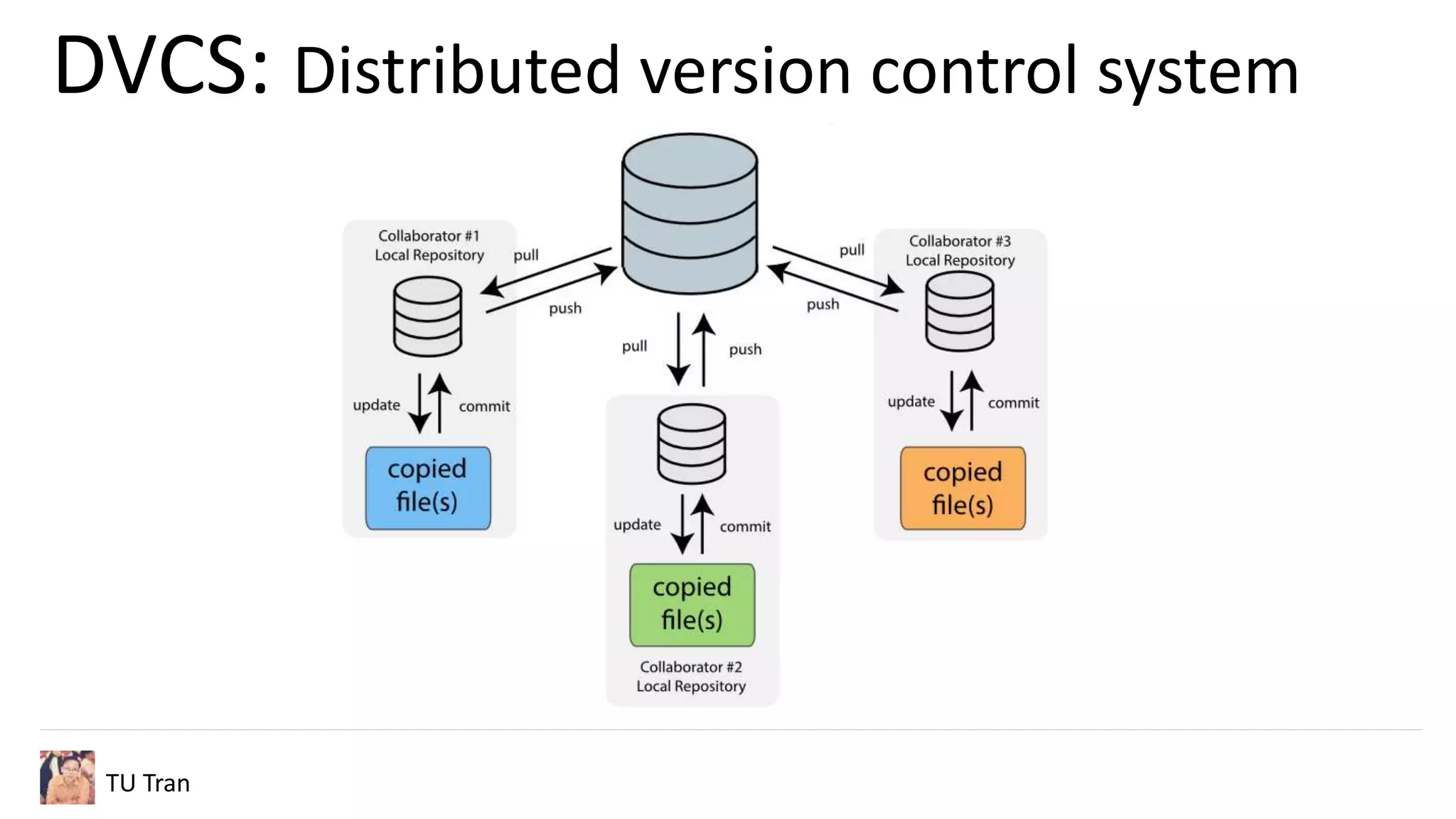
DVCS: Distributed version control system
Example: Git, Mercurial
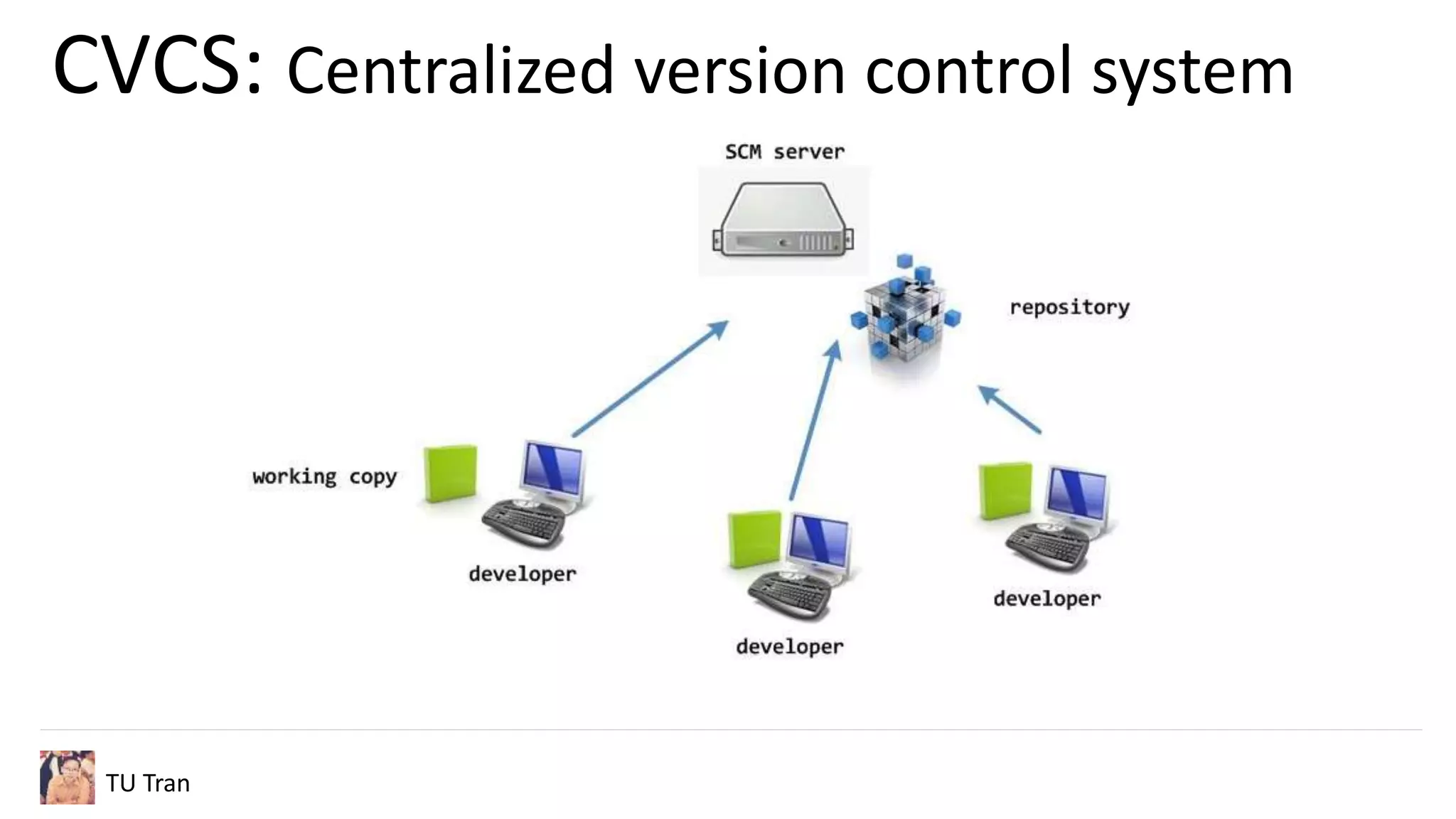
CVCS: Centralized Version Control System
Example: CVS, Perforce, SVN
CVCS: Centralized version control system
TU Tran
DVCS: Distributed version control system
TU Tran
GIT
TU Tran
- Install Git on local
- Checkout code from remote
- Create + push Branch
- Merge Branch
- Resolve Conflict
SourceTree
TU Tran
- Install Git on local
- Checkout code from remote
- Create + push Branch
- Merge Branch
- Resolve Conflict
Branching Model
TU Tran
- Implement new features
- Finalizing current code for new release
- Hotfix
Branching Model/ Overview
TU Tran
Branching Model/ Feature branch
TU Tran
- Scenario:
- Develop should not impact to others during implementing
their tasks/ features
- Solution:
- Create new branch from develop
- Implement your feature there
- Merge back to develop when completed
Branching Model/ Release branch
TU Tran
- Scenario:
- Completed features need to be tested before delivering to
customer
- Develops can continue on other features in parallel
- Solution:
- Create new branch from develop
- Testing your complemented features and fix bugs
- Merge to master, develop branches when ready for new
release
Branching Model/ Hotfix branch
TU Tran
- Scenario:
- We found bugs on production need to be fixed SAP
- Solution:
- Create new branch from master
- Fix bugs and re-test on staging
- Merge to master, develop branches
Branching Model/ Review
TU Tran
TU Tran
Thank You

Git & SourceTree

Editor's Notes

  • #5 Download and install both UI and commandline tool Clone and perform basic actions in git
  • #6 Which become common today and why?
  • #7 Easy to commit the mistake into central repo Can not work offline Commit unfinished feature into remote and break others in the team work on the same branch => Hard to co-operate with others
  • #8 Can work offline, commit local unfinished feature Push to remote only when finish the feature Rollback on local Avoid breaking others Fast: Commit, reverse, diff on local
  • #9 Ignore files Work on the same folder New code from new branch will sreplace old code
  • #10 Gitflow tool Local vs remote Add more remote source
  • #11 The team can continue their works while preparing new release
  • #12 Explain each and when we need it
  • #13 Team have many members 1 members can break others by typo mistake It can be future feature, not release at the moment -> Each member need to have their own work space
  • #14 We should only have a few members working on this Explain why we need to merge back to develop Suitable for minor bugs Create new branch for big bugs? Or missing features???
  • #15 Issue found in old version of release , old tag?? If having release branch, merge to release branch instead of develop
  • #16 Explain each and when we need it