1
Breach and Attack Simulation
Open Source Tools
2
Overview
• Security measures
• Attack Cycle
• What is Breach and Attack Simulation (BAS)
• Why Use BAS tools
• Overview of the MITRE ATT&CK Matrix
• Overview of the various tools
3
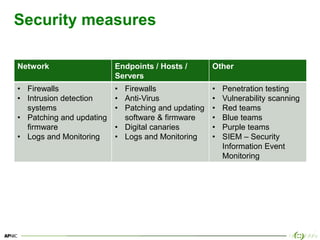
Security measures
Network Endpoints / Hosts /
Servers
Other
• Firewalls
• Intrusion detection
systems
• Patching and updating
firmware
• Logs and Monitoring
• Firewalls
• Anti-Virus
• Patching and updating
software & firmware
• Digital canaries
• Logs and Monitoring
• Penetration testing
• Vulnerability scanning
• Red teams
• Blue teams
• Purple teams
• SIEM – Security
Information Event
Monitoring
4
Modern Defence Strategies
• No matter the security measures, a compromise is likely to
happen
• Therefore a shift towards detection orientated strategies
– Incident Response teams
– Post-Exploitation focus
“Prevention is ideal, but detection is a must”
Hunting for Post-Exploitation Stage Attacks with Elastic Stack and the MITRE ATT&CK Framework – John Hubbard
5
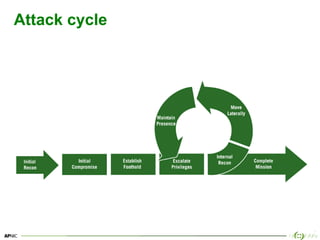
Attack cycle
6
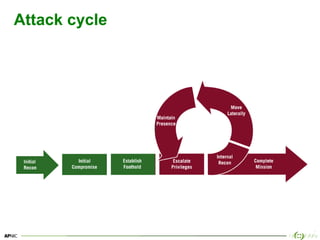
Attack cycle
7
What is Breach and Attack Simulation (BAS)
• Ability to simulate adversarial activities with some degree of
automation. [1]
• May be adversary model based, for example the
Adversarial Tactics, Techniques & Common Knowledge
(ATT&CK™) project. [2]
8
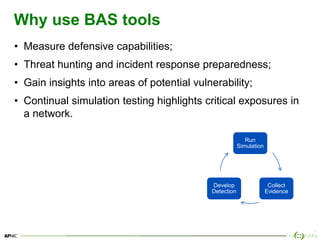
Why use BAS tools
• Measure defensive capabilities;
• Threat hunting and incident response preparedness;
• Gain insights into areas of potential vulnerability;
• Continual simulation testing highlights critical exposures in
a network.
Run
Simulation
Collect
Evidence
Develop
Detection
9
Use Cases
• Early indicators of compromise
• Account Abuse
• Spear phishing technical defenses
• Malware detection and response
• Lateral movement and protected assets compromised
https://vectr.io/security-risk-advisors-simulation/
10
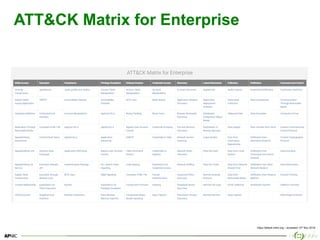
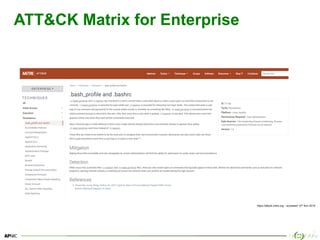
ATT&CK Matrix for Enterprise
https://attack.mitre.org – accessed 12th Nov 2018
11
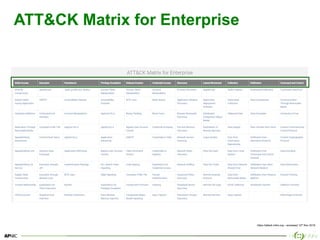
ATT&CK Matrix for Enterprise
https://attack.mitre.org – accessed 12th Nov 2018
12
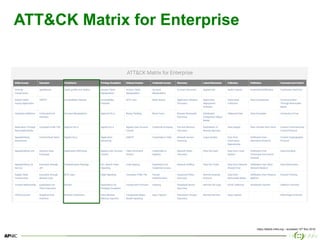
ATT&CK Matrix for Enterprise
https://attack.mitre.org – accessed 12th Nov 2018
13
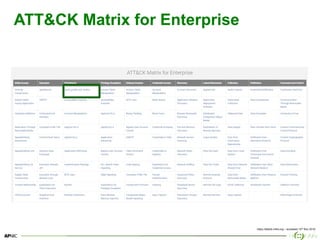
ATT&CK Matrix for Enterprise
https://attack.mitre.org – accessed 12th Nov 2018
14
ATT&CK Matrix for Enterprise
https://attack.mitre.org – accessed 12th Nov 2018
15
ATT&CK Matrix for Enterprise
• Adversarial Tactics, Techniques, and Common Knowledge
(ATT&CK);
• MITRE started this project in 2013 to document common
tactics, techniques, and procedures (TTPs) an adversary
takes while operating within an enterprise network;
• Help organizations understand the stages of attack events;
• Stage of event across top axis and the mechanism for that
stage down the column.
Use it as a check list of what to look for
16
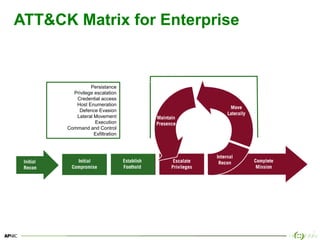
ATT&CK Matrix for Enterprise
Persistance
Privilege escalation
Credential access
Host Enumeration
Defence Evasion
Lateral Movement
Execution
Command and Control
Exfiltration
17
Post exploitation
How are you detecting or monitoring
• Authentication
• Process creation
• Autoruns, scripts, PowerShell
• Network connections from suspicious processes
• Network or Data extraction using DNS, HTTP
• SSL Certs
• Command and Control traffic
18
Open source tools
• Guardicore’s Infection Monkey
– http://infectionmonkey.com
• Uber’s Metta -
– https://github.com/uber-common/metta
• AlphaSOC’s FlightSIM
– https://github.com/alphasoc/flightsim
• Synex Caldera
– https://github.com/mitre/caldera
• Blue team training toolkit (BT3)
– https://www.encripto.no/en/downloads-2/tools/
• Atomic Red Team
– https://atomicredteam.io
• Redhunt OS
– https://github.com/redhuntlabs/RedHunt-OS
* This list is not all of the open source projects and is only limited by the authors knowledge
19
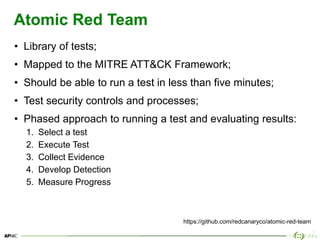
Atomic Red Team
• Library of tests;
• Mapped to the MITRE ATT&CK Framework;
• Should be able to run a test in less than five minutes;
• Test security controls and processes;
• Phased approach to running a test and evaluating results:
1. Select a test
2. Execute Test
3. Collect Evidence
4. Develop Detection
5. Measure Progress
https://github.com/redcanaryco/atomic-red-team
20
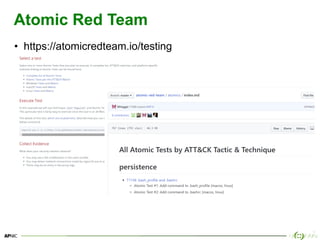
Atomic Red Team
• https://atomicredteam.io/testing
21
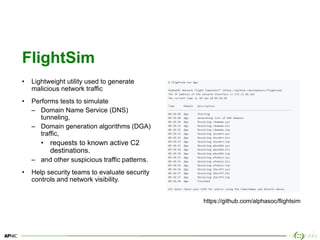
FlightSim
• Lightweight utility used to generate
malicious network traffic
• Performs tests to simulate
– Domain Name Service (DNS)
tunneling,
– Domain generation algorithms (DGA)
traffic,
• requests to known active C2
destinations.
– and other suspicious traffic patterns.
• Help security teams to evaluate security
controls and network visibility.
https://github.com/alphasoc/flightsim
22
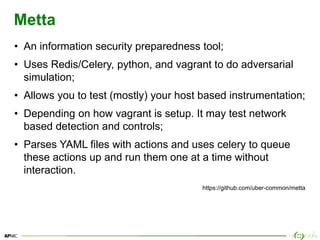
Metta
• An information security preparedness tool;
• Uses Redis/Celery, python, and vagrant to do adversarial
simulation;
• Allows you to test (mostly) your host based instrumentation;
• Depending on how vagrant is setup. It may test network
based detection and controls;
• Parses YAML files with actions and uses celery to queue
these actions up and run them one at a time without
interaction.
https://github.com/uber-common/metta
23
Metta [Installation]
1. sudo apt-get update && apt-get install -y build-essential
2. sudo apt-get install -y redis-server git python-pip screen python-yaml
libcurl3 dkms wget
3. cd ~/Downloads
4. wget -O https://download.virtualbox.org/virtualbox/6.0.4/virtualbox-
6.0_6.0.4-128413~Ubuntu~xenial_amd64.deb
5. sudo dpkg -i virtualbox-6.0_6.0.4-128413~Ubuntu~xenial_amd64.deb
6. sudo -H pip install --user pipenv
7. git clone https://github.com/uber-common/metta.git /home/apnic/metta
8. cd /home/apnic/metta
9. sudo apt-get install -y virtualenv
10.virtualenv metta
11.source metta/bin/activate
12.pip install -r requirements.txt
https://github.com/uber-common/metta
24
Metta [Installation]
1. cd ~/Downloads
2. wget -O https://releases.hashicorp.com/vagrant/2.2.3/vagrant_2.2.3_x86_64.deb
3. sudo dpkg -i vagrant_2.0.0_x86_64.deb
4. cd /home/apnic/metta
5. vagrant init StefanScherer/windows_10
6. vagrant up
7. sudo pip install requests
8. pip install celery
9. pip install redis
https://github.com/uber-common/metta
25
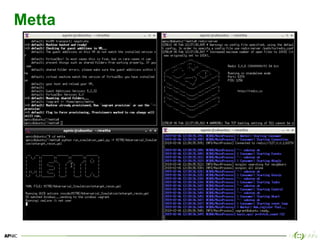
Metta [Starting]
# Open a new terminal and confirm redis is running
cd metta
redis-server
# Open a new terminal and start the celery shell script
cd metta
virtualenv metta
source metta/bin/activate
pip install -r requirements.txt
./start_vagrant_celery.sh
# Open a new terminal and start vagrant
cd metta
vagrant up
# Open a new terminal and start simulation
cd metta
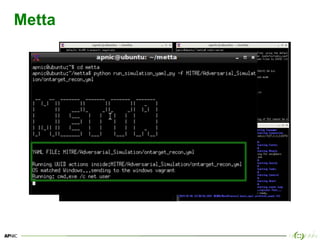
python run_simulation_yaml.py -f MITRE/Adversarial_Simulation/ontarget_recon.yml
https://github.com/uber-common/metta
26
Metta
27
Metta
28
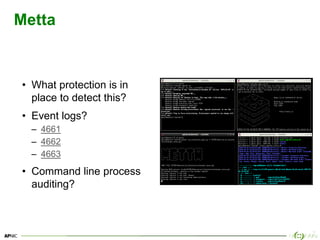
Metta
• What protection is in
place to detect this?
• Event logs?
– 4661
– 4662
– 4663
• Command line process
auditing?
29
Infection Monkey
• Available for download, and as a virtual instance on Azure
and Amazon marketplace.
• Designed to test the resilience of modern data centers and
clouds against cyber attacks.
• Developed by GuardiCore Labs under the GPL v3 open
source license.
• Comprised of two parts:
– Monkey – A tool which infects other machines and propagates to
them
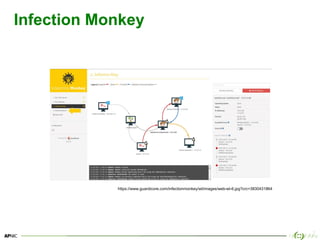
– Monkey Island – A Command & Control server with a dedicated UI to
visualize the Chaos Monkey’s progress
https://github.com/guardicore/monkey
30
Infection Monkey
https://www.guardicore.com/infectionmonkey/wt/images/web-wt-6.jpg?crc=3830431864
31
Caldera
• CALDERA is a MITRE research project;
• An automated adversary emulation system;
• Performs post-compromise adversarial behavior within
Windows Enterprise networks;
• Only supports Windows Enterprise networks that are
configured as a Windows Domain;
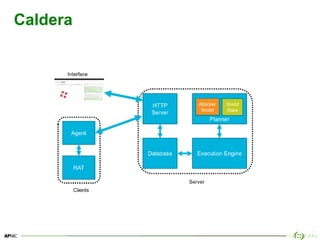
• Generates plans during operation using a planning system
and a pre-configured adversary model based on ATT&CK™
https://github.com/mitre/caldera
32
Caldera
33
Caldera [Installation]
1. docker-ce --version
2. docker-compose --version
3. sudo apt-get update
4. sudo git clone https://github.com/mitre/caldera
5. cd caldera
6. sudo chown -R `whoami`:docker ./caldera/conf
7. cd caldera
8. sudo docker-compose up
# open a web browser
• https://localhost:8888
https://github.com/mitre/caldera
34
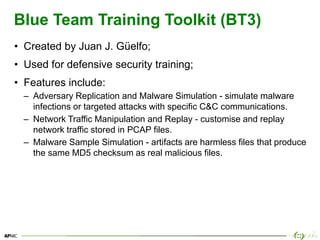
Blue Team Training Toolkit (BT3)
• Created by Juan J. Güelfo;
• Used for defensive security training;
• Features include:
– Adversary Replication and Malware Simulation - simulate malware
infections or targeted attacks with specific C&C communications.
– Network Traffic Manipulation and Replay - customise and replay
network traffic stored in PCAP files.
– Malware Sample Simulation - artifacts are harmless files that produce
the same MD5 checksum as real malicious files.
35
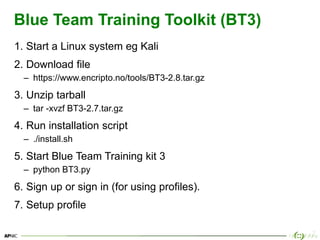
Blue Team Training Toolkit (BT3)
1. Start a Linux system eg Kali
2. Download file
– https://www.encripto.no/tools/BT3-2.8.tar.gz
3. Unzip tarball
– tar -xvzf BT3-2.7.tar.gz
4. Run installation script
– ./install.sh
5. Start Blue Team Training kit 3
– python BT3.py
6. Sign up or sign in (for using profiles).
7. Setup profile
36
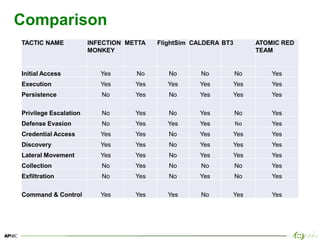
Comparison
TACTIC NAME INFECTION
MONKEY
METTA FlightSim CALDERA BT3 ATOMIC RED
TEAM
Initial Access Yes No No No No Yes
Execution Yes Yes Yes Yes Yes Yes
Persistence No Yes No Yes Yes Yes
Privilege Escalation No Yes No Yes No Yes
Defense Evasion No Yes Yes Yes No Yes
Credential Access Yes Yes No Yes Yes Yes
Discovery Yes Yes No Yes Yes Yes
Lateral Movement Yes Yes No Yes Yes Yes
Collection No Yes No No No Yes
Exfiltration No Yes No Yes No Yes
Command & Control Yes Yes Yes No Yes Yes
37
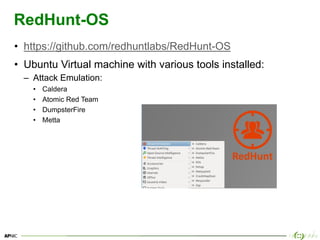
RedHunt-OS
• https://github.com/redhuntlabs/RedHunt-OS
• Ubuntu Virtual machine with various tools installed:
– Attack Emulation:
• Caldera
• Atomic Red Team
• DumpsterFire
• Metta
38
Other resources
• List of Adversary Simulation tools
– http://pentestit.com/adversary-emulation-tools-list/
39
39
40
Issue Date:
Revision:
www.facebook.com/APNIC
www.twitter.com/apnic
www.youtube.com/apnicmultimedia
www.flickr.com/apnic
www.weibo.com/APNICrir

Breach and attack simulation tools

  • 1.
    1 Breach and AttackSimulation Open Source Tools
  • 2.
    2 Overview • Security measures •Attack Cycle • What is Breach and Attack Simulation (BAS) • Why Use BAS tools • Overview of the MITRE ATT&CK Matrix • Overview of the various tools
  • 3.
    3 Security measures Network Endpoints/ Hosts / Servers Other • Firewalls • Intrusion detection systems • Patching and updating firmware • Logs and Monitoring • Firewalls • Anti-Virus • Patching and updating software & firmware • Digital canaries • Logs and Monitoring • Penetration testing • Vulnerability scanning • Red teams • Blue teams • Purple teams • SIEM – Security Information Event Monitoring
  • 4.
    4 Modern Defence Strategies •No matter the security measures, a compromise is likely to happen • Therefore a shift towards detection orientated strategies – Incident Response teams – Post-Exploitation focus “Prevention is ideal, but detection is a must” Hunting for Post-Exploitation Stage Attacks with Elastic Stack and the MITRE ATT&CK Framework – John Hubbard
  • 5.
  • 6.
  • 7.
    7 What is Breachand Attack Simulation (BAS) • Ability to simulate adversarial activities with some degree of automation. [1] • May be adversary model based, for example the Adversarial Tactics, Techniques & Common Knowledge (ATT&CK™) project. [2]
  • 8.
    8 Why use BAStools • Measure defensive capabilities; • Threat hunting and incident response preparedness; • Gain insights into areas of potential vulnerability; • Continual simulation testing highlights critical exposures in a network. Run Simulation Collect Evidence Develop Detection
  • 9.
    9 Use Cases • Earlyindicators of compromise • Account Abuse • Spear phishing technical defenses • Malware detection and response • Lateral movement and protected assets compromised https://vectr.io/security-risk-advisors-simulation/
  • 10.
    10 ATT&CK Matrix forEnterprise https://attack.mitre.org – accessed 12th Nov 2018
  • 11.
    11 ATT&CK Matrix forEnterprise https://attack.mitre.org – accessed 12th Nov 2018
  • 12.
    12 ATT&CK Matrix forEnterprise https://attack.mitre.org – accessed 12th Nov 2018
  • 13.
    13 ATT&CK Matrix forEnterprise https://attack.mitre.org – accessed 12th Nov 2018
  • 14.
    14 ATT&CK Matrix forEnterprise https://attack.mitre.org – accessed 12th Nov 2018
  • 15.
    15 ATT&CK Matrix forEnterprise • Adversarial Tactics, Techniques, and Common Knowledge (ATT&CK); • MITRE started this project in 2013 to document common tactics, techniques, and procedures (TTPs) an adversary takes while operating within an enterprise network; • Help organizations understand the stages of attack events; • Stage of event across top axis and the mechanism for that stage down the column. Use it as a check list of what to look for
  • 16.
    16 ATT&CK Matrix forEnterprise Persistance Privilege escalation Credential access Host Enumeration Defence Evasion Lateral Movement Execution Command and Control Exfiltration
  • 17.
    17 Post exploitation How areyou detecting or monitoring • Authentication • Process creation • Autoruns, scripts, PowerShell • Network connections from suspicious processes • Network or Data extraction using DNS, HTTP • SSL Certs • Command and Control traffic
  • 18.
    18 Open source tools •Guardicore’s Infection Monkey – http://infectionmonkey.com • Uber’s Metta - – https://github.com/uber-common/metta • AlphaSOC’s FlightSIM – https://github.com/alphasoc/flightsim • Synex Caldera – https://github.com/mitre/caldera • Blue team training toolkit (BT3) – https://www.encripto.no/en/downloads-2/tools/ • Atomic Red Team – https://atomicredteam.io • Redhunt OS – https://github.com/redhuntlabs/RedHunt-OS * This list is not all of the open source projects and is only limited by the authors knowledge
  • 19.
    19 Atomic Red Team •Library of tests; • Mapped to the MITRE ATT&CK Framework; • Should be able to run a test in less than five minutes; • Test security controls and processes; • Phased approach to running a test and evaluating results: 1. Select a test 2. Execute Test 3. Collect Evidence 4. Develop Detection 5. Measure Progress https://github.com/redcanaryco/atomic-red-team
  • 20.
    20 Atomic Red Team •https://atomicredteam.io/testing
  • 21.
    21 FlightSim • Lightweight utilityused to generate malicious network traffic • Performs tests to simulate – Domain Name Service (DNS) tunneling, – Domain generation algorithms (DGA) traffic, • requests to known active C2 destinations. – and other suspicious traffic patterns. • Help security teams to evaluate security controls and network visibility. https://github.com/alphasoc/flightsim
  • 22.
    22 Metta • An informationsecurity preparedness tool; • Uses Redis/Celery, python, and vagrant to do adversarial simulation; • Allows you to test (mostly) your host based instrumentation; • Depending on how vagrant is setup. It may test network based detection and controls; • Parses YAML files with actions and uses celery to queue these actions up and run them one at a time without interaction. https://github.com/uber-common/metta
  • 23.
    23 Metta [Installation] 1. sudoapt-get update && apt-get install -y build-essential 2. sudo apt-get install -y redis-server git python-pip screen python-yaml libcurl3 dkms wget 3. cd ~/Downloads 4. wget -O https://download.virtualbox.org/virtualbox/6.0.4/virtualbox- 6.0_6.0.4-128413~Ubuntu~xenial_amd64.deb 5. sudo dpkg -i virtualbox-6.0_6.0.4-128413~Ubuntu~xenial_amd64.deb 6. sudo -H pip install --user pipenv 7. git clone https://github.com/uber-common/metta.git /home/apnic/metta 8. cd /home/apnic/metta 9. sudo apt-get install -y virtualenv 10.virtualenv metta 11.source metta/bin/activate 12.pip install -r requirements.txt https://github.com/uber-common/metta
  • 24.
    24 Metta [Installation] 1. cd~/Downloads 2. wget -O https://releases.hashicorp.com/vagrant/2.2.3/vagrant_2.2.3_x86_64.deb 3. sudo dpkg -i vagrant_2.0.0_x86_64.deb 4. cd /home/apnic/metta 5. vagrant init StefanScherer/windows_10 6. vagrant up 7. sudo pip install requests 8. pip install celery 9. pip install redis https://github.com/uber-common/metta
  • 25.
    25 Metta [Starting] # Opena new terminal and confirm redis is running cd metta redis-server # Open a new terminal and start the celery shell script cd metta virtualenv metta source metta/bin/activate pip install -r requirements.txt ./start_vagrant_celery.sh # Open a new terminal and start vagrant cd metta vagrant up # Open a new terminal and start simulation cd metta python run_simulation_yaml.py -f MITRE/Adversarial_Simulation/ontarget_recon.yml https://github.com/uber-common/metta
  • 26.
  • 27.
  • 28.
    28 Metta • What protectionis in place to detect this? • Event logs? – 4661 – 4662 – 4663 • Command line process auditing?
  • 29.
    29 Infection Monkey • Availablefor download, and as a virtual instance on Azure and Amazon marketplace. • Designed to test the resilience of modern data centers and clouds against cyber attacks. • Developed by GuardiCore Labs under the GPL v3 open source license. • Comprised of two parts: – Monkey – A tool which infects other machines and propagates to them – Monkey Island – A Command & Control server with a dedicated UI to visualize the Chaos Monkey’s progress https://github.com/guardicore/monkey
  • 30.
  • 31.
    31 Caldera • CALDERA isa MITRE research project; • An automated adversary emulation system; • Performs post-compromise adversarial behavior within Windows Enterprise networks; • Only supports Windows Enterprise networks that are configured as a Windows Domain; • Generates plans during operation using a planning system and a pre-configured adversary model based on ATT&CK™ https://github.com/mitre/caldera
  • 32.
  • 33.
    33 Caldera [Installation] 1. docker-ce--version 2. docker-compose --version 3. sudo apt-get update 4. sudo git clone https://github.com/mitre/caldera 5. cd caldera 6. sudo chown -R `whoami`:docker ./caldera/conf 7. cd caldera 8. sudo docker-compose up # open a web browser • https://localhost:8888 https://github.com/mitre/caldera
  • 34.
    34 Blue Team TrainingToolkit (BT3) • Created by Juan J. Güelfo; • Used for defensive security training; • Features include: – Adversary Replication and Malware Simulation - simulate malware infections or targeted attacks with specific C&C communications. – Network Traffic Manipulation and Replay - customise and replay network traffic stored in PCAP files. – Malware Sample Simulation - artifacts are harmless files that produce the same MD5 checksum as real malicious files.
  • 35.
    35 Blue Team TrainingToolkit (BT3) 1. Start a Linux system eg Kali 2. Download file – https://www.encripto.no/tools/BT3-2.8.tar.gz 3. Unzip tarball – tar -xvzf BT3-2.7.tar.gz 4. Run installation script – ./install.sh 5. Start Blue Team Training kit 3 – python BT3.py 6. Sign up or sign in (for using profiles). 7. Setup profile
  • 36.
    36 Comparison TACTIC NAME INFECTION MONKEY METTAFlightSim CALDERA BT3 ATOMIC RED TEAM Initial Access Yes No No No No Yes Execution Yes Yes Yes Yes Yes Yes Persistence No Yes No Yes Yes Yes Privilege Escalation No Yes No Yes No Yes Defense Evasion No Yes Yes Yes No Yes Credential Access Yes Yes No Yes Yes Yes Discovery Yes Yes No Yes Yes Yes Lateral Movement Yes Yes No Yes Yes Yes Collection No Yes No No No Yes Exfiltration No Yes No Yes No Yes Command & Control Yes Yes Yes No Yes Yes
  • 37.
    37 RedHunt-OS • https://github.com/redhuntlabs/RedHunt-OS • UbuntuVirtual machine with various tools installed: – Attack Emulation: • Caldera • Atomic Red Team • DumpsterFire • Metta
  • 38.
    38 Other resources • Listof Adversary Simulation tools – http://pentestit.com/adversary-emulation-tools-list/
  • 39.
  • 40.