2 INTRODUCTION TO TOOLS AND PLATFORMS
Ethical hacking requires a secure and controlled environment for testing cybersecurity techniques,
exploiting vulnerabilities, and improving hacking skills. Virtual Machines (VMs) and dedicated hacking
labs provide safe, cost-effective, and flexible platforms to practice without damaging real-world systems.
 What are Virtual Machines (VMs)?
A Virtual Machine (VM) is a software-based simulation of a physical computer. It runs an operating
system (OS) inside another OS, allowing ethical hackers to experiment without affecting the host system.
For example, if you install Kali Linux in a virtual machine on your Windows laptop, you can practice
penetration testing while keeping your primary OS safe from malware or configuration changes.
 Benefits of Using Virtual Machines for Hacking
 Safe & Controlled Environment – Perform security testing without affecting real networks.
 Cost-Effective – No need for multiple physical machines; run different OSes on one system
 Flexibility – Easily switch between different operating systems (Kali Linux, Parrot OS,
Windows, etc.)
 Snapshots & Rollbacks – If your VM is compromised, restore it to a previous state instantly.
 Portable – Move your hacking lab across different computers using VM images.
 Best Virtualization Software for Ethical Hacking
To run virtual machines, you need virtualization software. Here are the some options:
1. VirtualBox (Free & Open-Source)
 Developed by Oracle, VirtualBox is one of the most popular tools for running VMs.
 Supports Windows, Linux, and macOS as host systems.
 Features snapshot and restore options for safe hacking experiments.
 Best for: Beginners, as it’s free and easy to set up.
2. VMware Workstation Player (Free for Personal Use) & VMware Workstation Pro (Paid)
 VMware Workstation Player is free for personal use, while VMware Pro provides advanced
features.
 More performance-optimized than VirtualBox, with better support for guest OS drivers.
 Best for: Those looking for a powerful and stable virtualization platform.
3. Hyper-V (Windows Only, Built-in Feature)
 Available in Windows 10 Pro, Enterprise, and Windows Server editions.
 Allows users to create and manage virtual machines without third-party software.
 Best for: Windows users who don’t want to install additional virtualization tools.
 What Hardware Do We Need?
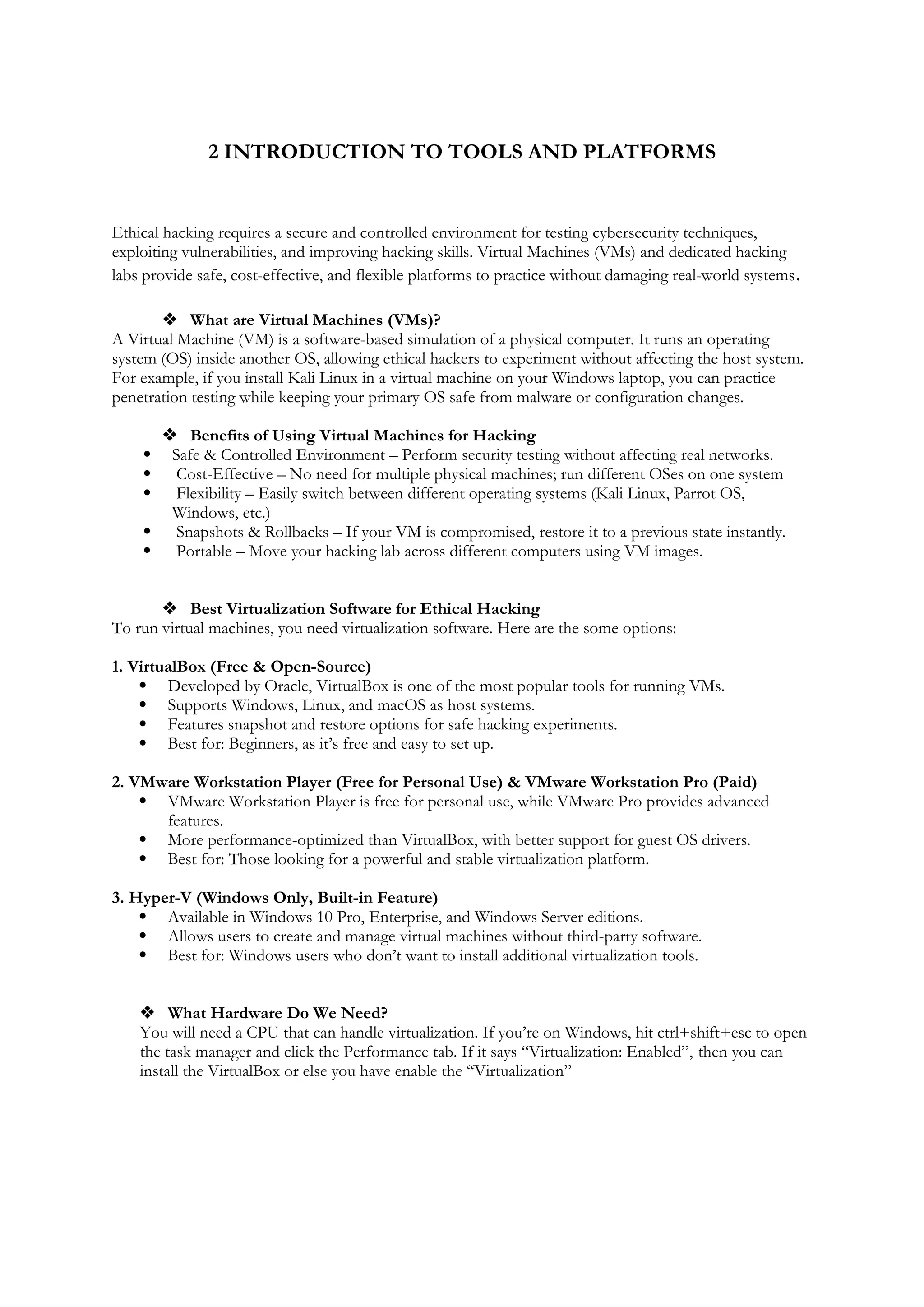
You will need a CPU that can handle virtualization. If you’re on Windows, hit ctrl+shift+esc to open
the task manager and click the Performance tab. If it says “Virtualization: Enabled”, then you can
install the VirtualBox or else you have enable the “Virtualization”
 What Software Do We Need?
To set up your hypervisor - the virtualization software required to run virtual machines - you have several
options, such as HyperV and VMWare (check out this guide on installing Kali Linux on VMWare here).
However, in this, we'll be focusing on installing Oracle's VirtualBox.
 Follow the below steps to get Installed with the Oracle's VirtualBox :
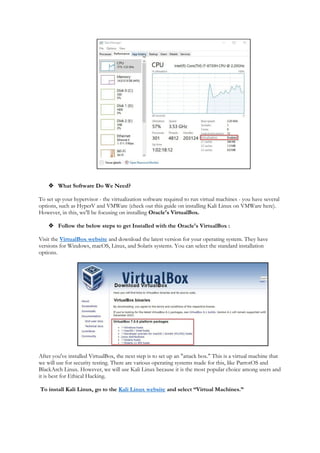
Visit the VirtualBox website and download the latest version for your operating system. They have
versions for Windows, macOS, Linux, and Solaris systems. You can select the standard installation
options.
After you've installed VirtualBox, the next step is to set up an "attack box." This is a virtual machine that
we will use for security testing. There are various operating systems made for this, like ParrotOS and
BlackArch Linux. However, we will use Kali Linux because it is the most popular choice among users and
it is best for Ethical Hacking.
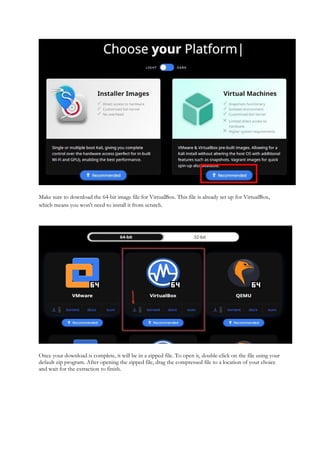
To install Kali Linux, go to the Kali Linux website and select “Virtual Machines.”
Make sure to download the 64-bit image file for VirtualBox. This file is already set up for VirtualBox,
which means you won't need to install it from scratch.
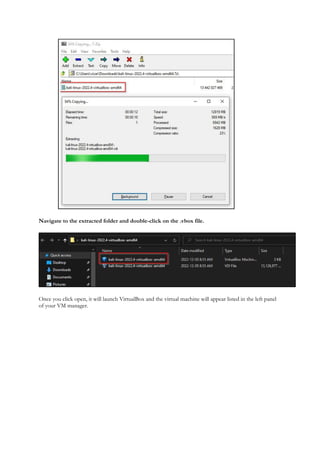
Once your download is complete, it will be in a zipped file. To open it, double-click on the file using your
default zip program. After opening the zipped file, drag the compressed file to a location of your choice
and wait for the extraction to finish.
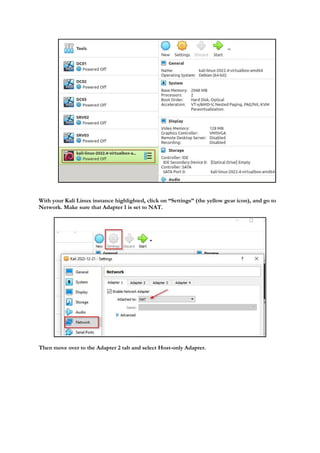
Navigate to the extracted folder and double-click on the .vbox file.
Once you click open, it will launch VirtualBox and the virtual machine will appear listed in the left panel
of your VM manager.
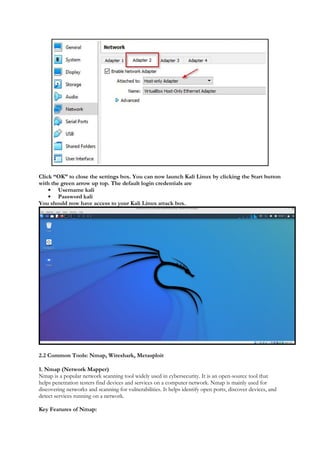
With your Kali Linux instance highlighted, click on “Settings” (the yellow gear icon), and go to
Network. Make sure that Adapter 1 is set to NAT.
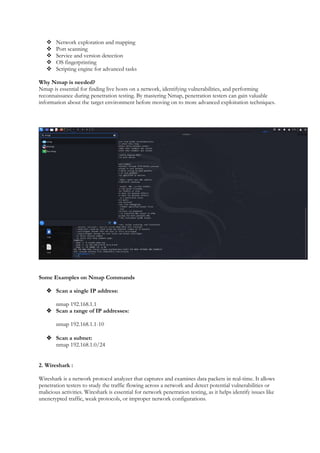
Then move over to the Adapter 2 tab and select Host-only Adapter.
Click “OK” to close the settings box. You can now launch Kali Linux by clicking the Start button
with the green arrow up top. The default login credentials are
 Username kali
 Password kali
You should now have access to your Kali Linux attack box.
2.2 Common Tools: Nmap, Wireshark, Metasploit
1. Nmap (Network Mapper)
Nmap is a popular network scanning tool widely used in cybersecurity. It is an open-source tool that
helps penetration testers find devices and services on a computer network. Nmap is mainly used for
discovering networks and scanning for vulnerabilities. It helps identify open ports, discover devices, and
detect services running on a network.
Key Features of Nmap:
 Network exploration and mapping
 Port scanning
 Service and version detection
 OS fingerprinting
 Scripting engine for advanced tasks
Why Nmap is needed?
Nmap is essential for finding live hosts on a network, identifying vulnerabilities, and performing
reconnaissance during penetration testing. By mastering Nmap, penetration testers can gain valuable
information about the target environment before moving on to more advanced exploitation techniques.
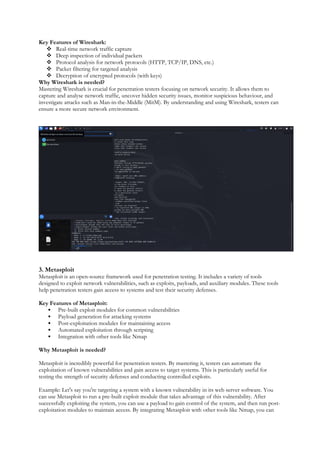
Some Examples on Nmap Commands
 Scan a single IP address:
nmap 192.168.1.1
 Scan a range of IP addresses:
nmap 192.168.1.1-10
 Scan a subnet:
nmap 192.168.1.0/24
2. Wireshark :
Wireshark is a network protocol analyzer that captures and examines data packets in real-time. It allows
penetration testers to study the traffic flowing across a network and detect potential vulnerabilities or
malicious activities. Wireshark is essential for network penetration testing, as it helps identify issues like
unencrypted traffic, weak protocols, or improper network configurations.
Key Features of Wireshark:
 Real-time network traffic capture
 Deep inspection of individual packets
 Protocol analysis for network protocols (HTTP, TCP/IP, DNS, etc.)
 Packet filtering for targeted analysis
 Decryption of encrypted protocols (with keys)
Why Wireshark is needed?
Mastering Wireshark is crucial for penetration testers focusing on network security. It allows them to
capture and analyse network traffic, uncover hidden security issues, monitor suspicious behaviour, and
investigate attacks such as Man-in-the-Middle (MitM). By understanding and using Wireshark, testers can
ensure a more secure network environment.
3. Metasploit
Metasploit is an open-source framework used for penetration testing. It includes a variety of tools
designed to exploit network vulnerabilities, such as exploits, payloads, and auxiliary modules. These tools
help penetration testers gain access to systems and test their security defenses.
Key Features of Metasploit:
 Pre-built exploit modules for common vulnerabilities
 Payload generation for attacking systems
 Post-exploitation modules for maintaining access
 Automated exploitation through scripting
 Integration with other tools like Nmap
Why Metasploit is needed?
Metasploit is incredibly powerful for penetration testers. By mastering it, testers can automate the
exploitation of known vulnerabilities and gain access to target systems. This is particularly useful for
testing the strength of security defenses and conducting controlled exploits.
Example: Let's say you're targeting a system with a known vulnerability in its web server software. You
can use Metasploit to run a pre-built exploit module that takes advantage of this vulnerability. After
successfully exploiting the system, you can use a payload to gain control of the system, and then run post-
exploitation modules to maintain access. By integrating Metasploit with other tools like Nmap, you can
perform comprehensive security assessments and uncover potential weaknesses in the network.
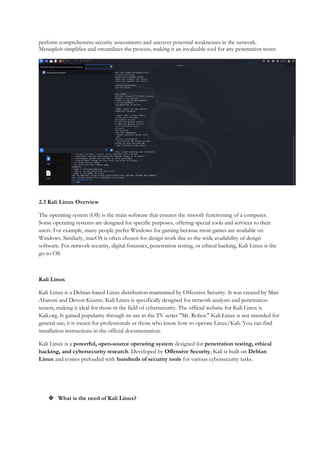
Metasploit simplifies and streamlines the process, making it an invaluable tool for any penetration tester.
2.3 Kali Linux Overview
The operating system (OS) is the main software that ensures the smooth functioning of a computer.
Some operating systems are designed for specific purposes, offering special tools and services to their
users. For example, many people prefer Windows for gaming because most games are available on
Windows. Similarly, macOS is often chosen for design work due to the wide availability of design
software. For network security, digital forensics, penetration testing, or ethical hacking, Kali Linux is the
go-to OS.
Kali Linux
Kali Linux is a Debian-based Linux distribution maintained by Offensive Security. It was created by Mati
Aharoni and Devon Kearns. Kali Linux is specifically designed for network analysts and penetration
testers, making it ideal for those in the field of cybersecurity. The official website for Kali Linux is
Kali.org. It gained popularity through its use in the TV series "Mr. Robot." Kali Linux is not intended for
general use; it is meant for professionals or those who know how to operate Linux/Kali. You can find
installation instructions in the official documentation.
Kali Linux is a powerful, open-source operating system designed for penetration testing, ethical
hacking, and cybersecurity research. Developed by Offensive Security, Kali is built on Debian
Linux and comes preloaded with hundreds of security tools for various cybersecurity tasks.
 What is the need of Kali Linux?
Kali Linux is widely used by ethical hackers, security professionals, and cybersecurity enthusiasts
because it provides:
 Pre-installed Security Tools – Includes Metasploit, Nmap, Wireshark, Burp Suite, Aircrack-ng,
and more,
 Regular Updates – Maintained by Offensive Security with frequent updates for new security
tools and exploits.
 Customizability – Can be installed on bare-metal PCs, virtual machines, Raspberry Pi, and
USB drives.
 Support for Wireless & Forensics Testing – Used for testing Wi-Fi security, digital forensics,
and vulnerability assessments.
 Free & Open-Source – Anyone can download, modify, and contribute to the system.
 Key Features of Kali Linux
 Live Boot & Installation – Can be run as a Live OS from a USB without installation or
installed on a hard drive.
 Multiple Desktop Environments – Supports XFCE, GNOME, KDE, and more for
flexibility.
 ARM Support – Works on Raspberry Pi and ARM-based devices.
 Kali NetHunter – A mobile penetration testing platform for Android devices.
 Kali Linux for Virtual Machines – Ready-to-use VM images for VirtualBox and VMware.
Advantages:
 Comes with 600+ pre-installed penetration testing and network security tools.
 Completely free and open-source, allowing you to use and contribute to its development.
 Supports multiple languages.
 Great for users with intermediate Linux skills.
 Can be easily used with Raspberry Pi.
Disadvantages:
 Not recommended for beginners who want to learn Linux (since it is penetration-oriented).
 Slightly slower performance.
 Some software may malfunction.
Kali Linux is best suited for professional penetration testers, cybersecurity experts, ethical hackers, or
those who are familiar with Linux commands and system management. If you are new to Linux, it is
recommended to start with Ubuntu, gain some experience, and then switch to Kali Linux.
2.4 Introduction to Burp Suite
Burp Suite, commonly known as Burp, is a collection of tools designed for penetration testing of web
applications. Developed by a company called Portswigger, which was founded by Dafydd Stuttard, Burp
Suite aims to provide an all-in-one solution for web app security testing. Its functionality can be expanded
by adding various add-ons known as BApps.
Burp Suite is highly popular among professional web application security researchers and bug bounty
hunters. Its user-friendly interface makes it a preferred choice over free alternatives like OWASP ZAP.
Burp Suite is one of the most powerful and widely used tools for web security testing. Developed by
PortSwigger, it is primarily used by ethical hackers, penetration testers, and security researchers to
identify and exploit vulnerabilities in web applications.
 Why Use Burp Suite?
Burp Suite provides a comprehensive set of tools to analyse, intercept, and manipulate web traffic,
making it an essential tool for web penetration testing.
 Intercept and Modify HTTP/S Requests – Allows testers to see and alter data between the
client and the server.
 Automated Vulnerability Scanning – Detects SQL injection, XSS, CSRF, and other
security flaws.
 User-Friendly Interface – Provides a graphical user interface (GUI) that simplifies web testing.
 Active & Passive Scanning – Helps discover vulnerabilities both automatically and manually.
 Extensibility – Supports extensions and plugins for enhanced functionality.
 Key Features of Burp Suite
 Proxy – Intercepts and modifies requests/responses between the browser and the
target server.
 Scanner – Automates the detection of security flaws. (Available in the Pro version)
 Intruder – Performs automated attacks to test authentication, session management, and
brute-force vulnerabilities.
 Repeater – Allows testers to modify and resend individual requests for manual testing.
 Decoder – Encodes and decodes data in different formats (Base64, URL encoding,
etc.).
 Extender – Enables users to install Burp extensions to expand its capabilities.
 BurpSuite Editions
 Burp Suite is available in three editions, each catering to different user needs:
 Burp Suite Community Edition (Free) – Basic features like proxy, repeater, and decoder.
 Burp Suite Professional (Paid) – Advanced features like vulnerability scanning and
automation.
 Burp Suite Enterprise (Paid) – Designed for large organizations, offering scalable
security testing.
The tools offered by BurpSuite are:
1. Spider:
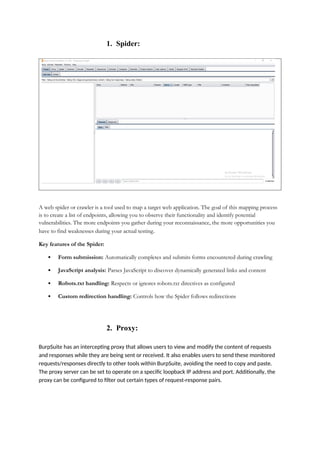
A web spider or crawler is a tool used to map a target web application. The goal of this mapping process
is to create a list of endpoints, allowing you to observe their functionality and identify potential
vulnerabilities. The more endpoints you gather during your reconnaissance, the more opportunities you
have to find weaknesses during your actual testing.
Key features of the Spider:
 Form submission: Automatically completes and submits forms encountered during crawling
 JavaScript analysis: Parses JavaScript to discover dynamically generated links and content
 Robots.txt handling: Respects or ignores robots.txt directives as configured
 Custom redirection handling: Controls how the Spider follows redirections
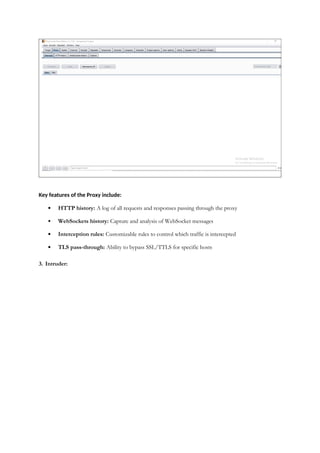
2. Proxy:
BurpSuite has an intercepting proxy that allows users to view and modify the content of requests
and responses while they are being sent or received. It also enables users to send these monitored
requests/responses directly to other tools within BurpSuite, avoiding the need to copy and paste.
The proxy server can be set to operate on a specific loopback IP address and port. Additionally, the
proxy can be configured to filter out certain types of request-response pairs.
Key features of the Proxy include:
 HTTP history: A log of all requests and responses passing through the proxy
 WebSockets history: Capture and analysis of WebSocket messages
 Interception rules: Customizable rules to control which traffic is intercepted
 TLS pass-through: Ability to bypass SSL/TTLS for specific hosts
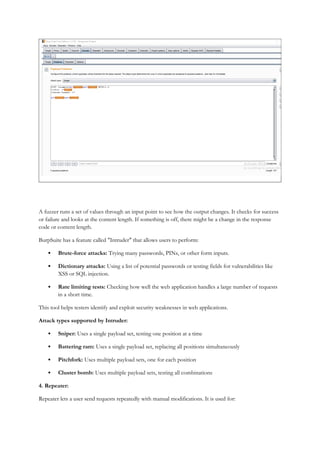
3. Intruder:
A fuzzer runs a set of values through an input point to see how the output changes. It checks for success
or failure and looks at the content length. If something is off, there might be a change in the response
code or content length.
BurpSuite has a feature called "Intruder" that allows users to perform:
 Brute-force attacks: Trying many passwords, PINs, or other form inputs.
 Dictionary attacks: Using a list of potential passwords or testing fields for vulnerabilities like
XSS or SQL injection.
 Rate limiting tests: Checking how well the web application handles a large number of requests
in a short time.
This tool helps testers identify and exploit security weaknesses in web applications.
Attack types supported by Intruder:
 Sniper: Uses a single payload set, testing one position at a time
 Battering ram: Uses a single payload set, replacing all positions simultaneously
 Pitchfork: Uses multiple payload sets, one for each position
 Cluster bomb: Uses multiple payload sets, testing all combinations
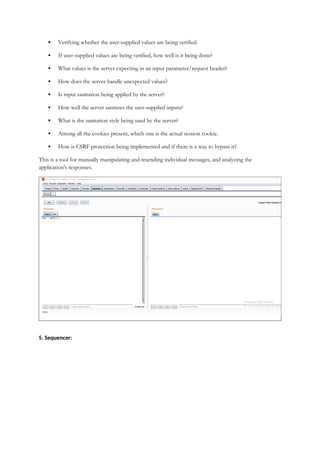
4. Repeater:
Repeater lets a user send requests repeatedly with manual modifications. It is used for:
 Verifying whether the user-supplied values are being verified.
 If user-supplied values are being verified, how well is it being done?
 What values is the server expecting in an input parameter/request header?
 How does the server handle unexpected values?
 Is input sanitation being applied by the server?
 How well the server sanitizes the user-supplied inputs?
 What is the sanitation style being used by the server?
 Among all the cookies present, which one is the actual session cookie.
 How is CSRF protection being implemented and if there is a way to bypass it?
This is a tool for manually manipulating and resending individual messages, and analyzing the
application's responses.
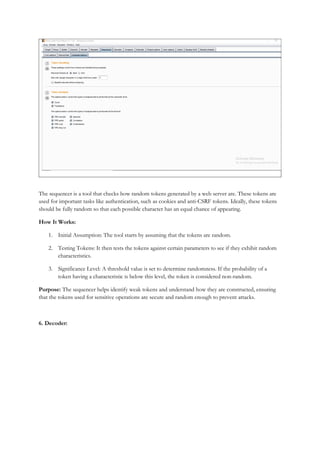
5. Sequencer:
The sequencer is a tool that checks how random tokens generated by a web server are. These tokens are
used for important tasks like authentication, such as cookies and anti-CSRF tokens. Ideally, these tokens
should be fully random so that each possible character has an equal chance of appearing.
How It Works:
1. Initial Assumption: The tool starts by assuming that the tokens are random.
2. Testing Tokens: It then tests the tokens against certain parameters to see if they exhibit random
characteristics.
3. Significance Level: A threshold value is set to determine randomness. If the probability of a
token having a characteristic is below this level, the token is considered non-random.
Purpose: The sequencer helps identify weak tokens and understand how they are constructed, ensuring
that the tokens used for sensitive operations are secure and random enough to prevent attacks.
6. Decoder:
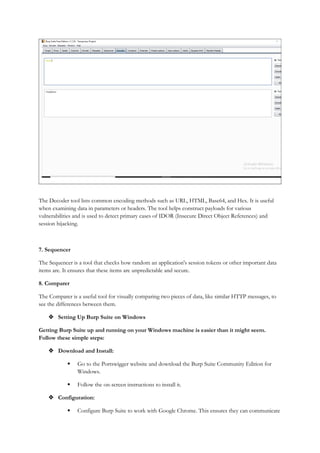
The Decoder tool lists common encoding methods such as URL, HTML, Base64, and Hex. It is useful
when examining data in parameters or headers. The tool helps construct payloads for various
vulnerabilities and is used to detect primary cases of IDOR (Insecure Direct Object References) and
session hijacking.
7. Sequencer
The Sequencer is a tool that checks how random an application's session tokens or other important data
items are. It ensures that these items are unpredictable and secure.
8. Comparer
The Comparer is a useful tool for visually comparing two pieces of data, like similar HTTP messages, to
see the differences between them.
 Setting Up Burp Suite on Windows
Getting Burp Suite up and running on your Windows machine is easier than it might seem.
Follow these simple steps:
 Download and Install:
 Go to the Portswigger website and download the Burp Suite Community Edition for
Windows.
 Follow the on-screen instructions to install it.
 Configuration:
 Configure Burp Suite to work with Google Chrome. This ensures they can communicate
smoothly.
 First Interception:
 Once everything is set up, you can start intercepting your first request.
 Steps to install and configure the BurpSuite are as follows
1. Install the BurpSuite from the official Website
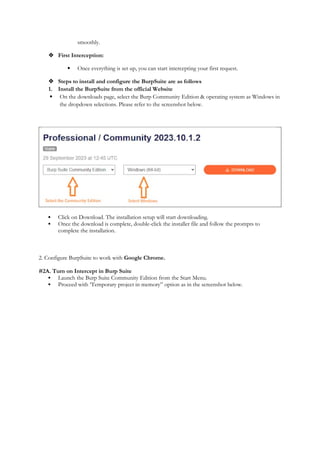
 On the downloads page, select the Burp Community Edition & operating system as Windows in
the dropdown selections. Please refer to the screenshot below.
 Click on Download. The installation setup will start downloading.
 Once the download is complete, double-click the installer file and follow the prompts to
complete the installation.
2. Configure BurpSuite to work with Google Chrome.
#2A. Turn on Intercept in Burp Suite
 Launch the Burp Suite Community Edition from the Start Menu.
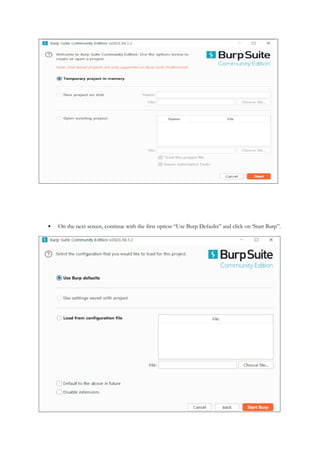
 Proceed with ‘Temporary project in memory” option as in the screenshot below.
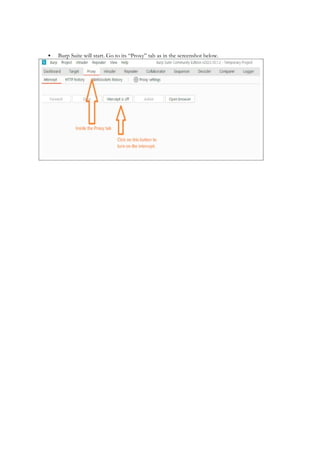
 On the next screen, continue with the first option “Use Burp Defaults” and click on ‘Start Burp”.
 Burp Suite will start. Go to its “Proxy” tab as in the screenshot below.

unit 2 Intoduction to Tools and Platforms.docx

  • 1.
    2 INTRODUCTION TOTOOLS AND PLATFORMS Ethical hacking requires a secure and controlled environment for testing cybersecurity techniques, exploiting vulnerabilities, and improving hacking skills. Virtual Machines (VMs) and dedicated hacking labs provide safe, cost-effective, and flexible platforms to practice without damaging real-world systems.  What are Virtual Machines (VMs)? A Virtual Machine (VM) is a software-based simulation of a physical computer. It runs an operating system (OS) inside another OS, allowing ethical hackers to experiment without affecting the host system. For example, if you install Kali Linux in a virtual machine on your Windows laptop, you can practice penetration testing while keeping your primary OS safe from malware or configuration changes.  Benefits of Using Virtual Machines for Hacking  Safe & Controlled Environment – Perform security testing without affecting real networks.  Cost-Effective – No need for multiple physical machines; run different OSes on one system  Flexibility – Easily switch between different operating systems (Kali Linux, Parrot OS, Windows, etc.)  Snapshots & Rollbacks – If your VM is compromised, restore it to a previous state instantly.  Portable – Move your hacking lab across different computers using VM images.  Best Virtualization Software for Ethical Hacking To run virtual machines, you need virtualization software. Here are the some options: 1. VirtualBox (Free & Open-Source)  Developed by Oracle, VirtualBox is one of the most popular tools for running VMs.  Supports Windows, Linux, and macOS as host systems.  Features snapshot and restore options for safe hacking experiments.  Best for: Beginners, as it’s free and easy to set up. 2. VMware Workstation Player (Free for Personal Use) & VMware Workstation Pro (Paid)  VMware Workstation Player is free for personal use, while VMware Pro provides advanced features.  More performance-optimized than VirtualBox, with better support for guest OS drivers.  Best for: Those looking for a powerful and stable virtualization platform. 3. Hyper-V (Windows Only, Built-in Feature)  Available in Windows 10 Pro, Enterprise, and Windows Server editions.  Allows users to create and manage virtual machines without third-party software.  Best for: Windows users who don’t want to install additional virtualization tools.  What Hardware Do We Need? You will need a CPU that can handle virtualization. If you’re on Windows, hit ctrl+shift+esc to open the task manager and click the Performance tab. If it says “Virtualization: Enabled”, then you can install the VirtualBox or else you have enable the “Virtualization”
  • 2.
     What SoftwareDo We Need? To set up your hypervisor - the virtualization software required to run virtual machines - you have several options, such as HyperV and VMWare (check out this guide on installing Kali Linux on VMWare here). However, in this, we'll be focusing on installing Oracle's VirtualBox.  Follow the below steps to get Installed with the Oracle's VirtualBox : Visit the VirtualBox website and download the latest version for your operating system. They have versions for Windows, macOS, Linux, and Solaris systems. You can select the standard installation options. After you've installed VirtualBox, the next step is to set up an "attack box." This is a virtual machine that we will use for security testing. There are various operating systems made for this, like ParrotOS and BlackArch Linux. However, we will use Kali Linux because it is the most popular choice among users and it is best for Ethical Hacking. To install Kali Linux, go to the Kali Linux website and select “Virtual Machines.”
  • 3.
    Make sure todownload the 64-bit image file for VirtualBox. This file is already set up for VirtualBox, which means you won't need to install it from scratch. Once your download is complete, it will be in a zipped file. To open it, double-click on the file using your default zip program. After opening the zipped file, drag the compressed file to a location of your choice and wait for the extraction to finish.
  • 4.
    Navigate to theextracted folder and double-click on the .vbox file. Once you click open, it will launch VirtualBox and the virtual machine will appear listed in the left panel of your VM manager.
  • 5.
    With your KaliLinux instance highlighted, click on “Settings” (the yellow gear icon), and go to Network. Make sure that Adapter 1 is set to NAT. Then move over to the Adapter 2 tab and select Host-only Adapter.
  • 6.
    Click “OK” toclose the settings box. You can now launch Kali Linux by clicking the Start button with the green arrow up top. The default login credentials are  Username kali  Password kali You should now have access to your Kali Linux attack box. 2.2 Common Tools: Nmap, Wireshark, Metasploit 1. Nmap (Network Mapper) Nmap is a popular network scanning tool widely used in cybersecurity. It is an open-source tool that helps penetration testers find devices and services on a computer network. Nmap is mainly used for discovering networks and scanning for vulnerabilities. It helps identify open ports, discover devices, and detect services running on a network. Key Features of Nmap:
  • 7.
     Network explorationand mapping  Port scanning  Service and version detection  OS fingerprinting  Scripting engine for advanced tasks Why Nmap is needed? Nmap is essential for finding live hosts on a network, identifying vulnerabilities, and performing reconnaissance during penetration testing. By mastering Nmap, penetration testers can gain valuable information about the target environment before moving on to more advanced exploitation techniques. Some Examples on Nmap Commands  Scan a single IP address: nmap 192.168.1.1  Scan a range of IP addresses: nmap 192.168.1.1-10  Scan a subnet: nmap 192.168.1.0/24 2. Wireshark : Wireshark is a network protocol analyzer that captures and examines data packets in real-time. It allows penetration testers to study the traffic flowing across a network and detect potential vulnerabilities or malicious activities. Wireshark is essential for network penetration testing, as it helps identify issues like unencrypted traffic, weak protocols, or improper network configurations.
  • 8.
    Key Features ofWireshark:  Real-time network traffic capture  Deep inspection of individual packets  Protocol analysis for network protocols (HTTP, TCP/IP, DNS, etc.)  Packet filtering for targeted analysis  Decryption of encrypted protocols (with keys) Why Wireshark is needed? Mastering Wireshark is crucial for penetration testers focusing on network security. It allows them to capture and analyse network traffic, uncover hidden security issues, monitor suspicious behaviour, and investigate attacks such as Man-in-the-Middle (MitM). By understanding and using Wireshark, testers can ensure a more secure network environment. 3. Metasploit Metasploit is an open-source framework used for penetration testing. It includes a variety of tools designed to exploit network vulnerabilities, such as exploits, payloads, and auxiliary modules. These tools help penetration testers gain access to systems and test their security defenses. Key Features of Metasploit:  Pre-built exploit modules for common vulnerabilities  Payload generation for attacking systems  Post-exploitation modules for maintaining access  Automated exploitation through scripting  Integration with other tools like Nmap Why Metasploit is needed? Metasploit is incredibly powerful for penetration testers. By mastering it, testers can automate the exploitation of known vulnerabilities and gain access to target systems. This is particularly useful for testing the strength of security defenses and conducting controlled exploits. Example: Let's say you're targeting a system with a known vulnerability in its web server software. You can use Metasploit to run a pre-built exploit module that takes advantage of this vulnerability. After successfully exploiting the system, you can use a payload to gain control of the system, and then run post- exploitation modules to maintain access. By integrating Metasploit with other tools like Nmap, you can
  • 9.
    perform comprehensive securityassessments and uncover potential weaknesses in the network. Metasploit simplifies and streamlines the process, making it an invaluable tool for any penetration tester. 2.3 Kali Linux Overview The operating system (OS) is the main software that ensures the smooth functioning of a computer. Some operating systems are designed for specific purposes, offering special tools and services to their users. For example, many people prefer Windows for gaming because most games are available on Windows. Similarly, macOS is often chosen for design work due to the wide availability of design software. For network security, digital forensics, penetration testing, or ethical hacking, Kali Linux is the go-to OS. Kali Linux Kali Linux is a Debian-based Linux distribution maintained by Offensive Security. It was created by Mati Aharoni and Devon Kearns. Kali Linux is specifically designed for network analysts and penetration testers, making it ideal for those in the field of cybersecurity. The official website for Kali Linux is Kali.org. It gained popularity through its use in the TV series "Mr. Robot." Kali Linux is not intended for general use; it is meant for professionals or those who know how to operate Linux/Kali. You can find installation instructions in the official documentation. Kali Linux is a powerful, open-source operating system designed for penetration testing, ethical hacking, and cybersecurity research. Developed by Offensive Security, Kali is built on Debian Linux and comes preloaded with hundreds of security tools for various cybersecurity tasks.  What is the need of Kali Linux?
  • 10.
    Kali Linux iswidely used by ethical hackers, security professionals, and cybersecurity enthusiasts because it provides:  Pre-installed Security Tools – Includes Metasploit, Nmap, Wireshark, Burp Suite, Aircrack-ng, and more,  Regular Updates – Maintained by Offensive Security with frequent updates for new security tools and exploits.  Customizability – Can be installed on bare-metal PCs, virtual machines, Raspberry Pi, and USB drives.  Support for Wireless & Forensics Testing – Used for testing Wi-Fi security, digital forensics, and vulnerability assessments.  Free & Open-Source – Anyone can download, modify, and contribute to the system.  Key Features of Kali Linux  Live Boot & Installation – Can be run as a Live OS from a USB without installation or installed on a hard drive.  Multiple Desktop Environments – Supports XFCE, GNOME, KDE, and more for flexibility.  ARM Support – Works on Raspberry Pi and ARM-based devices.  Kali NetHunter – A mobile penetration testing platform for Android devices.  Kali Linux for Virtual Machines – Ready-to-use VM images for VirtualBox and VMware. Advantages:  Comes with 600+ pre-installed penetration testing and network security tools.  Completely free and open-source, allowing you to use and contribute to its development.  Supports multiple languages.  Great for users with intermediate Linux skills.  Can be easily used with Raspberry Pi. Disadvantages:  Not recommended for beginners who want to learn Linux (since it is penetration-oriented).  Slightly slower performance.  Some software may malfunction. Kali Linux is best suited for professional penetration testers, cybersecurity experts, ethical hackers, or those who are familiar with Linux commands and system management. If you are new to Linux, it is recommended to start with Ubuntu, gain some experience, and then switch to Kali Linux. 2.4 Introduction to Burp Suite Burp Suite, commonly known as Burp, is a collection of tools designed for penetration testing of web applications. Developed by a company called Portswigger, which was founded by Dafydd Stuttard, Burp Suite aims to provide an all-in-one solution for web app security testing. Its functionality can be expanded by adding various add-ons known as BApps.
  • 11.
    Burp Suite ishighly popular among professional web application security researchers and bug bounty hunters. Its user-friendly interface makes it a preferred choice over free alternatives like OWASP ZAP. Burp Suite is one of the most powerful and widely used tools for web security testing. Developed by PortSwigger, it is primarily used by ethical hackers, penetration testers, and security researchers to identify and exploit vulnerabilities in web applications.  Why Use Burp Suite? Burp Suite provides a comprehensive set of tools to analyse, intercept, and manipulate web traffic, making it an essential tool for web penetration testing.  Intercept and Modify HTTP/S Requests – Allows testers to see and alter data between the client and the server.  Automated Vulnerability Scanning – Detects SQL injection, XSS, CSRF, and other security flaws.  User-Friendly Interface – Provides a graphical user interface (GUI) that simplifies web testing.  Active & Passive Scanning – Helps discover vulnerabilities both automatically and manually.  Extensibility – Supports extensions and plugins for enhanced functionality.  Key Features of Burp Suite  Proxy – Intercepts and modifies requests/responses between the browser and the target server.  Scanner – Automates the detection of security flaws. (Available in the Pro version)  Intruder – Performs automated attacks to test authentication, session management, and brute-force vulnerabilities.  Repeater – Allows testers to modify and resend individual requests for manual testing.  Decoder – Encodes and decodes data in different formats (Base64, URL encoding, etc.).  Extender – Enables users to install Burp extensions to expand its capabilities.  BurpSuite Editions  Burp Suite is available in three editions, each catering to different user needs:  Burp Suite Community Edition (Free) – Basic features like proxy, repeater, and decoder.  Burp Suite Professional (Paid) – Advanced features like vulnerability scanning and automation.  Burp Suite Enterprise (Paid) – Designed for large organizations, offering scalable security testing. The tools offered by BurpSuite are:
  • 12.
    1. Spider: A webspider or crawler is a tool used to map a target web application. The goal of this mapping process is to create a list of endpoints, allowing you to observe their functionality and identify potential vulnerabilities. The more endpoints you gather during your reconnaissance, the more opportunities you have to find weaknesses during your actual testing. Key features of the Spider:  Form submission: Automatically completes and submits forms encountered during crawling  JavaScript analysis: Parses JavaScript to discover dynamically generated links and content  Robots.txt handling: Respects or ignores robots.txt directives as configured  Custom redirection handling: Controls how the Spider follows redirections 2. Proxy: BurpSuite has an intercepting proxy that allows users to view and modify the content of requests and responses while they are being sent or received. It also enables users to send these monitored requests/responses directly to other tools within BurpSuite, avoiding the need to copy and paste. The proxy server can be set to operate on a specific loopback IP address and port. Additionally, the proxy can be configured to filter out certain types of request-response pairs.
  • 13.
    Key features ofthe Proxy include:  HTTP history: A log of all requests and responses passing through the proxy  WebSockets history: Capture and analysis of WebSocket messages  Interception rules: Customizable rules to control which traffic is intercepted  TLS pass-through: Ability to bypass SSL/TTLS for specific hosts 3. Intruder:
  • 14.
    A fuzzer runsa set of values through an input point to see how the output changes. It checks for success or failure and looks at the content length. If something is off, there might be a change in the response code or content length. BurpSuite has a feature called "Intruder" that allows users to perform:  Brute-force attacks: Trying many passwords, PINs, or other form inputs.  Dictionary attacks: Using a list of potential passwords or testing fields for vulnerabilities like XSS or SQL injection.  Rate limiting tests: Checking how well the web application handles a large number of requests in a short time. This tool helps testers identify and exploit security weaknesses in web applications. Attack types supported by Intruder:  Sniper: Uses a single payload set, testing one position at a time  Battering ram: Uses a single payload set, replacing all positions simultaneously  Pitchfork: Uses multiple payload sets, one for each position  Cluster bomb: Uses multiple payload sets, testing all combinations 4. Repeater: Repeater lets a user send requests repeatedly with manual modifications. It is used for:
  • 15.
     Verifying whetherthe user-supplied values are being verified.  If user-supplied values are being verified, how well is it being done?  What values is the server expecting in an input parameter/request header?  How does the server handle unexpected values?  Is input sanitation being applied by the server?  How well the server sanitizes the user-supplied inputs?  What is the sanitation style being used by the server?  Among all the cookies present, which one is the actual session cookie.  How is CSRF protection being implemented and if there is a way to bypass it? This is a tool for manually manipulating and resending individual messages, and analyzing the application's responses. 5. Sequencer:
  • 16.
    The sequencer isa tool that checks how random tokens generated by a web server are. These tokens are used for important tasks like authentication, such as cookies and anti-CSRF tokens. Ideally, these tokens should be fully random so that each possible character has an equal chance of appearing. How It Works: 1. Initial Assumption: The tool starts by assuming that the tokens are random. 2. Testing Tokens: It then tests the tokens against certain parameters to see if they exhibit random characteristics. 3. Significance Level: A threshold value is set to determine randomness. If the probability of a token having a characteristic is below this level, the token is considered non-random. Purpose: The sequencer helps identify weak tokens and understand how they are constructed, ensuring that the tokens used for sensitive operations are secure and random enough to prevent attacks. 6. Decoder:
  • 17.
    The Decoder toollists common encoding methods such as URL, HTML, Base64, and Hex. It is useful when examining data in parameters or headers. The tool helps construct payloads for various vulnerabilities and is used to detect primary cases of IDOR (Insecure Direct Object References) and session hijacking. 7. Sequencer The Sequencer is a tool that checks how random an application's session tokens or other important data items are. It ensures that these items are unpredictable and secure. 8. Comparer The Comparer is a useful tool for visually comparing two pieces of data, like similar HTTP messages, to see the differences between them.  Setting Up Burp Suite on Windows Getting Burp Suite up and running on your Windows machine is easier than it might seem. Follow these simple steps:  Download and Install:  Go to the Portswigger website and download the Burp Suite Community Edition for Windows.  Follow the on-screen instructions to install it.  Configuration:  Configure Burp Suite to work with Google Chrome. This ensures they can communicate
  • 18.
    smoothly.  First Interception: Once everything is set up, you can start intercepting your first request.  Steps to install and configure the BurpSuite are as follows 1. Install the BurpSuite from the official Website  On the downloads page, select the Burp Community Edition & operating system as Windows in the dropdown selections. Please refer to the screenshot below.  Click on Download. The installation setup will start downloading.  Once the download is complete, double-click the installer file and follow the prompts to complete the installation. 2. Configure BurpSuite to work with Google Chrome. #2A. Turn on Intercept in Burp Suite  Launch the Burp Suite Community Edition from the Start Menu.  Proceed with ‘Temporary project in memory” option as in the screenshot below.
  • 19.
     On thenext screen, continue with the first option “Use Burp Defaults” and click on ‘Start Burp”.
  • 20.
     Burp Suitewill start. Go to its “Proxy” tab as in the screenshot below.