.
Week 5 : Use Case Modelling
Objectives
■ Understand the rules and style guidelines for use
cases and use case diagrams.
■ Be able to create functional models using activity
diagrams, use cases, and use case diagrams.
Key Ideas
• A use case illustrates the activities that are
performed by users of a system.
• Use cases are logical models -- they describe
the activities of a system without specifying
how the activities are implemented.
What are Use-Case
Descriptions?
• Describe basic functions of the system
•What the user can do
•How the system responds
• Use cases are building blocks for continued design
activities.
How Are Use-Cases
Created?
• Two steps:
• Write text-based case descriptions
• Translate descriptions into diagrams
• Describes one and only one function, but
may have multiple paths.
• Developed working with users for content.
Types of Use-Cases
• Overview versus detail
■ The use case represents an important business
process.
■ The use case supports revenue generation or
cost reduction.
■ Technology needed to support the use case is
new or risky and therefore will require
considerable research.
• Essential versus real
Elements of a Use-Case
Description
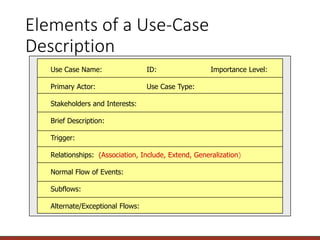
Use Case Name: ID: Importance Level:
Primary Actor: Use Case Type:
Stakeholders and Interests:
Brief Description:
Trigger:
Relationships: (Association, Include, Extend, Generalization)
Normal Flow of Events:
Subflows:
Alternate/Exceptional Flows:
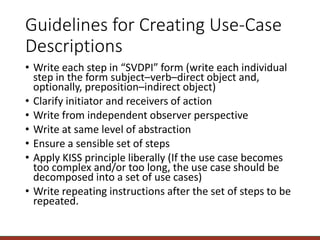
Guidelines for Creating Use-Case
Descriptions
• Write each step in “SVDPI” form (write each individual
step in the form subject–verb–direct object and,
optionally, preposition–indirect object)
• Clarify initiator and receivers of action
• Write from independent observer perspective
• Write at same level of abstraction
• Ensure a sensible set of steps
• Apply KISS principle liberally (If the use case becomes
too complex and/or too long, the use case should be
decomposed into a set of use cases)
• Write repeating instructions after the set of steps to be
repeated.
Your Turn
• How would you make requirements
gathering (interviews, questionnaires,
observation, and document analysis) more
effective by knowing that eventually you will
be creating use-case descriptions and
diagrams?
USE-CASE DIAGRAMS
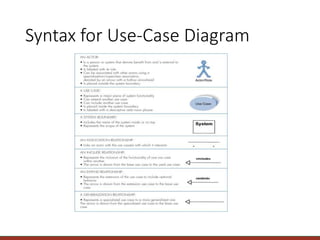
Syntax for Use-Case Diagram
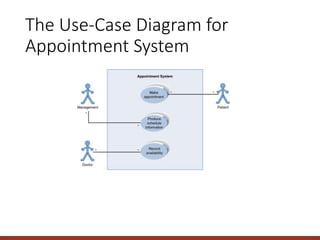
The Use-Case Diagram for
Appointment System
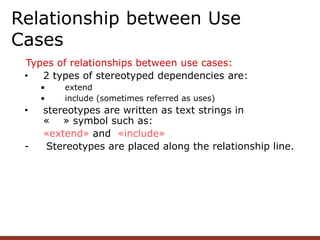
Types of relationships between use cases:
• 2 types of stereotyped dependencies are:
• extend
• include (sometimes referred as uses)
• stereotypes are written as text strings in
« » symbol such as:
«extend» and «include»
- Stereotypes are placed along the relationship line.
Relationship between Use
Cases
• An extend relationship is used when you wish to show
that a use case provides additional functionality that may
be required in another use case.
• Purpose:
• To model optional behaviour or alternative at certain
point in separate use case.
• To mitigate the complexity of base use case
• View as optional system behaviour
Extend Relationship
editor
spell checking grammar checking
edit text
<<extend>> <<extend>>
Every time an editor wants to edit
text, he can do spell checking or
grammar checking use case
Extend Relationship
• An include relationship is used when you wish to show
that a use case provides additional functionality that
always required in another use case.
• Never stands alone
• Purpose:
• a use case may include more than one other use
cases
• can be used to separate out a sequence of behaviour
that is used in many use cases (reusable or common
behaviour)
Include Relationship
customer
deposit funds
withdraw money
verify customer
<<include>>
<<include>>
Every time a customer wants to
deposit funds, he must verify
himself to the system.
Include Relationship
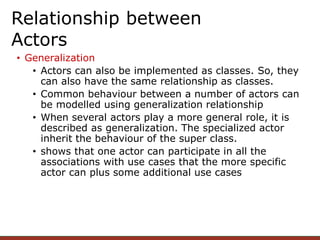
• Generalization
• Actors can also be implemented as classes. So, they
can also have the same relationship as classes.
• Common behaviour between a number of actors can
be modelled using generalization relationship
• When several actors play a more general role, it is
described as generalization. The specialized actor
inherit the behaviour of the super class.
• shows that one actor can participate in all the
associations with use cases that the more specific
actor can plus some additional use cases
Relationship between
Actors
Relationship between
Actors
Individual
customer corporate
customer
customer
perform card transaction
Credit Card Validation System
CREATING USE-CASE
DESCRIPTIONS AND USE-
CASE DIAGRAMS
Major Steps in Writing Use-Cases
• Identify the major use-cases
• Expand the major use-case
• Confirm the major use-cases
• Create the use-case diagram
Identifying the Major Use-Cases
• Identify the system’s boundaries
• List the primary actors
• List the goals of each primary actor
• Identify and write the major use-cases
• Carefully review use-cases
Selecting the Appropriate
Techniques
Interviews JAD Questionnaires Document Observation
Analysis
Type of As-Is As-Is As-Is As-Is As-Is
Information Improve. Improve. Improve.
To-Be To-Be
Depth of High High Medium Low Low
Information
Breadth of Low Medium High High Low
Information
Integration Low High Low Low Low
of Info.
User Medium High Low Low Low
Involvement
Cost Medium Low- Low Low Low-
Medium Medium
Summary
• Use-case descriptions are the basis for
further analysis and design.
• Use-case diagrams present a graphical
overview of the main functionality of a
system.
Your Turn
• Create the Use Case description and Use
Case diagram for your project

Use Case Modelling.pptx

  • 1.
    . Week 5 :Use Case Modelling
  • 2.
    Objectives ■ Understand therules and style guidelines for use cases and use case diagrams. ■ Be able to create functional models using activity diagrams, use cases, and use case diagrams.
  • 3.
    Key Ideas • Ause case illustrates the activities that are performed by users of a system. • Use cases are logical models -- they describe the activities of a system without specifying how the activities are implemented.
  • 4.
    What are Use-Case Descriptions? •Describe basic functions of the system •What the user can do •How the system responds • Use cases are building blocks for continued design activities.
  • 5.
    How Are Use-Cases Created? •Two steps: • Write text-based case descriptions • Translate descriptions into diagrams • Describes one and only one function, but may have multiple paths. • Developed working with users for content.
  • 6.
    Types of Use-Cases •Overview versus detail ■ The use case represents an important business process. ■ The use case supports revenue generation or cost reduction. ■ Technology needed to support the use case is new or risky and therefore will require considerable research. • Essential versus real
  • 7.
    Elements of aUse-Case Description Use Case Name: ID: Importance Level: Primary Actor: Use Case Type: Stakeholders and Interests: Brief Description: Trigger: Relationships: (Association, Include, Extend, Generalization) Normal Flow of Events: Subflows: Alternate/Exceptional Flows:
  • 8.
    Guidelines for CreatingUse-Case Descriptions • Write each step in “SVDPI” form (write each individual step in the form subject–verb–direct object and, optionally, preposition–indirect object) • Clarify initiator and receivers of action • Write from independent observer perspective • Write at same level of abstraction • Ensure a sensible set of steps • Apply KISS principle liberally (If the use case becomes too complex and/or too long, the use case should be decomposed into a set of use cases) • Write repeating instructions after the set of steps to be repeated.
  • 9.
    Your Turn • Howwould you make requirements gathering (interviews, questionnaires, observation, and document analysis) more effective by knowing that eventually you will be creating use-case descriptions and diagrams?
  • 10.
  • 11.
  • 12.
    The Use-Case Diagramfor Appointment System
  • 13.
    Types of relationshipsbetween use cases: • 2 types of stereotyped dependencies are: • extend • include (sometimes referred as uses) • stereotypes are written as text strings in « » symbol such as: «extend» and «include» - Stereotypes are placed along the relationship line. Relationship between Use Cases
  • 14.
    • An extendrelationship is used when you wish to show that a use case provides additional functionality that may be required in another use case. • Purpose: • To model optional behaviour or alternative at certain point in separate use case. • To mitigate the complexity of base use case • View as optional system behaviour Extend Relationship
  • 15.
    editor spell checking grammarchecking edit text <<extend>> <<extend>> Every time an editor wants to edit text, he can do spell checking or grammar checking use case Extend Relationship
  • 16.
    • An includerelationship is used when you wish to show that a use case provides additional functionality that always required in another use case. • Never stands alone • Purpose: • a use case may include more than one other use cases • can be used to separate out a sequence of behaviour that is used in many use cases (reusable or common behaviour) Include Relationship
  • 17.
    customer deposit funds withdraw money verifycustomer <<include>> <<include>> Every time a customer wants to deposit funds, he must verify himself to the system. Include Relationship
  • 18.
    • Generalization • Actorscan also be implemented as classes. So, they can also have the same relationship as classes. • Common behaviour between a number of actors can be modelled using generalization relationship • When several actors play a more general role, it is described as generalization. The specialized actor inherit the behaviour of the super class. • shows that one actor can participate in all the associations with use cases that the more specific actor can plus some additional use cases Relationship between Actors
  • 19.
  • 20.
  • 21.
    Major Steps inWriting Use-Cases • Identify the major use-cases • Expand the major use-case • Confirm the major use-cases • Create the use-case diagram
  • 22.
    Identifying the MajorUse-Cases • Identify the system’s boundaries • List the primary actors • List the goals of each primary actor • Identify and write the major use-cases • Carefully review use-cases
  • 23.
    Selecting the Appropriate Techniques InterviewsJAD Questionnaires Document Observation Analysis Type of As-Is As-Is As-Is As-Is As-Is Information Improve. Improve. Improve. To-Be To-Be Depth of High High Medium Low Low Information Breadth of Low Medium High High Low Information Integration Low High Low Low Low of Info. User Medium High Low Low Low Involvement Cost Medium Low- Low Low Low- Medium Medium
  • 24.
    Summary • Use-case descriptionsare the basis for further analysis and design. • Use-case diagrams present a graphical overview of the main functionality of a system.
  • 25.
    Your Turn • Createthe Use Case description and Use Case diagram for your project