







Introduction
➔
➔
➔
➔

Grunt is a workflow / task automation tool.
Built on top of Node.js.
Primary focus is web development.
Awesome range of plugins.
A workflow / task automation tool
Build automation is the act of scripting or automating a wide variety of tasks
that software developers do in their day-to-day activities including things like:
●

compiling computer source code into binary code

●

packaging binary code

●

running tests

●

deployment to production systems

●

creating documentation and/or release notes
Built on top of
It’s better than…
● Shell scripts / Batch files
● ANT
● Rake

➔ It’s written in JavaScript, and we all know that.
➔ It’s modular, and manages its own dependencies in a
clean, source-control friendly way.
Focus is on web development
Enough talk.
Show me some magic.
Let’s see what we can do with Grunt: http://bit.ly/19A7Vq7
This is cool, and it’s flexible. We can make it work with PHP/.NET
How did we achieve that?
Plugins.
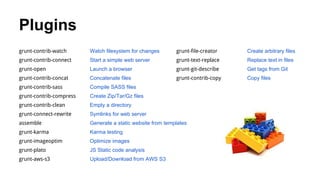
Plugins
grunt-contrib-watch

Watch filesystem for changes

grunt-file-creator

Create arbitrary files

grunt-contrib-connect

Start a simple web server

grunt-text-replace

Replace text in files

grunt-open

Launch a browser

grunt-git-describe

Get tags from Git

grunt-contrib-concat

Concatenate files

grunt-contrib-copy

Copy files

grunt-contrib-sass

Compile SASS files

grunt-contrib-compress

Create Zip/Tar/Gz files

grunt-contrib-clean

Empty a directory

grunt-connect-rewrite

Symlinks for web server

assemble

Generate a static website from templates

grunt-karma

Karma testing

grunt-imageoptim

Optimize images

grunt-plato

JS Static code analysis

grunt-aws-s3

Upload/Download from AWS S3
Grunt does two really useful things.
➔ It ties your plugins together
and runs them in a specific order.
➔ It normalises (to a certain extent) the format in which
you supply options to the plugins.

As an added bonus…
➔ Grunt + NPM helps manage build dependencies.
Time for another trick.
...installing a project from scratch.
Starting from scratch*
➔ Fresh directory / machine
➔ Node.js & Grunt Cli installed (but nothing more)
➔
➔
➔
➔

git clone https://github.com/psyked/grunt-example-project
cd grunt-example-project
npm install
grunt
What is this magic?
It’s package.json
Introducing package.json
➔ It’s a standard part of Node.js
➔ It describes your project, including its dependencies.
➔ It gets auto-updated as you ‘install’ additional plugins for
your project.
➔ Create one using npm init
➔ Auto-add dependencies by installing them with the -save-dev flag
Enough talk.
Show me how.
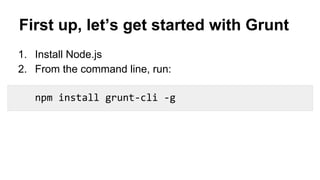
First up, let’s get started with Grunt
1. Install Node.js
2. From the command line, run:
npm install grunt-cli -g
Running Grunt tasks
➔ Run a default task:

grunt

➔ Run a specific task:

grunt taskname

➔ Run a task config:

grunt taskname:config
Grunt training deck

Grunt training deck

  • 2.
    Introduction ➔ ➔ ➔ ➔ Grunt is aworkflow / task automation tool. Built on top of Node.js. Primary focus is web development. Awesome range of plugins.
  • 3.
    A workflow /task automation tool Build automation is the act of scripting or automating a wide variety of tasks that software developers do in their day-to-day activities including things like: ● compiling computer source code into binary code ● packaging binary code ● running tests ● deployment to production systems ● creating documentation and/or release notes
  • 4.
    Built on topof It’s better than… ● Shell scripts / Batch files ● ANT ● Rake ➔ It’s written in JavaScript, and we all know that. ➔ It’s modular, and manages its own dependencies in a clean, source-control friendly way.
  • 5.
    Focus is onweb development
  • 6.
  • 7.
    Let’s see whatwe can do with Grunt: http://bit.ly/19A7Vq7
  • 8.
    This is cool,and it’s flexible. We can make it work with PHP/.NET
  • 9.
    How did weachieve that? Plugins.
  • 11.
    Plugins grunt-contrib-watch Watch filesystem forchanges grunt-file-creator Create arbitrary files grunt-contrib-connect Start a simple web server grunt-text-replace Replace text in files grunt-open Launch a browser grunt-git-describe Get tags from Git grunt-contrib-concat Concatenate files grunt-contrib-copy Copy files grunt-contrib-sass Compile SASS files grunt-contrib-compress Create Zip/Tar/Gz files grunt-contrib-clean Empty a directory grunt-connect-rewrite Symlinks for web server assemble Generate a static website from templates grunt-karma Karma testing grunt-imageoptim Optimize images grunt-plato JS Static code analysis grunt-aws-s3 Upload/Download from AWS S3
  • 12.
    Grunt does tworeally useful things. ➔ It ties your plugins together and runs them in a specific order. ➔ It normalises (to a certain extent) the format in which you supply options to the plugins. As an added bonus… ➔ Grunt + NPM helps manage build dependencies.
  • 13.
    Time for anothertrick. ...installing a project from scratch.
  • 14.
    Starting from scratch* ➔Fresh directory / machine ➔ Node.js & Grunt Cli installed (but nothing more) ➔ ➔ ➔ ➔ git clone https://github.com/psyked/grunt-example-project cd grunt-example-project npm install grunt
  • 15.
    What is thismagic? It’s package.json
  • 16.
    Introducing package.json ➔ It’sa standard part of Node.js ➔ It describes your project, including its dependencies. ➔ It gets auto-updated as you ‘install’ additional plugins for your project. ➔ Create one using npm init ➔ Auto-add dependencies by installing them with the -save-dev flag
  • 17.
  • 18.
    First up, let’sget started with Grunt 1. Install Node.js 2. From the command line, run: npm install grunt-cli -g
  • 19.
    Running Grunt tasks ➔Run a default task: grunt ➔ Run a specific task: grunt taskname ➔ Run a task config: grunt taskname:config