Building Management
Systems (BMS)
Seminar1–TheBasicsExplained
1) What is a BMS?
2) What Does it Do?
3) Benefits
4) Operational Considerations
Seminar 2 - Advanced Management and Improvement Opportunities
5) BMS System Architecture
6) BMS Programming
7) Extended BMS Functionality
8) Upgrades and Retrofits
1. WhatisaBMS?
 Industry jargon, Terminology and acronyms
 What is a Building Management and Controls System
 BMS suppliers and integrators
 Typical System Components
 Typical User Interface Options
IndustryJargon,TerminologyandAcronyms
• Building Management Systems (BMS) also known as Building Automation
Systems (BAS), Building Management and Control System (BMCS), Direct
Digital Controls (DDC) and Building Controls
• Other terms associated with Control Systems include:
– Supervisory, Control and Data Acquisition (SCADA)
– Programmable Logic Controllers (PLC)
– Energy Management System (EMS)
– Data gathering panels (DGP)
– Modbus, Lonworks, and Bacnet – All refer to communications protocols
– ‘Front End’ – legacy term used to refer to the BMS Operator Workstation
• Most Common Current industry term –
– Building Management System (BMS) or
– Building Management and Control Systems (BMCS)
WhatisaBuilding ManagementSystem?
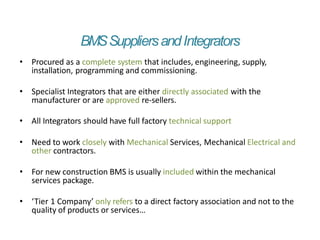
• BMS systems are “Intelligent” microprocessor based controller networks
installed to monitor and control a buildings technical systems and services
such as air conditioning, ventilation, lighting and hydraulics.
• More specifically they link the functionality of individual pieces of building
equipment so that they operate as one complete integrated system.
• Now installed in every major building or facility with the availability of
direct integration into all other building services such as security, access
control, CCTV, fire, Lifts and other life and safety systems.
• Current generation BMS systems are now based on open communications
protocols and are WEB enabled allowing integration of systems from
multiple system vendors and access from anywhere in the world.
WhatDoesIntelligentMicroprocessorControl Mean?
OUTPUTS
INPUTS
NETWORK
WhatDoesIntelligentMicroprocessorControl Mean?
OUTPUTS
INPUTS
NETWORK
BMSSuppliersandIntegrators
• Procured as a complete system that includes, engineering, supply,
installation, programming and commissioning.
• Specialist Integrators that are either directly associated with the
manufacturer or are approved re-sellers.
• All Integrators should have full factory technical support
• Need to work closely with Mechanical Services, Mechanical Electrical and
other contractors.
• For new construction BMS is usually included within the mechanical
services package.
• ‘Tier 1 Company’ only refers to a direct factory association and not to the
quality of products or services…
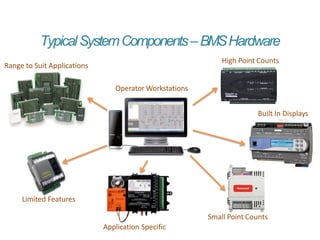
TypicalSystemComponents–BMSHardware
Operator Workstations
Range to Suit Applications
Built In Displays
High Point Counts
Small Point Counts
Application Specific
Limited Features
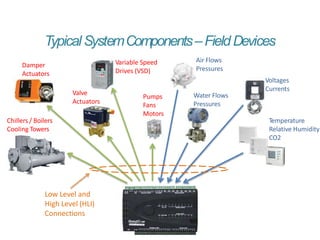
TypicalSystemComponents–FieldDevices
Temperature
Relative Humidity
CO2
Low Level and
High Level (HLI)
Connections
Voltages
Currents
Water Flows
Pressures
Air Flows
Pressures
Variable Speed
Drives (VSD)
Pumps
Fans
Motors
Damper
Actuators
Valve
Actuators
Chillers / Boilers
Cooling Towers
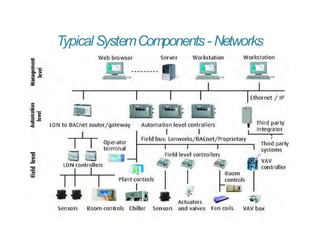
TypicalSystemComponents- Networks
TypicalUserInterfaceOptions
 Can be a basic LCD display through to
full Graphic Operator Workstations.
 The Graphic Interface must be
intuitive to use and not require an
Engineering degree to interpret
 They must provide sufficient level of
detail to enable the operator to
determine what is happening and
what is going to happen next
 Graphics need to provide access to
parameters for tuning and seasonal
information needs to be built into the
system
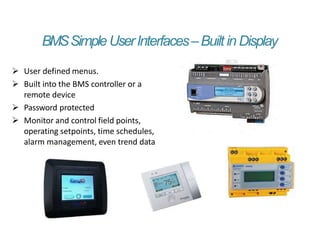
BMSSimpleUserInterfaces–Built in Display
 User defined menus.
 Built into the BMS controller or a
remote device
 Password protected
 Monitor and control field points,
operating setpoints, time schedules,
alarm management, even trend data
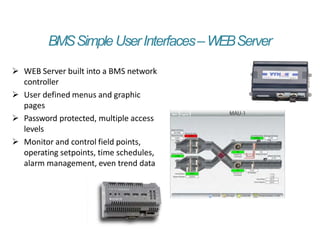
BMSSimpleUserInterfaces–WEBServer
 WEB Server built into a BMS network
controller
 User defined menus and graphic
pages
 Password protected, multiple access
levels
 Monitor and control field points,
operating setpoints, time schedules,
alarm management, even trend data
2. WhatDoesaBMSDo?
 The role of the BMS in day to day building operation
 Building Control Applications
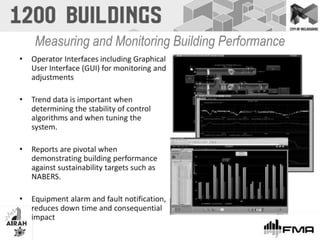
 Measuring and Monitoring building performance
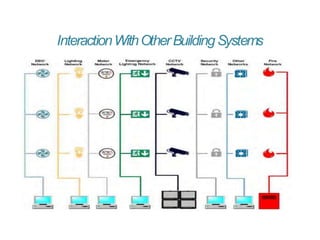
 Interaction with other building systems
TheDaytoDayRoleoftheBMS…
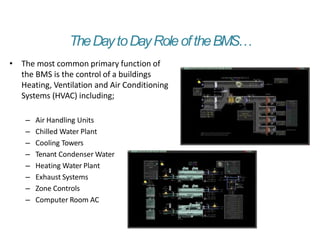
• The most common primary function of
the BMS is the control of a buildings
Heating, Ventilation and Air Conditioning
Systems (HVAC) including;
– Air Handling Units
– Chilled Water Plant
– Cooling Towers
– Tenant Condenser Water
– Heating Water Plant
– Exhaust Systems
– Zone Controls
– Computer Room AC
TheDaytoDayRoleoftheBMS…
• Control of Building Systems and Services
• Graphic User Interface (GUI)
• Real Time Monitoring of Building Operation and Performance
• Trending and Logging of Building Operation and Performance
• Time Scheduling of Building Systems
• Fault Management and Alarming
• Control Application Programming
• User Event Management
• Energy Management and Reporting (NABERS)
BuildingControlApplications
• Building control applications include for following:
– Zone temperature monitoring and control
– Zone Variable Air Volume (VAV) control to zones
– Zone CO2 monitoring and control (Air Quality)
– Air handling unit supply air temperature control
– Air handling unit supply air flow / pressure control
– Main Plant Chiller and Boiler sequencing
– Toilet, car park, kitchen and general exhaust fan control
– After Hours Building Control
InteractionWithOtherBuildingSystems
3. BenefitsofHavingaBMS
 The advantages of a BMS versus stand alone control
 Improved Tenant comfort conditions
 Energy Management and reduced operational costs
 Management of building ratings such as NABERS
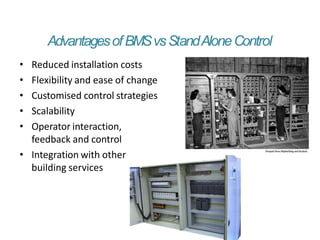
AdvantagesofBMSvsStandAloneControl
• Reduced installation costs
• Flexibility and ease of change
• Customised control strategies
• Scalability
• Operator interaction,
feedback and control
• Integration with other
building services
ImprovedT
enantComfort Conditions
• Real time monitoring of tenant conditions
• Greater load based control strategies
• Trend data of performance, improved fault finding
• Air quality management (CO2)
• After hours operational requests, tenant billing
• Alarm notifications of faults reduce downtime
• Automated change over of failed equipment
EnergyManagementandReduceOperationalCosts
• Optimal start and stop of plant
• Building warm up and cool down cycles
• Night purge
• Automatic Seasonal plant sequence selection
• Seasonal temperature setting adjustments
• Load based control strategies
• Economy cycle control including CO2
• Equipment runtime monitoring and duty cycling
• Occupancy control and control setback
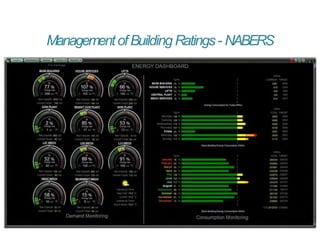
ManagementofBuilding Ratings- NABERS
• Can be integrated with Energy Management System (EMS)
• Real time monitoring of energy performance
• Proactive adjustment not retrospective catch up
• Measurement against load profile targets
• Separation of tenant and base building loads
• Historical trend data for NABERS management
• Energy demand and consumption dashboards
• EMS is a dedicated software packed for the monitoring and management of electrical,
water, gas and thermal energy metering systems.
ManagementofBuilding Ratings- NABERS
4. OperationalConsiderations
 Tuning and optimisation
 Importance of System Documentation
 System Maintenance, what, how often and by whom
 Life cycle expectations and considerations
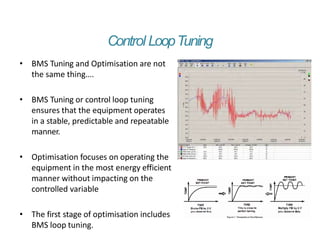
Control LoopTuning
• BMS Tuning and Optimisation are not
the same thing….
• BMS Tuning or control loop tuning
ensures that the equipment operates
in a stable, predictable and repeatable
manner.
• Optimisation focuses on operating the
equipment in the most energy efficient
manner without impacting on the
controlled variable
• The first stage of optimisation includes
BMS loop tuning.
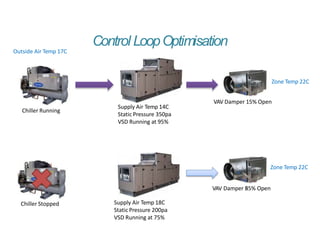
Control LoopOptimisation
Outside Air Temp 17C
Chiller Running
Supply Air Temp 14C
Static Pressure 350pa
VSD Running at 95%
VAV Damper 15% Open
Zone Temp 22C
Chiller Stopped Supply Air Temp 18C
Static Pressure 200pa
VSD Running at 75%
Zone Temp 22C
VAV Damper 8
55% Open
ImportanceofSystemDocumentation
• Functional Description (FD)
– Details the configuration of the BMS
– Overview of the building services
– Describes in detail each of the BMS control strategies and sequences of
operation
– Documents interaction between each part of the system
• Point Schedules
– Detail all connected devices and their point type
– Critical for planning and system engineering
• Control System Drawings
– Should include a network architecture drawing
– Detail the physical wiring connections to controllers
– Useful for fault finding and establishing spare capacity
ImportanceofSystemDocumentation
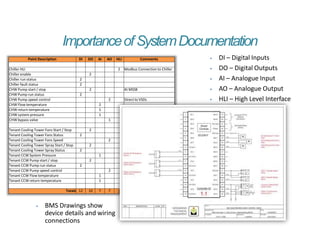
Point Description DI DO AI AO HLI Comments
Chiller HLI 2 Modbus Connection to Chiller
Chiller enable 2
Chiller run status 2
Chiller fault status 2
CHW Pump start / stop 2 At MSSB
CHW Pump run status 2
CHW Pump speed control 2 Direct to VSDs
CHW Flow temperature 2
CHW return temperature 1
CHW system pressure 1
CHW bypass valve 1
Tenant Cooling Tower Fans Start / Stop 2
Tenant Cooling Tower Fans Status 2
Tenant Cooling Tower Fans Speed 2
Tenant Cooling Tower Spray Start / Stop 2
Tenant Cooling Tower Spray Status 2
Tenant CCW System Pressure 1
Tenant CCW Pump start / stop 2
Tenant CCW Pump run status 2
Tenant CCW Pump speed control 2
Tenant CCW Flow temperature 1
Tenant CCW return temperature 1
Totals 12 10 7 7 2
⦁ DI – Digital Inputs
⦁ DO – Digital Outputs
⦁ AI – Analogue Input
⦁ AO – Analogue Output
⦁ HLI – High Level Interface
⦁ BMS Drawings show
device details and wiring
connections
SystemMaintenance
• The BMS belongs to the building owner who should act as its
administrator managing BMS access rights
• The BMS should be maintained with an appropriate level of servicing
• As with any software driven system, data and files should be backed up on
a regular basis
• Critical components should be identified and checked at regular intervals
• BMS functions such as trend data, reports and alarms can be used to
perform maintenance by exception
• Maintenance should be approached as the performance of the controlled
system not individual components, i.e. AHU or Chiller Plant
• While the BMS equipment vendor should be utilised to maintain the
critical components, other suitably qualified technicians can be utilised for
field equipment
BMSLifecycle Considerations
• Considerations:
– Check equipment production cycle status
– Select hardware with proven record (avoid beta)
– Check for level of software and hardware support
– Check for forward compatibility policy
• Equipment Lifecycle:
– BMS field controllers – 15 to 20 years
– Field devices – 15 to 20 years
– BMS computer hardware – 3 to 5 years
– BMS software – Major releases 3 to 5 years
BMSTheBasicsExplained–Recap…
• BMS systems are “Intelligent” microprocessor based controller networks
installed to monitor and control a buildings technical systems and services
such as air conditioning, ventilation, lighting and hydraulics.
• Scalable from just one device to thousands of devices
• Link the functionality of individual pieces of building equipment so that
they operate as one complete integrated system.
• Provide the building owners and operators with the tools to manage the
performance and energy efficiency of their buildings
• Can be integrated into all other building services such as security, access
control, CCTV, fire, Lifts and other life and safety systems.
bms-the-basics-explained.pptx

bms-the-basics-explained.pptx

  • 1.
  • 2.
    Seminar1–TheBasicsExplained 1) What isa BMS? 2) What Does it Do? 3) Benefits 4) Operational Considerations Seminar 2 - Advanced Management and Improvement Opportunities 5) BMS System Architecture 6) BMS Programming 7) Extended BMS Functionality 8) Upgrades and Retrofits
  • 3.
    1. WhatisaBMS?  Industryjargon, Terminology and acronyms  What is a Building Management and Controls System  BMS suppliers and integrators  Typical System Components  Typical User Interface Options
  • 4.
    IndustryJargon,TerminologyandAcronyms • Building ManagementSystems (BMS) also known as Building Automation Systems (BAS), Building Management and Control System (BMCS), Direct Digital Controls (DDC) and Building Controls • Other terms associated with Control Systems include: – Supervisory, Control and Data Acquisition (SCADA) – Programmable Logic Controllers (PLC) – Energy Management System (EMS) – Data gathering panels (DGP) – Modbus, Lonworks, and Bacnet – All refer to communications protocols – ‘Front End’ – legacy term used to refer to the BMS Operator Workstation • Most Common Current industry term – – Building Management System (BMS) or – Building Management and Control Systems (BMCS)
  • 5.
    WhatisaBuilding ManagementSystem? • BMSsystems are “Intelligent” microprocessor based controller networks installed to monitor and control a buildings technical systems and services such as air conditioning, ventilation, lighting and hydraulics. • More specifically they link the functionality of individual pieces of building equipment so that they operate as one complete integrated system. • Now installed in every major building or facility with the availability of direct integration into all other building services such as security, access control, CCTV, fire, Lifts and other life and safety systems. • Current generation BMS systems are now based on open communications protocols and are WEB enabled allowing integration of systems from multiple system vendors and access from anywhere in the world.
  • 6.
  • 7.
  • 8.
    BMSSuppliersandIntegrators • Procured asa complete system that includes, engineering, supply, installation, programming and commissioning. • Specialist Integrators that are either directly associated with the manufacturer or are approved re-sellers. • All Integrators should have full factory technical support • Need to work closely with Mechanical Services, Mechanical Electrical and other contractors. • For new construction BMS is usually included within the mechanical services package. • ‘Tier 1 Company’ only refers to a direct factory association and not to the quality of products or services…
  • 9.
    TypicalSystemComponents–BMSHardware Operator Workstations Range toSuit Applications Built In Displays High Point Counts Small Point Counts Application Specific Limited Features
  • 10.
    TypicalSystemComponents–FieldDevices Temperature Relative Humidity CO2 Low Leveland High Level (HLI) Connections Voltages Currents Water Flows Pressures Air Flows Pressures Variable Speed Drives (VSD) Pumps Fans Motors Damper Actuators Valve Actuators Chillers / Boilers Cooling Towers
  • 11.
  • 12.
    TypicalUserInterfaceOptions  Can bea basic LCD display through to full Graphic Operator Workstations.  The Graphic Interface must be intuitive to use and not require an Engineering degree to interpret  They must provide sufficient level of detail to enable the operator to determine what is happening and what is going to happen next  Graphics need to provide access to parameters for tuning and seasonal information needs to be built into the system
  • 13.
    BMSSimpleUserInterfaces–Built in Display User defined menus.  Built into the BMS controller or a remote device  Password protected  Monitor and control field points, operating setpoints, time schedules, alarm management, even trend data
  • 14.
    BMSSimpleUserInterfaces–WEBServer  WEB Serverbuilt into a BMS network controller  User defined menus and graphic pages  Password protected, multiple access levels  Monitor and control field points, operating setpoints, time schedules, alarm management, even trend data
  • 17.
    2. WhatDoesaBMSDo?  Therole of the BMS in day to day building operation  Building Control Applications  Measuring and Monitoring building performance  Interaction with other building systems
  • 18.
    TheDaytoDayRoleoftheBMS… • The mostcommon primary function of the BMS is the control of a buildings Heating, Ventilation and Air Conditioning Systems (HVAC) including; – Air Handling Units – Chilled Water Plant – Cooling Towers – Tenant Condenser Water – Heating Water Plant – Exhaust Systems – Zone Controls – Computer Room AC
  • 19.
    TheDaytoDayRoleoftheBMS… • Control ofBuilding Systems and Services • Graphic User Interface (GUI) • Real Time Monitoring of Building Operation and Performance • Trending and Logging of Building Operation and Performance • Time Scheduling of Building Systems • Fault Management and Alarming • Control Application Programming • User Event Management • Energy Management and Reporting (NABERS)
  • 20.
    BuildingControlApplications • Building controlapplications include for following: – Zone temperature monitoring and control – Zone Variable Air Volume (VAV) control to zones – Zone CO2 monitoring and control (Air Quality) – Air handling unit supply air temperature control – Air handling unit supply air flow / pressure control – Main Plant Chiller and Boiler sequencing – Toilet, car park, kitchen and general exhaust fan control – After Hours Building Control
  • 22.
  • 23.
    3. BenefitsofHavingaBMS  Theadvantages of a BMS versus stand alone control  Improved Tenant comfort conditions  Energy Management and reduced operational costs  Management of building ratings such as NABERS
  • 24.
    AdvantagesofBMSvsStandAloneControl • Reduced installationcosts • Flexibility and ease of change • Customised control strategies • Scalability • Operator interaction, feedback and control • Integration with other building services
  • 25.
    ImprovedT enantComfort Conditions • Realtime monitoring of tenant conditions • Greater load based control strategies • Trend data of performance, improved fault finding • Air quality management (CO2) • After hours operational requests, tenant billing • Alarm notifications of faults reduce downtime • Automated change over of failed equipment
  • 26.
    EnergyManagementandReduceOperationalCosts • Optimal startand stop of plant • Building warm up and cool down cycles • Night purge • Automatic Seasonal plant sequence selection • Seasonal temperature setting adjustments • Load based control strategies • Economy cycle control including CO2 • Equipment runtime monitoring and duty cycling • Occupancy control and control setback
  • 27.
    ManagementofBuilding Ratings- NABERS •Can be integrated with Energy Management System (EMS) • Real time monitoring of energy performance • Proactive adjustment not retrospective catch up • Measurement against load profile targets • Separation of tenant and base building loads • Historical trend data for NABERS management • Energy demand and consumption dashboards • EMS is a dedicated software packed for the monitoring and management of electrical, water, gas and thermal energy metering systems.
  • 28.
  • 29.
    4. OperationalConsiderations  Tuningand optimisation  Importance of System Documentation  System Maintenance, what, how often and by whom  Life cycle expectations and considerations
  • 30.
    Control LoopTuning • BMSTuning and Optimisation are not the same thing…. • BMS Tuning or control loop tuning ensures that the equipment operates in a stable, predictable and repeatable manner. • Optimisation focuses on operating the equipment in the most energy efficient manner without impacting on the controlled variable • The first stage of optimisation includes BMS loop tuning.
  • 31.
    Control LoopOptimisation Outside AirTemp 17C Chiller Running Supply Air Temp 14C Static Pressure 350pa VSD Running at 95% VAV Damper 15% Open Zone Temp 22C Chiller Stopped Supply Air Temp 18C Static Pressure 200pa VSD Running at 75% Zone Temp 22C VAV Damper 8 55% Open
  • 32.
    ImportanceofSystemDocumentation • Functional Description(FD) – Details the configuration of the BMS – Overview of the building services – Describes in detail each of the BMS control strategies and sequences of operation – Documents interaction between each part of the system • Point Schedules – Detail all connected devices and their point type – Critical for planning and system engineering • Control System Drawings – Should include a network architecture drawing – Detail the physical wiring connections to controllers – Useful for fault finding and establishing spare capacity
  • 33.
    ImportanceofSystemDocumentation Point Description DIDO AI AO HLI Comments Chiller HLI 2 Modbus Connection to Chiller Chiller enable 2 Chiller run status 2 Chiller fault status 2 CHW Pump start / stop 2 At MSSB CHW Pump run status 2 CHW Pump speed control 2 Direct to VSDs CHW Flow temperature 2 CHW return temperature 1 CHW system pressure 1 CHW bypass valve 1 Tenant Cooling Tower Fans Start / Stop 2 Tenant Cooling Tower Fans Status 2 Tenant Cooling Tower Fans Speed 2 Tenant Cooling Tower Spray Start / Stop 2 Tenant Cooling Tower Spray Status 2 Tenant CCW System Pressure 1 Tenant CCW Pump start / stop 2 Tenant CCW Pump run status 2 Tenant CCW Pump speed control 2 Tenant CCW Flow temperature 1 Tenant CCW return temperature 1 Totals 12 10 7 7 2 ⦁ DI – Digital Inputs ⦁ DO – Digital Outputs ⦁ AI – Analogue Input ⦁ AO – Analogue Output ⦁ HLI – High Level Interface ⦁ BMS Drawings show device details and wiring connections
  • 34.
    SystemMaintenance • The BMSbelongs to the building owner who should act as its administrator managing BMS access rights • The BMS should be maintained with an appropriate level of servicing • As with any software driven system, data and files should be backed up on a regular basis • Critical components should be identified and checked at regular intervals • BMS functions such as trend data, reports and alarms can be used to perform maintenance by exception • Maintenance should be approached as the performance of the controlled system not individual components, i.e. AHU or Chiller Plant • While the BMS equipment vendor should be utilised to maintain the critical components, other suitably qualified technicians can be utilised for field equipment
  • 35.
    BMSLifecycle Considerations • Considerations: –Check equipment production cycle status – Select hardware with proven record (avoid beta) – Check for level of software and hardware support – Check for forward compatibility policy • Equipment Lifecycle: – BMS field controllers – 15 to 20 years – Field devices – 15 to 20 years – BMS computer hardware – 3 to 5 years – BMS software – Major releases 3 to 5 years
  • 36.
    BMSTheBasicsExplained–Recap… • BMS systemsare “Intelligent” microprocessor based controller networks installed to monitor and control a buildings technical systems and services such as air conditioning, ventilation, lighting and hydraulics. • Scalable from just one device to thousands of devices • Link the functionality of individual pieces of building equipment so that they operate as one complete integrated system. • Provide the building owners and operators with the tools to manage the performance and energy efficiency of their buildings • Can be integrated into all other building services such as security, access control, CCTV, fire, Lifts and other life and safety systems.