BLOGGER.COM FOR
MATHEMATICS
INTEGRATING BLOGGING INTO THE MIDDLE SCHOOL MATHEMATICS
CLASSROOM
DANIELLE PARKER
WHAT’S ON MY BLOGGER SITE
• RSS feeds for articles on how mathematics is used in the everyday
world
• Blogging Rubric for students
• Questions students need to answer in blog post
• Videos students can respond to in lieu of articles
• Rules of the Blog
• “How To” tutorial for getting set up, posting videos, links, pictures,
comments, and blog responses
CHECK IT OUT!
• Class Blog  Mathematics in the Real World Blog
STUDENT ASSESSMENT
Students will be assessed on:
• Structure: Grammar, punctuation, spelling, length
• Content: How well does the student answer the 5 questions;
mathematical relevance of the article
• Reflection: Thoughtfulness of the blog post, addition of supporting
images, links, videos, etc.
• Understanding: student has an understanding of mathematical
concepts and their applications
• Comments: students made thoughtful comments on other students’
blog posts, added supporting or additional information
21ST CENTURY SKILLS ADDRESSED
• Students will develop global, financial, business, health, and
environmental awareness through the incorporation of the real world
articles in the classroom
• Support learning across subjects
• Inspire students to take their own initiative to increase their learning
• Promotion of communication and collaboration between students
• Increase technology skills and fluency
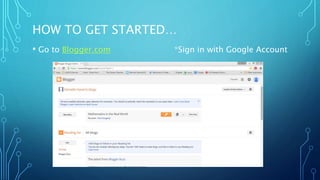
HOW TO GET STARTED…
• Go to Blogger.com *Sign in with Google Account
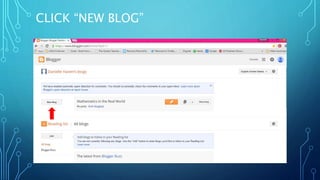
CLICK “NEW BLOG”
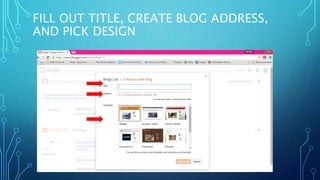
FILL OUT TITLE, CREATE BLOG ADDRESS,
AND PICK DESIGN
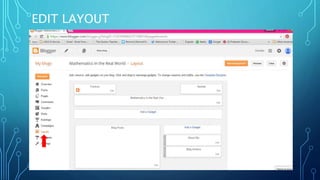
EDIT LAYOUT
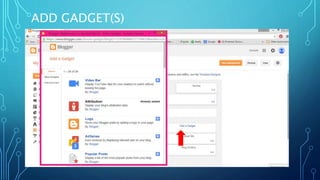
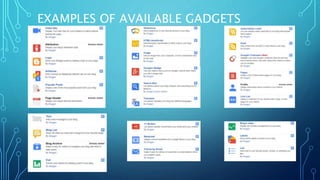
ADD GADGET(S)
EXAMPLES OF AVAILABLE GADGETS
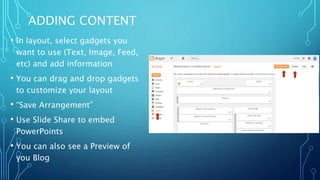
ADDING CONTENT
• In layout, select gadgets you
want to use (Text, Image, Feed,
etc) and add information
• You can drag and drop gadgets
to customize your layout
• “Save Arrangement”
• Use Slide Share to embed
PowerPoints
• You can also see a Preview of
you Blog
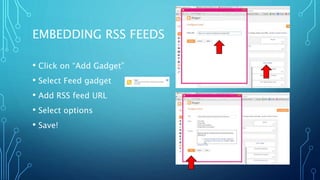
EMBEDDING RSS FEEDS
• Click on “Add Gadget”
• Select Feed gadget
• Add RSS feed URL
• Select options
• Save!
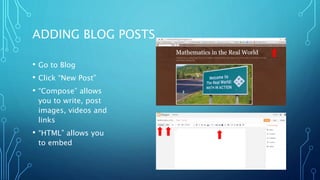
ADDING BLOG POSTS
• Go to Blog
• Click “New Post”
• “Compose” allows
you to write, post
images, videos and
links
• “HTML” allows you
to embed
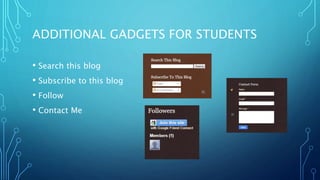
ADDITIONAL GADGETS FOR STUDENTS
• Search this blog
• Subscribe to this blog
• Follow
• Contact Me
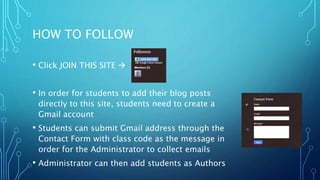
HOW TO FOLLOW
• Click JOIN THIS SITE 
• In order for students to add their blog posts
directly to this site, students need to create a
Gmail account
• Students can submit Gmail address through the
Contact Form with class code as the message in
order for the Administrator to collect emails
• Administrator can then add students as Authors
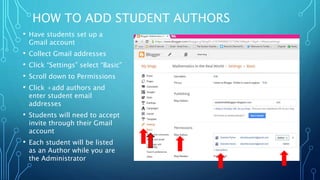
HOW TO ADD STUDENT AUTHORS
• Have students set up a
Gmail account
• Collect Gmail addresses
• Click “Settings” select “Basic”
• Scroll down to Permissions
• Click +add authors and
enter student email
addresses
• Students will need to accept
invite through their Gmail
account
• Each student will be listed
as an Author while you are
the Administrator
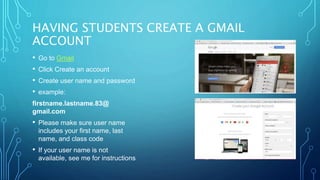
HAVING STUDENTS CREATE A GMAIL
ACCOUNT
• Go to Gmail
• Click Create an account
• Create user name and password
• example:
firstname.lastname.83@
gmail.com
• Please make sure user name
includes your first name, last
name, and class code
• If your user name is not
available, see me for instructions
CONNECTING AND CONTRIBUTING TO THE BLOG
• Go to:
http://studentmathbloggers.blogspot.com/
• Scroll to bottom of blog
• Click “Join This Site”
• Go to Contact Form
• Submit name, Gmail address you just
created, and message as class code
• Go to your Gmail account
• Open email “You have been invited to
contribute to Mathematics in the Real
World”
• Click “Accept Invitation”
KEEPING TRACK OF STUDENT CONTRIBUTIONS
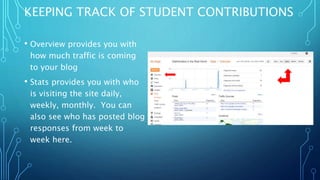
• Overview provides you with
how much traffic is coming
to your blog
• Stats provides you with who
is visiting the site daily,
weekly, monthly. You can
also see who has posted blog
responses from week to
week here.
KEEPING TRACK OF STUDENT CONTRIBUTIONS
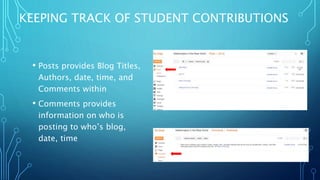
• Posts provides Blog Titles,
Authors, date, time, and
Comments within
• Comments provides
information on who is
posting to who’s blog,
date, time

Blogger

  • 1.
    BLOGGER.COM FOR MATHEMATICS INTEGRATING BLOGGINGINTO THE MIDDLE SCHOOL MATHEMATICS CLASSROOM DANIELLE PARKER
  • 2.
    WHAT’S ON MYBLOGGER SITE • RSS feeds for articles on how mathematics is used in the everyday world • Blogging Rubric for students • Questions students need to answer in blog post • Videos students can respond to in lieu of articles • Rules of the Blog • “How To” tutorial for getting set up, posting videos, links, pictures, comments, and blog responses
  • 3.
    CHECK IT OUT! •Class Blog  Mathematics in the Real World Blog
  • 4.
    STUDENT ASSESSMENT Students willbe assessed on: • Structure: Grammar, punctuation, spelling, length • Content: How well does the student answer the 5 questions; mathematical relevance of the article • Reflection: Thoughtfulness of the blog post, addition of supporting images, links, videos, etc. • Understanding: student has an understanding of mathematical concepts and their applications • Comments: students made thoughtful comments on other students’ blog posts, added supporting or additional information
  • 5.
    21ST CENTURY SKILLSADDRESSED • Students will develop global, financial, business, health, and environmental awareness through the incorporation of the real world articles in the classroom • Support learning across subjects • Inspire students to take their own initiative to increase their learning • Promotion of communication and collaboration between students • Increase technology skills and fluency
  • 6.
    HOW TO GETSTARTED… • Go to Blogger.com *Sign in with Google Account
  • 7.
  • 8.
    FILL OUT TITLE,CREATE BLOG ADDRESS, AND PICK DESIGN
  • 9.
  • 10.
  • 11.
  • 12.
    ADDING CONTENT • Inlayout, select gadgets you want to use (Text, Image, Feed, etc) and add information • You can drag and drop gadgets to customize your layout • “Save Arrangement” • Use Slide Share to embed PowerPoints • You can also see a Preview of you Blog
  • 13.
    EMBEDDING RSS FEEDS •Click on “Add Gadget” • Select Feed gadget • Add RSS feed URL • Select options • Save!
  • 14.
    ADDING BLOG POSTS •Go to Blog • Click “New Post” • “Compose” allows you to write, post images, videos and links • “HTML” allows you to embed
  • 15.
    ADDITIONAL GADGETS FORSTUDENTS • Search this blog • Subscribe to this blog • Follow • Contact Me
  • 16.
    HOW TO FOLLOW •Click JOIN THIS SITE  • In order for students to add their blog posts directly to this site, students need to create a Gmail account • Students can submit Gmail address through the Contact Form with class code as the message in order for the Administrator to collect emails • Administrator can then add students as Authors
  • 17.
    HOW TO ADDSTUDENT AUTHORS • Have students set up a Gmail account • Collect Gmail addresses • Click “Settings” select “Basic” • Scroll down to Permissions • Click +add authors and enter student email addresses • Students will need to accept invite through their Gmail account • Each student will be listed as an Author while you are the Administrator
  • 18.
    HAVING STUDENTS CREATEA GMAIL ACCOUNT • Go to Gmail • Click Create an account • Create user name and password • example: firstname.lastname.83@ gmail.com • Please make sure user name includes your first name, last name, and class code • If your user name is not available, see me for instructions
  • 19.
    CONNECTING AND CONTRIBUTINGTO THE BLOG • Go to: http://studentmathbloggers.blogspot.com/ • Scroll to bottom of blog • Click “Join This Site” • Go to Contact Form • Submit name, Gmail address you just created, and message as class code • Go to your Gmail account • Open email “You have been invited to contribute to Mathematics in the Real World” • Click “Accept Invitation”
  • 20.
    KEEPING TRACK OFSTUDENT CONTRIBUTIONS • Overview provides you with how much traffic is coming to your blog • Stats provides you with who is visiting the site daily, weekly, monthly. You can also see who has posted blog responses from week to week here.
  • 21.
    KEEPING TRACK OFSTUDENT CONTRIBUTIONS • Posts provides Blog Titles, Authors, date, time, and Comments within • Comments provides information on who is posting to who’s blog, date, time