COMPUTER BLOGCOMPUTER BLOG
COMPUTER BLOG
 What Is It?
 Blogs are found on the Internet.
 The term “blog” is short for web log.
 A blog is a series of entries, or posts created by someone,
stored in chronological order, are searchable, and allows readers to
comment on your content.
 The first “blogger” was a man named Dave Winer and his blog
Scripting News has been in existence since 1994; you can find it at
www.scripting.com.
COMPUTER BLOG
 Why Blog?
 To share information
 Personal – blog as a journal
 Professional – blog as a product
 As part of their work
 Journalists – blogs as news outlets
 Businesses – blogs as advertising
COMPUTER BLOG
 Blog Examples:
 BuzzMachine by Jeff Jarvis: http://www.buzzmachine.com/
 A blog by a journalist, expressing his opinions on the latest news
stories.
 Library of Congress Blog: http://www.loc.gov/blog/
 example of a government entity using the blog format to make
public their events.
COMPUTER BLOG
 Blog Examples:
Simms Real Estate Blog: http://blog.ssimms.com/
 Example of a business using the blog format to both advertise
and communicate with potential customers.
 CassandraRea Blog: http://coachcassandra.wordpress.com/
 Example of a blog in transition – rather unusual! This person
is transitioning her business blog into a personal blog.
COMPUTER BLOG
http://gillottssci.blogspot.com/
Gillotts School Science Blog
Other
links
Most
recent
article
Archive
of older
articles
Example
Older
articles
in date
order
COMPUTER BLOG
 How to find Blogs
 Blog Search Services
 Blog Search Engine: www.blogsearchengine.com
 Google Blog Search: www.blogsearch.google.com
 Technorati: www.technorati.com
COMPUTER BLOG
How to Create Blog ?
Three steps; five minutes
 Create an account at
 http://www.blogger.com
 Choose a title and URL for your blog
 http://xxx.blogspot.com
 xxx must be a unique name
 blogspot.com cannot be changed
 Choose an appearance template for your blog
 Everything but the URL can be changed later
COMPUTER BLOG
Step 1, create an account
http://www.blogger.com
COMPUTER BLOG
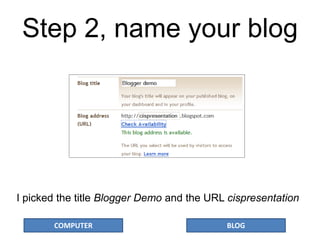
Step 2, name your blog
I picked the title Blogger Demo and the URL cispresentation
COMPUTER BLOG
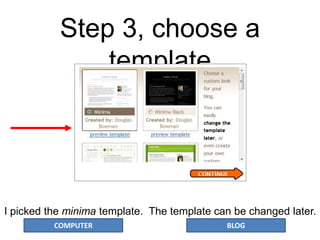
Step 3, choose a
template
I picked the minima template. The template can be changed later.
COMPUTER BLOG
The blog is at:
http://cispresentation.blogspot.com
There
are no
posts
yet.
The content
and layout
of the right-
hand
column were
generated
by default
and can be
changed
later.
COMPUTER BLOG
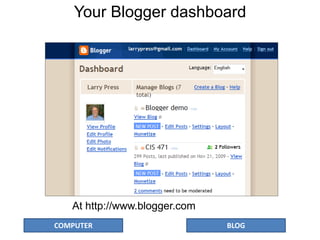
Your Blogger dashboard
At http://www.blogger.com
COMPUTER BLOG
Create Blog

Blog presentation

  • 1.
  • 2.
    COMPUTER BLOG  WhatIs It?  Blogs are found on the Internet.  The term “blog” is short for web log.  A blog is a series of entries, or posts created by someone, stored in chronological order, are searchable, and allows readers to comment on your content.  The first “blogger” was a man named Dave Winer and his blog Scripting News has been in existence since 1994; you can find it at www.scripting.com.
  • 3.
    COMPUTER BLOG  WhyBlog?  To share information  Personal – blog as a journal  Professional – blog as a product  As part of their work  Journalists – blogs as news outlets  Businesses – blogs as advertising
  • 4.
    COMPUTER BLOG  BlogExamples:  BuzzMachine by Jeff Jarvis: http://www.buzzmachine.com/  A blog by a journalist, expressing his opinions on the latest news stories.  Library of Congress Blog: http://www.loc.gov/blog/  example of a government entity using the blog format to make public their events.
  • 5.
    COMPUTER BLOG  BlogExamples: Simms Real Estate Blog: http://blog.ssimms.com/  Example of a business using the blog format to both advertise and communicate with potential customers.  CassandraRea Blog: http://coachcassandra.wordpress.com/  Example of a blog in transition – rather unusual! This person is transitioning her business blog into a personal blog.
  • 6.
    COMPUTER BLOG http://gillottssci.blogspot.com/ Gillotts SchoolScience Blog Other links Most recent article Archive of older articles Example Older articles in date order
  • 7.
    COMPUTER BLOG  Howto find Blogs  Blog Search Services  Blog Search Engine: www.blogsearchengine.com  Google Blog Search: www.blogsearch.google.com  Technorati: www.technorati.com
  • 8.
    COMPUTER BLOG How toCreate Blog ? Three steps; five minutes  Create an account at  http://www.blogger.com  Choose a title and URL for your blog  http://xxx.blogspot.com  xxx must be a unique name  blogspot.com cannot be changed  Choose an appearance template for your blog  Everything but the URL can be changed later
  • 9.
    COMPUTER BLOG Step 1,create an account http://www.blogger.com
  • 10.
    COMPUTER BLOG Step 2,name your blog I picked the title Blogger Demo and the URL cispresentation
  • 11.
    COMPUTER BLOG Step 3,choose a template I picked the minima template. The template can be changed later.
  • 12.
    COMPUTER BLOG The blogis at: http://cispresentation.blogspot.com There are no posts yet. The content and layout of the right- hand column were generated by default and can be changed later.
  • 13.
    COMPUTER BLOG Your Bloggerdashboard At http://www.blogger.com
  • 14.