Blogging
What, Why & How
By: Gaganpreet Singh
fb.com/CreativeBloggingIdeas
Agenda
I. What is a blog
II.What is blogging
III.Why you should blog
IV. How Blogs make money
V. How to choose a blog niche
VI. How to choose Blogging Software
VII.How to choose Domain Names
VIII.How to choose Hosting
IX.How To Choose Blog Themes/Templates
Agenda...
I. Structure of a Blog
II. Essential Pages of a Blog
III.Blog Design Elements
IV.How to get post ideas
V.How to write blog posts
VI.How to market a blog
VII.How to make money with blog
VIII.Questions
What is a Blog ?
I. Everyone has different opinion
II.Blog is a abbreviated version of “Web Log”.
III.Blog is a website with some key features
IV.Articles are listed in chronological order
with the newest article at the top
V.It’s easy to add new content
VI.Content is updated frequently
VII.Blogs allow people to leave comments
VIII.People trust blogs more than normal
websites b'coz blogging is a conversation
History
I. Got popular in 1998
II.Open Diary - 1998 – Where people used to
come and add their entries and others used to
read them and comment on them
III.Then came Live journal in 1999
IV.In 1999, Pyra Labs create Blogger
V.In 2003, Internet giant Google, bought Blogger
and then the magic started happening
What Is Blogging

Every skill you need to run and manage a
Blog is called blogging

Art of sharing your thoughts, knowledge,
experience with others

Includes writing, editing, designing, SEO,
Social Media Marketing etc

Building relationships with your readers and
other Bloggers
Why you should Blog ?
I. If aim is Money = Quit Blogging
II.Successful blogs all have one thing in
common – they improve people’s lives.
III.If your blog is to do the same, you have to
determine what it is you can offer that can
improve the lives of.
IV.Other people – what is your gift to give to
the blogosphere?
V.Try to be a Problem Solver and money will
start coming automatically
Why You Should Blog
I. Its free & easy – Why not giving it a try ?
II.Help others by Sharing Knowledge
III.Eg Maths Teacher near my house, he has a
blog, why ? Just for sharing knowledge
IV.Increase your writing skills
V.It's fun – Meet like minded people, attend blog
camps. IndiBlogger Meets – Free Drinks :P
VI.You’ll be famous – Darren Rowse, Yaro
VII.Grow your business
VIII.Making Money
How Blogs Make Money
I. Print magazines make money by selling
advertising. More the circulation, more the
money
II.Blogs also make money through Ads
 Paid Posts / Sponsored Reviews
 Image Ad Slots & Text Links (Direct Ads)
 Affiliate Marketing
 Adsense & Similar Ad Networks
I. More Quality Traffic = More Money
II.What is Quality Traffic ?
How To Choose Blog Idea –
Niche Selection
I. Everything starts with RnD
II.Passion vs Profit
III. Bad Blogger will run after Profit
IV. Good Blogger will run after Passion
V. Profit = Find niche that people spend
money in. Do not sell “ice” in Himalayas !
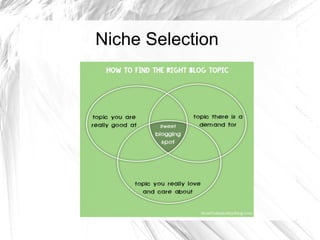
VI. Interest + Knowledge & Skills
VII. Create a Chart & Choose a Topic Wisely
Niche Selection
Niche Selection Chart
I. Who are you ?
II.What gets you up in the morning?
III.What do you do for a living?
IV.What do you love to do?
V.What are your hobbies?
VI.What do you have passion for?
VII.What do you dream about?
Niche Selection Chart
I. What do you know a lot about?
II.What do you have a talent for?
III.What skills and abilities do you have?
IV.What do you know that’s both rare and
valuable?
V.What are you experienced in?
VI.In what topics are you better than other
people?
Niche Selection

Find a Topic: What are Your Interests?

Work Experience

Hobbies

Education

Personal Attributes
Niche Selection Tool
I. Amazon – Go to category and find best selling
and top products
II.Udemy – Go to top courses
III.Adwords Tool
IV.Google Trends
V.Flippa - GoldMine
Niche Selection Tool
I. Amazon – Go to category and find best selling
and top products
II.Udemy – Go to top courses
III.Adwords Tool
IV.Google Trends
V.Flippa - GoldMine
Choosing Blogging Platform
I. Many Blogging platforms out there
II.Best of the best
 Blogger – By Google
 WordPress – Com & Org
I. Both have pros & cons
II.Lets discuss in detail:
Blogger – Why & When to use
Advantages
I.Its free
II.Provides environment to design your own
templates/themes/designs
III.Provides unlimited bandwidth
IV.You can create unlimited blogs
V.No downtime
Disadvantages
I.Limited features
II.Not SEO friendly as WordPress is
Use Blogger if :
I. You do not have initial investment to start a
blog
II.You are new to blogging
III.Not much technical – No Programming :(
IV.You want to start a personal blog
WordPress – Why & When to use
I. One of my favorite blogging platform
II.Most flexible blogging platform
III.Lots of option to customize your template
IV.Plugin feature makes it easy to add new
features to our template
V.Best for professional blogging
VI.SEO friendly, Google loves WordPress
VII.Advance Level Options
Use WordPress if:
I. If you want to start a blog and you want to take
it to the topmost level, I would recommend you
WordPress blogging platform.
How To Choose Domain Name
I. Dot Com – Recommended
II.Should match the topic of your blog
III.Easy to remember
IV.No hyphens
V.Check your domain with Archive.org
VI.Check if your domain is ban from Adsense or
not
VII.Avoid Trademarks
VIII.Ban from Facebook or not
IX.NameCheap, BigRock & Godaddy
How to Choose Web Hosting
I. Initially go for Shared Hosting
II.Cheap & Reliable
III.Shared - HostGator & KnownHost
IV.Private Server – Digital Ocean
V.Go For Unlimited Space & Domain Plans
VI.Before buying, make sure it has Live Chart
Support
Structure Of A Blog
I. Header
 Logo
 Ad Banner
I. Navigation Bar
II.Search Box – Google CSE
III.Sidebar
IV.Post Content Area
V.Post Excerpts
VI.Footer
Essential Pages of a Blog
I. Home Page – Index Page
II.Post
III. Page
IV.Category
V.Archive
VI.Search Page
Blog Theme Selection
I. Blog design is called Theme / Template
II. 4 Types of Themes
 Minimal – Highly Recommend
 Magazine Style – For news site with very
high no. of articles per day
 Business / Corporate Themes
 Portfolio Themes
I. For blogging
 Minimal
 Magazine Style
Quality Of a Good Theme
I. White or light colored background
II.Good Typography – Open Sans
III.2 Column Theme – Recommended
IV.Fast Loading
V.SEO Friendly
VI.Genesis Theme (Recommended)
Where to find Awesome Themes
If on Blogger
I. Btemplates.com
If on WordPress
I. ThemeForest
Blog Design Elements
I. Theme Color
II.Fonts
III.Header
IV.Post Content Area
V.Sidebar
VI.Comment Box
VII.Footer
Theme Color
I. Any light color
II.White background recommended
III.Never use dark background – low Avg time
on site
IV.Color Combination
 Blue (Trust & Confidence) – Business Blogs
 Red – Excitement – Movies, Songs, Food,
Dating, Love
 Green (Natural) – Health, Nature
Font
I. Gotham : http://www.typewolf.com/site-of-the-
day/fonts/gotham
II.Open Sans : http://www.typewolf.com/site-of-
the-day/fonts/open-sans
III.Font size – 16 px or 18 px works great
IV.Font color – Dark on Light but not opposite
Header
I. Left Side = Logo
II.Right Side
 Banner Ads
 Social Icons
 Link to important pages
 Lead Generation Form
 Search Box
Navigation Bar
I. Link to Categories & Sub Categories
II. Search Box
III.Top Categories – Top Pages
IV. Link Ads
Below Header
I. Lead Generation Box
II.Featured Posts
Home Page – Content Area
I. Post Excerpts
II.Thumbnails
III.Read More / Continue Reading
IV.Social Icons – Not Recommended
V. Date of Published Article
VI.Author Name & Pic – moz.com/blog
VII.Category
VIII.No. of Comments
IX.Pagination
Sidebar
I. Top – Social Icons
II.Subscription Box – FeedBurner by Google
III. FB Page Showcase
IV. Ad Slots
V. Related Articles
VI.Popular Posts
VII.Recent Comments – People like to be
featured
VIII.Other Widgets
Post Page Inside
I. Post Title
II.Ads below title and above the content
III.Social Icons
IV.Author Name, Category, Comments
V. Relevant Image & Content
VI.After Content ends again Social Icons and
Related Articles
VII.About Author Bio box
Footer
I. Least important area of a blog
II.But should be optimized
III.Includes small info about the blog
IV.Info about the blog owner
V. Links Important Pages
VI. Subscription Box
Before You Start a Blog

Mindset - Why you want to blog ?

Blog Topic

Awesome Blog Name

Blogging Platform (I) Blogger (ii) WordPress

Blog Hosting

Blog Template/Theme/Design

Essential Blog Elements
Lets Start with Content Ideas &
Writing Tips
How To Get Post Ideas

Pillar Content – Eg. Mobile Site, daily changing

Analyze popular blogs – See what they're
writing and add some extra value

Analyze comments on popular blogs

Use forums helpdesk – Look for the questions
and give solution on your blog

Write about latest news

Write List Articles

Use Delicious & Stumble Upon for post ideas

Interview other famous people and publish it on
your blog and see the magic
How To Get Post Ideas

Write “How To” Articles

Look for problems around you

Write Curated Content

Ask your readers eg. BloggerBuster

Write about Product Reviews in your niche

Check out trends in your niche and start writing
on it. Google Trends

Check out keyword tool what people are
looking in your niche
How To Write Blog Posts
I. You will need editors
II.Two Types
 In Built editor – Recommended
 Third Party – Like MS Word
How To Write Blog Posts
I. You will need editors
II.Two Types
 In Built editor – Recommended
 Third Party – Like MS Word
How To Write Blog Post

Write eye catching post title

Make post title SEO friendly

Short introduction – If intro is not good, no one
is going to read the article.

Make it very simple & to the point

Always write in points. No one reads long
paragraphs

No grammatical and spelling mistakes

Give relevant images & screenshots

Use bullet points, Heading, Sub Heading
How To Write Blog Post

Organize the content

Readers should know, what is in the article in
the introduction

Proper

Interlink with other articles

Ask for comments and feedback

Is the content already written – Give Extra -
Download my guide : How To Write High
Quality Content

Include to CTA at the end
How to write blog post
I. Ask Questions in the post
II. Valuable content first. Eg. Mobile Review
III. Do not make it too long
 If its too long, divide it in series. Eg. CBI
Design Series, Traffic Series
 Ask for subscription and
 Audience will come again
How To Market a Blog

Leaving comments on other blogs – If possible
be the first one to comment – Everyone reads
reactions – Eg FB

Reply to all your comments. Eg YouTube
Channel : InHouseRecipes

SEO is the key to traffic

Write Guest Posts

Build audience through Forums

Podcasting

Writing Case Studies
How To Market a Blog

Relevant Social Sites
 If Video site : YouTube
 If Image Blog – Pinterest, Reddit
 If Text Site – FB, StumbleUpon etc

Webinars – Gave me a good exposure

Link Exchange with other bloggers

Blog Engage - blogging community where all
bloggers submit their latest blog articles for
exposure

Blueprints
Make Money With Blog - Mindset
I. Not a simple process
II.Can take upto 6 months to 1 year
III.After you've good number of posts
IV.After you've a good design
V.After you've a decent traffic & audience
VI.Then think of making money
VII. Quality Traffic & Awesome Content is the
key to make money online
Making Money With Blogs -
Adsense
I. Simple & Effective Method – Adsense
II.Approval is difficult
III.Google Network
IV.Do not click on your own Ads
V.Do not ask anyone to click on your Ads
VI.Place Ads, optimize and let rest of stuff
happens naturally
VII.Do not try to game the system
VIII.Try to be smart but not over smart
Make Money With Blogs –
Media.net
I. Yahoo & Bing Network
II.Easily approved than Adsense
Make Money With InText Ads
I. My two favorite intext ad network
 Infolinks
 Kontera
Making Money With Blogs – Ad
Selling
I. Register your site on BuySellAds
II.Set a price
III.If advertiser finds your site useful, they will
buy the ads slots
Resources
31 Days Build A Better Blog - eBook
HowToMakeMyBlog.com
BloggingCage.com
ShoutMeLoud.com
Blogging Mastermind Course – Blogging Course
CreativeBloggingIdeas.com
http://goo.gl/lVOHcc - How To Write High Quality
Content
Questions

Blogging - What, Why & How

  • 1.
    Blogging What, Why &How By: Gaganpreet Singh fb.com/CreativeBloggingIdeas
  • 2.
    Agenda I. What isa blog II.What is blogging III.Why you should blog IV. How Blogs make money V. How to choose a blog niche VI. How to choose Blogging Software VII.How to choose Domain Names VIII.How to choose Hosting IX.How To Choose Blog Themes/Templates
  • 3.
    Agenda... I. Structure ofa Blog II. Essential Pages of a Blog III.Blog Design Elements IV.How to get post ideas V.How to write blog posts VI.How to market a blog VII.How to make money with blog VIII.Questions
  • 4.
    What is aBlog ? I. Everyone has different opinion II.Blog is a abbreviated version of “Web Log”. III.Blog is a website with some key features IV.Articles are listed in chronological order with the newest article at the top V.It’s easy to add new content VI.Content is updated frequently VII.Blogs allow people to leave comments VIII.People trust blogs more than normal websites b'coz blogging is a conversation
  • 5.
    History I. Got popularin 1998 II.Open Diary - 1998 – Where people used to come and add their entries and others used to read them and comment on them III.Then came Live journal in 1999 IV.In 1999, Pyra Labs create Blogger V.In 2003, Internet giant Google, bought Blogger and then the magic started happening
  • 6.
    What Is Blogging  Everyskill you need to run and manage a Blog is called blogging  Art of sharing your thoughts, knowledge, experience with others  Includes writing, editing, designing, SEO, Social Media Marketing etc  Building relationships with your readers and other Bloggers
  • 7.
    Why you shouldBlog ? I. If aim is Money = Quit Blogging II.Successful blogs all have one thing in common – they improve people’s lives. III.If your blog is to do the same, you have to determine what it is you can offer that can improve the lives of. IV.Other people – what is your gift to give to the blogosphere? V.Try to be a Problem Solver and money will start coming automatically
  • 8.
    Why You ShouldBlog I. Its free & easy – Why not giving it a try ? II.Help others by Sharing Knowledge III.Eg Maths Teacher near my house, he has a blog, why ? Just for sharing knowledge IV.Increase your writing skills V.It's fun – Meet like minded people, attend blog camps. IndiBlogger Meets – Free Drinks :P VI.You’ll be famous – Darren Rowse, Yaro VII.Grow your business VIII.Making Money
  • 9.
    How Blogs MakeMoney I. Print magazines make money by selling advertising. More the circulation, more the money II.Blogs also make money through Ads  Paid Posts / Sponsored Reviews  Image Ad Slots & Text Links (Direct Ads)  Affiliate Marketing  Adsense & Similar Ad Networks I. More Quality Traffic = More Money II.What is Quality Traffic ?
  • 10.
    How To ChooseBlog Idea – Niche Selection I. Everything starts with RnD II.Passion vs Profit III. Bad Blogger will run after Profit IV. Good Blogger will run after Passion V. Profit = Find niche that people spend money in. Do not sell “ice” in Himalayas ! VI. Interest + Knowledge & Skills VII. Create a Chart & Choose a Topic Wisely
  • 11.
  • 12.
    Niche Selection Chart I.Who are you ? II.What gets you up in the morning? III.What do you do for a living? IV.What do you love to do? V.What are your hobbies? VI.What do you have passion for? VII.What do you dream about?
  • 13.
    Niche Selection Chart I.What do you know a lot about? II.What do you have a talent for? III.What skills and abilities do you have? IV.What do you know that’s both rare and valuable? V.What are you experienced in? VI.In what topics are you better than other people?
  • 14.
    Niche Selection  Find aTopic: What are Your Interests?  Work Experience  Hobbies  Education  Personal Attributes
  • 15.
    Niche Selection Tool I.Amazon – Go to category and find best selling and top products II.Udemy – Go to top courses III.Adwords Tool IV.Google Trends V.Flippa - GoldMine
  • 16.
    Niche Selection Tool I.Amazon – Go to category and find best selling and top products II.Udemy – Go to top courses III.Adwords Tool IV.Google Trends V.Flippa - GoldMine
  • 17.
    Choosing Blogging Platform I.Many Blogging platforms out there II.Best of the best  Blogger – By Google  WordPress – Com & Org I. Both have pros & cons II.Lets discuss in detail:
  • 18.
    Blogger – Why& When to use Advantages I.Its free II.Provides environment to design your own templates/themes/designs III.Provides unlimited bandwidth IV.You can create unlimited blogs V.No downtime Disadvantages I.Limited features II.Not SEO friendly as WordPress is
  • 19.
    Use Blogger if: I. You do not have initial investment to start a blog II.You are new to blogging III.Not much technical – No Programming :( IV.You want to start a personal blog
  • 20.
    WordPress – Why& When to use I. One of my favorite blogging platform II.Most flexible blogging platform III.Lots of option to customize your template IV.Plugin feature makes it easy to add new features to our template V.Best for professional blogging VI.SEO friendly, Google loves WordPress VII.Advance Level Options
  • 21.
    Use WordPress if: I.If you want to start a blog and you want to take it to the topmost level, I would recommend you WordPress blogging platform.
  • 22.
    How To ChooseDomain Name I. Dot Com – Recommended II.Should match the topic of your blog III.Easy to remember IV.No hyphens V.Check your domain with Archive.org VI.Check if your domain is ban from Adsense or not VII.Avoid Trademarks VIII.Ban from Facebook or not IX.NameCheap, BigRock & Godaddy
  • 23.
    How to ChooseWeb Hosting I. Initially go for Shared Hosting II.Cheap & Reliable III.Shared - HostGator & KnownHost IV.Private Server – Digital Ocean V.Go For Unlimited Space & Domain Plans VI.Before buying, make sure it has Live Chart Support
  • 24.
    Structure Of ABlog I. Header  Logo  Ad Banner I. Navigation Bar II.Search Box – Google CSE III.Sidebar IV.Post Content Area V.Post Excerpts VI.Footer
  • 25.
    Essential Pages ofa Blog I. Home Page – Index Page II.Post III. Page IV.Category V.Archive VI.Search Page
  • 26.
    Blog Theme Selection I.Blog design is called Theme / Template II. 4 Types of Themes  Minimal – Highly Recommend  Magazine Style – For news site with very high no. of articles per day  Business / Corporate Themes  Portfolio Themes I. For blogging  Minimal  Magazine Style
  • 27.
    Quality Of aGood Theme I. White or light colored background II.Good Typography – Open Sans III.2 Column Theme – Recommended IV.Fast Loading V.SEO Friendly VI.Genesis Theme (Recommended)
  • 28.
    Where to findAwesome Themes If on Blogger I. Btemplates.com If on WordPress I. ThemeForest
  • 29.
    Blog Design Elements I.Theme Color II.Fonts III.Header IV.Post Content Area V.Sidebar VI.Comment Box VII.Footer
  • 30.
    Theme Color I. Anylight color II.White background recommended III.Never use dark background – low Avg time on site IV.Color Combination  Blue (Trust & Confidence) – Business Blogs  Red – Excitement – Movies, Songs, Food, Dating, Love  Green (Natural) – Health, Nature
  • 31.
    Font I. Gotham :http://www.typewolf.com/site-of-the- day/fonts/gotham II.Open Sans : http://www.typewolf.com/site-of- the-day/fonts/open-sans III.Font size – 16 px or 18 px works great IV.Font color – Dark on Light but not opposite
  • 32.
    Header I. Left Side= Logo II.Right Side  Banner Ads  Social Icons  Link to important pages  Lead Generation Form  Search Box
  • 33.
    Navigation Bar I. Linkto Categories & Sub Categories II. Search Box III.Top Categories – Top Pages IV. Link Ads
  • 34.
    Below Header I. LeadGeneration Box II.Featured Posts
  • 35.
    Home Page –Content Area I. Post Excerpts II.Thumbnails III.Read More / Continue Reading IV.Social Icons – Not Recommended V. Date of Published Article VI.Author Name & Pic – moz.com/blog VII.Category VIII.No. of Comments IX.Pagination
  • 36.
    Sidebar I. Top –Social Icons II.Subscription Box – FeedBurner by Google III. FB Page Showcase IV. Ad Slots V. Related Articles VI.Popular Posts VII.Recent Comments – People like to be featured VIII.Other Widgets
  • 37.
    Post Page Inside I.Post Title II.Ads below title and above the content III.Social Icons IV.Author Name, Category, Comments V. Relevant Image & Content VI.After Content ends again Social Icons and Related Articles VII.About Author Bio box
  • 38.
    Footer I. Least importantarea of a blog II.But should be optimized III.Includes small info about the blog IV.Info about the blog owner V. Links Important Pages VI. Subscription Box
  • 39.
    Before You Starta Blog  Mindset - Why you want to blog ?  Blog Topic  Awesome Blog Name  Blogging Platform (I) Blogger (ii) WordPress  Blog Hosting  Blog Template/Theme/Design  Essential Blog Elements
  • 40.
    Lets Start withContent Ideas & Writing Tips
  • 41.
    How To GetPost Ideas  Pillar Content – Eg. Mobile Site, daily changing  Analyze popular blogs – See what they're writing and add some extra value  Analyze comments on popular blogs  Use forums helpdesk – Look for the questions and give solution on your blog  Write about latest news  Write List Articles  Use Delicious & Stumble Upon for post ideas  Interview other famous people and publish it on your blog and see the magic
  • 42.
    How To GetPost Ideas  Write “How To” Articles  Look for problems around you  Write Curated Content  Ask your readers eg. BloggerBuster  Write about Product Reviews in your niche  Check out trends in your niche and start writing on it. Google Trends  Check out keyword tool what people are looking in your niche
  • 43.
    How To WriteBlog Posts I. You will need editors II.Two Types  In Built editor – Recommended  Third Party – Like MS Word
  • 44.
    How To WriteBlog Posts I. You will need editors II.Two Types  In Built editor – Recommended  Third Party – Like MS Word
  • 45.
    How To WriteBlog Post  Write eye catching post title  Make post title SEO friendly  Short introduction – If intro is not good, no one is going to read the article.  Make it very simple & to the point  Always write in points. No one reads long paragraphs  No grammatical and spelling mistakes  Give relevant images & screenshots  Use bullet points, Heading, Sub Heading
  • 46.
    How To WriteBlog Post  Organize the content  Readers should know, what is in the article in the introduction  Proper  Interlink with other articles  Ask for comments and feedback  Is the content already written – Give Extra - Download my guide : How To Write High Quality Content  Include to CTA at the end
  • 47.
    How to writeblog post I. Ask Questions in the post II. Valuable content first. Eg. Mobile Review III. Do not make it too long  If its too long, divide it in series. Eg. CBI Design Series, Traffic Series  Ask for subscription and  Audience will come again
  • 48.
    How To Marketa Blog  Leaving comments on other blogs – If possible be the first one to comment – Everyone reads reactions – Eg FB  Reply to all your comments. Eg YouTube Channel : InHouseRecipes  SEO is the key to traffic  Write Guest Posts  Build audience through Forums  Podcasting  Writing Case Studies
  • 49.
    How To Marketa Blog  Relevant Social Sites  If Video site : YouTube  If Image Blog – Pinterest, Reddit  If Text Site – FB, StumbleUpon etc  Webinars – Gave me a good exposure  Link Exchange with other bloggers  Blog Engage - blogging community where all bloggers submit their latest blog articles for exposure  Blueprints
  • 50.
    Make Money WithBlog - Mindset I. Not a simple process II.Can take upto 6 months to 1 year III.After you've good number of posts IV.After you've a good design V.After you've a decent traffic & audience VI.Then think of making money VII. Quality Traffic & Awesome Content is the key to make money online
  • 51.
    Making Money WithBlogs - Adsense I. Simple & Effective Method – Adsense II.Approval is difficult III.Google Network IV.Do not click on your own Ads V.Do not ask anyone to click on your Ads VI.Place Ads, optimize and let rest of stuff happens naturally VII.Do not try to game the system VIII.Try to be smart but not over smart
  • 52.
    Make Money WithBlogs – Media.net I. Yahoo & Bing Network II.Easily approved than Adsense
  • 53.
    Make Money WithInText Ads I. My two favorite intext ad network  Infolinks  Kontera
  • 54.
    Making Money WithBlogs – Ad Selling I. Register your site on BuySellAds II.Set a price III.If advertiser finds your site useful, they will buy the ads slots
  • 55.
    Resources 31 Days BuildA Better Blog - eBook HowToMakeMyBlog.com BloggingCage.com ShoutMeLoud.com Blogging Mastermind Course – Blogging Course CreativeBloggingIdeas.com http://goo.gl/lVOHcc - How To Write High Quality Content
  • 56.