© 2016 Boise State University 1
Kerry Rice, Ed. D.
Professor and Fulbright Scholar
Department of Educational Technology
Boise State University
INACOL
October, 2016
#iNACOL16
© 2016 Boise State University 2
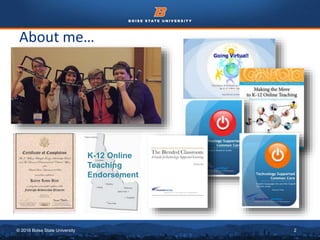
About me…
K-12 Online
Teaching
Endorsement
© 2016 Boise State University 3
Introductions
Background
Stations
Share
Hello!
Blended
0
0
0
© 2016 Boise State University 4
https://answergarden.ch/363514
© 2016 Boise State University 5
Blended Learning
“Blended Learning combines online delivery of
educational content with the best features of
classroom interaction and live instruction to
personalize learning, allow thoughtful reflection,
and differentiate instruction from student to
student across a diverse group of learners.”
(iNACOL)
© 2016 Boise State University 6
“a formal education program in which a student
learns:
• at least in part through online learning, with
some element of student control over time,
pace, place, and/or path;
• at least in part in a supervised brick-and-
mortar location away from home;
• and the modalities along each student’s
learning path within a course or subject are
connected to provide an integrated learning
experience.”
Blended Learning
© 2016 Boise State University 7
What Blended Learning is Not…
• A class website with links to homework,
practice quizzes, or other resources that
supplement your instruction.
• Students’ use of instructional software during
class time or even after school for
remediation.
• WebQuests, Scavenger Hunts or other
Internet-based activities incorporated into
your normal classroom curriculum.
• After school chats using a Web-based chat
tool
• Recorded tutorials for struggling students
© 2016 Boise State University 8
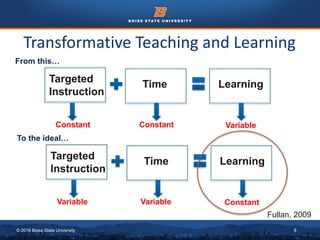
Transformative Teaching and Learning
Targeted
Instruction
Time Learning
Constant Constant Variable
From this…
Targeted
Instruction
Time Learning
Variable Variable Constant
To the ideal…
Fullan, 2009
© 2016 Boise State University 9
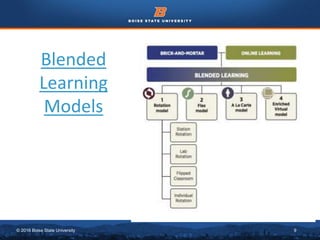
Blended
Learning
Models
© 2016 Boise State University 10
© 2016 Boise State University 11
© 2016 Boise State University 12
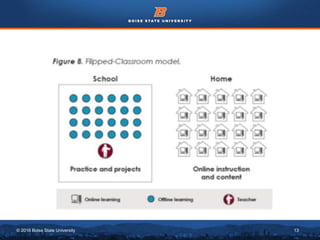
© 2016 Boise State University 13
© 2016 Boise State University 14
Newbie to Veteran Journey…
© 2016 Boise State University 15
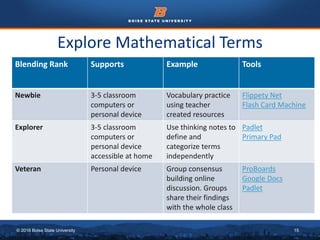
Explore Mathematical Terms
Blending Rank Supports Example Tools
Newbie 3-5 classroom
computers or
personal device
Vocabulary practice
using teacher
created resources
Flippety Net
Flash Card Machine
Explorer 3-5 classroom
computers or
personal device
accessible at home
Use thinking notes to
define and
categorize terms
independently
Padlet
Primary Pad
Veteran Personal device Group consensus
building online
discussion. Groups
share their findings
with the whole class
ProBoards
Google Docs
Padlet
© 2016 Boise State University 16
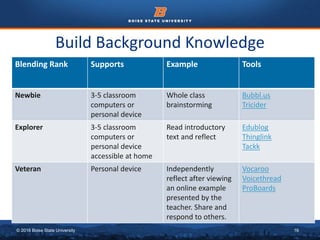
Build Background Knowledge
Blending Rank Supports Example Tools
Newbie 3-5 classroom
computers or
personal device
Whole class
brainstorming
Bubbl.us
Tricider
Explorer 3-5 classroom
computers or
personal device
accessible at home
Read introductory
text and reflect
Edublog
Thinglink
Tackk
Veteran Personal device Independently
reflect after viewing
an online example
presented by the
teacher. Share and
respond to others.
Vocaroo
Voicethread
ProBoards
© 2016 Boise State University 17
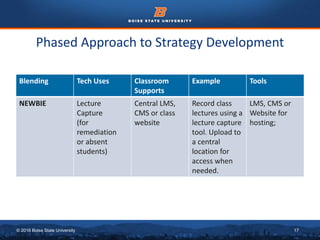
Phased Approach to Strategy Development
Blending Tech Uses Classroom
Supports
Example Tools
NEWBIE Lecture
Capture
(for
remediation
or absent
students)
Central LMS,
CMS or class
website
Record class
lectures using a
lecture capture
tool. Upload to
a central
location for
access when
needed.
LMS, CMS or
Website for
hosting;
© 2016 Boise State University 18
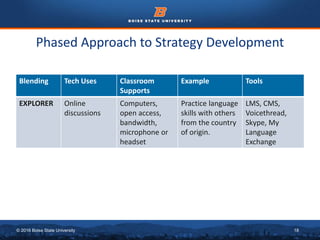
Phased Approach to Strategy Development
Blending Tech Uses Classroom
Supports
Example Tools
EXPLORER Online
discussions
Computers,
open access,
bandwidth,
microphone or
headset
Practice language
skills with others
from the country
of origin.
LMS, CMS,
Voicethread,
Skype, My
Language
Exchange
© 2016 Boise State University 19
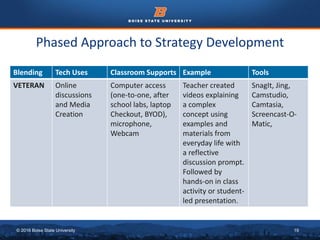
Phased Approach to Strategy Development
Blending Tech Uses Classroom Supports Example Tools
VETERAN Online
discussions
and Media
Creation
Computer access
(one-to-one, after
school labs, laptop
Checkout, BYOD),
microphone,
Webcam
Teacher created
videos explaining
a complex
concept using
examples and
materials from
everyday life with
a reflective
discussion prompt.
Followed by
hands-on in class
activity or student-
led presentation.
SnagIt, Jing,
Camstudio,
Camtasia,
Screencast-O-
Matic,
© 2016 Boise State University 20
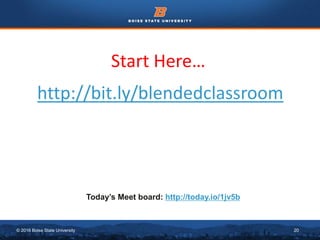
Start Here…
http://bit.ly/blendedclassroom
Today’s Meet board: http://today.io/1jv5b
© 2016 Boise State University 21
INSPIRATION
© 2016 Boise State University 22
Before Class Starts
• Course and Syllabus
Scavenger Hunt
Scavenger Hunt
Creator, Google Forms)
• Weekly Agenda
Checklist
(Checkli, Gliffy, Cacoo)
• Take Safety Seriously
(SafeKids, NetSmartz,
Digital Citizenship)
• Make “Appropriate Use”
Explicit
(Netiquette, Creative
Commons, Anti-
Plagiarism, Dupli
Checker)
© 2016 Boise State University 23
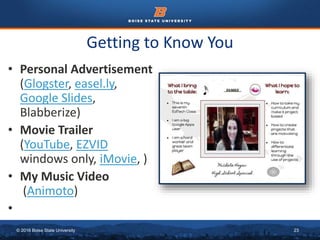
Getting to Know You
• Personal Advertisement
(Glogster, easel.ly,
Google Slides,
Blabberize)
• Movie Trailer
(YouTube, EZVID
windows only, iMovie, )
• My Music Video
(Animoto)
•
© 2016 Boise State University 24
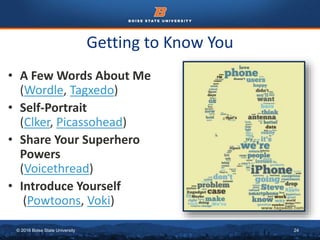
Getting to Know You
• A Few Words About Me
(Wordle, Tagxedo)
• Self-Portrait
(Clker, Picassohead)
• Share Your Superhero
Powers
(Voicethread)
• Introduce Yourself
(Powtoons, Voki)
© 2016 Boise State University 25
Getting to Know You
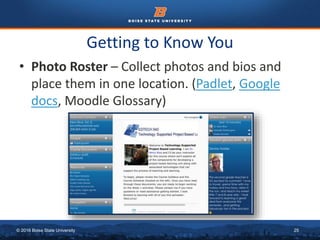
• Photo Roster – Collect photos and bios and
place them in one location. (Padlet, Google
docs, Moodle Glossary)
© 2016 Boise State University 26
Discussion Forums
• Creative Think Tank – Share ideas and collaborate.
• Tech Help Forum – Provide assistance to others in the class.
• Writing Roulette – Each individual or group builds on previous writing.
• Consensus Building – Small groups meet and agree on important
criteria for any topic, then share their results with the whole group.
• Jigsaw – Experts learn or review a topic
and share with others.
• Role Play – Invent a scenario and ask
learners to assume a role for the
discussion.
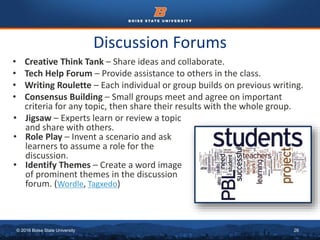
• Identify Themes – Create a word image
of prominent themes in the discussion
forum. (Wordle, Tagxedo)
© 2016 Boise State University 27
Explore Concepts
• Engage Students with Hands-on
Experiences
Use simulations or create engaging
content-specific supplemental
materials like virtual field trips. (Phet,
Smithsonian, Plotly, Probability Simulator)
• Use External Resources
Allow learners to preview material
before they read the text. (Khan
Academy, Best of History, Spongelab,
Interactive KWL Creator)
• Customize video for your classroom
with EdPuzzle, Zaption.
© 2016 Boise State University 28
Explore Concepts
• Idea Generation
Brainstorm and collaborate
complex concepts and
themes (LucidChart,
Bubbl.us, Padlet, Coggle,
Tangle)
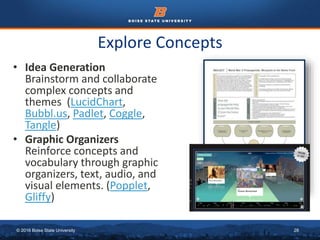
• Graphic Organizers
Reinforce concepts and
vocabulary through graphic
organizers, text, audio, and
visual elements. (Popplet,
Gliffy)
© 2016 Boise State University 29
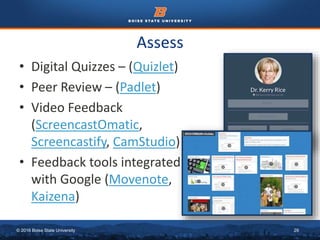
Assess
• Digital Quizzes – (Quizlet)
• Peer Review – (Padlet)
• Video Feedback
(ScreencastOmatic,
Screencastify, CamStudio)
• Feedback tools integrated
with Google (Movenote,
Kaizena)
© 2016 Boise State University 30
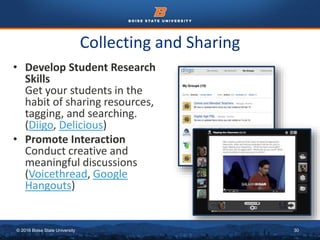
Collecting and Sharing
• Develop Student Research
Skills
Get your students in the
habit of sharing resources,
tagging, and searching.
(Diigo, Delicious)
• Promote Interaction
Conduct creative and
meaningful discussions
(Voicethread, Google
Hangouts)
© 2016 Boise State University 31
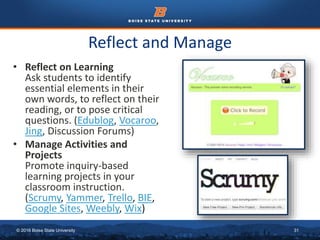
Reflect and Manage
• Reflect on Learning
Ask students to identify
essential elements in their
own words, to reflect on their
reading, or to pose critical
questions. (Edublog, Vocaroo,
Jing, Discussion Forums)
• Manage Activities and
Projects
Promote inquiry-based
learning projects in your
classroom instruction.
(Scrumy, Yammer, Trello, BIE,
Google Sites, Weebly, Wix)
© 2016 Boise State University 32
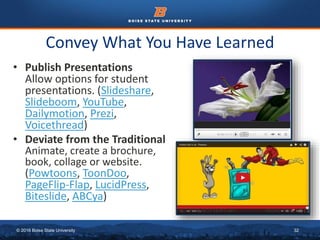
Convey What You Have Learned
• Publish Presentations
Allow options for student
presentations. (Slideshare,
Slideboom, YouTube,
Dailymotion, Prezi,
Voicethread)
• Deviate from the Traditional
Animate, create a brochure,
book, collage or website.
(Powtoons, ToonDoo,
PageFlip-Flap, LucidPress,
Biteslide, ABCya)
© 2016 Boise State University 33
Using the Google Form, name one thing you will
do now, TODAY, to transform your classroom.
Form Link: https://goo.gl/forms/O7XfsB8kVCAEtbOH2
Key Take-Away’s
© 2016 Boise State University 34
How Will Your Classroom
be Transformed?
Kerry Rice
Department of Educational Technology
Boise State University
krice@boisestate.edu
Questions?
© 2016 Boise State University 35
Resources
• Rice, K. (2012). Making the Move to K-12 Online Teaching: Research-Based Strategies and Practices. Boston,
MA: Pearson Education. www.pearsonhighered.com/rice1e
• U.S. Department of Education, Office of Educational Technology, Understanding the Implications of Online
Learning for Educational Productivity, Washington, D.C., 2012.
http://www2.ed.gov/about/offices/list/os/technology/implications-online-learning.pdf
• U.S. Department of Education. (2010). Evaluation of Evidence-based Practices in Online Learning.
http://www2.ed.gov/rschstat/eval/tech/evidence-based-practices/finalreport.pdf
• U.S. Department of Education, Office for Civil Rights. Civil Rights Data Collection: Data Snapshot: College and
Career Readiness. http://ocrdata.ed.gov/Downloads/CRDC-College-and-Career-Readiness-Snapshot.pdf
• Watson, J., et. al. (2011). Keeping Pace with K-12 Online Learning: An Annual Review of Policy and Practice.
Evergreen Education Group. http://kpk12.com/
• State Strategies for Awarding Credit to Support Student Learning: http://www.edweek.org/media/23biz-
state-1202educreditbrief.pdf
• The reality of virtual schools: A review of the literature. (2008). http://1.usa.gov/MLJwSF
• Innosight Institute: http://www.innosightinstitute.org/
• Fast Facts About Online Learning: http://www.inacol.org/press/docs/nacol_fast_facts.pdf
• Technology Tools for Reflection: https://sites.google.com/site/reflection4learning/technology-tools-for-
reflection
• Lowenthal, P. R., & Dunlap, J. C. (2010). From Pixel on a Screen to Real Person in Your Student’ Lives:
Establishing Presence using Digital StoryTelling. Internet and Higher Education, 13, 70-72. Retrieved from
http://www.cehd.umn.edu/PSTL/Water/Resources/Documents/LowenthalDunlap2010.pdf
• Dunlap, J. C., & Lowenthal, P. R. (in press). Learning, unlearning, and relearning: Using Web 2.0 technologies
to support the development of lifelong learning skills. In G. D. Magoulas (Ed.), E-infrastructures and
technologies for lifelong learning: Next generation environments. Hershey, PA: IGI Global. Retrieved from
http://www.patricklowenthal.com/publications/LLLandWeb20preprint.pdf
• Getting to Know You: The First Week of Class and Beyond http://joannadunlap.com/?p=60

Blended Learning: Practical Strategies for the Classroom

  • 1.
    © 2016 BoiseState University 1 Kerry Rice, Ed. D. Professor and Fulbright Scholar Department of Educational Technology Boise State University INACOL October, 2016 #iNACOL16
  • 2.
    © 2016 BoiseState University 2 About me… K-12 Online Teaching Endorsement
  • 3.
    © 2016 BoiseState University 3 Introductions Background Stations Share Hello! Blended 0 0 0
  • 4.
    © 2016 BoiseState University 4 https://answergarden.ch/363514
  • 5.
    © 2016 BoiseState University 5 Blended Learning “Blended Learning combines online delivery of educational content with the best features of classroom interaction and live instruction to personalize learning, allow thoughtful reflection, and differentiate instruction from student to student across a diverse group of learners.” (iNACOL)
  • 6.
    © 2016 BoiseState University 6 “a formal education program in which a student learns: • at least in part through online learning, with some element of student control over time, pace, place, and/or path; • at least in part in a supervised brick-and- mortar location away from home; • and the modalities along each student’s learning path within a course or subject are connected to provide an integrated learning experience.” Blended Learning
  • 7.
    © 2016 BoiseState University 7 What Blended Learning is Not… • A class website with links to homework, practice quizzes, or other resources that supplement your instruction. • Students’ use of instructional software during class time or even after school for remediation. • WebQuests, Scavenger Hunts or other Internet-based activities incorporated into your normal classroom curriculum. • After school chats using a Web-based chat tool • Recorded tutorials for struggling students
  • 8.
    © 2016 BoiseState University 8 Transformative Teaching and Learning Targeted Instruction Time Learning Constant Constant Variable From this… Targeted Instruction Time Learning Variable Variable Constant To the ideal… Fullan, 2009
  • 9.
    © 2016 BoiseState University 9 Blended Learning Models
  • 10.
    © 2016 BoiseState University 10
  • 11.
    © 2016 BoiseState University 11
  • 12.
    © 2016 BoiseState University 12
  • 13.
    © 2016 BoiseState University 13
  • 14.
    © 2016 BoiseState University 14 Newbie to Veteran Journey…
  • 15.
    © 2016 BoiseState University 15 Explore Mathematical Terms Blending Rank Supports Example Tools Newbie 3-5 classroom computers or personal device Vocabulary practice using teacher created resources Flippety Net Flash Card Machine Explorer 3-5 classroom computers or personal device accessible at home Use thinking notes to define and categorize terms independently Padlet Primary Pad Veteran Personal device Group consensus building online discussion. Groups share their findings with the whole class ProBoards Google Docs Padlet
  • 16.
    © 2016 BoiseState University 16 Build Background Knowledge Blending Rank Supports Example Tools Newbie 3-5 classroom computers or personal device Whole class brainstorming Bubbl.us Tricider Explorer 3-5 classroom computers or personal device accessible at home Read introductory text and reflect Edublog Thinglink Tackk Veteran Personal device Independently reflect after viewing an online example presented by the teacher. Share and respond to others. Vocaroo Voicethread ProBoards
  • 17.
    © 2016 BoiseState University 17 Phased Approach to Strategy Development Blending Tech Uses Classroom Supports Example Tools NEWBIE Lecture Capture (for remediation or absent students) Central LMS, CMS or class website Record class lectures using a lecture capture tool. Upload to a central location for access when needed. LMS, CMS or Website for hosting;
  • 18.
    © 2016 BoiseState University 18 Phased Approach to Strategy Development Blending Tech Uses Classroom Supports Example Tools EXPLORER Online discussions Computers, open access, bandwidth, microphone or headset Practice language skills with others from the country of origin. LMS, CMS, Voicethread, Skype, My Language Exchange
  • 19.
    © 2016 BoiseState University 19 Phased Approach to Strategy Development Blending Tech Uses Classroom Supports Example Tools VETERAN Online discussions and Media Creation Computer access (one-to-one, after school labs, laptop Checkout, BYOD), microphone, Webcam Teacher created videos explaining a complex concept using examples and materials from everyday life with a reflective discussion prompt. Followed by hands-on in class activity or student- led presentation. SnagIt, Jing, Camstudio, Camtasia, Screencast-O- Matic,
  • 20.
    © 2016 BoiseState University 20 Start Here… http://bit.ly/blendedclassroom Today’s Meet board: http://today.io/1jv5b
  • 21.
    © 2016 BoiseState University 21 INSPIRATION
  • 22.
    © 2016 BoiseState University 22 Before Class Starts • Course and Syllabus Scavenger Hunt Scavenger Hunt Creator, Google Forms) • Weekly Agenda Checklist (Checkli, Gliffy, Cacoo) • Take Safety Seriously (SafeKids, NetSmartz, Digital Citizenship) • Make “Appropriate Use” Explicit (Netiquette, Creative Commons, Anti- Plagiarism, Dupli Checker)
  • 23.
    © 2016 BoiseState University 23 Getting to Know You • Personal Advertisement (Glogster, easel.ly, Google Slides, Blabberize) • Movie Trailer (YouTube, EZVID windows only, iMovie, ) • My Music Video (Animoto) •
  • 24.
    © 2016 BoiseState University 24 Getting to Know You • A Few Words About Me (Wordle, Tagxedo) • Self-Portrait (Clker, Picassohead) • Share Your Superhero Powers (Voicethread) • Introduce Yourself (Powtoons, Voki)
  • 25.
    © 2016 BoiseState University 25 Getting to Know You • Photo Roster – Collect photos and bios and place them in one location. (Padlet, Google docs, Moodle Glossary)
  • 26.
    © 2016 BoiseState University 26 Discussion Forums • Creative Think Tank – Share ideas and collaborate. • Tech Help Forum – Provide assistance to others in the class. • Writing Roulette – Each individual or group builds on previous writing. • Consensus Building – Small groups meet and agree on important criteria for any topic, then share their results with the whole group. • Jigsaw – Experts learn or review a topic and share with others. • Role Play – Invent a scenario and ask learners to assume a role for the discussion. • Identify Themes – Create a word image of prominent themes in the discussion forum. (Wordle, Tagxedo)
  • 27.
    © 2016 BoiseState University 27 Explore Concepts • Engage Students with Hands-on Experiences Use simulations or create engaging content-specific supplemental materials like virtual field trips. (Phet, Smithsonian, Plotly, Probability Simulator) • Use External Resources Allow learners to preview material before they read the text. (Khan Academy, Best of History, Spongelab, Interactive KWL Creator) • Customize video for your classroom with EdPuzzle, Zaption.
  • 28.
    © 2016 BoiseState University 28 Explore Concepts • Idea Generation Brainstorm and collaborate complex concepts and themes (LucidChart, Bubbl.us, Padlet, Coggle, Tangle) • Graphic Organizers Reinforce concepts and vocabulary through graphic organizers, text, audio, and visual elements. (Popplet, Gliffy)
  • 29.
    © 2016 BoiseState University 29 Assess • Digital Quizzes – (Quizlet) • Peer Review – (Padlet) • Video Feedback (ScreencastOmatic, Screencastify, CamStudio) • Feedback tools integrated with Google (Movenote, Kaizena)
  • 30.
    © 2016 BoiseState University 30 Collecting and Sharing • Develop Student Research Skills Get your students in the habit of sharing resources, tagging, and searching. (Diigo, Delicious) • Promote Interaction Conduct creative and meaningful discussions (Voicethread, Google Hangouts)
  • 31.
    © 2016 BoiseState University 31 Reflect and Manage • Reflect on Learning Ask students to identify essential elements in their own words, to reflect on their reading, or to pose critical questions. (Edublog, Vocaroo, Jing, Discussion Forums) • Manage Activities and Projects Promote inquiry-based learning projects in your classroom instruction. (Scrumy, Yammer, Trello, BIE, Google Sites, Weebly, Wix)
  • 32.
    © 2016 BoiseState University 32 Convey What You Have Learned • Publish Presentations Allow options for student presentations. (Slideshare, Slideboom, YouTube, Dailymotion, Prezi, Voicethread) • Deviate from the Traditional Animate, create a brochure, book, collage or website. (Powtoons, ToonDoo, PageFlip-Flap, LucidPress, Biteslide, ABCya)
  • 33.
    © 2016 BoiseState University 33 Using the Google Form, name one thing you will do now, TODAY, to transform your classroom. Form Link: https://goo.gl/forms/O7XfsB8kVCAEtbOH2 Key Take-Away’s
  • 34.
    © 2016 BoiseState University 34 How Will Your Classroom be Transformed? Kerry Rice Department of Educational Technology Boise State University krice@boisestate.edu Questions?
  • 35.
    © 2016 BoiseState University 35 Resources • Rice, K. (2012). Making the Move to K-12 Online Teaching: Research-Based Strategies and Practices. Boston, MA: Pearson Education. www.pearsonhighered.com/rice1e • U.S. Department of Education, Office of Educational Technology, Understanding the Implications of Online Learning for Educational Productivity, Washington, D.C., 2012. http://www2.ed.gov/about/offices/list/os/technology/implications-online-learning.pdf • U.S. Department of Education. (2010). Evaluation of Evidence-based Practices in Online Learning. http://www2.ed.gov/rschstat/eval/tech/evidence-based-practices/finalreport.pdf • U.S. Department of Education, Office for Civil Rights. Civil Rights Data Collection: Data Snapshot: College and Career Readiness. http://ocrdata.ed.gov/Downloads/CRDC-College-and-Career-Readiness-Snapshot.pdf • Watson, J., et. al. (2011). Keeping Pace with K-12 Online Learning: An Annual Review of Policy and Practice. Evergreen Education Group. http://kpk12.com/ • State Strategies for Awarding Credit to Support Student Learning: http://www.edweek.org/media/23biz- state-1202educreditbrief.pdf • The reality of virtual schools: A review of the literature. (2008). http://1.usa.gov/MLJwSF • Innosight Institute: http://www.innosightinstitute.org/ • Fast Facts About Online Learning: http://www.inacol.org/press/docs/nacol_fast_facts.pdf • Technology Tools for Reflection: https://sites.google.com/site/reflection4learning/technology-tools-for- reflection • Lowenthal, P. R., & Dunlap, J. C. (2010). From Pixel on a Screen to Real Person in Your Student’ Lives: Establishing Presence using Digital StoryTelling. Internet and Higher Education, 13, 70-72. Retrieved from http://www.cehd.umn.edu/PSTL/Water/Resources/Documents/LowenthalDunlap2010.pdf • Dunlap, J. C., & Lowenthal, P. R. (in press). Learning, unlearning, and relearning: Using Web 2.0 technologies to support the development of lifelong learning skills. In G. D. Magoulas (Ed.), E-infrastructures and technologies for lifelong learning: Next generation environments. Hershey, PA: IGI Global. Retrieved from http://www.patricklowenthal.com/publications/LLLandWeb20preprint.pdf • Getting to Know You: The First Week of Class and Beyond http://joannadunlap.com/?p=60