Beyond Search
Lucy Gray • Summer 2012
1
Google’s Mission
Online content
Billions of web pages
Offline content
Billions of items becoming
indexed
To organize the world’s information
and make it universally accessible
and useful.
A New Digital Divide
• Those who know how to “think” about search
vs. those don’t.
• Those who know how to validate soft
information vs. those don’t.
• Those who know where to find information in
new “hot” channels vs. those don’t.
• Those who understand the current culture of
informal languages vs. those don’t
A New Digital Divide
• Those who know how to get information to
travel to them vs. those who still chase it.
• Those who have the knowledge and skills to
create and re-mix digital media vs. those who
don’t.
• Those that understand that learning is a
continual process vs. those that view learning
as achievement.
-Helen Blowers, Columbus Metropolitan Library
Guiding Thoughts
• Search is the essential 21st century skill.
• The responsibility of teaching search to
kids lies within the entire school
community.
• How can educators help students to
organize, access, and leverage their
collection of information in useful ways?
Did You Know?
Parisian Love Story
What’s Your Search Story?
http://www.youtube.com/user/SearchStories
Inside Web Search
11
A Google A Day
12
Chrome App
13
Search Stories
14
Search Education Hub
15
New!
Google Power Searcher Class
16
Dan Russell
Control + F
Organizing a Search
What is it I’m looking for?
(think about common keywords)
How would someone else talk about it?
(what words would they use? how would THEY describe it?)
Which of those terms would be most common?
Which of those terms would be very specialized to this topic?
What kind of thing would make me happy?
(do I want a single web page, a definition, a collection, an image.... or … ?)
19
Keyword Choice
Think about what you are trying to find
Choose words that you think will appear on the page
Put yourself in the mindset of the author of those words
Use synonyms
Start broad and use just a few words, then go deep
Use contextual terms
20
Other Search Tips	
Use specifiers
Example: [Georgia population wikipedia]
Try an image search when normal means fail, you might find
something that will be useful or spark your interest in a different way.
Word order matters—when it’s not working one way, try another.
When searching for common phrases, don’t leave out the “stop
words.” (e.g., [ Lord of the Rings] )
Use double quotes to find a particular sequence of words
Example: “Daniel M Russell” or “Ursula K Le Guin”
21
http://youtu.be/F9dBn3aK4rw
Web Search Lessons
23
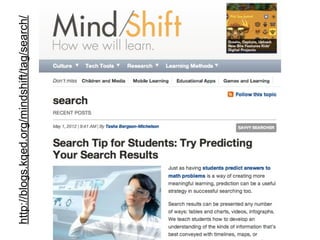
http://blogs.kqed.org/mindshift/tag/search/
What Do You Love?
25
Search Tools
26
Search Options
News
Scholar
Books
Keep in Mind
Everything is searchable.
Control + F is incredibly useful.
Nothing stays constant on the web.
Advanced Search and Preferences are
available with each product.
RSS feeds are usually also available.
Just about every product has a team
blog.
27
Search Options
Show Search Tools
46
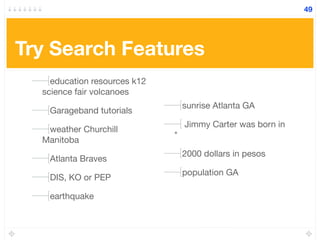
Try Search Features
education resources k12
science fair volcanoes
Garageband tutorials
weather Churchill
Manitoba
Atlanta Braves
DIS, KO or PEP
earthquake
sunrise Atlanta GA
Jimmy Carter was born in
*
2000 dollars in pesos
population GA
49
News
Located at the bottom
of a news search page
RSS & Email Alerts
Try Google News
Go to http://news.google.com
Type in a search term.
Click on Advanced Search.
Restrict your search to a particular news source.
Set up a Google News alert for your school. See the bottom of the
page.
60
Scholar
Try Google Scholar
Go to http://scholar.google.com
Enter a search term such as John Dewey, Brown vs. Board of
Education, or NASA and see what you can find.
Customize your results. For instance, see if you can select Georgia
courts and search for using a term of your choice.
Do another search using the keyword mobile.
Click on Advanced Scholar Search.
Narrow your results by entering “Learning and Leading with Technology”
in the publication field.
77
Book Search
Try Google Book Search
Do a search for the following authors, pick a title, and click on About This Book:
W.E.B Du Bois
Martin Luther King, Jr.
Margaret Mitchell
Flannery O’Connor
Alice Walker
Shakespeare, A Midsummer Night’s Dream
Make sure you are logged into your Google account and search for your favorite
books. Create shelves and add books to your shelves. You can link to your My
Library to share your collections with others.
95
Help & Resources
• Google Inside Search
• Google Search Basics
• Google Guide Quick Reference
• Google in Education Diigo Group
Conclusion
• Plan on learning new skills.
• Nothing stays constant on the web.
• Search engines are continually improving.
• New search tools are always being developed
• Make research to be a part of everything that you do in the
classroom. Teach and model this attitude to your students.
• Help students and colleagues develop a research stance
across content areas using News, Scholar, and Book Search.
• Encourage your school or district to adopt search tools and
strategies globally.

Beyond Search - Blackfoot ETC

  • 1.
    Beyond Search Lucy Gray• Summer 2012 1
  • 5.
    Google’s Mission Online content Billionsof web pages Offline content Billions of items becoming indexed To organize the world’s information and make it universally accessible and useful.
  • 6.
    A New DigitalDivide • Those who know how to “think” about search vs. those don’t. • Those who know how to validate soft information vs. those don’t. • Those who know where to find information in new “hot” channels vs. those don’t. • Those who understand the current culture of informal languages vs. those don’t
  • 7.
    A New DigitalDivide • Those who know how to get information to travel to them vs. those who still chase it. • Those who have the knowledge and skills to create and re-mix digital media vs. those who don’t. • Those that understand that learning is a continual process vs. those that view learning as achievement. -Helen Blowers, Columbus Metropolitan Library
  • 8.
    Guiding Thoughts • Searchis the essential 21st century skill. • The responsibility of teaching search to kids lies within the entire school community. • How can educators help students to organize, access, and leverage their collection of information in useful ways?
  • 9.
  • 10.
    What’s Your SearchStory? http://www.youtube.com/user/SearchStories
  • 11.
  • 12.
    A Google ADay 12
  • 13.
  • 14.
  • 15.
  • 16.
  • 17.
  • 18.
  • 19.
    Organizing a Search Whatis it I’m looking for? (think about common keywords) How would someone else talk about it? (what words would they use? how would THEY describe it?) Which of those terms would be most common? Which of those terms would be very specialized to this topic? What kind of thing would make me happy? (do I want a single web page, a definition, a collection, an image.... or … ?) 19
  • 20.
    Keyword Choice Think aboutwhat you are trying to find Choose words that you think will appear on the page Put yourself in the mindset of the author of those words Use synonyms Start broad and use just a few words, then go deep Use contextual terms 20
  • 21.
    Other Search Tips Usespecifiers Example: [Georgia population wikipedia] Try an image search when normal means fail, you might find something that will be useful or spark your interest in a different way. Word order matters—when it’s not working one way, try another. When searching for common phrases, don’t leave out the “stop words.” (e.g., [ Lord of the Rings] ) Use double quotes to find a particular sequence of words Example: “Daniel M Russell” or “Ursula K Le Guin” 21
  • 22.
  • 23.
  • 24.
  • 25.
    What Do YouLove? 25
  • 26.
  • 27.
    Keep in Mind Everythingis searchable. Control + F is incredibly useful. Nothing stays constant on the web. Advanced Search and Preferences are available with each product. RSS feeds are usually also available. Just about every product has a team blog. 27
  • 28.
  • 46.
  • 49.
    Try Search Features educationresources k12 science fair volcanoes Garageband tutorials weather Churchill Manitoba Atlanta Braves DIS, KO or PEP earthquake sunrise Atlanta GA Jimmy Carter was born in * 2000 dollars in pesos population GA 49
  • 50.
  • 59.
    Located at thebottom of a news search page RSS & Email Alerts
  • 60.
    Try Google News Goto http://news.google.com Type in a search term. Click on Advanced Search. Restrict your search to a particular news source. Set up a Google News alert for your school. See the bottom of the page. 60
  • 61.
  • 77.
    Try Google Scholar Goto http://scholar.google.com Enter a search term such as John Dewey, Brown vs. Board of Education, or NASA and see what you can find. Customize your results. For instance, see if you can select Georgia courts and search for using a term of your choice. Do another search using the keyword mobile. Click on Advanced Scholar Search. Narrow your results by entering “Learning and Leading with Technology” in the publication field. 77
  • 78.
  • 95.
    Try Google BookSearch Do a search for the following authors, pick a title, and click on About This Book: W.E.B Du Bois Martin Luther King, Jr. Margaret Mitchell Flannery O’Connor Alice Walker Shakespeare, A Midsummer Night’s Dream Make sure you are logged into your Google account and search for your favorite books. Create shelves and add books to your shelves. You can link to your My Library to share your collections with others. 95
  • 96.
    Help & Resources •Google Inside Search • Google Search Basics • Google Guide Quick Reference • Google in Education Diigo Group
  • 97.
    Conclusion • Plan onlearning new skills. • Nothing stays constant on the web. • Search engines are continually improving. • New search tools are always being developed • Make research to be a part of everything that you do in the classroom. Teach and model this attitude to your students. • Help students and colleagues develop a research stance across content areas using News, Scholar, and Book Search. • Encourage your school or district to adopt search tools and strategies globally.