S1WEB
DEVELOPMENTIntroduction to HTML
Learning Intentions
In this lesson, you will be able to:
■ Describe whatWWW and URL stand for
■ Describe what HTML is
■ Use HTML tags to create simple web pages
■ Modify HTML tags using styling to improve the appearance of web pages
WWW and URL
■ WWW –WorldWideWeb, the part of the Internet that displays web pages.
■ URL – Uniform Resource Locator, the web address for a webpage.
What is aWeb Browser?
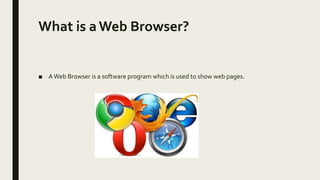
■ AWeb Browser is a software program which is used to show web pages.
HTML
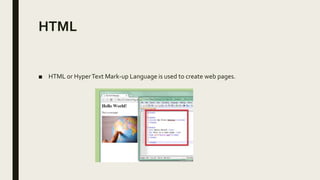
■ HTML or HyperText Mark-up Language is used to create web pages.
What is HTML?
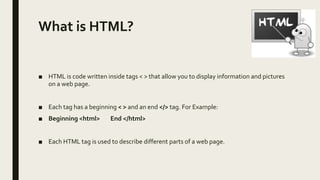
■ HTML is code written inside tags < > that allow you to display information and pictures
on a web page.
■ Each tag has a beginning < > and an end </> tag. For Example:
■ Beginning <html> End </html>
■ Each HTML tag is used to describe different parts of a web page.
Notepad
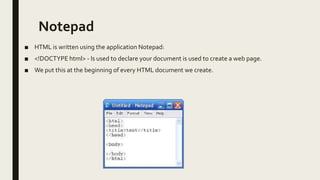
■ HTML is written using the application Notepad:
■ <!DOCTYPE html> - Is used to declare your document is used to create a web page.
■ We put this at the beginning of every HTML document we create.
From Notepad toWeb Page
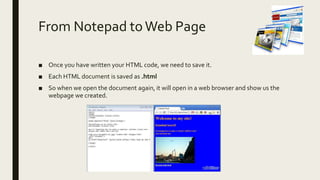
■ Once you have written your HTML code, we need to save it.
■ Each HTML document is saved as .html
■ So when we open the document again, it will open in a web browser and show us the
webpage we created.
Tag Meanings
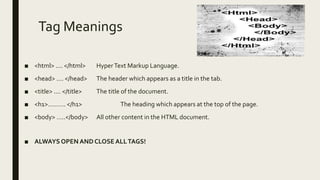
■ <html> .... </html> HyperText Markup Language.
■ <head> .... </head> The header which appears as a title in the tab.
■ <title> .... </title> The title of the document.
■ <h1>………. </h1> The heading which appears at the top of the page.
■ <body> …..</body> All other content in the HTML document.
■ ALWAYS OPEN ANDCLOSE ALLTAGS!
PlenaryTask – KahootTime!
■ https://create.kahoot.it/share/html-basics/3ba0fff9-7dcc-4ec1-9caa-e67993718ad4
SuccessCriteria
After this series of lessons, I can:
■ Describe whatWWW and URL stand for
■ Describe what HTML is
■ Use HTML tags to create simple web pages
■ Modify HTML tags using styling to improve the appearance of web pages

S1 Web Development

  • 1.
  • 2.
    Learning Intentions In thislesson, you will be able to: ■ Describe whatWWW and URL stand for ■ Describe what HTML is ■ Use HTML tags to create simple web pages ■ Modify HTML tags using styling to improve the appearance of web pages
  • 3.
    WWW and URL ■WWW –WorldWideWeb, the part of the Internet that displays web pages. ■ URL – Uniform Resource Locator, the web address for a webpage.
  • 4.
    What is aWebBrowser? ■ AWeb Browser is a software program which is used to show web pages.
  • 5.
    HTML ■ HTML orHyperText Mark-up Language is used to create web pages.
  • 6.
    What is HTML? ■HTML is code written inside tags < > that allow you to display information and pictures on a web page. ■ Each tag has a beginning < > and an end </> tag. For Example: ■ Beginning <html> End </html> ■ Each HTML tag is used to describe different parts of a web page.
  • 7.
    Notepad ■ HTML iswritten using the application Notepad: ■ <!DOCTYPE html> - Is used to declare your document is used to create a web page. ■ We put this at the beginning of every HTML document we create.
  • 8.
    From Notepad toWebPage ■ Once you have written your HTML code, we need to save it. ■ Each HTML document is saved as .html ■ So when we open the document again, it will open in a web browser and show us the webpage we created.
  • 9.
    Tag Meanings ■ <html>.... </html> HyperText Markup Language. ■ <head> .... </head> The header which appears as a title in the tab. ■ <title> .... </title> The title of the document. ■ <h1>………. </h1> The heading which appears at the top of the page. ■ <body> …..</body> All other content in the HTML document. ■ ALWAYS OPEN ANDCLOSE ALLTAGS!
  • 10.
    PlenaryTask – KahootTime! ■https://create.kahoot.it/share/html-basics/3ba0fff9-7dcc-4ec1-9caa-e67993718ad4
  • 11.
    SuccessCriteria After this seriesof lessons, I can: ■ Describe whatWWW and URL stand for ■ Describe what HTML is ■ Use HTML tags to create simple web pages ■ Modify HTML tags using styling to improve the appearance of web pages