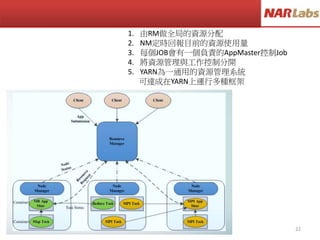
MapReduce如何做字數統計
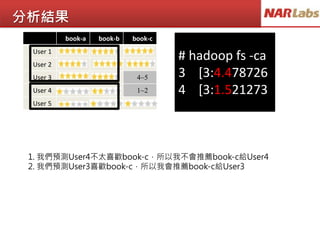
This is abook
This is a pen
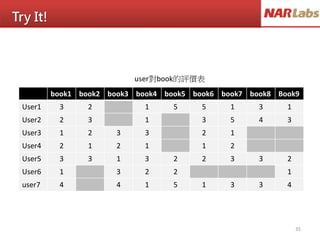
This is a desk
That is my book
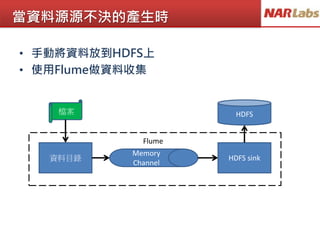
That is my pen
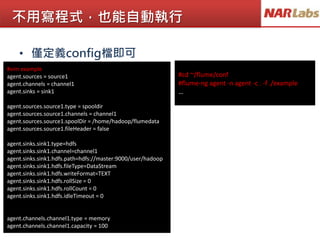
<This,3>
<That,2>
This is a desk
That is my book
map1
map2
map3
<This,1>, <is, 1>, <a, 1>, <book,1>
<This,1>, <is, 1>, <a, 1>, <pen,1>
<This,1>, <is, 1>, <a, 1>, <desk,1>
<That,1>, <is, 1>, <my, 1>, <book,1>
<That,1>, <is, 1>, <my, 1>, <pen,1>
reduce
<This,3>, <That,2>, <is, 5>, <my, 2>, <a,3>
<book,2>, <desk,1>, <pen,2>
<This, [1,1,1]>
<That,[1,1]>
<is,[1,1,1,1,1]>
<my,[1,1]>
<a,[1,1,1]>
<book,[1,1]>
<pen,[1,1]>
<desk,[1]>
<is,5>
<my,2>
<a,3>
map2
<book,2>
<desk,1>
<pen,2>
That is my pen
map3
This is a book
This is a pen
map1
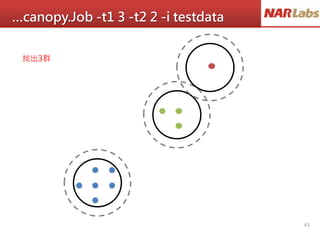
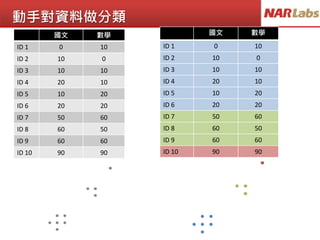
動手對資料做分類
國文 數學
ID 10 10
ID 2 10 0
ID 3 10 10
ID 4 20 10
ID 5 10 20
ID 6 20 20
ID 7 50 60
ID 8 60 50
ID 9 60 60
ID 10 90 90
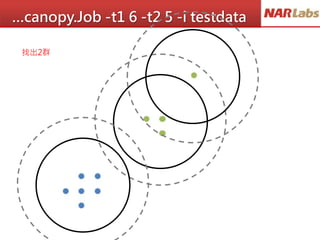
國文 數學
ID 1 0 10
ID 2 10 0
ID 3 10 10
ID 4 20 10
ID 5 10 20
ID 6 20 20
ID 7 50 60
ID 8 60 50
ID 9 60 60
ID 10 90 90








![Vim文字編輯器介紹
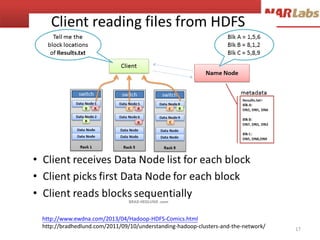
• 使用『 vi filename 』進入一般指令模式
• 按下 i 進入編輯模式,開始編輯文字
• 按下 [ESC] 按鈕回到一般指令模式
• 按: 進入指令列模式,檔案儲存(w)並離開(q) vi 環境
http://linux.vbird.org/linux_basic/0310vi.php#vi](https://image.slidesharecdn.com/bigdata-150811010156-lva1-app6891/85/Bigdata-8-320.jpg)






![MapReduce如何做字數統計
This is a book
This is a pen
This is a desk
That is my book
That is my pen
<This,3>
<That,2>
This is a desk
That is my book
map1
map2
map3
<This,1>, <is, 1>, <a, 1>, <book,1>
<This,1>, <is, 1>, <a, 1>, <pen,1>
<This,1>, <is, 1>, <a, 1>, <desk,1>
<That,1>, <is, 1>, <my, 1>, <book,1>
<That,1>, <is, 1>, <my, 1>, <pen,1>
reduce
<This,3>, <That,2>, <is, 5>, <my, 2>, <a,3>
<book,2>, <desk,1>, <pen,2>
<This, [1,1,1]>
<That,[1,1]>
<is,[1,1,1,1,1]>
<my,[1,1]>
<a,[1,1,1]>
<book,[1,1]>
<pen,[1,1]>
<desk,[1]>
<is,5>
<my,2>
<a,3>
map2
<book,2>
<desk,1>
<pen,2>
That is my pen
map3
This is a book
This is a pen
map1](https://image.slidesharecdn.com/bigdata-150811010156-lva1-app6891/85/Bigdata-21-320.jpg)

![Step by Step
#vi clustering.data
0 10
10 0
10 10
20 10
10 20
20 20
50 60
60 50
60 60
90 90
# hadoop fs -mkdir testdata
# hadoop fs -put clustering.data testdata
# hadoop fs -ls -R testdata
-rw-r--r-- 3 root hdfs 288374 2014-02-05 21:53 testdata/clustering.data
# mahout org.apache.mahout.clustering.syntheticcontrol.canopy.Job
-t1 3 -t2 2 -i testdata -o output
...omit...
14/09/08 01:31:07 INFO clustering.ClusterDumper: Wrote 3 clusters
14/09/08 01:31:07 INFO driver.MahoutDriver: Program took 104405
ms (Minutes: 1.7400833333333334)
#mahout clusterdump --input output/clusters-0-final --pointsDir output/clusteredPoints
C-0{n=1 c=[9.000, 9.000] r=[]}
Weight : [props - optional]: Point:
1.0: [9.000, 9.000]
C-1{n=2 c=[5.833, 5.583] r=[0.167, 0.083]}
Weight : [props - optional]: Point:
1.0: [5.000, 6.000]
1.0: [6.000, 5.000]
1.0: [6.000, 6.000]
C-2{n=4 c=[1.313, 1.333] r=[0.345, 0.527]}
Weight : [props - optional]: Point:
1.0: [1:1.000]
1.0: [0:1.000]
1.0: [1.000, 1.000]
1.0: [2.000, 1.000]
1.0: [1.000, 2.000]
1.0: [2.000, 2.000]](https://image.slidesharecdn.com/bigdata-150811010156-lva1-app6891/85/Bigdata-28-320.jpg)




![Step by Step
#vi recom.data
1,1,5
1,2,4
1,3,5
2,1,4
2,2,5
2,3,4
3,1,5
3,2,4
4,1,1
4,2,2
5,1,2
5,2,1
5,3,1
# hadoop fs -mkdir testdata
# hadoop fs -put recom.data testdata
# hadoop fs -ls -R testdata
-rw-r--r-- 3 root hdfs 288374 2014-02-05 21:53 testdata/recom.data
# mahout recommenditembased -s SIMILARITY_EUCLIDEAN_DISTANCE -i testdata -o output
...omit…
File Input Format Counters
Bytes Read=287
File Output Format Counters
Bytes Written=32
14/09/04 05:46:56 INFO driver.MahoutDriver:
Program took 434965 ms (Minutes: 7.249416666666667)
# hadoop fs -cat output/part-r-00000
3 [3:4.4787264]
4 [3:1.5212735]](https://image.slidesharecdn.com/bigdata-150811010156-lva1-app6891/85/Bigdata-33-320.jpg)