BASICS OF
PRINCE KUMAR
BSc IT
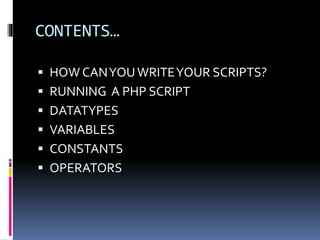
CONTENTS…
 HOW CANYOUWRITEYOUR SCRIPTS?
 RUNNING A PHP SCRIPT
 DATATYPES
 VARIABLES
 CONSTANTS
 OPERATORS
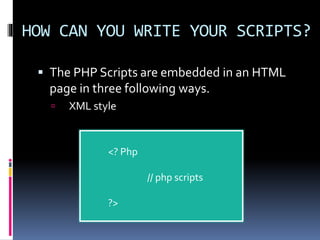
HOW CAN YOU WRITE YOUR SCRIPTS?
 The PHP Scripts are embedded in an HTML
page in three following ways.
 XML style
<? Php
// php scripts
?>
CONTINUED…
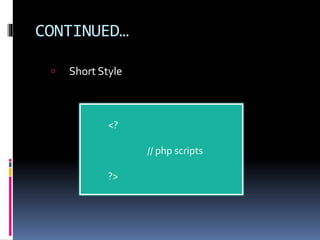
 Short Style
<?
// php scripts
?>
CONTINUED…
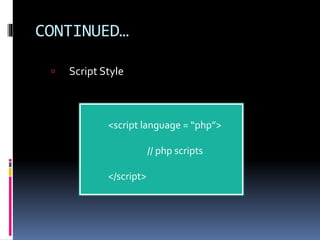
 Script Style
<script language = “php”>
// php scripts
</script>
CONTINUED…
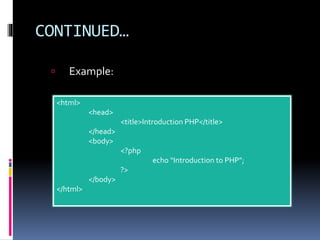
 Example:
<html>
<head>
<title>Introduction PHP</title>
</head>
<body>
<?php
echo “Introduction to PHP”;
?>
</body>
</html>
RUNNING A PHP SCRIPT
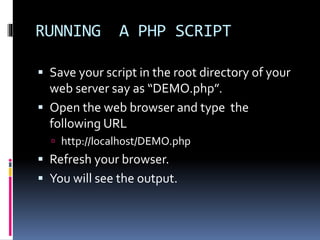
 Save your script in the root directory of your
web server say as “DEMO.php”.
 Open the web browser and type the
following URL
 http://localhost/DEMO.php
 Refresh your browser.
 You will see the output.
DATA TYPES
 Data type tells about the behavior of data.
 In PHP there are following data types_
 Integers
 Float numbers
 Strings
 Boolean
 Arrays
 Objects
 Resources
 Null
VARIABLES
 Variables are declared memory that contains
data during execution.
 Rules to declare variable_
 Only $, [A-Z, a-z], [0-9] and underscore are
allowed.
 Every name must preceded by the $ sign.
 After the $ sign there must be an alphabet or
underscore.
 E.g. $var_name, $varName, $abc123, $_1234 etc
are some valid declaration.
CONTINUED…
 For assigning values into the variables we use
the = sign.
 E.g. $var = 10; $varWord=‘PHP tutorial’;
 Assigning value from one variable to another.
 E.g. $var1=$var;
 Destroying variables when they are not
required_
 E.g. unset($var);
CONTINUED…
 Printing values from variables
 E.g.
<?php
$x = 10;$word = ‘PHP’;
echo “variable x = ”$x,”n variable word = ”$word;
print $x;
?>
note: print is used for formatted output.
CONSTANTS
 Constants are the values those never alter
during the program run.
 There are a lot of constants are predefined in
PHP. E.g. M_PI defines the value of ∏.
 Defining constants in PHP
 E.g.
<?php
define(“ConstantName”, constantValue);
echo “ConstantName”;
?>
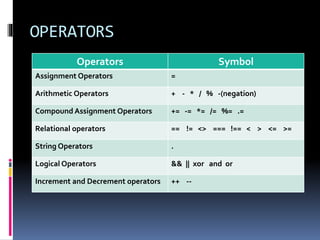
OPERATORS
Operators Symbol
Assignment Operators =
Arithmetic Operators + - * / % -(negation)
Compound Assignment Operators += -= *= /= %= .=
Relational operators == != <> === !== < > <= >=
String Operators .
Logical Operators && || xor and or
Increment and Decrement operators ++ --
THANKS
Prev : Introduction
PHP.
Next: Control program
flow

basics of php

  • 1.
  • 2.
    CONTENTS…  HOW CANYOUWRITEYOURSCRIPTS?  RUNNING A PHP SCRIPT  DATATYPES  VARIABLES  CONSTANTS  OPERATORS
  • 3.
    HOW CAN YOUWRITE YOUR SCRIPTS?  The PHP Scripts are embedded in an HTML page in three following ways.  XML style <? Php // php scripts ?>
  • 4.
  • 5.
    CONTINUED…  Script Style <scriptlanguage = “php”> // php scripts </script>
  • 6.
  • 7.
    RUNNING A PHPSCRIPT  Save your script in the root directory of your web server say as “DEMO.php”.  Open the web browser and type the following URL  http://localhost/DEMO.php  Refresh your browser.  You will see the output.
  • 8.
    DATA TYPES  Datatype tells about the behavior of data.  In PHP there are following data types_  Integers  Float numbers  Strings  Boolean  Arrays  Objects  Resources  Null
  • 9.
    VARIABLES  Variables aredeclared memory that contains data during execution.  Rules to declare variable_  Only $, [A-Z, a-z], [0-9] and underscore are allowed.  Every name must preceded by the $ sign.  After the $ sign there must be an alphabet or underscore.  E.g. $var_name, $varName, $abc123, $_1234 etc are some valid declaration.
  • 10.
    CONTINUED…  For assigningvalues into the variables we use the = sign.  E.g. $var = 10; $varWord=‘PHP tutorial’;  Assigning value from one variable to another.  E.g. $var1=$var;  Destroying variables when they are not required_  E.g. unset($var);
  • 11.
    CONTINUED…  Printing valuesfrom variables  E.g. <?php $x = 10;$word = ‘PHP’; echo “variable x = ”$x,”n variable word = ”$word; print $x; ?> note: print is used for formatted output.
  • 12.
    CONSTANTS  Constants arethe values those never alter during the program run.  There are a lot of constants are predefined in PHP. E.g. M_PI defines the value of ∏.  Defining constants in PHP  E.g. <?php define(“ConstantName”, constantValue); echo “ConstantName”; ?>
  • 13.
    OPERATORS Operators Symbol Assignment Operators= Arithmetic Operators + - * / % -(negation) Compound Assignment Operators += -= *= /= %= .= Relational operators == != <> === !== < > <= >= String Operators . Logical Operators && || xor and or Increment and Decrement operators ++ --
  • 14.