Unit Two:- Server-side Script
This unit to provide you the necessary information regarding the
following content coverage and topics:
 Development Environment
 Basic syntax of Server-side scripts
 Forms and user input
 Working with Database
 Security Features in web development
Compiled By Alelign M(MSc in Computer Networking )
Development Environment
 PHP is a commanding language widely utilized in web development.
 This process provides the necessary PHP development tools for Windows it can help in efficient coding, testing &
debugging applications, and ensuring streamlined efficiency during the transition from development to production.
 To set up PHP on Windows, XAMPP proves to be an excellent solution. This free, open-source software offers
an easy-to-navigate platform for PHP development.
 Bundling essential core components like PHP, Apache, and MySQL XAMPP's accessibility makes it ideal for
beginners, yet its comprehensive toolset caters to the needs of experienced PHP developers.
Configuring XAMPP for PHP Development
Whether you're an established developer or a beginner venturing into PHP, setting up an efficient development environment is
critical One of the most recommended and popular solutions is XAMPP - a free and open-source software that stands as a
beacon for setting up a local web server for developers worldwide. In the process of configuration, the next steps are opening
XAMPP Control Panel and setting-up local development server
Apache: Core of Server-Side Processing
 Apache HTTP Server, commonly referred to as Apache, is a highly customizable and
robust open-source web server software.
 It interprets and executes the PHP code embedded in your HTML and sends the
resulting data to the client in other words, Apache in the bridge that connects your
PHP scripts to the user's browser.
 Apache is on indispensable tool in a PHP development environment, providing sever-
side processing capabilities that empower developers to build dynamic web
application
MySQL: Core of Data Management
 MySQL, on the other hand, is a relational database management system.
 It allows you to store, retrieve, and manipulate databases with which your PHP scripts
interact.
 Whether building a simple website or a complex web application, data management is
a core function, making MySQL an essential part of the PHP development process.
Basic syntax of Server-side scripts
 PHP is one of the most popular scripting languages and works on the server side.
 Its acronym means “Hypertext Preprocessor” in Spanish and it is embedded in HTML.
 It allows: creating personalized web content, sending and receiving cookies,
evaluating form data sent from a browser, etc.
 In addition to its features, it has integration with several popular databases like
 Postgre SQL
 Oracle, Sybase
 SQL
 MySQL.
 It also handles forms, saves data to files, and collects data from files.
Basic PHP Syntax
 A PHP script can be placed anywhere in a document.
 This script starts with <?php and ends with?>. We present an example:
 The default extension of PHP files is: .php.
 A PHP file usually contains HTML tags and some PHP script code
Basic PHP Syntax
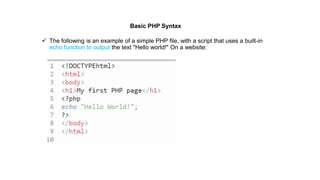
 The following is an example of a simple PHP file, with a script that uses a built-in
echo function to output the text "Hello world!" On a website:
PHP Variables
 In PHP, a variable is declared using a $ sign followed by the variable name.
 Here, some important points to know about variables:
 As PHP is a loosely typed language, so we do not need to declare the data types of
the variables.
 It automatically analyzes the values and makes conversions to its correct datatype.
 After declaring a variable, it can be reused throughout the code.
 Assignment Operator (=) is used to assign the value to a variable.
Syntax of declaring a variable in PHP is given below:
PHP Variables
Rules for declaring PHP variable:
 A variable must start with a dollar ($) sign, followed by the variable name.
 It can only contain alpha-numeric character and underscore (A-z, 0-9, _).
 A variable name must start with a letter or underscore (_) character.
 A PHP variable name cannot contain spaces.
 One thing to be kept in mind that the variable name cannot start with a number or special
symbols.
 PHP variables are case-sensitive, so $name and $NAME both are treated as different variable.
A. PHP Variable: Declaring string, integer, and float
Let's see the example to store string, integer, and float values in PHP variables.
File: variable1.php
B. PHP Variable: Sum of two variables
File: variable2.php
C. PHP Variable: case sensitive
In PHP, variable names are case sensitive. So variable name "color" is different from
Color, COLOR, COLor etc. File: variable3.php
D. PHP Variable: Rules
PHP variables must start with letter or underscore only.
PHP variable can't be start with numbers and special symbols. File: variablevalid.php
D. PHP Variable: Rules
PHP Data Types
 PHP data types are used to hold different types of data or values.
 PHP supports 8 primitive data types that can be categorized further in 3 types:
i. Scalar Types (predefined)
ii. Compound Types (user-defined)
iii. Special Types
PHP Data Types: Scalar Types
It holds only single value. There are 4 scalar data types in PHP.
i. Boolean
ii. integer
iii. float
iv. string
PHP Data Types: Compound Types
It can hold multiple values. There are 2 compound data types in PHP.
i. array
ii. object
PHP Data Types: Special Types
 There are 2 special data types in PHP.
i. resource
ii. NULL
PHP Data Types: Scalar Types (predefined)
Boolean
 A Boolean represents two possible states: TRUE or FALSE
 The output is bool(true)
 Booleans are often used in conditional testing.
PHP Data Types: Scalar Types (predefined)
Integer
 An integer data type is a non-decimal number between -2,147,483,648 and 2,147,483,647.
Rules for integers:
 An integer must have at least one digit
 An integer must not have a decimal point
 An integer can be either positive or negative
 Integers can be specified in: decimal (base 10), hexadecimal (base 16), octal (base 8), or binary (base 2) notation
In the following example $x is an integer. The PHP var_dump() function returns the data type and value:
the output of the code is
int(5985)
PHP Data Types: Scalar Types (predefined)
 Float
A float (floating point number) is a number with a decimal point or a number in exponential form.
In the following example $x is a float. The PHP var_dump() function returns the data type and value:
the output of the code is
float(10.365)
PHP Data Types: Scalar Types (predefined)
String
A string is a sequence of characters, like "Hello world!".
A string can be any text inside quotes. You can use single or double quotes:
the output of the code is
string(12) "Hello world!"
PHP Data Types: Compound Types (user-defined)
Array
 An array stores multiple values in one single variable.
 In the following example $cars is an array. The PHP var_dump() function returns the data type and
value:
the output of the code is
array(3) {
[0]=>string(5) "Volvo"
[1]=> string(3) "BMW"
[2]=>string(6) "Toyota"
}
PHP Data Types: Compound Types (user-defined)
Object
 Classes and objects are the two main aspects of object-oriented programming.
 A class is a template for objects, and an object is an instance of a class.
 When the individual objects are created, they inherit all the properties and behaviors from the
class, but each object will have different values for the properties.
 Let's assume we have a class named Car that can have properties like model, color, etc. We can
define variables like $model, $color, and so on, to hold the values of these properties.
 When the individual objects (Volvo, BMW, Toyota, etc.) are created, they inherit all the properties
and behaviors from the class, but each object will have different values for the properties.
 If you create a __construct() function, PHP will automatically call this function when you create an
object from a class.
the output of the code is
Object
(Car)#1 (2) { ["color"]=> string(3) "red“
["model"]=> string(5) "Volvo" }
PHP Data Types: Special Types
NULL Value
 Null is a special data type which can have only one value: NULL.
 A variable of data type NULL is a variable that has no value assigned
to it.
Tip: If a variable is created without a value, it is automatically assigned a value of NULL.
Variables can also be emptied by setting the value to NULL:
the output of the code is NULL
PHP Data Types: Special Types
Resource
 The special resource type is not an actual data type.
 It is the storing of a reference to functions and resources external to PHP.
 A common example of using the resource data type is a database call.
PHP Operators
 Operators are used to performing operations on some values. In other words, we can describe
operators as something that takes some values, performs some operation on them, and gives a
result.
 From example, “1 + 2 = 3” in this expression ‘+’ is an operator.
 It takes two values 1 and 2, performs an addition operation on them to give 3.
 Just like any other programming language, PHP also supports various types of operations like
arithmetic operations (addition, subtraction, etc), logical operations (AND, OR etc),
Increment/Decrement Operations, etc.
 Thus, PHP provides us with many operators to perform such operations on various operands or
variables, or values.
 These operators are nothing but symbols needed to perform operations of various types
PHP Operators
 Given below are the various groups of operators:
 Arithmetic Operators
 Logical or Relational Operators
 Comparison Operators
 Conditional or Ternary Operators
 Assignment Operators
 Array Operators
 Increment/Decrement Operators
 String Operators
PHP Operators
Arithmetic Operators
 The arithmetic operators are used to perform simple mathematical operations like addition,
subtraction, multiplication, etc.
 Below is the list of arithmetic operators along with their syntax and operations in PHP.
PHP Operators
Logical or Relational Operators
 These are basically used to operate with conditional statements and expressions.
 Conditional statements are based on conditions. Also, a condition can either be met or cannot be met so the result
of a conditional statement can either be true or false.
 Here are the logical operators along with their syntax and operations in PHP.
PHP Operators
Comparison Operators
 These operators are used to compare two elements and outputs the result in Boolean form.
 Here are the comparison operators along with their syntax and operations in PHP.
PHP Operators
Conditional or Ternary Operators
 These operators are used to compare two values and take either of the results
simultaneously, depending on whether the outcome is TRUE or FALSE.
 These are also used as a shorthand notation for if…else statement that we will read in the
article on decision making.
Syntax: $var = (condition)? value1 : value2;
 Here, the condition will either evaluate as true or false.
 If the condition evaluates to True, then value1 will be assigned to the variable $var
otherwise value2 will be assigned to it.
PHP Operators
Assignment Operators
 These operators are used to assign values to different variables, with or without mid
operations.
 Here are the assignment operators along with their syntax and operations, that PHP
provides for the operations.
PHP Operators
Array Operators
 These operators are used in the case of arrays.
 Here are the array operators along with their syntax and operations, that PHP provides for
the array operation
PHP Operators
Increment/Decrement Operators
 These are called the unary operators as they work on single operands.
 These are used to increment or decrement values
PHP Operators
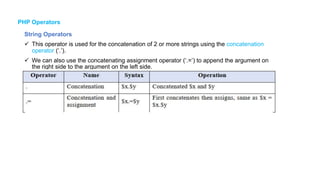
String Operators
 This operator is used for the concatenation of 2 or more strings using the concatenation
operator (‘.’).
 We can also use the concatenating assignment operator (‘.=’) to append the argument on
the right side to the argument on the left side.
PHP Comments
 PHP comments can be used to describe any line of code so that other developer can
understand the code easily. It can also be used to hide any code.
 PHP supports single line and multi line comments.
 These comments are similar to C/C++ and Perl style (Unix shell style) comments.
PHP Single Line Comments
There are two ways to use single line comments in PHP.
 // (C++ style single line comment)
 # (Unix Shell style single line comment)
PHP Comments
 PHP Multi Line Comments
 In PHP, we can comment multiple lines also.
 To do so, we need to enclose all lines within /* */. Let's see a simple example of PHP
multiple line comment.
Control Structures in PHP
 Control structures are an essential part of any programming language and PHP is no
exception.
 They provide the ability to control the flow of execution in a program based on certain
conditions.
 In other words, they allow you to make decisions in your code and execute different blocks
of code based on those decisions. This helps to simplify complex tasks, making it easier to
write and maintain the code.
 These statements are mainly categorized into following:
• Conditional Statements
• Loop Statements
• Jump Statements
Control Structures in PHP
Conditional Statements
 Conditional Statements performs different computations or actions depending on conditions.
In
PHP, the following are conditional statements
• if statement
• if - else statement
• if - elseif - else statement
• switch statement
Control Structures in PHP
if statement
 The if statement is used to test a specific condition. If the condition is true, a block of code
(if block) will be executed.
if - else statement
 The if-else statement provides an else block combined with the if statement which is
executed in the false case of the condition.
Control Structures in PHP
if - elseif - else statement
 The elseif statement enables us to check multiple conditions and execute the specific block
of
statements depending upon the true condition among them.
Control Structures in PHP
switch statement
 The switch statement enables us to execute a block of code from multiple conditions
depending
upon the expression.
Control Structures in PHP
Loop Statements
 Sometimes we may need to alter the flow of the program.
 If the execution of a specific code may need to be repeated several numbers of times then
we can go for loop statements.
In PHP, the following are loop statements
• while loop
• do - while loop
• for loop
 while loop statement
With the while loop we can execute a set of statements as long as a condition is true. The
while
loop is mostly used in the case where the number of iterations is not known in advance.
Control Structures in PHP
do - while loop statement
The do-while loop will always execute a set of statements at least once and then execute a set
of
statements as long as a condition is true.
Control Structures in PHP
for loop statement
 With the for loop, we can execute a set of statements specified number of times.
 The for loop is mostly used in the case where the number of iterations is known in advance
Jump Statements
 Jump statements in PHP are used to alter the flow of a loop like you want to skip a part of a
loop or terminate a loop.
In PHP, the following are jump statements
• break statement
• continue statement
A. break statement
 The break is a keyword in PHP which is used to bring the program control out of the loop.
i.e.
when a break statement is encountered inside a loop, the loop is terminated and program
control
resumes at the next statement following the loop.
continue statement
 The continue statement in PHP is used to bring the program control to the beginning of the loop.
 i.e. when a continue statement is encountered inside the loop, remaining statements are skipped and
loop proceeds with the next iteration.
 The continue statement skips the remaining lines of code inside the loop and start with the next
iteration.
 It is mainly used for a particular condition inside the loop so that we can skip some specific code for
a particular condition.
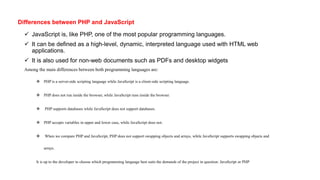
Differences between PHP and JavaScript
 JavaScript is, like PHP, one of the most popular programming languages.
 It can be defined as a high-level, dynamic, interpreted language used with HTML web
applications.
 It is also used for non-web documents such as PDFs and desktop widgets
Among the main differences between both programming languages are:
 PHP is a server-side scripting language while JavaScript is a client-side scripting language.
 PHP does not run inside the browser, while JavaScript runs inside the browser.
 PHP supports databases while JavaScript does not support databases.
 PHP accepts variables in upper and lower case, while JavaScript does not.
 When we compare PHP and JavaScript, PHP does not support swapping objects and arrays, while JavaScript supports swapping objects and
arrays.
It is up to the developer to choose which programming language best suits the demands of the project in question: JavaScript or PHP
Forms and user input
 When a user submits a form, PHP takes charge of processing the data. This involves accessing the form elements
using super global variables like $_POST and $_GET. Understanding the nuances of form submission and super
global variables is fundamental to effective user input handling.
 To create a form, you use the <form> element as follows:
 The <form> element has two important attributes:
 action: specifies the URL that processes the form submission. In this example, the form.php will process the form.
 method: specifies the HTTP method for submitting the form. The most commonly used form methods are POST
and GET. In this example, the form method is post
Forms and user input
File: welcome.php
PHP Post Form
Post request is widely used to submit form that have large amount of data such as file upload, image upload, login form, registration
form etc. The data passed through post request is not visible on the URL browser so it is secured. You can send large amount of data
through post request. Let's see a simple example to receive data from post request in PHP.
Forms and user input
 The form method is case-insensitive. It means that you can use either post or POST. If you
don’t specify the method attribute, the form element will use the get method by default.
 Typically, a form has one or more input elements including text, password, checkbox, radio
button, select, file upload, etc.
 The input elements are often called form fields. An input element has the following important
attributes name, type, and value.
 The name attribute will be used for accessing the value in PHP.
PHP Get Form
 Get request is the default form request. The data passed through get request is visible on the URL browser so it is
not secured. You can send limited amount of data through get request.
 Let's see a simple example to receive data from get request in PHP. File: form1.html
PHP Get Form
 Get request is the default form request. The data passed through get request is visible on the URL browser so it is
not secured. You can send limited amount of data through get request.
 Let's see a simple example to receive data from get request in PHP.
 File: form1.html
PHP Post Form
 Post request is widely used to submit form that have large amount of data such as file
upload, image upload, login form, registration form etc.
 The data passed through post request is not visible on the URL browser so it is secured.
 You can send large amount of data through post request.
Let's see a simple example to receive data from post request in PHP.
Conn’t …
After Login the page will be display like this
Working with Database
Brief Overview of MySQL
 MySQL is a widely popular open-source relational database management system (RDBMS) that excels in storing, managing, and retrieving data.
 It is renowned for its efficiency, versatility, and widespread adoption.
 MySQL, when combined with PHP cloud, employs a structured approach to data organization.
 It arranges data into tables consisting of rows and columns with defined data types.
 Relationships between tables are established through primary and foreign keys, ensuring data integrity and enabling complex data querying.
 MySQL’s adaptability is demonstrated by its cross-platform compatibility, operating seamlessly across various operating systems.
 Its extensive community and ecosystem contribute to its ongoing refinement and integration with other tools and technologies.
System Requirements of MySQL
The Enterprise Service Manager has certain system requirements that are recommended for
optimal performance. These requirements are outlined below.
System Requirements of MySQL
There are 3 types of methods in PHP to connect MySQL database through the backend:
I. MySQL
II. MySQLi
III. PDO
mysql() is now obsolete because of security issues like SQL injection etc., but the other two are
being actively used.
I. MySQLi
 MySQLi is an API that serves as a connector function, linking the backend of PHP applications to MySQL
databases.
 It is an improvement over its predecessor, offering enhanced safety, speed, and a more extensive set of functions
and extensions.
 MySQLi was introduced with PHP 5.0.0, and its drivers were installed in version 5.3.0. The API was designed to
support MySQL versions 4.1.13 and newer
System Requirements of MySQL
II. PDO
 The PHP Data Objects (PDO) extension is a Database Abstraction Layer that serves as an interface for the
backend to interact with MySQL databases.
 It allows for changes to be made to the database without altering the PHP code and provides the flexibility to
work with multiple databases.
 One of the significant advantages of using PDO is that it keeps your code simple and portable.
System Requirements of MySQL
PHPMyAdmin
phpMyAdmin supports RTL and LTR languages, so many users can easily use this software. It can help you run
MySQL queries, repair, optimize, check tables, and execute other database management commands.
Security Features in web development
 Website security is a primary consideration in web development but it is often not taken seriously by a lot
of website owners.
 If you have built a secure website, then you must have sought out the services of a security expert who
spots areas of weaknesses in your system and also carry out routine maintenance checks for new flaws and
vulnerabilities.
 These are the minimum requirements for any safe website and I have grouped them into 10 must-have
features for your website .
1. Registry lock
 A skilled hacker can take control of an unsecured domain, alter the configurations and redirect the site
elsewhere. Apart from the embarrassment that such a breach might bring, there could also be potential legal
consequences.
 In 2003, the New York Times had to deal with the consequences of such a breach.
 With a registry lock feature, it becomes very difficult for a domain to be hijacked or its DNS configurations
altered by a third party without rigorous procedures.
 A registry lock demands multiple party authorization from registrar and registry before alterations to the
domain can be made.
 This is a fundamental requirement for bigger organizations especially.
 Installing this feature requires a bit of manual effort and companies typically charge for this service.
Security Features in web development
2. Hotlink protection
 Some sites can take images and hyperlinks from your website and display them on their pages,
essentially stealing your data.
 This process is called hotlinking. Hotlinking also affects your bandwidth and disk space of your site
so preventing this is crucial.
 You can protect your website from this theft of your data by making use of special preventive tools
available.
3. Spam stop feature
 If you are a frequent user of the internet, it is impossible not to encounter ads and commercials and
these are increasingly using up a lot of online space.
 A little pop-up here or there might be benign and users often want to support their favorite brands.
Sometimes, these pop-ups are not so benign and can cause your site to become infected with spam
and this could be bad for user experience.
 As a business owner, you want your audience to get a pleasant experience and one way of doing this
is by investing in spam stop feature.
Security Features in web development
4. DDOs attack protection
 Distributed denial of service attacks is a common nuisance most sites have to deal with.
 But you want these attacks to be as infrequent as possible as they can cause your site to become spammed if they originate
from multiple points.
 These attacks can also cause your site to run slower than normal.
 Your web hosting company can also provide protection against these kinds of attacks.
5. Secure sockets layer (SSL protection)
This feature provides privacy and security of communication done over the web. This is especially important if you want you
want to sell products or services on your site. SSL protects the integrity of your website in two basic ways:
 i. It creates a secure network between users and tracks every message that is exchanged over the internet. Some web
hosting companies use an encryption service called secure shell host (SSH). SSH reduces the need for additional security
installations. SSL employs “optional session caching” in optimizing the connections between networks.
 ii. It employs a mechanism called symmetric cryptography to maintain complete privacy during web communication
between parties. It is also particularly useful when the communication involves transactions of a financial nature
Security Features in web development
6.Two-Step verification
 This is also known as two-factor authentication (2FA).
 It is a security feature that requires owners of online accounts to produce two authentication factors
rather than one.
 Accounts that require just one factor for their authentication are known as single factor authentication
(SFA) accounts.
 An example of an SFA account would be one that requires a password for access while an example
of a 2FA account would be your bank account as you would require your debit card and a pin before
withdrawing money from an ATM.
 The dual-factor authentication is a very powerful security measure and as a rule, you should never
patronize a domain company that does not provide a two-step verification process for all its user
accounts.
Security Features in web development
7. Secure administrative passwords
 It goes without saying that a strong access password is crucial.
 A website with a weak password is an easy target for hackers, more so when it is hosted on an open
content management platform like WordPress. Make sure you select a password that is lengthy and
does not look like a word.
 It should also not be information about you or your business that can be easily researched or even
guessed.
 Get a reliable password generator.
 The most secure websites will only accept strong passwords and will also require that the admins
change their passwords quarterly.
 A tedious process no doubt but way less tedious than the problems you’ll have to deal with if your
weak password is breached.
Security Features in web development
8. Bot Blocking
 Search engines employ bots to go through websites to help them index and rank efficiently.
 Non-friendly spider bots can also get information the same way and this can be sold or used for
malicious purposes.
 Bot can overrun your websites giving you skewed analytics and inflated traffic results. Distributed
denial of service attack (DDOS) can also be caused by bots.
 They overload your website by attacking your network from multiple systems causing it to become
overloaded, this slows down your website or can cause it to crash altogether.
 A security-conscious web developer will take measures using available web tools to prevent
malicious bot attacks
Security Features in web development
9. Protection from cross-site scripting (XSS) attacks
 JavaScript can be maliciously introduced into a website.
 This can cause unwanted effects like changing the content of your web pages or worse still
lead to data theft from your website to the point of origin.
 Your web security provider would want to focus on how user data can be obtained and
manipulated by an external party causing it to be misinterpreted by the browser.
10. Data backup
 Website data breaches and loss are always a possibility.
 As undesirable as they may be, it is wise to have a content backup plan in the event of a
breach.
 Hosting companies offer data backup services that ensure you do not lose your data even if
you are compromised and you will be able to get your website up and running within a few
hours even if you come under damaging attack.
Any Question

chapter Two Server-side Script lang.pptx

  • 1.
    Unit Two:- Server-sideScript This unit to provide you the necessary information regarding the following content coverage and topics:  Development Environment  Basic syntax of Server-side scripts  Forms and user input  Working with Database  Security Features in web development Compiled By Alelign M(MSc in Computer Networking )
  • 2.
    Development Environment  PHPis a commanding language widely utilized in web development.  This process provides the necessary PHP development tools for Windows it can help in efficient coding, testing & debugging applications, and ensuring streamlined efficiency during the transition from development to production.  To set up PHP on Windows, XAMPP proves to be an excellent solution. This free, open-source software offers an easy-to-navigate platform for PHP development.  Bundling essential core components like PHP, Apache, and MySQL XAMPP's accessibility makes it ideal for beginners, yet its comprehensive toolset caters to the needs of experienced PHP developers. Configuring XAMPP for PHP Development Whether you're an established developer or a beginner venturing into PHP, setting up an efficient development environment is critical One of the most recommended and popular solutions is XAMPP - a free and open-source software that stands as a beacon for setting up a local web server for developers worldwide. In the process of configuration, the next steps are opening XAMPP Control Panel and setting-up local development server
  • 3.
    Apache: Core ofServer-Side Processing  Apache HTTP Server, commonly referred to as Apache, is a highly customizable and robust open-source web server software.  It interprets and executes the PHP code embedded in your HTML and sends the resulting data to the client in other words, Apache in the bridge that connects your PHP scripts to the user's browser.  Apache is on indispensable tool in a PHP development environment, providing sever- side processing capabilities that empower developers to build dynamic web application
  • 4.
    MySQL: Core ofData Management  MySQL, on the other hand, is a relational database management system.  It allows you to store, retrieve, and manipulate databases with which your PHP scripts interact.  Whether building a simple website or a complex web application, data management is a core function, making MySQL an essential part of the PHP development process.
  • 5.
    Basic syntax ofServer-side scripts  PHP is one of the most popular scripting languages and works on the server side.  Its acronym means “Hypertext Preprocessor” in Spanish and it is embedded in HTML.  It allows: creating personalized web content, sending and receiving cookies, evaluating form data sent from a browser, etc.  In addition to its features, it has integration with several popular databases like  Postgre SQL  Oracle, Sybase  SQL  MySQL.  It also handles forms, saves data to files, and collects data from files.
  • 6.
    Basic PHP Syntax A PHP script can be placed anywhere in a document.  This script starts with <?php and ends with?>. We present an example:  The default extension of PHP files is: .php.  A PHP file usually contains HTML tags and some PHP script code
  • 7.
    Basic PHP Syntax The following is an example of a simple PHP file, with a script that uses a built-in echo function to output the text "Hello world!" On a website:
  • 8.
    PHP Variables  InPHP, a variable is declared using a $ sign followed by the variable name.  Here, some important points to know about variables:  As PHP is a loosely typed language, so we do not need to declare the data types of the variables.  It automatically analyzes the values and makes conversions to its correct datatype.  After declaring a variable, it can be reused throughout the code.  Assignment Operator (=) is used to assign the value to a variable. Syntax of declaring a variable in PHP is given below:
  • 9.
    PHP Variables Rules fordeclaring PHP variable:  A variable must start with a dollar ($) sign, followed by the variable name.  It can only contain alpha-numeric character and underscore (A-z, 0-9, _).  A variable name must start with a letter or underscore (_) character.  A PHP variable name cannot contain spaces.  One thing to be kept in mind that the variable name cannot start with a number or special symbols.  PHP variables are case-sensitive, so $name and $NAME both are treated as different variable.
  • 10.
    A. PHP Variable:Declaring string, integer, and float Let's see the example to store string, integer, and float values in PHP variables. File: variable1.php
  • 11.
    B. PHP Variable:Sum of two variables File: variable2.php
  • 12.
    C. PHP Variable:case sensitive In PHP, variable names are case sensitive. So variable name "color" is different from Color, COLOR, COLor etc. File: variable3.php
  • 13.
    D. PHP Variable:Rules PHP variables must start with letter or underscore only. PHP variable can't be start with numbers and special symbols. File: variablevalid.php
  • 14.
  • 15.
    PHP Data Types PHP data types are used to hold different types of data or values.  PHP supports 8 primitive data types that can be categorized further in 3 types: i. Scalar Types (predefined) ii. Compound Types (user-defined) iii. Special Types PHP Data Types: Scalar Types It holds only single value. There are 4 scalar data types in PHP. i. Boolean ii. integer iii. float iv. string PHP Data Types: Compound Types It can hold multiple values. There are 2 compound data types in PHP. i. array ii. object
  • 16.
    PHP Data Types:Special Types  There are 2 special data types in PHP. i. resource ii. NULL
  • 17.
    PHP Data Types:Scalar Types (predefined) Boolean  A Boolean represents two possible states: TRUE or FALSE  The output is bool(true)  Booleans are often used in conditional testing.
  • 18.
    PHP Data Types:Scalar Types (predefined) Integer  An integer data type is a non-decimal number between -2,147,483,648 and 2,147,483,647. Rules for integers:  An integer must have at least one digit  An integer must not have a decimal point  An integer can be either positive or negative  Integers can be specified in: decimal (base 10), hexadecimal (base 16), octal (base 8), or binary (base 2) notation In the following example $x is an integer. The PHP var_dump() function returns the data type and value: the output of the code is int(5985)
  • 19.
    PHP Data Types:Scalar Types (predefined)  Float A float (floating point number) is a number with a decimal point or a number in exponential form. In the following example $x is a float. The PHP var_dump() function returns the data type and value: the output of the code is float(10.365)
  • 20.
    PHP Data Types:Scalar Types (predefined) String A string is a sequence of characters, like "Hello world!". A string can be any text inside quotes. You can use single or double quotes: the output of the code is string(12) "Hello world!" string(12) "Hello world!"
  • 21.
    PHP Data Types:Compound Types (user-defined) Array  An array stores multiple values in one single variable.  In the following example $cars is an array. The PHP var_dump() function returns the data type and value: the output of the code is array(3) { [0]=>string(5) "Volvo" [1]=> string(3) "BMW" [2]=>string(6) "Toyota" }
  • 22.
    PHP Data Types:Compound Types (user-defined) Object  Classes and objects are the two main aspects of object-oriented programming.  A class is a template for objects, and an object is an instance of a class.  When the individual objects are created, they inherit all the properties and behaviors from the class, but each object will have different values for the properties.  Let's assume we have a class named Car that can have properties like model, color, etc. We can define variables like $model, $color, and so on, to hold the values of these properties.  When the individual objects (Volvo, BMW, Toyota, etc.) are created, they inherit all the properties and behaviors from the class, but each object will have different values for the properties.  If you create a __construct() function, PHP will automatically call this function when you create an object from a class. the output of the code is Object (Car)#1 (2) { ["color"]=> string(3) "red“ ["model"]=> string(5) "Volvo" }
  • 23.
    PHP Data Types:Special Types NULL Value  Null is a special data type which can have only one value: NULL.  A variable of data type NULL is a variable that has no value assigned to it. Tip: If a variable is created without a value, it is automatically assigned a value of NULL. Variables can also be emptied by setting the value to NULL: the output of the code is NULL
  • 24.
    PHP Data Types:Special Types Resource  The special resource type is not an actual data type.  It is the storing of a reference to functions and resources external to PHP.  A common example of using the resource data type is a database call.
  • 25.
    PHP Operators  Operatorsare used to performing operations on some values. In other words, we can describe operators as something that takes some values, performs some operation on them, and gives a result.  From example, “1 + 2 = 3” in this expression ‘+’ is an operator.  It takes two values 1 and 2, performs an addition operation on them to give 3.  Just like any other programming language, PHP also supports various types of operations like arithmetic operations (addition, subtraction, etc), logical operations (AND, OR etc), Increment/Decrement Operations, etc.  Thus, PHP provides us with many operators to perform such operations on various operands or variables, or values.  These operators are nothing but symbols needed to perform operations of various types
  • 26.
    PHP Operators  Givenbelow are the various groups of operators:  Arithmetic Operators  Logical or Relational Operators  Comparison Operators  Conditional or Ternary Operators  Assignment Operators  Array Operators  Increment/Decrement Operators  String Operators
  • 27.
    PHP Operators Arithmetic Operators The arithmetic operators are used to perform simple mathematical operations like addition, subtraction, multiplication, etc.  Below is the list of arithmetic operators along with their syntax and operations in PHP.
  • 28.
    PHP Operators Logical orRelational Operators  These are basically used to operate with conditional statements and expressions.  Conditional statements are based on conditions. Also, a condition can either be met or cannot be met so the result of a conditional statement can either be true or false.  Here are the logical operators along with their syntax and operations in PHP.
  • 29.
    PHP Operators Comparison Operators These operators are used to compare two elements and outputs the result in Boolean form.  Here are the comparison operators along with their syntax and operations in PHP.
  • 30.
    PHP Operators Conditional orTernary Operators  These operators are used to compare two values and take either of the results simultaneously, depending on whether the outcome is TRUE or FALSE.  These are also used as a shorthand notation for if…else statement that we will read in the article on decision making. Syntax: $var = (condition)? value1 : value2;  Here, the condition will either evaluate as true or false.  If the condition evaluates to True, then value1 will be assigned to the variable $var otherwise value2 will be assigned to it.
  • 31.
    PHP Operators Assignment Operators These operators are used to assign values to different variables, with or without mid operations.  Here are the assignment operators along with their syntax and operations, that PHP provides for the operations.
  • 32.
    PHP Operators Array Operators These operators are used in the case of arrays.  Here are the array operators along with their syntax and operations, that PHP provides for the array operation
  • 33.
    PHP Operators Increment/Decrement Operators These are called the unary operators as they work on single operands.  These are used to increment or decrement values
  • 34.
    PHP Operators String Operators This operator is used for the concatenation of 2 or more strings using the concatenation operator (‘.’).  We can also use the concatenating assignment operator (‘.=’) to append the argument on the right side to the argument on the left side.
  • 35.
    PHP Comments  PHPcomments can be used to describe any line of code so that other developer can understand the code easily. It can also be used to hide any code.  PHP supports single line and multi line comments.  These comments are similar to C/C++ and Perl style (Unix shell style) comments. PHP Single Line Comments There are two ways to use single line comments in PHP.  // (C++ style single line comment)  # (Unix Shell style single line comment)
  • 36.
    PHP Comments  PHPMulti Line Comments  In PHP, we can comment multiple lines also.  To do so, we need to enclose all lines within /* */. Let's see a simple example of PHP multiple line comment.
  • 37.
    Control Structures inPHP  Control structures are an essential part of any programming language and PHP is no exception.  They provide the ability to control the flow of execution in a program based on certain conditions.  In other words, they allow you to make decisions in your code and execute different blocks of code based on those decisions. This helps to simplify complex tasks, making it easier to write and maintain the code.  These statements are mainly categorized into following: • Conditional Statements • Loop Statements • Jump Statements
  • 38.
    Control Structures inPHP Conditional Statements  Conditional Statements performs different computations or actions depending on conditions. In PHP, the following are conditional statements • if statement • if - else statement • if - elseif - else statement • switch statement
  • 39.
    Control Structures inPHP if statement  The if statement is used to test a specific condition. If the condition is true, a block of code (if block) will be executed. if - else statement  The if-else statement provides an else block combined with the if statement which is executed in the false case of the condition.
  • 40.
    Control Structures inPHP if - elseif - else statement  The elseif statement enables us to check multiple conditions and execute the specific block of statements depending upon the true condition among them.
  • 41.
    Control Structures inPHP switch statement  The switch statement enables us to execute a block of code from multiple conditions depending upon the expression.
  • 42.
    Control Structures inPHP Loop Statements  Sometimes we may need to alter the flow of the program.  If the execution of a specific code may need to be repeated several numbers of times then we can go for loop statements. In PHP, the following are loop statements • while loop • do - while loop • for loop  while loop statement With the while loop we can execute a set of statements as long as a condition is true. The while loop is mostly used in the case where the number of iterations is not known in advance.
  • 43.
    Control Structures inPHP do - while loop statement The do-while loop will always execute a set of statements at least once and then execute a set of statements as long as a condition is true.
  • 44.
    Control Structures inPHP for loop statement  With the for loop, we can execute a set of statements specified number of times.  The for loop is mostly used in the case where the number of iterations is known in advance
  • 45.
    Jump Statements  Jumpstatements in PHP are used to alter the flow of a loop like you want to skip a part of a loop or terminate a loop. In PHP, the following are jump statements • break statement • continue statement A. break statement  The break is a keyword in PHP which is used to bring the program control out of the loop. i.e. when a break statement is encountered inside a loop, the loop is terminated and program control resumes at the next statement following the loop.
  • 46.
    continue statement  Thecontinue statement in PHP is used to bring the program control to the beginning of the loop.  i.e. when a continue statement is encountered inside the loop, remaining statements are skipped and loop proceeds with the next iteration.  The continue statement skips the remaining lines of code inside the loop and start with the next iteration.  It is mainly used for a particular condition inside the loop so that we can skip some specific code for a particular condition.
  • 47.
    Differences between PHPand JavaScript  JavaScript is, like PHP, one of the most popular programming languages.  It can be defined as a high-level, dynamic, interpreted language used with HTML web applications.  It is also used for non-web documents such as PDFs and desktop widgets Among the main differences between both programming languages are:  PHP is a server-side scripting language while JavaScript is a client-side scripting language.  PHP does not run inside the browser, while JavaScript runs inside the browser.  PHP supports databases while JavaScript does not support databases.  PHP accepts variables in upper and lower case, while JavaScript does not.  When we compare PHP and JavaScript, PHP does not support swapping objects and arrays, while JavaScript supports swapping objects and arrays. It is up to the developer to choose which programming language best suits the demands of the project in question: JavaScript or PHP
  • 48.
    Forms and userinput  When a user submits a form, PHP takes charge of processing the data. This involves accessing the form elements using super global variables like $_POST and $_GET. Understanding the nuances of form submission and super global variables is fundamental to effective user input handling.  To create a form, you use the <form> element as follows:  The <form> element has two important attributes:  action: specifies the URL that processes the form submission. In this example, the form.php will process the form.  method: specifies the HTTP method for submitting the form. The most commonly used form methods are POST and GET. In this example, the form method is post
  • 49.
    Forms and userinput File: welcome.php PHP Post Form Post request is widely used to submit form that have large amount of data such as file upload, image upload, login form, registration form etc. The data passed through post request is not visible on the URL browser so it is secured. You can send large amount of data through post request. Let's see a simple example to receive data from post request in PHP.
  • 50.
    Forms and userinput  The form method is case-insensitive. It means that you can use either post or POST. If you don’t specify the method attribute, the form element will use the get method by default.  Typically, a form has one or more input elements including text, password, checkbox, radio button, select, file upload, etc.  The input elements are often called form fields. An input element has the following important attributes name, type, and value.  The name attribute will be used for accessing the value in PHP. PHP Get Form  Get request is the default form request. The data passed through get request is visible on the URL browser so it is not secured. You can send limited amount of data through get request.  Let's see a simple example to receive data from get request in PHP. File: form1.html
  • 51.
    PHP Get Form Get request is the default form request. The data passed through get request is visible on the URL browser so it is not secured. You can send limited amount of data through get request.  Let's see a simple example to receive data from get request in PHP.  File: form1.html
  • 52.
    PHP Post Form Post request is widely used to submit form that have large amount of data such as file upload, image upload, login form, registration form etc.  The data passed through post request is not visible on the URL browser so it is secured.  You can send large amount of data through post request. Let's see a simple example to receive data from post request in PHP.
  • 53.
    Conn’t … After Loginthe page will be display like this
  • 54.
    Working with Database BriefOverview of MySQL  MySQL is a widely popular open-source relational database management system (RDBMS) that excels in storing, managing, and retrieving data.  It is renowned for its efficiency, versatility, and widespread adoption.  MySQL, when combined with PHP cloud, employs a structured approach to data organization.  It arranges data into tables consisting of rows and columns with defined data types.  Relationships between tables are established through primary and foreign keys, ensuring data integrity and enabling complex data querying.  MySQL’s adaptability is demonstrated by its cross-platform compatibility, operating seamlessly across various operating systems.  Its extensive community and ecosystem contribute to its ongoing refinement and integration with other tools and technologies.
  • 55.
    System Requirements ofMySQL The Enterprise Service Manager has certain system requirements that are recommended for optimal performance. These requirements are outlined below.
  • 56.
    System Requirements ofMySQL There are 3 types of methods in PHP to connect MySQL database through the backend: I. MySQL II. MySQLi III. PDO mysql() is now obsolete because of security issues like SQL injection etc., but the other two are being actively used. I. MySQLi  MySQLi is an API that serves as a connector function, linking the backend of PHP applications to MySQL databases.  It is an improvement over its predecessor, offering enhanced safety, speed, and a more extensive set of functions and extensions.  MySQLi was introduced with PHP 5.0.0, and its drivers were installed in version 5.3.0. The API was designed to support MySQL versions 4.1.13 and newer
  • 57.
    System Requirements ofMySQL II. PDO  The PHP Data Objects (PDO) extension is a Database Abstraction Layer that serves as an interface for the backend to interact with MySQL databases.  It allows for changes to be made to the database without altering the PHP code and provides the flexibility to work with multiple databases.  One of the significant advantages of using PDO is that it keeps your code simple and portable.
  • 58.
    System Requirements ofMySQL PHPMyAdmin phpMyAdmin supports RTL and LTR languages, so many users can easily use this software. It can help you run MySQL queries, repair, optimize, check tables, and execute other database management commands.
  • 59.
    Security Features inweb development  Website security is a primary consideration in web development but it is often not taken seriously by a lot of website owners.  If you have built a secure website, then you must have sought out the services of a security expert who spots areas of weaknesses in your system and also carry out routine maintenance checks for new flaws and vulnerabilities.  These are the minimum requirements for any safe website and I have grouped them into 10 must-have features for your website . 1. Registry lock  A skilled hacker can take control of an unsecured domain, alter the configurations and redirect the site elsewhere. Apart from the embarrassment that such a breach might bring, there could also be potential legal consequences.  In 2003, the New York Times had to deal with the consequences of such a breach.  With a registry lock feature, it becomes very difficult for a domain to be hijacked or its DNS configurations altered by a third party without rigorous procedures.  A registry lock demands multiple party authorization from registrar and registry before alterations to the domain can be made.  This is a fundamental requirement for bigger organizations especially.  Installing this feature requires a bit of manual effort and companies typically charge for this service.
  • 60.
    Security Features inweb development 2. Hotlink protection  Some sites can take images and hyperlinks from your website and display them on their pages, essentially stealing your data.  This process is called hotlinking. Hotlinking also affects your bandwidth and disk space of your site so preventing this is crucial.  You can protect your website from this theft of your data by making use of special preventive tools available. 3. Spam stop feature  If you are a frequent user of the internet, it is impossible not to encounter ads and commercials and these are increasingly using up a lot of online space.  A little pop-up here or there might be benign and users often want to support their favorite brands. Sometimes, these pop-ups are not so benign and can cause your site to become infected with spam and this could be bad for user experience.  As a business owner, you want your audience to get a pleasant experience and one way of doing this is by investing in spam stop feature.
  • 61.
    Security Features inweb development 4. DDOs attack protection  Distributed denial of service attacks is a common nuisance most sites have to deal with.  But you want these attacks to be as infrequent as possible as they can cause your site to become spammed if they originate from multiple points.  These attacks can also cause your site to run slower than normal.  Your web hosting company can also provide protection against these kinds of attacks. 5. Secure sockets layer (SSL protection) This feature provides privacy and security of communication done over the web. This is especially important if you want you want to sell products or services on your site. SSL protects the integrity of your website in two basic ways:  i. It creates a secure network between users and tracks every message that is exchanged over the internet. Some web hosting companies use an encryption service called secure shell host (SSH). SSH reduces the need for additional security installations. SSL employs “optional session caching” in optimizing the connections between networks.  ii. It employs a mechanism called symmetric cryptography to maintain complete privacy during web communication between parties. It is also particularly useful when the communication involves transactions of a financial nature
  • 62.
    Security Features inweb development 6.Two-Step verification  This is also known as two-factor authentication (2FA).  It is a security feature that requires owners of online accounts to produce two authentication factors rather than one.  Accounts that require just one factor for their authentication are known as single factor authentication (SFA) accounts.  An example of an SFA account would be one that requires a password for access while an example of a 2FA account would be your bank account as you would require your debit card and a pin before withdrawing money from an ATM.  The dual-factor authentication is a very powerful security measure and as a rule, you should never patronize a domain company that does not provide a two-step verification process for all its user accounts.
  • 63.
    Security Features inweb development 7. Secure administrative passwords  It goes without saying that a strong access password is crucial.  A website with a weak password is an easy target for hackers, more so when it is hosted on an open content management platform like WordPress. Make sure you select a password that is lengthy and does not look like a word.  It should also not be information about you or your business that can be easily researched or even guessed.  Get a reliable password generator.  The most secure websites will only accept strong passwords and will also require that the admins change their passwords quarterly.  A tedious process no doubt but way less tedious than the problems you’ll have to deal with if your weak password is breached.
  • 64.
    Security Features inweb development 8. Bot Blocking  Search engines employ bots to go through websites to help them index and rank efficiently.  Non-friendly spider bots can also get information the same way and this can be sold or used for malicious purposes.  Bot can overrun your websites giving you skewed analytics and inflated traffic results. Distributed denial of service attack (DDOS) can also be caused by bots.  They overload your website by attacking your network from multiple systems causing it to become overloaded, this slows down your website or can cause it to crash altogether.  A security-conscious web developer will take measures using available web tools to prevent malicious bot attacks
  • 65.
    Security Features inweb development 9. Protection from cross-site scripting (XSS) attacks  JavaScript can be maliciously introduced into a website.  This can cause unwanted effects like changing the content of your web pages or worse still lead to data theft from your website to the point of origin.  Your web security provider would want to focus on how user data can be obtained and manipulated by an external party causing it to be misinterpreted by the browser. 10. Data backup  Website data breaches and loss are always a possibility.  As undesirable as they may be, it is wise to have a content backup plan in the event of a breach.  Hosting companies offer data backup services that ensure you do not lose your data even if you are compromised and you will be able to get your website up and running within a few hours even if you come under damaging attack.
  • 66.