© USI proprietary and confidential
ASE Group
Prepared by : Milin
Date : July – 2012
Essential Intro to RF and Wireless
© USI proprietary and confidential 2
自我介绍
姓名: 宓霖
目前职务: M&N上海研发部硬件课 副理
学历: 工学硕士
经历: 1998~2005 东南大学无线电工程系;
2005~now,环旭电子股份有限公司;先后参与IP STB,
VOIP,Wi-Fi AP/Router等产品的开发工作;
公司分机: 81267
MIAL: Lin_mi@usish.com
© USI proprietary and confidential 3
Content
• Essential Intro to RF and Wireless: Fundamentals, RF
hardware and system – easy way to learn about
• Part 1. RF Fundamentals
• Part 2. RF Hardware
• Part 3. RF system technologies – Wireless Networks
Reference Book:
The Essential Guide to RF and Wireless , 2nd Editon,
by Carl J.Weisman
© USI proprietary and confidential
• Part 1. Fundamentals
• 1. Basic Concepts:
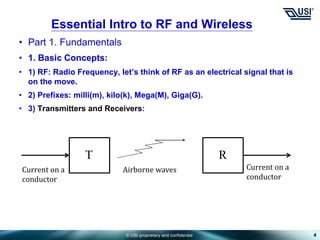
• 1) RF: Radio Frequency, let’s think of RF as an electrical signal that is
on the move.
• 2) Prefixes: milli(m), kilo(k), Mega(M), Giga(G).
• 3) Transmitters and Receivers:
4
Essential Intro to RF and Wireless
T R
Current on a
conductor
Current on a
conductor
Airborne waves
© USI proprietary and confidential
• Part 1. Fundamentals
• 1. Basic Concepts:
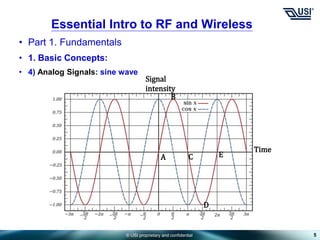
• 4) Analog Signals: sine wave
5
Essential Intro to RF and Wireless
A
B
C
D
E
Signal
intensity
Time
© USI proprietary and confidential
• Part 1. Fundamentals
• 1. Basic Concepts:
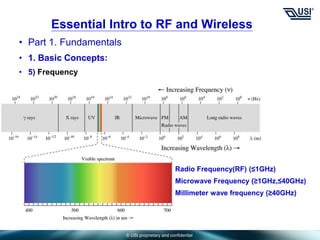
• 5) Frequency
Essential Intro to RF and Wireless
Radio Frequency(RF) (≤1GHz)
Microwave Frequency (≥1GHz,≤40GHz)
Millimeter wave frequency (≥40GHz)
© USI proprietary and confidential
• Part 1. Fundamentals
• 1. Basic Concepts:
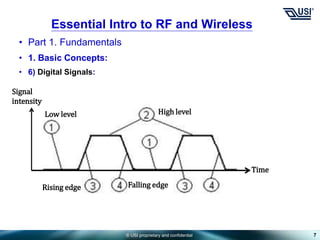
• 6) Digital Signals:
7
Essential Intro to RF and Wireless
High level
Low level
Rising edge Falling edge
Signal
intensity
Time
© USI proprietary and confidential
• Part 1. Fundamentals
• 2. RF behavior:
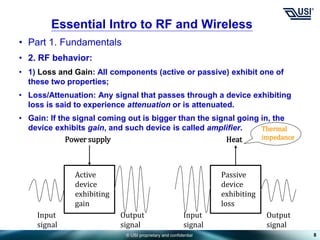
• 1) Loss and Gain: All components (active or passive) exhibit one of
these two properties;
• Loss/Attenuation: Any signal that passes through a device exhibiting
loss is said to experience attenuation or is attenuated.
• Gain: If the signal coming out is bigger than the signal going in, the
device exhibits gain, and such device is called amplifier.
8
Essential Intro to RF and Wireless
Power supply
Active
device
exhibiting
gain
Input
signal
Output
signal
Heat
Passive
device
exhibiting
loss
Input
signal
Output
signal
Thermal
impedance
© USI proprietary and confidential
• Part 1. Fundamentals
• 2. RF behavior:
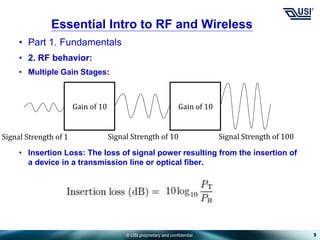
• Multiple Gain Stages:
• Insertion Loss: The loss of signal power resulting from the insertion of
a device in a transmission line or optical fiber.
9
Essential Intro to RF and Wireless
Gain of 10
Signal Strength of 100
Signal Strength of 1 Signal Strength of 10
Gain of 10
© USI proprietary and confidential
• Part 1. Fundamentals
• 2. RF behavior:
• 2) DECIBELS
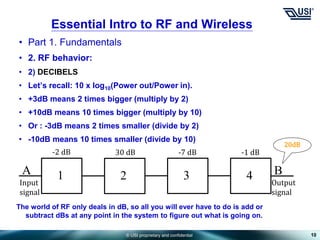
• Let’s recall: 10 x log10(Power out/Power in).
• +3dB means 2 times bigger (multiply by 2)
• +10dB means 10 times bigger (multiply by 10)
• Or : -3dB means 2 times smaller (divide by 2)
• -10dB means 10 times smaller (divide by 10)
10
Essential Intro to RF and Wireless
1 2
Input
signal
Output
signal
A 3 4 B
-2 dB 30 dB -7 dB -1 dB
20dB
The world of RF only deals in dB, so all you will ever have to do is add or
subtract dBs at any point in the system to figure out what is going on.
© USI proprietary and confidential
• Part 1. Fundamentals
• 2. RF behavior:
• 3) BANDWIDTH
• Example: If a device can accommodate all frequencies between 75MHz
and 125MHz, what is its band width and percentage bandwidth?
• 125MHz – 75MHz = 50MHz;
• 50MHz ÷ [(125MHz + 75MHz) ÷ 2] × 100% = 50%
• Octaves bandwidth example: 100MHz ~ 200MHz
• Decades bandwidth example: 100MHz ~ 1GHz
• 4) WIDEBAND AND NARROWBAND
• For example: narrowband – bandwidth < 50%; wideband – bandwidth >
50%
• Key: the wider the bandwidth of a component, the more frequencies it
can accommodate, but the more it costs and the worse it performs.
11
Essential Intro to RF and Wireless
© USI proprietary and confidential
• Part 1. Fundamentals
• 2. RF behavior:
• 5) RF IN THE ENVIRONMENT
• Signal behavior
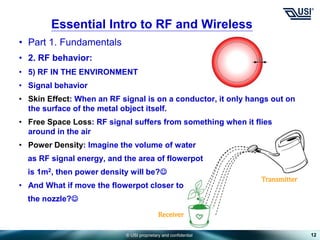
• Skin Effect: When an RF signal is on a conductor, it only hangs out on
the surface of the metal object itself.
• Free Space Loss: RF signal suffers from something when it flies
around in the air
• Power Density: Imagine the volume of water
as RF signal energy, and the area of flowerpot
is 1m2, then power density will be?
• And What if move the flowerpot closer to
the nozzle?
12
Essential Intro to RF and Wireless
Transmitter
Receiver
© USI proprietary and confidential
• Part 1. Fundamentals
• 2. RF behavior:
• 5) RF IN THE ENVIRONMENT
• Signal behavior
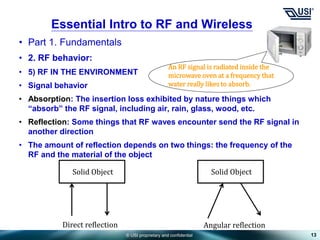
• Absorption: The insertion loss exhibited by nature things which
“absorb” the RF signal, including air, rain, glass, wood, etc.
• Reflection: Some things that RF waves encounter send the RF signal in
another direction
• The amount of reflection depends on two things: the frequency of the
RF and the material of the object
13
Essential Intro to RF and Wireless
An RF signal is radiated inside the
microwave oven at a frequency that
water really likes to absorb.
Solid Object Solid Object
Direct reflection Angular reflection
© USI proprietary and confidential
• Part 1. Fundamentals
• 2. RF behavior:
• 6) MATCH
• What Is Match?
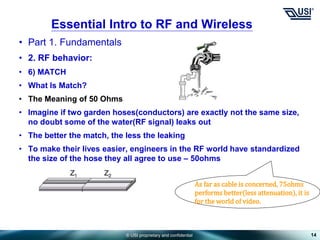
• The Meaning of 50 Ohms
• Imagine if two garden hoses(conductors) are exactly not the same size,
no doubt some of the water(RF signal) leaks out
• The better the match, the less the leaking
• To make their lives easier, engineers in the RF world have standardized
the size of the hose they all agree to use – 50ohms
14
Essential Intro to RF and Wireless
As far as cable is concerned, 75ohms
performs better(less attenuation), it is
for the world of video.
© USI proprietary and confidential
• Part 1. Fundamentals
• 2. RF behavior:
• 6) MATCH
• What Is Match?
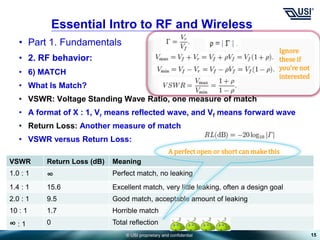
• VSWR: Voltage Standing Wave Ratio, one measure of match
• A format of X : 1, Vr means reflected wave, and Vf means forward wave
• Return Loss: Another measure of match
• VSWR versus Return Loss:
15
Essential Intro to RF and Wireless
Ignore
these if
you’re not
interested
VSWR Return Loss (dB) Meaning
1.0 : 1 ∞ Perfect match, no leaking
1.4 : 1 15.6 Excellent match, very little leaking, often a design goal
2.0 : 1 9.5 Good match, acceptable amount of leaking
10 : 1 1.7 Horrible match
∞ : 1 0 Total reflection
A perfect open or short can make this
© USI proprietary and confidential
• Part 1. Fundamentals
• 2. RF behavior:
• 6) MATCH
• Consequences of an Imperfect Match
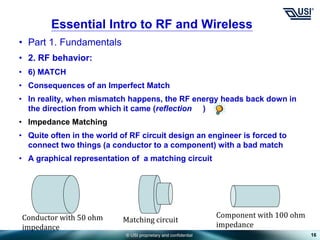
• In reality, when mismatch happens, the RF energy heads back down in
the direction from which it came (reflection )
• Impedance Matching
• Quite often in the world of RF circuit design an engineer is forced to
connect two things (a conductor to a component) with a bad match
• A graphical representation of a matching circuit
16
Essential Intro to RF and Wireless
Conductor with 50 ohm
impedance
Component with 100 ohm
impedance
Matching circuit
© USI proprietary and confidential
• Part 2. RF Hardware
• 3. Basic System Components:
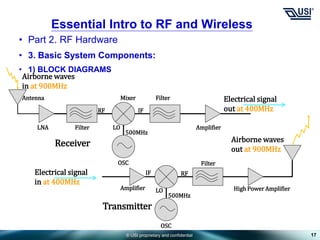
• 1) BLOCK DIAGRAMS
17
Essential Intro to RF and Wireless
Receiver
Airborne waves
in at 900MHz
Electrical signal
out at 400MHz
Antenna
LNA Filter
RF IF
Mixer
LO
500MHz
OSC
Filter
Amplifier
Transmitter
Electrical signal
in at 400MHz
Airborne waves
out at 900MHz
Amplifier
OSC
IF RF
LO
500MHz
Filter
High Power Amplifier
© USI proprietary and confidential
• Part 2. RF Hardware
• 3. Basic System Components:
• 2) ANTENNAS
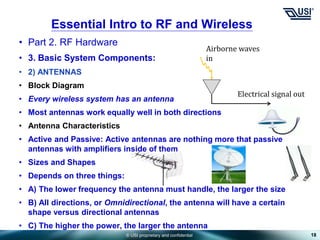
• Block Diagram
• Every wireless system has an antenna
• Most antennas work equally well in both directions
• Antenna Characteristics
• Active and Passive: Active antennas are nothing more that passive
antennas with amplifiers inside of them
• Sizes and Shapes
• Depends on three things:
• A) The lower frequency the antenna must handle, the larger the size
• B) All directions, or Omnidirectional, the antenna will have a certain
shape versus directional antennas
• C) The higher the power, the larger the antenna
18
Essential Intro to RF and Wireless
Airborne waves
in
Electrical signal out
© USI proprietary and confidential
• Part 2. RF Hardware
• 3. Basic System Components:
• 2) ANTENNAS
• Antenna Characteristics
• Signal Strength and Direction
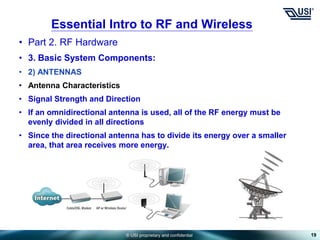
• If an omnidirectional antenna is used, all of the RF energy must be
evenly divided in all directions
• Since the directional antenna has to divide its energy over a smaller
area, that area receives more energy.
19
Essential Intro to RF and Wireless
© USI proprietary and confidential
• Part 2. RF Hardware
• 3. Basic System Components:
• 2) ANTENNAS
• How Antennas Work
• Wavelength
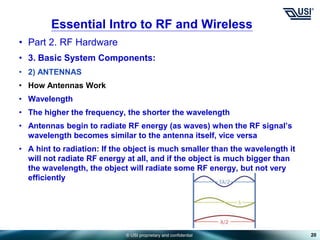
• The higher the frequency, the shorter the wavelength
• Antennas begin to radiate RF energy (as waves) when the RF signal’s
wavelength becomes similar to the antenna itself, vice versa
• A hint to radiation: If the object is much smaller than the wavelength it
will not radiate RF energy at all, and if the object is much bigger than
the wavelength, the object will radiate some RF energy, but not very
efficiently
20
Essential Intro to RF and Wireless
© USI proprietary and confidential
• Part 2. RF Hardware
• 3. Basic System Components:
• 2) ANTENNAS
• Antenna Performance
• Antenna Patterns
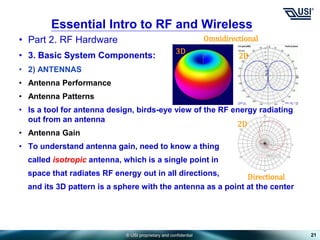
• Is a tool for antenna design, birds-eye view of the RF energy radiating
out from an antenna
• Antenna Gain
• To understand antenna gain, need to know a thing
called isotropic antenna, which is a single point in
space that radiates RF energy out in all directions,
and its 3D pattern is a sphere with the antenna as a point at the center
21
Essential Intro to RF and Wireless
Omnidirectional
Directional
3D
2D
2D
© USI proprietary and confidential
• Part 2. RF Hardware
• 3. Basic System Components:
• 2) ANTENNAS
• Antenna Performance
• Antenna Gain
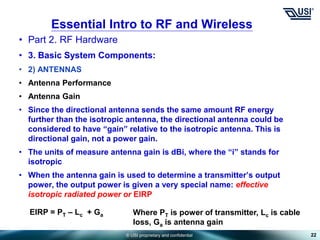
• Since the directional antenna sends the same amount RF energy
further than the isotropic antenna, the directional antenna could be
considered to have “gain” relative to the isotropic antenna. This is
directional gain, not a power gain.
• The units of measure antenna gain is dBi, where the “i” stands for
isotropic
• When the antenna gain is used to determine a transmitter’s output
power, the output power is given a very special name: effective
isotropic radiated power or EIRP
22
Essential Intro to RF and Wireless
Where PT is power of transmitter, Lc is cable
loss, Ga is antenna gain
EIRP = PT – Lc + Ga
© USI proprietary and confidential
• Part 2. RF Hardware
• 3. Basic System Components:
• 2) ANTENNAS
• Polarization
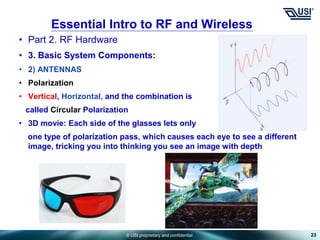
• Vertical, Horizontal, and the combination is
called Circular Polarization
• 3D movie: Each side of the glasses lets only
one type of polarization pass, which causes each eye to see a different
image, tricking you into thinking you see an image with depth
23
Essential Intro to RF and Wireless
© USI proprietary and confidential
• Part 2. RF Hardware
• 3. Basic System Components:
• 2) ANTENNAS
• Antenna Dimensions
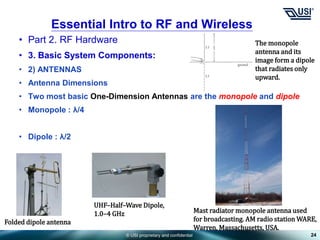
• Two most basic One-Dimension Antennas are the monopole and dipole
• Monopole : λ/4
• Dipole : λ/2
24
Essential Intro to RF and Wireless
The monopole
antenna and its
image form a dipole
that radiates only
upward.
Folded dipole antenna
UHF–Half–Wave Dipole,
1.0–4 GHz Mast radiator monopole antenna used
for broadcasting. AM radio station WARE,
Warren, Massachusetts, USA.
© USI proprietary and confidential
• Part 2. RF Hardware
• 3. Basic System Components:
• 2) ANTENNAS
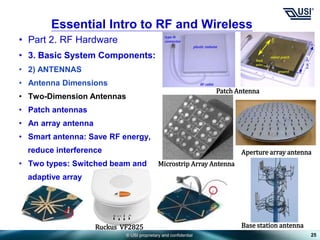
• Antenna Dimensions
• Two-Dimension Antennas
• Patch antennas
• An array antenna
• Smart antenna: Save RF energy,
reduce interference
• Two types: Switched beam and
adaptive array
25
Essential Intro to RF and Wireless
Microstrip Array Antenna
Patch Antenna
Aperture array antenna
Base station antenna
Ruckus VF2825
© USI proprietary and confidential
• Part 2. RF Hardware
• 3. Basic System Components:
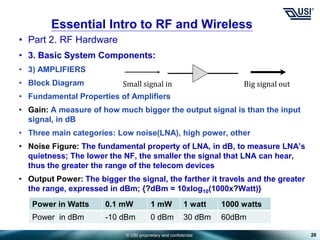
• 3) AMPLIFIERS
• Block Diagram
• Fundamental Properties of Amplifiers
• Gain: A measure of how much bigger the output signal is than the input
signal, in dB
• Three main categories: Low noise(LNA), high power, other
• Noise Figure: The fundamental property of LNA, in dB, to measure LNA’s
quietness; The lower the NF, the smaller the signal that LNA can hear,
thus the greater the range of the telecom devices
• Output Power: The bigger the signal, the farther it travels and the greater
the range, expressed in dBm; {?dBm = 10xlog10(1000x?Watt)}
26
Essential Intro to RF and Wireless
Big signal out
Small signal in
Power in Watts 0.1 mW 1 mW 1 watt 1000 watts
Power in dBm -10 dBm 0 dBm 30 dBm 60dBm
© USI proprietary and confidential
• Part 2. RF Hardware
• 3. Basic System Components:
• 3) AMPLIFIERS
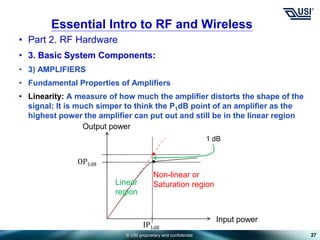
• Fundamental Properties of Amplifiers
• Linearity: A measure of how much the amplifier distorts the shape of the
signal; It is much simper to think the P1dB point of an amplifier as the
highest power the amplifier can put out and still be in the linear region
27
Essential Intro to RF and Wireless
OP1dB
Input power
IP1dB
Output power
1 dB
Linear
region
Non-linear or
Saturation region
© USI proprietary and confidential
• Part 2. RF Hardware
• 3. Basic System Components:
• 3) AMPLIFIERS
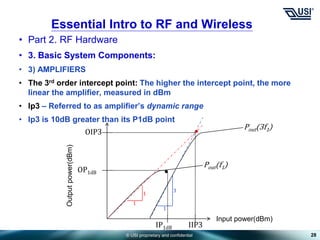
• The 3rd order intercept point: The higher the intercept point, the more
linear the amplifier, measured in dBm
• Ip3 – Referred to as amplifier’s dynamic range
• Ip3 is 10dB greater than its P1dB point
28
Essential Intro to RF and Wireless
OP1dB
Input power(dBm)
IP1dB
Output
power(dBm)
OIP3
IIP3
Pout(f1)
Pout(3f1)
1
1
3
1
© USI proprietary and confidential
• Part 2. RF Hardware
• 3. Basic System Components:
• 3) AMPLIFIERS
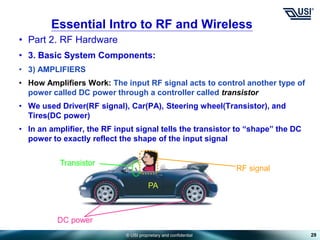
• How Amplifiers Work: The input RF signal acts to control another type of
power called DC power through a controller called transistor
• We used Driver(RF signal), Car(PA), Steering wheel(Transistor), and
Tires(DC power)
• In an amplifier, the RF input signal tells the transistor to “shape” the DC
power to exactly reflect the shape of the input signal
29
Essential Intro to RF and Wireless
DC power
PA
Transistor
RF signal
© USI proprietary and confidential
• Part 2. RF Hardware
• 3. Basic System Components:
• 3) AMPLIFIERS
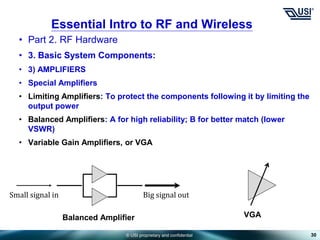
• Special Amplifiers
• Limiting Amplifiers: To protect the components following it by limiting the
output power
• Balanced Amplifiers: A for high reliability; B for better match (lower
VSWR)
• Variable Gain Amplifiers, or VGA
30
Essential Intro to RF and Wireless
Big signal out
Small signal in
Balanced Amplifier VGA
© USI proprietary and confidential
• Part 2. RF Hardware
• 3. Basic System Components:
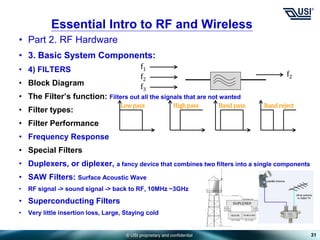
• 4) FILTERS
• Block Diagram
• The Filter’s function: Filters out all the signals that are not wanted
• Filter types:
• Filter Performance
• Frequency Response
• Special Filters
• Duplexers, or diplexer, a fancy device that combines two filters into a single components
• SAW Filters: Surface Acoustic Wave
• RF signal -> sound signal -> back to RF, 10MHz ~3GHz
• Superconducting Filters
• Very little insertion loss, Large, Staying cold
31
Essential Intro to RF and Wireless
f1
f2
f3
f2
Low pass High pass Band pass Band reject
© USI proprietary and confidential
• Part 2. RF Hardware
• 3. Basic System Components:
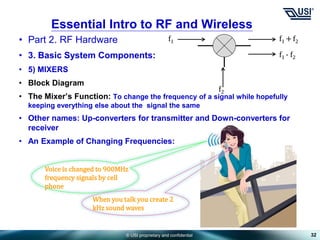
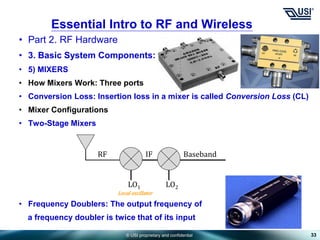
• 5) MIXERS
• Block Diagram
• The Mixer’s Function: To change the frequency of a signal while hopefully
keeping everything else about the signal the same
• Other names: Up-converters for transmitter and Down-converters for
receiver
• An Example of Changing Frequencies:
32
Essential Intro to RF and Wireless
f1 +f2
f1 - f2
f1
f2
When you talk you create 2
kHz sound waves
Voice is changed to 900MHz
frequency signals by cell
phone
© USI proprietary and confidential
• Part 2. RF Hardware
• 3. Basic System Components:
• 5) MIXERS
• How Mixers Work: Three ports
• Conversion Loss: Insertion loss in a mixer is called Conversion Loss (CL)
• Mixer Configurations
• Two-Stage Mixers
• Frequency Doublers: The output frequency of
a frequency doubler is twice that of its input
33
Essential Intro to RF and Wireless
LO1 LO2
RF IF Baseband
Local oscillator
© USI proprietary and confidential
• Part 2. RF Hardware
• 3. Basic System Components:
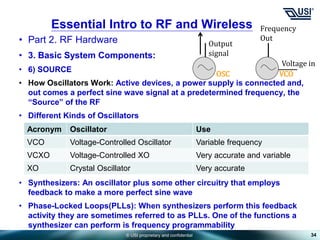
• 6) SOURCE
• How Oscillators Work: Active devices, a power supply is connected and,
out comes a perfect sine wave signal at a predetermined frequency, the
“Source” of the RF
• Different Kinds of Oscillators
• Synthesizers: An oscillator plus some other circuitry that employs
feedback to make a more perfect sine wave
• Phase-Locked Loops(PLLs): When synthesizers perform this feedback
activity they are sometimes referred to as PLLs. One of the functions a
synthesizer can perform is frequency programmability
34
Essential Intro to RF and Wireless
Output
signal
Acronym Oscillator Use
VCO Voltage-Controlled Oscillator Variable frequency
VCXO Voltage-Controlled XO Very accurate and variable
XO Crystal Oscillator Very accurate
Frequency
Out
Voltage in
OSC VCO
© USI proprietary and confidential
• Part 2. RF Hardware
• 4. Other Components:
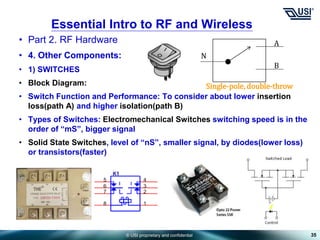
• 1) SWITCHES
• Block Diagram:
• Switch Function and Performance: To consider about lower insertion
loss(path A) and higher isolation(path B)
• Types of Switches: Electromechanical Switches switching speed is in the
order of “mS”, bigger signal
• Solid State Switches, level of “nS”, smaller signal, by diodes(lower loss)
or transistors(faster)
35
Essential Intro to RF and Wireless
N
A
B
Single-pole, double-throw
© USI proprietary and confidential
• Part 2. RF Hardware
• 4. Other Components:
• 1) SWITCHES
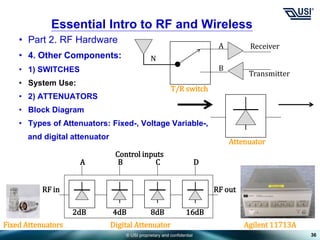
• System Use:
• 2) ATTENUATORS
• Block Diagram
• Types of Attenuators: Fixed-, Voltage Variable-,
and digital attenuator
36
Essential Intro to RF and Wireless
N
A
B
T/R switch
Receiver
Transmitter
Attenuator
Fixed Attenuators Digital Attenuator Agilent 11713A
2dB 4dB 8dB 16dB
RF in RF out
A B C D
Control inputs
© USI proprietary and confidential
• Part 2. RF Hardware
• 4. Other Components:
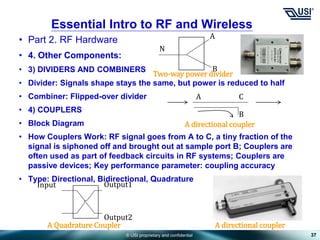
• 3) DIVIDERS AND COMBINERS
• Divider: Signals shape stays the same, but power is reduced to half
• Combiner: Flipped-over divider
• 4) COUPLERS
• Block Diagram
• How Couplers Work: RF signal goes from A to C, a tiny fraction of the
signal is siphoned off and brought out at sample port B; Couplers are
often used as part of feedback circuits in RF systems; Couplers are
passive devices; Key performance parameter: coupling accuracy
• Type: Directional, Bidirectional, Quadrature
37
Essential Intro to RF and Wireless
N
A
B
Two-way power divider
A
A directional coupler
C
B
Input Output1
Output2
A Quadrature Coupler A directional coupler
© USI proprietary and confidential
• Part 2. RF Hardware
• 4. Other Components:
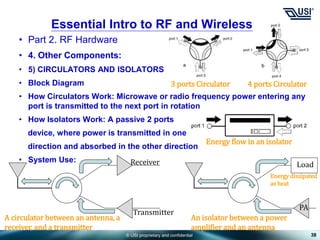
• 5) CIRCULATORS AND ISOLATORS
• Block Diagram
• How Circulators Work: Microwave or radio frequency power entering any
port is transmitted to the next port in rotation
• How Isolators Work: A passive 2 ports
device, where power is transmitted in one
direction and absorbed in the other direction
• System Use:
38
Essential Intro to RF and Wireless
3 ports Circulator 4 ports Circulator
Energy flow in an isolator
Receiver
Transmitter
A circulator between an antenna, a
receiver, and a transmitter
Load
PA
An isolator between a power
amplifier and an antenna
Energy dissipated
as heat
© USI proprietary and confidential
• Part 2. RF Hardware
• 4. Other Components:
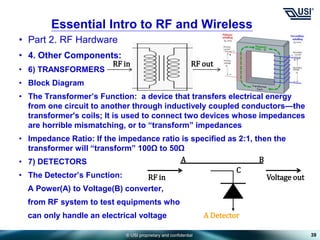
• 6) TRANSFORMERS
• Block Diagram
• The Transformer’s Function: a device that transfers electrical energy
from one circuit to another through inductively coupled conductors—the
transformer's coils; It is used to connect two devices whose impedances
are horrible mismatching, or to “transform” impedances
• Impedance Ratio: If the impedance ratio is specified as 2:1, then the
transformer will “transform” 100Ω to 50Ω
• 7) DETECTORS
• The Detector’s Function:
A Power(A) to Voltage(B) converter,
from RF system to test equipments who
can only handle an electrical voltage
39
Essential Intro to RF and Wireless
RF in RF out
A Detector
C
B
A
RF in Voltage out
© USI proprietary and confidential
• Part 2. RF Hardware
• 4. Other Components:
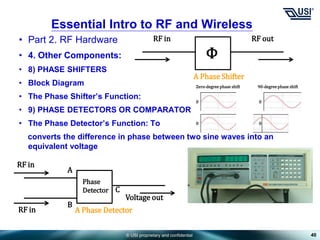
• 8) PHASE SHIFTERS
• Block Diagram
• The Phase Shifter’s Function:
• 9) PHASE DETECTORS OR COMPARATOR
• The Phase Detector’s Function: To
converts the difference in phase between two sine waves into an
equivalent voltage
40
Essential Intro to RF and Wireless
A Phase Shifter
RF in RF out
Ф
Zero-degree phase shift 90-degree phase shift
0
0 0
0
A Phase Detector
RF in
Voltage out
Phase
Detector
RF in
A
B
C
© USI proprietary and confidential
• Part 2. RF Hardware
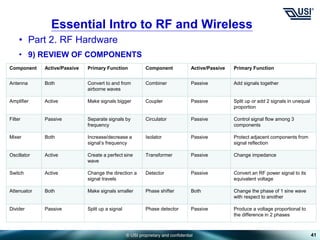
• 9) REVIEW OF COMPONENTS
41
Essential Intro to RF and Wireless
Component Active/Passive Primary Function Component Active/Passive Primary Function
Antenna Both Convert to and from
airborne waves
Combiner Passive Add signals together
Amplifier Active Make signals bigger Coupler Passive Split up or add 2 signals in unequal
proportion
Filter Passive Separate signals by
frequency
Circulator Passive Control signal flow among 3
components
Mixer Both Increase/decrease a
signal’s frequency
Isolator Passive Protect adjacent components from
signal reflection
Oscillator Active Create a perfect sine
wave
Transformer Passive Change impedance
Switch Active Change the direction a
signal travels
Detector Passive Convert an RF power signal to its
equivalent voltage
Attenuator Both Make signals smaller Phase shifter Both Change the phase of 1 sine wave
with respect to another
Divider Passive Split up a signal Phase detector Passive Produce a voltage proportional to
the difference in 2 phases
© USI proprietary and confidential
• Part 2. RF Hardware
• 5. Circuits and Signals:
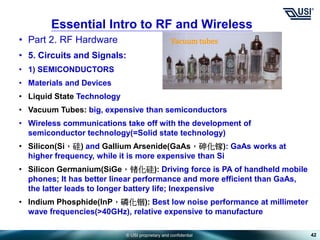
• 1) SEMICONDUCTORS
• Materials and Devices
• Liquid State Technology
• Vacuum Tubes: big, expensive than semiconductors
• Wireless communications take off with the development of
semiconductor technology(=Solid state technology)
• Silicon(Si,硅) and Gallium Arsenide(GaAs,砷化镓): GaAs works at
higher frequency, while it is more expensive than Si
• Silicon Germanium(SiGe,锗化硅): Driving force is PA of handheld mobile
phones; It has better linear performance and more efficient than GaAs,
the latter leads to longer battery life; Inexpensive
• Indium Phosphide(InP,磷化铟): Best low noise performance at millimeter
wave frequencies(>40GHz), relative expensive to manufacture
42
Essential Intro to RF and Wireless
Vacuum tubes
© USI proprietary and confidential
• Part 2. RF Hardware
• 5. Circuits and Signals:
• 1) SEMICONDUCTORS
• Materials and Devices
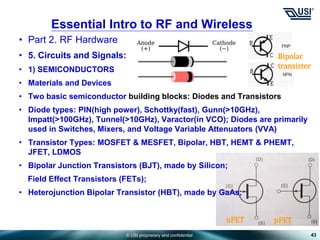
• Two basic semiconductor building blocks: Diodes and Transistors
• Diode types: PIN(high power), Schottky(fast), Gunn(>10GHz),
Impatt(>100GHz), Tunnel(>10GHz), Varactor(in VCO); Diodes are primarily
used in Switches, Mixers, and Voltage Variable Attenuators (VVA)
• Transistor Types: MOSFET & MESFET, Bipolar, HBT, HEMT & PHEMT,
JFET, LDMOS
• Bipolar Junction Transistors (BJT), made by Silicon;
Field Effect Transistors (FETs);
• Heterojunction Bipolar Transistor (HBT), made by GaAs;
43
Essential Intro to RF and Wireless
Bipolar
transistor
nFET pFET
© USI proprietary and confidential
• Part 2. RF Hardware
• 5. Circuits and Signals:
• 1) SEMICONDUCTORS
• Materials and Devices
• Transistor Usage:
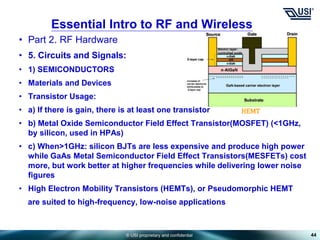
• a) If there is gain, there is at least one transistor
• b) Metal Oxide Semiconductor Field Effect Transistor(MOSFET) (<1GHz,
by silicon, used in HPAs)
• c) When>1GHz: silicon BJTs are less expensive and produce high power
while GaAs Metal Semiconductor Field Effect Transistors(MESFETs) cost
more, but work better at higher frequencies while delivering lower noise
figures
• High Electron Mobility Transistors (HEMTs), or Pseudomorphic HEMT
are suited to high-frequency, low-noise applications
44
Essential Intro to RF and Wireless
HEMT
© USI proprietary and confidential
• Part 2. RF Hardware
• 5. Circuits and Signals:
• 1) SEMICONDUCTORS
• Monolithic Microwave Integrated Circuits (MMIC)
• When more than one electrical device is combined onto a single piece of
semiconductor, it is called an IC
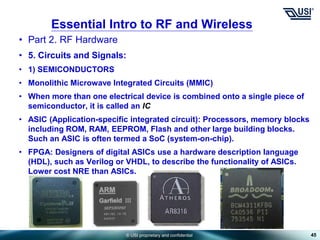
• ASIC (Application-specific integrated circuit): Processors, memory blocks
including ROM, RAM, EEPROM, Flash and other large building blocks.
Such an ASIC is often termed a SoC (system-on-chip).
• FPGA: Designers of digital ASICs use a hardware description language
(HDL), such as Verilog or VHDL, to describe the functionality of ASICs.
Lower cost NRE than ASICs.
45
Essential Intro to RF and Wireless
© USI proprietary and confidential
• Part 2. RF Hardware
• 5. Circuits and Signals:
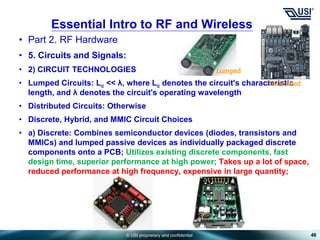
• 2) CIRCUIT TECHNOLOGIES
• Lumped Circuits: Lc << λ, where Lc denotes the circuit's characteristic
length, and λ denotes the circuit's operating wavelength
• Distributed Circuits: Otherwise
• Discrete, Hybrid, and MMIC Circuit Choices
• a) Discrete: Combines semiconductor devices (diodes, transistors and
MMICs) and lumped passive devices as individually packaged discrete
components onto a PCB; Utilizes existing discrete components, fast
design time, superior performance at high power; Takes up a lot of space,
reduced performance at high frequency, expensive in large quantity;
46
Essential Intro to RF and Wireless
Lumped
Distributed
© USI proprietary and confidential
• Part 2. RF Hardware
• 5. Circuits and Signals:
• 2) CIRCUIT TECHNOLOGIES
• Discrete, Hybrid, and MMIC Circuit Choices
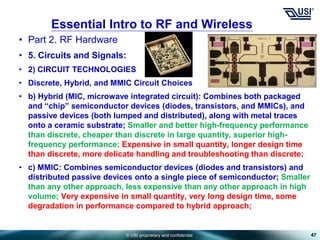
• b) Hybrid (MIC, microwave integrated circuit): Combines both packaged
and “chip” semiconductor devices (diodes, transistors, and MMICs), and
passive devices (both lumped and distributed), along with metal traces
onto a ceramic substrate; Smaller and better high-frequency performance
than discrete, cheaper than discrete in large quantity, superior high-
frequency performance; Expensive in small quantity, longer design time
than discrete, more delicate handling and troubleshooting than discrete;
• c) MMIC: Combines semiconductor devices (diodes and transistors) and
distributed passive devices onto a single piece of semiconductor; Smaller
than any other approach, less expensive than any other approach in high
volume; Very expensive in small quantity, very long design time, some
degradation in performance compared to hybrid approach;
47
Essential Intro to RF and Wireless
© USI proprietary and confidential
• Part 2. RF Hardware
• 5. Circuits and Signals:
• 3) MODULATION
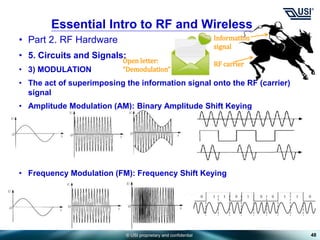
• The act of superimposing the information signal onto the RF (carrier)
signal
• Amplitude Modulation (AM): Binary Amplitude Shift Keying
• Frequency Modulation (FM): Frequency Shift Keying
48
Essential Intro to RF and Wireless
Information
signal
RF carrier
Open letter:
“Demodulation”
© USI proprietary and confidential
• Part 2. RF Hardware
• 5. Circuits and Signals:
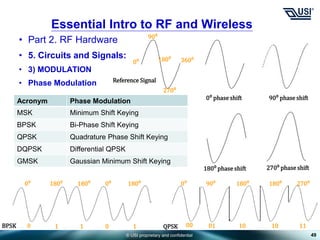
• 3) MODULATION
• Phase Modulation
49
Essential Intro to RF and Wireless
0⁰
90⁰
180⁰
270⁰
360⁰
Reference Signal
0⁰ phase shift 90⁰ phase shift
180⁰ phase shift 270⁰ phase shift
Acronym Phase Modulation
MSK Minimum Shift Keying
BPSK Bi-Phase Shift Keying
QPSK Quadrature Phase Shift Keying
DQPSK Differential QPSK
GMSK Gaussian Minimum Shift Keying
0⁰ 180⁰ 180⁰ 180⁰
0⁰
0 1 1 0 1
0⁰ 90⁰ 180⁰ 270⁰
180⁰
00 01 10 10 11
BPSK QPSK
© USI proprietary and confidential
• Part 2. RF Hardware
• 5. Circuits and Signals:
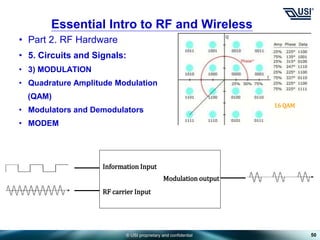
• 3) MODULATION
• Quadrature Amplitude Modulation
(QAM)
• Modulators and Demodulators
• MODEM
50
Essential Intro to RF and Wireless
16 QAM
Information Input
RF carrier Input
Modulation output
© USI proprietary and confidential
• Part 2. RF Hardware
• 5. Circuits and Signals:
• 4) GETTING AROUND
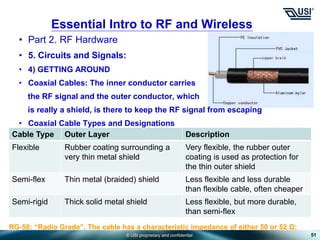
• Coaxial Cables: The inner conductor carries
the RF signal and the outer conductor, which
is really a shield, is there to keep the RF signal from escaping
• Coaxial Cable Types and Designations
51
Essential Intro to RF and Wireless
Cable Type Outer Layer Description
Flexible Rubber coating surrounding a
very thin metal shield
Very flexible, the rubber outer
coating is used as protection for
the thin outer shield
Semi-flex Thin metal (braided) shield Less flexible and less durable
than flexible cable, often cheaper
Semi-rigid Thick solid metal shield Less flexible, but more durable,
than semi-flex
RG-58: “Radio Grade”, The cable has a characteristic impedance of either 50 or 52 Ω;
© USI proprietary and confidential
• Part 2. RF Hardware
• 5. Circuits and Signals:
• 4) GETTING AROUND
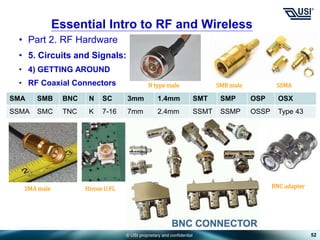
• RF Coaxial Connectors
52
Essential Intro to RF and Wireless
SMA SMB BNC N SC 3mm 1.4mm SMT SMP OSP OSX
SSMA SMC TNC K 7-16 7mm 2.4mm SSMT SSMP OSSP Type 43
SMA male
N type male
Hirose U.FL
SMB male SSMA
BNC adapter
© USI proprietary and confidential
• Part 2. RF Hardware
• 5. Circuits and Signals:
• 4) GETTING AROUND
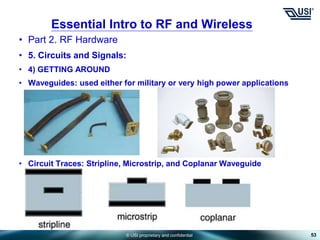
• Waveguides: used either for military or very high power applications
• Circuit Traces: Stripline, Microstrip, and Coplanar Waveguide
53
Essential Intro to RF and Wireless
© USI proprietary and confidential
• Part 3. RF Systems Technologies
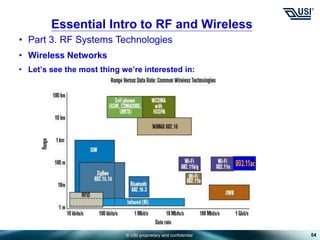
• Wireless Networks
• Let’s see the most thing we’re interested in:
54
Essential Intro to RF and Wireless
© USI proprietary and confidential
• Part 3. RF Systems Technologies
• Wireless Networks
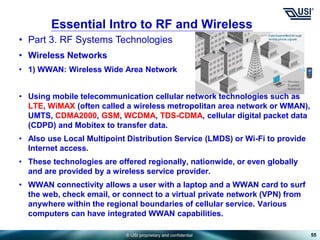
• 1) WWAN: Wireless Wide Area Network
• Using mobile telecommunication cellular network technologies such as
LTE, WiMAX (often called a wireless metropolitan area network or WMAN),
UMTS, CDMA2000, GSM, WCDMA, TDS-CDMA, cellular digital packet data
(CDPD) and Mobitex to transfer data.
• Also use Local Multipoint Distribution Service (LMDS) or Wi-Fi to provide
Internet access.
• These technologies are offered regionally, nationwide, or even globally
and are provided by a wireless service provider.
• WWAN connectivity allows a user with a laptop and a WWAN card to surf
the web, check email, or connect to a virtual private network (VPN) from
anywhere within the regional boundaries of cellular service. Various
computers can have integrated WWAN capabilities.
55
Essential Intro to RF and Wireless
© USI proprietary and confidential
• Part 3. RF Systems Technologies
• Wireless Networks
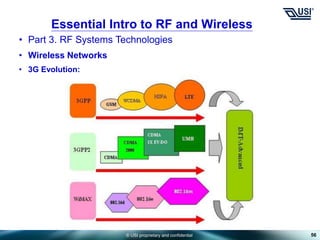
• 3G Evolution:
56
Essential Intro to RF and Wireless
© USI proprietary and confidential
• Part 3. RF Systems Technologies
• Wireless Networks
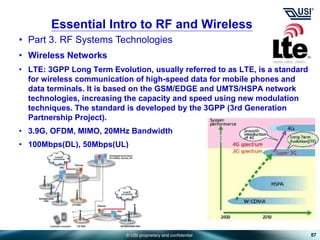
• LTE: 3GPP Long Term Evolution, usually referred to as LTE, is a standard
for wireless communication of high-speed data for mobile phones and
data terminals. It is based on the GSM/EDGE and UMTS/HSPA network
technologies, increasing the capacity and speed using new modulation
techniques. The standard is developed by the 3GPP (3rd Generation
Partnership Project).
• 3.9G, OFDM, MIMO, 20MHz Bandwidth
• 100Mbps(DL), 50Mbps(UL)
57
Essential Intro to RF and Wireless
© USI proprietary and confidential
• Part 3. RF Systems Technologies
• Wireless Networks
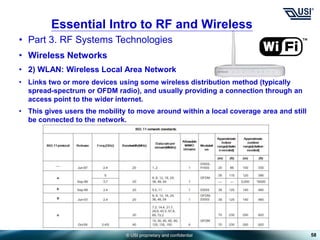
• 2) WLAN: Wireless Local Area Network
• Links two or more devices using some wireless distribution method (typically
spread-spectrum or OFDM radio), and usually providing a connection through an
access point to the wider internet.
• This gives users the mobility to move around within a local coverage area and still
be connected to the network.
58
Essential Intro to RF and Wireless
© USI proprietary and confidential
• Part 3. RF Systems Technologies
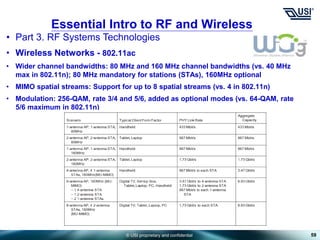
• Wireless Networks - 802.11ac
• Wider channel bandwidths: 80 MHz and 160 MHz channel bandwidths (vs. 40 MHz
max in 802.11n); 80 MHz mandatory for stations (STAs), 160MHz optional
• MIMO spatial streams: Support for up to 8 spatial streams (vs. 4 in 802.11n)
• Modulation: 256-QAM, rate 3/4 and 5/6, added as optional modes (vs. 64-QAM, rate
5/6 maximum in 802.11n)
59
Essential Intro to RF and Wireless
© USI proprietary and confidential
• Part 3. RF Systems Technologies
• Wireless Networks
• 3) WPAN: Wireless Personal Area Network
• A network for interconnecting devices centered around an individual
person's workspace - in which the connections are wireless.
• Wireless PAN is based on the standard IEEE 802.15.
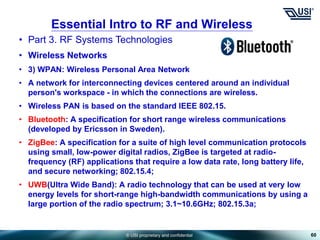
• Bluetooth: A specification for short range wireless communications
(developed by Ericsson in Sweden).
• ZigBee: A specification for a suite of high level communication protocols
using small, low-power digital radios, ZigBee is targeted at radio-
frequency (RF) applications that require a low data rate, long battery life,
and secure networking; 802.15.4;
• UWB(Ultra Wide Band): A radio technology that can be used at very low
energy levels for short-range high-bandwidth communications by using a
large portion of the radio spectrum; 3.1~10.6GHz; 802.15.3a;
60
Essential Intro to RF and Wireless
© USI proprietary and confidential
• Part 3. RF Systems Technologies
• Wireless Networks
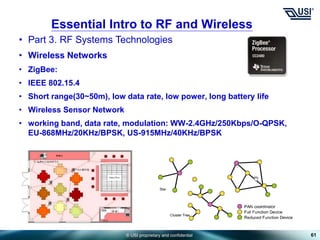
• ZigBee:
• IEEE 802.15.4
• Short range(30~50m), low data rate, low power, long battery life
• Wireless Sensor Network
• working band, data rate, modulation: WW-2.4GHz/250Kbps/O-QPSK,
EU-868MHz/20KHz/BPSK, US-915MHz/40KHz/BPSK
61
Essential Intro to RF and Wireless
© USI proprietary and confidential
• Part 3. RF Systems Technologies
• Wireless Networks
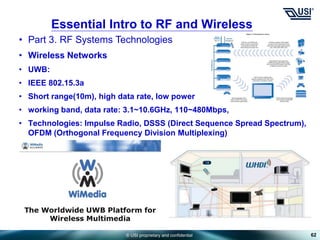
• UWB:
• IEEE 802.15.3a
• Short range(10m), high data rate, low power
• working band, data rate: 3.1~10.6GHz, 110~480Mbps,
• Technologies: Impulse Radio, DSSS (Direct Sequence Spread Spectrum),
OFDM (Orthogonal Frequency Division Multiplexing)
62
Essential Intro to RF and Wireless
Basic RF introduction for newbies eng.ppt

Basic RF introduction for newbies eng.ppt

  • 1.
    © USI proprietaryand confidential ASE Group Prepared by : Milin Date : July – 2012 Essential Intro to RF and Wireless
  • 2.
    © USI proprietaryand confidential 2 自我介绍 姓名: 宓霖 目前职务: M&N上海研发部硬件课 副理 学历: 工学硕士 经历: 1998~2005 东南大学无线电工程系; 2005~now,环旭电子股份有限公司;先后参与IP STB, VOIP,Wi-Fi AP/Router等产品的开发工作; 公司分机: 81267 MIAL: Lin_mi@usish.com
  • 3.
    © USI proprietaryand confidential 3 Content • Essential Intro to RF and Wireless: Fundamentals, RF hardware and system – easy way to learn about • Part 1. RF Fundamentals • Part 2. RF Hardware • Part 3. RF system technologies – Wireless Networks Reference Book: The Essential Guide to RF and Wireless , 2nd Editon, by Carl J.Weisman
  • 4.
    © USI proprietaryand confidential • Part 1. Fundamentals • 1. Basic Concepts: • 1) RF: Radio Frequency, let’s think of RF as an electrical signal that is on the move. • 2) Prefixes: milli(m), kilo(k), Mega(M), Giga(G). • 3) Transmitters and Receivers: 4 Essential Intro to RF and Wireless T R Current on a conductor Current on a conductor Airborne waves
  • 5.
    © USI proprietaryand confidential • Part 1. Fundamentals • 1. Basic Concepts: • 4) Analog Signals: sine wave 5 Essential Intro to RF and Wireless A B C D E Signal intensity Time
  • 6.
    © USI proprietaryand confidential • Part 1. Fundamentals • 1. Basic Concepts: • 5) Frequency Essential Intro to RF and Wireless Radio Frequency(RF) (≤1GHz) Microwave Frequency (≥1GHz,≤40GHz) Millimeter wave frequency (≥40GHz)
  • 7.
    © USI proprietaryand confidential • Part 1. Fundamentals • 1. Basic Concepts: • 6) Digital Signals: 7 Essential Intro to RF and Wireless High level Low level Rising edge Falling edge Signal intensity Time
  • 8.
    © USI proprietaryand confidential • Part 1. Fundamentals • 2. RF behavior: • 1) Loss and Gain: All components (active or passive) exhibit one of these two properties; • Loss/Attenuation: Any signal that passes through a device exhibiting loss is said to experience attenuation or is attenuated. • Gain: If the signal coming out is bigger than the signal going in, the device exhibits gain, and such device is called amplifier. 8 Essential Intro to RF and Wireless Power supply Active device exhibiting gain Input signal Output signal Heat Passive device exhibiting loss Input signal Output signal Thermal impedance
  • 9.
    © USI proprietaryand confidential • Part 1. Fundamentals • 2. RF behavior: • Multiple Gain Stages: • Insertion Loss: The loss of signal power resulting from the insertion of a device in a transmission line or optical fiber. 9 Essential Intro to RF and Wireless Gain of 10 Signal Strength of 100 Signal Strength of 1 Signal Strength of 10 Gain of 10
  • 10.
    © USI proprietaryand confidential • Part 1. Fundamentals • 2. RF behavior: • 2) DECIBELS • Let’s recall: 10 x log10(Power out/Power in). • +3dB means 2 times bigger (multiply by 2) • +10dB means 10 times bigger (multiply by 10) • Or : -3dB means 2 times smaller (divide by 2) • -10dB means 10 times smaller (divide by 10) 10 Essential Intro to RF and Wireless 1 2 Input signal Output signal A 3 4 B -2 dB 30 dB -7 dB -1 dB 20dB The world of RF only deals in dB, so all you will ever have to do is add or subtract dBs at any point in the system to figure out what is going on.
  • 11.
    © USI proprietaryand confidential • Part 1. Fundamentals • 2. RF behavior: • 3) BANDWIDTH • Example: If a device can accommodate all frequencies between 75MHz and 125MHz, what is its band width and percentage bandwidth? • 125MHz – 75MHz = 50MHz; • 50MHz ÷ [(125MHz + 75MHz) ÷ 2] × 100% = 50% • Octaves bandwidth example: 100MHz ~ 200MHz • Decades bandwidth example: 100MHz ~ 1GHz • 4) WIDEBAND AND NARROWBAND • For example: narrowband – bandwidth < 50%; wideband – bandwidth > 50% • Key: the wider the bandwidth of a component, the more frequencies it can accommodate, but the more it costs and the worse it performs. 11 Essential Intro to RF and Wireless
  • 12.
    © USI proprietaryand confidential • Part 1. Fundamentals • 2. RF behavior: • 5) RF IN THE ENVIRONMENT • Signal behavior • Skin Effect: When an RF signal is on a conductor, it only hangs out on the surface of the metal object itself. • Free Space Loss: RF signal suffers from something when it flies around in the air • Power Density: Imagine the volume of water as RF signal energy, and the area of flowerpot is 1m2, then power density will be? • And What if move the flowerpot closer to the nozzle? 12 Essential Intro to RF and Wireless Transmitter Receiver
  • 13.
    © USI proprietaryand confidential • Part 1. Fundamentals • 2. RF behavior: • 5) RF IN THE ENVIRONMENT • Signal behavior • Absorption: The insertion loss exhibited by nature things which “absorb” the RF signal, including air, rain, glass, wood, etc. • Reflection: Some things that RF waves encounter send the RF signal in another direction • The amount of reflection depends on two things: the frequency of the RF and the material of the object 13 Essential Intro to RF and Wireless An RF signal is radiated inside the microwave oven at a frequency that water really likes to absorb. Solid Object Solid Object Direct reflection Angular reflection
  • 14.
    © USI proprietaryand confidential • Part 1. Fundamentals • 2. RF behavior: • 6) MATCH • What Is Match? • The Meaning of 50 Ohms • Imagine if two garden hoses(conductors) are exactly not the same size, no doubt some of the water(RF signal) leaks out • The better the match, the less the leaking • To make their lives easier, engineers in the RF world have standardized the size of the hose they all agree to use – 50ohms 14 Essential Intro to RF and Wireless As far as cable is concerned, 75ohms performs better(less attenuation), it is for the world of video.
  • 15.
    © USI proprietaryand confidential • Part 1. Fundamentals • 2. RF behavior: • 6) MATCH • What Is Match? • VSWR: Voltage Standing Wave Ratio, one measure of match • A format of X : 1, Vr means reflected wave, and Vf means forward wave • Return Loss: Another measure of match • VSWR versus Return Loss: 15 Essential Intro to RF and Wireless Ignore these if you’re not interested VSWR Return Loss (dB) Meaning 1.0 : 1 ∞ Perfect match, no leaking 1.4 : 1 15.6 Excellent match, very little leaking, often a design goal 2.0 : 1 9.5 Good match, acceptable amount of leaking 10 : 1 1.7 Horrible match ∞ : 1 0 Total reflection A perfect open or short can make this
  • 16.
    © USI proprietaryand confidential • Part 1. Fundamentals • 2. RF behavior: • 6) MATCH • Consequences of an Imperfect Match • In reality, when mismatch happens, the RF energy heads back down in the direction from which it came (reflection ) • Impedance Matching • Quite often in the world of RF circuit design an engineer is forced to connect two things (a conductor to a component) with a bad match • A graphical representation of a matching circuit 16 Essential Intro to RF and Wireless Conductor with 50 ohm impedance Component with 100 ohm impedance Matching circuit
  • 17.
    © USI proprietaryand confidential • Part 2. RF Hardware • 3. Basic System Components: • 1) BLOCK DIAGRAMS 17 Essential Intro to RF and Wireless Receiver Airborne waves in at 900MHz Electrical signal out at 400MHz Antenna LNA Filter RF IF Mixer LO 500MHz OSC Filter Amplifier Transmitter Electrical signal in at 400MHz Airborne waves out at 900MHz Amplifier OSC IF RF LO 500MHz Filter High Power Amplifier
  • 18.
    © USI proprietaryand confidential • Part 2. RF Hardware • 3. Basic System Components: • 2) ANTENNAS • Block Diagram • Every wireless system has an antenna • Most antennas work equally well in both directions • Antenna Characteristics • Active and Passive: Active antennas are nothing more that passive antennas with amplifiers inside of them • Sizes and Shapes • Depends on three things: • A) The lower frequency the antenna must handle, the larger the size • B) All directions, or Omnidirectional, the antenna will have a certain shape versus directional antennas • C) The higher the power, the larger the antenna 18 Essential Intro to RF and Wireless Airborne waves in Electrical signal out
  • 19.
    © USI proprietaryand confidential • Part 2. RF Hardware • 3. Basic System Components: • 2) ANTENNAS • Antenna Characteristics • Signal Strength and Direction • If an omnidirectional antenna is used, all of the RF energy must be evenly divided in all directions • Since the directional antenna has to divide its energy over a smaller area, that area receives more energy. 19 Essential Intro to RF and Wireless
  • 20.
    © USI proprietaryand confidential • Part 2. RF Hardware • 3. Basic System Components: • 2) ANTENNAS • How Antennas Work • Wavelength • The higher the frequency, the shorter the wavelength • Antennas begin to radiate RF energy (as waves) when the RF signal’s wavelength becomes similar to the antenna itself, vice versa • A hint to radiation: If the object is much smaller than the wavelength it will not radiate RF energy at all, and if the object is much bigger than the wavelength, the object will radiate some RF energy, but not very efficiently 20 Essential Intro to RF and Wireless
  • 21.
    © USI proprietaryand confidential • Part 2. RF Hardware • 3. Basic System Components: • 2) ANTENNAS • Antenna Performance • Antenna Patterns • Is a tool for antenna design, birds-eye view of the RF energy radiating out from an antenna • Antenna Gain • To understand antenna gain, need to know a thing called isotropic antenna, which is a single point in space that radiates RF energy out in all directions, and its 3D pattern is a sphere with the antenna as a point at the center 21 Essential Intro to RF and Wireless Omnidirectional Directional 3D 2D 2D
  • 22.
    © USI proprietaryand confidential • Part 2. RF Hardware • 3. Basic System Components: • 2) ANTENNAS • Antenna Performance • Antenna Gain • Since the directional antenna sends the same amount RF energy further than the isotropic antenna, the directional antenna could be considered to have “gain” relative to the isotropic antenna. This is directional gain, not a power gain. • The units of measure antenna gain is dBi, where the “i” stands for isotropic • When the antenna gain is used to determine a transmitter’s output power, the output power is given a very special name: effective isotropic radiated power or EIRP 22 Essential Intro to RF and Wireless Where PT is power of transmitter, Lc is cable loss, Ga is antenna gain EIRP = PT – Lc + Ga
  • 23.
    © USI proprietaryand confidential • Part 2. RF Hardware • 3. Basic System Components: • 2) ANTENNAS • Polarization • Vertical, Horizontal, and the combination is called Circular Polarization • 3D movie: Each side of the glasses lets only one type of polarization pass, which causes each eye to see a different image, tricking you into thinking you see an image with depth 23 Essential Intro to RF and Wireless
  • 24.
    © USI proprietaryand confidential • Part 2. RF Hardware • 3. Basic System Components: • 2) ANTENNAS • Antenna Dimensions • Two most basic One-Dimension Antennas are the monopole and dipole • Monopole : λ/4 • Dipole : λ/2 24 Essential Intro to RF and Wireless The monopole antenna and its image form a dipole that radiates only upward. Folded dipole antenna UHF–Half–Wave Dipole, 1.0–4 GHz Mast radiator monopole antenna used for broadcasting. AM radio station WARE, Warren, Massachusetts, USA.
  • 25.
    © USI proprietaryand confidential • Part 2. RF Hardware • 3. Basic System Components: • 2) ANTENNAS • Antenna Dimensions • Two-Dimension Antennas • Patch antennas • An array antenna • Smart antenna: Save RF energy, reduce interference • Two types: Switched beam and adaptive array 25 Essential Intro to RF and Wireless Microstrip Array Antenna Patch Antenna Aperture array antenna Base station antenna Ruckus VF2825
  • 26.
    © USI proprietaryand confidential • Part 2. RF Hardware • 3. Basic System Components: • 3) AMPLIFIERS • Block Diagram • Fundamental Properties of Amplifiers • Gain: A measure of how much bigger the output signal is than the input signal, in dB • Three main categories: Low noise(LNA), high power, other • Noise Figure: The fundamental property of LNA, in dB, to measure LNA’s quietness; The lower the NF, the smaller the signal that LNA can hear, thus the greater the range of the telecom devices • Output Power: The bigger the signal, the farther it travels and the greater the range, expressed in dBm; {?dBm = 10xlog10(1000x?Watt)} 26 Essential Intro to RF and Wireless Big signal out Small signal in Power in Watts 0.1 mW 1 mW 1 watt 1000 watts Power in dBm -10 dBm 0 dBm 30 dBm 60dBm
  • 27.
    © USI proprietaryand confidential • Part 2. RF Hardware • 3. Basic System Components: • 3) AMPLIFIERS • Fundamental Properties of Amplifiers • Linearity: A measure of how much the amplifier distorts the shape of the signal; It is much simper to think the P1dB point of an amplifier as the highest power the amplifier can put out and still be in the linear region 27 Essential Intro to RF and Wireless OP1dB Input power IP1dB Output power 1 dB Linear region Non-linear or Saturation region
  • 28.
    © USI proprietaryand confidential • Part 2. RF Hardware • 3. Basic System Components: • 3) AMPLIFIERS • The 3rd order intercept point: The higher the intercept point, the more linear the amplifier, measured in dBm • Ip3 – Referred to as amplifier’s dynamic range • Ip3 is 10dB greater than its P1dB point 28 Essential Intro to RF and Wireless OP1dB Input power(dBm) IP1dB Output power(dBm) OIP3 IIP3 Pout(f1) Pout(3f1) 1 1 3 1
  • 29.
    © USI proprietaryand confidential • Part 2. RF Hardware • 3. Basic System Components: • 3) AMPLIFIERS • How Amplifiers Work: The input RF signal acts to control another type of power called DC power through a controller called transistor • We used Driver(RF signal), Car(PA), Steering wheel(Transistor), and Tires(DC power) • In an amplifier, the RF input signal tells the transistor to “shape” the DC power to exactly reflect the shape of the input signal 29 Essential Intro to RF and Wireless DC power PA Transistor RF signal
  • 30.
    © USI proprietaryand confidential • Part 2. RF Hardware • 3. Basic System Components: • 3) AMPLIFIERS • Special Amplifiers • Limiting Amplifiers: To protect the components following it by limiting the output power • Balanced Amplifiers: A for high reliability; B for better match (lower VSWR) • Variable Gain Amplifiers, or VGA 30 Essential Intro to RF and Wireless Big signal out Small signal in Balanced Amplifier VGA
  • 31.
    © USI proprietaryand confidential • Part 2. RF Hardware • 3. Basic System Components: • 4) FILTERS • Block Diagram • The Filter’s function: Filters out all the signals that are not wanted • Filter types: • Filter Performance • Frequency Response • Special Filters • Duplexers, or diplexer, a fancy device that combines two filters into a single components • SAW Filters: Surface Acoustic Wave • RF signal -> sound signal -> back to RF, 10MHz ~3GHz • Superconducting Filters • Very little insertion loss, Large, Staying cold 31 Essential Intro to RF and Wireless f1 f2 f3 f2 Low pass High pass Band pass Band reject
  • 32.
    © USI proprietaryand confidential • Part 2. RF Hardware • 3. Basic System Components: • 5) MIXERS • Block Diagram • The Mixer’s Function: To change the frequency of a signal while hopefully keeping everything else about the signal the same • Other names: Up-converters for transmitter and Down-converters for receiver • An Example of Changing Frequencies: 32 Essential Intro to RF and Wireless f1 +f2 f1 - f2 f1 f2 When you talk you create 2 kHz sound waves Voice is changed to 900MHz frequency signals by cell phone
  • 33.
    © USI proprietaryand confidential • Part 2. RF Hardware • 3. Basic System Components: • 5) MIXERS • How Mixers Work: Three ports • Conversion Loss: Insertion loss in a mixer is called Conversion Loss (CL) • Mixer Configurations • Two-Stage Mixers • Frequency Doublers: The output frequency of a frequency doubler is twice that of its input 33 Essential Intro to RF and Wireless LO1 LO2 RF IF Baseband Local oscillator
  • 34.
    © USI proprietaryand confidential • Part 2. RF Hardware • 3. Basic System Components: • 6) SOURCE • How Oscillators Work: Active devices, a power supply is connected and, out comes a perfect sine wave signal at a predetermined frequency, the “Source” of the RF • Different Kinds of Oscillators • Synthesizers: An oscillator plus some other circuitry that employs feedback to make a more perfect sine wave • Phase-Locked Loops(PLLs): When synthesizers perform this feedback activity they are sometimes referred to as PLLs. One of the functions a synthesizer can perform is frequency programmability 34 Essential Intro to RF and Wireless Output signal Acronym Oscillator Use VCO Voltage-Controlled Oscillator Variable frequency VCXO Voltage-Controlled XO Very accurate and variable XO Crystal Oscillator Very accurate Frequency Out Voltage in OSC VCO
  • 35.
    © USI proprietaryand confidential • Part 2. RF Hardware • 4. Other Components: • 1) SWITCHES • Block Diagram: • Switch Function and Performance: To consider about lower insertion loss(path A) and higher isolation(path B) • Types of Switches: Electromechanical Switches switching speed is in the order of “mS”, bigger signal • Solid State Switches, level of “nS”, smaller signal, by diodes(lower loss) or transistors(faster) 35 Essential Intro to RF and Wireless N A B Single-pole, double-throw
  • 36.
    © USI proprietaryand confidential • Part 2. RF Hardware • 4. Other Components: • 1) SWITCHES • System Use: • 2) ATTENUATORS • Block Diagram • Types of Attenuators: Fixed-, Voltage Variable-, and digital attenuator 36 Essential Intro to RF and Wireless N A B T/R switch Receiver Transmitter Attenuator Fixed Attenuators Digital Attenuator Agilent 11713A 2dB 4dB 8dB 16dB RF in RF out A B C D Control inputs
  • 37.
    © USI proprietaryand confidential • Part 2. RF Hardware • 4. Other Components: • 3) DIVIDERS AND COMBINERS • Divider: Signals shape stays the same, but power is reduced to half • Combiner: Flipped-over divider • 4) COUPLERS • Block Diagram • How Couplers Work: RF signal goes from A to C, a tiny fraction of the signal is siphoned off and brought out at sample port B; Couplers are often used as part of feedback circuits in RF systems; Couplers are passive devices; Key performance parameter: coupling accuracy • Type: Directional, Bidirectional, Quadrature 37 Essential Intro to RF and Wireless N A B Two-way power divider A A directional coupler C B Input Output1 Output2 A Quadrature Coupler A directional coupler
  • 38.
    © USI proprietaryand confidential • Part 2. RF Hardware • 4. Other Components: • 5) CIRCULATORS AND ISOLATORS • Block Diagram • How Circulators Work: Microwave or radio frequency power entering any port is transmitted to the next port in rotation • How Isolators Work: A passive 2 ports device, where power is transmitted in one direction and absorbed in the other direction • System Use: 38 Essential Intro to RF and Wireless 3 ports Circulator 4 ports Circulator Energy flow in an isolator Receiver Transmitter A circulator between an antenna, a receiver, and a transmitter Load PA An isolator between a power amplifier and an antenna Energy dissipated as heat
  • 39.
    © USI proprietaryand confidential • Part 2. RF Hardware • 4. Other Components: • 6) TRANSFORMERS • Block Diagram • The Transformer’s Function: a device that transfers electrical energy from one circuit to another through inductively coupled conductors—the transformer's coils; It is used to connect two devices whose impedances are horrible mismatching, or to “transform” impedances • Impedance Ratio: If the impedance ratio is specified as 2:1, then the transformer will “transform” 100Ω to 50Ω • 7) DETECTORS • The Detector’s Function: A Power(A) to Voltage(B) converter, from RF system to test equipments who can only handle an electrical voltage 39 Essential Intro to RF and Wireless RF in RF out A Detector C B A RF in Voltage out
  • 40.
    © USI proprietaryand confidential • Part 2. RF Hardware • 4. Other Components: • 8) PHASE SHIFTERS • Block Diagram • The Phase Shifter’s Function: • 9) PHASE DETECTORS OR COMPARATOR • The Phase Detector’s Function: To converts the difference in phase between two sine waves into an equivalent voltage 40 Essential Intro to RF and Wireless A Phase Shifter RF in RF out Ф Zero-degree phase shift 90-degree phase shift 0 0 0 0 A Phase Detector RF in Voltage out Phase Detector RF in A B C
  • 41.
    © USI proprietaryand confidential • Part 2. RF Hardware • 9) REVIEW OF COMPONENTS 41 Essential Intro to RF and Wireless Component Active/Passive Primary Function Component Active/Passive Primary Function Antenna Both Convert to and from airborne waves Combiner Passive Add signals together Amplifier Active Make signals bigger Coupler Passive Split up or add 2 signals in unequal proportion Filter Passive Separate signals by frequency Circulator Passive Control signal flow among 3 components Mixer Both Increase/decrease a signal’s frequency Isolator Passive Protect adjacent components from signal reflection Oscillator Active Create a perfect sine wave Transformer Passive Change impedance Switch Active Change the direction a signal travels Detector Passive Convert an RF power signal to its equivalent voltage Attenuator Both Make signals smaller Phase shifter Both Change the phase of 1 sine wave with respect to another Divider Passive Split up a signal Phase detector Passive Produce a voltage proportional to the difference in 2 phases
  • 42.
    © USI proprietaryand confidential • Part 2. RF Hardware • 5. Circuits and Signals: • 1) SEMICONDUCTORS • Materials and Devices • Liquid State Technology • Vacuum Tubes: big, expensive than semiconductors • Wireless communications take off with the development of semiconductor technology(=Solid state technology) • Silicon(Si,硅) and Gallium Arsenide(GaAs,砷化镓): GaAs works at higher frequency, while it is more expensive than Si • Silicon Germanium(SiGe,锗化硅): Driving force is PA of handheld mobile phones; It has better linear performance and more efficient than GaAs, the latter leads to longer battery life; Inexpensive • Indium Phosphide(InP,磷化铟): Best low noise performance at millimeter wave frequencies(>40GHz), relative expensive to manufacture 42 Essential Intro to RF and Wireless Vacuum tubes
  • 43.
    © USI proprietaryand confidential • Part 2. RF Hardware • 5. Circuits and Signals: • 1) SEMICONDUCTORS • Materials and Devices • Two basic semiconductor building blocks: Diodes and Transistors • Diode types: PIN(high power), Schottky(fast), Gunn(>10GHz), Impatt(>100GHz), Tunnel(>10GHz), Varactor(in VCO); Diodes are primarily used in Switches, Mixers, and Voltage Variable Attenuators (VVA) • Transistor Types: MOSFET & MESFET, Bipolar, HBT, HEMT & PHEMT, JFET, LDMOS • Bipolar Junction Transistors (BJT), made by Silicon; Field Effect Transistors (FETs); • Heterojunction Bipolar Transistor (HBT), made by GaAs; 43 Essential Intro to RF and Wireless Bipolar transistor nFET pFET
  • 44.
    © USI proprietaryand confidential • Part 2. RF Hardware • 5. Circuits and Signals: • 1) SEMICONDUCTORS • Materials and Devices • Transistor Usage: • a) If there is gain, there is at least one transistor • b) Metal Oxide Semiconductor Field Effect Transistor(MOSFET) (<1GHz, by silicon, used in HPAs) • c) When>1GHz: silicon BJTs are less expensive and produce high power while GaAs Metal Semiconductor Field Effect Transistors(MESFETs) cost more, but work better at higher frequencies while delivering lower noise figures • High Electron Mobility Transistors (HEMTs), or Pseudomorphic HEMT are suited to high-frequency, low-noise applications 44 Essential Intro to RF and Wireless HEMT
  • 45.
    © USI proprietaryand confidential • Part 2. RF Hardware • 5. Circuits and Signals: • 1) SEMICONDUCTORS • Monolithic Microwave Integrated Circuits (MMIC) • When more than one electrical device is combined onto a single piece of semiconductor, it is called an IC • ASIC (Application-specific integrated circuit): Processors, memory blocks including ROM, RAM, EEPROM, Flash and other large building blocks. Such an ASIC is often termed a SoC (system-on-chip). • FPGA: Designers of digital ASICs use a hardware description language (HDL), such as Verilog or VHDL, to describe the functionality of ASICs. Lower cost NRE than ASICs. 45 Essential Intro to RF and Wireless
  • 46.
    © USI proprietaryand confidential • Part 2. RF Hardware • 5. Circuits and Signals: • 2) CIRCUIT TECHNOLOGIES • Lumped Circuits: Lc << λ, where Lc denotes the circuit's characteristic length, and λ denotes the circuit's operating wavelength • Distributed Circuits: Otherwise • Discrete, Hybrid, and MMIC Circuit Choices • a) Discrete: Combines semiconductor devices (diodes, transistors and MMICs) and lumped passive devices as individually packaged discrete components onto a PCB; Utilizes existing discrete components, fast design time, superior performance at high power; Takes up a lot of space, reduced performance at high frequency, expensive in large quantity; 46 Essential Intro to RF and Wireless Lumped Distributed
  • 47.
    © USI proprietaryand confidential • Part 2. RF Hardware • 5. Circuits and Signals: • 2) CIRCUIT TECHNOLOGIES • Discrete, Hybrid, and MMIC Circuit Choices • b) Hybrid (MIC, microwave integrated circuit): Combines both packaged and “chip” semiconductor devices (diodes, transistors, and MMICs), and passive devices (both lumped and distributed), along with metal traces onto a ceramic substrate; Smaller and better high-frequency performance than discrete, cheaper than discrete in large quantity, superior high- frequency performance; Expensive in small quantity, longer design time than discrete, more delicate handling and troubleshooting than discrete; • c) MMIC: Combines semiconductor devices (diodes and transistors) and distributed passive devices onto a single piece of semiconductor; Smaller than any other approach, less expensive than any other approach in high volume; Very expensive in small quantity, very long design time, some degradation in performance compared to hybrid approach; 47 Essential Intro to RF and Wireless
  • 48.
    © USI proprietaryand confidential • Part 2. RF Hardware • 5. Circuits and Signals: • 3) MODULATION • The act of superimposing the information signal onto the RF (carrier) signal • Amplitude Modulation (AM): Binary Amplitude Shift Keying • Frequency Modulation (FM): Frequency Shift Keying 48 Essential Intro to RF and Wireless Information signal RF carrier Open letter: “Demodulation”
  • 49.
    © USI proprietaryand confidential • Part 2. RF Hardware • 5. Circuits and Signals: • 3) MODULATION • Phase Modulation 49 Essential Intro to RF and Wireless 0⁰ 90⁰ 180⁰ 270⁰ 360⁰ Reference Signal 0⁰ phase shift 90⁰ phase shift 180⁰ phase shift 270⁰ phase shift Acronym Phase Modulation MSK Minimum Shift Keying BPSK Bi-Phase Shift Keying QPSK Quadrature Phase Shift Keying DQPSK Differential QPSK GMSK Gaussian Minimum Shift Keying 0⁰ 180⁰ 180⁰ 180⁰ 0⁰ 0 1 1 0 1 0⁰ 90⁰ 180⁰ 270⁰ 180⁰ 00 01 10 10 11 BPSK QPSK
  • 50.
    © USI proprietaryand confidential • Part 2. RF Hardware • 5. Circuits and Signals: • 3) MODULATION • Quadrature Amplitude Modulation (QAM) • Modulators and Demodulators • MODEM 50 Essential Intro to RF and Wireless 16 QAM Information Input RF carrier Input Modulation output
  • 51.
    © USI proprietaryand confidential • Part 2. RF Hardware • 5. Circuits and Signals: • 4) GETTING AROUND • Coaxial Cables: The inner conductor carries the RF signal and the outer conductor, which is really a shield, is there to keep the RF signal from escaping • Coaxial Cable Types and Designations 51 Essential Intro to RF and Wireless Cable Type Outer Layer Description Flexible Rubber coating surrounding a very thin metal shield Very flexible, the rubber outer coating is used as protection for the thin outer shield Semi-flex Thin metal (braided) shield Less flexible and less durable than flexible cable, often cheaper Semi-rigid Thick solid metal shield Less flexible, but more durable, than semi-flex RG-58: “Radio Grade”, The cable has a characteristic impedance of either 50 or 52 Ω;
  • 52.
    © USI proprietaryand confidential • Part 2. RF Hardware • 5. Circuits and Signals: • 4) GETTING AROUND • RF Coaxial Connectors 52 Essential Intro to RF and Wireless SMA SMB BNC N SC 3mm 1.4mm SMT SMP OSP OSX SSMA SMC TNC K 7-16 7mm 2.4mm SSMT SSMP OSSP Type 43 SMA male N type male Hirose U.FL SMB male SSMA BNC adapter
  • 53.
    © USI proprietaryand confidential • Part 2. RF Hardware • 5. Circuits and Signals: • 4) GETTING AROUND • Waveguides: used either for military or very high power applications • Circuit Traces: Stripline, Microstrip, and Coplanar Waveguide 53 Essential Intro to RF and Wireless
  • 54.
    © USI proprietaryand confidential • Part 3. RF Systems Technologies • Wireless Networks • Let’s see the most thing we’re interested in: 54 Essential Intro to RF and Wireless
  • 55.
    © USI proprietaryand confidential • Part 3. RF Systems Technologies • Wireless Networks • 1) WWAN: Wireless Wide Area Network • Using mobile telecommunication cellular network technologies such as LTE, WiMAX (often called a wireless metropolitan area network or WMAN), UMTS, CDMA2000, GSM, WCDMA, TDS-CDMA, cellular digital packet data (CDPD) and Mobitex to transfer data. • Also use Local Multipoint Distribution Service (LMDS) or Wi-Fi to provide Internet access. • These technologies are offered regionally, nationwide, or even globally and are provided by a wireless service provider. • WWAN connectivity allows a user with a laptop and a WWAN card to surf the web, check email, or connect to a virtual private network (VPN) from anywhere within the regional boundaries of cellular service. Various computers can have integrated WWAN capabilities. 55 Essential Intro to RF and Wireless
  • 56.
    © USI proprietaryand confidential • Part 3. RF Systems Technologies • Wireless Networks • 3G Evolution: 56 Essential Intro to RF and Wireless
  • 57.
    © USI proprietaryand confidential • Part 3. RF Systems Technologies • Wireless Networks • LTE: 3GPP Long Term Evolution, usually referred to as LTE, is a standard for wireless communication of high-speed data for mobile phones and data terminals. It is based on the GSM/EDGE and UMTS/HSPA network technologies, increasing the capacity and speed using new modulation techniques. The standard is developed by the 3GPP (3rd Generation Partnership Project). • 3.9G, OFDM, MIMO, 20MHz Bandwidth • 100Mbps(DL), 50Mbps(UL) 57 Essential Intro to RF and Wireless
  • 58.
    © USI proprietaryand confidential • Part 3. RF Systems Technologies • Wireless Networks • 2) WLAN: Wireless Local Area Network • Links two or more devices using some wireless distribution method (typically spread-spectrum or OFDM radio), and usually providing a connection through an access point to the wider internet. • This gives users the mobility to move around within a local coverage area and still be connected to the network. 58 Essential Intro to RF and Wireless
  • 59.
    © USI proprietaryand confidential • Part 3. RF Systems Technologies • Wireless Networks - 802.11ac • Wider channel bandwidths: 80 MHz and 160 MHz channel bandwidths (vs. 40 MHz max in 802.11n); 80 MHz mandatory for stations (STAs), 160MHz optional • MIMO spatial streams: Support for up to 8 spatial streams (vs. 4 in 802.11n) • Modulation: 256-QAM, rate 3/4 and 5/6, added as optional modes (vs. 64-QAM, rate 5/6 maximum in 802.11n) 59 Essential Intro to RF and Wireless
  • 60.
    © USI proprietaryand confidential • Part 3. RF Systems Technologies • Wireless Networks • 3) WPAN: Wireless Personal Area Network • A network for interconnecting devices centered around an individual person's workspace - in which the connections are wireless. • Wireless PAN is based on the standard IEEE 802.15. • Bluetooth: A specification for short range wireless communications (developed by Ericsson in Sweden). • ZigBee: A specification for a suite of high level communication protocols using small, low-power digital radios, ZigBee is targeted at radio- frequency (RF) applications that require a low data rate, long battery life, and secure networking; 802.15.4; • UWB(Ultra Wide Band): A radio technology that can be used at very low energy levels for short-range high-bandwidth communications by using a large portion of the radio spectrum; 3.1~10.6GHz; 802.15.3a; 60 Essential Intro to RF and Wireless
  • 61.
    © USI proprietaryand confidential • Part 3. RF Systems Technologies • Wireless Networks • ZigBee: • IEEE 802.15.4 • Short range(30~50m), low data rate, low power, long battery life • Wireless Sensor Network • working band, data rate, modulation: WW-2.4GHz/250Kbps/O-QPSK, EU-868MHz/20KHz/BPSK, US-915MHz/40KHz/BPSK 61 Essential Intro to RF and Wireless
  • 62.
    © USI proprietaryand confidential • Part 3. RF Systems Technologies • Wireless Networks • UWB: • IEEE 802.15.3a • Short range(10m), high data rate, low power • working band, data rate: 3.1~10.6GHz, 110~480Mbps, • Technologies: Impulse Radio, DSSS (Direct Sequence Spread Spectrum), OFDM (Orthogonal Frequency Division Multiplexing) 62 Essential Intro to RF and Wireless