Columbus County
Emergency Services
Basic Radio Training
Sign-in
   Click on the link below and complete
    the sign-in sheet to get credit for
    completing the training.
   http://www.surveymonkey.com/s/5JLZCVL
AGENDA
   Introduction to Radio’s
   Radio Etiquette
   Overview and Use of Motorola XTS
    2500
   Overview and Use of EF Johnson 51SL
    ES
   Overview and Use of Kenwood 2212L
    VHF Portable Radios
Introduction to Radios
   Types of radios
       Portable
       Mobile
       Base station
   Types of bands
       VHF – Fire/EMS/Local Government
       UHF – Law Enforcement
       800 mhz - State
Introduction to Radios
   Issues
       Using a portable in a building, car, etc.
       Using a portable when a mobile is
        available
       Users standing too close to each other
       Using a lapel microphone while sitting with
        the radio one the belt
       Improper holding of a radio
Introduction to Radios
   Radio basics
       Be careful what you say
       Avoid “walking” on others, make sure the
        channel is clear
       Think before you speak, is it really
        important
       Not everyone needs a radio
       Not everyone that has a radio has to talk
        on it
Introduction to Radios
   Radio Test
       Turn on radio.
       Speak into radio
         
             Radio check
       Anyone who has heard the radio test can
        answer
            Check good
Introduction to Radios
   Proper use
       Press and hold the transmit button for a
        brief moment
       Hold the radio with the antenna pointed up
       Speak directly and clearly while holding the
        mic 2-3 inches from your mouth
       Begin your transmission
       Be brief and to the point, keep the channel
        open for others
Introduction to Radios
   Proper use
       Use the name/call sign for the person/unit
        you are trying to contact and identify your
        self. Example: “You this is Me”.
       Release the transmit button and wait for
        acknowledgement.
       Proper acknowledgement “This is Kim, go
        ahead”
Radio Etiquette
   Radio Terminology
       Location = Where are you
       Acknowledge = Confirm that you
        understand my message
       Affirmative = Yes, confirm
       Check/Copy that = Understood
       Correction = I made a mistake. Correct
        version is...
Radio Etiquette
   Radio Terminology
       Do you read/Copy = Called you once or
        more, reply please
       Go ahead = Listening, proceed with your
        message
       Negative = No
       Out = My message ended, no reply
        expected
       Over = Message completed, reply
        expected
Radio Etiquette
   Radio Terminology
       Read back = Repeat this message back to me
       Roger = Yes, confirm
       Say again = Repeat last message
       Stand-by = Busy, please pause for a moment
       That is correct = Yes, confirm
       Wilco = Message understood, will comply
       Words twice = Send every phrase twice
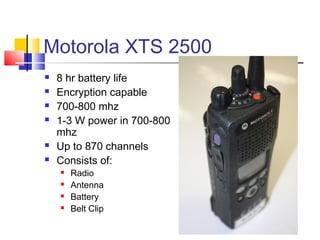
Motorola XTS 2500
   8 hr battery life
   Encryption capable
   700-800 mhz
   1-3 W power in 700-800
    mhz
   Up to 870 channels
   Consists of:
       Radio
       Antenna
       Battery
       Belt Clip
Motorola XTS 2500
Motorola XTS 2500
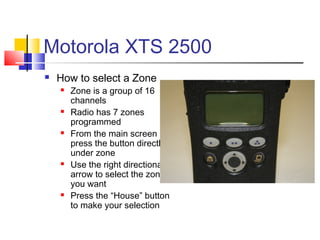
   How to select a Zone
       Zone is a group of 16
        channels
       Radio has 7 zones
        programmed
       From the main screen
        press the button directly
        under zone
       Use the right directional
        arrow to select the zone
        you want
       Press the “House” button
        to make your selection
Motorola XTS 2500
                 Use the select knob
                  located on the top
                  center of the radio and
                  select which of the 16
                  channels you wish to
                  talk on
                 Channel will be
                  displayed on the screen
                 The smaller knob is
                  used to adjust the
                  volume
Motorola XTS 2500
                 Other Buttons
                     Top Purple
                       
                           Identifies the tower
                           you are talking off
                           and the signal
                           strength.
                       
                           Large textured button
                           is the transmit button
                       
                           Side button #1 is
                           unprogrammed
                          Side button #2 is not
                           used
EF Johnson 51SL
   12 hour battery life
   Encryption capable
   1-3 W power
   700-800 mhz
   Emergency Services
    Radios
       Immersion rated 1 meter
        for 30 minutes
       Intrinsically safe
   Public Health and
    Sheriff radios – Lithium
    Ion battery
EF Johnson 51SL
                Select a zone
                     Use the up and down
                      arrows to select a
                      zone
                     Once selected
                      release and the radio
                      will set on that zone
EF Johnson 51SL
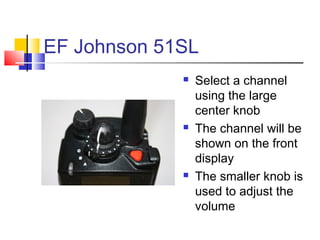
                Select a channel
                 using the large
                 center knob
                The channel will be
                 shown on the front
                 display
                The smaller knob is
                 used to adjust the
                 volume
EF Johnson 51SL
   Option Button 1
   Option Button 2
   Option Button 3
   Push to Talk (PTT)
    is the large textured
    button at the bottom
EF Johnson 51SL
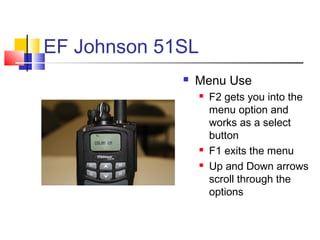
                Menu Use
                     F2 gets you into the
                      menu option and
                      works as a select
                      button
                     F1 exits the menu
                     Up and Down arrows
                      scroll through the
                      options
EF Johnson 51SL
                Menu Options
                     Contrast
                     Audio Mute
                     Radio Info
                     Scan Edit
                     Scan Select
                     Site Search
                     Surv mode
                     Keyprs Vol
Kenwood TK-2212L
   5W VHF Portable
   128 Zones
   128 Channels
   Scramble capable
   We have the
    equipment to be
    able to program in
    the field
Kenwood TK-2212L
               Use the C button to
                select a Zone
               Once a zone is selected
                use the large center
                knob to select the
                channel
               The channel will be
                shown on the display
               Use the small knob to
                adjust the volume
Kenwood TK-2212L
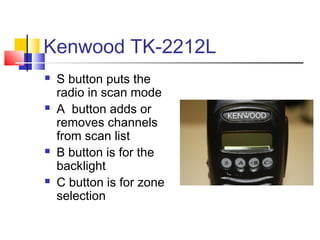
   S button puts the
    radio in scan mode
   A button adds or
    removes channels
    from scan list
   B button is for the
    backlight
   C button is for zone
    selection
Kenwood TK-2212L
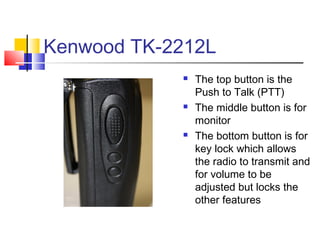
               The top button is the
                Push to Talk (PTT)
               The middle button is for
                monitor
               The bottom button is for
                key lock which allows
                the radio to transmit and
                for volume to be
                adjusted but locks the
                other features
Review
   Radio use
       Proper vs improper
       Radio test
       Transmit
   Radio Etiquette
   Motorola XTS 2500
   EF Johnson 51SL
   Kenwood TK-2212

Basic radio training v2

  • 1.
  • 2.
    Sign-in  Click on the link below and complete the sign-in sheet to get credit for completing the training.  http://www.surveymonkey.com/s/5JLZCVL
  • 3.
    AGENDA  Introduction to Radio’s  Radio Etiquette  Overview and Use of Motorola XTS 2500  Overview and Use of EF Johnson 51SL ES  Overview and Use of Kenwood 2212L VHF Portable Radios
  • 4.
    Introduction to Radios  Types of radios  Portable  Mobile  Base station  Types of bands  VHF – Fire/EMS/Local Government  UHF – Law Enforcement  800 mhz - State
  • 5.
    Introduction to Radios  Issues  Using a portable in a building, car, etc.  Using a portable when a mobile is available  Users standing too close to each other  Using a lapel microphone while sitting with the radio one the belt  Improper holding of a radio
  • 6.
    Introduction to Radios  Radio basics  Be careful what you say  Avoid “walking” on others, make sure the channel is clear  Think before you speak, is it really important  Not everyone needs a radio  Not everyone that has a radio has to talk on it
  • 7.
    Introduction to Radios  Radio Test  Turn on radio.  Speak into radio  Radio check  Anyone who has heard the radio test can answer  Check good
  • 8.
    Introduction to Radios  Proper use  Press and hold the transmit button for a brief moment  Hold the radio with the antenna pointed up  Speak directly and clearly while holding the mic 2-3 inches from your mouth  Begin your transmission  Be brief and to the point, keep the channel open for others
  • 9.
    Introduction to Radios  Proper use  Use the name/call sign for the person/unit you are trying to contact and identify your self. Example: “You this is Me”.  Release the transmit button and wait for acknowledgement.  Proper acknowledgement “This is Kim, go ahead”
  • 10.
    Radio Etiquette  Radio Terminology  Location = Where are you  Acknowledge = Confirm that you understand my message  Affirmative = Yes, confirm  Check/Copy that = Understood  Correction = I made a mistake. Correct version is...
  • 11.
    Radio Etiquette  Radio Terminology  Do you read/Copy = Called you once or more, reply please  Go ahead = Listening, proceed with your message  Negative = No  Out = My message ended, no reply expected  Over = Message completed, reply expected
  • 12.
    Radio Etiquette  Radio Terminology  Read back = Repeat this message back to me  Roger = Yes, confirm  Say again = Repeat last message  Stand-by = Busy, please pause for a moment  That is correct = Yes, confirm  Wilco = Message understood, will comply  Words twice = Send every phrase twice
  • 13.
    Motorola XTS 2500  8 hr battery life  Encryption capable  700-800 mhz  1-3 W power in 700-800 mhz  Up to 870 channels  Consists of:  Radio  Antenna  Battery  Belt Clip
  • 14.
  • 15.
    Motorola XTS 2500  How to select a Zone  Zone is a group of 16 channels  Radio has 7 zones programmed  From the main screen press the button directly under zone  Use the right directional arrow to select the zone you want  Press the “House” button to make your selection
  • 16.
    Motorola XTS 2500  Use the select knob located on the top center of the radio and select which of the 16 channels you wish to talk on  Channel will be displayed on the screen  The smaller knob is used to adjust the volume
  • 17.
    Motorola XTS 2500  Other Buttons  Top Purple  Identifies the tower you are talking off and the signal strength.  Large textured button is the transmit button  Side button #1 is unprogrammed  Side button #2 is not used
  • 18.
    EF Johnson 51SL  12 hour battery life  Encryption capable  1-3 W power  700-800 mhz  Emergency Services Radios  Immersion rated 1 meter for 30 minutes  Intrinsically safe  Public Health and Sheriff radios – Lithium Ion battery
  • 19.
    EF Johnson 51SL  Select a zone  Use the up and down arrows to select a zone  Once selected release and the radio will set on that zone
  • 20.
    EF Johnson 51SL  Select a channel using the large center knob  The channel will be shown on the front display  The smaller knob is used to adjust the volume
  • 21.
    EF Johnson 51SL  Option Button 1  Option Button 2  Option Button 3  Push to Talk (PTT) is the large textured button at the bottom
  • 22.
    EF Johnson 51SL  Menu Use  F2 gets you into the menu option and works as a select button  F1 exits the menu  Up and Down arrows scroll through the options
  • 23.
    EF Johnson 51SL  Menu Options  Contrast  Audio Mute  Radio Info  Scan Edit  Scan Select  Site Search  Surv mode  Keyprs Vol
  • 24.
    Kenwood TK-2212L  5W VHF Portable  128 Zones  128 Channels  Scramble capable  We have the equipment to be able to program in the field
  • 25.
    Kenwood TK-2212L  Use the C button to select a Zone  Once a zone is selected use the large center knob to select the channel  The channel will be shown on the display  Use the small knob to adjust the volume
  • 26.
    Kenwood TK-2212L  S button puts the radio in scan mode  A button adds or removes channels from scan list  B button is for the backlight  C button is for zone selection
  • 27.
    Kenwood TK-2212L  The top button is the Push to Talk (PTT)  The middle button is for monitor  The bottom button is for key lock which allows the radio to transmit and for volume to be adjusted but locks the other features
  • 28.
    Review  Radio use  Proper vs improper  Radio test  Transmit  Radio Etiquette  Motorola XTS 2500  EF Johnson 51SL  Kenwood TK-2212