B - Trees
In a binary search tree, AVL Tree, Red-Black tree etc., every node can have only one value
(key) and maximum of two children but there is another type of search tree called B-Tree in
which a node can store more than one value (key) and it can have more than two children. B-
Tree was developed in the year of 1972 by Bayer and McCreight with the name Height
Balanced m-way Search Tree. Later it was named as B-Tree
B-Tree can be defined as follows...
B-Tree is a self-balanced search tree with multiple keys in every node and more than two
children for every node.
Here, number of keys in a node and number of children for a node is depend on the order of
the B-Tree. Every B-Tree has order.
B-Tree of Order m has the following properties...
• Property #1 - All the leaf nodes must be at same level.
• Property #2 - All nodes except root must have at least [m/2]-1 keys and maximum
of m-1 keys.
• Property #3 - All non leaf nodes except root (i.e. all internal nodes) must have at
least m/2 children.
• Property #4 - If the root node is a non leaf node, then it must have at least 2 children.
• Property #5 - A non leaf node with n-1 keys must have n number of children.
• Property #6 - All the key values within a node must be in Ascending Order.
For example, B-Tree of Order 4 contains maximum 3 key values in a node and maximum 4
children for a node.
Operations on a B-Tree
The following operations are performed on a B-Tree...
• Search
• Insertion
• Deletion
Search Operation in B-Tree
• In a B-Ttree, the search operation is similar to that of Binary Search Tree. In a Binary
search tree, the search process starts from the root node and every time we make a 2-
way decision (we go to either left subtree or right subtree). In B-Tree also search
process starts from the root node but every time we make n-way decision where n is
the total number of children that node has. In a B-Ttree, the search operation is
performed with O(log n) time complexity. The search operation is performed as
follows...
Step 1: Read the search element from the user
• Step 2: Compare, the search element with first key value of root node in the tree.
• Step 3: If both are matching, then display "Given node found!!!" and terminate the
function
• Step 4: If both are not matching, then check whether search element is smaller or
larger than that key value.
• Step 5: If search element is smaller, then continue the search process in left subtree
Step 6: If search element is larger, then compare with next key value in the same node
and repeate step 3, 4, 5 and 6 until we found exact match or comparision completed
with last key value in a leaf node.
• Step 7: If we completed with last key value in a leaf node, then display "Element is not
found" and terminate the function.
Insertion Operation in B-Tree
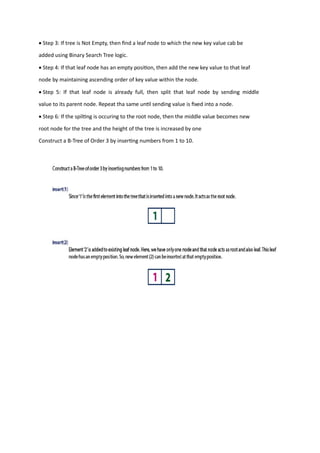
In a B-Tree, the new element must be added only at leaf node. That means, always the new
keyValue is attached to leaf node only. The insertion operation is performed as follows...
• Step 1: Check whether tree is Empty.
• Step 2: If tree is Empty, then create a new node with new key value and insert into the
tree as a root node.
• Step 3: If tree is Not Empty, then find a leaf node to which the new key value cab be
added using Binary Search Tree logic.
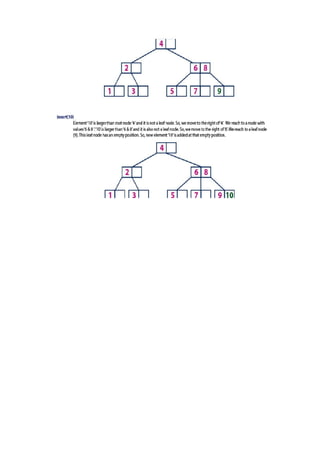
• Step 4: If that leaf node has an empty position, then add the new key value to that leaf
node by maintaining ascending order of key value within the node.
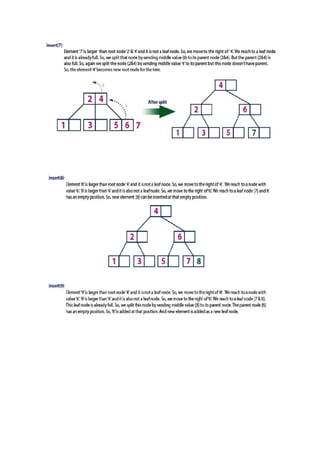
• Step 5: If that leaf node is already full, then split that leaf node by sending middle
value to its parent node. Repeat tha same until sending value is fixed into a node.
• Step 6: If the spilting is occuring to the root node, then the middle value becomes new
root node for the tree and the height of the tree is increased by one
Construct a B-Tree of Order 3 by inserting numbers from 1 to 10.
Splay Tree
• Splay tree is another variant of binary search tree. In a splay tree, the recently accessed
element is placed at the root of the tree. A splay tree is defined as follows...
• Splay Tree is a self - adjusted Binary Search Tree in which every operation on an
element rearrange the tree so that the element is placed at the root position of the tree.
• In a splay tree, every operation is performed at root of the tree. All the operations on a
splay tree are involved with a common operation called "Splaying".
• Splaying an element is the process of bringing it to the root position by performing
suitable rotation operations.
• In a splay tree, splaying an element rearrange all the elements in the tree so that
splayed element is placed at root of the tree.
With the help of splaying an element we can bring most frequently used element closer to the
root of the tree so that any operation on those element performed quickly. That means the
splaying operation automatically brings more frequently used elements closer to the root of
the tree.
Every operation on a splay tree performs the splaying operation. For example, the insertion
operation first inserts the new element as it inserted into the binary search tree, after insertion
the newly inserted element is splayed so that it is placed at root of the tree. The search
operation in a splay tree is search the element using binary search process then splay the
searched element so that it placed at the root of the tree.
In a splay tree, to splay any element we use the following rotation operations...
Rotations in Splay Tree
1. Zig Rotation
2. Zag Rotation
3. Zig - Zig Rotation
4. Zag - Zag Rotation
5. Zig - Zag Rotation
6. Zag - Zig Rotation
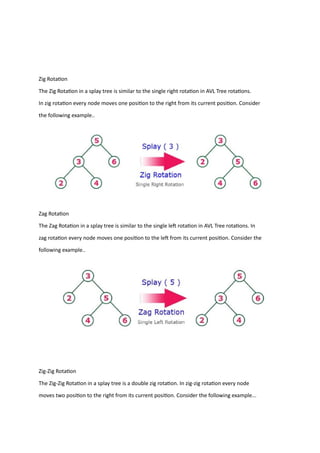
Zig Rotation
The Zig Rotation in a splay tree is similar to the single right rotation in AVL Tree rotations.
In zig rotation every node moves one position to the right from its current position. Consider
the following example..
Zag Rotation
The Zag Rotation in a splay tree is similar to the single left rotation in AVL Tree rotations. In
zag rotation every node moves one position to the left from its current position. Consider the
following example..
Zig-Zig Rotation
The Zig-Zig Rotation in a splay tree is a double zig rotation. In zig-zig rotation every node
moves two position to the right from its current position. Consider the following example...
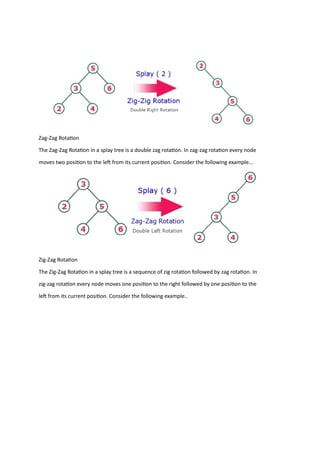
Zag-Zag Rotation
The Zag-Zag Rotation in a splay tree is a double zag rotation. In zag-zag rotation every node
moves two position to the left from its current position. Consider the following example...
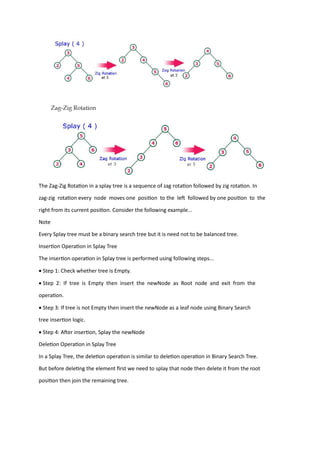
Zig-Zag Rotation
The Zig-Zag Rotation in a splay tree is a sequence of zig rotation followed by zag rotation. In
zig-zag rotation every node moves one position to the right followed by one position to the
left from its current position. Consider the following example..
The Zag-Zig Rotation in a splay tree is a sequence of zag rotation followed by zig rotation. In
zag-zig rotation every node moves one position to the left followed by one position to the
right from its current position. Consider the following example...
Note
Every Splay tree must be a binary search tree but it is need not to be balanced tree.
Insertion Operation in Splay Tree
The insertion operation in Splay tree is performed using following steps...
• Step 1: Check whether tree is Empty.
• Step 2: If tree is Empty then insert the newNode as Root node and exit from the
operation.
• Step 3: If tree is not Empty then insert the newNode as a leaf node using Binary Search
tree insertion logic.
• Step 4: After insertion, Splay the newNode
Deletion Operation in Splay Tree
In a Splay Tree, the deletion operation is similar to deletion operation in Binary Search Tree.
But before deleting the element first we need to splay that node then delete it from the root
position then join the remaining tree.
Red-Black Trees
• Red - Black Tree is another variant of Binary Search Tree in which every node is
colored either RED or BLACK. We can define a Red Black Tree as follows...
• Red Black Tree is a Binary Search Tree in which every node is colored eigther RED
or BLACK.
• In a Red Black Tree the color of a node is decided based on the Red Black Tree
properties. Every Red Black Tree has the following properties.
Properties of Red Black Tree
• Property #1: Red - Black Tree must be a Binary Search Tree.
• Property #2: The ROOT node must colored BLACK.
• Property #3: The children of Red colored node must colored BLACK. (There should
not be two consecutive RED nodes).
• Property #4: In all the paths of the tree there must be same number of BLACK colored
nodes.
• Property #5: Every new node must inserted with RED color.
• Property #6: Every leaf (e.i. NULL node) must colored BLACK.
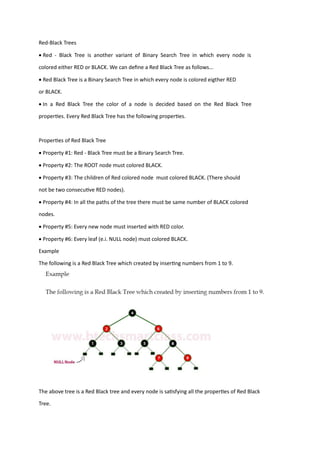
Example
The following is a Red Black Tree which created by inserting numbers from 1 to 9.
The above tree is a Red Black tree and every node is satisfying all the properties of Red Black
Tree.
Every Red Black Tree is a binary search tree but all the Binary Search Trees need not to be
Red Black trees.
Insertion into RED BLACK Tree:
• In a Red Black Tree, every new node must be inserted with color RED.
• The insertion operation in Red Black Tree is similar to insertion operation in Binary
Search Tree. But it is inserted with a color property.
After every insertion operation, we need to check all the properties of Red Black Tree.
If all the properties are satisfied then we go to next operation otherwise we need to
perform following operation to make it Red Black Tree.
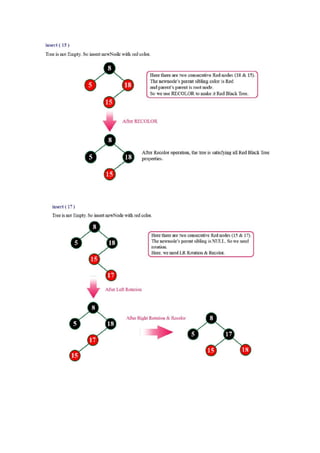
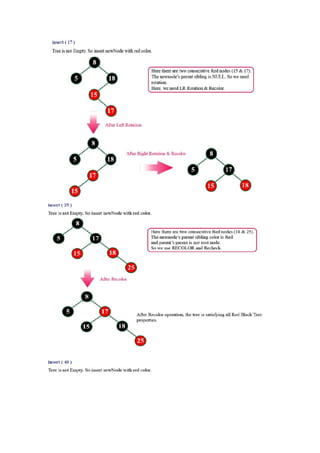
o Recolor
o Rotation followed by Recolor
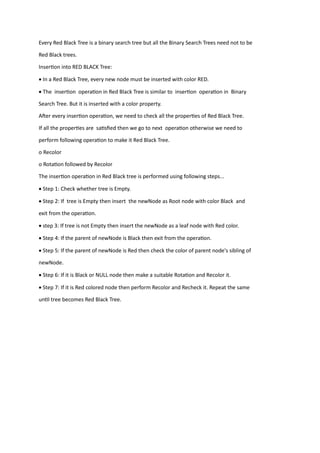
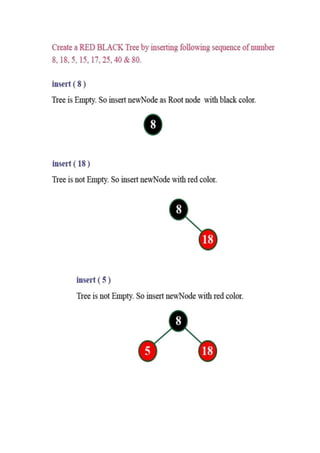
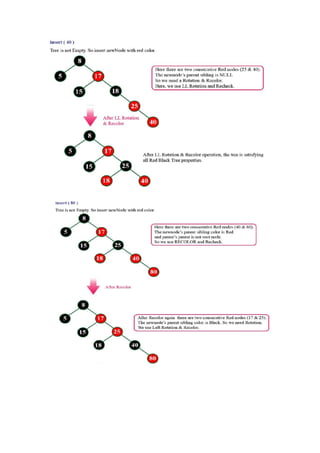
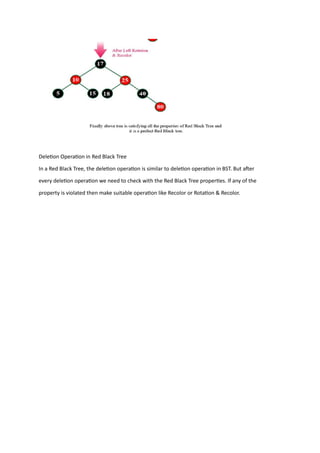
The insertion operation in Red Black tree is performed using following steps...
• Step 1: Check whether tree is Empty.
• Step 2: If tree is Empty then insert the newNode as Root node with color Black and
exit from the operation.
• step 3: If tree is not Empty then insert the newNode as a leaf node with Red color.
• Step 4: If the parent of newNode is Black then exit from the operation.
• Step 5: If the parent of newNode is Red then check the color of parent node's sibling of
newNode.
• Step 6: If it is Black or NULL node then make a suitable Rotation and Recolor it.
• Step 7: If it is Red colored node then perform Recolor and Recheck it. Repeat the same
until tree becomes Red Black Tree.
Deletion Operation in Red Black Tree
In a Red Black Tree, the deletion operation is similar to deletion operation in BST. But after
every deletion operation we need to check with the Red Black Tree properties. If any of the
property is violated then make suitable operation like Recolor or Rotation & Recolor.

B Tree, Introduction ,example,Splay tree

  • 1.
    B - Trees Ina binary search tree, AVL Tree, Red-Black tree etc., every node can have only one value (key) and maximum of two children but there is another type of search tree called B-Tree in which a node can store more than one value (key) and it can have more than two children. B- Tree was developed in the year of 1972 by Bayer and McCreight with the name Height Balanced m-way Search Tree. Later it was named as B-Tree B-Tree can be defined as follows... B-Tree is a self-balanced search tree with multiple keys in every node and more than two children for every node. Here, number of keys in a node and number of children for a node is depend on the order of the B-Tree. Every B-Tree has order. B-Tree of Order m has the following properties... • Property #1 - All the leaf nodes must be at same level. • Property #2 - All nodes except root must have at least [m/2]-1 keys and maximum of m-1 keys. • Property #3 - All non leaf nodes except root (i.e. all internal nodes) must have at least m/2 children. • Property #4 - If the root node is a non leaf node, then it must have at least 2 children. • Property #5 - A non leaf node with n-1 keys must have n number of children. • Property #6 - All the key values within a node must be in Ascending Order. For example, B-Tree of Order 4 contains maximum 3 key values in a node and maximum 4 children for a node.
  • 3.
    Operations on aB-Tree The following operations are performed on a B-Tree... • Search • Insertion • Deletion Search Operation in B-Tree • In a B-Ttree, the search operation is similar to that of Binary Search Tree. In a Binary search tree, the search process starts from the root node and every time we make a 2- way decision (we go to either left subtree or right subtree). In B-Tree also search process starts from the root node but every time we make n-way decision where n is the total number of children that node has. In a B-Ttree, the search operation is performed with O(log n) time complexity. The search operation is performed as follows... Step 1: Read the search element from the user • Step 2: Compare, the search element with first key value of root node in the tree. • Step 3: If both are matching, then display "Given node found!!!" and terminate the function • Step 4: If both are not matching, then check whether search element is smaller or larger than that key value. • Step 5: If search element is smaller, then continue the search process in left subtree Step 6: If search element is larger, then compare with next key value in the same node and repeate step 3, 4, 5 and 6 until we found exact match or comparision completed with last key value in a leaf node. • Step 7: If we completed with last key value in a leaf node, then display "Element is not found" and terminate the function. Insertion Operation in B-Tree In a B-Tree, the new element must be added only at leaf node. That means, always the new keyValue is attached to leaf node only. The insertion operation is performed as follows... • Step 1: Check whether tree is Empty. • Step 2: If tree is Empty, then create a new node with new key value and insert into the tree as a root node.
  • 4.
    • Step 3:If tree is Not Empty, then find a leaf node to which the new key value cab be added using Binary Search Tree logic. • Step 4: If that leaf node has an empty position, then add the new key value to that leaf node by maintaining ascending order of key value within the node. • Step 5: If that leaf node is already full, then split that leaf node by sending middle value to its parent node. Repeat tha same until sending value is fixed into a node. • Step 6: If the spilting is occuring to the root node, then the middle value becomes new root node for the tree and the height of the tree is increased by one Construct a B-Tree of Order 3 by inserting numbers from 1 to 10.
  • 8.
    Splay Tree • Splaytree is another variant of binary search tree. In a splay tree, the recently accessed element is placed at the root of the tree. A splay tree is defined as follows... • Splay Tree is a self - adjusted Binary Search Tree in which every operation on an element rearrange the tree so that the element is placed at the root position of the tree. • In a splay tree, every operation is performed at root of the tree. All the operations on a splay tree are involved with a common operation called "Splaying". • Splaying an element is the process of bringing it to the root position by performing suitable rotation operations. • In a splay tree, splaying an element rearrange all the elements in the tree so that splayed element is placed at root of the tree. With the help of splaying an element we can bring most frequently used element closer to the root of the tree so that any operation on those element performed quickly. That means the splaying operation automatically brings more frequently used elements closer to the root of the tree. Every operation on a splay tree performs the splaying operation. For example, the insertion operation first inserts the new element as it inserted into the binary search tree, after insertion the newly inserted element is splayed so that it is placed at root of the tree. The search operation in a splay tree is search the element using binary search process then splay the searched element so that it placed at the root of the tree. In a splay tree, to splay any element we use the following rotation operations... Rotations in Splay Tree 1. Zig Rotation 2. Zag Rotation 3. Zig - Zig Rotation 4. Zag - Zag Rotation 5. Zig - Zag Rotation 6. Zag - Zig Rotation
  • 9.
    Zig Rotation The ZigRotation in a splay tree is similar to the single right rotation in AVL Tree rotations. In zig rotation every node moves one position to the right from its current position. Consider the following example.. Zag Rotation The Zag Rotation in a splay tree is similar to the single left rotation in AVL Tree rotations. In zag rotation every node moves one position to the left from its current position. Consider the following example.. Zig-Zig Rotation The Zig-Zig Rotation in a splay tree is a double zig rotation. In zig-zig rotation every node moves two position to the right from its current position. Consider the following example...
  • 10.
    Zag-Zag Rotation The Zag-ZagRotation in a splay tree is a double zag rotation. In zag-zag rotation every node moves two position to the left from its current position. Consider the following example... Zig-Zag Rotation The Zig-Zag Rotation in a splay tree is a sequence of zig rotation followed by zag rotation. In zig-zag rotation every node moves one position to the right followed by one position to the left from its current position. Consider the following example..
  • 11.
    The Zag-Zig Rotationin a splay tree is a sequence of zag rotation followed by zig rotation. In zag-zig rotation every node moves one position to the left followed by one position to the right from its current position. Consider the following example... Note Every Splay tree must be a binary search tree but it is need not to be balanced tree. Insertion Operation in Splay Tree The insertion operation in Splay tree is performed using following steps... • Step 1: Check whether tree is Empty. • Step 2: If tree is Empty then insert the newNode as Root node and exit from the operation. • Step 3: If tree is not Empty then insert the newNode as a leaf node using Binary Search tree insertion logic. • Step 4: After insertion, Splay the newNode Deletion Operation in Splay Tree In a Splay Tree, the deletion operation is similar to deletion operation in Binary Search Tree. But before deleting the element first we need to splay that node then delete it from the root position then join the remaining tree.
  • 12.
    Red-Black Trees • Red- Black Tree is another variant of Binary Search Tree in which every node is colored either RED or BLACK. We can define a Red Black Tree as follows... • Red Black Tree is a Binary Search Tree in which every node is colored eigther RED or BLACK. • In a Red Black Tree the color of a node is decided based on the Red Black Tree properties. Every Red Black Tree has the following properties. Properties of Red Black Tree • Property #1: Red - Black Tree must be a Binary Search Tree. • Property #2: The ROOT node must colored BLACK. • Property #3: The children of Red colored node must colored BLACK. (There should not be two consecutive RED nodes). • Property #4: In all the paths of the tree there must be same number of BLACK colored nodes. • Property #5: Every new node must inserted with RED color. • Property #6: Every leaf (e.i. NULL node) must colored BLACK. Example The following is a Red Black Tree which created by inserting numbers from 1 to 9. The above tree is a Red Black tree and every node is satisfying all the properties of Red Black Tree.
  • 13.
    Every Red BlackTree is a binary search tree but all the Binary Search Trees need not to be Red Black trees. Insertion into RED BLACK Tree: • In a Red Black Tree, every new node must be inserted with color RED. • The insertion operation in Red Black Tree is similar to insertion operation in Binary Search Tree. But it is inserted with a color property. After every insertion operation, we need to check all the properties of Red Black Tree. If all the properties are satisfied then we go to next operation otherwise we need to perform following operation to make it Red Black Tree. o Recolor o Rotation followed by Recolor The insertion operation in Red Black tree is performed using following steps... • Step 1: Check whether tree is Empty. • Step 2: If tree is Empty then insert the newNode as Root node with color Black and exit from the operation. • step 3: If tree is not Empty then insert the newNode as a leaf node with Red color. • Step 4: If the parent of newNode is Black then exit from the operation. • Step 5: If the parent of newNode is Red then check the color of parent node's sibling of newNode. • Step 6: If it is Black or NULL node then make a suitable Rotation and Recolor it. • Step 7: If it is Red colored node then perform Recolor and Recheck it. Repeat the same until tree becomes Red Black Tree.
  • 18.
    Deletion Operation inRed Black Tree In a Red Black Tree, the deletion operation is similar to deletion operation in BST. But after every deletion operation we need to check with the Red Black Tree properties. If any of the property is violated then make suitable operation like Recolor or Rotation & Recolor.