


Azure Reserved Virtual
Machine Instances Made
Simple
2 © 2018 CLOUDHEALTH® TECHNOLOGIES INC.
Today’s Presenters
Reid Scrivener
Senior Business Planner
Microsoft
Samir Mehra
Director, Products
CloudHealth Technologies
3 © 2018 CLOUDHEALTH® TECHNOLOGIES INC.
1.Who is CloudHealth Technologies?
2.Azure Reserved Virtual Machine Instances Overview
3.Managing Azure RIs with CloudHealth – 4 Steps
4.Wrap-up
Agenda
4 © 2018 CLOUDHEALTH® TECHNOLOGIES INC.
Who is CloudHealth Technologies?
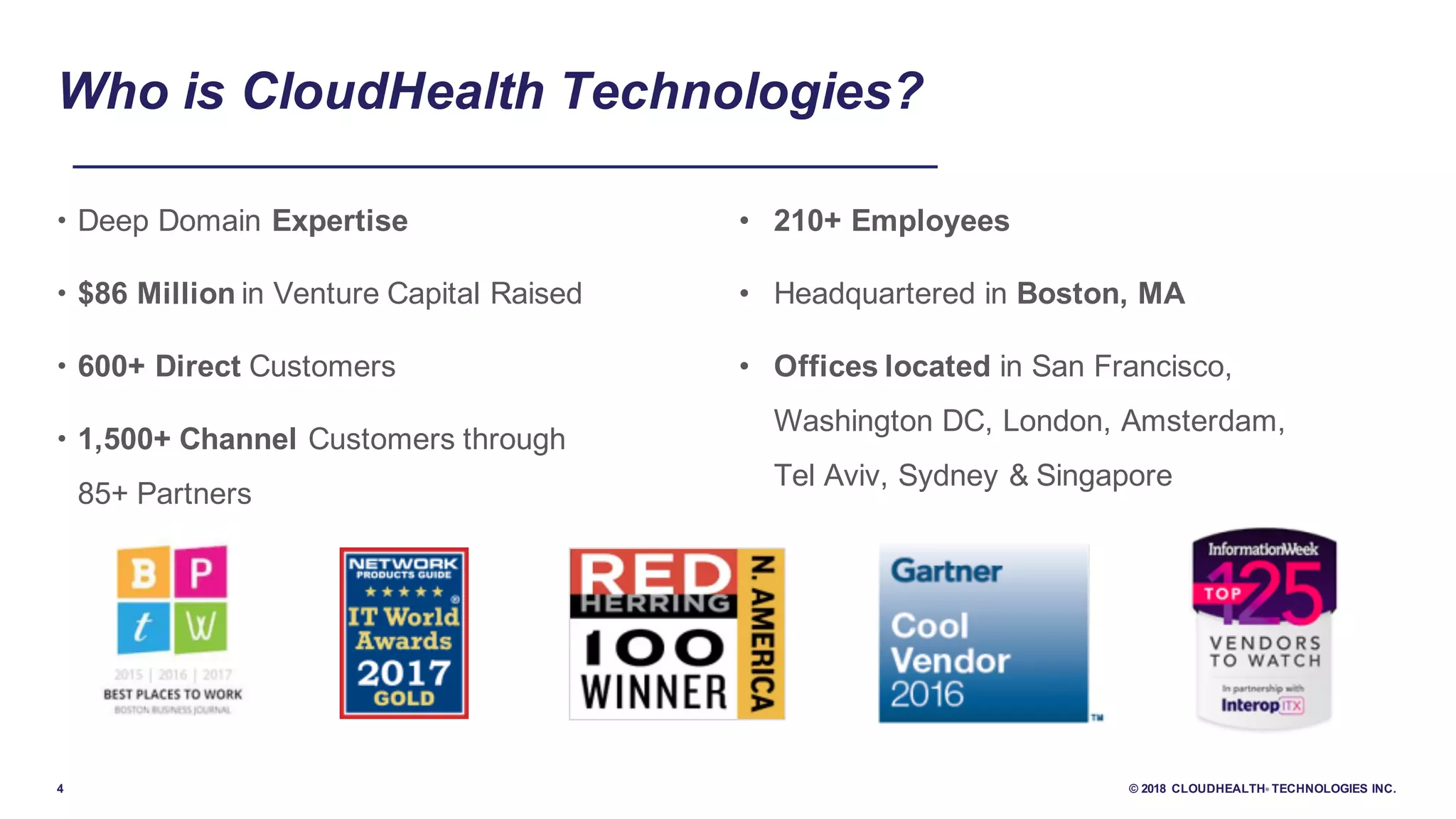
• Deep Domain Expertise
• $86 Million in Venture Capital Raised
• 600+ Direct Customers
• 1,500+ Channel Customers through
85+ Partners
• 210+ Employees
• Headquartered in Boston, MA
• Offices located in San Francisco,
Washington DC, London, Amsterdam,
Tel Aviv, Sydney & Singapore
5 © 2018 CLOUDHEALTH® TECHNOLOGIES INC.
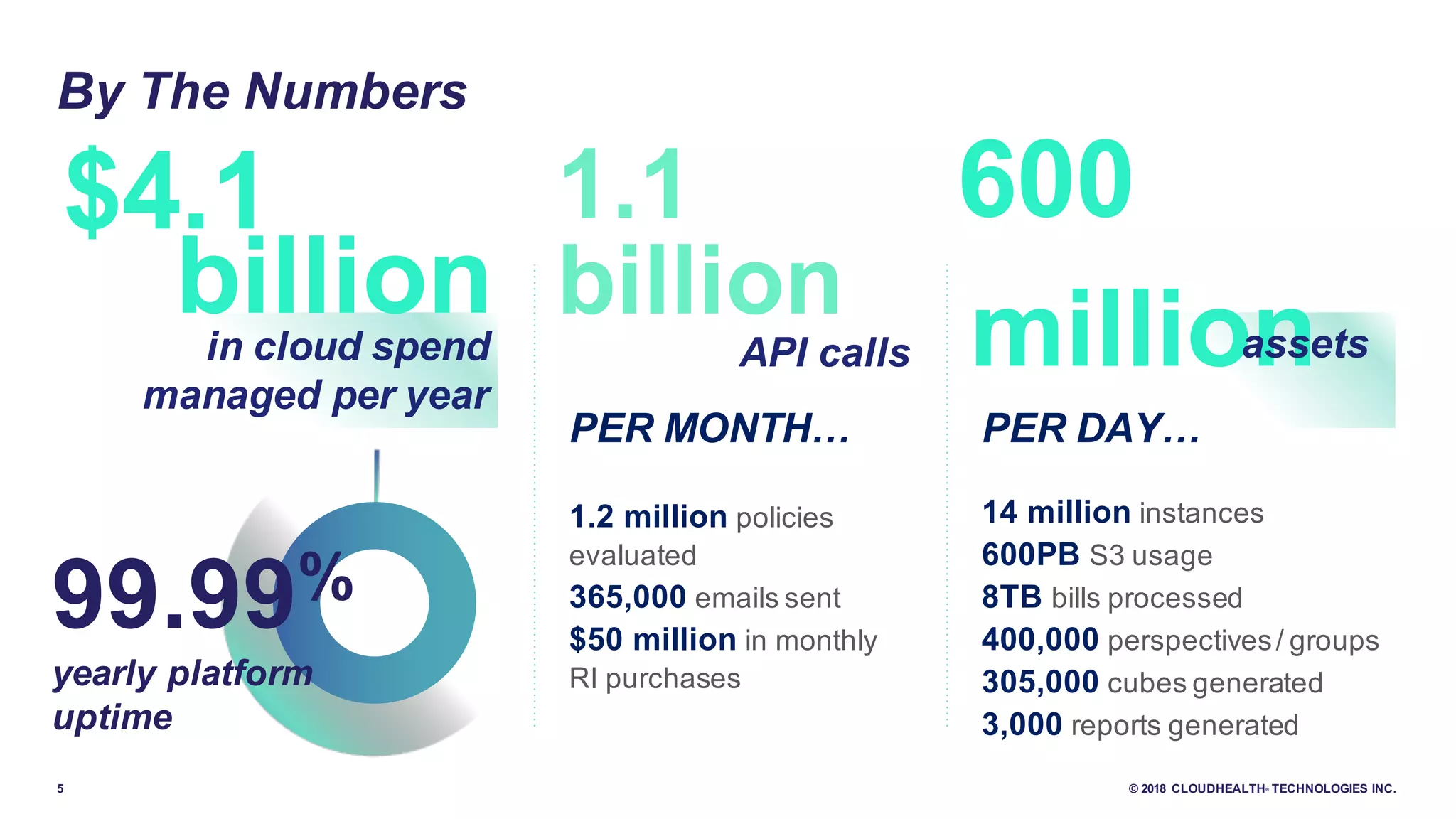
million
1.1
By The Numbers
99.99%
yearly platform
uptime
600
assets
PER MONTH…
1.2 million policies
evaluated
365,000 emails sent
$50 million in monthly
RI purchases
PER DAY…
14 million instances
600PB S3 usage
8TB bills processed
400,000 perspectives/ groups
305,000 cubes generated
3,000 reports generated
billion
API calls
$4.1
in cloud spend
managed per year
billion
6 © 2018 CLOUDHEALTH® TECHNOLOGIES INC.
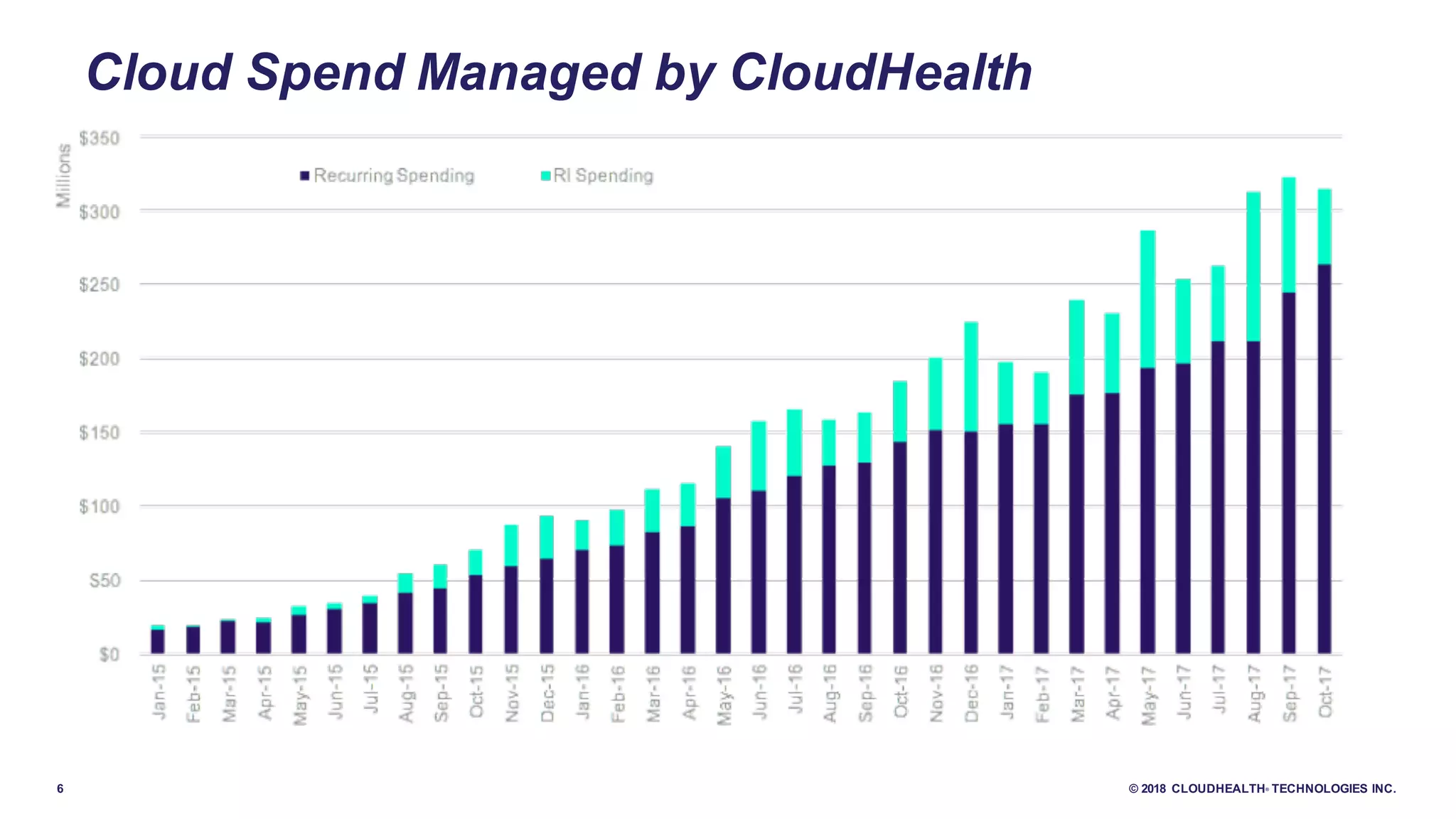
Cloud Spend Managed by CloudHealth
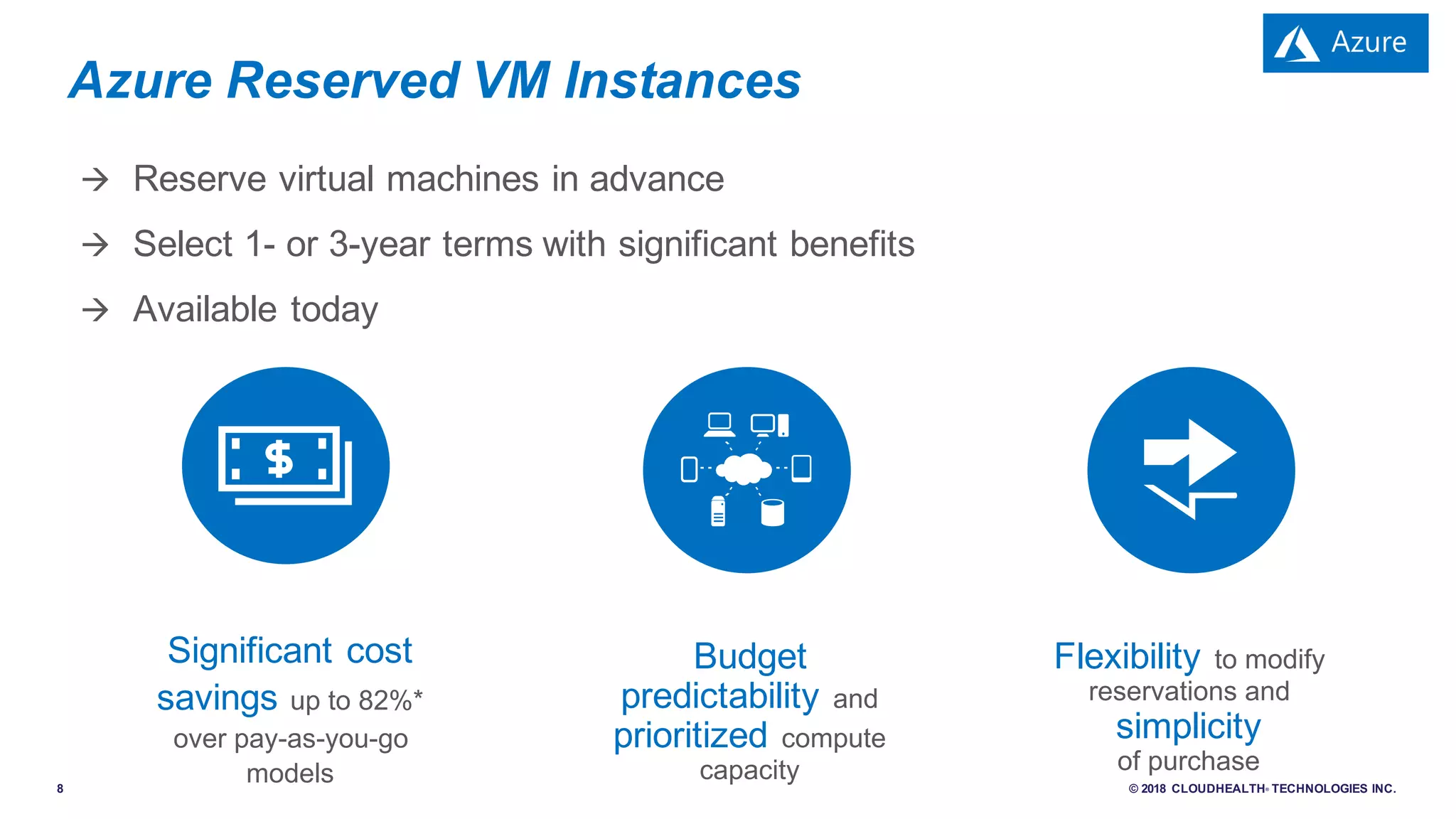
Azure Reserved VM Instances
8 © 2018 CLOUDHEALTH® TECHNOLOGIES INC.
à Reserve virtual machines in advance
à Select 1- or 3-year terms with significant benefits
à Available today
Azure Reserved VM Instances
Significant cost
savings up to 82%*
over pay-as-you-go
models
Flexibility to modify
reservations and
simplicity
of purchase
Budget
predictability and
prioritized compute
capacity
9 © 2018 CLOUDHEALTH® TECHNOLOGIES INC.
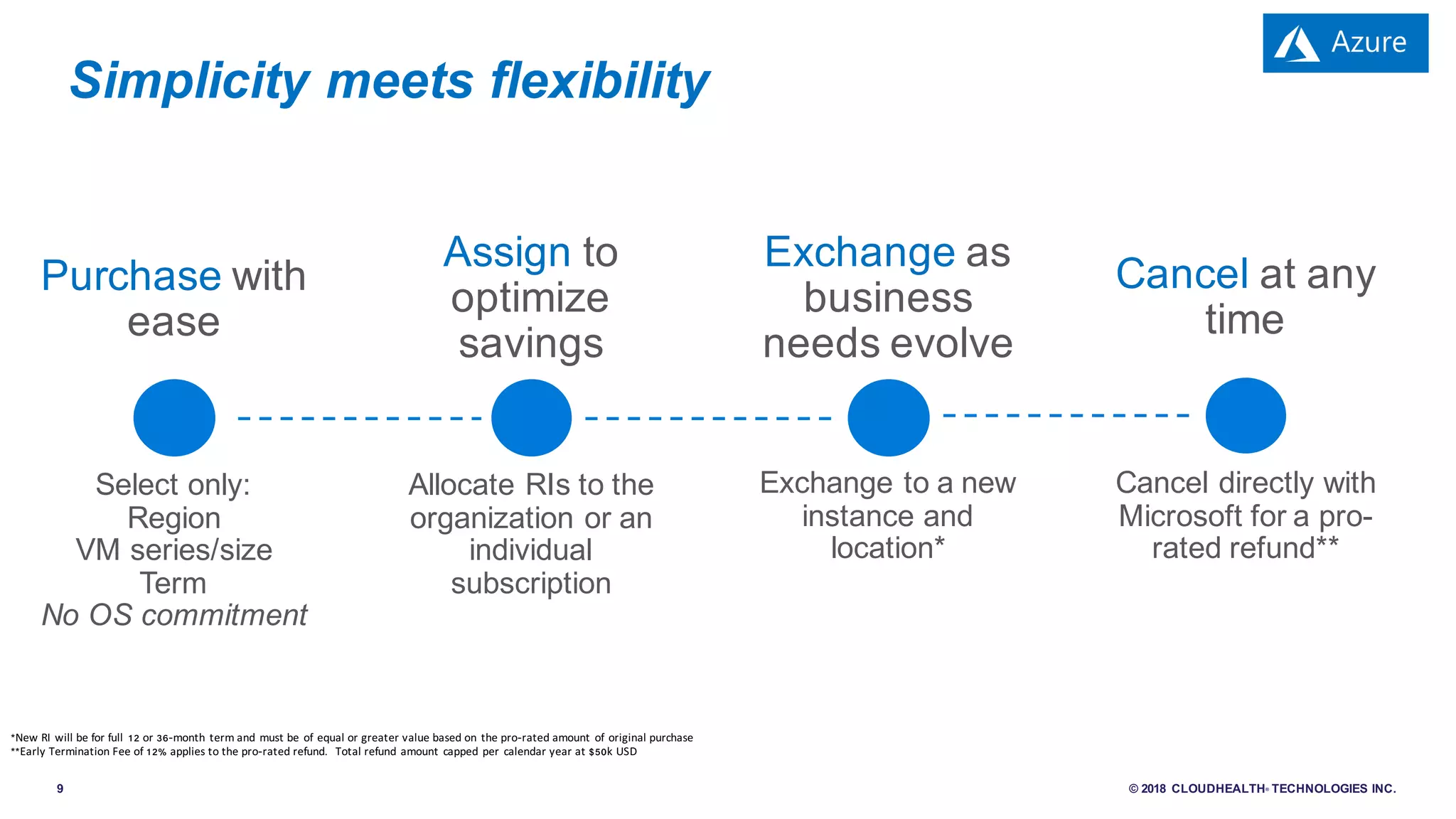
Simplicity meets flexibility
Assign to
optimize
savings
Exchange as
business
needs evolve
Cancel at any
time
Allocate RIs to the
organization or an
individual
subscription
Exchange to a new
instance and
location*
Cancel directly with
Microsoft for a pro-
rated refund**
Purchase with
ease
Select only:
Region
VM series/size
Term
No OS commitment
*New RI will be for full 12 or 36-month term and must be of equal or greater value based on the pro-rated amount of original purchase
**Early Termination Fee of 12% applies to the pro-rated refund. Total refund amount capped per calendar year at $50k USD
10 © 2018 CLOUDHEALTH® TECHNOLOGIES INC.
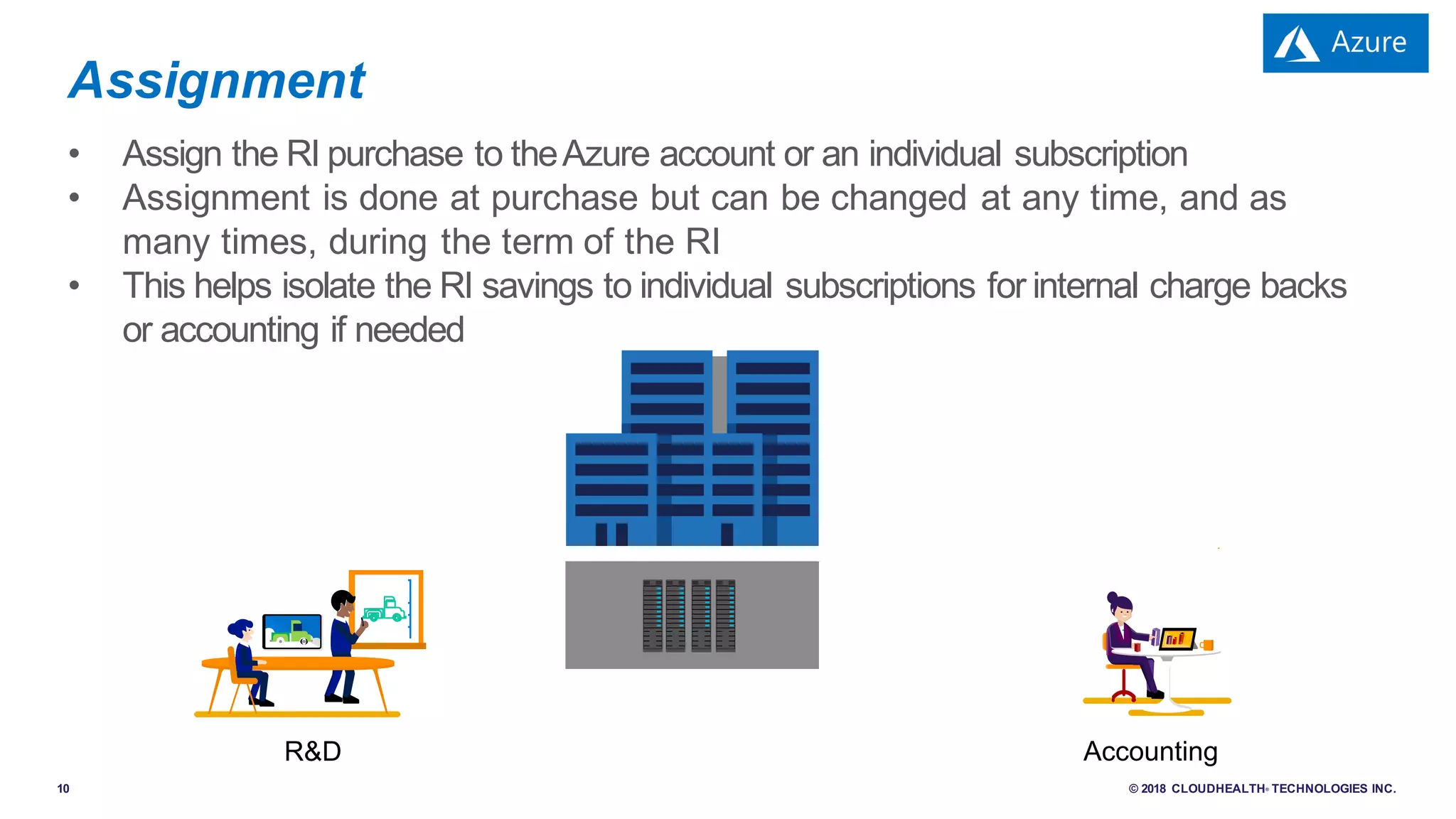
• Assign the RI purchase to theAzure account or an individual subscription
• Assignment is done at purchase but can be changed at any time, and as
many times, during the term of the RI
• This helps isolate the RI savings to individual subscriptions for internal charge backs
or accounting if needed
Assignment
R&D Accounting
11 © 2018 CLOUDHEALTH® TECHNOLOGIES INC.
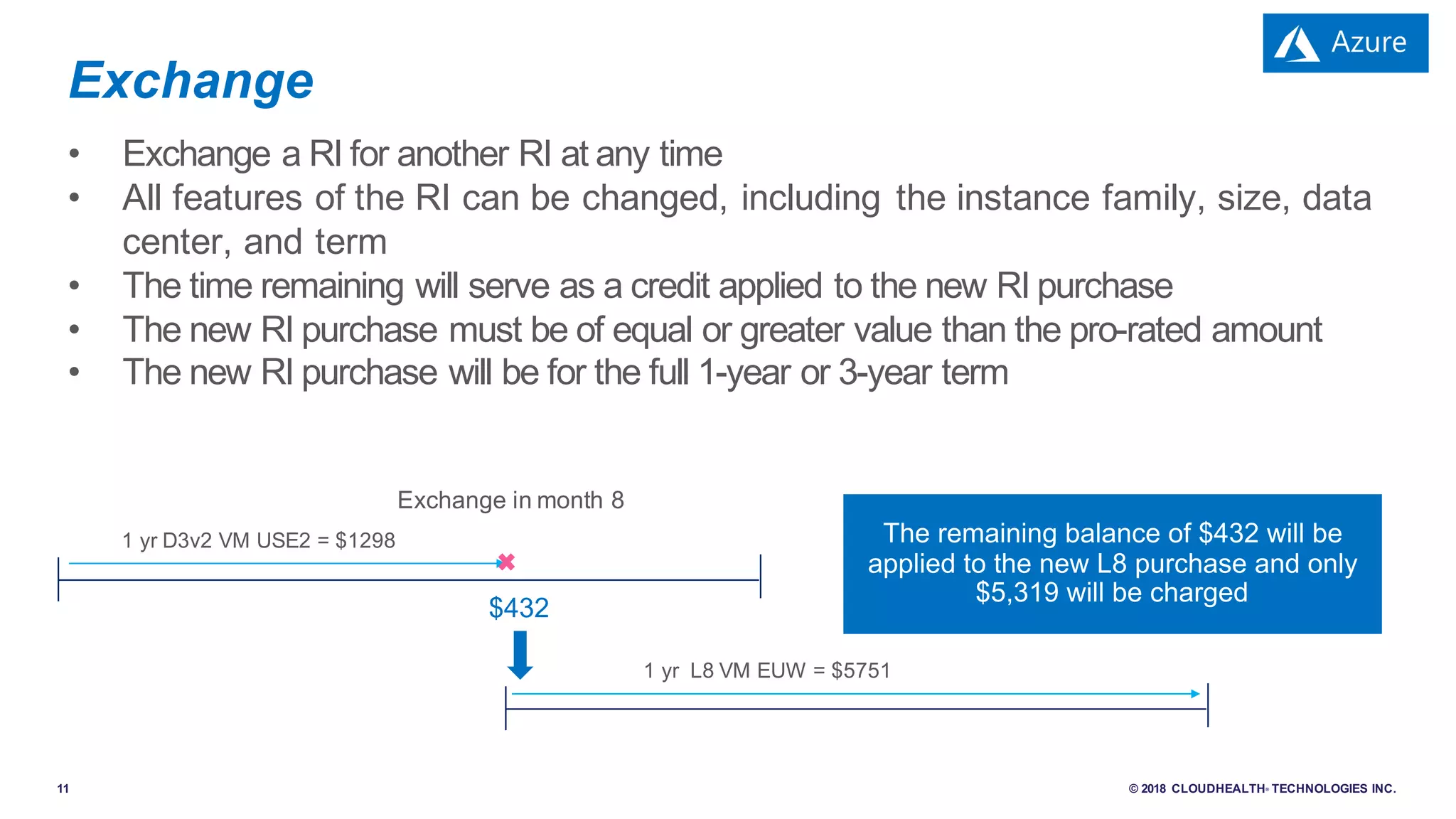
• Exchange a RI for another RI at any time
• All features of the RI can be changed, including the instance family, size, data
center, and term
• The time remaining will serve as a credit applied to the new RI purchase
• The new RI purchase must be of equal or greater value than the pro-rated amount
• The new RI purchase will be for the full 1-year or 3-year term
Exchange
1 yr D3v2 VM USE2 = $1298
1 yr L8 VM EUW = $5751
Exchange in month 8
$432
12 © 2018 CLOUDHEALTH® TECHNOLOGIES INC.
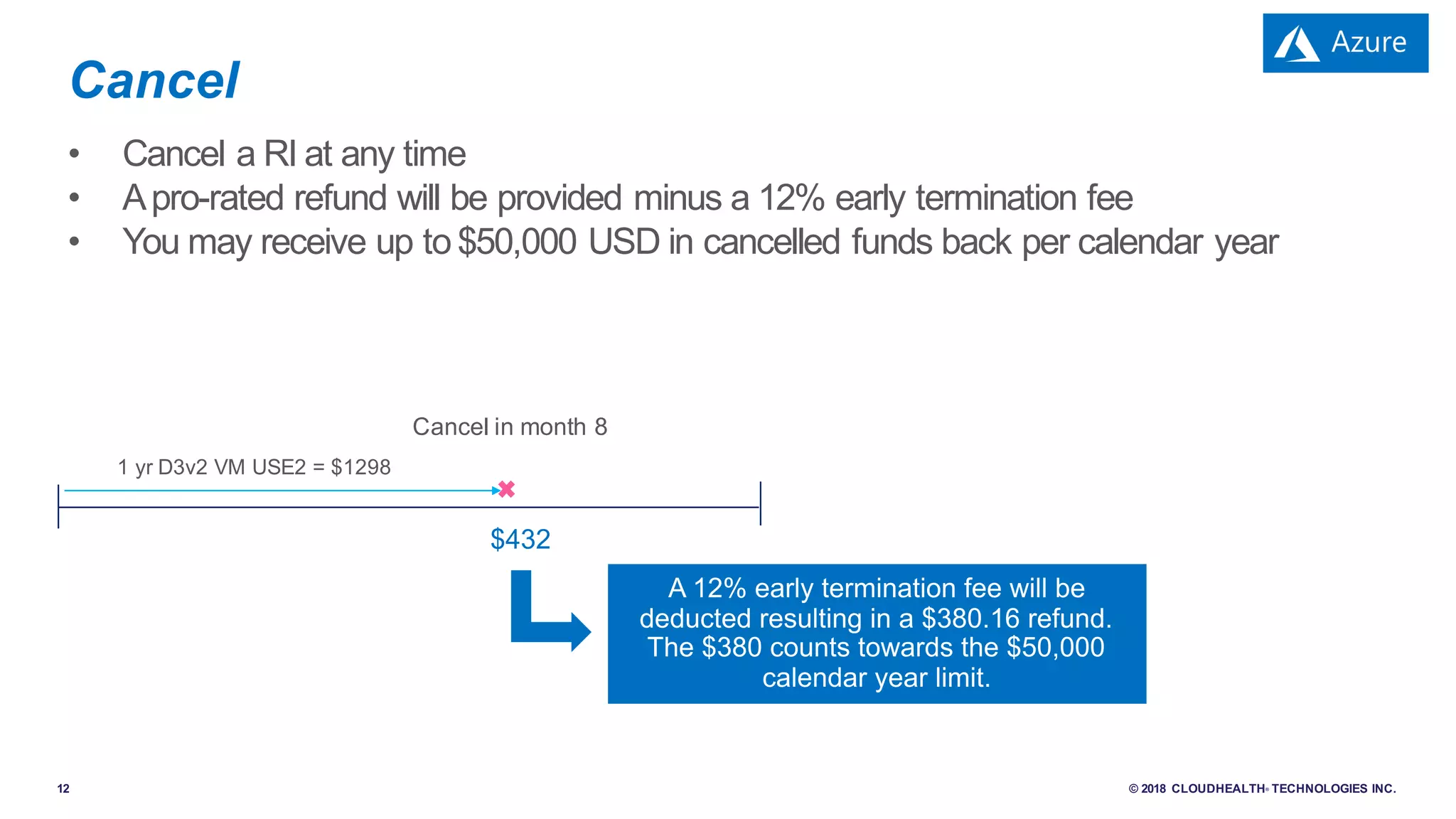
• Cancel a RI at any time
• Apro-rated refund will be provided minus a 12% early termination fee
• You may receive up to $50,000 USD in cancelled funds back per calendar year
Cancel
1 yr D3v2 VM USE2 = $1298
Cancel in month 8
$432
13 © 2018 CLOUDHEALTH® TECHNOLOGIES INC.
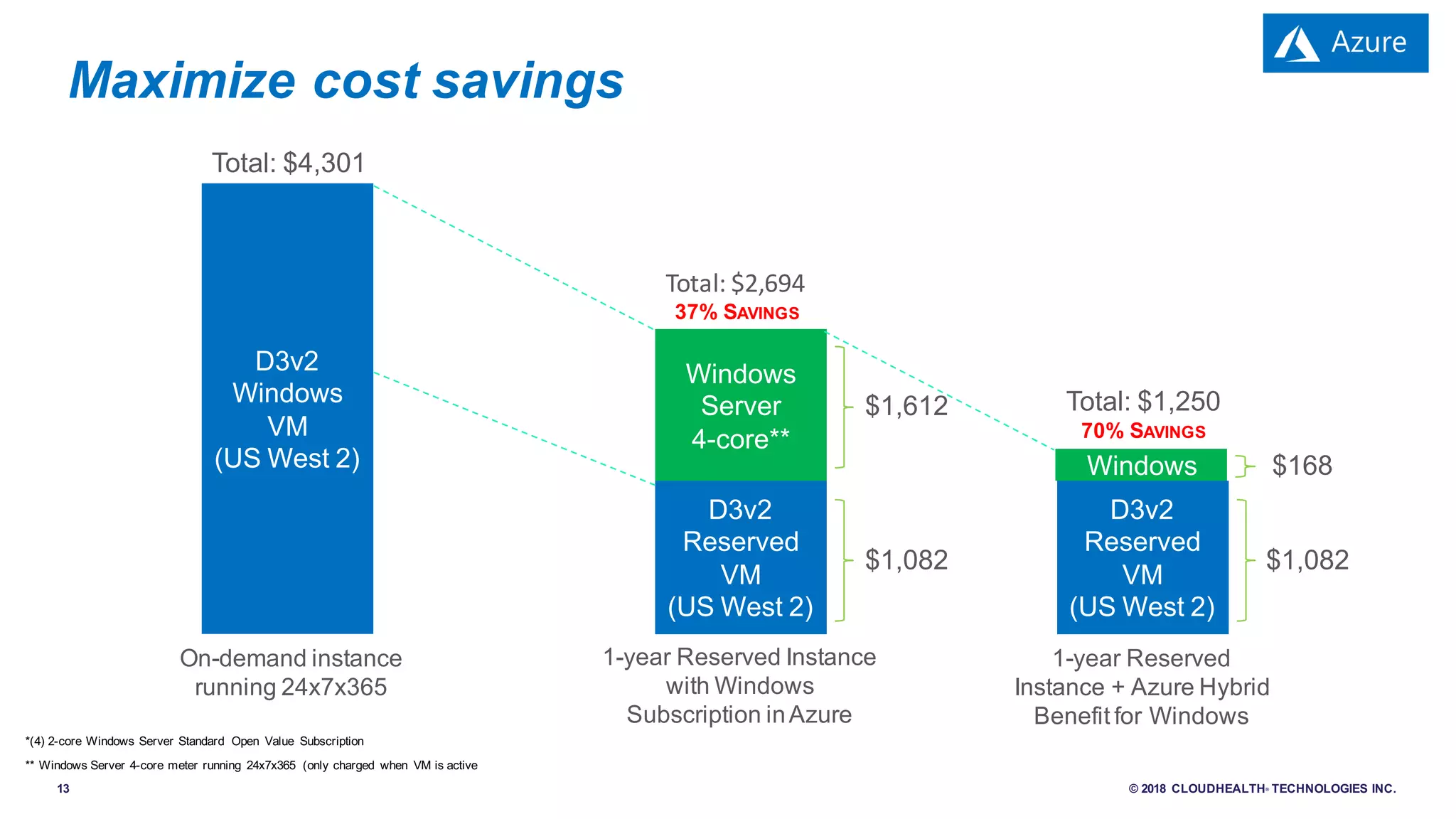
Maximize cost savings
D3v2
Windows
VM
(US West 2)
D3v2
Reserved
VM
(US West 2)
Windows
On-demand instance
running 24x7x365
D3v2
Reserved
VM
(US West 2)
Windows
Server
4-core**
Total: $4,301
1-year Reserved Instance
with Windows
Subscription inAzure
1-year Reserved
Instance + Azure Hybrid
Benefit for Windows
$1,082
$1,612
Total:	$2,694
37% SAVINGS
$1,082
$168
Total: $1,250
70% SAVINGS
*(4) 2-core Windows Server Standard Open Value Subscription
** Windows Server 4-core meter running 24x7x365 (only charged when VM is active)
Managing Reserved Instances
With CloudHealth — 4 Steps
15 © 2018 CLOUDHEALTH® TECHNOLOGIES INC.
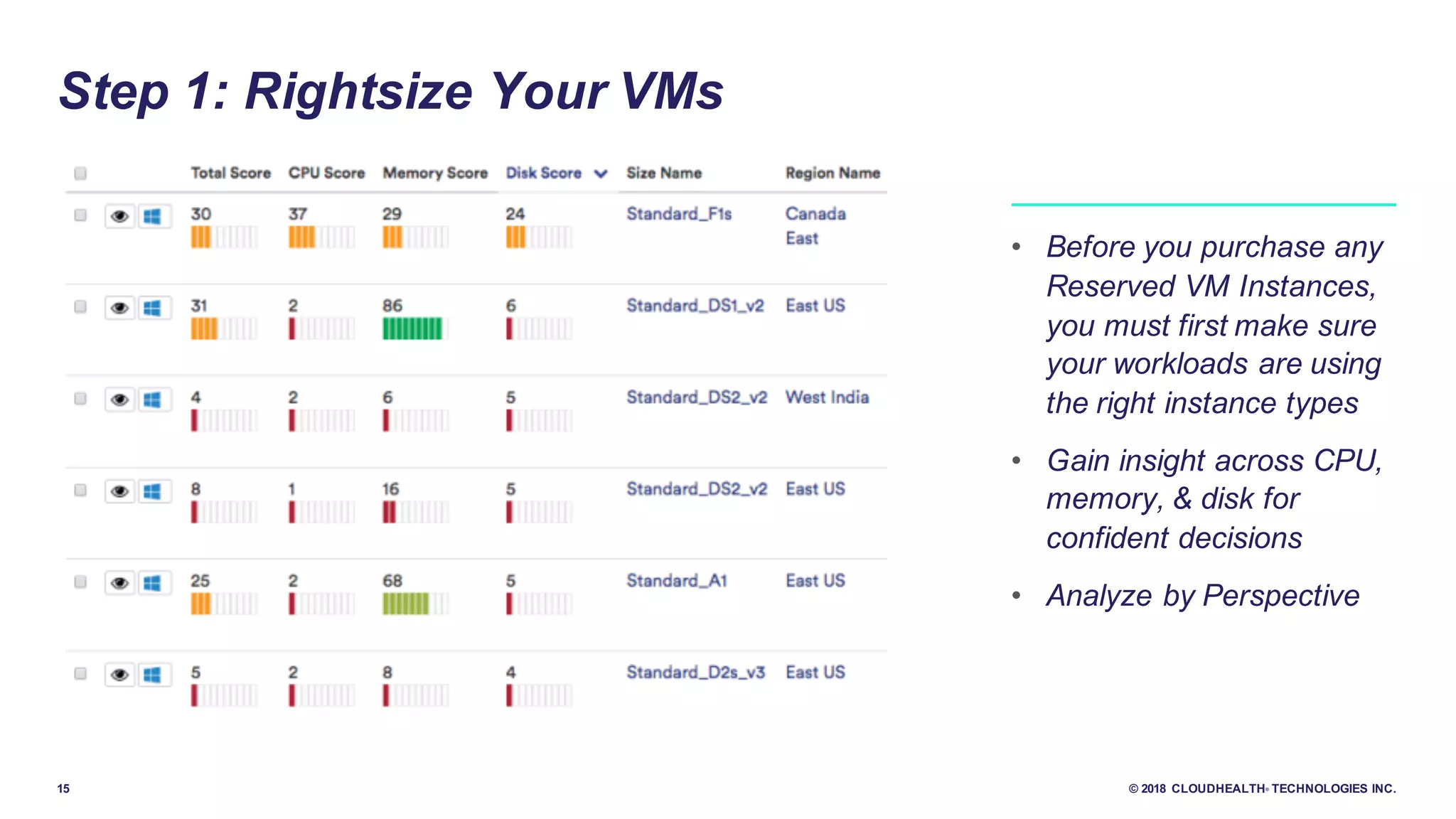
Step 1: Rightsize Your VMs
• Before you purchase any
Reserved VM Instances,
you must first make sure
your workloads are using
the right instance types
• Gain insight across CPU,
memory, & disk for
confident decisions
• Analyze by Perspective
16 © 2018 CLOUDHEALTH® TECHNOLOGIES INC.
• Considerations: Will you purchase based on budget? Or on coverage?
- CHT best practice is 70% reservation coverage
• Determine frequency: monthly, quarterly, continually?
- CHT best practice is to continuously monitor for opportunities for savings with RI purchases
• Centralized or delegated purchases?
- CHT best practice is to purchase centralized
RI Purchasing strategies
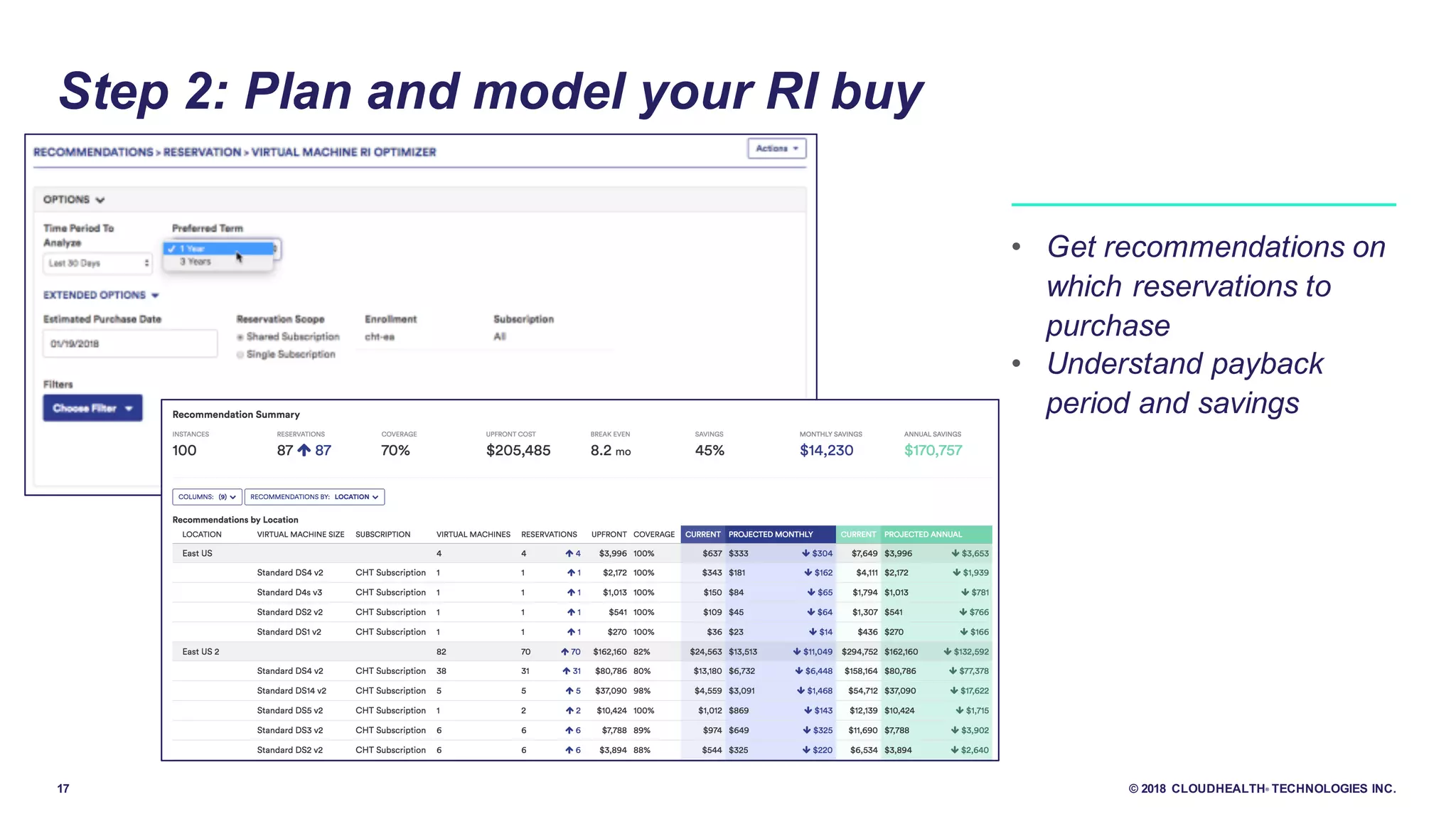
Step 2: Plan and model your RI buy
17 © 2018 CLOUDHEALTH® TECHNOLOGIES INC.
Step 2: Plan and model your RI buy
• Get recommendations on
which reservations to
purchase
• Understand payback
period and savings
18 © 2018 CLOUDHEALTH® TECHNOLOGIES INC.
Step 3: Modify reservations
• Change the Scope from Single Subscription to Shared, or
vice versa.
• Exchange Reserved VM Instances across any region and
series.
• Cancel your Reserved VM Instances at any time for an
adjusted refund.
• Maximize your ROI by
modifying Reservations
19 © 2018 CLOUDHEALTH® TECHNOLOGIES INC.
Step 4: Monitor for new opportunities and
underutilized reservations
• Keep an eye on underutilized reservations, you can cancel
• Look for areas with high on-demand usage, there may be
opportunities for additional savings with reservations
• Stay on top of expiring reservations!
• Leveraging CloudHealth’s
soon to be released reports
on Azure Reserved VM
Instances, you can quickly
identify when your pay-as-
you-go workloads have
outgrown your Reserved
Instance purchases.
20 © 2018 CLOUDHEALTH® TECHNOLOGIES INC.
• Easily model out reservation purchases to understand ROI and make the best decisions
• Get alerts on underutilized reservations and opportunities for purchasing new reservations so
your environment is continuously optimized
The End Result: What CloudHealth Customers Get
Demo
Questions?
Thank you

Azure Reserved VM Instances Made Simple

  • 1.
    Azure Reserved Virtual MachineInstances Made Simple
  • 2.
    2 © 2018CLOUDHEALTH® TECHNOLOGIES INC. Today’s Presenters Reid Scrivener Senior Business Planner Microsoft Samir Mehra Director, Products CloudHealth Technologies
  • 3.
    3 © 2018CLOUDHEALTH® TECHNOLOGIES INC. 1.Who is CloudHealth Technologies? 2.Azure Reserved Virtual Machine Instances Overview 3.Managing Azure RIs with CloudHealth – 4 Steps 4.Wrap-up Agenda
  • 4.
    4 © 2018CLOUDHEALTH® TECHNOLOGIES INC. Who is CloudHealth Technologies? • Deep Domain Expertise • $86 Million in Venture Capital Raised • 600+ Direct Customers • 1,500+ Channel Customers through 85+ Partners • 210+ Employees • Headquartered in Boston, MA • Offices located in San Francisco, Washington DC, London, Amsterdam, Tel Aviv, Sydney & Singapore
  • 5.
    5 © 2018CLOUDHEALTH® TECHNOLOGIES INC. million 1.1 By The Numbers 99.99% yearly platform uptime 600 assets PER MONTH… 1.2 million policies evaluated 365,000 emails sent $50 million in monthly RI purchases PER DAY… 14 million instances 600PB S3 usage 8TB bills processed 400,000 perspectives/ groups 305,000 cubes generated 3,000 reports generated billion API calls $4.1 in cloud spend managed per year billion
  • 6.
    6 © 2018CLOUDHEALTH® TECHNOLOGIES INC. Cloud Spend Managed by CloudHealth
  • 7.
  • 8.
    8 © 2018CLOUDHEALTH® TECHNOLOGIES INC. à Reserve virtual machines in advance à Select 1- or 3-year terms with significant benefits à Available today Azure Reserved VM Instances Significant cost savings up to 82%* over pay-as-you-go models Flexibility to modify reservations and simplicity of purchase Budget predictability and prioritized compute capacity
  • 9.
    9 © 2018CLOUDHEALTH® TECHNOLOGIES INC. Simplicity meets flexibility Assign to optimize savings Exchange as business needs evolve Cancel at any time Allocate RIs to the organization or an individual subscription Exchange to a new instance and location* Cancel directly with Microsoft for a pro- rated refund** Purchase with ease Select only: Region VM series/size Term No OS commitment *New RI will be for full 12 or 36-month term and must be of equal or greater value based on the pro-rated amount of original purchase **Early Termination Fee of 12% applies to the pro-rated refund. Total refund amount capped per calendar year at $50k USD
  • 10.
    10 © 2018CLOUDHEALTH® TECHNOLOGIES INC. • Assign the RI purchase to theAzure account or an individual subscription • Assignment is done at purchase but can be changed at any time, and as many times, during the term of the RI • This helps isolate the RI savings to individual subscriptions for internal charge backs or accounting if needed Assignment R&D Accounting
  • 11.
    11 © 2018CLOUDHEALTH® TECHNOLOGIES INC. • Exchange a RI for another RI at any time • All features of the RI can be changed, including the instance family, size, data center, and term • The time remaining will serve as a credit applied to the new RI purchase • The new RI purchase must be of equal or greater value than the pro-rated amount • The new RI purchase will be for the full 1-year or 3-year term Exchange 1 yr D3v2 VM USE2 = $1298 1 yr L8 VM EUW = $5751 Exchange in month 8 $432
  • 12.
    12 © 2018CLOUDHEALTH® TECHNOLOGIES INC. • Cancel a RI at any time • Apro-rated refund will be provided minus a 12% early termination fee • You may receive up to $50,000 USD in cancelled funds back per calendar year Cancel 1 yr D3v2 VM USE2 = $1298 Cancel in month 8 $432
  • 13.
    13 © 2018CLOUDHEALTH® TECHNOLOGIES INC. Maximize cost savings D3v2 Windows VM (US West 2) D3v2 Reserved VM (US West 2) Windows On-demand instance running 24x7x365 D3v2 Reserved VM (US West 2) Windows Server 4-core** Total: $4,301 1-year Reserved Instance with Windows Subscription inAzure 1-year Reserved Instance + Azure Hybrid Benefit for Windows $1,082 $1,612 Total: $2,694 37% SAVINGS $1,082 $168 Total: $1,250 70% SAVINGS *(4) 2-core Windows Server Standard Open Value Subscription ** Windows Server 4-core meter running 24x7x365 (only charged when VM is active)
  • 14.
    Managing Reserved Instances WithCloudHealth — 4 Steps
  • 15.
    15 © 2018CLOUDHEALTH® TECHNOLOGIES INC. Step 1: Rightsize Your VMs • Before you purchase any Reserved VM Instances, you must first make sure your workloads are using the right instance types • Gain insight across CPU, memory, & disk for confident decisions • Analyze by Perspective
  • 16.
    16 © 2018CLOUDHEALTH® TECHNOLOGIES INC. • Considerations: Will you purchase based on budget? Or on coverage? - CHT best practice is 70% reservation coverage • Determine frequency: monthly, quarterly, continually? - CHT best practice is to continuously monitor for opportunities for savings with RI purchases • Centralized or delegated purchases? - CHT best practice is to purchase centralized RI Purchasing strategies Step 2: Plan and model your RI buy
  • 17.
    17 © 2018CLOUDHEALTH® TECHNOLOGIES INC. Step 2: Plan and model your RI buy • Get recommendations on which reservations to purchase • Understand payback period and savings
  • 18.
    18 © 2018CLOUDHEALTH® TECHNOLOGIES INC. Step 3: Modify reservations • Change the Scope from Single Subscription to Shared, or vice versa. • Exchange Reserved VM Instances across any region and series. • Cancel your Reserved VM Instances at any time for an adjusted refund. • Maximize your ROI by modifying Reservations
  • 19.
    19 © 2018CLOUDHEALTH® TECHNOLOGIES INC. Step 4: Monitor for new opportunities and underutilized reservations • Keep an eye on underutilized reservations, you can cancel • Look for areas with high on-demand usage, there may be opportunities for additional savings with reservations • Stay on top of expiring reservations! • Leveraging CloudHealth’s soon to be released reports on Azure Reserved VM Instances, you can quickly identify when your pay-as- you-go workloads have outgrown your Reserved Instance purchases.
  • 20.
    20 © 2018CLOUDHEALTH® TECHNOLOGIES INC. • Easily model out reservation purchases to understand ROI and make the best decisions • Get alerts on underutilized reservations and opportunities for purchasing new reservations so your environment is continuously optimized The End Result: What CloudHealth Customers Get
  • 21.
  • 22.
  • 23.